CSV 流式导出
这是「从零搭建灌装监控系统」系列第11篇。生产记录已经落到 SQLite,但现场人员还需要按日期导出数据。这篇实现 CSV 导出,重点不只是“能写文件”,还要处理大数据量、中文编码、分隔符、文件占用和取消操作。
导出按钮把软件卡死了
有一次测试数据只有几百条,点击导出很快就结束了。于是有人把“查询全部记录,再一次性写 CSV”的代码提交了。上线后数据量涨到几万条,操作员点下按钮,界面先停住,过了很久才恢复。
更麻烦的是,导出期间如果用户误点了第二次,程序会同时打开两个文件写入;如果目标文件正被 Excel 占用,异常又只显示成一句“导出失败”。
导出功能看似简单,实际上同时碰到数据库查询、内存占用、文件编码、UI 线程和异常提示。正确的做法是让数据库分批给数据,文件流逐批接收,UI 只显示进度和结果。
先确定 CSV 的契约
CSV 不是“把属性用逗号拼起来”。在实现之前要先确定:
- 第一行是否写表头;
- 字段顺序是否固定;
- 分隔符用逗号还是分号;
- 中文软件用什么编码;
- 字段中包含逗号、换行或引号时如何转义;
- 导出时间范围是闭区间还是半开区间。
这里采用:
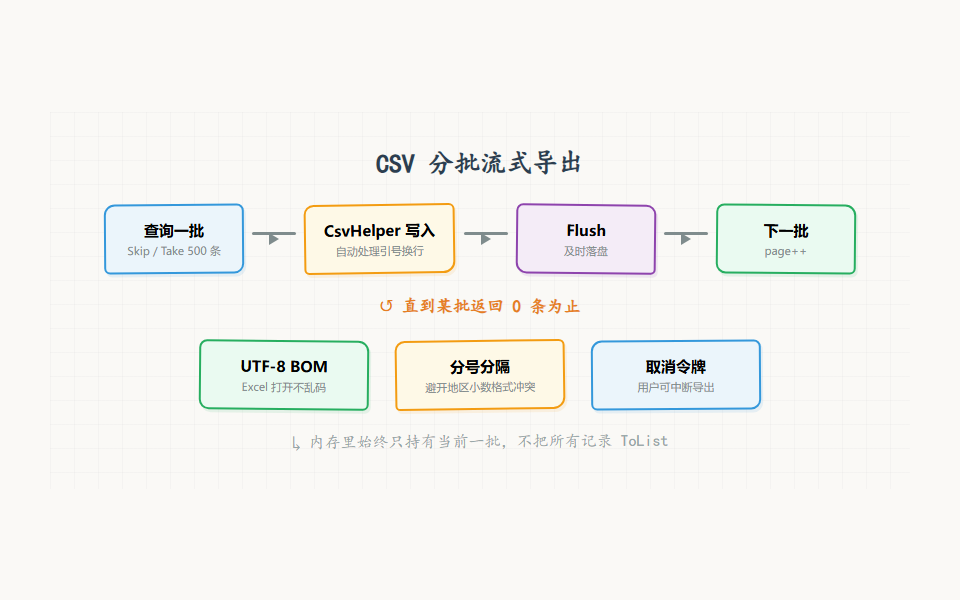
- UTF-8 BOM,方便旧版 Excel 正确识别中文;
- 分号作为分隔符,避免某些地区设置下逗号与小数格式冲突;
- 第一行写表头;
- 由 CsvHelper 负责引号和换行转义;
- 查询范围使用 [start, end)。
这些不是“唯一正确答案”,但必须稳定。一旦用户用导出的 CSV 做了统计,下一次字段顺序和编码不能随意变化。
不要一次性 ToList
最直观的实现是:
var records = await DbProvider.Fsql.Select<ProductionRecord>()
.Where(x => x.Time >= start && x.Time < end)
.ToListAsync();
await csv.WriteRecordsAsync(records);
它在数据少时没问题,数据多时会把所有记录先放进内存。监控软件本来还要同时运行轮询、报警和 UI,导出不应该把内存和数据库连接都占满。
分批查询的思路是固定批次大小,每次只取一批:
const int batchSize = 500;
var page = 0;
while (true)
{
var batch = await DbProvider.Fsql.Select<ProductionRecord>()
.Where(x => x.Time >= start && x.Time < end)
.OrderByDescending(x => x.Time)
.Skip(page * batchSize)
.Take(batchSize)
.ToListAsync();
if (batch.Count == 0)
break;
await csv.WriteRecordsAsync(batch);
await csv.FlushAsync();
page++;
}
一次只持有 500 条记录,内存压力稳定很多。FlushAsync 让已经写出的内容尽快落到文件里,程序异常时至少不会所有内容都滞留在缓冲区。
对于非常大的表,反复 Skip 可能随着页数增加而变慢。此时可以改成基于时间和主键的游标分页:记住上一批最后一条记录,再查询更早的数据。文章先用页码分页,因为它更容易理解,也足以应对普通单机监控数据量。
#mermaid-svg-YxZxnrGtun0rcsQO{font-family:\”trebuchet ms\”,verdana,arial,sans-serif;font-size:16px;fill:#333;}@keyframes edge-animation-frame{from{stroke-dashoffset:0;}}@keyframes dash{to{stroke-dashoffset:0;}}#mermaid-svg-YxZxnrGtun0rcsQO .edge-animation-slow{stroke-dasharray:9,5!important;stroke-dashoffset:900;animation:dash 50s linear infinite;stroke-linecap:round;}#mermaid-svg-YxZxnrGtun0rcsQO .edge-animation-fast{stroke-dasharray:9,5!important;stroke-dashoffset:900;animation:dash 20s linear infinite;stroke-linecap:round;}#mermaid-svg-YxZxnrGtun0rcsQO .error-icon{fill:#552222;}#mermaid-svg-YxZxnrGtun0rcsQO .error-text{fill:#552222;stroke:#552222;}#mermaid-svg-YxZxnrGtun0rcsQO .edge-thickness-normal{stroke-width:1px;}#mermaid-svg-YxZxnrGtun0rcsQO .edge-thickness-thick{stroke-width:3.5px;}#mermaid-svg-YxZxnrGtun0rcsQO .edge-pattern-solid{stroke-dasharray:0;}#mermaid-svg-YxZxnrGtun0rcsQO .edge-thickness-invisible{stroke-width:0;fill:none;}#mermaid-svg-YxZxnrGtun0rcsQO .edge-pattern-dashed{stroke-dasharray:3;}#mermaid-svg-YxZxnrGtun0rcsQO .edge-pattern-dotted{stroke-dasharray:2;}#mermaid-svg-YxZxnrGtun0rcsQO .marker{fill:#333333;stroke:#333333;}#mermaid-svg-YxZxnrGtun0rcsQO .marker.cross{stroke:#333333;}#mermaid-svg-YxZxnrGtun0rcsQO svg{font-family:\”trebuchet ms\”,verdana,arial,sans-serif;font-size:16px;}#mermaid-svg-YxZxnrGtun0rcsQO p{margin:0;}#mermaid-svg-YxZxnrGtun0rcsQO .label{font-family:\”trebuchet ms\”,verdana,arial,sans-serif;color:#333;}#mermaid-svg-YxZxnrGtun0rcsQO .cluster-label text{fill:#333;}#mermaid-svg-YxZxnrGtun0rcsQO .cluster-label span{color:#333;}#mermaid-svg-YxZxnrGtun0rcsQO .cluster-label span p{background-color:transparent;}#mermaid-svg-YxZxnrGtun0rcsQO .label text,#mermaid-svg-YxZxnrGtun0rcsQO span{fill:#333;color:#333;}#mermaid-svg-YxZxnrGtun0rcsQO .node rect,#mermaid-svg-YxZxnrGtun0rcsQO .node circle,#mermaid-svg-YxZxnrGtun0rcsQO .node ellipse,#mermaid-svg-YxZxnrGtun0rcsQO .node polygon,#mermaid-svg-YxZxnrGtun0rcsQO .node path{fill:#ECECFF;stroke:#9370DB;stroke-width:1px;}#mermaid-svg-YxZxnrGtun0rcsQO .rough-node .label text,#mermaid-svg-YxZxnrGtun0rcsQO .node .label text,#mermaid-svg-YxZxnrGtun0rcsQO .image-shape .label,#mermaid-svg-YxZxnrGtun0rcsQO .icon-shape .label{text-anchor:middle;}#mermaid-svg-YxZxnrGtun0rcsQO .node .katex path{fill:#000;stroke:#000;stroke-width:1px;}#mermaid-svg-YxZxnrGtun0rcsQO .rough-node .label,#mermaid-svg-YxZxnrGtun0rcsQO .node .label,#mermaid-svg-YxZxnrGtun0rcsQO .image-shape .label,#mermaid-svg-YxZxnrGtun0rcsQO .icon-shape .label{text-align:center;}#mermaid-svg-YxZxnrGtun0rcsQO .node.clickable{cursor:pointer;}#mermaid-svg-YxZxnrGtun0rcsQO .root .anchor path{fill:#333333!important;stroke-width:0;stroke:#333333;}#mermaid-svg-YxZxnrGtun0rcsQO .arrowheadPath{fill:#333333;}#mermaid-svg-YxZxnrGtun0rcsQO .edgePath .path{stroke:#333333;stroke-width:2.0px;}#mermaid-svg-YxZxnrGtun0rcsQO .flowchart-link{stroke:#333333;fill:none;}#mermaid-svg-YxZxnrGtun0rcsQO .edgeLabel{background-color:rgba(232,232,232, 0.8);text-align:center;}#mermaid-svg-YxZxnrGtun0rcsQO .edgeLabel p{background-color:rgba(232,232,232, 0.8);}#mermaid-svg-YxZxnrGtun0rcsQO .edgeLabel rect{opacity:0.5;background-color:rgba(232,232,232, 0.8);fill:rgba(232,232,232, 0.8);}#mermaid-svg-YxZxnrGtun0rcsQO .labelBkg{background-color:rgba(232, 232, 232, 0.5);}#mermaid-svg-YxZxnrGtun0rcsQO .cluster rect{fill:#ffffde;stroke:#aaaa33;stroke-width:1px;}#mermaid-svg-YxZxnrGtun0rcsQO .cluster text{fill:#333;}#mermaid-svg-YxZxnrGtun0rcsQO .cluster span{color:#333;}#mermaid-svg-YxZxnrGtun0rcsQO div.mermaidTooltip{position:absolute;text-align:center;max-width:200px;padding:2px;font-family:\”trebuchet ms\”,verdana,arial,sans-serif;font-size:12px;background:hsl(80, 100%, 96.2745098039%);border:1px solid #aaaa33;border-radius:2px;pointer-events:none;z-index:100;}#mermaid-svg-YxZxnrGtun0rcsQO .flowchartTitleText{text-anchor:middle;font-size:18px;fill:#333;}#mermaid-svg-YxZxnrGtun0rcsQO rect.text{fill:none;stroke-width:0;}#mermaid-svg-YxZxnrGtun0rcsQO .icon-shape,#mermaid-svg-YxZxnrGtun0rcsQO .image-shape{background-color:rgba(232,232,232, 0.8);text-align:center;}#mermaid-svg-YxZxnrGtun0rcsQO .icon-shape p,#mermaid-svg-YxZxnrGtun0rcsQO .image-shape p{background-color:rgba(232,232,232, 0.8);padding:2px;}#mermaid-svg-YxZxnrGtun0rcsQO .icon-shape rect,#mermaid-svg-YxZxnrGtun0rcsQO .image-shape rect{opacity:0.5;background-color:rgba(232,232,232, 0.8);fill:rgba(232,232,232, 0.8);}#mermaid-svg-YxZxnrGtun0rcsQO .label-icon{display:inline-block;height:1em;overflow:visible;vertical-align:-0.125em;}#mermaid-svg-YxZxnrGtun0rcsQO .node .label-icon path{fill:currentColor;stroke:revert;stroke-width:revert;}#mermaid-svg-YxZxnrGtun0rcsQO :root{–mermaid-font-family:\”trebuchet ms\”,verdana,arial,sans-serif;}
是
否
是
否
点击导出
固定导出结束时间
CountAsync 统计总数
写表头
查询一批 500 条
本批为空?
关闭文件并返回总数
写入 CSV 并 Flush
已取消?
中断导出
page 加一
用 CsvHelper 处理转义
不要手动拼字符串:
writer.WriteLine($"{record.BatchNo};{record.Operator};{record.Message}");
只要操作员姓名或备注中出现分号、引号或换行,列就会错位。CsvHelper 能处理这些边界情况:
var config = new CsvConfiguration(CultureInfo.InvariantCulture)
{
Delimiter = ";",
HasHeaderRecord = true,
Encoding = new UTF8Encoding(encoderShouldEmitUTF8Identifier: true)
};
await using var stream = new FileStream(
filePath, FileMode.Create, FileAccess.Write, FileShare.Read);
await using var writer = new StreamWriter(stream, config.Encoding);
await using var csv = new CsvWriter(writer, config);
csv.WriteHeader<ProductionRecord>();
await csv.NextRecordAsync();
如果版本的 CsvHelper 不接受 Encoding 配置,就把编码交给 StreamWriter,并在配置中只设置分隔符。关键不是 API 形式,而是要明确写入 BOM。
表头建议使用稳定的导出模型,不要直接把数据库实体当成永久格式:
public sealed class ProductionExportRow
{
public string BatchNo { get; init; } = "";
public DateTime Time { get; init; }
public decimal Volume { get; init; }
public decimal Temperature { get; init; }
public string Operator { get; init; } = "";
}
数据库实体以后可能新增内部字段,但用户导出的列应该由产品需求控制。两者耦合在一起,数据库一次加字段就可能改变客户收到的文件格式。
完整的流式导出服务
下面是一个适合放在 DataService 的教学版实现:
public static async Task<(int total, string filePath)> ExportToCsvAsync(
DateTime start, DateTime end, string filePath,
CancellationToken token = default)
{
var query = DbProvider.Fsql.Select<ProductionRecord>()
.Where(x => x.Time >= start && x.Time < end);
var total = (int)await query.CountAsync();
var page = 0;
const int batchSize = 500;
var encoding = new UTF8Encoding(true);
await using var stream = new FileStream(
filePath, FileMode.Create, FileAccess.Write, FileShare.Read);
await using var writer = new StreamWriter(stream, encoding);
await using var csv = new CsvWriter(writer, CultureInfo.InvariantCulture);
csv.WriteHeader<ProductionExportRow>();
await csv.NextRecordAsync();
while (true)
{
token.ThrowIfCancellationRequested();
var batch = await DbProvider.Fsql.Select<ProductionRecord>()
.Where(x => x.Time >= start && x.Time < end)
.OrderByDescending(x => x.Time)
.Skip(page * batchSize)
.Take(batchSize)
.ToListAsync(token);
if (batch.Count == 0)
break;
await csv.WriteRecordsAsync(batch.Select(Map), token);
await csv.FlushAsync();
page++;
}
return (total, filePath);
}
不同 FreeSql 或 CsvHelper 版本的异步方法签名可能略有差异,文章中的结构比某个版本的参数细节更重要:先统计、写表头、分批查询、逐批写入、支持取消。
实际项目还需要处理目标目录不存在、文件正在被 Excel 占用和用户取消。错误要记录到日志,同时给 UI 一个不带堆栈的提示;堆栈留在日志里,操作员不需要看一屏异常文本。
UI 层只负责选择条件和显示进度
ViewModel 不应该自己拼 SQL。它拿到日期范围后调用服务:
[RelayCommand]
private async Task ExportAsync()
{
if (IsBusy)
return;
IsBusy = true;
try
{
var path = await SelectExportPathAsync();
if (path == null)
return;
var result = await DataService.ExportToCsvAsync(
StartDate, EndDate.AddDays(1), path, _exportCts.Token);
StatusText = $"已导出 {result.total} 条记录";
}
catch (OperationCanceledException)
{
StatusText = "导出已取消";
}
catch (IOException)
{
StatusText = "文件正在被其他程序使用,请关闭后重试";
}
catch (Exception ex)
{
LogService.Error("导出生产记录失败", ex);
StatusText = "导出失败,请查看日志";
}
finally
{
IsBusy = false;
}
}
IsBusy 是防重复点击的第一道保护。按钮禁用、取消令牌和服务层异常处理要配合使用,不能只在界面上把按钮变灰,因为其他调用方仍可能触发导出。
导出顺序和分页一致性
导出过程中如果数据库仍在写入,分页查询可能遇到数据变化。按时间倒序查询时,新插入的记录会出现在前面,极端情况下可能影响页码偏移。
有几种处理方式:
这里推荐第一种。导出开始时固定 exportEnd = DateTime.Now,用户看到的就是“点击导出瞬间之前”的数据,不会因为导出持续一分钟而把后一分钟的记录悄悄混进来。
踩坑记录
用系统默认编码写中文
在一台电脑上正常,换到另一台电脑打开全是乱码。UTF-8 BOM 是兼容 Excel 的简单办法,别指望用户自己去选择编码。
手工拼 CSV
字段里一旦出现分隔符或换行,导出的列会错位。把转义交给成熟库,自己只负责定义导出模型。
页码从 1 还是 0 开始
FreeSql 的 Page 通常从 1 开始,手写 Skip 则习惯从 0 计算。不要把两个概念混在一起,最好在方法内部统一。
导出路径和数据库路径混用
数据库文件属于应用数据,CSV 是用户主动选择的输出。两者目录职责不同,不能为了方便把导出文件全部丢进数据库目录。
本篇小结
| 大数据量导出 | 500 条一批,逐批写入 |
| 中文乱码 | UTF-8 BOM |
| 特殊字符错列 | CsvHelper 负责转义 |
| 重复点击 | IsBusy + 取消令牌 |
| 查询边界 | 固定导出结束时间,使用半开区间 |
| 数据库和导出解耦 | 使用独立的导出模型 |
导出做好以后,用户可以把数据带走,但配置仍然是另一个危险点:程序正在运行时写配置,如果刚好断电,JSON 可能只剩半截。
下期预告
第12篇:配置系统:原子写入与容错
下一篇处理配置保存中的半文件、并发写入和损坏恢复,让设备参数不会因为一次意外断电就全部回到默认值。