Apache Doris(原名Palo)是一个现代化的MPP分析型数据库,具备高并发、低延迟的查询性能。在现代数据架构中,实时数据集成是构建高效数据仓库的关键环节。Doris通过与Kafka和Flink的集成,能够实现实时数据的无缝接入与处理,为企业提供实时的数据分析能力。本文将详细介绍Doris通过Routine Load和Stream Load两种方式与Kafka集成的实现方法,并结合Flink构建完整的实时数仓链路。
Routine Load是Doris提供的一种持续从消息队列(如Kafka)拉取数据并导入的方式,特别适合处理持续不断的数据流。
2.1 工作原理
Routine Load通过创建一个异步任务,定期从Kafka中读取数据并导入到Doris表中。该任务会持续运行,直到被手动停止。Doris使用一个名为"broker"的组件连接到Kafka集群,获取数据并导入。
2.2 适用场景
Routine Load适用于以下场景:
- 持续不断的数据流导入
- 数据量较大但实时性要求不是最高的场景
- 能够容忍少量数据延迟的场景
- 无需频繁启动/停止导入任务的情况
2.3 实现步骤
实现Routine Load的基本步骤如下:
CREATE ROUTINE LOAD example_db.example_load ON TABLE example_table
COLUMNS(k1, k2, k3),
PROPERTIES (
"format" = "json",
"strip_outer_array" = "true"
)
FROM KAFKA (
"kafka_broker" = "kafka1:9092,kafka2:9092",
"kafka_topic" = "example_topic",
"property.group.id" = "example_group"
);
SHOW ROUTINE LOAD WHERE NAME = 'example_load';
PAUSE ROUTINE LOAD FOR example_db.example_load;
RESUME ROUTINE LOAD FOR example_db.example_load;
STOP ROUTINE LOAD FOR example_db.example_load;
2.4 优缺点分析
| 优点 | 1. 持续运行,无需手动干预<br>2. 支持高吞吐量数据导入<br>3. 自动重试机制,保证数据可靠性<br>4. 支持数据过滤和转换 |
| 缺点 | 1. 启动和停止操作较为复杂<br>2. 无法精确控制导入时间点<br>3. 任务状态管理较为繁琐<br>4. 配置参数较多,调试成本高 |
Stream Load是Doris提供的一种通过HTTP协议导入数据的方式,适合需要手动触发或通过程序控制的数据导入场景。
3.1 工作原理
Stream Load通过发送HTTP请求将数据文件导入到Doris表中。客户端可以构造包含数据内容的HTTP请求,Doris收到请求后解析数据并导入。这种方式不需要额外的服务组件,直接通过Doris的HTTP服务完成导入。
3.2 适用场景
Stream Load适用于以下场景:
- 需要精确控制导入时间的场景
- 数据量相对较小但要求实时性高的场景
- 程序化控制导入过程的场景
- 需要快速验证数据正确性的场景
3.3 实现步骤
实现Stream Load的基本步骤如下:
curl –location-trusted -u user:password -H "label:stream_load_20230601" -H "Content-Type: text/plain" -T data.txt http://doris_host:8030/api/example_db/example_table/_stream_load
参数说明:
- user:password:Doris认证信息
- label:导入任务标签,用于唯一标识一次导入
- Content-Type:数据格式,支持多种格式
- data.txt:包含数据的文件
- http://doris_host:8030/api/example_db/example_table/_stream_load:Stream Load API地址
import requests
def stream_load_to_doris(data, doris_url, user, password, table):
headers = {
'label': 'stream_load_' + str(int(time.time())),
'Content-Type': 'text/plain'
}
response = requests.post(
f'http://{doris_url}/api/{table}',
auth=(user, password),
headers=headers,
data=data
)
return response.json()
# 使用示例
data = "1,example1,2023-06-01\\n2,example2,2023-06-01"
result = stream_load_to_doris(data, 'doris_host:8030', 'user', 'password', 'example_db.example_table')
print(result)
3.4 优缺点分析
| 优点 | 1. 实现简单,无需额外组件<br>2. 可精确控制导入时机<br>3. 支持各种编程语言调用<br>4. 导入状态反馈及时 |
| 缺点 | 1. 需要客户端构造数据<br>2. 不适合持续不断的数据流<br>3. 大数据量导入性能较差<br>4. 需要处理网络异常情况 |
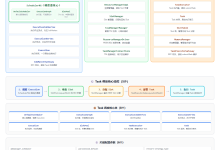
结合Routine Load/Stream Load与Flink,可以构建完整的实时数仓链路。下面通过mermaid流程图展示整体架构:
#publish-mermaid-0-1790499718749{font-family:\”trebuchet ms\”,verdana,arial,sans-serif;font-size:16px;fill:#333;}@keyframes edge-animation-frame{from{stroke-dashoffset:0;}}@keyframes dash{to{stroke-dashoffset:0;}}#publish-mermaid-0-1790499718749 .edge-animation-slow{stroke-dasharray:9,5!important;stroke-dashoffset:900;animation:dash 50s linear infinite;stroke-linecap:round;}#publish-mermaid-0-1790499718749 .edge-animation-fast{stroke-dasharray:9,5!important;stroke-dashoffset:900;animation:dash 20s linear infinite;stroke-linecap:round;}#publish-mermaid-0-1790499718749 .error-icon{fill:#552222;}#publish-mermaid-0-1790499718749 .error-text{fill:#552222;stroke:#552222;}#publish-mermaid-0-1790499718749 .edge-thickness-normal{stroke-width:1px;}#publish-mermaid-0-1790499718749 .edge-thickness-thick{stroke-width:3.5px;}#publish-mermaid-0-1790499718749 .edge-pattern-solid{stroke-dasharray:0;}#publish-mermaid-0-1790499718749 .edge-thickness-invisible{stroke-width:0;fill:none;}#publish-mermaid-0-1790499718749 .edge-pattern-dashed{stroke-dasharray:3;}#publish-mermaid-0-1790499718749 .edge-pattern-dotted{stroke-dasharray:2;}#publish-mermaid-0-1790499718749 .marker{fill:#333333;stroke:#333333;}#publish-mermaid-0-1790499718749 .marker.cross{stroke:#333333;}#publish-mermaid-0-1790499718749 svg{font-family:\”trebuchet ms\”,verdana,arial,sans-serif;font-size:16px;}#publish-mermaid-0-1790499718749 p{margin:0;}#publish-mermaid-0-1790499718749 .label{font-family:\”trebuchet ms\”,verdana,arial,sans-serif;color:#333;}#publish-mermaid-0-1790499718749 .cluster-label text{fill:#333;}#publish-mermaid-0-1790499718749 .cluster-label span{color:#333;}#publish-mermaid-0-1790499718749 .cluster-label span p{background-color:transparent;}#publish-mermaid-0-1790499718749 .label text,#publish-mermaid-0-1790499718749 span{fill:#333;color:#333;}#publish-mermaid-0-1790499718749 .node rect,#publish-mermaid-0-1790499718749 .node circle,#publish-mermaid-0-1790499718749 .node ellipse,#publish-mermaid-0-1790499718749 .node polygon,#publish-mermaid-0-1790499718749 .node path{fill:#ECECFF;stroke:#9370DB;stroke-width:1px;}#publish-mermaid-0-1790499718749 .rough-node .label text,#publish-mermaid-0-1790499718749 .node .label text,#publish-mermaid-0-1790499718749 .image-shape .label,#publish-mermaid-0-1790499718749 .icon-shape .label{text-anchor:middle;}#publish-mermaid-0-1790499718749 .node .katex path{fill:#000;stroke:#000;stroke-width:1px;}#publish-mermaid-0-1790499718749 .rough-node .label,#publish-mermaid-0-1790499718749 .node .label,#publish-mermaid-0-1790499718749 .image-shape .label,#publish-mermaid-0-1790499718749 .icon-shape .label{text-align:center;}#publish-mermaid-0-1790499718749 .node.clickable{cursor:pointer;}#publish-mermaid-0-1790499718749 .root .anchor path{fill:#333333!important;stroke-width:0;stroke:#333333;}#publish-mermaid-0-1790499718749 .arrowheadPath{fill:#333333;}#publish-mermaid-0-1790499718749 .edgePath .path{stroke:#333333;stroke-width:1px;}#publish-mermaid-0-1790499718749 .flowchart-link{stroke:#333333;fill:none;}#publish-mermaid-0-1790499718749 .edgeLabel{background-color:rgba(232,232,232, 0.8);text-align:center;}#publish-mermaid-0-1790499718749 .edgeLabel p{background-color:rgba(232,232,232, 0.8);}#publish-mermaid-0-1790499718749 .edgeLabel rect{opacity:0.5;background-color:rgba(232,232,232, 0.8);fill:rgba(232,232,232, 0.8);}#publish-mermaid-0-1790499718749 .labelBkg{background-color:rgba(232, 232, 232, 0.5);}#publish-mermaid-0-1790499718749 .cluster rect{fill:#ffffde;stroke:#aaaa33;stroke-width:1px;}#publish-mermaid-0-1790499718749 .cluster text{fill:#333;}#publish-mermaid-0-1790499718749 .cluster span{color:#333;}#publish-mermaid-0-1790499718749 div.mermaidTooltip{position:absolute;text-align:center;max-width:200px;padding:2px;font-family:\”trebuchet ms\”,verdana,arial,sans-serif;font-size:12px;background:hsl(80, 100%, 96.2745098039%);border:1px solid #aaaa33;border-radius:2px;pointer-events:none;z-index:100;}#publish-mermaid-0-1790499718749 .flowchartTitleText{text-anchor:middle;font-size:18px;fill:#333;}#publish-mermaid-0-1790499718749 rect.text{fill:none;stroke-width:0;}#publish-mermaid-0-1790499718749 .icon-shape,#publish-mermaid-0-1790499718749 .image-shape{background-color:rgba(232,232,232, 0.8);text-align:center;}#publish-mermaid-0-1790499718749 .icon-shape p,#publish-mermaid-0-1790499718749 .image-shape p{background-color:rgba(232,232,232, 0.8);padding:2px;}#publish-mermaid-0-1790499718749 .icon-shape .label rect,#publish-mermaid-0-1790499718749 .image-shape .label rect{opacity:0.5;background-color:rgba(232,232,232, 0.8);fill:rgba(232,232,232, 0.8);}#publish-mermaid-0-1790499718749 .label-icon{display:inline-block;height:1em;overflow:visible;vertical-align:-0.125em;}#publish-mermaid-0-1790499718749 .node .label-icon path{fill:currentColor;stroke:revert;stroke-width:revert;}#publish-mermaid-0-1790499718749 .node .neo-node{stroke:#9370DB;}#publish-mermaid-0-1790499718749 [data-look=\”neo\”].node rect,#publish-mermaid-0-1790499718749 [data-look=\”neo\”].cluster rect,#publish-mermaid-0-1790499718749 [data-look=\”neo\”].node polygon{stroke:#9370DB;filter:drop-shadow(1px 2px 2px rgba(185, 185, 185, 1));}#publish-mermaid-0-1790499718749 [data-look=\”neo\”].swimlane.cluster rect{filter:none;}#publish-mermaid-0-1790499718749 [data-look=\”neo\”].node path{stroke:#9370DB;stroke-width:1px;}#publish-mermaid-0-1790499718749 [data-look=\”neo\”].node .outer-path{filter:drop-shadow(1px 2px 2px rgba(185, 185, 185, 1));}#publish-mermaid-0-1790499718749 [data-look=\”neo\”].node .neo-line path{stroke:#9370DB;filter:none;}#publish-mermaid-0-1790499718749 [data-look=\”neo\”].node circle{stroke:#9370DB;filter:drop-shadow(1px 2px 2px rgba(185, 185, 185, 1));}#publish-mermaid-0-1790499718749 [data-look=\”neo\”].node circle .state-start{fill:#000000;}#publish-mermaid-0-1790499718749 [data-look=\”neo\”].icon-shape .icon{fill:#9370DB;filter:drop-shadow(1px 2px 2px rgba(185, 185, 185, 1));}#publish-mermaid-0-1790499718749 [data-look=\”neo\”].icon-shape .icon-neo path{stroke:#9370DB;filter:drop-shadow(1px 2px 2px rgba(185, 185, 185, 1));}#publish-mermaid-0-1790499718749 :root{–mermaid-font-family:\”trebuchet ms\”,verdana,arial,sans-serif;}Stream Load方式Routine Load方式Flink处理
数据接入
实时计算
结果输出
数据源
Kafka
Flink处理
数据清洗/转换
Doris存储
实时查询
Doris Routine Load任务
客户端程序
Stream Load API
构建实时数仓链路的步骤如下:
一个完整的Flink处理示例:
import org.apache.flink.streaming.api.environment.StreamExecutionEnvironment;
import org.apache.flink.streaming.connectors.kafka.FlinkKafkaConsumer;
import org.apache.flink.streaming.util.serialization.SimpleStringSchema;
public class DorisRealtimeETL {
public static void main(String[] args) throws Exception {
// 创建执行环境
final StreamExecutionEnvironment env = StreamExecutionEnvironment.getExecutionEnvironment();
// 配置Kafka消费者
properties.setProperty("bootstrap.servers", "kafka1:9092,kafka2:9092");
properties.setProperty("group.id", "doris_etl");
FlinkKafkaConsumer<String> kafkaSource = new FlinkKafkaConsumer<>(
"example_topic",
new SimpleStringSchema(),
properties
);
// 添加数据源
DataStream<String> stream = env.addSource(kafkaSource);
// 数据处理逻辑(示例:简单解析和转换)
DataStream<String> processedStream = stream.map(value -> {
// 解析JSON数据并进行转换
// 这里只是示例,实际应根据业务需求编写处理逻辑
return processAndTransform(value);
});
// 输出到Doris(通过自定义Sink或调用Stream Load API)
processedStream.addSink(new DorisSink());
// 执行任务
env.execute("Doris Realtime ETL");
}
private static String processAndTransform(String input) {
// 数据处理逻辑
return transformedData;
}
}
5.1 最小示例
以下是一个完整的Doris与Kafka/Flink集成的最小示例:
CREATE TABLE example_db.user_events (
user_id BIGINT,
event_type VARCHAR(32),
event_time DATETIME,
event_data VARCHAR(1024)
) ENGINE=OLAP
PRIMARY KEY(user_id, event_time)
DISTRIBUTED BY HASH(user_id) BUCKETS 10;
CREATE ROUTINE LOAD example_db.user_events_load ON TABLE example_db.user_events
COLUMNS(user_id, event_type, event_time, event_data),
PROPERTIES (
"format" = "json",
"jsonpaths" = "$.user_id, $.event_type, $.event_time, $.event_data"
)
FROM KAFKA (
"kafka_broker" = "kafka1:9092,kafka2:9092",
"kafka_topic" = "user_events",
"property.group.id" = "user_events_group"
);
import org.apache.flink.streaming.api.environment.StreamExecutionEnvironment;
import org.apache.flink.streaming.connectors.kafka.FlinkKafkaConsumer;
import org.apache.flink.streaming.util.serialization.JSONKeyValueDeserializationSchema;
import org.apache.flink.shaded.jackson2.com.fasterxml.jackson.databind.JsonNode;
public class SimpleFlinkJob {
public static void main(String[] args) throws Exception {
final StreamExecutionEnvironment env = StreamExecutionEnvironment.getExecutionEnvironment();
Properties properties = new Properties();
properties.setProperty("bootstrap.servers", "kafka1:9092,kafka2:9092");
properties.setProperty("group.id", "user_events_group");
FlinkKafkaConsumer<JsonNode> kafkaSource = new FlinkKafkaConsumer<>(
"user_events",
new JSONKeyValueDeserializationSchema(true),
properties
);
env.addSource(kafkaSource)
.addSink(new DorisSink("example_db.user_events"));
env.execute("Simple Flink to Doris");
}
}
import org.apache.flink.streaming.connectors.kafka.FlinkKafkaProducer;
import org.apache.flink.streaming.connectors.kafka.KafkaSerializationSchema;
import org.apache.kafka.clients.producer.ProducerRecord;
public class DorisSink extends RichSinkFunction<JsonNode> {
private final String table;
private transient HttpPost httpPost;
public DorisSink(String table) {
this.table = table;
}
@Override
public void open(Configuration parameters) throws Exception {
// 初始化HTTP请求
httpPost = new HttpPost("http://doris_host:8030/api/" + table + "/_stream_load");
httpPost.setHeader("Content-Type", "application/json");
httpPost.setHeader("Authorization", "Basic " + Base64.encodeBase64String("user:password".getBytes()));
}
@Override
public void invoke(JsonNode value, Context context) throws Exception {
// 发送数据到Doris
String requestBody = value.toString();
httpPost.setEntity(new StringEntity(requestBody));
try (CloseableHttpResponse response = httpClient.execute(httpPost)) {
// 处理响应
EntityUtils.consume(response.getEntity());
}
}
@Override
public void close() throws Exception {
if (httpPost != null) {
httpPost.releaseConnection();
}
}
}
5.2 注意事项
- Doris表设计中合理设置分桶数量
- 针对查询模式优化列存储
- 批量导入时调整超时参数
- 使用唯一的label确保数据不重复
- 设置合适的重试机制
- 监控导入失败情况
- 合理设置Flink并行度
- 控制Doris导入任务数量
- 监控系统资源使用情况
- 实现完善的错误捕获机制
- 设置合理的重试策略
- 记录详细的日志信息
- 使用HTTPS连接Doris
- 定期更换认证凭据
- 实施最小权限原则
通过以上内容,我们了解了Doris与Kafka/Flink实时集成的实现方法,包括Routine Load和Stream Load两种数据导入方式,以及如何构建完整的实时数仓链路。结合提供的示例代码和注意事项,开发者可以根据实际业务需求快速搭建实时数据集成平台。