本期学习ai-agent-book 第四章
https://github.com/bojieli/ai-agent-book/blob/main/chapter4/README.md
先大概理解一下本期的主要学习方向Tools 与 MCP。mcp协议、mcp服务、tools三个是独立的概念。MCP协议定义了通信规则,MCP服务是规则的实现载体,Tool是挂在MCP服务上对外暴露的具体能力单元。mcp的出现最开始也是因为各家大模型调用外部工具的标准不一样,所以mcp解决了标准化的问题,类似usb协议。也就是实现一次 MCP 客户端,可以通吃所有 MCP 工具服务;工具按 MCP 标准开发一次,就能被所有 MCP 类型 Agent 调用。
Q:那感知工具 MCP 服务器、执行工具 MCP 服务器的关系和区别是什么?
ans:
1)关系:感知工具 MCP 服务器、执行工具 MCP 服务器都是mcp服务的程序实例,两者是独立的。MCP 协议本身只定义了三类能力:Tools / Resources / Prompts。他们的层级关系是 MCP 协议 → MCP 的 Tools 能力 → 业务层面再划分感知 Tools、执行 Tool。
2)区别:
- 感知工具 MCP 服务器:它里面封装的是感知类工具(只读、无副作用) 能力示例:读取指标文档、查询表元信息、检索知识库。 MCP 层面:以 MCP Tool 形式对外提供只读查询能力。
- 执行工具 MCP 服务器:里面封装执行类工具(调用后产生副作用,修改外部状态) 能力示例:执行 SQL、生成文件、导出报表。 自带:参数校验、权限控制、审计日志、高危操作人工确认。
3)两者和agent的关系:Agent 只需要实现一份 MCP Client 代码,就可以同时连接这两个 MCP 服务器:
- 需要读取文档、查元数据 → 请求感知 MCP Server
- 需要跑 SQL、生成文件 → 请求执行 MCP Server
工具的数量变多必然会带来新的问题,也就是无法一次性吧全部工具的schema全部喂给llm。大量工具带来的上下文与选型难题催生了 Active Tool Discovery(主动工具发现)。他的核心思路是不要一次性加载全部工具,按需检索、按需加载。主动工具发现负责从感知 MCP、执行 MCP 提供的全部工具集中,检索筛选少量候选工具,按需加载给大模型;它是 Agent 上层检索逻辑,不属于 MCP 协议本身。
实验4-4 Execution Tools MCP Server / 执行工具 MCP 服务器
背景:Agent 生成一条命令,并不代表命令已经成功执行。本实验围绕执行工具学习完整动作链:接收参数、检查条件、执行操作,再把结果交回模型。
# 1. 进入实验目录
cd /Users/td/Downloads/ai-agent-book/chapter4/execution-tools
# 2. 激活项目虚拟环境
source ../../.venv/bin/activate
# 3. 确认文件存在
ls
# 4. 安装依赖
python -m pip install -r requirements.txt
#5.复制env.example 为 .env:
cp env.example .env
#6.配制参数文件
nano .env
配制的参数为:
运行:
# 查看总帮助与所有子命令
python cli.py –help
(.venv) td@air execution-tools % python cli.py –help
usage: cli.py [-h] [–provider PROVIDER] [–workspace WORKSPACE] [–no-approval] [–no-verify]
[–no-summarize]
<子命令> …
执行工具统一命令行入口(实验 4-4:执行工具 MCP 服务器)。
positional arguments:
<子命令>
list 列出所有可用的执行工具
demo 运行端到端离线演示(推荐先看这个)
code 调用 code_interpreter 执行代码
shell 调用 virtual_terminal 执行 shell 命令
write 调用 file_write 写文件
edit 调用 file_edit 按搜索-替换编辑文件
calendar 调用 google_calendar_add 创建日历事件(需要凭据)
pr 调用 github_create_pr 创建 Pull Request(需要 token)
options:
-h, –help show this help message and exit
–provider PROVIDER LLM 提供商(覆盖 PROVIDER,如
dashscope/qwen/bailian/kimi/doubao/siliconflow/openrouter)
–workspace WORKSPACE
工作目录(覆盖 WORKSPACE_DIR,文件操作被限制在此目录内)
–no-approval 关闭危险操作的 LLM 事前审批
–no-verify 关闭写文件/代码的自动语法校验
–no-summarize 关闭长输出的 LLM 总结(仍会截断持久化)
示例:
python cli.py list 列出所有执行工具
python cli.py demo 运行端到端离线演示
python cli.py code –code "print(6*7)" 执行 Python 代码
python cli.py shell "ls -la" 执行 shell 命令
python cli.py write –path a.txt –content hi –overwrite
python cli.py –no-approval shell "echo hello"
关闭 –no-approval / –no-summarize / –no-verify 后,
code/shell/write/edit 等命令可完全离线运行,无需 API key。
运行:
python cli.py list
结果:
可用执行工具:
工具名 类别 说明
——————– ——– —————————————-
file_write 文件系统 写文件,写入前自动做语法/linter 校验
file_edit 文件系统 按搜索-替换编辑文件,附带 diff 预览与校验
code_interpreter 通用执行 多语言沙盒代码执行(Python/JS/Go/Java/C++/Rust/PHP/Bash)
virtual_terminal 通用执行 Shell 命令执行,含危险命令检测与长输出截断
google_calendar_add 外部系统 创建 Google 日历事件(需要 credentials.json)
github_create_pr 外部系统 创建 GitHub Pull Request(需要 GITHUB_TOKEN)
用 `python cli.py <子命令> –help` 查看每个工具的参数。
用 `python cli.py demo` 运行端到端离线演示。
上面所有列出的工具(file_write、file_edit、code_interpreter、virtual_terminal)就是4-4实验里封装好的 MCP 执行工具集合,cli.py 是 MCP 服务配套的命令行客户端,用来测试这套 MCP 服务里的工具。
运行mcp服务器
在【execution-tools】目录里新建一个client.py文件,吧教程里的代码复制进去
cat > client.py <<'EOF'
import asyncio
from mcp import ClientSession, StdioServerParameters
from mcp.client.stdio import stdio_client
async def use_tools():
server_params = StdioServerParameters(
command="python",
args=["server.py"],
)
async with stdio_client(server_params) as (read, write):
async with ClientSession(read, write) as session:
await session.initialize()
# Use file write tool
result = await session.call_tool("file_write", {
"path": "test.py",
"content": "print('Hello, World!')"
})
print("==== file_write 结果 ====")
print(result)
# Use code interpreter
result = await session.call_tool("code_interpreter", {
"code": "import math\\nprint(math.sqrt(16))"
})
print("\\n==== code_interpreter 结果 ====")
print(result)
# Use virtual terminal
result = await session.call_tool("virtual_terminal", {
"command": "ls -la"
})
print("\\n==== virtual_terminal 结果 ====")
print(result)
if __name__ == "__main__":
asyncio.run(use_tools())
EOF
之后可以检查一下,这个目录下面文件有没有创建成功,内容有没有正确粘贴进去
ls -la client.py
–能看到 `client.py` 文件,就代表创建好了。
cat client.py —核对内容
python client.py —-运行代码
跑出来的结果就是:
(.venv) td@air execution-tools % ls -la client.py
-rw-r–r– 1 td staff 1224 10 20 10:40 client.py
(.venv) td@air execution-tools % cat client.py
import asyncio
from mcp import ClientSession, StdioServerParameters
from mcp.client.stdio import stdio_client
async def use_tools():
server_params = StdioServerParameters(
command="python",
args=["server.py"],
)
async with stdio_client(server_params) as (read, write):
async with ClientSession(read, write) as session:
await session.initialize()
# Use file write tool
result = await session.call_tool("file_write", {
"path": "test.py",
"content": "print('Hello, World!')"
})
print("==== file_write 结果 ====")
print(result)
# Use code interpreter
result = await session.call_tool("code_interpreter", {
"code": "import math\\nprint(math.sqrt(16))"
})
print("\\n==== code_interpreter 结果 ====")
print(result)
# Use virtual terminal
result = await session.call_tool("virtual_terminal", {
"command": "ls -la"
})
print("\\n==== virtual_terminal 结果 ====")
print(result)
if __name__ == "__main__":
asyncio.run(use_tools())
(.venv) td@air execution-tools % python client.py
==== file_write 结果 ====
meta=None content=[TextContent(type='text', text='{\\n "success": true,\\n "path": "/Users/td/Downloads/ai-agent-book/chapter4/execution-tools/test.py",\\n "bytes_written": 22,\\n "verification": "passed"\\n}', annotations=None, meta=None)] structuredContent=None isError=False
==== code_interpreter 结果 ====
meta=None content=[TextContent(type='text', text='{\\n "success": true,\\n "status": "success",\\n "language": "python",\\n "stdout": "4.0\\\\n",\\n "stderr": "",\\n "stdout_file": null,\\n "stderr_file": null,\\n "returncode": 0,\\n "error": null,\\n "compile_output": null,\\n "phase": null,\\n "execution_time": 0.011078119277954102,\\n "sandbox": {\\n "kind": "local-process",\\n "degraded": true\\n },\\n "verification": "passed"\\n}', annotations=None, meta=None)] structuredContent=None isError=False
==== virtual_terminal 结果 ====
meta=None content=[TextContent(type='text', text='{\\n "success": true,\\n "returncode": 0,\\n "stdout": "total 760\\\\ndrwxr-xr-x 49 td staff 1568 Oct 20 10:40 .\\\\ndrwxr-xr-x 25 td staff 800 Oct 8 17:36 ..\\\\n-rw-r–r–@ 1 td staff 6148 Oct 19 18:46 .DS_Store\\\\n-rw-r–r–@ 1 td staff 1472 Oct 19 18:56 .env\\\\ndrwxr-xr-x 2 td staff 64 Oct 20 10:40 .execution-tmp\\\\n-rw-r–r– 1 td staff 3537 Oct 8 17:20 Dockerfile\\\\n-rw-r–r– 1 td staff 8552 Oct 8 17:20 EXPERIMENT.md\\\\n-rw-r–r– 1 td staff 19737 Oct 8 17:20 README.md\\\\ndrwxr-xr-x 9 td staff 288 Oct 20 10:10 __pycache__\\\\n-rw-r–r– 1 td staff 18673 Oct 8 17:20 cli.py\\\\n-rw-r–r– 1 td staff 1224 Oct 20 10:40 client.py\\\\n-rw-r–r– 1 td staff 7151 Oct 8 17:20 config.py\\\\n-rw-r–r– 1 td staff 64 Oct 20 09:26 data.txt\\\\n-rw-r–r– 1 td staff 1320 Oct 8 17:20 env.example\\\\n-rw-r–r– 1 td staff 4332 Oct 8 17:20 examples.py\\\\n-rw-r–r– 1 td staff 11340 Oct 8 17:20 execution_tools.py\\\\n-rw-r–r– 1 td staff 917 Oct 8 17:20 experiment_protocol.json\\\\n-rw-r–r– 1 td staff 19634 Oct 8 17:20 extended_tools.py\\\\n-rw-r–r– 1 td staff 10508 Oct 8 17:20 external_tools.py\\\\n-rw-r–r– 1 td staff 7296 Oct 8 17:20 file_tools.py\\\\n-rw-r–r– 1 td staff 22095 Oct 8 17:20 filesystem_enhanced.py\\\\n-rw-r–r– 1 td staff 155 Oct 8 17:20 hello.py\\\\n-rw-r–r– 1 td staff 12206 Oct 8 17:20 llm_helper.py\\\\n-rw-r–r– 1 td staff 25434 Oct 8 17:20 multilang_executor.py\\\\n-rw-r–r– 1 td staff 2888 Oct 8 17:20 quickstart.py\\\\n-rw-r–r– 1 td staff 1066 Oct 8 17:20 requirements.txt\\\\n-rw-r–r– 1 td staff 14890 Oct 8 17:20 run_experiment_4_4.py\\\\n-rw-r–r– 1 td staff 13978 Oct 8 17:20 server.py\\\\n-rw-r–r– 1 td staff 15579 Oct 8 17:20 terminal_controller.py\\\\n-rw-r–r– 1 td staff 22 Oct 20 10:40 test.py\\\\n-rw-r–r– 1 td staff 3258 Oct 8 17:20 test_bash_lookup.py\\\\n-rw-r–r– 1 td staff 5615 Oct 8 17:20 test_code_interpreter_python_runtime.py\\\\n-rw-r–r– 1 td staff 961 Oct 8 17:20 test_command_history_count_zero.py\\\\n-rw-r–r– 1 td staff 1774 Oct 8 17:20 test_config_env.py\\\\n-rw-r–r– 1 td staff 1295 Oct 8 17:20 test_edit_reject_empty_search.py\\\\n-rw-r–r– 1 td staff 5408 Oct 8 17:20 test_execution_tools.py\\\\n-rw-r–r– 1 td staff 3149 Oct 8 17:20 test_external_tools.py\\\\n-rw-r–r– 1 td staff 2835 Oct 8 17:20 test_file_tools.py\\\\n-rw-r–r– 1 td staff 12977 Oct 8 17:20 test_filesystem_enhanced.py\\\\n-rw-r–r– 1 td staff 1634 Oct 8 17:20 test_github_idempotency.py\\\\n-rw-r–r– 1 td staff 682 Oct 8 17:20 test_gui_tools.py\\\\n-rw-r–r– 1 td staff 4201 Oct 8 17:20 test_multilang.py\\\\n-rw-r–r– 1 td staff 877 Oct 8 17:20 test_multilang_output.py\\\\n-rw-r–r– 1 td staff 1669 Oct 8 17:20 test_null_language.py\\\\n-rw-r–r– 1 td staff 98 Oct 8 17:20 test_script.py\\\\n-rw-r–r– 1 td staff 6883 Oct 8 17:20 test_terminal_controller.py\\\\n-rw-r–r– 1 td staff 1316 Oct 8 17:20 test_truncate_tail_lines_zero.py\\\\ndrwxr-xr-x 4 td staff 128 Oct 19 18:43 validation\\\\n-rw-r–r– 1 td staff 332 Oct 20 09:26 wordcount.py\\\\n",\\n "stderr": "",\\n "stdout_file": null,\\n "stderr_file": null\\n}', annotations=None, meta=None)] structuredContent=None isError=False
全部 3 个工具调用返回success: true
看下回传结果,file_write函数成功在当前目录生成test.py,code_interpreter负责在沙盒内运行代码,virtual_terminal调用shell执行ls -la,输出的结果均是json格式。把我们输入的代码和终端输出的结果串联起来,复习下前面学的内容:
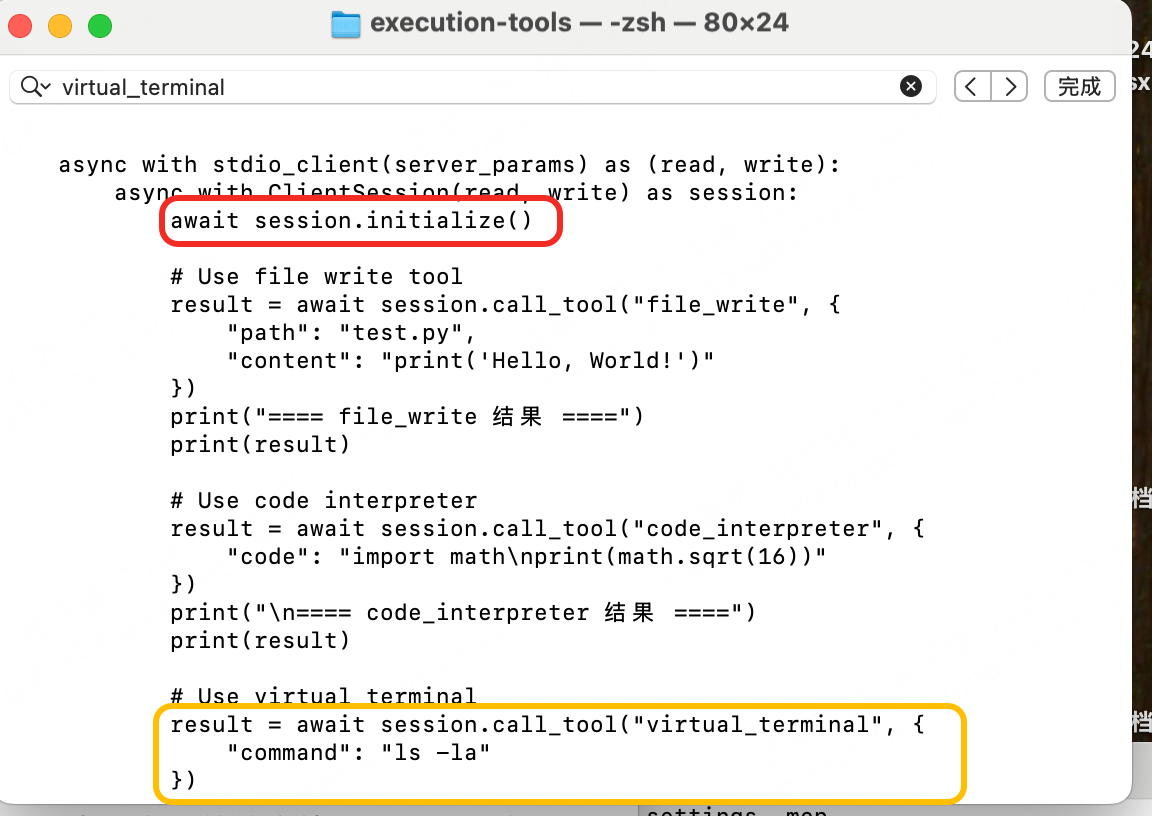
第一步,红框里的“await session.initialize()“代码表示mcp握手初始化,客户端发送初始化信息(我是什么客户端,支持哪些能力);第二步Active Tool Discovery 主动工具发现,握手成功之后客户端主动向服务端发送请求(你都可以提供哪些工具?发给我);第三步seesion.call_tool()发起工具调用,客户端知道工具列表之后按需发起调用,高危动作会走 LLM 安全审批拦截。对应回传的结果就是:
call_tool("file_write", {"path":"test.py", "content":"print('hello')"})
简单理解就是client.py = AI Agent(大脑,做决策),server.py = MCP 服务(工具仓库,干活的工具集合)
也可以进一步的吧主动工具发现这一步打印出来
cat > client.py <<'EOF'
import asyncio
from mcp import ClientSession, StdioServerParameters
from mcp.client.stdio import stdio_client
async def use_tools():
server_params = StdioServerParameters(
command="python",
args=["server.py"],
)
async with stdio_client(server_params) as (read, write):
async with ClientSession(read, write) as session:
print("===== Step1: MCP握手 initialize =====")
await session.initialize()
print("握手完成\\n")
print("===== Step2: Active Tool Discovery 主动工具发现 =====")
tools_response = await session.list_tools()
for tool in tools_response.tools:
print(f"工具名称:{tool.name}")
print(f"工具描述:{tool.description}\\n")
print("===== Step3: 调用 file_write =====")
result = await session.call_tool("file_write", {
"path": "test.py",
"content": "print('Hello, World!')"
})
print(result)
print("\\n===== Step3: 调用 code_interpreter =====")
result = await session.call_tool("code_interpreter", {
"code": "import math\\nprint(math.sqrt(16))"
})
print(result)
print("\\n===== Step3: 调用 virtual_terminal =====")
result = await session.call_tool("virtual_terminal", {
"command": "ls -la"
})
print(result)
if __name__ == "__main__":
asyncio.run(use_tools())
EOF
结果是:
(.venv) td@air execution-tools % python client.py
===== Step1: MCP握手 initialize =====
握手完成
===== Step2: Active Tool Discovery 主动工具发现 =====
工具名称:file_write
工具描述:Write content to a file with automatic syntax verification
工具名称:file_edit
工具描述:Edit an existing file by searching and replacing content
工具名称:code_interpreter
工具描述:Execute code in multiple programming languages in a sandboxed environment with result analysis. Supports: Python, JavaScript, TypeScript, Go, Java, C++, Rust, PHP, Bash
工具名称:virtual_terminal
工具描述:Execute shell commands with error summarization
工具名称:google_calendar_add
工具描述:Add an event to Google Calendar
工具名称:github_create_pr
工具描述:Create a GitHub Pull Request
工具名称:excel_create_with_formula_and_screenshot
工具描述:Create an XLSX workbook, apply formulas, and render a real screenshot with LibreOffice
工具名称:webhook_post
工具描述:POST JSON to a real HTTPS webhook endpoint
工具名称:browser_navigate
工具描述:Navigate with real headless Chromium, extract page content, and save a screenshot
工具名称:virtual_desktop_execute
工具描述:Drive a headful Chromium desktop through X11 keyboard events and retain a screenshot
工具名称:virtual_mobile_execute
工具描述:Operate a running AndroidWorld emulator through ADB and retain a screenshot
工具名称:environment_capabilities
工具描述:Inspect real Computer Use container and Android device availability
===== Step3: 调用 file_write =====
meta=None content=[TextContent(type='text', text='{\\n "success": false,\\n "error": "Overwrite not approved: Approval check failed: API key not found for provider \\'openai\\'. Set OPENAI_API_KEY or OPENROUTER_API_KEY."\\n}', annotations=None, meta=None)] structuredContent=None isError=False
===== Step3: 调用 code_interpreter =====
meta=None content=[TextContent(type='text', text='{\\n "success": true,\\n "status": "success",\\n "language": "python",\\n "stdout": "4.0\\\\n",\\n "stderr": "",\\n "stdout_file": null,\\n "stderr_file": null,\\n "returncode": 0,\\n "error": null,\\n "compile_output": null,\\n "phase": null,\\n "execution_time": 0.0098419189453125,\\n "sandbox": {\\n "kind": "local-process",\\n "degraded": true\\n },\\n "verification": "passed"\\n}', annotations=None, meta=None)] structuredContent=None isError=False
===== Step3: 调用 virtual_terminal =====
meta=None content=[TextContent(type='text', text='{\\n "success": true,\\n "returncode": 0,\\n "stdout": "total 760\\\\ndrwxr-xr-x 49 td staff 1568 Oct 20 10:40 .\\\\ndrwxr-xr-x 25 td staff 800 Oct 8 17:36 ..\\\\n-rw-r–r–@ 1 td staff 6148 Oct 19 18:46 .DS_Store\\\\n-rw-r–r–@ 1 td staff 1472 Oct 19 18:56 .env\\\\ndrwxr-xr-x 2 td staff 64 Oct 20 11:01 .execution-tmp\\\\n-rw-r–r– 1 td staff 3537 Oct 8 17:20 Dockerfile\\\\n-rw-r–r– 1 td staff 8552 Oct 8 17:20 EXPERIMENT.md\\\\n-rw-r–r– 1 td staff 19737 Oct 8 17:20 README.md\\\\ndrwxr-xr-x 9 td staff 288 Oct 20 10:10 __pycache__\\\\n-rw-r–r– 1 td staff 18673 Oct 8 17:20 cli.py\\\\n-rw-r–r– 1 td staff 1543 Oct 20 11:01 client.py\\\\n-rw-r–r– 1 td staff 7151 Oct 8 17:20 config.py\\\\n-rw-r–r– 1 td staff 64 Oct 20 09:26 data.txt\\\\n-rw-r–r– 1 td staff 1320 Oct 8 17:20 env.example\\\\n-rw-r–r– 1 td staff 4332 Oct 8 17:20 examples.py\\\\n-rw-r–r– 1 td staff 11340 Oct 8 17:20 execution_tools.py\\\\n-rw-r–r– 1 td staff 917 Oct 8 17:20 experiment_protocol.json\\\\n-rw-r–r– 1 td staff 19634 Oct 8 17:20 extended_tools.py\\\\n-rw-r–r– 1 td staff 10508 Oct 8 17:20 external_tools.py\\\\n-rw-r–r– 1 td staff 7296 Oct 8 17:20 file_tools.py\\\\n-rw-r–r– 1 td staff 22095 Oct 8 17:20 filesystem_enhanced.py\\\\n-rw-r–r– 1 td staff 155 Oct 8 17:20 hello.py\\\\n-rw-r–r– 1 td staff 12206 Oct 8 17:20 llm_helper.py\\\\n-rw-r–r– 1 td staff 25434 Oct 8 17:20 multilang_executor.py\\\\n-rw-r–r– 1 td staff 2888 Oct 8 17:20 quickstart.py\\\\n-rw-r–r– 1 td staff 1066 Oct 8 17:20 requirements.txt\\\\n-rw-r–r– 1 td staff 14890 Oct 8 17:20 run_experiment_4_4.py\\\\n-rw-r–r– 1 td staff 13978 Oct 8 17:20 server.py\\\\n-rw-r–r– 1 td staff 15579 Oct 8 17:20 terminal_controller.py\\\\n-rw-r–r– 1 td staff 22 Oct 20 10:40 test.py\\\\n-rw-r–r– 1 td staff 3258 Oct 8 17:20 test_bash_lookup.py\\\\n-rw-r–r– 1 td staff 5615 Oct 8 17:20 test_code_interpreter_python_runtime.py\\\\n-rw-r–r– 1 td staff 961 Oct 8 17:20 test_command_history_count_zero.py\\\\n-rw-r–r– 1 td staff 1774 Oct 8 17:20 test_config_env.py\\\\n-rw-r–r– 1 td staff 1295 Oct 8 17:20 test_edit_reject_empty_search.py\\\\n-rw-r–r– 1 td staff 5408 Oct 8 17:20 test_execution_tools.py\\\\n-rw-r–r– 1 td staff 3149 Oct 8 17:20 test_external_tools.py\\\\n-rw-r–r– 1 td staff 2835 Oct 8 17:20 test_file_tools.py\\\\n-rw-r–r– 1 td staff 12977 Oct 8 17:20 test_filesystem_enhanced.py\\\\n-rw-r–r– 1 td staff 1634 Oct 8 17:20 test_github_idempotency.py\\\\n-rw-r–r– 1 td staff 682 Oct 8 17:20 test_gui_tools.py\\\\n-rw-r–r– 1 td staff 4201 Oct 8 17:20 test_multilang.py\\\\n-rw-r–r– 1 td staff 877 Oct 8 17:20 test_multilang_output.py\\\\n-rw-r–r– 1 td staff 1669 Oct 8 17:20 test_null_language.py\\\\n-rw-r–r– 1 td staff 98 Oct 8 17:20 test_script.py\\\\n-rw-r–r– 1 td staff 6883 Oct 8 17:20 test_terminal_controller.py\\\\n-rw-r–r– 1 td staff 1316 Oct 8 17:20 test_truncate_tail_lines_zero.py\\\\ndrwxr-xr-x 4 td staff 128 Oct 19 18:43 validation\\\\n-rw-r–r– 1 td staff 332 Oct 20 09:26 wordcount.py\\\\n",\\n "stderr": "",\\n "stdout_file": null,\\n "stderr_file": null\\n}', annotations=None, meta=None)] structuredContent=None isError=False
MCP 服务一次性返回了它能提供的全部 12 个工具清单 + 每个工具的描述,这些是执行工具mcp服务器,感知 MCP 服务器,工具一般是:read_file、list_dir、get_file_metadata。
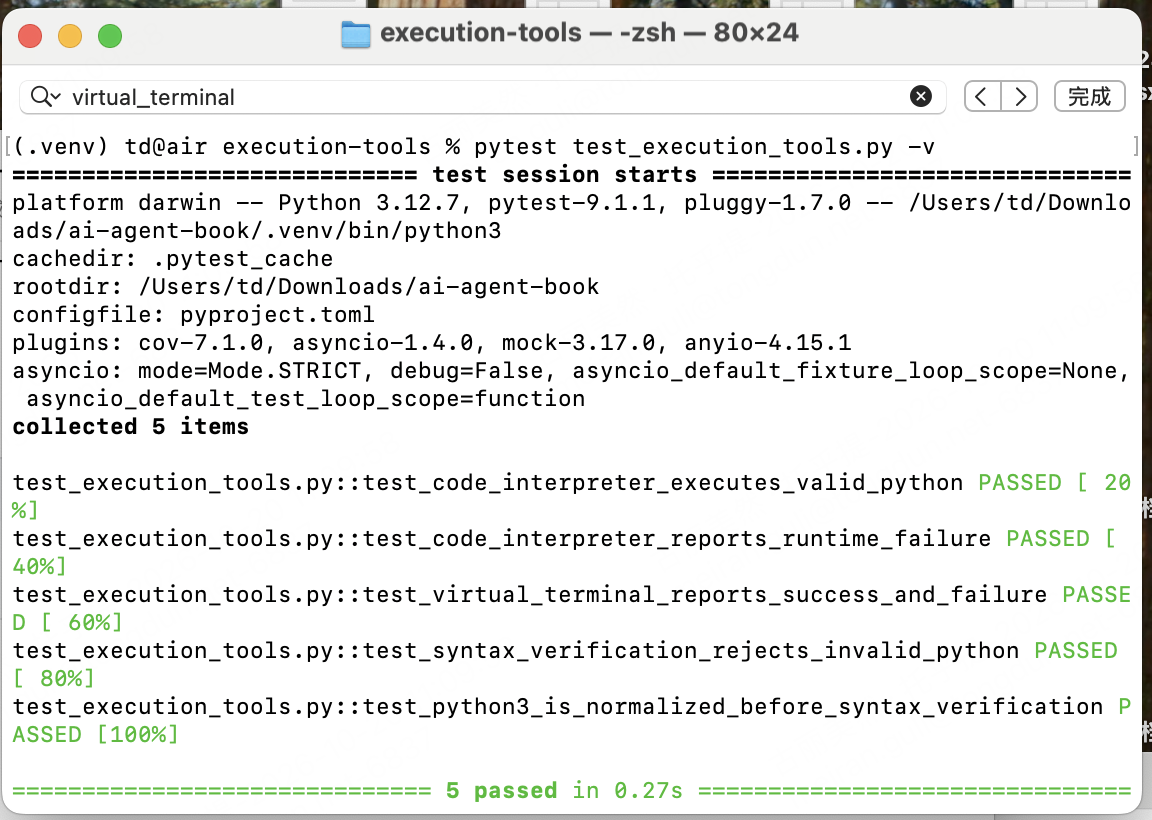
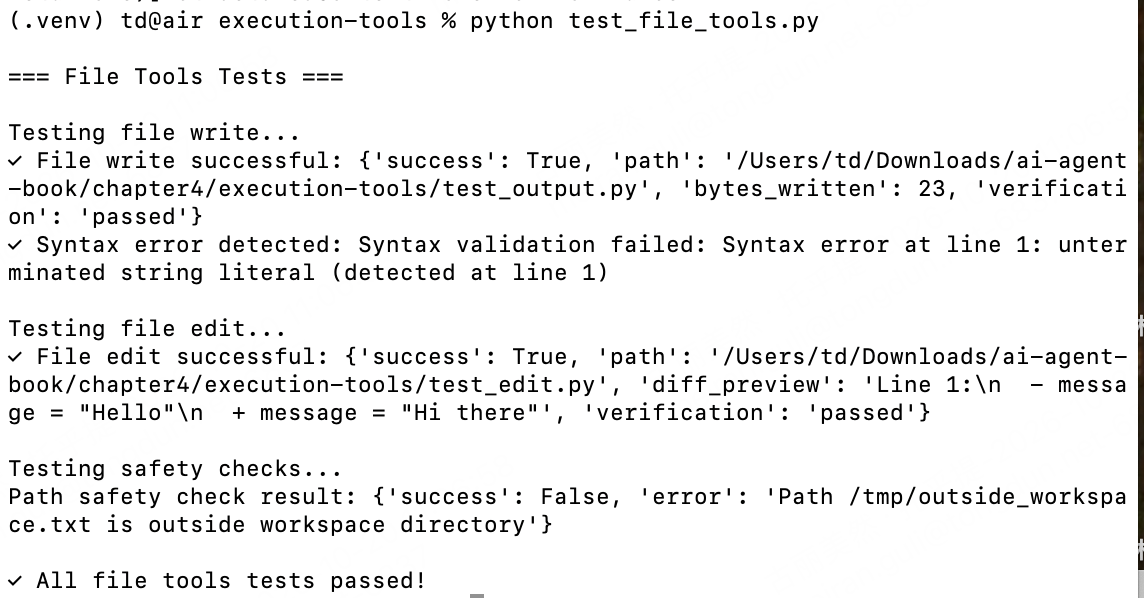
也可以去看单个工具测试情况: