在 AI 具身智能落地的浪潮中,魔珐星云平台凭借低门槛的工具链与突破性的技术能力,成为开发者快速搭建智能应用的新选择。本文将从平台配置流程、产品体验两方面,拆解其易用性与技术价值。
一、快速上手:魔珐星云的配置与 SDK 实践
具身智能应用的 “零门槛” 搭建
登录魔珐星云平台后,仅需 3 步即可完成具身智能应用的创建与调试:
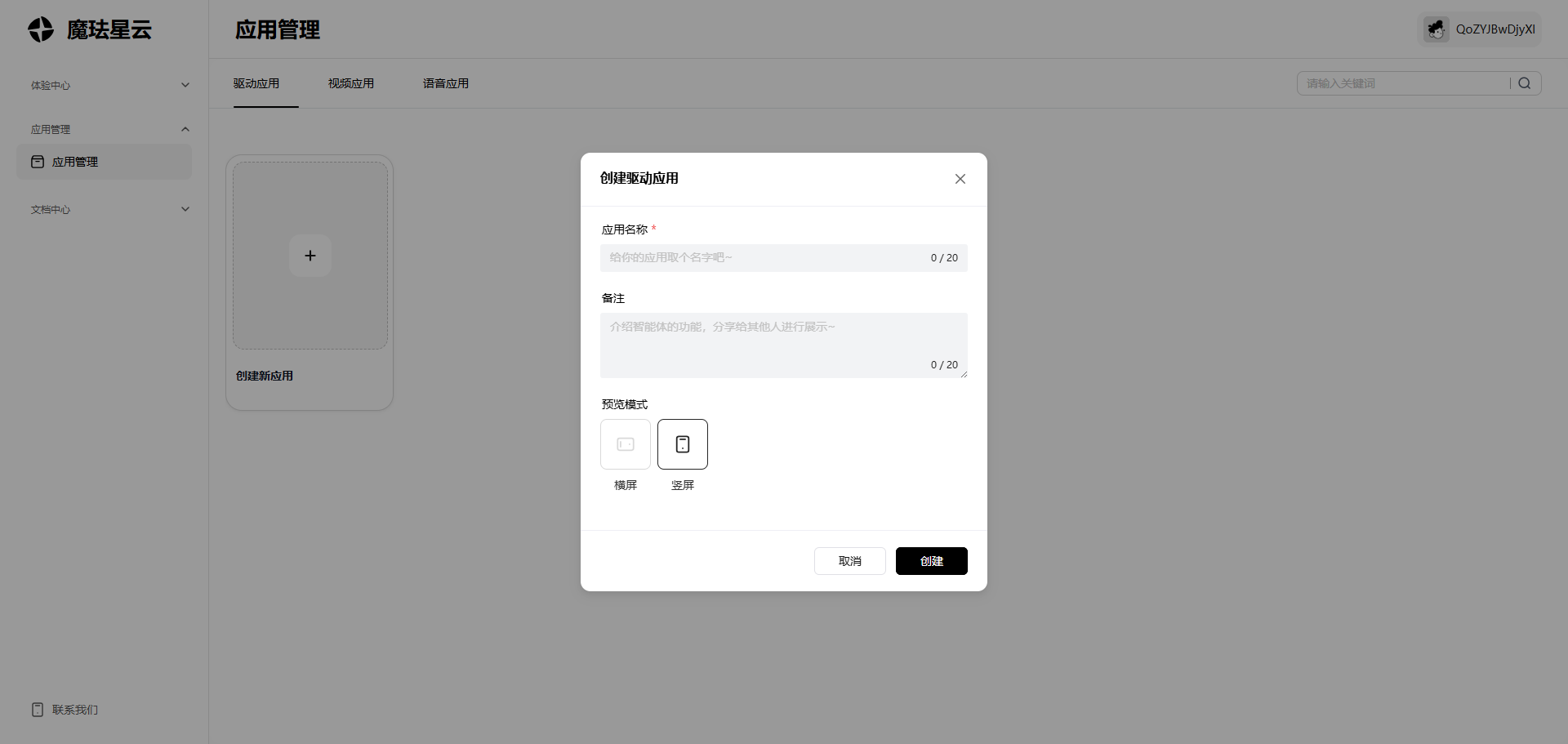
- 进入 “应用管理” 模块,点击 “新建应用”,填写名称与场景标签(如 “全能陪伴助手”);
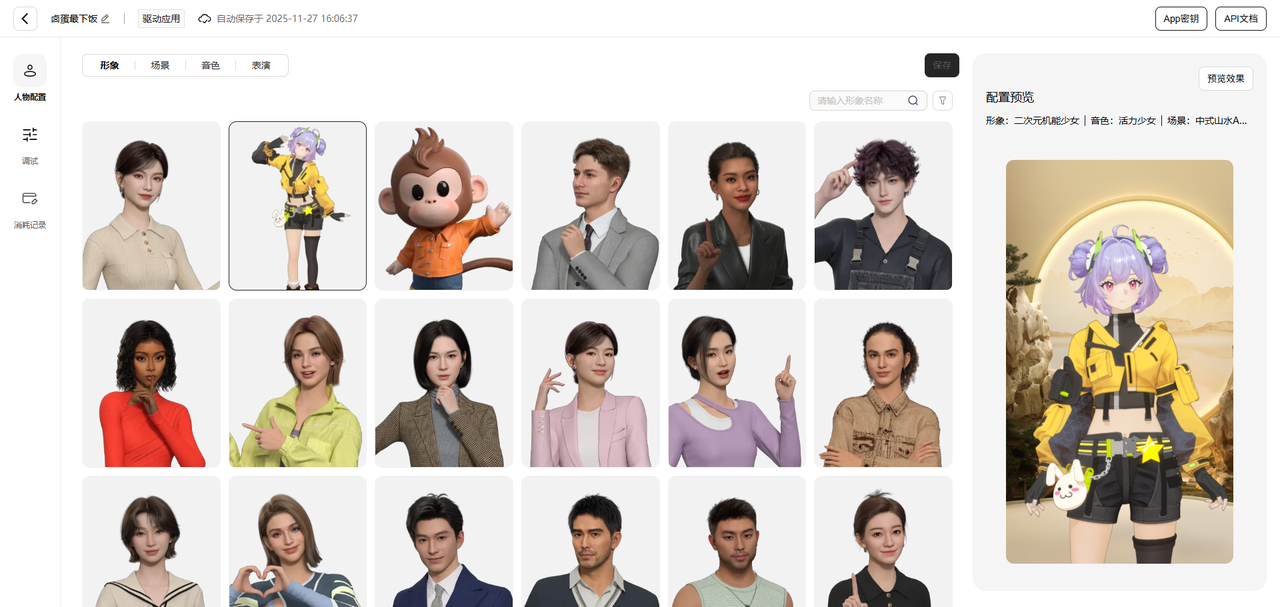
- 在 “配置中心” 的人物配置中,可以选择你想要创建的3D数字人的形象,包括场景、音色、表演等各项配置;
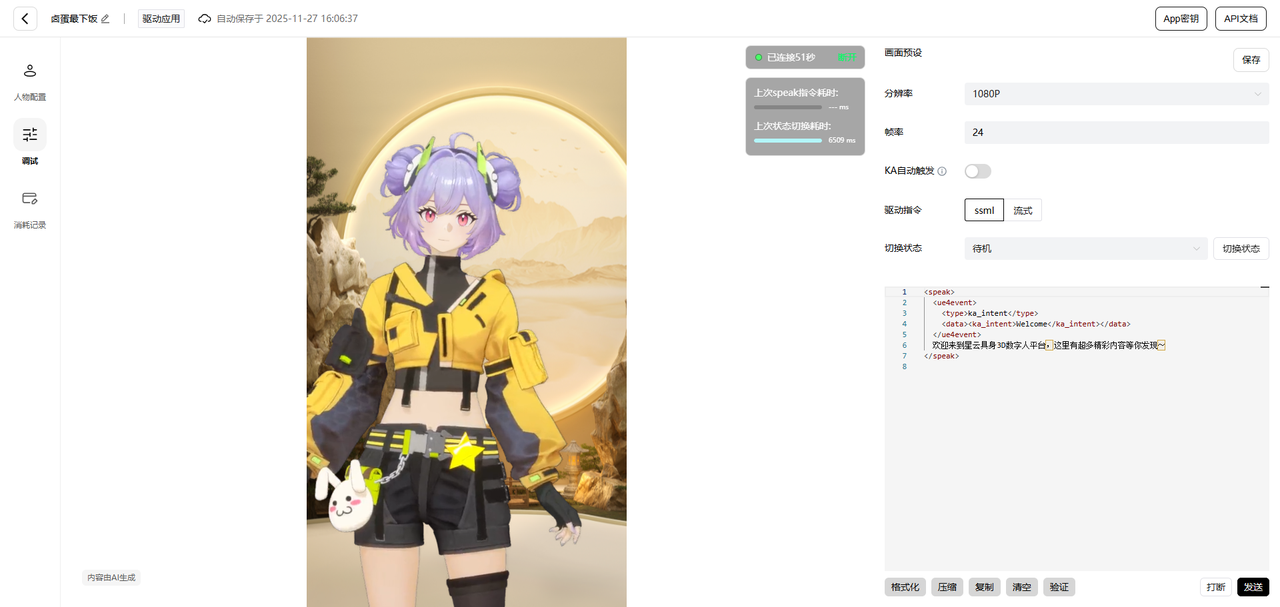
- 进入 “调试面板”,通过模拟指令(如 “来个开场白,简单介绍一下自己”)验证应用响应,实时调整动作流畅度与语义理解精度。整个流程无需复杂代码,10 分钟内即可完成基础应用的搭建。
二、智能车载副驾交互系统演示SDK使用
SDK:开发者友好的 “轻量工具”
魔珐星云 SDK 的易用性体现在 “极简集成”,在页面中引入以下依赖,便可快速的使用魔珐星云SDK:
<script src="https://media.xingyun3d.com/xingyun3d/general/litesdk/xmovAvatar@latest.js"></script>
SDK 内置了动作模型、语义解析等能力,开发者无需关注底层逻辑,即可快速将 AI 具身智能嵌入自有应用。
以下将展示如何将魔珐星云平台接入车载系统,实现一个具备情感交互与场景感知能力的智能副驾助手。
实现核心功能如下:
该示例展示了如何将魔珐星云的3D数字人能力深度融入智能车载场景,实现了从“被动响应”到“主动感知+情感化交互”的升级。
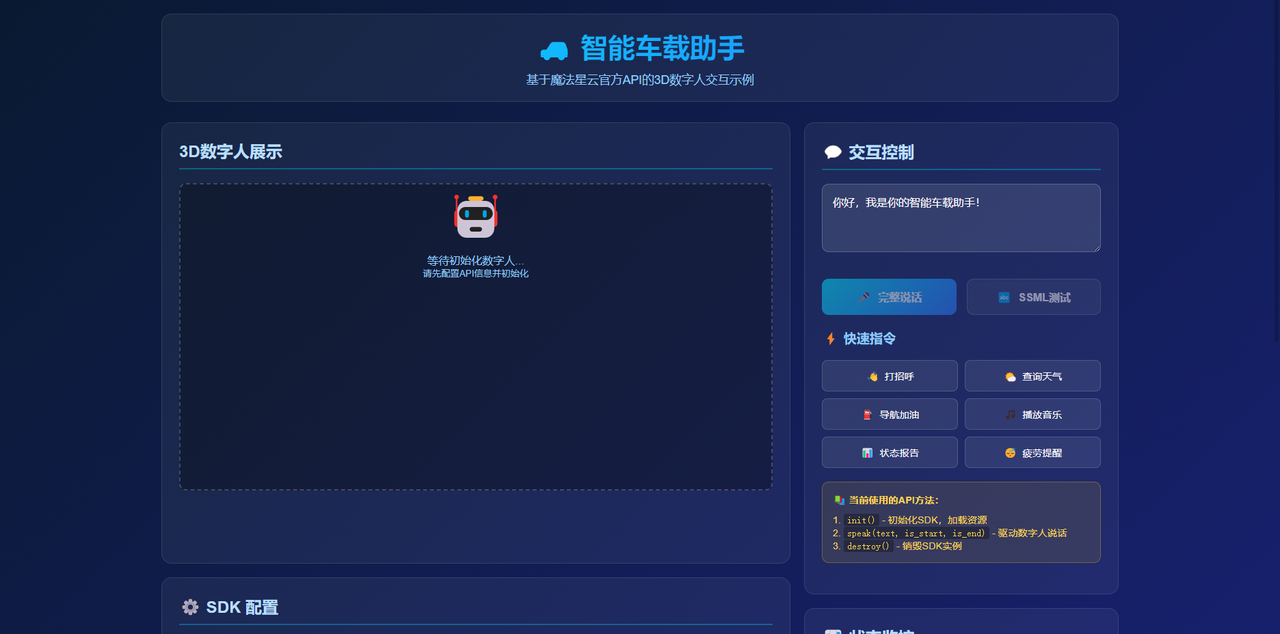
SDK初始化配置
功能说明:
- 创建SDK实例,配置基础参数
- 设置各种事件回调,监听SDK状态变化
- containerId指定数字人渲染的DOM容器
// 创建SDK实例
const liteSDK = new XmovAvatar({
containerId: '#avatar-container', // 数字人容器ID
appId: 'your_app_id', // 从平台获取的App ID
appSecret: 'your_app_secret', // 从平台获取的App Secret
gatewayServer: 'https://nebula-agent.xingyun3d.com/user/v1/ttsa/session',
// 事件回调函数
onWidgetEvent(data) {
console.log('Widget事件:', data);
},
onNetworkInfo(networkInfo) {
console.log('网络信息:', networkInfo);
},
onMessage(message) {
console.log('SDK消息:', message);
},
onStateChange(state) {
console.log('SDK状态变化:', state);
},
onVoiceStateChange(status) {
console.log('语音状态变化:', status);
},
enableLogger: true // 启用日志
});
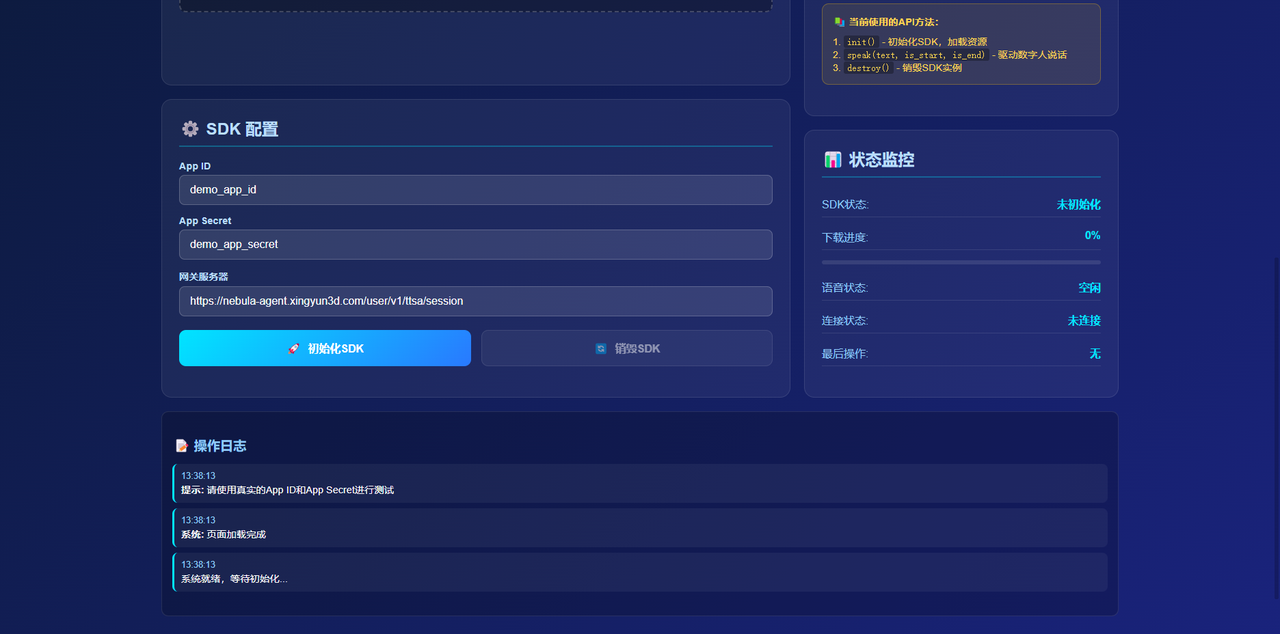
SDK初始化与资源加载
参数说明:
- onDownloadProgress: 资源下载进度回调函数,progress为0-100的数值
功能说明:
- 异步初始化SDK,加载数字人模型和资源文件
- 通过进度回调实时显示下载进度
- 初始化成功后标记状态,启用交互功能
// 初始化SDK并加载资源
async function initSDK() {
try {
await liteSDK.init({
onDownloadProgress: (progress) => {
// 资源下载进度回调
console.log('下载进度:', progress);
// 可以在这里更新UI进度条
updateProgressBar(progress);
}
});
console.log('SDK初始化成功!');
isInitialized = true;
} catch (error) {
console.error('SDK初始化失败:', error);
throw error;
}
}
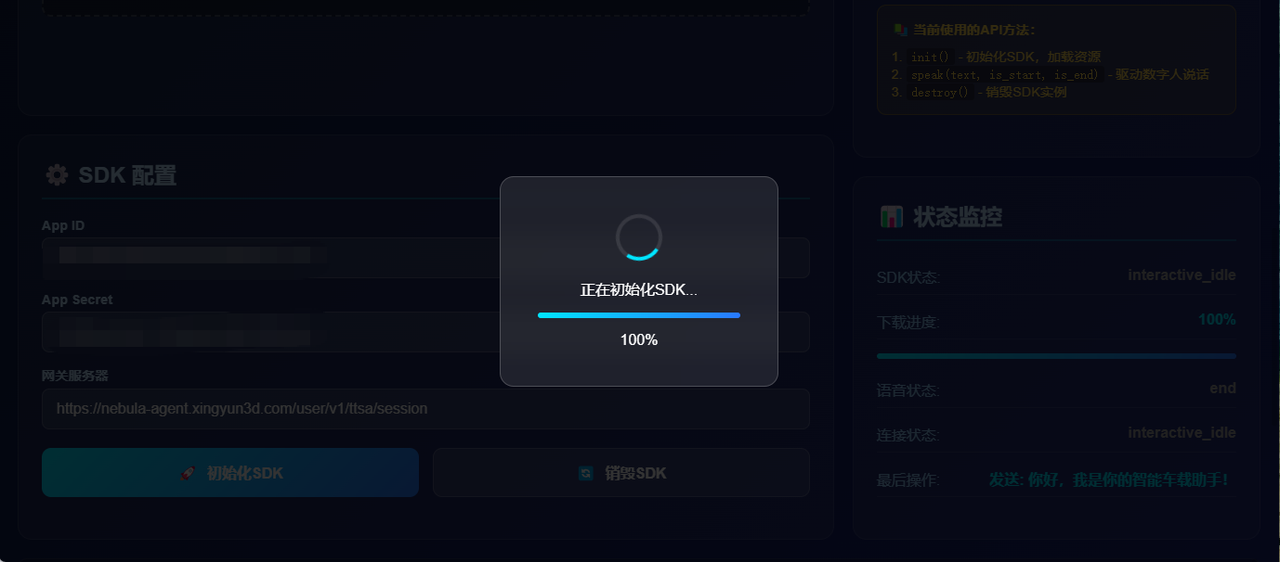
驱动数字人说话
参数说明:
- text: 要说的文本内容
- is_start: 是否为开始说话(true表示开始新的话语)
- is_end: 是否为结束说话(true表示这句话结束)
功能说明:
- 驱动3D数字人根据文本内容说话并生成相应动作
- 支持流式说话模式,可以分段发送
- 支持SSML标记语言
// 基本说话功能
function speakMessage(text, is_start = true, is_end = true) {
if (!liteSDK || !isInitialized) {
throw new Error('SDK未初始化');
}
// 调用官方speak方法
liteSDK.speak(text, is_start, is_end);
console.log('已发送消息:', text);
}
// 使用示例
// 完整的一句话
speakMessage("欢迎使用魔珐星云", true, true);
// 分段说话(流式)
speakMessage("第一段", true, false); // 开始说话
speakMessage("第二段", false, false); // 继续说话
speakMessage("第三段", false, true); // 结束说话
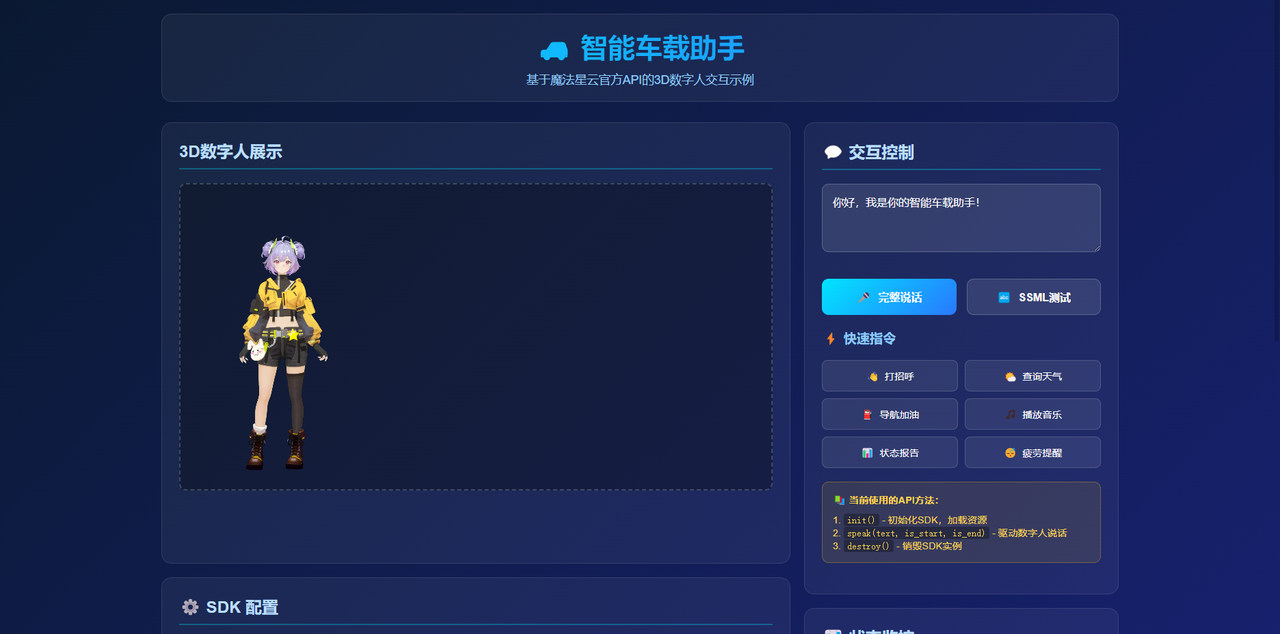
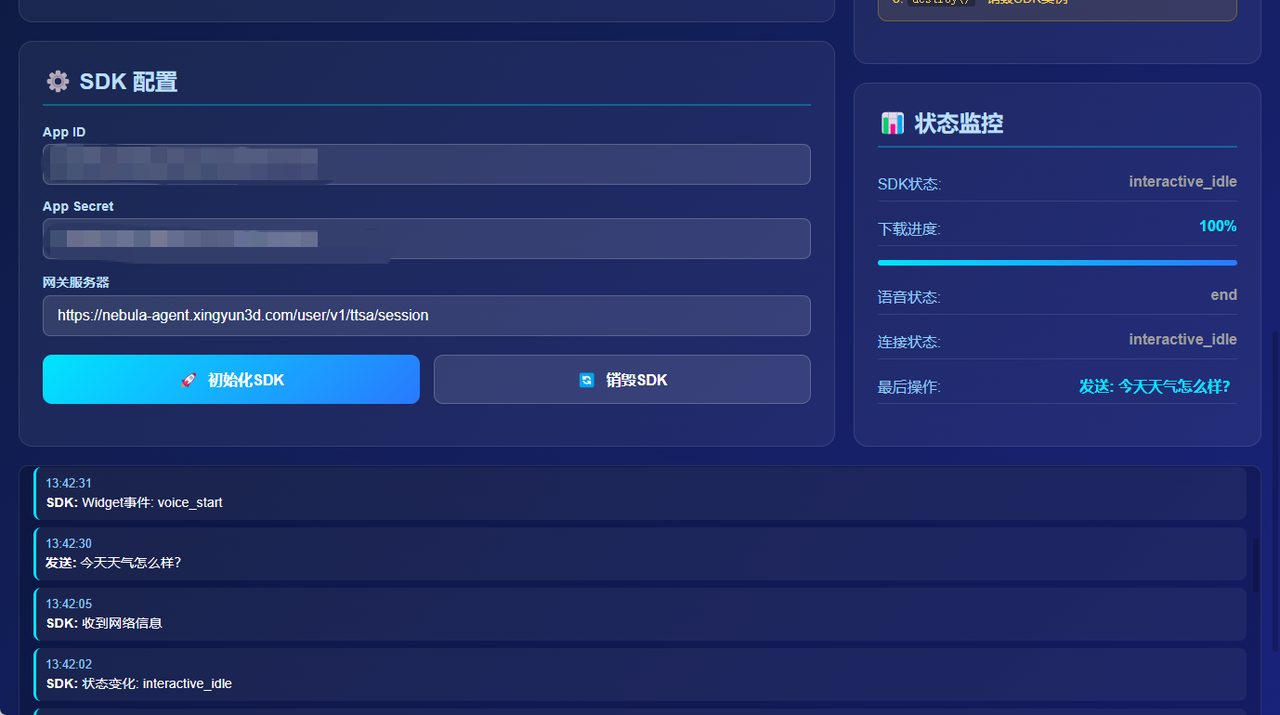
使用SSML增强说话效果
功能说明:
- 使用SSML(语音合成标记语言)增强说话效果
- 可以控制语速、停顿、音调等
- 需要根据魔法星云平台支持的SSML标签使用
// SSML示例
function speakWithSSML() {
const ssmlText = `<speak>
欢迎使用<break time="300ms"/>魔珐星云智能助手。
我能够为您提供<prosody rate="slow">清晰自然的</prosody>语音交互服务。
</speak>`;
liteSDK.speak(ssmlText, true, true);
}
SDK销毁与清理
功能说明:
- 释放SDK占用的资源
- 断开网络连接
- 清理内存,准备重新初始化
// 销毁SDK实例
async function destroySDK() {
try {
if (liteSDK) {
await liteSDK.destroy();
liteSDK = null;
isInitialized = false;
console.log('SDK已销毁');
}
} catch (error) {
console.error('销毁SDK失败:', error);
throw error;
}
}
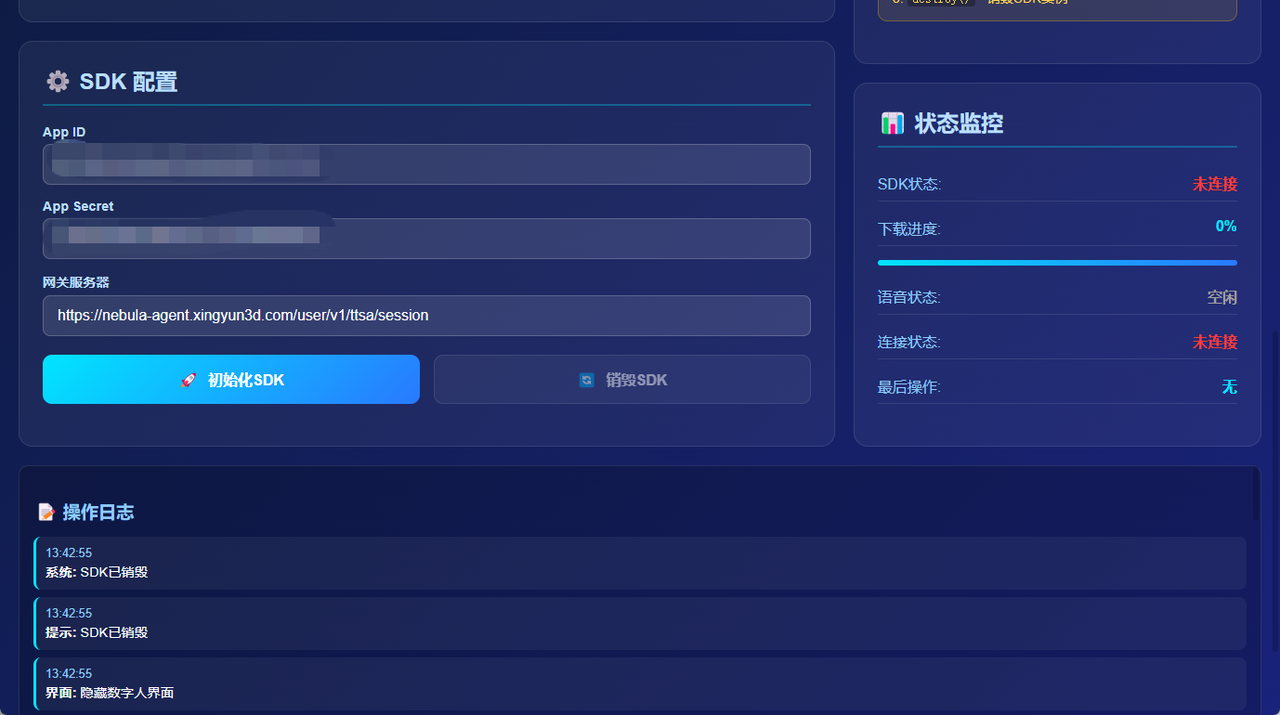
最后附上本演示系统的完整代码,想要尝试的小伙伴可以直接使用下面代码去体验魔珐星云的3D数字人。
<!DOCTYPE html>
<html lang="zh-CN">
<head>
<meta charset="UTF-8">
<meta name="viewport" content="width=device-width, initial-scale=1.0">
<title>魔珐星云SDK示例 – 智能车载助手</title>
<!– 引入魔珐星云官方SDK –>
<script src="https://media.xingyun3d.com/xingyun3d/general/litesdk/xmovAvatar@latest.js"></script>
<style>
* {
margin: 0;
padding: 0;
box-sizing: border-box;
font-family: 'Arial', 'Microsoft YaHei', sans-serif;
}
body {
background: linear-gradient(135deg, #0a1931 0%, #1a237e 100%);
color: #fff;
min-height: 100vh;
padding: 20px;
}
.container {
max-width: 1400px;
margin: 0 auto;
}
header {
text-align: center;
margin-bottom: 30px;
padding: 20px;
background: rgba(255, 255, 255, 0.05);
border-radius: 15px;
border: 1px solid rgba(255, 255, 255, 0.1);
}
h1 {
font-size: 2.5rem;
margin-bottom: 10px;
background: linear-gradient(90deg, #00e5ff, #2979ff);
-webkit-background-clip: text;
background-clip: text;
color: transparent;
}
.subtitle {
color: #90caf9;
font-size: 1.1rem;
}
.main-content {
display: grid;
grid-template-columns: 2fr 1fr;
gap: 20px;
}
.left-column {
display: flex;
flex-direction: column;
gap: 20px;
}
.sdk-section {
background: rgba(255, 255, 255, 0.05);
border-radius: 15px;
padding: 25px;
border: 1px solid rgba(255, 255, 255, 0.1);
flex: 1;
}
/* SDK配置区移动到上面 */
.config-section {
background: rgba(255, 255, 255, 0.05);
border-radius: 15px;
padding: 25px;
border: 1px solid rgba(255, 255, 255, 0.1);
margin-bottom: 0;
}
/* 交互控制区移到下面 */
.interaction-section {
background: rgba(255, 255, 255, 0.05);
border-radius: 15px;
padding: 25px;
border: 1px solid rgba(255, 255, 255, 0.1);
}
.right-column {
display: flex;
flex-direction: column;
gap: 20px;
}
.status-section {
background: rgba(255, 255, 255, 0.05);
border-radius: 15px;
padding: 25px;
border: 1px solid rgba(255, 255, 255, 0.1);
}
h2 {
font-size: 1.5rem;
margin-bottom: 20px;
color: #bbdefb;
border-bottom: 2px solid rgba(0, 229, 255, 0.3);
padding-bottom: 10px;
}
h3 {
font-size: 1.2rem;
margin: 20px 0 15px 0;
color: #90caf9;
}
/* SDK容器样式 */
.sdk-container {
background: rgba(0, 0, 0, 0.3);
border-radius: 10px;
height: 450px;
display: flex;
align-items: center;
justify-content: center;
margin: 15px 0;
border: 2px dashed rgba(255, 255, 255, 0.2);
overflow: hidden;
position: relative;
}
#sdk {
width: 100%;
height: 100%;
}
.placeholder {
text-align: center;
color: #90caf9;
transition: opacity 0.3s ease;
}
.placeholder.hidden {
display: none;
}
.placeholder-icon {
font-size: 4rem;
margin-bottom: 15px;
}
.avatar-active {
width: 100%;
height: 100%;
display: none;
}
.avatar-active.show {
display: block;
}
/* 配置样式 */
.config-group {
margin-bottom: 15px;
}
label {
display: block;
margin-bottom: 5px;
color: #bbdefb;
font-size: 0.9rem;
font-weight: bold;
}
input, select, textarea {
width: 100%;
padding: 12px 15px;
border-radius: 8px;
border: 1px solid rgba(255, 255, 255, 0.2);
background: rgba(255, 255, 255, 0.1);
color: white;
font-size: 1rem;
transition: all 0.3s ease;
}
input:focus, select:focus, textarea:focus {
outline: none;
border-color: #00e5ff;
box-shadow: 0 0 0 2px rgba(0, 229, 255, 0.2);
}
/* 按钮样式 */
.btn-group {
display: grid;
grid-template-columns: 1fr 1fr;
gap: 15px;
margin: 20px 0;
}
.btn {
padding: 15px;
border: none;
border-radius: 10px;
font-size: 1rem;
font-weight: bold;
cursor: pointer;
transition: all 0.3s ease;
display: flex;
align-items: center;
justify-content: center;
gap: 10px;
}
.btn-primary {
background: linear-gradient(135deg, #00e5ff, #2979ff);
color: white;
}
.btn-secondary {
background: rgba(255, 255, 255, 0.1);
color: white;
border: 1px solid rgba(255, 255, 255, 0.2);
}
.btn:hover:not(:disabled) {
transform: translateY(-2px);
box-shadow: 0 5px 15px rgba(0, 0, 0, 0.3);
}
.btn:active:not(:disabled) {
transform: translateY(0);
}
.btn:disabled {
opacity: 0.5;
cursor: not-allowed;
}
/* 交互控制样式 */
.input-group {
margin: 20px 0;
}
#message-input {
width: 100%;
padding: 15px;
border-radius: 10px;
border: 1px solid rgba(255, 255, 255, 0.2);
background: rgba(255, 255, 255, 0.1);
color: white;
font-size: 1rem;
resize: vertical;
min-height: 100px;
margin-bottom: 15px;
}
/* 快速指令 */
.quick-commands {
display: grid;
grid-template-columns: repeat(2, 1fr);
gap: 10px;
margin: 20px 0;
}
.quick-btn {
padding: 12px;
border-radius: 8px;
background: rgba(255, 255, 255, 0.08);
border: 1px solid rgba(255, 255, 255, 0.15);
color: white;
font-size: 0.9rem;
cursor: pointer;
transition: all 0.2s;
display: flex;
align-items: center;
justify-content: center;
gap: 8px;
}
.quick-btn:hover:not(:disabled) {
background: rgba(255, 255, 255, 0.12);
transform: translateY(-1px);
}
/* 状态面板样式 */
.status-panel {
margin: 20px 0;
}
.status-item {
display: flex;
justify-content: space-between;
margin: 10px 0;
padding: 8px 0;
border-bottom: 1px solid rgba(255, 255, 255, 0.1);
}
.status-label {
color: #90caf9;
}
.status-value {
color: #00e5ff;
font-weight: bold;
}
.progress-bar {
width: 100%;
height: 6px;
background: rgba(255, 255, 255, 0.1);
border-radius: 3px;
margin: 15px 0;
overflow: hidden;
}
.progress-fill {
height: 100%;
background: linear-gradient(90deg, #00e5ff, #2979ff);
width: 0%;
transition: width 0.3s ease;
}
/* 日志面板 */
.log-panel {
background: rgba(0, 0, 0, 0.2);
border-radius: 10px;
padding: 15px;
height: 300px;
overflow-y: auto;
margin-top: 20px;
border: 1px solid rgba(255, 255, 255, 0.1);
}
.log-entry {
padding: 10px;
margin-bottom: 8px;
background: rgba(255, 255, 255, 0.05);
border-radius: 8px;
border-left: 3px solid #00e5ff;
font-size: 0.9rem;
}
.log-time {
color: #90caf9;
font-size: 0.8rem;
margin-bottom: 3px;
}
/* 加载遮罩 */
.loading-overlay {
position: fixed;
top: 0;
left: 0;
right: 0;
bottom: 0;
background: rgba(0, 0, 0, 0.8);
display: none;
justify-content: center;
align-items: center;
z-index: 1000;
}
.loading-content {
text-align: center;
background: rgba(255, 255, 255, 0.1);
backdrop-filter: blur(10px);
padding: 40px;
border-radius: 15px;
border: 1px solid rgba(255, 255, 255, 0.2);
min-width: 300px;
}
.spinner {
border: 4px solid rgba(255, 255, 255, 0.1);
border-radius: 50%;
border-top: 4px solid #00e5ff;
width: 50px;
height: 50px;
animation: spin 1s linear infinite;
margin: 0 auto 20px auto;
}
@keyframes spin {
0% { transform: rotate(0deg); }
100% { transform: rotate(360deg); }
}
/* 信息提示 */
.info-box {
background: rgba(255, 193, 7, 0.1);
border: 1px solid rgba(255, 193, 7, 0.3);
padding: 15px;
border-radius: 10px;
margin: 20px 0;
font-size: 0.9rem;
color: #ffd54f;
}
.info-box h4 {
margin-bottom: 10px;
color: #ffd54f;
}
.info-box code {
background: rgba(0, 0, 0, 0.3);
padding: 2px 5px;
border-radius: 3px;
font-family: monospace;
}
footer {
text-align: center;
margin-top: 30px;
padding-top: 20px;
border-top: 1px solid rgba(255, 255, 255, 0.1);
color: #90caf9;
font-size: 0.9rem;
}
footer a {
color: #00e5ff;
text-decoration: none;
}
footer a:hover {
text-decoration: underline;
}
/* 响应式设计 */
@media (max-width: 1024px) {
.main-content {
grid-template-columns: 1fr;
}
.btn-group, .quick-commands {
grid-template-columns: 1fr;
}
}
</style>
</head>
<body>
<div class="container">
<header>
<h1>🚗 智能车载助手</h1>
<div class="subtitle">基于魔珐星云官方API的3D数字人交互示例</div>
</header>
<div class="main-content">
<!– 左侧:SDK展示和配置 –>
<div class="left-column">
<!– SDK展示区 –>
<div class="sdk-section">
<h2>3D数字人展示</h2>
<div class="sdk-container">
<div id="sdk">
<!– 等待初始化时的占位符 –>
<div class="placeholder" id="placeholder">
<div class="placeholder-icon">🤖</div>
<p>等待初始化数字人…</p>
<p><small>请先配置API信息并初始化</small></p>
</div>
<!– 数字人激活时的展示区域 –>
<div class="avatar-active" id="avatar-active">
<!– SDK将在这里渲染数字人 –>
</div>
</div>
</div>
</div>
<!– SDK配置区(现在在上面) –>
<div class="config-section">
<h2>⚙️ SDK 配置</h2>
<div class="config-group">
<label for="app-id">App ID</label>
<input type="text" id="app-id" placeholder="请输入您的App ID" value="demo_app_id">
</div>
<div class="config-group">
<label for="app-secret">App Secret</label>
<input type="text" id="app-secret" placeholder="请输入您的App Secret" value="demo_app_secret">
</div>
<div class="config-group">
<label for="gateway-server">网关服务器</label>
<input type="text" id="gateway-server"
value="https://nebula-agent.xingyun3d.com/user/v1/ttsa/session">
</div>
<div class="btn-group">
<button class="btn btn-primary" onclick="initSDK()" id="init-btn">
<span>🚀</span> 初始化SDK
</button>
<button class="btn btn-secondary" onclick="destroySDK()" id="destroy-btn" disabled>
<span>🔄</span> 销毁SDK
</button>
</div>
</div>
</div>
<!– 右侧:交互控制和状态监控 –>
<div class="right-column">
<!– 交互控制区(现在在上面) –>
<div class="interaction-section">
<h2>💬 交互控制</h2>
<div class="input-group">
<textarea id="message-input" placeholder="输入要发送的文本…">你好,我是你的智能车载助手!</textarea>
<div class="btn-group">
<button class="btn btn-primary" onclick="speakMessage(true, true)" id="speak-btn" disabled>
<span>🎤</span> 完整说话
</button>
<button class="btn btn-secondary" onclick="testSSML()" id="ssml-btn" disabled>
<span>🔤</span> SSML测试
</button>
</div>
</div>
<!– 快速指令 –>
<h3>⚡ 快速指令</h3>
<div class="quick-commands">
<button class="quick-btn" onclick="quickCommand('你好,介绍一下你自己')" disabled>
<span>👋</span> 打招呼
</button>
<button class="quick-btn" onclick="quickCommand('今天天气怎么样?')" disabled>
<span>🌤️</span> 查询天气
</button>
<button class="quick-btn" onclick="quickCommand('导航到最近的加油站')" disabled>
<span>⛽</span> 导航加油
</button>
<button class="quick-btn" onclick="quickCommand('播放一些轻松的音乐')" disabled>
<span>🎵</span> 播放音乐
</button>
<button class="quick-btn" onclick="quickCommand('报告车辆状态')" disabled>
<span>📊</span> 状态报告
</button>
<button class="quick-btn" onclick="quickCommand('我感觉有点累了')" disabled>
<span>😴</span> 疲劳提醒
</button>
</div>
<!– API信息 –>
<div class="info-box">
<h4>📚 当前使用的API方法:</h4>
<p>1. <code>init()</code> – 初始化SDK,加载资源</p>
<p>2. <code>speak(text, is_start, is_end)</code> – 驱动数字人说话</p>
<p>3. <code>destroy()</code> – 销毁SDK实例</p>
</div>
</div>
<!– 状态监控区 –>
<div class="status-section">
<h2>📊 状态监控</h2>
<div class="status-panel">
<div class="status-item">
<span class="status-label">SDK状态:</span>
<span class="status-value" id="sdk-status">未初始化</span>
</div>
<div class="status-item">
<span class="status-label">下载进度:</span>
<span class="status-value" id="download-status">0%</span>
</div>
<div class="progress-bar">
<div class="progress-fill" id="loading-progress"></div>
</div>
<div class="status-item">
<span class="status-label">语音状态:</span>
<span class="status-value" id="voice-status">空闲</span>
</div>
<div class="status-item">
<span class="status-label">连接状态:</span>
<span class="status-value" id="connection-status">未连接</span>
</div>
<div class="status-item">
<span class="status-label">最后操作:</span>
<span class="status-value" id="last-action">无</span>
</div>
</div>
</div>
</div>
</div>
<!– 日志面板 –>
<div class="log-panel">
<h3>📝 操作日志</h3>
<div id="log-container">
<div class="log-entry">
<div class="log-time" id="current-time">–:–:–</div>
<div class="log-content">系统就绪,等待初始化…</div>
</div>
</div>
</div>
<footer>
<p>Powered by 魔珐星云平台 | 基于官方API文档实现</p>
<p style="margin-top: 10px;">
<a href="https://xingyun3d.com?utm_campaign=daily&utm_source=jixinghuiKoc14" target="_blank">
🔗 访问魔珐星云平台获取App ID和App Secret
</a>
</p>
</footer>
</div>
<!– 加载遮罩 –>
<div class="loading-overlay" id="loading-overlay">
<div class="loading-content">
<div class="spinner"></div>
<div id="loading-text">正在初始化SDK…</div>
<div class="progress-bar">
<div class="progress-fill" id="loading-progress-inner"></div>
</div>
<div id="progress-text">0%</div>
</div>
</div>
<script>
// 全局变量
let liteSDK = null;
let isInitialized = false;
let isSpeaking = false;
// 添加日志 – 安全版本
function addLog(type, message) {
const now = new Date();
const timeStr = now.toLocaleTimeString();
const logContainer = document.getElementById('log-container');
if (!logContainer) {
console.log(`[${type}] ${message}`);
return;
}
const logEntry = document.createElement('div');
logEntry.className = 'log-entry';
logEntry.innerHTML = `
<div class="log-time">${timeStr}</div>
<div class="log-content"><strong>${type}:</strong> ${message}</div>
`;
logContainer.prepend(logEntry);
// 更新时间显示
const currentTimeElement = document.getElementById('current-time');
if (currentTimeElement) {
currentTimeElement.textContent = timeStr;
}
// 保持日志数量
if (logContainer.children.length > 20) {
logContainer.removeChild(logContainer.lastChild);
}
console.log(`[${type}] ${message}`);
}
// 显示提示
function showAlert(message, type = 'info') {
addLog('提示', message);
if (document.readyState === 'complete') {
const alertDiv = document.createElement('div');
alertDiv.style.cssText = `
position: fixed;
top: 20px;
right: 20px;
padding: 12px 20px;
background: ${type === 'error' ? '#f44336' : type === 'success' ? '#4caf50' : '#2196f3'};
color: white;
border-radius: 8px;
box-shadow: 0 4px 12px rgba(0,0,0,0.15);
z-index: 1000;
animation: slideIn 0.3s ease;
`;
alertDiv.textContent = message;
document.body.appendChild(alertDiv);
setTimeout(() => {
if (alertDiv.parentNode) {
alertDiv.parentNode.removeChild(alertDiv);
}
}, 3000);
}
}
// 显示/隐藏加载遮罩
function showLoading(message) {
const loadingOverlay = document.getElementById('loading-overlay');
const loadingText = document.getElementById('loading-text');
if (loadingText) loadingText.textContent = message;
if (loadingOverlay) loadingOverlay.style.display = 'flex';
}
function hideLoading() {
const loadingOverlay = document.getElementById('loading-overlay');
if (loadingOverlay) loadingOverlay.style.display = 'none';
}
// 更新进度
function updateProgress(progress) {
const progressFill = document.getElementById('loading-progress');
const progressText = document.getElementById('progress-text');
const downloadStatus = document.getElementById('download-status');
const loadingProgressInner = document.getElementById('loading-progress-inner');
if (progressFill) progressFill.style.width = `${progress}%`;
if (loadingProgressInner) loadingProgressInner.style.width = `${progress}%`;
if (progressText) progressText.textContent = `${progress}%`;
if (downloadStatus) downloadStatus.textContent = `${progress}%`;
if (progress >= 100) {
setTimeout(() => {
hideLoading();
}, 500);
}
}
// 启用/禁用控制按钮
function enableControls(enabled) {
const controls = ['destroy-btn', 'speak-btn', 'ssml-btn'];
controls.forEach(id => {
const btn = document.getElementById(id);
if (btn) btn.disabled = !enabled;
});
const quickBtns = document.querySelectorAll('.quick-btn');
quickBtns.forEach(btn => {
if (btn) btn.disabled = !enabled;
});
}
// 更新SDK状态显示
function updateSDKStatus(state) {
const sdkStatus = document.getElementById('sdk-status');
if (!sdkStatus) return;
const statusMap = {
'initializing': { text: '初始化中', color: '#ff9800' },
'connected': { text: '已连接', color: '#4caf50' },
'disconnected': { text: '未连接', color: '#ff3b30' },
'error': { text: '错误', color: '#f44336' }
};
const status = statusMap[state] || { text: state, color: '#9e9e9e' };
sdkStatus.textContent = status.text;
sdkStatus.style.color = status.color;
}
// 更新连接状态
function updateConnectionStatus(status) {
const connectionStatus = document.getElementById('connection-status');
if (!connectionStatus) return;
const statusMap = {
'connected': { text: '已连接', color: '#4caf50' },
'disconnected': { text: '未连接', color: '#ff3b30' },
'error': { text: '连接错误', color: '#f44336' }
};
const statusInfo = statusMap[status] || { text: status, color: '#9e9e9e' };
connectionStatus.textContent = statusInfo.text;
connectionStatus.style.color = statusInfo.color;
}
// 更新语音状态
function updateVoiceStatus(status) {
const voiceStatus = document.getElementById('voice-status');
if (!voiceStatus) return;
const statusMap = {
'speaking': { text: '说话中', color: '#4caf50' },
'idle': { text: '空闲', color: '#9e9e9e' },
'error': { text: '错误', color: '#f44336' }
};
const voiceStatusInfo = statusMap[status] || { text: status, color: '#9e9e9e' };
voiceStatus.textContent = voiceStatusInfo.text;
voiceStatus.style.color = voiceStatusInfo.color;
}
// 隐藏等待占位符,显示数字人
function showAvatar() {
const placeholder = document.getElementById('placeholder');
const avatarActive = document.getElementById('avatar-active');
if (placeholder) placeholder.classList.add('hidden');
if (avatarActive) avatarActive.classList.add('show');
addLog('界面', '显示数字人界面');
}
// 显示等待占位符,隐藏数字人
function hideAvatar() {
const placeholder = document.getElementById('placeholder');
const avatarActive = document.getElementById('avatar-active');
if (placeholder) placeholder.classList.remove('hidden');
if (avatarActive) avatarActive.classList.remove('show');
addLog('界面', '隐藏数字人界面');
}
// ============ 核心API函数 ============
// 1. 初始化SDK
async function initSDK() {
const appId = document.getElementById('app-id');
const appSecret = document.getElementById('app-secret');
const gatewayServer = document.getElementById('gateway-server');
if (!appId || !appSecret || !gatewayServer) {
showAlert('请填写完整的配置信息', 'error');
return;
}
const appIdValue = appId.value.trim();
const appSecretValue = appSecret.value.trim();
const gatewayServerValue = gatewayServer.value.trim();
if (!appIdValue || !appSecretValue) {
showAlert('请输入App ID和App Secret', 'error');
return;
}
showLoading('正在初始化SDK…');
addLog('系统', '开始初始化SDK');
try {
// 销毁旧的SDK实例
if (liteSDK) {
try {
await destroySDK();
} catch (e) {
console.log('清理旧SDK实例时出错:', e);
}
}
// 创建SDK实例
liteSDK = new XmovAvatar({
containerId: '#avatar-active', // 注意:这里指向avatar-active容器
appId: appIdValue,
appSecret: appSecretValue,
gatewayServer: gatewayServerValue,
// 事件回调
onWidgetEvent(data) {
console.log('Widget事件:', data);
addLog('SDK', `Widget事件: ${data.type || '未知类型'}`);
},
onNetworkInfo(networkInfo) {
console.log('网络信息:', networkInfo);
addLog('SDK', '收到网络信息');
},
onMessage(message) {
console.log('SDK消息:', message);
if (message && typeof message === 'object') {
addLog('SDK', `收到消息: ${JSON.stringify(message).substring(0, 100)}…`);
} else {
addLog('SDK', `收到消息: ${message}`);
}
},
onStateChange(state) {
console.log('SDK状态变化:', state);
updateSDKStatus(state);
updateConnectionStatus(state);
addLog('SDK', `状态变化: ${state}`);
if (state === 'connected') {
onSDKConnected();
} else if (state === 'disconnected') {
onSDKDisconnected();
}
},
onStatusChange(status) {
console.log('SDK状态变更:', status);
},
onStateRenderChange(state, duration) {
console.log('SDK渲染状态变化:', state, duration);
},
onVoiceStateChange(status) {
console.log('语音状态变化:', status);
updateVoiceStatus(status);
},
enableLogger: true
});
// 调用官方init方法
await liteSDK.init({
onDownloadProgress: (progress) => {
console.log('下载进度:', progress);
updateProgress(progress);
if (progress % 25 === 0) {
addLog('进度', `资源下载进度: ${progress}%`);
}
}
});
isInitialized = true;
enableControls(true);
updateSDKStatus('connected');
updateConnectionStatus('connected');
// 显示数字人,隐藏占位符
showAvatar();
showAlert('SDK初始化成功!', 'success');
addLog('系统', 'SDK初始化成功');
// 发送欢迎消息
setTimeout(() => {
speakMessage(true, true);
}, 1000);
} catch (error) {
console.error('初始化失败:', error);
showAlert(`初始化失败: ${error.message}`, 'error');
addLog('错误', `初始化失败: ${error.message}`);
isInitialized = false;
updateSDKStatus('error');
updateConnectionStatus('error');
} finally {
hideLoading();
}
}
// SDK连接成功回调
function onSDKConnected() {
addLog('SDK', '连接成功');
updateConnectionStatus('connected');
}
// SDK断开连接回调
function onSDKDisconnected() {
addLog('SDK', '连接断开');
updateConnectionStatus('disconnected');
}
// 2. 驱动数字人说话
function speakMessage(is_start = true, is_end = true) {
if (!liteSDK || !isInitialized) {
showAlert('请先初始化SDK', 'error');
return;
}
if (isSpeaking) {
showAlert('数字人正在说话,请稍候…', 'warning');
return;
}
const messageInput = document.getElementById('message-input');
if (!messageInput) {
showAlert('找不到消息输入框', 'error');
return;
}
const message = messageInput.value.trim();
if (!message) {
showAlert('请输入要发送的消息', 'warning');
return;
}
try {
isSpeaking = true;
updateVoiceStatus('speaking');
// 调用官方speak方法
liteSDK.speak(message, is_start, is_end);
// 更新最后操作显示
const lastAction = document.getElementById('last-action');
if (lastAction) {
const shortMessage = message.length > 20 ? message.substring(0, 20) + '…' : message;
lastAction.textContent = `发送: ${shortMessage}`;
}
addLog('发送', message);
// 2秒后重置说话状态
setTimeout(() => {
isSpeaking = false;
updateVoiceStatus('idle');
}, 2000);
} catch (error) {
console.error('发送失败:', error);
isSpeaking = false;
updateVoiceStatus('error');
showAlert(`发送失败: ${error.message}`, 'error');
addLog('错误', `发送失败: ${error.message}`);
}
}
// 3. 销毁SDK实例
async function destroySDK() {
if (!liteSDK) {
showAlert('SDK未初始化', 'warning');
return;
}
try {
// 调用官方destroy方法
await liteSDK.destroy();
liteSDK = null;
isInitialized = false;
isSpeaking = false;
enableControls(false);
updateSDKStatus('disconnected');
updateConnectionStatus('disconnected');
updateVoiceStatus('idle');
// 更新下载状态
const downloadStatus = document.getElementById('download-status');
if (downloadStatus) {
downloadStatus.textContent = '0%';
}
// 更新最后操作
const lastAction = document.getElementById('last-action');
if (lastAction) {
lastAction.textContent = '无';
}
// 隐藏数字人,显示占位符
hideAvatar();
showAlert('SDK已销毁', 'info');
addLog('系统', 'SDK已销毁');
} catch (error) {
console.error('销毁失败:', error);
showAlert(`销毁失败: ${error.message}`, 'error');
addLog('错误', `销毁失败: ${error.message}`);
}
}
// ============ 辅助函数 ============
function quickCommand(command) {
const messageInput = document.getElementById('message-input');
if (messageInput) {
messageInput.value = command;
speakMessage(true, true);
}
}
function testSSML() {
// SSML示例
const ssmlText = `<speak>
欢迎使用<break time="300ms"/>魔珐星云智能助手。
我能够为您提供<prosody rate="slow">清晰自然的</prosody>语音交互服务。
</speak>`;
const messageInput = document.getElementById('message-input');
if (messageInput) {
messageInput.value = ssmlText;
showAlert('已加载SSML示例,点击"完整说话"按钮测试', 'info');
}
}
// 页面初始化
function initPage() {
// 添加CSS动画
if (!document.getElementById('animations')) {
const style = document.createElement('style');
style.id = 'animations';
style.textContent = `
@keyframes slideIn {
from { transform: translateX(100%); opacity: 0; }
to { transform: translateX(0); opacity: 1; }
}
`;
document.head.appendChild(style);
}
addLog('系统', '页面加载完成');
addLog('提示', '请使用真实的App ID和App Secret进行测试');
}
// 页面加载完成后初始化
window.addEventListener('DOMContentLoaded', initPage);
</script>
</body>
</html>
三、产品价值:打破瓶颈的技术与场景落地
6 大核心特点:兼顾性能与成本
魔珐星云的核心优势可概括为 6 点:
- 高质量:3D 数字人动作精度达毫米级,表情还原度超 95%;
- 低延时:支持实时打断与指令切换,响应延迟<200ms;
- 高并发:单节点可同时承载 1000 + 数字人实例;
- 低成本:相比传统方案,开发与部署成本降低 60%;
- 多终端:适配手机、AR 头显、人形机器人等 10 + 终端;
- 信创支持:兼容国产芯片与操作系统,满足企业合规需求。
打破 3D 数字人的 “不可能三角”
传统 3D 数字人难以同时实现 “高质量、低成本、低延时”,而魔珐星云通过文生 3D 多模态动作大模型 + AI 端边协同解算,实现了三者的平衡:
- 大模型生成高保真动作序列,端边设备分担解算压力,既保证了质量,又降低了云端成本与延时。
四、结语:AI陪伴
技术的终极意义,是让每个人都能享受创新的红利。无需复杂技术储备,从调用 SDK 生成第一个数字人动作开始,就能让 “有表情、有动作、懂情绪” 的智能陪伴,真正走进你的生活,让每一次交互都充满 “在场感” 的温暖。
最后,以一个车载3D数字人的使用场景结尾吧。
深夜高速,驾驶者略显疲惫,车载数字人感知到状态变化,主动调整车内灯光,用温和的声音说:“检测到您已连续驾驶3小时,前方2公里有服务区,建议休息片刻。想听首轻音乐放松一下吗?”同时呈现出一个关切的眼神和指引手势——这种无缝融合场景感知与情感交互的能力,正是魔法星云赋予开发者的创新利器。