问:当服务器资源有限,前端项目高并发优化策略 🤔

当服务器资源有限时,大量用户同时访问会导致:
| 🐌 加载缓慢 | 页面白屏时间长 | FCP > 3秒 | 资源请求排队 |
| 💥 服务器崩溃 | 503/502错误 | 可用性 < 99% | 并发连接数超限 |
| 📱 用户流失 | 跳出率飙升 | 跳出率 > 70% | 用户体验差 |
| 💰 业务损失 | 转化率下降 | 转化率 < 2% | 无法完成操作 |
💡 前端优化策略
1. 📦 资源优化 – 减少服务器压力
🎯 代码分割与懒加载:
/**
* Vue Router 路由懒加载
* 减少首屏资源大小,降低服务器并发压力
*/
// ❌ 不推荐:一次性加载所有组件
import Home from '@/views/Home.vue'
import About from '@/views/About.vue'
import Contact from '@/views/Contact.vue'
// ✅ 推荐:按需懒加载
const routes = [
{
path: '/',
name: 'Home',
component: () => import(/* webpackChunkName: "home" */ '@/views/Home.vue')
},
{
path: '/about',
name: 'About',
component: () => import(/* webpackChunkName: "about" */ '@/views/About.vue')
},
{
path: '/contact',
name: 'Contact',
component: () => import(/* webpackChunkName: "contact" */ '@/views/Contact.vue')
}
]
// 组件级懒加载
export default {
components: {
// 异步组件,只在需要时加载
AsyncComponent: () => import('@/components/HeavyComponent.vue')
}
}
🗜️ 资源压缩与优化:
// vue.config.js – 生产环境优化
module.exports = {
configureWebpack: config => {
if (process.env.NODE_ENV === 'production') {
// Gzip压缩
config.plugins.push(
new CompressionPlugin({
algorithm: 'gzip',
test: /\\.(js|css|html|svg)$/,
threshold: 8192,
minRatio: 0.8
})
)
// 代码分割优化
config.optimization = {
splitChunks: {
chunks: 'all',
cacheGroups: {
// 第三方库单独打包
vendor: {
name: 'chunk-vendors',
test: /[\\\\/]node_modules[\\\\/]/,
priority: 10,
chunks: 'initial'
},
// 公共组件单独打包
common: {
name: 'chunk-common',
minChunks: 2,
priority: 5,
chunks: 'initial',
reuseExistingChunk: true
}
}
}
}
}
}
}
2. 🚀 缓存策略 – 最大化缓存利用
📋 多层缓存架构:
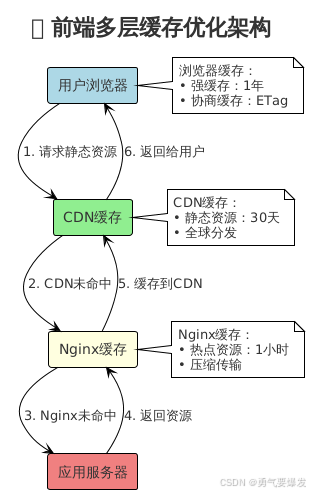
⚙️ 缓存配置实现:
/**
* 1. 浏览器缓存 – Service Worker 配置
* 📁 文件位置:在项目根目录创建 public/sw.js 文件
* 🎯 作用:拦截网络请求,提供离线缓存功能
*/
// 缓存版本号,更新时修改此版本号可清除旧缓存
const CACHE_NAME = 'app-v1.0.0'
// 需要缓存的资源列表(关键资源优先缓存)
const urlsToCache = [
'/', // 首页HTML
'/static/css/main.css', // 主要样式文件
'/static/js/main.js', // 主要脚本文件
'/static/images/logo.png' // 重要图片资源
]
/**
* Service Worker 安装事件
* 在此阶段预缓存关键资源
*/
self.addEventListener('install', event => {
console.log('Service Worker 正在安装…')
event.waitUntil(
// 打开指定名称的缓存存储
caches.open(CACHE_NAME)
.then(cache => {
console.log('开始缓存关键资源')
// 将指定的URL列表添加到缓存中
return cache.addAll(urlsToCache)
})
.then(() => {
console.log('关键资源缓存完成')
})
)
})
/**
* Service Worker 网络请求拦截事件
* 实现缓存优先的请求策略
*/
self.addEventListener('fetch', event => {
event.respondWith(
// 首先检查缓存中是否有匹配的资源
caches.match(event.request)
.then(response => {
// 缓存命中,直接返回缓存的资源
if (response) {
console.log('从缓存返回:', event.request.url)
return response
}
// 缓存未命中,发起网络请求获取资源
console.log('从网络获取:', event.request.url)
return fetch(event.request)
.then(response => {
// 可选:将新获取的资源也加入缓存
if (response.status === 200) {
const responseClone = response.clone()
caches.open(CACHE_NAME)
.then(cache => {
cache.put(event.request, responseClone)
})
}
return response
})
})
.catch(() => {
// 网络请求失败时的降级处理
console.log('网络请求失败,返回离线页面')
return caches.match('/offline.html')
})
)
})
/**
* 在 main.js 中注册Service Worker
* 📝 将以下代码添加到项目的 src/main.js 文件中
*/
if ('serviceWorker' in navigator) {
// 页面加载完成后注册Service Worker
window.addEventListener('load', () => {
navigator.serviceWorker.register('/sw.js')
.then(registration => {
console.log('Service Worker 注册成功:', registration.scope)
})
.catch(error => {
console.log('Service Worker 注册失败:', error)
})
})
}
// 2. HTTP缓存策略
// nginx.conf
server {
# 静态资源长期缓存
location ~* \\.(js|css|png|jpg|jpeg|gif|ico|svg|woff|woff2)$ {
expires 1y;
add_header Cache–Control "public, immutable";
add_header Vary "Accept-Encoding";
# 启用Gzip压缩
gzip on;
gzip_vary on;
gzip_min_length 1024;
gzip_types text/css application/javascript image/svg+xml;
}
# HTML文件协商缓存
location ~* \\.html$ {
add_header Cache–Control "no-cache";
etag on;
}
}
3. 🌐 CDN与边缘计算 – 分散服务器压力
📊 CDN优化配置:
| JS/CSS | 强缓存 | 30天 | Gzip + Brotli | 减少90%请求 |
| 图片 | 强缓存 | 7天 | WebP转换 | 减少60%带宽 |
| 字体 | 强缓存 | 1年 | Woff2压缩 | 减少80%大小 |
| API数据 | 协商缓存 | 5分钟 | JSON压缩 | 减少70%请求 |
// CDN配置示例
const cdnConfig = {
// 静态资源CDN
staticCDN: 'https://static.example.com',
// 图片CDN(支持实时处理)
imageCDN: 'https://img.example.com',
// API CDN(边缘计算)
apiCDN: 'https://api.example.com'
}
// Webpack配置CDN
module.exports = {
output: {
publicPath: process.env.NODE_ENV === 'production'
? 'https://static.example.com/'
: '/'
},
externals: {
// 使用CDN加载大型库
'vue': 'Vue',
'vue-router': 'VueRouter',
'axios': 'axios'
}
}
4. ⚡ 性能监控与自动优化 – 实时调整策略
📈 性能监控实现:
/**
* 前端性能监控
* 📁 配置位置:在 src/utils/performance-monitor.js 创建文件
* 📝 使用方式:在 main.js 中导入并启动监控
* 🎯 作用:实时收集性能数据,自动调整优化策略
*/
class PerformanceMonitor {
constructor() {
this.metrics = {}
this.init()
}
init() {
// 监控页面加载性能
this.monitorPageLoad()
// 监控资源加载
this.monitorResourceLoad()
// 监控用户交互
this.monitorUserInteraction()
}
monitorPageLoad() {
window.addEventListener('load', () => {
const navigation = performance.getEntriesByType('navigation')[0]
this.metrics = {
// 首屏时间
FCP: this.getFCP(),
// 最大内容绘制
LCP: this.getLCP(),
// 累积布局偏移
CLS: this.getCLS(),
// 首次输入延迟
FID: this.getFID(),
// DNS解析时间
dnsTime: navigation.domainLookupEnd – navigation.domainLookupStart,
// 服务器响应时间
serverTime: navigation.responseEnd – navigation.requestStart,
// 页面加载总时间
loadTime: navigation.loadEventEnd – navigation.navigationStart
}
// 发送性能数据
this.sendMetrics()
// 根据性能数据自动优化
this.autoOptimize()
})
}
autoOptimize() {
// 如果FCP > 3秒,启用预加载
if (this.metrics.FCP > 3000) {
this.enablePreload()
}
// 如果服务器响应慢,启用更激进的缓存
if (this.metrics.serverTime > 1000) {
this.enableAggressiveCache()
}
// 如果LCP > 2.5秒,优化关键资源
if (this.metrics.LCP > 2500) {
this.optimizeCriticalResources()
}
}
enablePreload() {
// 动态添加关键资源预加载
const criticalResources = [
'/static/css/critical.css',
'/static/js/critical.js'
]
criticalResources.forEach(url => {
const link = document.createElement('link')
link.rel = 'preload'
link.href = url
link.as = url.endsWith('.css') ? 'style' : 'script'
document.head.appendChild(link)
})
}
}
// 导出性能监控类
export default PerformanceMonitor
// 📝 在 main.js 中使用:
// import PerformanceMonitor from '@/utils/performance-monitor.js'
// new PerformanceMonitor()
5. 🔄 请求优化 – 减少服务器负载
📡 请求合并与批处理:
/**
* API请求优化
* 合并请求、批处理、智能重试
*/
class RequestOptimizer {
constructor() {
this.requestQueue = []
this.batchTimer = null
this.retryConfig = {
maxRetries: 3,
backoffMultiplier: 2,
initialDelay: 1000
}
}
// 批量请求处理
batchRequest(requests) {
return new Promise((resolve, reject) => {
this.requestQueue.push(…requests)
// 防抖处理,100ms内的请求合并
clearTimeout(this.batchTimer)
this.batchTimer = setTimeout(() => {
this.processBatch()
}, 100)
})
}
async processBatch() {
if (this.requestQueue.length === 0) return
const batch = this.requestQueue.splice(0, 10) // 每批最多10个请求
try {
// 使用GraphQL或自定义批处理接口
const response = await fetch('/api/batch', {
method: 'POST',
headers: { 'Content-Type': 'application/json' },
body: JSON.stringify({ requests: batch })
})
const results = await response.json()
this.handleBatchResults(results)
} catch (error) {
this.handleBatchError(batch, error)
}
}
// 智能重试机制
async retryRequest(request, attempt = 1) {
try {
return await fetch(request.url, request.options)
} catch (error) {
if (attempt < this.retryConfig.maxRetries) {
const delay = this.retryConfig.initialDelay *
Math.pow(this.retryConfig.backoffMultiplier, attempt – 1)
await this.sleep(delay)
return this.retryRequest(request, attempt + 1)
}
throw error
}
}
sleep(ms) {
return new Promise(resolve => setTimeout(resolve, ms))
}
}
// 使用示例
const optimizer = new RequestOptimizer()
// 合并多个API请求
optimizer.batchRequest([
{ url: '/api/user/profile', method: 'GET' },
{ url: '/api/user/settings', method: 'GET' },
{ url: '/api/notifications', method: 'GET' }
])
📊 优化效果对比
| 代码分割 | 首屏5MB | 首屏800KB | 84% ⬇️ | 减少60%并发请求 |
| CDN缓存 | 响应时间2s | 响应时间200ms | 90% ⬇️ | 减少80%服务器请求 |
| 资源压缩 | 传输10MB | 传输3MB | 70% ⬇️ | 减少70%带宽占用 |
| 请求合并 | 20个请求 | 2个请求 | 90% ⬇️ | 减少90%连接数 |
| 智能缓存 | 缓存命中30% | 缓存命中85% | 183% ⬆️ | 减少55%数据库查询 |
🎯 实施优先级建议
| 🔴 极高 | CDN + 缓存策略 | 减少80%服务器压力 | ⭐⭐ 简单 | 💰 低 |
| 🟡 高 | 代码分割 + 懒加载 | 减少60%首屏请求 | ⭐⭐⭐ 中等 | 💰💰 中 |
| 🟢 中 | 资源压缩 + 优化 | 减少70%传输量 | ⭐⭐ 简单 | 💰 低 |
| 🔵 低 | 性能监控 + 自动优化 | 持续性能提升 | ⭐⭐⭐⭐ 复杂 | 💰💰💰 高 |