一、 部署需要分「前端」「后端」「数据库」三个部分
优先选低成本 + 易操作的组合:
- 前端:免费静态托管平台(Netlify/Vercel,无需服务器)
- 后端:云服务器(学生机,每月 9 元起)
- 数据库:云服务器内置 MySQL(或用免费云数据库)
下文的部署采用的是全服务器部署方式,即前后端都部署到云服务器上
二、第一步:部署前端(Vue 项目,免费 + 5 分钟完成)
在 Vue 项目根目录执行命令,生成静态文件目录dist:
npm run build
(如果是全服务器部署,此步骤可以跳过)
把前端代码推到 GitHub/Gitee 仓库(已有仓库可跳过);
打开Netlify 官网,用 GitHub/Gitee 账号登录;
点击「Add new site」→「Import an existing project」,选择你的前端仓库;
配置构建参数(Netlify 会自动识别 Vue 项目,默认即可):
构建命令:npm run build
发布目录:dist
点击「Deploy site」,等待 2 分钟,Netlify 会生成一个免费域名(如your-site.netlify.app),前端部署完成。
三、第二步:部署后端(Java/SpringBoot,学生机低成本)
推荐腾讯云轻量应用服务器(学生机):
价格:2 核 2G/1M 带宽,每月 9 元(需学生认证);
系统:选CentOS 7.x(Linux 系统,稳定常用,宝塔面板部署)。
登录腾讯云服务器控制台,通过「WebShell」登录服务器;
安装宝塔面板(可视化管理服务器):
wget -O install.sh http://download.bt.cn/install/install_6.0.sh && bash install.sh
这个命令只需要输入一次,记住给的账号和密码,下次再次登录,直接使用外网地址就行,重复运行会导致内存挤压,程序崩溃
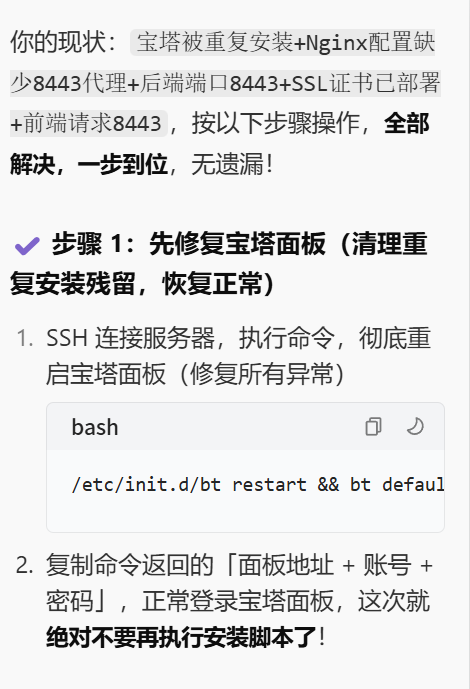
安装完成后,记录宝塔的登录地址(如http://服务器IP:8888)、账号密码;
登录宝塔面板,一键安装「LNMP 套件」(包含 Nginx/MySQL/Node.js)。
⚠ 如果忘记宝塔界面登录密码,重置方法:
cmd + R打开终端面板,输入 ssr 用户名@主机服务器ip指定 SSR 客户端连接代理服务器
接着输入下面的代码
cd /www/server/panel && btpython tools.py panel 你的重置密码
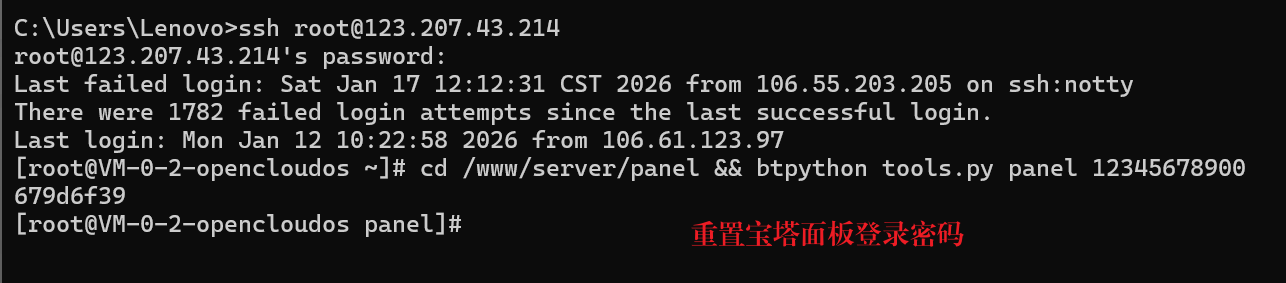
当看见命令行返回了你宝塔账户的用户名,就证明你成功地重置了密码。
完成以上操作就可以重新登录宝塔面板啦!
四、第三步:部署数据库(MySQL,服务器内置)
宝塔面板→「软件商店」→安装MySQL 8.0;
点击「设置」→「数据库」→「添加数据库」:
数据库名:quiz_db
用户名 / 密码:自定义(如quiz_user/123456);
导入本地数据库脚本:
本地导出 SQL 文件,在宝塔「数据库」→「导入」上传 SQL 文件。
如果出现报错信息:mysqldump: [ERROR] unknown variable ‘collation=utf8mb4_general_ci’.
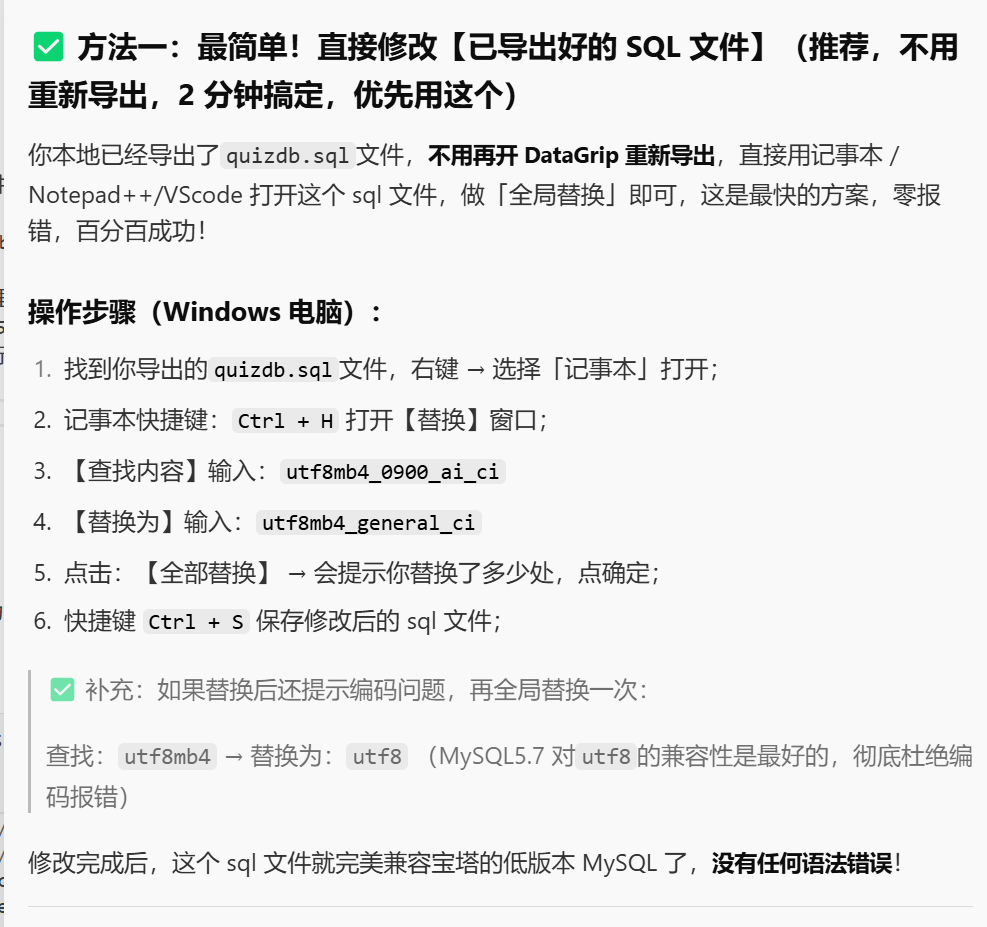
✅ 本地 DataGrip 连接的是 MySQL 8.0 版本,导出的 SQL 里自带了高版本专属的排序规则 utf8mb4_0900_ai_ci;✅ 服务器宝塔的 MySQL 版本是 5.7/5.6 版本,不认识这个高版本规则,直接拒绝导入,同时连带报表不存在(因为建表语句第一步就执行失败了)。
五、第四步:连接前后端 + 配置域名
修改 SpringBoot 项目的application.yml,将数据库连接改为服务器的 MySQL:
spring:
datasource:
url: jdbc:mysql://服务器IP:3306/quiz_db?useSSL=false&serverTimezone=Asia/Shanghai
username: quiz_user
password: 123456
打包 jar 包,上传到服务器并启动后端服务。
部署后端代码具体步骤:
本地打包 SpringBoot 项目为jar包: IDEA 中执行mvn package,生成target/xxx.jar;
上传jar 包到服务器: 宝塔面板→「文件」→新建目录(如/www/backend),上传 jar 包;
启动后端服务:
- 安装「PM2
管理器」、「Java项目项目管理器」(宝塔软件商店); - 点击左侧导航栏「网站」→「Java项目」: 项目名称:自定义(如quiz-backend)
- 启动文件:选择上传的 jar 包 启动命令:java -jar xxx.jar –server.port=8080(指定端口);
- 完成创建后项目会自动启动,后端服务在服务器8080端口运行。
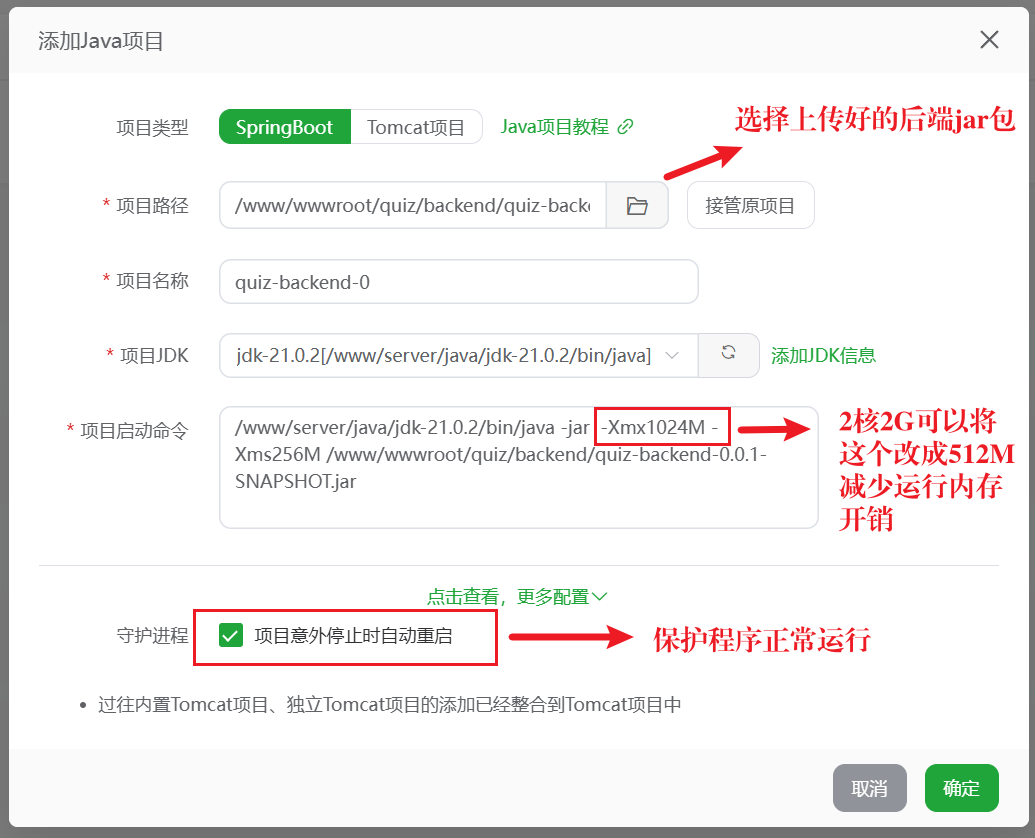
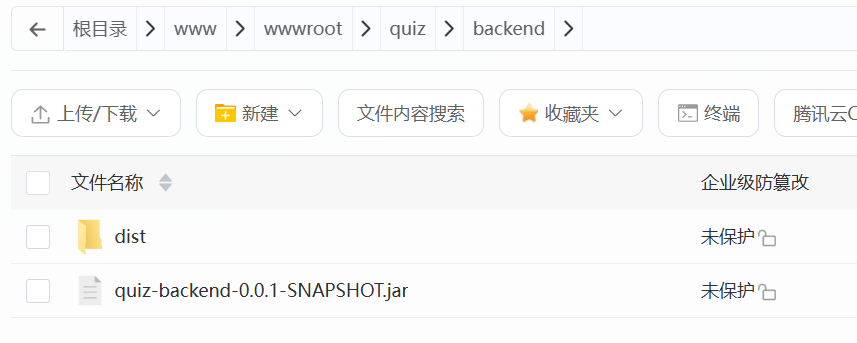
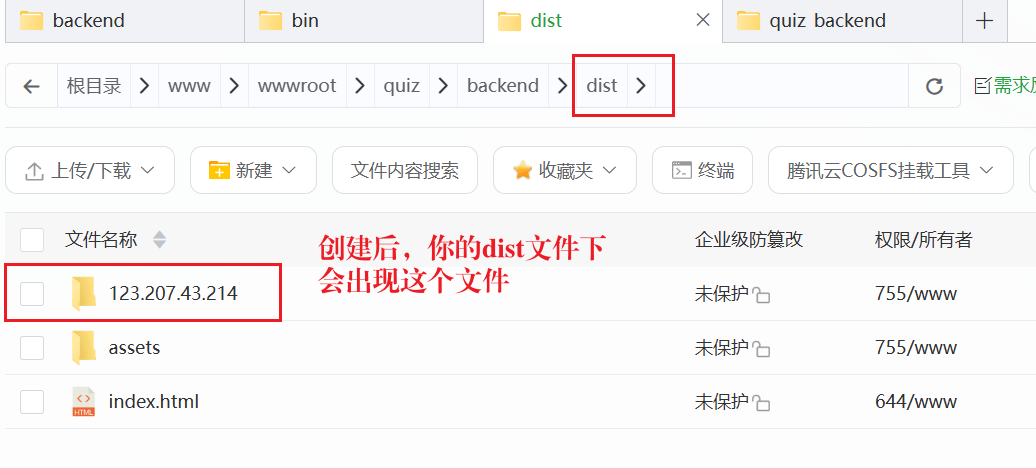
前端打包成静态资源放在和jar同一目录下
使用Nginx进行反向代理
「网站」→「PHP项目」→ 「添加站点」
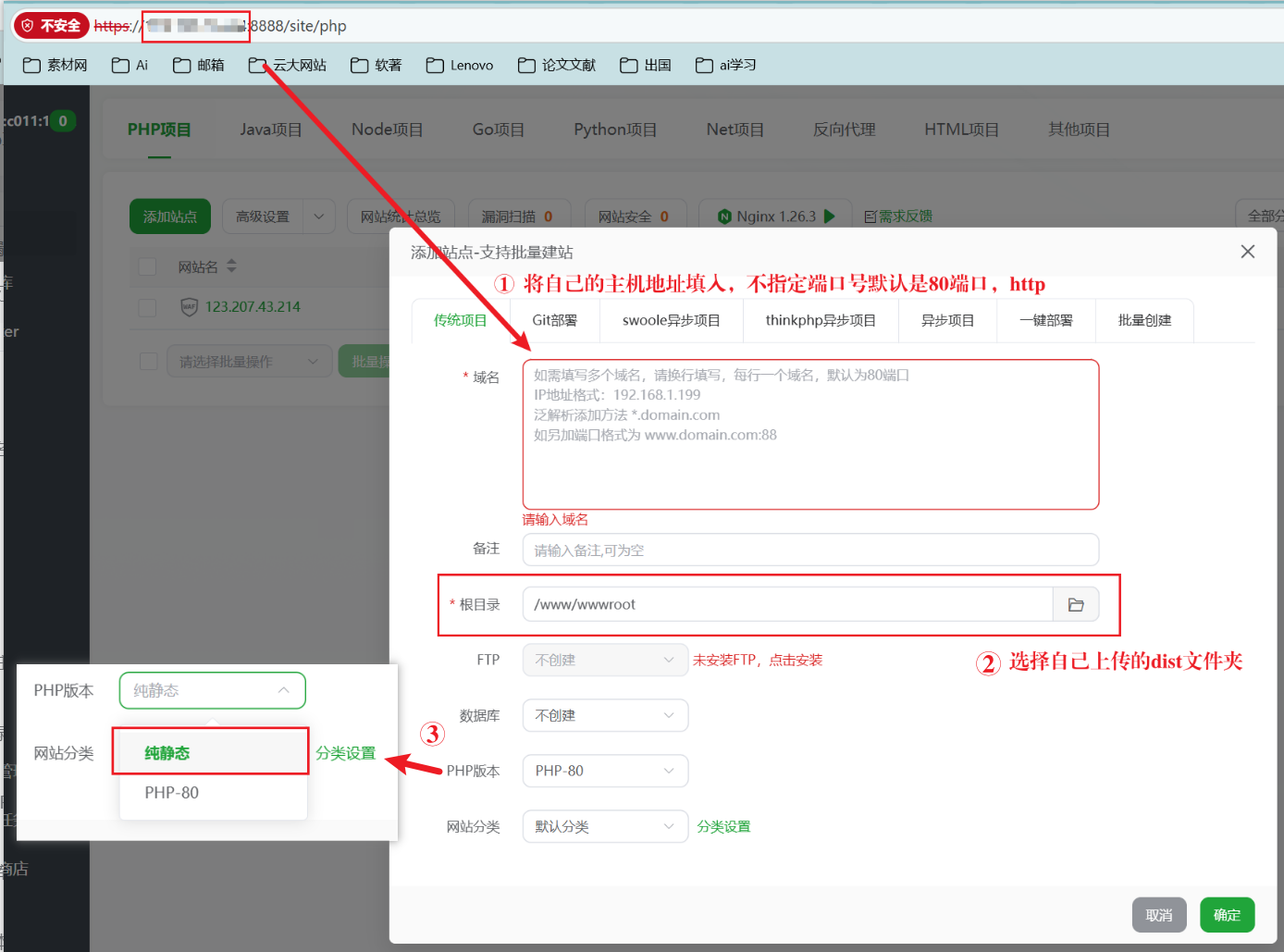
六、最终访问
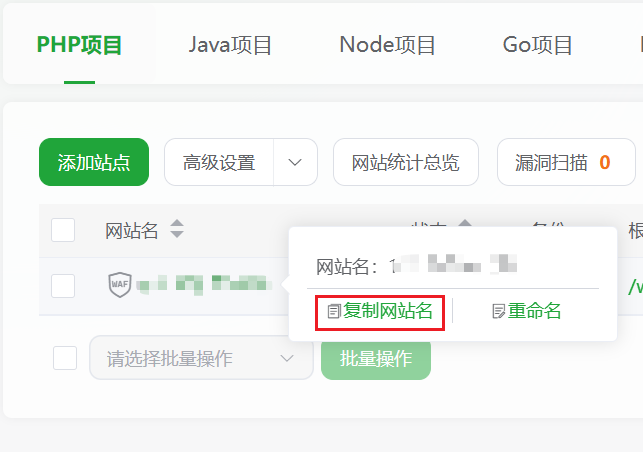
将这个网址发给你的朋友,他们就可以访问你的网站啦!
以上采用的是全服务器部署策略,若是采用前端Netlify部署 + 后端服务器部署,Netlify会强制将http请求转换成https请求,而https请求若是没有部署ssl证书和域名的加持,浏览器会识别成不安全网站,向后端请求资源的行为会被拦截
解决方案有两个:
方案一:全服务器部署 ,使用http请求(即上文提到的部署方式)
- 将前后端都部署在云服务器上,使用http请求和默认80端口,将前端项目打包,上传至后端项目
所在文件夹,使用Nginx进行反向代理 - 核心优势是 “零额外成本”(无需买域名、SSL 证书),适合个人测试、小型 demo 或非公开项目;
- 缺点: “HTTP” 有安全性缺陷(数据传输未加密,适合非敏感场景),且无法使用需要 HTTPS 的功能(如浏览器定位、PWA、部分第三方 API); 前端静态资源和后端 API 都依赖同一台服务器的带宽和性能,若访问量增大,可能需要升级服务器配置;
- Nginx 的作用:监听服务器的 80 端口(HTTP 默认端口),当用户访问http://服务器IP时,Nginx 会 “转发请求”—— 静态资源(页面、CSS、JS)直接返回前端文件,API 请求(如/api/login)转发到后端的 8080 端口
请求发送流程图:
#mermaid-svg-aTlXiK60hTlZMPPJ{font-family:\”trebuchet ms\”,verdana,arial,sans-serif;font-size:16px;fill:#333;}@keyframes edge-animation-frame{from{stroke-dashoffset:0;}}@keyframes dash{to{stroke-dashoffset:0;}}#mermaid-svg-aTlXiK60hTlZMPPJ .edge-animation-slow{stroke-dasharray:9,5!important;stroke-dashoffset:900;animation:dash 50s linear infinite;stroke-linecap:round;}#mermaid-svg-aTlXiK60hTlZMPPJ .edge-animation-fast{stroke-dasharray:9,5!important;stroke-dashoffset:900;animation:dash 20s linear infinite;stroke-linecap:round;}#mermaid-svg-aTlXiK60hTlZMPPJ .error-icon{fill:#552222;}#mermaid-svg-aTlXiK60hTlZMPPJ .error-text{fill:#552222;stroke:#552222;}#mermaid-svg-aTlXiK60hTlZMPPJ .edge-thickness-normal{stroke-width:1px;}#mermaid-svg-aTlXiK60hTlZMPPJ .edge-thickness-thick{stroke-width:3.5px;}#mermaid-svg-aTlXiK60hTlZMPPJ .edge-pattern-solid{stroke-dasharray:0;}#mermaid-svg-aTlXiK60hTlZMPPJ .edge-thickness-invisible{stroke-width:0;fill:none;}#mermaid-svg-aTlXiK60hTlZMPPJ .edge-pattern-dashed{stroke-dasharray:3;}#mermaid-svg-aTlXiK60hTlZMPPJ .edge-pattern-dotted{stroke-dasharray:2;}#mermaid-svg-aTlXiK60hTlZMPPJ .marker{fill:#333333;stroke:#333333;}#mermaid-svg-aTlXiK60hTlZMPPJ .marker.cross{stroke:#333333;}#mermaid-svg-aTlXiK60hTlZMPPJ svg{font-family:\”trebuchet ms\”,verdana,arial,sans-serif;font-size:16px;}#mermaid-svg-aTlXiK60hTlZMPPJ p{margin:0;}#mermaid-svg-aTlXiK60hTlZMPPJ .label{font-family:\”trebuchet ms\”,verdana,arial,sans-serif;color:#333;}#mermaid-svg-aTlXiK60hTlZMPPJ .cluster-label text{fill:#333;}#mermaid-svg-aTlXiK60hTlZMPPJ .cluster-label span{color:#333;}#mermaid-svg-aTlXiK60hTlZMPPJ .cluster-label span p{background-color:transparent;}#mermaid-svg-aTlXiK60hTlZMPPJ .label text,#mermaid-svg-aTlXiK60hTlZMPPJ span{fill:#333;color:#333;}#mermaid-svg-aTlXiK60hTlZMPPJ .node rect,#mermaid-svg-aTlXiK60hTlZMPPJ .node circle,#mermaid-svg-aTlXiK60hTlZMPPJ .node ellipse,#mermaid-svg-aTlXiK60hTlZMPPJ .node polygon,#mermaid-svg-aTlXiK60hTlZMPPJ .node path{fill:#ECECFF;stroke:#9370DB;stroke-width:1px;}#mermaid-svg-aTlXiK60hTlZMPPJ .rough-node .label text,#mermaid-svg-aTlXiK60hTlZMPPJ .node .label text,#mermaid-svg-aTlXiK60hTlZMPPJ .image-shape .label,#mermaid-svg-aTlXiK60hTlZMPPJ .icon-shape .label{text-anchor:middle;}#mermaid-svg-aTlXiK60hTlZMPPJ .node .katex path{fill:#000;stroke:#000;stroke-width:1px;}#mermaid-svg-aTlXiK60hTlZMPPJ .rough-node .label,#mermaid-svg-aTlXiK60hTlZMPPJ .node .label,#mermaid-svg-aTlXiK60hTlZMPPJ .image-shape .label,#mermaid-svg-aTlXiK60hTlZMPPJ .icon-shape .label{text-align:center;}#mermaid-svg-aTlXiK60hTlZMPPJ .node.clickable{cursor:pointer;}#mermaid-svg-aTlXiK60hTlZMPPJ .root .anchor path{fill:#333333!important;stroke-width:0;stroke:#333333;}#mermaid-svg-aTlXiK60hTlZMPPJ .arrowheadPath{fill:#333333;}#mermaid-svg-aTlXiK60hTlZMPPJ .edgePath .path{stroke:#333333;stroke-width:2.0px;}#mermaid-svg-aTlXiK60hTlZMPPJ .flowchart-link{stroke:#333333;fill:none;}#mermaid-svg-aTlXiK60hTlZMPPJ .edgeLabel{background-color:rgba(232,232,232, 0.8);text-align:center;}#mermaid-svg-aTlXiK60hTlZMPPJ .edgeLabel p{background-color:rgba(232,232,232, 0.8);}#mermaid-svg-aTlXiK60hTlZMPPJ .edgeLabel rect{opacity:0.5;background-color:rgba(232,232,232, 0.8);fill:rgba(232,232,232, 0.8);}#mermaid-svg-aTlXiK60hTlZMPPJ .labelBkg{background-color:rgba(232, 232, 232, 0.5);}#mermaid-svg-aTlXiK60hTlZMPPJ .cluster rect{fill:#ffffde;stroke:#aaaa33;stroke-width:1px;}#mermaid-svg-aTlXiK60hTlZMPPJ .cluster text{fill:#333;}#mermaid-svg-aTlXiK60hTlZMPPJ .cluster span{color:#333;}#mermaid-svg-aTlXiK60hTlZMPPJ div.mermaidTooltip{position:absolute;text-align:center;max-width:200px;padding:2px;font-family:\”trebuchet ms\”,verdana,arial,sans-serif;font-size:12px;background:hsl(80, 100%, 96.2745098039%);border:1px solid #aaaa33;border-radius:2px;pointer-events:none;z-index:100;}#mermaid-svg-aTlXiK60hTlZMPPJ .flowchartTitleText{text-anchor:middle;font-size:18px;fill:#333;}#mermaid-svg-aTlXiK60hTlZMPPJ rect.text{fill:none;stroke-width:0;}#mermaid-svg-aTlXiK60hTlZMPPJ .icon-shape,#mermaid-svg-aTlXiK60hTlZMPPJ .image-shape{background-color:rgba(232,232,232, 0.8);text-align:center;}#mermaid-svg-aTlXiK60hTlZMPPJ .icon-shape p,#mermaid-svg-aTlXiK60hTlZMPPJ .image-shape p{background-color:rgba(232,232,232, 0.8);padding:2px;}#mermaid-svg-aTlXiK60hTlZMPPJ .icon-shape rect,#mermaid-svg-aTlXiK60hTlZMPPJ .image-shape rect{opacity:0.5;background-color:rgba(232,232,232, 0.8);fill:rgba(232,232,232, 0.8);}#mermaid-svg-aTlXiK60hTlZMPPJ .label-icon{display:inline-block;height:1em;overflow:visible;vertical-align:-0.125em;}#mermaid-svg-aTlXiK60hTlZMPPJ .node .label-icon path{fill:currentColor;stroke:revert;stroke-width:revert;}#mermaid-svg-aTlXiK60hTlZMPPJ :root{–mermaid-font-family:\”trebuchet ms\”,verdana,arial,sans-serif;}1. 在浏览器输入:http://服务器IP2. 80端口请求进入Nginx3. 判断请求类型:静态资源(页面/CSS/JS)3. 判断请求类型:API接口(如/api/login)4. 返回静态资源4. 处理API请求,返回数据(如JSON)5. Nginx将结果返回给浏览器6. 浏览器渲染页面,展示内容
用户
云服务器(公网IP)
Nginx反向代理
服务器本地:前端静态文件(dist文件夹)
服务器本地:后端服务(8080端口)
用户看到最终页面
方案二:Netlify 前端 + 服务器后端 , 使用https请求
-
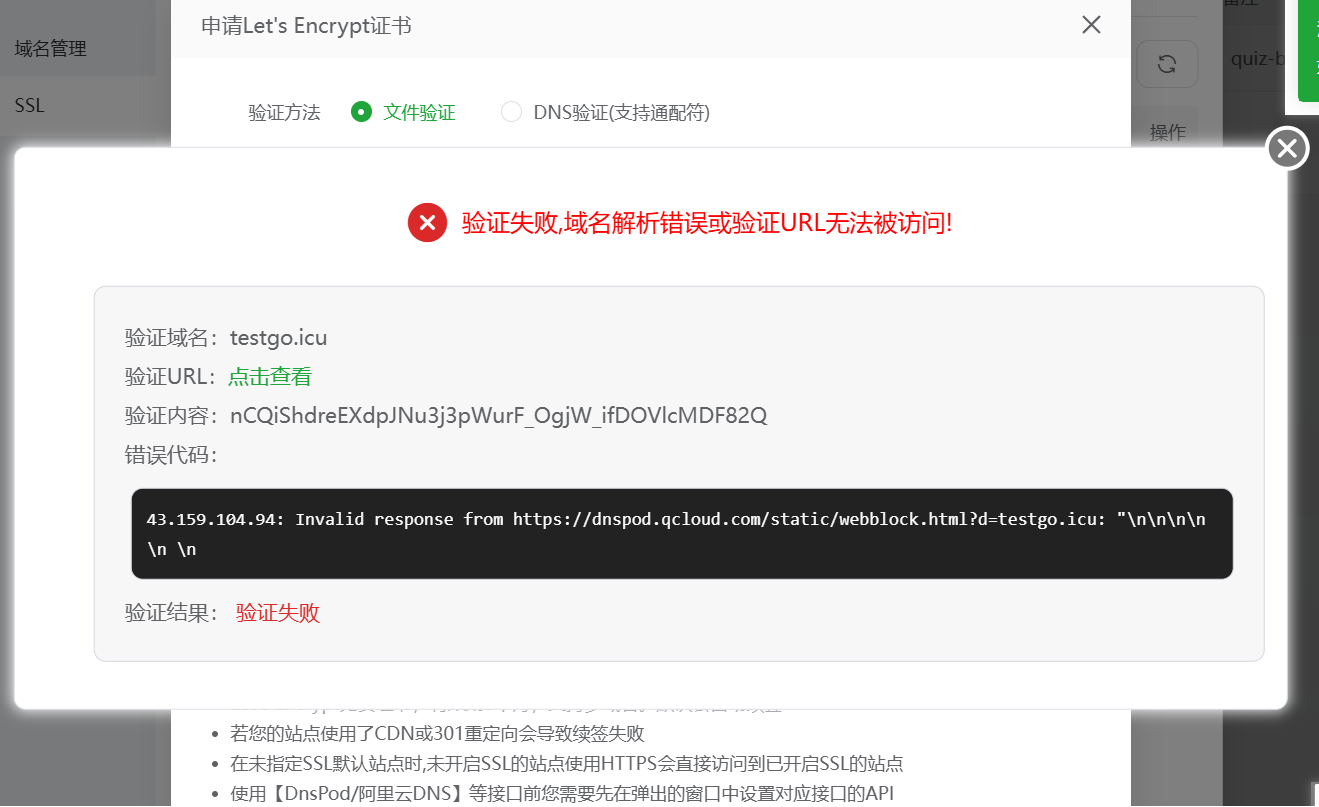
如果坚持将前端部署在Netlify上,需要购买域名,申请SSL证书,购买域名后,需要解析域名(DNS[ Domain Name System]解析),与自己的服务器进行绑定,但是,这个方法,如果是在腾讯云购买域名,会提示你,只有备案过的域名才能进行解析,但是,只有购买期超过三个月的域名才能够备案
-
核心优势是 “生产级正式性”(HTTPS 加密、自定义域名),适合公开项目、面向用户的产品,但需承担域名 / SSL 成本(部分 SSL 免费),并遵守备案规则;前端静态资源由 Netlify 的 CDN(全球分发网络)加载,用户访问页面更快(就近获取资源),后端仅需处理 API 请求,服务器压力更小,更适合有一定访问量的项目。
-
后端服务器配置 SSL 证书(通过 Nginx 或后端框架本身),让后端接口支持https://你的域名:8080/api(或用 Nginx 监听 443 端口,转发到 8080,隐藏端口)—— 否则前端(HTTPS)调用后端(HTTP)仍会被浏览器拦截(混合内容错误)。
请求发送流程图:
#mermaid-svg-pFtKWoRiG5uZ7BYp{font-family:\”trebuchet ms\”,verdana,arial,sans-serif;font-size:16px;fill:#333;}@keyframes edge-animation-frame{from{stroke-dashoffset:0;}}@keyframes dash{to{stroke-dashoffset:0;}}#mermaid-svg-pFtKWoRiG5uZ7BYp .edge-animation-slow{stroke-dasharray:9,5!important;stroke-dashoffset:900;animation:dash 50s linear infinite;stroke-linecap:round;}#mermaid-svg-pFtKWoRiG5uZ7BYp .edge-animation-fast{stroke-dasharray:9,5!important;stroke-dashoffset:900;animation:dash 20s linear infinite;stroke-linecap:round;}#mermaid-svg-pFtKWoRiG5uZ7BYp .error-icon{fill:#552222;}#mermaid-svg-pFtKWoRiG5uZ7BYp .error-text{fill:#552222;stroke:#552222;}#mermaid-svg-pFtKWoRiG5uZ7BYp .edge-thickness-normal{stroke-width:1px;}#mermaid-svg-pFtKWoRiG5uZ7BYp .edge-thickness-thick{stroke-width:3.5px;}#mermaid-svg-pFtKWoRiG5uZ7BYp .edge-pattern-solid{stroke-dasharray:0;}#mermaid-svg-pFtKWoRiG5uZ7BYp .edge-thickness-invisible{stroke-width:0;fill:none;}#mermaid-svg-pFtKWoRiG5uZ7BYp .edge-pattern-dashed{stroke-dasharray:3;}#mermaid-svg-pFtKWoRiG5uZ7BYp .edge-pattern-dotted{stroke-dasharray:2;}#mermaid-svg-pFtKWoRiG5uZ7BYp .marker{fill:#333333;stroke:#333333;}#mermaid-svg-pFtKWoRiG5uZ7BYp .marker.cross{stroke:#333333;}#mermaid-svg-pFtKWoRiG5uZ7BYp svg{font-family:\”trebuchet ms\”,verdana,arial,sans-serif;font-size:16px;}#mermaid-svg-pFtKWoRiG5uZ7BYp p{margin:0;}#mermaid-svg-pFtKWoRiG5uZ7BYp .label{font-family:\”trebuchet ms\”,verdana,arial,sans-serif;color:#333;}#mermaid-svg-pFtKWoRiG5uZ7BYp .cluster-label text{fill:#333;}#mermaid-svg-pFtKWoRiG5uZ7BYp .cluster-label span{color:#333;}#mermaid-svg-pFtKWoRiG5uZ7BYp .cluster-label span p{background-color:transparent;}#mermaid-svg-pFtKWoRiG5uZ7BYp .label text,#mermaid-svg-pFtKWoRiG5uZ7BYp span{fill:#333;color:#333;}#mermaid-svg-pFtKWoRiG5uZ7BYp .node rect,#mermaid-svg-pFtKWoRiG5uZ7BYp .node circle,#mermaid-svg-pFtKWoRiG5uZ7BYp .node ellipse,#mermaid-svg-pFtKWoRiG5uZ7BYp .node polygon,#mermaid-svg-pFtKWoRiG5uZ7BYp .node path{fill:#ECECFF;stroke:#9370DB;stroke-width:1px;}#mermaid-svg-pFtKWoRiG5uZ7BYp .rough-node .label text,#mermaid-svg-pFtKWoRiG5uZ7BYp .node .label text,#mermaid-svg-pFtKWoRiG5uZ7BYp .image-shape .label,#mermaid-svg-pFtKWoRiG5uZ7BYp .icon-shape .label{text-anchor:middle;}#mermaid-svg-pFtKWoRiG5uZ7BYp .node .katex path{fill:#000;stroke:#000;stroke-width:1px;}#mermaid-svg-pFtKWoRiG5uZ7BYp .rough-node .label,#mermaid-svg-pFtKWoRiG5uZ7BYp .node .label,#mermaid-svg-pFtKWoRiG5uZ7BYp .image-shape .label,#mermaid-svg-pFtKWoRiG5uZ7BYp .icon-shape .label{text-align:center;}#mermaid-svg-pFtKWoRiG5uZ7BYp .node.clickable{cursor:pointer;}#mermaid-svg-pFtKWoRiG5uZ7BYp .root .anchor path{fill:#333333!important;stroke-width:0;stroke:#333333;}#mermaid-svg-pFtKWoRiG5uZ7BYp .arrowheadPath{fill:#333333;}#mermaid-svg-pFtKWoRiG5uZ7BYp .edgePath .path{stroke:#333333;stroke-width:2.0px;}#mermaid-svg-pFtKWoRiG5uZ7BYp .flowchart-link{stroke:#333333;fill:none;}#mermaid-svg-pFtKWoRiG5uZ7BYp .edgeLabel{background-color:rgba(232,232,232, 0.8);text-align:center;}#mermaid-svg-pFtKWoRiG5uZ7BYp .edgeLabel p{background-color:rgba(232,232,232, 0.8);}#mermaid-svg-pFtKWoRiG5uZ7BYp .edgeLabel rect{opacity:0.5;background-color:rgba(232,232,232, 0.8);fill:rgba(232,232,232, 0.8);}#mermaid-svg-pFtKWoRiG5uZ7BYp .labelBkg{background-color:rgba(232, 232, 232, 0.5);}#mermaid-svg-pFtKWoRiG5uZ7BYp .cluster rect{fill:#ffffde;stroke:#aaaa33;stroke-width:1px;}#mermaid-svg-pFtKWoRiG5uZ7BYp .cluster text{fill:#333;}#mermaid-svg-pFtKWoRiG5uZ7BYp .cluster span{color:#333;}#mermaid-svg-pFtKWoRiG5uZ7BYp div.mermaidTooltip{position:absolute;text-align:center;max-width:200px;padding:2px;font-family:\”trebuchet ms\”,verdana,arial,sans-serif;font-size:12px;background:hsl(80, 100%, 96.2745098039%);border:1px solid #aaaa33;border-radius:2px;pointer-events:none;z-index:100;}#mermaid-svg-pFtKWoRiG5uZ7BYp .flowchartTitleText{text-anchor:middle;font-size:18px;fill:#333;}#mermaid-svg-pFtKWoRiG5uZ7BYp rect.text{fill:none;stroke-width:0;}#mermaid-svg-pFtKWoRiG5uZ7BYp .icon-shape,#mermaid-svg-pFtKWoRiG5uZ7BYp .image-shape{background-color:rgba(232,232,232, 0.8);text-align:center;}#mermaid-svg-pFtKWoRiG5uZ7BYp .icon-shape p,#mermaid-svg-pFtKWoRiG5uZ7BYp .image-shape p{background-color:rgba(232,232,232, 0.8);padding:2px;}#mermaid-svg-pFtKWoRiG5uZ7BYp .icon-shape rect,#mermaid-svg-pFtKWoRiG5uZ7BYp .image-shape rect{opacity:0.5;background-color:rgba(232,232,232, 0.8);fill:rgba(232,232,232, 0.8);}#mermaid-svg-pFtKWoRiG5uZ7BYp .label-icon{display:inline-block;height:1em;overflow:visible;vertical-align:-0.125em;}#mermaid-svg-pFtKWoRiG5uZ7BYp .node .label-icon path{fill:currentColor;stroke:revert;stroke-width:revert;}#mermaid-svg-pFtKWoRiG5uZ7BYp :root{–mermaid-font-family:\”trebuchet ms\”,verdana,arial,sans-serif;}1. 输入: https://你的自定义域名2. 加载前端静态资源3. 返回前端页面 完成初步渲染4. 前端发起接口请求: https://你的域名/api5. 解析域名 → 云服务器公网IP6. 转发请求到本机后端7. 处理业务 返回JSON数据8. HTTPS加密返回数据9. 把接口数据返回前端
用户浏览器
Netlify CDN服务器
Netlify 存储前端打包文件
DNS域名解析服务器
云服务器 443端口 HTTPS
Nginx 反向代理 已配置SSL证书
云服务器本地 后端服务 8080端口
浏览器渲染接口数据 展示最终完整页面
简言之,方案一更加省钱,但是,方案二是更为正式稳健的一种部署方案。