Vue 组件通信:Vue2 与 Vue3 通用方案解析
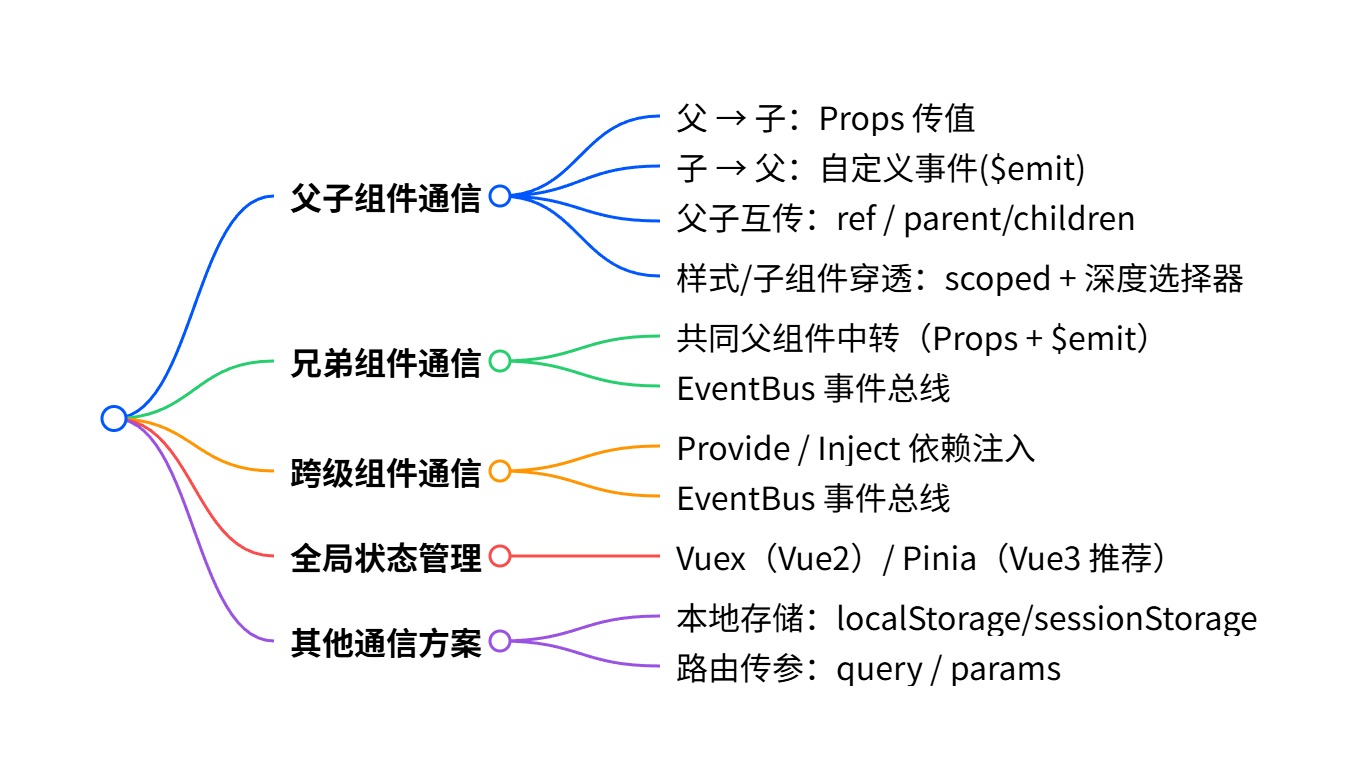
结合 Vue2/Vue3 通用的组件通信场景,我整理了结构化思维导图,并为每种通信方式配套核心关键代码,覆盖开发中高频使用的方案,区分使用场景和适用范围,方便你系统学习和查阅。
一、Vue 组件通信 思维导图
二、各通信方式 核心关键代码
环境说明
以下代码基于 Vue2 语法(Vue3 组合式API仅语法略有差异,通信逻辑一致),均为单文件组件标准写法。
一、父子组件通信(最常用)
1. 父传子:Props
适用场景:父组件向子组件传递数据、配置项
核心规则:单向数据流,子组件不能直接修改Props
父组件 Parent.vue
<template>
<div>
<!– 动态绑定数据传递给子组件 –>
<Child :msg="parentMsg" :list="parentList" />
</div>
</template>
<script>
import Child from './Child.vue'
export default {
components: { Child },
data() {
return {
parentMsg: '父组件数据',
parentList: [1, 2, 3]
}
}
}
</script>
子组件 Child.vue
<template>
<div>
<p>{{ msg }}</p>
<p>{{ list }}</p>
</div>
</template>
<script>
export default {
// 声明接收props,推荐写法:指定类型/默认值/必填校验
props: {
msg: {
type: String,
required: true
},
list: {
type: Array,
default: () => []
}
}
}
</script>
2. 子传父:自定义事件 $emit
适用场景:子组件向父组件传递数据、通知事件(如点击、表单提交)
子组件 Child.vue
<template>
<button @click="sendData">向父组件传值</button>
</template>
<script>
export default {
methods: {
sendData() {
// 触发自定义事件,传递参数
this.$emit('child-event', '子组件数据', 666)
}
}
}
</script>
父组件 Parent.vue
<template>
<div>
<!– 监听子组件的自定义事件 –>
<Child @child-event="handleChildEvent" />
</div>
</template>
<script>
import Child from './Child.vue'
export default {
components: { Child },
methods: {
// 接收子组件传递的参数
handleChildEvent(data, num) {
console.log(data, num) // 输出:子组件数据 666
}
}
}
</script>
3. 父访问子:ref / $children
适用场景:父组件直接调用子组件方法、获取子组件数据
父组件 Parent.vue
<template>
<div>
<Child ref="childRef" />
<button @click="callChildMethod">调用子组件方法</button>
</div>
</template>
<script>
import Child from './Child.vue'
export default {
components: { Child },
methods: {
callChildMethod() {
// 通过 ref 获取子组件实例
console.log(this.$refs.childRef.childData)
this.$refs.childRef.testMethod()
}
}
}
</script>
子组件 Child.vue
<script>
export default {
data() {
return {
childData: '子组件内部数据'
}
},
methods: {
testMethod() {
alert('子组件方法被调用')
}
}
}
</script>
4. 子访问父:$parent
适用场景:子组件直接访问父组件实例(不推荐频繁使用,耦合度高)
// 子组件中直接调用
this.$parent.parentMethod() // 调用父组件方法
console.log(this.$parent.parentData) // 获取父组件数据
二、兄弟组件通信
方案1:父组件中转(基础方案)
核心逻辑:子1 → 父 → 子2,结合 $emit + Props 实现,代码复用上述父子通信逻辑。
方案2:EventBus 事件总线(全局事件中心)
适用场景:简单项目、无状态管理库时的跨组件通信
1. 创建 bus.js(全局事件对象)
// src/utils/bus.js
import Vue from 'vue'
export default new Vue()
2. 发送事件组件 BrotherA.vue
<script>
import Bus from '../utils/bus.js'
export default {
methods: {
sendToBrother() {
Bus.$emit('brother-event', '来自兄弟A的数据')
}
}
}
</script>
3. 接收事件组件 BrotherB.vue
<script>
import Bus from '../utils/bus.js'
export default {
mounted() {
// 监听事件,组件销毁时移除监听
Bus.$on('brother-event', (data) => {
console.log(data)
})
},
beforeDestroy() {
// 解绑事件,避免内存泄漏
Bus.$off('brother-event')
}
}
</script>
三、跨级组件通信(祖孙/多层嵌套)
Provide / Inject 依赖注入
适用场景:多层嵌套组件传值,替代逐层传递Props
顶层组件(祖先)
<script>
export default {
// 提供数据/方法,后代可注入
provide() {
return {
ancestorMsg: '祖先组件数据',
updateMsg: this.updateMsg // 传递方法
}
},
methods: {
updateMsg(val) {
console.log(val)
}
}
}
</script>
底层组件(后代,任意层级)
<script>
export default {
// 注入数据
inject: ['ancestorMsg', 'updateMsg'],
mounted() {
console.log(this.ancestorMsg)
this.updateMsg('后代组件修改数据')
}
}
</script>
注意:provide/inject 传递的数据非响应式,如需响应式可传递响应式对象或 Vuex/Pinia。
四、全局状态管理(大型项目推荐)
1. Pinia(Vue3 官方推荐)核心代码
定义 store
// src/stores/user.js
import { defineStore } from 'pinia'
export const useUserStore = defineStore('user', {
state: () => ({
name: '张三',
age: 18
}),
actions: {
updateName(newName) {
this.name = newName
}
}
})
组件中使用
<script>
import { useUserStore } from '../stores/user'
export default {
setup() {
const userStore = useUserStore()
// 获取数据
console.log(userStore.name)
// 修改数据
userStore.updateName('李四')
}
}
</script>
2. Vuex(Vue2 主流方案)核心代码
// store/index.js
import Vue from 'vue'
import Vuex from 'vuex'
Vue.use(Vuex)
export default new Vuex.Store({
state: { count: 0 },
mutations: {
ADD(state) { state.count++ }
},
actions: {
addAsync({ commit }) {
setTimeout(() => commit('ADD'), 1000)
}
}
})
// 组件中使用
this.$store.state.count // 获取数据
this.$store.commit('ADD') // 同步修改
this.$store.dispatch('addAsync') // 异步修改
五、补充通信方案
1. 本地存储通信
适用于跨页面/跨组件持久化数据,核心代码:
// 存储对象
localStorage.setItem('user', JSON.stringify({ name: '测试' }))
// 读取对象
const user = JSON.parse(localStorage.getItem('user'))
2. 路由传参
适用于页面跳转时传递数据
// 1. query 传参(地址栏可见,刷新不丢失)
this.$router.push({ path: '/detail', query: { id: 1 } })
// 接收参数
this.$route.query.id
// 2. params 传参(地址栏不可见,刷新丢失)
this.$router.push({ name: 'Detail', params: { id: 1 } })
// 接收参数
this.$route.params.id
三、方案选型总结
| 父子组件 | Props / $emit | Vue 官方标准方案,优先使用 |
| 兄弟组件 | 父组件中转 / EventBus | 简单项目用EventBus,复杂项目用状态库 |
| 跨级组件 | Provide/Inject | 适合无频繁更新的静态数据 |
| 大型项目全局共享 | Pinia / Vuex | 统一管理状态,便于维护调试 |
| 跨页面持久化 | localStorage | 配合序列化存储复杂数据 |
关键点回顾
父子通信是基础,遵循单向数据流,子组件禁止直接修改Props;
EventBus 需及时解绑事件,避免内存泄漏;
Provide/Inject 适合跨级传值,默认非响应式;
大型项目优先使用 Pinia/Vuex 替代零散的事件通信。