目录
1.1 SpringAI简介
1.2 需要环境
1.3 示例-对话&流式调用
步骤一: 去deepseek平台对应大模型平台申请app key
步骤二: 添加pom
步骤三: 配置文件,在 application.properties文件中添加 DeepSeek 的配置信息
步骤四:【示例】流式响应 & 流式响应
1.4 ChatClient接口
更多示例(预设角色)
流式输出
1.5 ChatModel接口
1.6 示例-函数调用
1.7 提示词
1.8 Spring AI官方文档
参考
1.1 SpringAI简介
AI测试、大模型测试(八)SpringAI核心技术
1.2 需要环境
- JDK 17 或更高版本(注:springboot项目)
- maven或 Gradle 构建工具
- DeepSeek API Key
1.3 示例-对话&流式调用
步骤一: 去deepseek平台对应大模型平台申请app key
申请地址:https://api-docs.deepseek.com/zh-cn/
使用curl测试一下appkey(调用deepseek的api接口测试一下):
curl -X POST -H "Content-Type: application/json" -H "Authorization: Bearer sk-xxx" -d '{"model": "deepseek-chat","messages": [{"role": "system", "content": "You are a helpful assistant."},{"role": "user", "content": "Hello!"}],"stream":false}' https://api.deepseek.com/chat/completions
ps, 余额不足返回: {"error":{"message":"Insufficient Balance","type":"unknown_error","param":null,"code":"invalid_request_error"}}
步骤二: 添加pom
<dependencies>
<dependency>
<groupId>org.springframework.boot</groupId>
<artifactId>spring-boot-starter-web</artifactId>
</dependency>
<dependency>
<groupId>org.springframework.ai</groupId>
<artifactId>spring-ai-openai-spring-boot-starter</artifactId>
</dependency>
</dependencies>
步骤三: 配置文件,在 application.properties文件中添加 DeepSeek 的配置信息
spring.ai.openai.api-key=xxx
spring.ai.openai.base-url=https://api.deepseek.com # 模型选择(示例使用对话模型)
spring.ai.openai.chat.options.model=deepseek-chat
注意:
其中,api-key 是在 DeepSeek 官网注册后获取的密钥,base-url 是 DeepSeek API 的服务地址,model 指定使用的模型版本。DeepSeek支持的模型:
- deepseek-chat(V3):适用于聊天机器人、智能客服、内容生成等,能够理解和生成日常对话内容。
- deepseek-reasoner(R1):专为复杂推理任务设计,适合解决需要深度逻辑分析和推理的问题。
比如:

步骤四:【示例】流式响应 & 流式响应
import org.springframework.beans.factory.annotation.Autowired;
import org.springframework.web.bind.annotation.*;
@RestController
@RequestMapping("/chat")
public class AIChatController {
@Autowired
private DeepSeekClient deepSeekClient;
//用于处理普通的非流式请求
@PostMapping("/chat")
public String chat(@RequestBody String message) {
return deepSeekClient.chatCompletion(message).getOutput().getContent();
}
//支持流式响应,能够实时返回 AI 的推理结果
@GetMapping(value = "/chatstream", produces = "text/event-stream")
public Flux<String> chatStream(@RequestParam String message) {
return deepSeekClient.chatFluxCompletion(message)
.map(response -> response.getOutput().getContent());
}
}
1.4 ChatClient接口
ChatClient是一个接口,它定义了一个与聊天服务交互的客户端。这个接口主要用于创建聊天客户端对象,设置请求规范,以及发起聊天请求。
@RestController
public class DeepSeekController {
private final ChatClient chatClient;
public ChatDeepSeekController(ChatClient.Builder chatClientBuilder) {
this.chatClient = chatClientBuilder.build();
}
@GetMapping("/chat2")
public String chat2(@RequestParam(value = "msg",defaultValue = "介绍一下杜甫")
String message) {
//prompt:提示词
return this.chatClient.prompt()
//用户输入的信息
.user(message)
//请求大模型
.call()
//返回文本
.content();
}
}
更多示例(预设角色)
@Configuration
public class AIConfig {
@Bean
public ChatClient chatClient(ChatClient.Builder builder) {
return builder.defaultSystem("你是一名资深开发工程师,你的名称教sfri).build();
}
}
流式输出
@GetMapping(value = "/chat/stream",produces="text/html;charset=UTF-8")
public Flux<String> chatStream(@RequestParam(value = "msg") String message) {
return chatClient.prompt().user(message).stream().content();
}
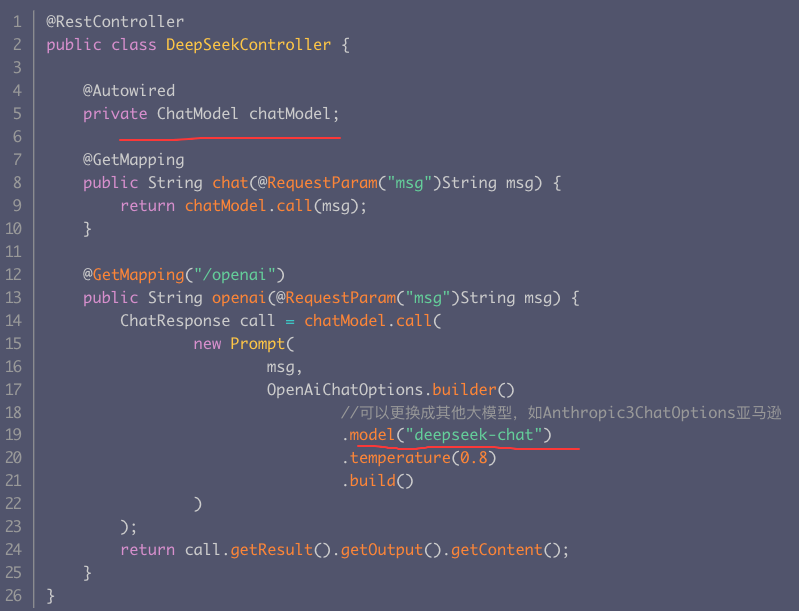
1.5 ChatModel接口
ChatClient底层是使用ChatModel作为属性的,在初始化ChatClient的时候可以指定ChatModel
1.6 示例-函数调用
- 允许大语言模型在生成回答时触发预定义的外部函数,从而实现动态数据获取或业务逻辑操作(如查询数据库、调用 API 等)。
- Spring AI 作为企业级 AI 开发框架,在 1.0.0.M6 版本中进行了重要升级:废弃 Function Calling 引入 Tool Calling 以更贴合行业术语。Spring AI 不会在内部处理函数调用,而是将其代理到客户端。然后,客户端负责处理函数调用,将其分派到相应的函数并返回结果。
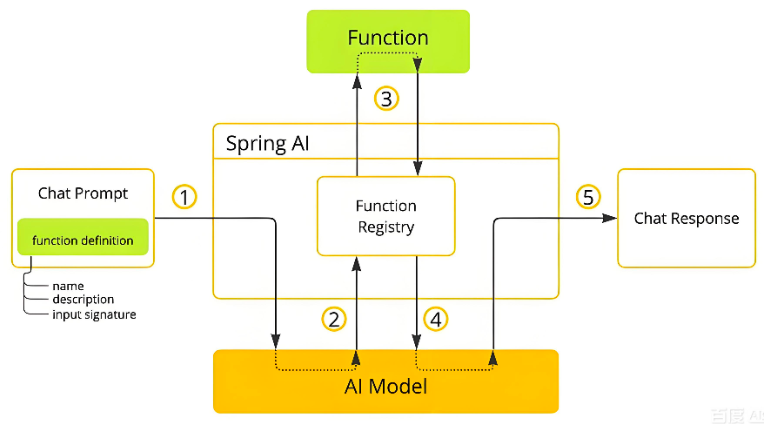
Spring AI的函数调用工作原理图核心流程如下:
例子
参考:https://cloud.tencent.com.cn/developer/article/2527674
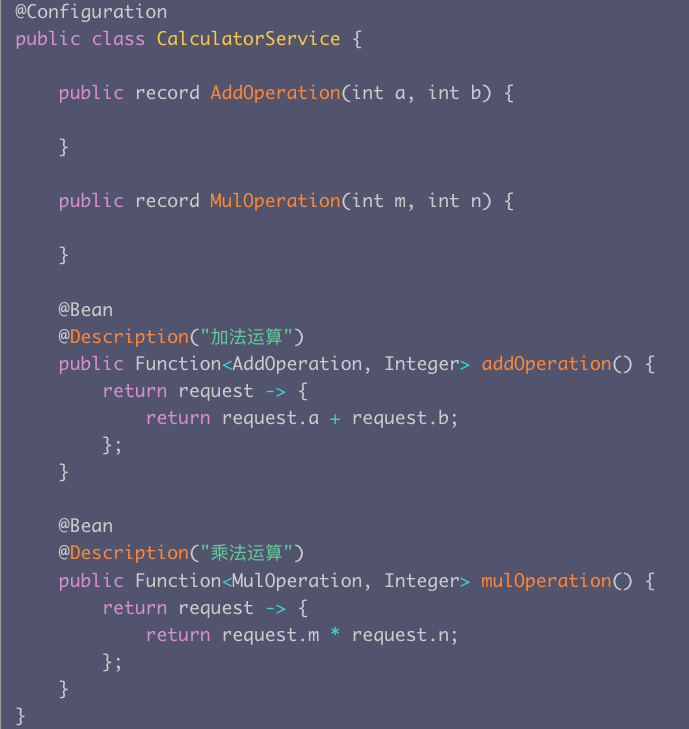
步骤一: 定义函数
步骤二:允许同时调用多个函数
@GetMapping(value = "/chatfuntion", produces = "application/json")
public String ragJsonText(@RequestParam(value = "userMessage") String userMessage){
return chatClient
.prompt()
.system("您是算术计算器的代理。\\n" +
"您能够支持加法运算、乘法运算等操作,其余功能将在后续版本中添加,如果用户问的问题不支持请告知详情。\\n" +
"在提供加法运算、乘法运算等操作之前,您必须从用户处获取如下信息:两个数字,运算类型。\\n" +
"请调用自定义函数执行加法运算、乘法运算。\\n" +
"请讲中文。")
.user(userMessage)
.functions("addOperation", "mulOperation")
.call()
.content();
}
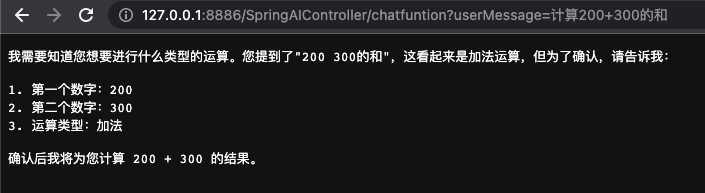
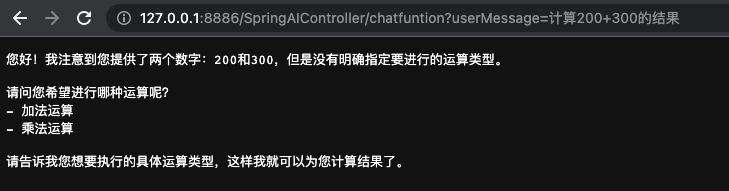
执行结果:

1.7 提示词
@GetMapping("/prompt")
public String prompt(@RequestParam("name")
String name,
@RequestParam("voice")
String voice){
String userText= "给我推荐北京的至少三种美食";
UserMessage userMessage = new UserMessage(userText);
String systemText= "你是一个美食咨询助手,可以帮助人们查询美食信息.你的名字是{name},你应该用你的名字和{voice}的饮食习惯回复用户的请求。";
SystemPromptTemplate systemPromptTemplate = new SystemPromptTemplate(systemText);
//替换占位符
Message systemMessage = systemPromptTemplate
.createMessage(Map.of("name", name, "voice", voice));
Prompt prompt = new Prompt(List.of(userMessage, systemMessage));
return chatClient.prompt(prompt)
//请求大模型
.call()
//返回文本
.content();
}
执行结果:


1.8 Spring AI官方文档
https://www.spring-doc.cn/spring-ai/1.1.0/api_chat-memory.html
参考
https://cloud.tencent.com/developer/article/2486290
https://www.spring-doc.cn/spring-ai/1.1.0/api_chatmodel.html