1、热点启动流程
APP调用WifiManager.java的startSoftAp的函数,用来启动热点. 在android 12之后,wifi框架相关试下被Google移动到了/packages/modules/Wifi/中.
热点相关启动流程如下:
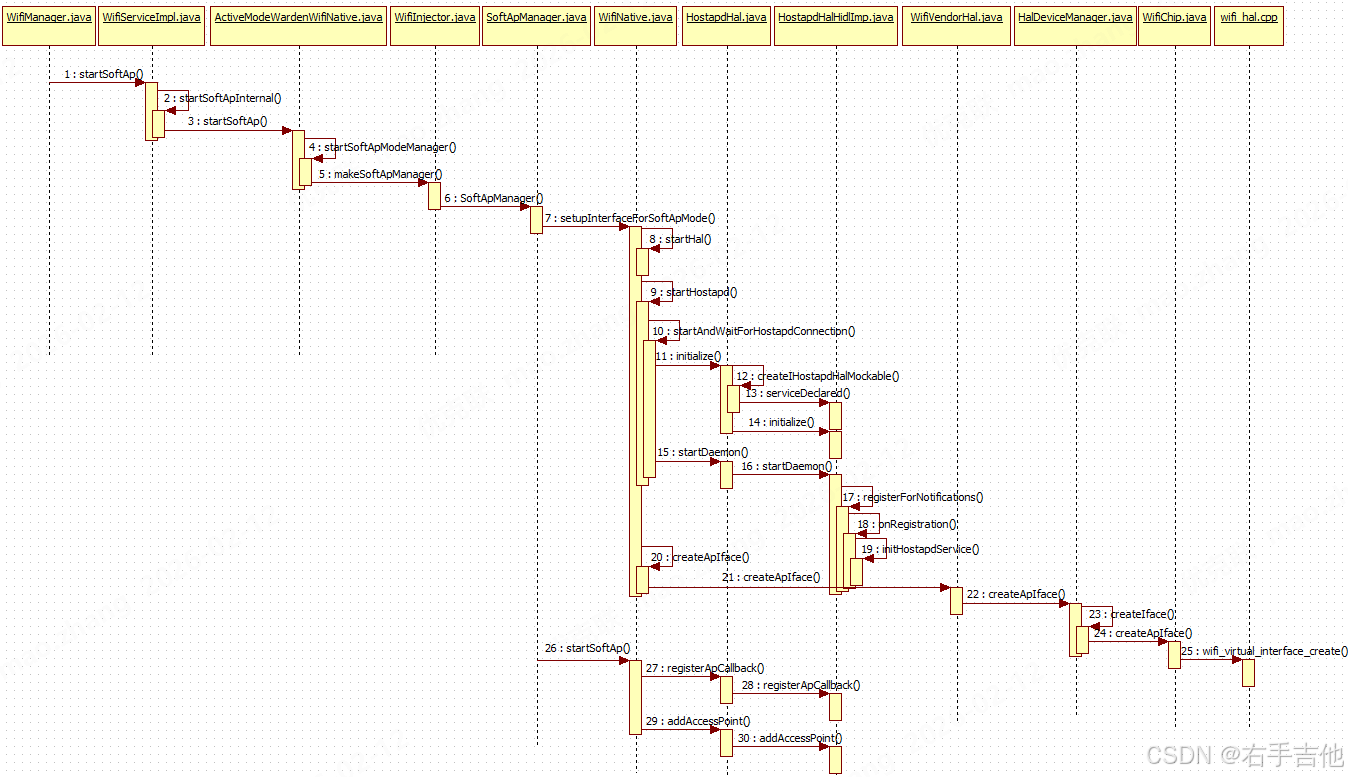
从流程图看,WifiNative.java为启动流程的关键类,主要启动过程包含如下三个步骤,启动Hal层,启动hostapd程序,创建WIFI热点网卡。
public String setupInterfaceForSoftApMode(
@NonNull InterfaceCallback interfaceCallback, @NonNull WorkSource requestorWs,
@SoftApConfiguration.BandType int band, boolean isBridged,
@NonNull SoftApManager softApManager, int type) {
synchronized (mLock) {
String bugTitle = "Wi-Fi BugReport (softAp interface failure)";
String errorMsg = "";
//启动HAL层程序
if (!startHal()) {
errorMsg = "Failed to start softAp Hal";
Log.e(TAG, errorMsg);
mWifiMetrics.incrementNumSetupSoftApInterfaceFailureDueToHal();
takeBugReportInterfaceFailureIfNeeded(bugTitle, errorMsg);
return null;
}
//启动hostapd程序
if (!startHostapd()) {
errorMsg = "Failed to start softAp hostapd";
Log.e(TAG, errorMsg);
mWifiMetrics.incrementNumSetupSoftApInterfaceFailureDueToHostapd();
takeBugReportInterfaceFailureIfNeeded(bugTitle, errorMsg);
return null;
}
//创建热点网卡
Iface iface = mIfaceMgr.allocateIface(Iface.IFACE_TYPE_AP);
if (iface == null) {
Log.e(TAG, "Failed to allocate new AP iface");
return null;
}
iface.externalListener = interfaceCallback;
iface.name = createApIface(iface, requestorWs, band, isBridged, softApManager, type);
…….
}
1.1、启动Hal层
拉起IWifi服务,具体实现在WifiHalHidlImpl.java中。
private void initServiceManagerIfNecessaryLocked() {
if (mServiceManager != null) {
Log.i(TAG, "mServiceManager already exists");
return;
}
Log.i(TAG, "initServiceManagerIfNecessaryLocked");
// Failures of IServiceManager are most likely system breaking.
// Behavior here will be to WTF and continue.
mServiceManager = getServiceManagerMockable();
if (mServiceManager == null) {
Log.wtf(TAG, "Failed to get IServiceManager instance");
return;
}
try {
if (!mServiceManager.linkToDeath(mServiceManagerDeathRecipient, 0)) {
Log.wtf(TAG, "Error on linkToDeath on IServiceManager");
mServiceManager = null;
return;
}
//注册IWIFI服务状态是否ready,在mServiceNotificationCallback回调中出初始化化完成
if (!mServiceManager.registerForNotifications(IWifi.kInterfaceName, "",
mServiceNotificationCallback)) {
Log.wtf(TAG, "Failed to register a listener for IWifi service");
mServiceManager = null;
}
} catch (RemoteException e) {
Log.wtf(TAG, "Exception while operating on IServiceManager: " + e);
mServiceManager = null;
return;
}
mIsVendorHalSupported = isSupportedInternal();
}
在WifiHalHidlImpl.java中mServiceNotificationCallback函数中保存private android.hardware.wifi.V1_0.IWifi mWifi;对象。IWifi最终实现在hardware/interfaces/wifi/1.5/default/wifi.cpp中。
1.2、启动hostapd程序
为IHostapd服务,其中HostapdHalHidlImp.java为Framework和Hal层交互的关键类,mIServiceManager.registerForNotifications监听IHostapd服务的启动,当IHostapd启动后,HostapdHalHidlImp获取到IHostapd实例。
@Override
public boolean initialize() {
synchronized (mLock) {
if (mVerboseLoggingEnabled) {
Log.i(TAG, "Registering IHostapd service ready callback.");
}
mIHostapd = null;
if (mIServiceManager != null) {
// Already have an IServiceManager and serviceNotification registered, don't
// don't register another.
return true;
}
try {
mIServiceManager = getServiceManagerMockable();
if (mIServiceManager == null) {
Log.e(TAG, "Failed to get HIDL Service Manager");
return false;
}
if (!linkToServiceManagerDeath()) {
return false;
}
/* TODO(b/33639391) : Use the new IHostapd.registerForNotifications() once it
exists */
// 此处Framework监听android.hardware.wifi.hostapd@1.0::IHostapd/default
// 是否启动完成,启动完成后框架可以调用IHostapd接口
if (!mIServiceManager.registerForNotifications(
IHostapd.kInterfaceName, "", mServiceNotificationCallback)) {
Log.e(TAG, "Failed to register for notifications to "
+ IHostapd.kInterfaceName);
mIServiceManager = null; // Will need to register a new ServiceNotification
return false;
}
} catch (RemoteException e) {
Log.e(TAG, "Exception while trying to register a listener for IHostapd service: "
+ e);
hostapdServiceDiedHandler(mDeathRecipientCookie);
mIServiceManager = null; // Will need to register a new ServiceNotification
return false;
}
return true;
}
}
IHostapd hal层服务实现在高通平台external\\wpa_supplicant_8\\hostapd\\hidl\\1.3\\hidl.cpp,在初始化函数hostapd_hidl_init中调用service->registerAsService,将IHostapd服务注册到系统中。
int hostapd_hidl_init(struct hapd_interfaces *interfaces)
{
wpa_printf(MSG_DEBUG, "Initing hidl control");
#ifdef ARCH_ARM_32
android::hardware::ProcessState::initWithMmapSize(getHWBinderMmapSize());
#endif /* ARCH_ARM_32 */
IPCThreadState::self()->setupPolling(&hidl_fd);
if (hidl_fd < 0)
goto err;
wpa_printf(MSG_INFO, "Processing hidl events on FD %d", hidl_fd);
// Look for read events from the hidl socket in the eloop.
if (eloop_register_read_sock(
hidl_fd, hostapd_hidl_sock_handler, interfaces, NULL) < 0)
goto err;
service = new Hostapd(interfaces);
if (!service)
goto err;
if (interfaces->hidl_service_name) {
wpa_printf(MSG_DEBUG, "Override HIDL service name: %s",
interfaces->hidl_service_name);
//注册Hidl服务,保证上框架层获取到服务实例
if (service->registerAsService(interfaces->hidl_service_name)
!= android::NO_ERROR)
goto err;
} else {
wpa_printf(MSG_DEBUG, "Using default HIDL service name");
if (service->registerAsService() != android::NO_ERROR)
goto err;
}
…….
return 0;
err:
hostapd_hidl_deinit(interfaces);
return -1;
}
hostapd_hidl_init 在external\\wpa_supplicant_8\\hostapd\\main.c的main函数中初始化。其中IHostapd为在rc中注册为service服务,框架侧涉及为lazy服务,就是需要的时候启动,不需要的的时候退出。
/vendor/etc/init $ cat hostapd.android.rc # # init.rc fragment for hostapd on Android # Copyright (c) 2002-2016, Jouni Malinen <j@w1.fi> # # This software may be distributed under the terms of the BSD license. # See README for more details. #
on post-fs-data mkdir /data/vendor/wifi 0770 wifi wifi mkdir /data/vendor/wifi/hostapd 0770 wifi wifi mkdir /data/vendor/wifi/hostapd/sockets 0770 wifi wifi
service hostapd /vendor/bin/hw/hostapd -dd -g /data/vendor/wifi/hostapd/global interface android.hardware.wifi.hostapd@1.0::IHostapd default interface android.hardware.wifi.hostapd@1.1::IHostapd default interface android.hardware.wifi.hostapd@1.2::IHostapd default interface android.hardware.wifi.hostapd@1.3::IHostapd default interface vendor.qti.hardware.wifi.hostapd@1.0::IHostapdVendor default interface vendor.qti.hardware.wifi.hostapd@1.1::IHostapdVendor default interface vendor.qti.hardware.wifi.hostapd@1.2::IHostapdVendor default
1.3、创建wlan网口
启动完成上面进程后,通过WifiChip.java创建wifi虚拟网卡。高通平台创建网卡名在hardware/interfaces/wifi/1.5/default/wifi_chip.cpp中实现,具体逻辑如下
uint32_t WifiChip::startIdxOfApIface() {
//如果wifi支持双STA,则AP使用网口为WLAN2
if (isDualStaConcurrencyAllowedInCurrentMode()) {
// When the HAL support dual STAs, AP should start with idx 2.
LOG(ERROR) << "startIdxOfApIface = 2 ";
return 2;
} else if (isStaApConcurrencyAllowedInCurrentMode()) {
// When the HAL support STA + AP but it doesn't support dual STAs.
// AP should start with idx 1.
LOG(ERROR) << "startIdxOfApIface = 1 ";
return 1;
}
// No concurrency support.
LOG(ERROR) << "startIdxOfApIface = 0 ";
return 0;
}
std::string getWlanIfaceName(unsigned idx) {
if (idx >= kMaxWlanIfaces) {
CHECK(false) << "Requested interface beyond wlan" << kMaxWlanIfaces;
return {};
}
std::array<char, PROPERTY_VALUE_MAX> buffer;
if (idx == 0 || idx == 1) {
const char* altPropName =
(idx == 0) ? "wifi.interface" : "wifi.concurrent.interface";
auto res = property_get(altPropName, buffer.data(), nullptr);
if (res > 0) return buffer.data();
}
std::string propName = "wifi.interface." + std::to_string(idx);
auto res = property_get(propName.c_str(), buffer.data(), nullptr);
if (res > 0) {
LOG(ERROR) << "getWlanIfaceName buffer.data() = " << buffer.data();
return buffer.data();
}
//AP使用网口为"wlan2", 相关代码解析以高通6490wifi芯片进行分析
LOG(ERROR) << "getWlanIfaceName idx = " << std::to_string(idx);
return "wlan" + std::to_string(idx);
}
相关Log如下:
02-12 15:05:13.832 2037 2572 I WifiNative: startHal is success !!! 02-12 15:05:13.849 2037 2572 I HostapdHalHidlImp: serviceDeclared interfaceName = android.hardware.wifi.hostapd@1.0::IHostapd 02-12 15:05:13.946 5463 5463 I hostapd : main argv[0] = /vendor/bin/hw/hostapd 02-12 15:05:13.946 5463 5463 I hostapd : main argv[0] = /vendor/bin/hw/hostapd 02-12 15:05:13.947 5463 5463 I hostapd : main argv[1] = -dd 02-12 15:05:13.947 5463 5463 I hostapd : main argv[2] = -g 02-12 15:05:13.947 5463 5463 I hostapd : main argv[3] = /data/vendor/wifi/hostapd/global 02-12 15:05:13.947 5463 5463 I hostapd : main argv[3] = /data/vendor/wifi/hostapd/global 02-12 15:05:13.947 5463 5463 E hostapd : debug, set loglevel 02-12 15:05:13.947 5463 5463 D hostapd : Using existing control interface directory 02-12 15:05:13.950 5463 5463 I HidlServiceManagement: Registered android.hardware.wifi.hostapd@1.3::IHostapd/default 02-12 15:05:13.980 2037 2572 I WifiNative: startHostapd is success !!! 02-12 15:05:13.985 2037 2572 I WifiNative: CreateApIface – vendor bridge=false 02-12 15:05:13.995 1171 1171 E android.hardware.wifi@1.0-service: startIdxOfApIface = 2 02-12 15:05:13.995 1171 1171 E android.hardware.wifi@1.0-service: getWlanIfaceName idx = 2 02-12 15:05:13.995 1171 1171 E android.hardware.wifi@1.0-service: allocate ap ifname = wlan2 02-12 15:05:14.026 2037 2572 I WifiNative: Successfully setup Iface:{Name=wlan2,Id=1,Type=AP} 02-12 15:05:14.102 2037 2572 D WifiNative: onSetCountryCodeSucceeded: CN 02-12 15:05:14.183 2037 2572 I WifiNative: Interface state changed on Iface:{Name=wlan2,Id=1,Type=AP}, isUp=true
1.4、添加热点
在SoftApManager.java中startSoftAp来启动启热点,最后通过HAL层调用到比hostapd.cpp中的addSingleAccessPoin函数。
V1_2::HostapdStatus Hostapd::addSingleAccessPoint(
const V1_3::IHostapd::IfaceParams& iface_params,
const V1_3::IHostapd::ChannelParams& channelParams,
const V1_3::IHostapd::NetworkParams& nw_params,
const std::string br_name)
{
if (hostapd_get_iface(interfaces_, iface_params.V1_2.V1_1.V1_0.ifaceName.c_str())) {
wpa_printf(
MSG_ERROR, "Interface %s already present",
iface_params.V1_2.V1_1.V1_0.ifaceName.c_str());
return {V1_2::HostapdStatusCode::FAILURE_IFACE_EXISTS, ""};
}
const auto conf_params = CreateHostapdConfig(iface_params, channelParams, nw_params, br_name);
if (conf_params.empty()) {
wpa_printf(MSG_ERROR, "Failed to create config params");
return {V1_2::HostapdStatusCode::FAILURE_ARGS_INVALID, ""};
}
const auto conf_file_path =
WriteHostapdConfig(iface_params.V1_2.V1_1.V1_0.ifaceName, conf_params);
if (conf_file_path.empty()) {
wpa_printf(MSG_ERROR, "Failed to write config file");
return {V1_2::HostapdStatusCode::FAILURE_UNKNOWN, ""};
}
std::string add_iface_param_str = StringPrintf(
"%s config=%s", iface_params.V1_2.V1_1.V1_0.ifaceName.c_str(),
conf_file_path.c_str());
std::vector<char> add_iface_param_vec(
add_iface_param_str.begin(), add_iface_param_str.end() + 1);
wpa_printf(MSG_INFO, "hostapd_add_iface %s success", add_iface_param_vec.data());
//此处调用wpa_supplicant_8包中的hapd_interfaces中的结构体和函数执行相关代码
if (hostapd_add_iface(interfaces_, add_iface_param_vec.data()) < 0) {
wpa_printf(
MSG_ERROR, "Adding interface %s failed",
add_iface_param_str.c_str());
return {V1_2::HostapdStatusCode::FAILURE_UNKNOWN, ""};
} else {
wpa_printf(
MSG_INFO, "hostapd_add_iface %s sucess",
iface_params.V1_2.V1_1.V1_0.ifaceName.c_str());
}
……
}
相关调用流程如下,最终通过driver_nl80211.c调用到wifi固件中,高通平台默认在vendor/qcom/opensource/wlan中,不同WIFI平台不同
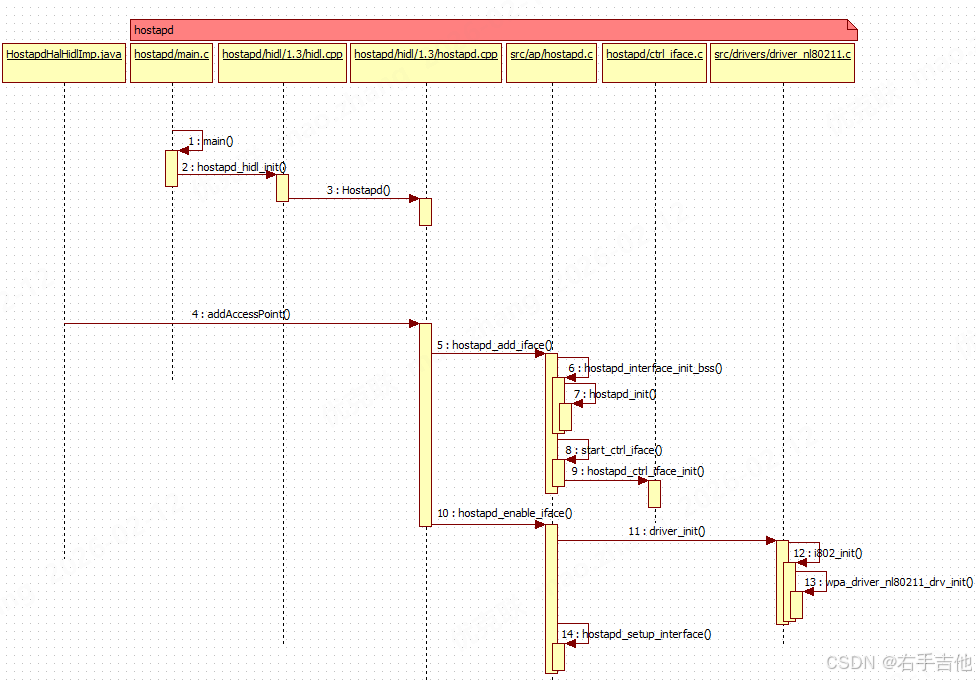
hostapd.cpp在external\\wpa_supplicant_8代码仓中,其中external\\wpa_supplicant_8为wifi开源代码。
参考相关网页https://w1.fi/wpa_supplicant/devel/index.html 查看hostapd相关架构图如下
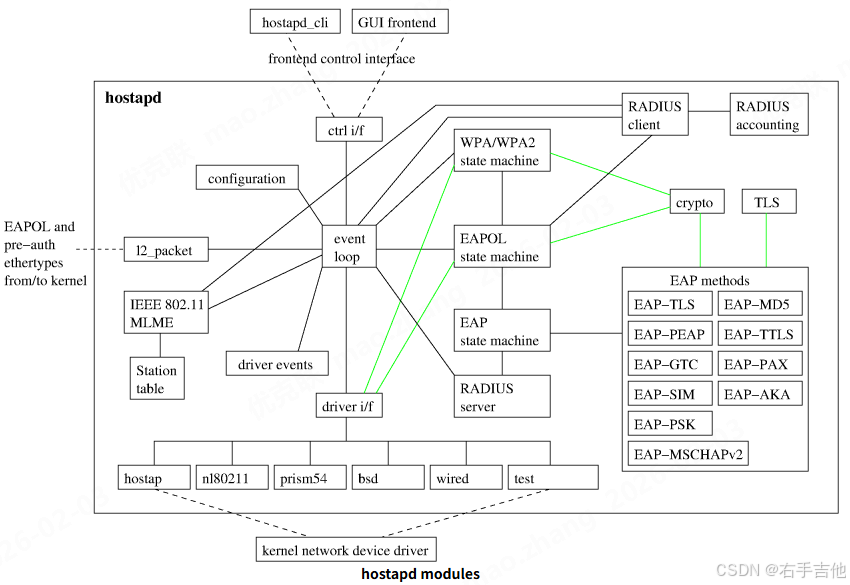
包含hostapd_cli和hostapd两个程序,hostapd_cli为控制程序,hostapd为热点实现程序。
其中hapd_interfaces为framework和Hidl交互的主要对象
struct hapd_interfaces {
int (*reload_config)(struct hostapd_iface *iface);
struct hostapd_config * (*config_read_cb)(const char *config_fname);
//hostapd_cli初始化函数指针
int (*ctrl_iface_init)(struct hostapd_data *hapd);
//hostapd_cli去初始化函数指针
void (*ctrl_iface_deinit)(struct hostapd_data *hapd);
int (*for_each_interface)(struct hapd_interfaces *interfaces,
int (*cb)(struct hostapd_iface *iface,
void *ctx), void *ctx);
//驱动交互函数指针
int (*driver_init)(struct hostapd_iface *iface);
size_t count;
int global_ctrl_sock;
struct dl_list global_ctrl_dst;
char *global_iface_path;
char *global_iface_name;
#ifdef CONFIG_CTRL_IFACE_HIDL
char *hidl_service_name;
#endif
#ifndef CONFIG_NATIVE_WINDOWS
gid_t ctrl_iface_group;
#endif /* CONFIG_NATIVE_WINDOWS */
struct hostapd_iface **iface;
size_t terminate_on_error;
#ifndef CONFIG_NO_VLAN
struct dynamic_iface *vlan_priv;
#endif /* CONFIG_NO_VLAN */
#ifdef CONFIG_ETH_P_OUI
struct dl_list eth_p_oui; /* OUI Extended EtherType handlers */
#endif /* CONFI
2、热点认证测试
— 带宽设置测试
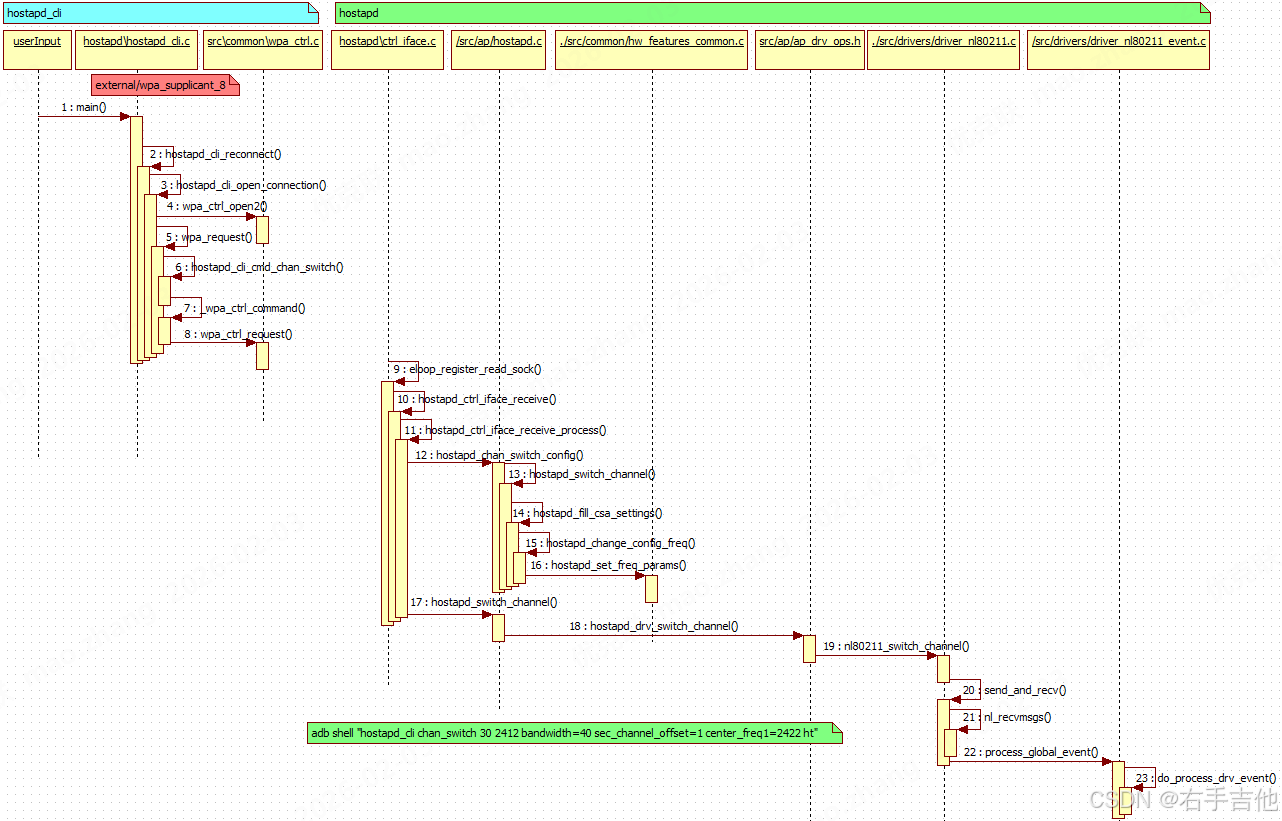
hostapd_cli chan_switch usage: <cs_count> <freq> [sec_channel_offset=] [center_freq1=] [center_freq2=] [bandwidth=] [blocktx] [ht|vht]
20MHz配置 adb shell "hostapd_cli chan_switch 30 5180 bandwidth=20 ht"
40MHz配置 adb shell "hostapd_cli chan_switch 30 2412 bandwidth=40 sec_channel_offset=1 center_freq1=2422 ht" adb shell "hostapd_cli chan_switch 30 5180 bandwidth=40 sec_channel_offset=1 center_freq1=5190 ht"
80MHz配置 adb shell "hostapd_cli chan_switch 30 5745 bandwidth=80 sec_channel_offset=1 center_freq1=5775 vht"
160MHz配置 adb shell "hostapd_cli chan_switch 30 5180 bandwidth=160 sec_channel_offset=1 center_freq1=5250 vht"
相关交互流程记录如下:
3、热点断开原因
在开发过程中经常出现热点断开的情况。可以参考如下网站
https://community.cisco.com/t5/wireless-mobility-knowledge-base/802-11-association-status-802-11-deauth-reason-codes/ta-p/3148055/page/2