前言
在软件开发的宏大叙事中,如果说 UI 组件是构筑界面的“砖石”,那么集合(Collections) 便是维系这些砖石的“砂浆”与“脚手架”。没有高效的数据容器,应用界面将沦为死板的静态堆砌,失去灵魂的律动。
在 OpenHarmony 生态快速崛起的今天,Flutter 作为跨端开发的利刃,其底层对数据的组织方式直接决定了应用在鸿蒙设备上的流畅度。Day 3 的第一站,我们将深入探讨 Dart 语言中最核心、最常用的数据结构——List(列表)。它不仅是构建动态歌单、商品流、社交消息的核心,更是理解有序存储哲学的基石。本篇将从内存逻辑、声明范式到实战应用,全方位剖析 List 的深度内涵。
目录
一、 序列的本质:有序存储的哲学内涵
List 在计算机科学中被称为“动态数组”或“向量”。它的核心精髓在于**“有序性”**。每一个元素(Element)在集合中都拥有一个唯一的、基于 0 开始的索引(Index)。
这种设计模仿了人类文明中“队列”的概念。从哲学的角度看,有序意味着可追溯、可定位。当我们在鸿蒙系统的音乐应用中滑动歌单时,这种有序性保证了用户能够按照预期的心理模型(从第一首到最后一首)进行交互。
1.1 List 的结构示意图
#mermaid-svg-Ylm3yVrm3v7GUox4{font-family:\”trebuchet ms\”,verdana,arial,sans-serif;font-size:16px;fill:#333;}@keyframes edge-animation-frame{from{stroke-dashoffset:0;}}@keyframes dash{to{stroke-dashoffset:0;}}#mermaid-svg-Ylm3yVrm3v7GUox4 .edge-animation-slow{stroke-dasharray:9,5!important;stroke-dashoffset:900;animation:dash 50s linear infinite;stroke-linecap:round;}#mermaid-svg-Ylm3yVrm3v7GUox4 .edge-animation-fast{stroke-dasharray:9,5!important;stroke-dashoffset:900;animation:dash 20s linear infinite;stroke-linecap:round;}#mermaid-svg-Ylm3yVrm3v7GUox4 .error-icon{fill:#552222;}#mermaid-svg-Ylm3yVrm3v7GUox4 .error-text{fill:#552222;stroke:#552222;}#mermaid-svg-Ylm3yVrm3v7GUox4 .edge-thickness-normal{stroke-width:1px;}#mermaid-svg-Ylm3yVrm3v7GUox4 .edge-thickness-thick{stroke-width:3.5px;}#mermaid-svg-Ylm3yVrm3v7GUox4 .edge-pattern-solid{stroke-dasharray:0;}#mermaid-svg-Ylm3yVrm3v7GUox4 .edge-thickness-invisible{stroke-width:0;fill:none;}#mermaid-svg-Ylm3yVrm3v7GUox4 .edge-pattern-dashed{stroke-dasharray:3;}#mermaid-svg-Ylm3yVrm3v7GUox4 .edge-pattern-dotted{stroke-dasharray:2;}#mermaid-svg-Ylm3yVrm3v7GUox4 .marker{fill:#333333;stroke:#333333;}#mermaid-svg-Ylm3yVrm3v7GUox4 .marker.cross{stroke:#333333;}#mermaid-svg-Ylm3yVrm3v7GUox4 svg{font-family:\”trebuchet ms\”,verdana,arial,sans-serif;font-size:16px;}#mermaid-svg-Ylm3yVrm3v7GUox4 p{margin:0;}#mermaid-svg-Ylm3yVrm3v7GUox4 .label{font-family:\”trebuchet ms\”,verdana,arial,sans-serif;color:#333;}#mermaid-svg-Ylm3yVrm3v7GUox4 .cluster-label text{fill:#333;}#mermaid-svg-Ylm3yVrm3v7GUox4 .cluster-label span{color:#333;}#mermaid-svg-Ylm3yVrm3v7GUox4 .cluster-label span p{background-color:transparent;}#mermaid-svg-Ylm3yVrm3v7GUox4 .label text,#mermaid-svg-Ylm3yVrm3v7GUox4 span{fill:#333;color:#333;}#mermaid-svg-Ylm3yVrm3v7GUox4 .node rect,#mermaid-svg-Ylm3yVrm3v7GUox4 .node circle,#mermaid-svg-Ylm3yVrm3v7GUox4 .node ellipse,#mermaid-svg-Ylm3yVrm3v7GUox4 .node polygon,#mermaid-svg-Ylm3yVrm3v7GUox4 .node path{fill:#ECECFF;stroke:#9370DB;stroke-width:1px;}#mermaid-svg-Ylm3yVrm3v7GUox4 .rough-node .label text,#mermaid-svg-Ylm3yVrm3v7GUox4 .node .label text,#mermaid-svg-Ylm3yVrm3v7GUox4 .image-shape .label,#mermaid-svg-Ylm3yVrm3v7GUox4 .icon-shape .label{text-anchor:middle;}#mermaid-svg-Ylm3yVrm3v7GUox4 .node .katex path{fill:#000;stroke:#000;stroke-width:1px;}#mermaid-svg-Ylm3yVrm3v7GUox4 .rough-node .label,#mermaid-svg-Ylm3yVrm3v7GUox4 .node .label,#mermaid-svg-Ylm3yVrm3v7GUox4 .image-shape .label,#mermaid-svg-Ylm3yVrm3v7GUox4 .icon-shape .label{text-align:center;}#mermaid-svg-Ylm3yVrm3v7GUox4 .node.clickable{cursor:pointer;}#mermaid-svg-Ylm3yVrm3v7GUox4 .root .anchor path{fill:#333333!important;stroke-width:0;stroke:#333333;}#mermaid-svg-Ylm3yVrm3v7GUox4 .arrowheadPath{fill:#333333;}#mermaid-svg-Ylm3yVrm3v7GUox4 .edgePath .path{stroke:#333333;stroke-width:2.0px;}#mermaid-svg-Ylm3yVrm3v7GUox4 .flowchart-link{stroke:#333333;fill:none;}#mermaid-svg-Ylm3yVrm3v7GUox4 .edgeLabel{background-color:rgba(232,232,232, 0.8);text-align:center;}#mermaid-svg-Ylm3yVrm3v7GUox4 .edgeLabel p{background-color:rgba(232,232,232, 0.8);}#mermaid-svg-Ylm3yVrm3v7GUox4 .edgeLabel rect{opacity:0.5;background-color:rgba(232,232,232, 0.8);fill:rgba(232,232,232, 0.8);}#mermaid-svg-Ylm3yVrm3v7GUox4 .labelBkg{background-color:rgba(232, 232, 232, 0.5);}#mermaid-svg-Ylm3yVrm3v7GUox4 .cluster rect{fill:#ffffde;stroke:#aaaa33;stroke-width:1px;}#mermaid-svg-Ylm3yVrm3v7GUox4 .cluster text{fill:#333;}#mermaid-svg-Ylm3yVrm3v7GUox4 .cluster span{color:#333;}#mermaid-svg-Ylm3yVrm3v7GUox4 div.mermaidTooltip{position:absolute;text-align:center;max-width:200px;padding:2px;font-family:\”trebuchet ms\”,verdana,arial,sans-serif;font-size:12px;background:hsl(80, 100%, 96.2745098039%);border:1px solid #aaaa33;border-radius:2px;pointer-events:none;z-index:100;}#mermaid-svg-Ylm3yVrm3v7GUox4 .flowchartTitleText{text-anchor:middle;font-size:18px;fill:#333;}#mermaid-svg-Ylm3yVrm3v7GUox4 rect.text{fill:none;stroke-width:0;}#mermaid-svg-Ylm3yVrm3v7GUox4 .icon-shape,#mermaid-svg-Ylm3yVrm3v7GUox4 .image-shape{background-color:rgba(232,232,232, 0.8);text-align:center;}#mermaid-svg-Ylm3yVrm3v7GUox4 .icon-shape p,#mermaid-svg-Ylm3yVrm3v7GUox4 .image-shape p{background-color:rgba(232,232,232, 0.8);padding:2px;}#mermaid-svg-Ylm3yVrm3v7GUox4 .icon-shape rect,#mermaid-svg-Ylm3yVrm3v7GUox4 .image-shape rect{opacity:0.5;background-color:rgba(232,232,232, 0.8);fill:rgba(232,232,232, 0.8);}#mermaid-svg-Ylm3yVrm3v7GUox4 .label-icon{display:inline-block;height:1em;overflow:visible;vertical-align:-0.125em;}#mermaid-svg-Ylm3yVrm3v7GUox4 .node .label-icon path{fill:currentColor;stroke:revert;stroke-width:revert;}#mermaid-svg-Ylm3yVrm3v7GUox4 :root{–mermaid-font-family:\”trebuchet ms\”,verdana,arial,sans-serif;}
List 内存布局 (有序索引)
索引 0: 歌曲 A
索引 1: 歌曲 B
索引 2: 歌曲 C
索引 3: 歌曲 D
二、 内存模型:可增长列表与固定长度列表的权衡
在 Dart 中,List 并非单一的实现,而是根据内存分配方式分为两种主要形态。这种区分体现了性能与灵活性的博弈。
2.1 可增长列表 (Growable List)
这是最常用的形态。它在内存中预留了一定的空间,当元素溢出时,系统会自动重新分配一块更大的空间并进行迁移。
- 优点:极致的灵活性,适合处理动态用户输入。
- 代价:扩容时存在微小的性能开销。
2.2 固定长度列表 (Fixed-length List)
通过 List.filled(length, fill, growable: false) 创建。
- 优点:内存开销恒定,访问速度极快,不会触发垃圾回收(GC)的频繁波动。
- 适用场景:已知数据总量且永不改变的静态场景。
2.3 内存特性对比表
| 内存分配 | 动态扩容 | 静态预留 |
| add() 操作 | 支持 | 抛出 UnsupportedError |
| remove() 操作 | 支持 | 不支持 |
| 性能等级 | 高 | 极高 (原生级) |
| 鸿蒙适配建议 | 适用于动态 Feed 流 | 适用于固定配置常量 |
三、 声明与初始化:构建数据序列的多维范式
Dart 提供了多种优雅的语法糖来初始化列表,开发者应根据语境选择最合适的表达方式。
3.1 声明范式详解
1. 字面量声明 (Literal Declaration)
这是最直观的方式,通常用于已知初始值的场景。
// 强类型声明,确保列表内只能存放字符串
List<String> cyberpunkSongs = ['Neon Dreams', 'Cyber Night', 'Silicon Soul'];
2. 空列表与泛型推导
用于需要动态填充数据的初始化。
var dynamicList = <int>[]; // 明确指定泛型为 int
3. 填充式声明
用于预设默认值。
// 创建一个长度为 5,初始值均为 "Pending" 的列表
List<String> taskStatus = List.filled(5, "Pending", growable: true);
4. 生成式构造 (Generator)
利用逻辑函数生成列表,非常适合数学计算或序列模拟。
// 生成 0 到 9 的平方数列
List<int> squares = List.generate(10, (index) => index * index);
四、 操作矩阵:增删改查的艺术与性能边界
掌握 List 的核心在于熟练运用其内置的方法论。这些操作不仅是逻辑的实现,更是代码美学的体现。
4.1 核心操作 API 表
| 增 | add(value) | 在序列末尾追加单一元素 | O(1) |
| 增 | insert(index, value) | 在指定缝隙插入元素(涉及元素后移) | O(n) |
| 删 | remove(value) | 按值进行匹配删除 | O(n) |
| 删 | removeAt(index) | 精确打击:按物理地址删除 | O(n) |
| 改 | list[index] = newValue | 直接物理覆盖 | O(1) |
| 查 | indexOf(value) | 检索值的物理索引位置 | O(n) |
| 查 | contains(value) | 探知序列中是否存在该值 | O(n) |
4.2 逻辑流转图
#mermaid-svg-8WiRnuEOnpcvOBZ1{font-family:\”trebuchet ms\”,verdana,arial,sans-serif;font-size:16px;fill:#333;}@keyframes edge-animation-frame{from{stroke-dashoffset:0;}}@keyframes dash{to{stroke-dashoffset:0;}}#mermaid-svg-8WiRnuEOnpcvOBZ1 .edge-animation-slow{stroke-dasharray:9,5!important;stroke-dashoffset:900;animation:dash 50s linear infinite;stroke-linecap:round;}#mermaid-svg-8WiRnuEOnpcvOBZ1 .edge-animation-fast{stroke-dasharray:9,5!important;stroke-dashoffset:900;animation:dash 20s linear infinite;stroke-linecap:round;}#mermaid-svg-8WiRnuEOnpcvOBZ1 .error-icon{fill:#552222;}#mermaid-svg-8WiRnuEOnpcvOBZ1 .error-text{fill:#552222;stroke:#552222;}#mermaid-svg-8WiRnuEOnpcvOBZ1 .edge-thickness-normal{stroke-width:1px;}#mermaid-svg-8WiRnuEOnpcvOBZ1 .edge-thickness-thick{stroke-width:3.5px;}#mermaid-svg-8WiRnuEOnpcvOBZ1 .edge-pattern-solid{stroke-dasharray:0;}#mermaid-svg-8WiRnuEOnpcvOBZ1 .edge-thickness-invisible{stroke-width:0;fill:none;}#mermaid-svg-8WiRnuEOnpcvOBZ1 .edge-pattern-dashed{stroke-dasharray:3;}#mermaid-svg-8WiRnuEOnpcvOBZ1 .edge-pattern-dotted{stroke-dasharray:2;}#mermaid-svg-8WiRnuEOnpcvOBZ1 .marker{fill:#333333;stroke:#333333;}#mermaid-svg-8WiRnuEOnpcvOBZ1 .marker.cross{stroke:#333333;}#mermaid-svg-8WiRnuEOnpcvOBZ1 svg{font-family:\”trebuchet ms\”,verdana,arial,sans-serif;font-size:16px;}#mermaid-svg-8WiRnuEOnpcvOBZ1 p{margin:0;}#mermaid-svg-8WiRnuEOnpcvOBZ1 .label{font-family:\”trebuchet ms\”,verdana,arial,sans-serif;color:#333;}#mermaid-svg-8WiRnuEOnpcvOBZ1 .cluster-label text{fill:#333;}#mermaid-svg-8WiRnuEOnpcvOBZ1 .cluster-label span{color:#333;}#mermaid-svg-8WiRnuEOnpcvOBZ1 .cluster-label span p{background-color:transparent;}#mermaid-svg-8WiRnuEOnpcvOBZ1 .label text,#mermaid-svg-8WiRnuEOnpcvOBZ1 span{fill:#333;color:#333;}#mermaid-svg-8WiRnuEOnpcvOBZ1 .node rect,#mermaid-svg-8WiRnuEOnpcvOBZ1 .node circle,#mermaid-svg-8WiRnuEOnpcvOBZ1 .node ellipse,#mermaid-svg-8WiRnuEOnpcvOBZ1 .node polygon,#mermaid-svg-8WiRnuEOnpcvOBZ1 .node path{fill:#ECECFF;stroke:#9370DB;stroke-width:1px;}#mermaid-svg-8WiRnuEOnpcvOBZ1 .rough-node .label text,#mermaid-svg-8WiRnuEOnpcvOBZ1 .node .label text,#mermaid-svg-8WiRnuEOnpcvOBZ1 .image-shape .label,#mermaid-svg-8WiRnuEOnpcvOBZ1 .icon-shape .label{text-anchor:middle;}#mermaid-svg-8WiRnuEOnpcvOBZ1 .node .katex path{fill:#000;stroke:#000;stroke-width:1px;}#mermaid-svg-8WiRnuEOnpcvOBZ1 .rough-node .label,#mermaid-svg-8WiRnuEOnpcvOBZ1 .node .label,#mermaid-svg-8WiRnuEOnpcvOBZ1 .image-shape .label,#mermaid-svg-8WiRnuEOnpcvOBZ1 .icon-shape .label{text-align:center;}#mermaid-svg-8WiRnuEOnpcvOBZ1 .node.clickable{cursor:pointer;}#mermaid-svg-8WiRnuEOnpcvOBZ1 .root .anchor path{fill:#333333!important;stroke-width:0;stroke:#333333;}#mermaid-svg-8WiRnuEOnpcvOBZ1 .arrowheadPath{fill:#333333;}#mermaid-svg-8WiRnuEOnpcvOBZ1 .edgePath .path{stroke:#333333;stroke-width:2.0px;}#mermaid-svg-8WiRnuEOnpcvOBZ1 .flowchart-link{stroke:#333333;fill:none;}#mermaid-svg-8WiRnuEOnpcvOBZ1 .edgeLabel{background-color:rgba(232,232,232, 0.8);text-align:center;}#mermaid-svg-8WiRnuEOnpcvOBZ1 .edgeLabel p{background-color:rgba(232,232,232, 0.8);}#mermaid-svg-8WiRnuEOnpcvOBZ1 .edgeLabel rect{opacity:0.5;background-color:rgba(232,232,232, 0.8);fill:rgba(232,232,232, 0.8);}#mermaid-svg-8WiRnuEOnpcvOBZ1 .labelBkg{background-color:rgba(232, 232, 232, 0.5);}#mermaid-svg-8WiRnuEOnpcvOBZ1 .cluster rect{fill:#ffffde;stroke:#aaaa33;stroke-width:1px;}#mermaid-svg-8WiRnuEOnpcvOBZ1 .cluster text{fill:#333;}#mermaid-svg-8WiRnuEOnpcvOBZ1 .cluster span{color:#333;}#mermaid-svg-8WiRnuEOnpcvOBZ1 div.mermaidTooltip{position:absolute;text-align:center;max-width:200px;padding:2px;font-family:\”trebuchet ms\”,verdana,arial,sans-serif;font-size:12px;background:hsl(80, 100%, 96.2745098039%);border:1px solid #aaaa33;border-radius:2px;pointer-events:none;z-index:100;}#mermaid-svg-8WiRnuEOnpcvOBZ1 .flowchartTitleText{text-anchor:middle;font-size:18px;fill:#333;}#mermaid-svg-8WiRnuEOnpcvOBZ1 rect.text{fill:none;stroke-width:0;}#mermaid-svg-8WiRnuEOnpcvOBZ1 .icon-shape,#mermaid-svg-8WiRnuEOnpcvOBZ1 .image-shape{background-color:rgba(232,232,232, 0.8);text-align:center;}#mermaid-svg-8WiRnuEOnpcvOBZ1 .icon-shape p,#mermaid-svg-8WiRnuEOnpcvOBZ1 .image-shape p{background-color:rgba(232,232,232, 0.8);padding:2px;}#mermaid-svg-8WiRnuEOnpcvOBZ1 .icon-shape rect,#mermaid-svg-8WiRnuEOnpcvOBZ1 .image-shape rect{opacity:0.5;background-color:rgba(232,232,232, 0.8);fill:rgba(232,232,232, 0.8);}#mermaid-svg-8WiRnuEOnpcvOBZ1 .label-icon{display:inline-block;height:1em;overflow:visible;vertical-align:-0.125em;}#mermaid-svg-8WiRnuEOnpcvOBZ1 .node .label-icon path{fill:currentColor;stroke:revert;stroke-width:revert;}#mermaid-svg-8WiRnuEOnpcvOBZ1 :root{–mermaid-font-family:\”trebuchet ms\”,verdana,arial,sans-serif;}
是
否
原始列表
add: 末尾新增
contains: 是否存在?
indexOf: 获取位置
保持现状
removeAt: 精准移除
输出净化后的列表
五、 实战解析:基于音乐库的序列化 UI 映射
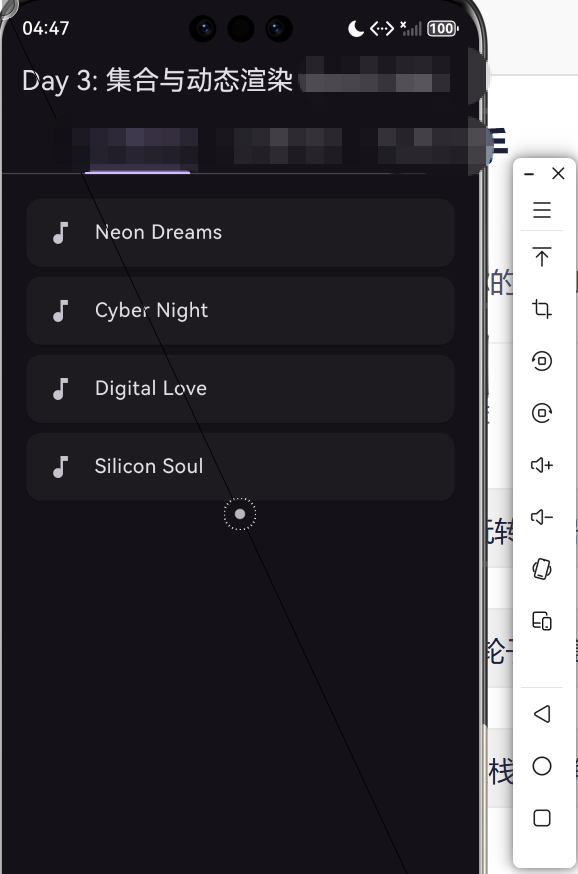
在 Day 3 的实战 Demo 中,我们通过 lib/main.dart 展示了如何将一个 List<String> 转化为 Flutter 的 ListView 单元。
5.1 核心代码逻辑深度解读
// 1. 数据层:模拟从鸿蒙分布式数据库获取的歌单
List<String> songs = ['未来已来', '星河璀璨', '万物互联', '鸿蒙初开'];
// 2. 逻辑转换:将数据流转化为 Widget 流
// 利用 map 算子进行高阶映射,将每一个 String 包装进 Card 组件
List<Widget> songCards = songs.map((song) => Card(
elevation: 4,
margin: const EdgeInsets.symmetric(vertical: 8),
child: ListTile(
leading: const Icon(Icons.music_note, color: Colors.blueAccent),
title: Text(song, style: const TextStyle(fontWeight: FontWeight.bold)),
trailing: const Icon(Icons.play_arrow),
onTap: () => print('播放: $song'),
),
)).toList(); // 关键:必须调用 toList() 将 Iterable 转回 List
5.2 渲染机制解析
Flutter 的 Column 或 ListView 接收一个 children: List<Widget> 参数。通过上述代码,我们实现了**“数据驱动 UI”**的闭环。当列表中的数据发生变化时,UI 能够通过响应式机制进行同步更新。
六、 总结:数据有序性对鸿蒙生态体验的价值
在构建万物互联的鸿蒙生态(HarmonyOS Next)时,数据的组织方式已不再仅仅是程序员的内部逻辑,它关乎到用户对交互边界的感知。List 所代表的有序序列,是人类认知世界最直观的方式之一。
通过对 List 的深度掌控,我们不仅能够实现高效的 UI 渲染,更能利用其物理存储的连续性,配合鸿蒙系统的底层预加载机制(Pre-fetch),实现从数据加载到界面呈现的无缝衔接。开发者应当铭记:优秀的代码,始于对基础数据结构的敬畏;而卓越的应用,成于对有序逻辑的极致追求。
- 开源鸿蒙跨平台社区: https://openharmonycrossplatform.csdn.net