目录
- 一、常见方案分析
-
- 1.1 Loading状态方案
- 1.2 请求标记方案
- 1.3 防抖/节流方案
- 1.4 请求拦截器方案
- 1.5 React Hooks方案
- 二、综合方案建议
- 三、使用建议和总结
-
- 3.1 方案选择建议
- 3.2 最佳实践总结
- 3.3 总结
一、常见方案分析
1.1 Loading状态方案
// 方案1: 按钮Loading状态
class RequestController {
constructor() {
this.loading = false;
}
async fetchData(params) {
if (this.loading) {
console.log('请求正在进行中,请稍后…');
return;
}
try {
this.loading = true;
// 显示loading UI
this.showLoading();
const response = await axios.get('/api/data', { params });
return response.data;
} catch (error) {
console.error('请求失败:', error);
throw error;
} finally {
this.loading = false;
// 隐藏loading UI
this.hideLoading();
}
}
showLoading() {
// 显示全局loading或按钮loading
}
hideLoading() {
// 隐藏loading
}
}
优点:
-
实现简单,用户体验直观
-
能有效防止重复点击
-
适用于按钮点击场景
缺点:
-
无法防止并行多个不同请求
-
需要手动管理loading状态
-
页面多个按钮需要分别处理
1.2 请求标记方案
// 方案2: 请求唯一标识
class RequestMarker {
constructor() {
this.pendingRequests = new Map();
}
async request(url, config = {}) {
const requestKey = this.generateKey(url, config.params || config.data);
// 检查是否已有相同请求
if (this.pendingRequests.has(requestKey)) {
// 可选:返回已有请求的Promise
return this.pendingRequests.get(requestKey);
}
// 创建新的请求
const requestPromise = axios({
url,
...config,
}).finally(() => {
// 请求完成后移除标记
this.pendingRequests.delete(requestKey);
});
// 存储请求
this.pendingRequests.set(requestKey, requestPromise);
return requestPromise;
}
generateKey(url, params) {
const sortedParams = params ?
Object.keys(params).sort().map(key => `${key}=${params[key]}`).join('&') : '';
return `${url}?${sortedParams}`;
}
// 手动取消特定请求
cancelRequest(url, params) {
const key = this.generateKey(url, params);
if (this.pendingRequests.has(key)) {
// 实际项目中可能需要使用axios的cancel token
this.pendingRequests.delete(key);
}
}
}
优点:
-
精确控制重复请求
-
可复用已有请求Promise
-
支持请求取消
缺点:
-
实现相对复杂
-
需要维护请求映射表
-
内存占用需要考虑
1.3 防抖/节流方案
// 方案3: 防抖请求
class DebounceRequest {
constructor(wait = 500) {
this.timer = null;
this.lastRequestTime = 0;
}
// 防抖版本
debounceRequest(url, params, wait = 500) {
return new Promise((resolve, reject) => {
if (this.timer) {
clearTimeout(this.timer);
}
this.timer = setTimeout(async () => {
try {
const response = await axios.get(url, { params });
resolve(response.data);
} catch (error) {
reject(error);
}
}, wait);
});
}
// 节流版本
throttleRequest(url, params, interval = 1000) {
return new Promise((resolve, reject) => {
const now = Date.now();
if (now – this.lastRequestTime < interval) {
console.log('请求过于频繁');
reject(new Error('请求过于频繁'));
return;
}
this.lastRequestTime = now;
axios.get(url, { params })
.then(response => resolve(response.data))
.catch(error => reject(error));
});
}
}
优点:
-
有效控制请求频率
-
减少服务器压力
-
适用于搜索框等高频场景
缺点:
-
可能延迟必要请求
-
不适合所有场景
-
需要合理设置时间间隔
1.4 请求拦截器方案
// 方案4: 拦截器全局控制
class AxiosInterceptor {
constructor() {
this.pendingRequests = new Map();
this.setupInterceptors();
}
setupInterceptors() {
// 请求拦截器
axios.interceptors.request.use(config => {
// 生成请求唯一标识
const requestKey = this.generateRequestKey(config);
// 取消重复请求
if (this.pendingRequests.has(requestKey)) {
config.cancelToken = new axios.CancelToken(cancel => {
cancel('重复请求,已取消');
});
} else {
// 存储cancel函数
config.cancelToken = config.cancelToken || new axios.CancelToken(cancel => {
this.pendingRequests.set(requestKey, cancel);
});
}
return config;
});
// 响应拦截器
axios.interceptors.response.use(
response => {
// 请求完成后移除
const requestKey = this.generateRequestKey(response.config);
this.pendingRequests.delete(requestKey);
return response;
},
error => {
if (axios.isCancel(error)) {
console.log('请求被取消:', error.message);
return Promise.reject(error);
}
// 错误时也移除请求
if (error.config) {
const requestKey = this.generateRequestKey(error.config);
this.pendingRequests.delete(requestKey);
}
return Promise.reject(error);
}
);
}
generateRequestKey(config) {
const { method, url, params, data } = config;
let key = `${method}–${url}`;
if (params) {
key += `–${JSON.stringify(params)}`;
}
if (data) {
key += `–${JSON.stringify(data)}`;
}
return key;
}
// 取消所有pending请求
cancelAllRequests() {
this.pendingRequests.forEach(cancel => {
cancel();
});
this.pendingRequests.clear();
}
}
优点:
-
全局统一处理
-
与业务代码解耦
-
支持精细化控制
缺点:
-
配置复杂
-
可能影响正常请求
-
需要处理边界情况
1.5 React Hooks方案
// 方案5: React自定义Hook
import { useRef, useState, useCallback } from 'react';
function usePreventDuplicateRequest() {
const [loading, setLoading] = useState(false);
const requestRef = useRef(null);
const pendingRequests = useRef(new Map());
// 带loading的请求
const requestWithLoading = useCallback(async (requestFn, ...args) => {
if (loading) {
console.log('已有请求在进行中');
return;
}
setLoading(true);
try {
const result = await requestFn(...args);
return result;
} finally {
setLoading(false);
}
}, [loading]);
// 防重复请求
const requestWithPrevention = useCallback(async (key, requestFn, ...args) => {
// 检查是否有相同请求
if (pendingRequests.current.has(key)) {
console.log('重复请求,使用缓存');
return pendingRequests.current.get(key);
}
try {
const requestPromise = requestFn(...args);
pendingRequests.current.set(key, requestPromise);
const result = await requestPromise;
return result;
} finally {
pendingRequests.current.delete(key);
}
}, []);
// 防抖请求
const debounceRequest = useCallback((requestFn, delay = 500) => {
return debounce(requestFn, delay);
}, []);
return {
loading,
requestWithLoading,
requestWithPrevention,
debounceRequest,
};
}
// 使用示例
function SearchComponent() {
const { loading, requestWithLoading } = usePreventDuplicateRequest();
const handleSearch = async (keyword) => {
return requestWithLoading(
() => axios.get('/api/search', { params: { q: keyword } })
);
};
return (
<div>
<button
onClick={handleSearch}
disabled={loading}
>
{loading ? '搜索中…' : '搜索'}
</button>
</div>
);
}
二、综合方案建议
推荐实现:分层防重复策略
// 综合方案:分层防重复
class ComprehensiveRequestManager {
constructor(options = {}) {
this.options = {
enableLoading: true,
enableDebounce: true,
enableRequestDedupe: true,
debounceTime: 300,
...options
};
this.loadingStates = new Map();
this.pendingRequests = new Map();
this.debounceTimers = new Map();
}
// 核心请求方法
async request(config) {
const {
url,
method = 'GET',
params,
data,
requestId,
showLoading = true,
useDebounce = false,
} = config;
// 1. 生成请求唯一标识
const requestKey = requestId || this.generateRequestKey({ url, method, params, data });
// 2. 防抖处理
if (useDebounce && this.options.enableDebounce) {
return this.debounceRequest(requestKey, () =>
this.executeRequest(requestKey, config, showLoading)
);
}
// 3. 直接执行请求
return this.executeRequest(requestKey, config, showLoading);
}
// 执行请求
async executeRequest(requestKey, config, showLoading) {
// 检查重复请求
if (this.options.enableRequestDedupe && this.pendingRequests.has(requestKey)) {
console.log(`请求 ${requestKey} 已存在,返回已有Promise`);
return this.pendingRequests.get(requestKey);
}
// 显示loading
if (showLoading && this.options.enableLoading) {
this.setLoading(requestKey, true);
}
try {
// 创建请求Promise
const requestPromise = axios({
...config,
cancelToken: new axios.CancelToken(cancel => {
// 存储cancel函数
this.pendingRequests.set(requestKey, { promise: requestPromise, cancel });
})
});
const response = await requestPromise;
return response.data;
} catch (error) {
if (!axios.isCancel(error)) {
console.error('请求失败:', error);
}
throw error;
} finally {
// 清理工作
this.pendingRequests.delete(requestKey);
if (showLoading && this.options.enableLoading) {
this.setLoading(requestKey, false);
}
}
}
// 防抖请求
debounceRequest(key, requestFn) {
return new Promise((resolve, reject) => {
// 清除已有定时器
if (this.debounceTimers.has(key)) {
clearTimeout(this.debounceTimers.get(key));
}
// 设置新定时器
const timer = setTimeout(async () => {
try {
const result = await requestFn();
resolve(result);
} catch (error) {
reject(error);
} finally {
this.debounceTimers.delete(key);
}
}, this.options.debounceTime);
this.debounceTimers.set(key, timer);
});
}
// 工具方法
generateRequestKey(config) {
const { url, method, params, data } = config;
return `${method.toUpperCase()}:${url}:${JSON.stringify(params)}:${JSON.stringify(data)}`;
}
setLoading(key, isLoading) {
this.loadingStates.set(key, isLoading);
// 触发loading状态变化事件
this.onLoadingChange(key, isLoading);
}
onLoadingChange(key, isLoading) {
// 可以在这里实现loading UI更新
console.log(`Loading状态变化: ${key} -> ${isLoading}`);
}
// 取消请求
cancelRequest(key) {
if (this.pendingRequests.has(key)) {
const { cancel } = this.pendingRequests.get(key);
cancel(`手动取消请求: ${key}`);
this.pendingRequests.delete(key);
}
}
// 取消所有请求
cancelAllRequests() {
this.pendingRequests.forEach(({ cancel }, key) => {
cancel(`取消所有请求: ${key}`);
});
this.pendingRequests.clear();
}
}
三、使用建议和总结
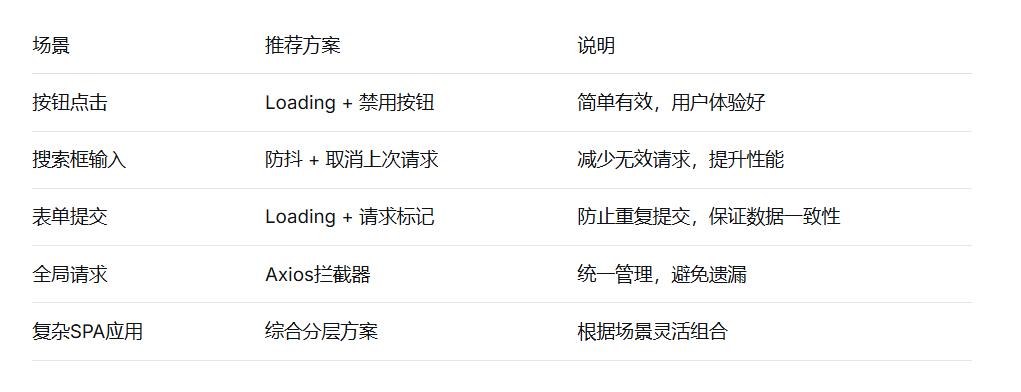
3.1 方案选择建议
3.2 最佳实践总结
分层防御策略:
-
UI层:按钮loading和禁用状态
-
网络层:请求拦截和取消
-
业务层:防抖/节流控制
关键注意事项:
-
区分重复请求和并行请求的业务需求
-
考虑请求失败的重试机制
-
注意内存泄漏,及时清理请求缓存
-
提供手动取消请求的接口
性能优化建议:
-
对于相同请求,考虑使用Promise缓存
-
合理设置防抖时间(通常300-500ms)
-
监控并限制最大并发请求数
3.3 总结
防止接口重复请求是一个系统工程,需要根据具体业务场景选择合适的方案组合。建议:
-
基础防护:使用按钮loading状态,这是最直接的用户反馈
-
核心防护:实现请求拦截和去重,这是技术保障
-
增强防护:根据业务特点添加防抖/节流等优化策略
-
监控反馈:添加请求日志,便于问题排查和优化
在实际项目中,建议采用综合分层方案,既保证用户体验,又确保系统稳定性,同时为后续扩展留出空间。