1.按键修饰符
键盘回车监听:
<!DOCTYPE html>
<html lang="en">
<head>
<meta charset="UTF-8">
<meta name="viewport" content="width=device-width, initial-scale=1.0">
<title>Document</title>
</head>
<!– ① 按键修饰符 @keyup.enter 键盘回车监听–>
<body>
<div id="app">
<h3>@keyup.enter -> 监听键盘回车事件</h3>
<input @keyup.enter="fn" v-model="username" type="text">
</div>
<script src="vue.js"></script>
<script>
const vue = new Vue({
el: "#app",
data: {
username: ''
},
methods: {
fn(e) { // e就是事件对象
console.log(this.username)
// if (e.key === 'Enter') { // e.key 获取当前按下的键 ‘Enter’ 回车键
// console.log(this.username)
// }
}
}
})
</script>
</body>
</html>
2.v-model修饰符:
1.v-model.trim(去除首尾空格):
2.v-model.number(把字符串类型数字转换为数字):
<!DOCTYPE html>
<html lang="en">
<head>
<meta charset="UTF-8">
<meta name="viewport" content="width=device-width, initial-scale=1.0">
<title>Document</title>
<style>
.father {
width: 200px;
height: 200px;
background-color: pink;
margin-top: 20px;
}
.son {
width: 100px;
height: 100px;
background-color: skyblue;
}
</style>
</head>
<body>
<div id="app">
<!– v-model.trim去除文本前后空格 –>
<!– v-model.number是将字符串类型的数字装换为数字 –>
姓名: <input type="text" v-model.trim="username"> <br>
年龄: <input type="text" v-model.number="age"><br>
</div>
<script src="vue.js"></script>
<script>
const vue = new Vue({
el: "#app",
data: {
username: '',
age: ''
},
})
</script>
</body>
</html>
3.事件修饰符:
1.@事件名.stop → 阻止冒泡
2.@事件名.prevent
<!DOCTYPE html>
<html lang="en">
<head>
<meta charset="UTF-8">
<meta name="viewport" content="width=device-width, initial-scale=1.0">
<title>Document</title>
<style>
.father {
width: 200px;
height: 200px;
background-color: pink;
margin-top: 20px;
}
.son {
width: 100px;
height: 100px;
background-color: skyblue;
}
</style>
</head>
<body>
<div id="app">
<h3>@事件名.prevent</h3>
<div class="father" @click="fatherFn">
<div class="son" @click.stop="sonFn">儿子</div>
</div>
<!– 阻止事件的传播行为,prevent阻止时间的传播,点击不会跳转页面 –>
<h3>@事件名.prevent->阻止事件的传播行为</h3>
<a @click.prevent href="http://www.baidu.com">阻止事件的传播行为</a>
</div>
<script src="vue.js"></script>
<script>
const vue = new Vue({
el: "#app",
methods: {
fatherFn() {
alert('父div被点击了')
},
sonFn() {
e.stopPropagation()
alert('子div被点击了')
}
}
})
</script>
</body>
</html>
点击超链接阻止事件的传播行为不会跳转到百度的页面。而阻止冒泡就是点击儿子区域的触发事件回传播给父亲,stop就封装了e.stopPropagation方法。
4:v-bind指令
1:修改div样式:
<!DOCTYPE html>
<html lang="en">
<head>
<meta charset="UTF-8">
<meta name="viewport" content="width=device-width, initial-scale=1.0">
<title>Document</title>
<style>
.box {
width: 200px;
height: 200px;
border: 3px solid #000;
font-size: 30px;
margin-top: 10px;
}
.color {
background-color: blue;
}
.big {
width: 300px;
height: 300px;
}
.color1{
background-color: red;
}
</style>
</head>
<body>
<div id="app">
<!– 对象的写法: 在当前的div上激活color big的类样式,v-bind进行动态样式增强 –>
<div class="box" :class="{color:true,big:false}">盒子1</div>
<!– 适用场景:一个类样式,来回切换,键是类名,值就是布尔值 –>
<!– 数组的写法: 在当前的div上激活color big的类样式 –>
<div class="box" :class="['color1','big']">盒子2</div>
<!– 适用场景:批量添加或删除类样式 –>
</div>
</body>
<script src="vue.js"></script>
<script>
const vue = new Vue({
el: "#app",
})
</script>
</html>
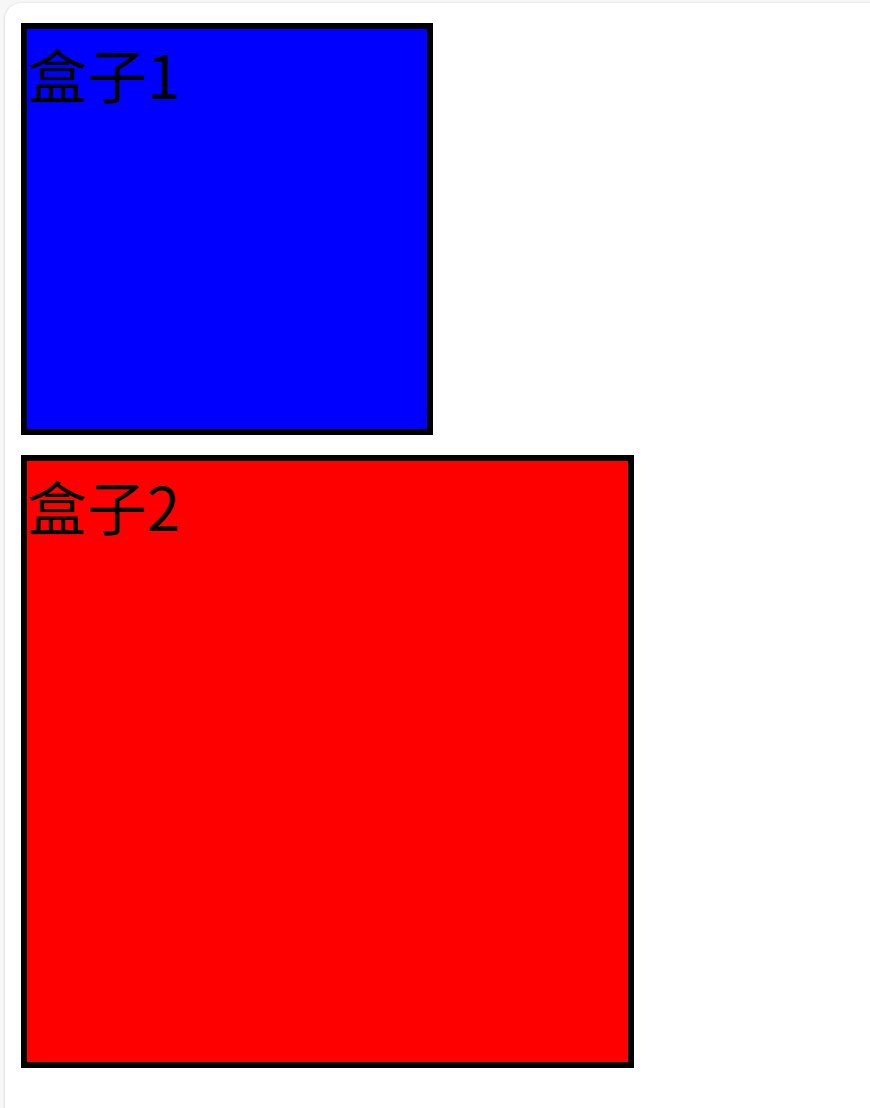
有运行结果可以看到v-bind指令可以由两种方式改变div的样式,请读者仔细阅读注释。