HBase与MR整合
三种情况:
hdfs->MR->hbase
从HDFS读取数据, MR计算,结果存储于hbas
需求:从HDFS读取/user/local/hello.txt, MR计算之后,将结果写到hbase的wordcount表中。
1、在hbase上添加表,hdfs上传源数据
hbase(main):001:0> create 'wordcount', 'cf'
#Hdfs上输出准备
[root@node3 ~]# for i in `seq 100000`; do echo "hello bjsxt $i" >>hello.txt;done
[root@node3 ~]# hdfs dfs -mkdir /user/local
[root@node3 ~]# hdfs dfs -put hello.txt
2、创建Maven项目并修改pom.xml添加依赖
<properties>
<project.build.sourceEncoding>UTF-8</project.build.sourceEncoding>
<hadoop.version>3.1.3</hadoop.version>
<mapreduce.version>3.1.3</mapreduce.version>
<hbase.version>2.0.5</hbase.version>
</properties>
<dependencies>
<!– hadoop-hdfs –>
<dependency>
<groupId>org.apache.hadoop</groupId>
<artifactId>hadoop-common</artifactId>
<version>${hadoop.version}</version>
</dependency>
<dependency>
<groupId>org.apache.hadoop</groupId>
<artifactId>hadoop-hdfs</artifactId>
<version>${hadoop.version}</version>
</dependency>
<dependency>
<groupId>org.apache.hadoop</groupId>
<artifactId>hadoop-hdfs-client</artifactId>
<version>${hadoop.version}</version>
</dependency>
<!– hadoop-mapreduce –>
<dependency>
<groupId>org.apache.hadoop</groupId>
<artifactId>hadoop-mapreduce-client-core</artifactId>
<version>${mapreduce.version}</version>
</dependency>
<dependency>
<groupId>org.apache.hadoop</groupId>
<artifactId>hadoop-mapreduce-client-jobclient</artifactId>
<version>${mapreduce.version}</version> <scope>provided</scope>
</dependency>
<dependency>
<groupId>org.apache.hadoop</groupId>
<artifactId>hadoop-mapreduce-client-common</artifactId>
<version>${mapreduce.version}</version>
</dependency>
<!– hbase –>
<dependency>
<groupId>org.apache.hbase</groupId>
<artifactId>hbase-client</artifactId>
<version>${hbase.version}</version>
</dependency>
<dependency>
<groupId>org.apache.hbase</groupId>
<artifactId>hbase-common</artifactId>
<version>${hbase.version}</version>
</dependency>
<dependency>
<groupId>org.apache.hbase</groupId>
<artifactId>hbase</artifactId>
<version>${hbase.version}</version>
<type>pom</type>
</dependency>
<dependency>
<groupId>org.apache.hbase</groupId>
<artifactId>hbase-server</artifactId>
<version>${hbase.version}</version>
</dependency>
<dependency>
<groupId>org.apache.hbase</groupId>
<artifactId>hbase-mapreduce</artifactId>
<version>${hbase.version}</version>
</dependency>
<dependency>
<groupId>junit</groupId>
<artifactId>junit</artifactId>
<version>4.13.2</version>
<scope>compile</scope>
</dependency>
</dependencies>
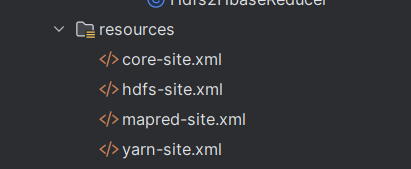
3、将hadoop-config下的四个hadoop配置文件拷贝到当前项目的resources 目录下。
4、Mapper类: Hdfs2HbaseMapper:
package com.wusen.hdfs2hbase;
import org.apache.hadoop.io.IntWritable;
import org.apache.hadoop.io.LongWritable;
import org.apache.hadoop.io.Text;
import org.apache.hadoop.mapreduce.Mapper;
import java.io.IOException;
public class Hdfs2HbaseMapper extends Mapper<LongWritable,Text, Text, IntWritable> {
//定义输出的key
private Text outKey = new Text();
//定义输出的value
private IntWritable outVal = new IntWritable(1);
@Override
protected void map(LongWritable key, Text value, Mapper<LongWritable, Text, Text, IntWritable>.Context context) throws IOException, InterruptedException {
//将读取的内容安装空格进行拆分
String[] words = value.toString().split(" ");
//遍历words,执行向外输出
for(String word:words) {
//将word封装到outKey中
outKey.set(word);
//输出
context.write(outKey, outVal);
}
}
}
5、Hdfs2HbaseReducer:
package com.wusen.hdfs2hbase;
import org.apache.hadoop.hbase.client.Mutation;
import org.apache.hadoop.hbase.client.Put;
import org.apache.hadoop.hbase.mapreduce.TableReducer;
import org.apache.hadoop.hbase.util.Bytes;
import org.apache.hadoop.io.IntWritable;
import org.apache.hadoop.io.Text;
import org.apache.hadoop.mapreduce.Reducer;
import java.io.IOException;
public class Hdfs2HbaseReducer extends TableReducer<Text, IntWritable, Text> {
@Override
protected void reduce(Text key, Iterable<IntWritable> values, Reducer<Text, IntWritable, Text, Mutation>.Context context) throws IOException, InterruptedException {
//定义变量sum,表示当前单词出现的总次数
int sum = 0;
//遍历values
for (IntWritable value : values) {
sum += value.get();
}
//创建Put类的对象 ,单词左右rowkey
//Put put = new Put(Bytes.toBytes(key.toString()));
Put put = new Put(key.toString().getBytes());
//为put指定列
put.addColumn("cf".getBytes(), "count".getBytes(), Bytes.toBytes(sum));
//输出
context.write(key, put);
}
}
6、主入口类: Hdfs2HbaseMain
package com.wusen.hdfs2hbase;
import org.apache.hadoop.conf.Configuration;
import org.apache.hadoop.fs.Path;
import org.apache.hadoop.hbase.mapreduce.TableMapReduceUtil;
import org.apache.hadoop.io.IntWritable;
import org.apache.hadoop.io.Text;
import org.apache.hadoop.mapreduce.Job;
import org.apache.hadoop.mapreduce.lib.input.FileInputFormat;
import java.io.IOException;
public class Hdfs2HbaseMain
{
public static void main( String[] args ) throws IOException, InterruptedException, ClassNotFoundException {
Configuration conf = new Configuration(true);
//设置本地运行
conf.set("mapreduce.framework.name" ,"local");
//指定hbase的zk集群
conf.set("hbase.zookeeper.quorum" ,"node2,node3 ,node4");
//创建job对象
Job job = Job.getInstance(conf, "hdfs2hbase demo");
//指定入口类
job.setJarByClass(Hdfs2HbaseMain.class);
//指定输入文件路径
FileInputFormat.addInputPath(job,new Path("/user/local/hello.txt"));
//指定Mapper相关属性
job.setMapOutputKeyClass(Text.class);
job.setMapOutputValueClass(IntWritable.class);
job.setMapperClass(Hdfs2HbaseMapper.class);
//指定Reducer类,以及处理后的数据放入到Hbase的哪种表中
TableMapReduceUtil.initTableReducerJob( "wordcount",//表名称
Hdfs2HbaseReducer.class,//指定Reducer类
job,//指定作业的job对象
null,null,null,null,
false//false表示不需要将依赖的jar上传到集群
);
//提交作业
job.waitForCompletion(true);
}
}
7、运行程序后查看结果

hbase ->MR->hdfs
从hbase读取数据,经过MR计算,将结果存储于hdfs
需求:将sentence表中的数据,经过MR统计单词数量后保存到HDFS上。
1、创建句子表:sentence
hbase(main):002:0> create 'sentence','cf'
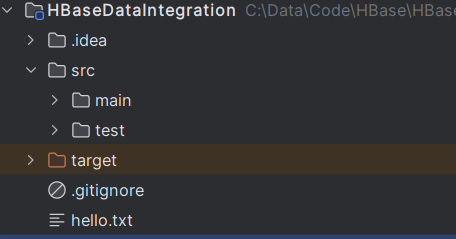
2、将hello.txt文件下载到本地,并添加到项目目录下
3、编写InsertSentence 类(用于将hello.txt文件中的内容添加到HBase的sentence表中)
package com.wusen.hbase2hdfs;
import org.apache.hadoop.conf.Configuration;
import org.apache.hadoop.hbase.HBaseConfiguration;
import org.apache.hadoop.hbase.TableName;
import org.apache.hadoop.hbase.client.Connection;
import org.apache.hadoop.hbase.client.ConnectionFactory;
import org.apache.hadoop.hbase.client.Put;
import org.apache.hadoop.hbase.client.Table;
import org.apache.hadoop.hbase.util.Bytes;
import org.junit.After;
import org.junit.Before;
import org.junit.Test;
import java.io.BufferedReader;
import java.io.File;
import java.io.FileReader;
import java.io.IOException;
import java.util.ArrayList;
import java.util.List;
public class InsertSentence {
//定义连接对象
private Connection connection;
//定义Table对象
private Table table;
@Before
public void before() throws IOException {
//构造conf对象
Configuration conf = HBaseConfiguration.create();
//设置hbase用到的zk集群
conf.set("hbase.zookeeper.quorum" ,"node2,node3,node4");
//获取连接对象
connection = ConnectionFactory.createConnection(conf);
//获取表的DML对象
table = connection.getTable(TableName.valueOf("sentence"));
}
@After
public void close() throws IOException {
if(table!=null){
table.close();
}
if(connection!=null){
connection.close();
}
}
//优化:1000行数据插入一次
@Test
public void insertData() throws Exception {
//从本地读取hello.txt
BufferedReader bufferedReader =new BufferedReader(new FileReader(System.getProperty("user.dir")+ File.separator +"hello.txt"));
//定义变量,表示读取到的当前行的内容
String line = null;
//定义rowkey
int index = 1;
//定义一个Put集合
List<Put> putList = new ArrayList<>();
//逐一读取文本中的内容,并写入到Hbase的sentence表中
while((line = bufferedReader.readLine()) !=null){
Put put = new Put(Bytes.toBytes(index));
put.addColumn("cf".getBytes(),"line".getBytes( ),line.getBytes());
//将put对象添加到putList中
putList.add(put);
//当index是1000的整数倍时执行一次批量插入
if(index%1000==0){
table.put(putList);
//清空putList
putList.clear();
}
index++;
}
if(!putList.isEmpty()){
table.put(putList);}
//关闭本地输入流对象
bufferedReader.close();
}
}
4、执行insertData()方法,并在HBase上查看是否插入成功

5、Hbase2HdfsMapper
package com.wusen.hbase2hdfs;
import org.apache.hadoop.hbase.client.Result;
import org.apache.hadoop.hbase.io.ImmutableBytesWritable;
import org.apache.hadoop.hbase.mapreduce.TableMapper;
import org.apache.hadoop.hbase.util.Bytes;
import org.apache.hadoop.io.IntWritable;
import org.apache.hadoop.io.Text;
import org.apache.hadoop.mapreduce.Mapper;
import java.io.IOException;
public class Hbase2HdfsMapper extends TableMapper<Text, IntWritable> {
//定义输出的key value对象
private Text keyOut = new Text();
private IntWritable valOut = new IntWritable(1);
@Override
protected void map(ImmutableBytesWritable key, Result value, Mapper<ImmutableBytesWritable, Result, Text, IntWritable>.Context context) throws IOException, InterruptedException {
//key:对应的就是HBase表当前行数据的rowkey
System.out.println("key:"+key.toString()) ;
//value就是从hbase读取到的一行数据的Result对象
// 读取当前行数据中的cf:line单元格中的数据
byte[] data = value.getValue("cf".getBytes(), "line".getBytes());
//将数据转换为字符串
String line = Bytes.toString(data);
//按照空格拆分
String[] words = line.split(" ");
//遍历输出,去掉最后那个行数
for(int i = 0;i< words.length-1;i++){
String word = words[i];
keyOut.set(word);
context.write(keyOut,valOut);
}
}
}
6、Hbase2HdfsReducer
package com.wusen.hbase2hdfs;
import org.apache.hadoop.io.IntWritable;
import org.apache.hadoop.io.Text;
import org.apache.hadoop.mapreduce.Reducer;
import java.io.IOException;
public class Hbase2HdfsReducer extends Reducer<Text, IntWritable,Text,IntWritable> {
//定义输出的value对象 ,不在reduce方法中定义的原因是可以减少垃圾对象的产生
private IntWritable valOut = new IntWritable();
@Override
protected void reduce(Text key, Iterable<IntWritable> values, Reducer<Text, IntWritable, Text, IntWritable>.Context context) throws IOException, InterruptedException {
//定义当前key代表的单词出现的总次数
int sum = 0;
//遍历values
for(IntWritable value:values){
sum += value.get();
}
//将sum的值封装到valOut对象中
valOut.set(sum);
//输出:hello 100000
context.write(key,valOut);
}
}
7、HBase2HdfsMain
package com.wusen.hbase2hdfs;
import org.apache.hadoop.conf.Configuration;
import org.apache.hadoop.fs.FileSystem;
import org.apache.hadoop.fs.Path;
import org.apache.hadoop.hbase.client.Scan;
import org.apache.hadoop.hbase.mapreduce.TableMapReduceUtil;
import org.apache.hadoop.io.IntWritable;
import org.apache.hadoop.io.Text;
import org.apache.hadoop.mapreduce.Job;
import org.apache.hadoop.mapreduce.lib.output.FileOutputFormat;
import java.io.IOException;
public class HBase2HdfsMain {
public static void main(String[] args) throws IOException, InterruptedException, ClassNotFoundException {
Configuration conf = new Configuration(true);
conf.set("mapreduce.framework.name" ,"local");
conf.set("hbase.zookeeper.quorum" ,"node2, node3,node4");
Job job = Job.getInstance(conf, "hbase2hdfs demo");
job.setJarByClass(HBase2HdfsMain.class);
//从HBase中的sentence表中读取数据
// 可以通过该对象设置查询的列族、列、过滤行等
Scan scan = new Scan();
TableMapReduceUtil.initTableMapperJob( "sentence",//表名
scan,
Hbase2HdfsMapper.class, //指定Mapper类
Text.class, IntWritable.class, //Mapper类输出的key\\value的类型
job,
false
);
//设置Reducer相关属性
job.setOutputKeyClass(Text.class);
job.setOutputValueClass(IntWritable.class );
job.setReducerClass(Hbase2HdfsReducer.class);
//设置输出路径
Path path = new Path("/user/local/wcout");
//获取HDFS文件系统的对象
FileSystem fileSystem = path.getFileSystem(conf);
//判断输出路径是否存在
if(fileSystem.exists(path)){
//如果存在则删除
fileSystem.delete(path,true);
}
FileOutputFormat.setOutputPath(job,path);
//提交作业
job.waitForCompletion(true);
}
}
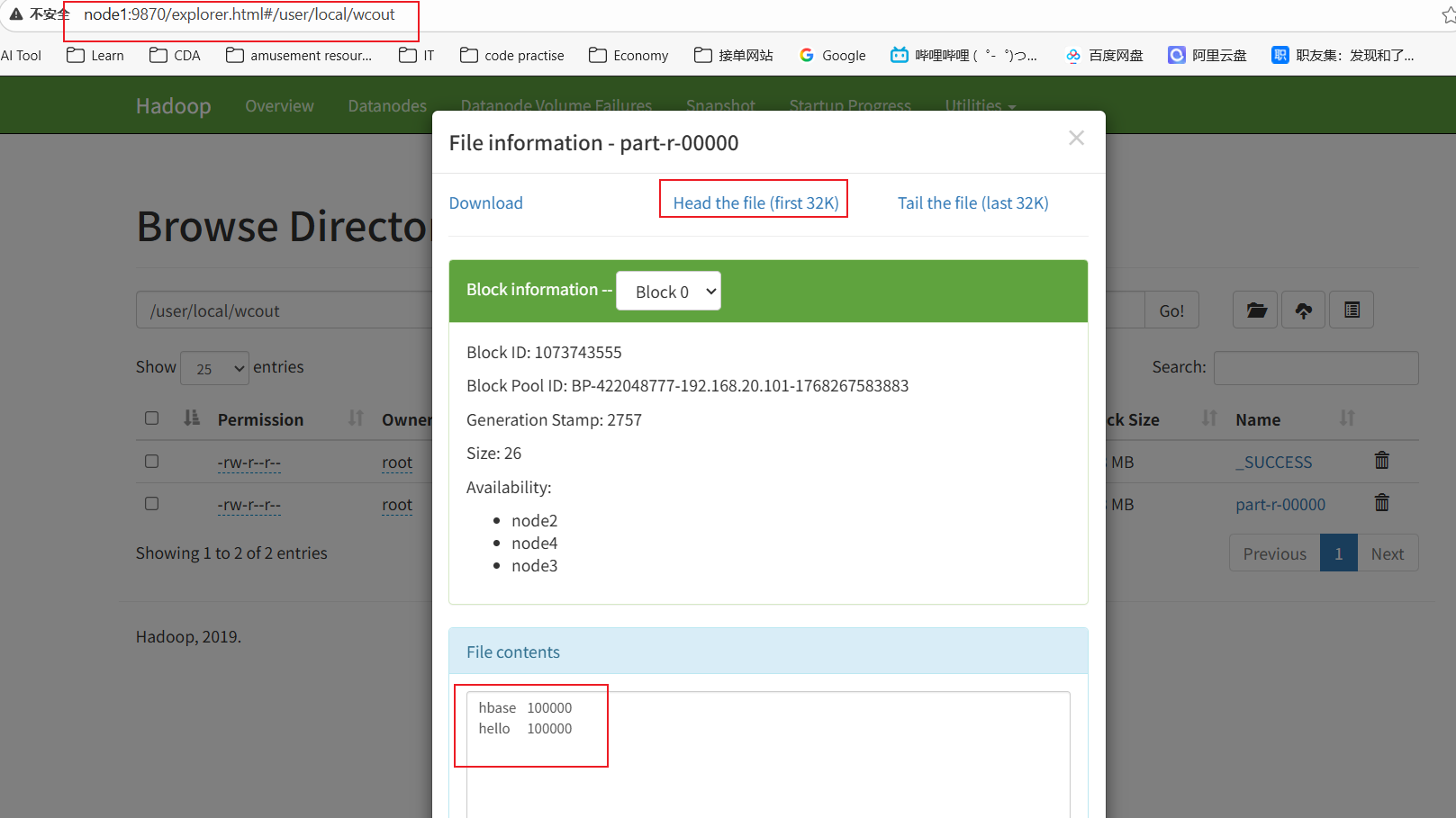
8、运行后,在HDFS上查看结果
hbase ->MR->hbase
从hbase读取数据,经过MR计算,将结果存储于hbase
需求:sentence表的数据->MR计算->wordcount表中
1.Hbase2HbaseMapper
package com.wusen.hbase2hbase;
import org.apache.hadoop.hbase.client.Result;
import org.apache.hadoop.hbase.io.ImmutableBytesWritable;
import org.apache.hadoop.hbase.mapreduce.TableMapper;
import org.apache.hadoop.hbase.util.Bytes;
import org.apache.hadoop.io.IntWritable;
import org.apache.hadoop.io.Text;
import org.apache.hadoop.mapreduce.Mapper;
import java.io.IOException;
public class Hbase2HbaseMapper extends TableMapper<Text, IntWritable> {
//定义输出的key和value对象
private Text keyOut = new Text();
private IntWritable valOut = new IntWritable(1);
@Override
protected void map(ImmutableBytesWritable key, Result value, Mapper<ImmutableBytesWritable, Result, Text, IntWritable>.Context context) throws IOException, InterruptedException {
//ImmutableBytesWritable key:表示当前行数据的rowkey,Result value:表示封装当前行数据的Result对象
//从vlaue中获取cf:line值
String line = Bytes.toString(value.getValue("cf".getBytes(), "line".getBytes()));
//按照空格进行拆分
String[] words = line.split(" ");
//遍历单词数组
for(String word:words){
//将word封装到keyOut中
keyOut.set(word);
//输出
context.write(keyOut,valOut); }
}
}
2.Hbase2HbaseReducer
package com.wusen.hbase2hbase;
import org.apache.hadoop.hbase.client.Mutation;
import org.apache.hadoop.hbase.client.Put;
import org.apache.hadoop.hbase.mapreduce.TableReducer;
import org.apache.hadoop.hbase.util.Bytes;
import org.apache.hadoop.io.IntWritable;
import org.apache.hadoop.io.Text;
import org.apache.hadoop.mapreduce.Reducer;
import java.io.IOException;
//<KEYIN, VALUEIN, KEYOUT>
public class Hbase2HbaseReducer extends TableReducer<Text, IntWritable,Text> {
@Override
protected void reduce(Text key, Iterable<IntWritable> values, Reducer<Text, IntWritable, Text, Mutation>.Context context) throws IOException, InterruptedException {
//当前key对应的单词出现的总次数
int sum = 0;
//遍历values,计算当前单词出现的总次数
for(IntWritable value:values){
//累加操作
sum += value.get();
}
//创建Put对象
Put put = new Put(key.toString().getBytes());
//添加列以及数据
put.addColumn("cf".getBytes(),"count".getBytes(), Bytes.toBytes(sum));
//输出
context.write(key,put);
}
}
3. Hbase2HbaseMain
package com.wusen.hbase2hbase;
import org.apache.hadoop.conf.Configuration;
import org.apache.hadoop.hbase.client.Scan;
import org.apache.hadoop.hbase.mapreduce.TableMapReduceUtil;
import org.apache.hadoop.hbase.util.Bytes;
import org.apache.hadoop.io.IntWritable;
import org.apache.hadoop.io.Text;
import org.apache.hadoop.mapreduce.Job;
import java.io.IOException;
public class Hbase2HbaseMain {
public static void main(String[] args) throws IOException, InterruptedException, ClassNotFoundException {
Configuration conf = new Configuration(true);
conf.set("mapreduce.framework.name" ,"local");
conf.set("hbase.zookeeper.quorum" ,"node2, node3,node4");
Job job = Job.getInstance(conf,"hbase2hbase demo");
//设置job的入口程序
job.setJarByClass(Hbase2HbaseMain.class);
//从hbase中去读取数据
Scan scan = new Scan();
//指定查询的列
scan.addColumn("cf".getBytes(), Bytes.toBytes("line"));
TableMapReduceUtil.initTableMapperJob(
"sentence",//从哪张表查询数据
scan,//表扫描器
Hbase2HbaseMapper.class,//Mapper类
Text.class,
IntWritable.class,//指定输出的key和value的类型
job,//指定作业对象
false);//不需要上传依赖的jar
//处理后的结果写入到Hbase的表中
TableMapReduceUtil.initTableReducerJob(
"wordcount",//处理后的数据写入到hbase的哪张表中
Hbase2HbaseReducer.class,//指定使用的Reducer类
job,//对应的job对象
null,null,null,null,
false//不要上传依赖的jar包
);
job.waitForCompletion(true);
}
}
4.清除hbase表wordcount的数据
hbase(main):003:0> truncate 'wordcount'
hbase(main):004:0> flush 'wordcount'
5.运行程序并查询
hbase(main):005:0> count "wordcount"
100002 row(s)
hbase(main):007:0> get 'wordcount','hello'
COLUMN CELL
cf:count timestamp=1770177646313, value=\\x00\\x01\\x86\\xA0
1 row(s)
HBase与Hive整合
准备工作
在node3上修改hive-site.xml中添加zookeeper的属性,如下:
<property>
<name>hive.zookeeper.quorum</name>
<value>node2,node3,node4</value> </property>
<property>
<name>hive.zookeeper.client.port</name> <value>2181</value>
</property>
要在hive中操作hbase的表,需要对列进行映射。使用关键字external创建为外部表,不使用该关键字创建的为内部表。
create [external] table hbase_table_1(key string,value string)
stored by 'org.apache.hadoop.hive.hbase.HBaseStorageHandler'
with serdeproperties ("hbase.columns.mapping" = ":key,cf1:val")
tblproperties ("hbase.table.name" = "xyz","hbase.mapred.output.outputtable" = "xyz");
必须指定hbase.columns.mapping属性。
stored by 指定hive中存储数据的时候,有该类来处理,该类会将数据放到hbase中存储。同时hive读取数据的时候,也是由该类处理hbase和hive的数据对应表关系。
hbase.table.name属性可选,用于指定hbase中对应的表名,允许在hive表中使用不同的表名。上例中, hive中表名为hbase_table_1, hbase中表名为xyz。如果不指定, hive中的表名与hbase中的表名一致。
hbase.mapred.output.outputtable属性可选,向表中插入数据的时候是必须的。该属性的值传递给了hbase.mapreduce.TableOutputFormat使用。
在hive表定义中的映射hbase.columns.mapping中的cf1:val在创建完表之后, hbase中只显示cf1,并不显示val,因为val是行级别的,cf1才是hbase中表级别的元数据。
准备工作:
1.启动hadoop集群
2.启动hbase集群
[root@node1 ~]# start-hbase.sh
3.启动hive服务器
[root@node3 ~]# hive –service metastore &
4.启动hive客户端
[root@node4 ~]# hive
内部表
hive中执行建表脚本
[root@node4 ~]# hive
hive> CREATE TABLE hbasetbl(key int, value string)
STORED BY
'org.apache.hadoop.hive.hbase.HBaseStorageHandler'
WITH SERDEPROPERTIES
("hbase.columns.mapping" = ":key,cf1:val")
TBLPROPERTIES ("hbase.table.name" = "xyz", "hbase.mapred.output.outputtable" ="xyz");
hbase中查看存在的表
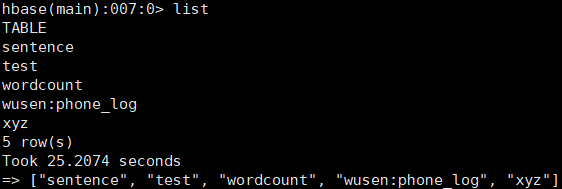
hive中创建hbasetbl表,由于它映射了hbase的xyz表,所以直接将xyz创建出来了。
注意:在hive创建映射hbase表的内部表时,在hbase中不能对应的表。
hbase中添加有映射关系的数据
hbase(main):003:0> put 'xyz','1111','cf1:val','java'
hive中查询是否有生成相关数据

如果是没有映射关系的数据,比如在hbase上执行
put 'xyz','1111','cf1:name','zhangsan'
则只会在hbase上有数据,hive上没有数据,因为这里hive建表的时候指定了映射关系是"hbase.columns.mapping" = ":key,cf1:val"。hive中查询时只能查询到hbase的表和hive表有映射关系列的数据。
接下来在hive中通过insert插入数据
hive> insert into hbasetbl values(2222,'bigdata');
插入后在hbase查看表数据变化,发现生成了对应数据

但是hive中插入一条数据花费时间长,效率太低了,接下试试通过load将数据加载到hbasetbl表中,值得注意的是这里不能直接将数据load到和hbase有映射关系的hive表中,需要建立临时中间表进行过渡。
node4上准备数据
[root@node4 ~]# cd data/
[root@node4 data]# vim tbl.txt
333^Aphp
444^Ajsp
555^Azookeeper
创建一个临时表,并将数据load到该表中
hive> create temporary table tbl2(key int, value string);
hive> load data local inpath '/root/data/tbl.txt' into table tbl2;
#将tbl2表中的数据插入到hbasetbl表中
hive> insert into table hbasetbl select * from tbl2;
这样可以一个job完成大批量数据添加到表中的任务
hbase上查看数据

思考:数据到底保存到hive的表中还是hbase的表中?
首先在hbase上刷新数据:flush 'xyz'
然后访问HDFS的WebUI界面查看hbase,发现有数据
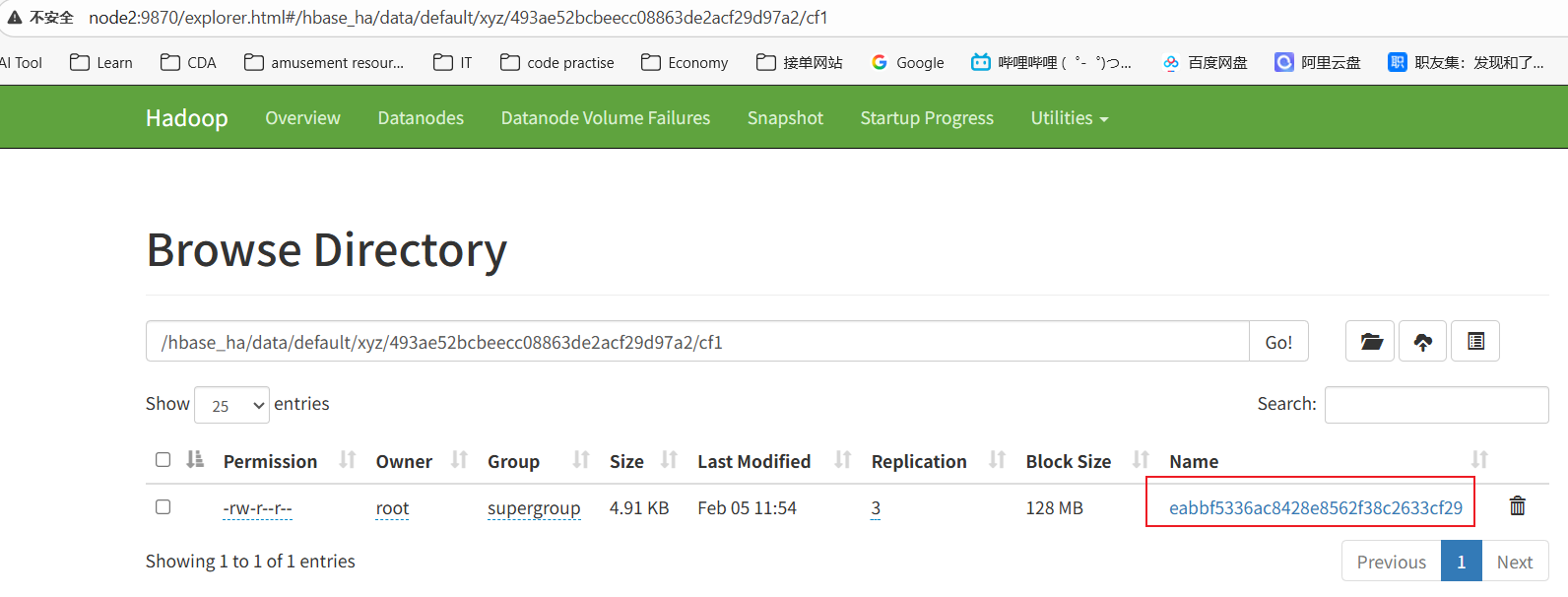
再看看hive,发现没有数据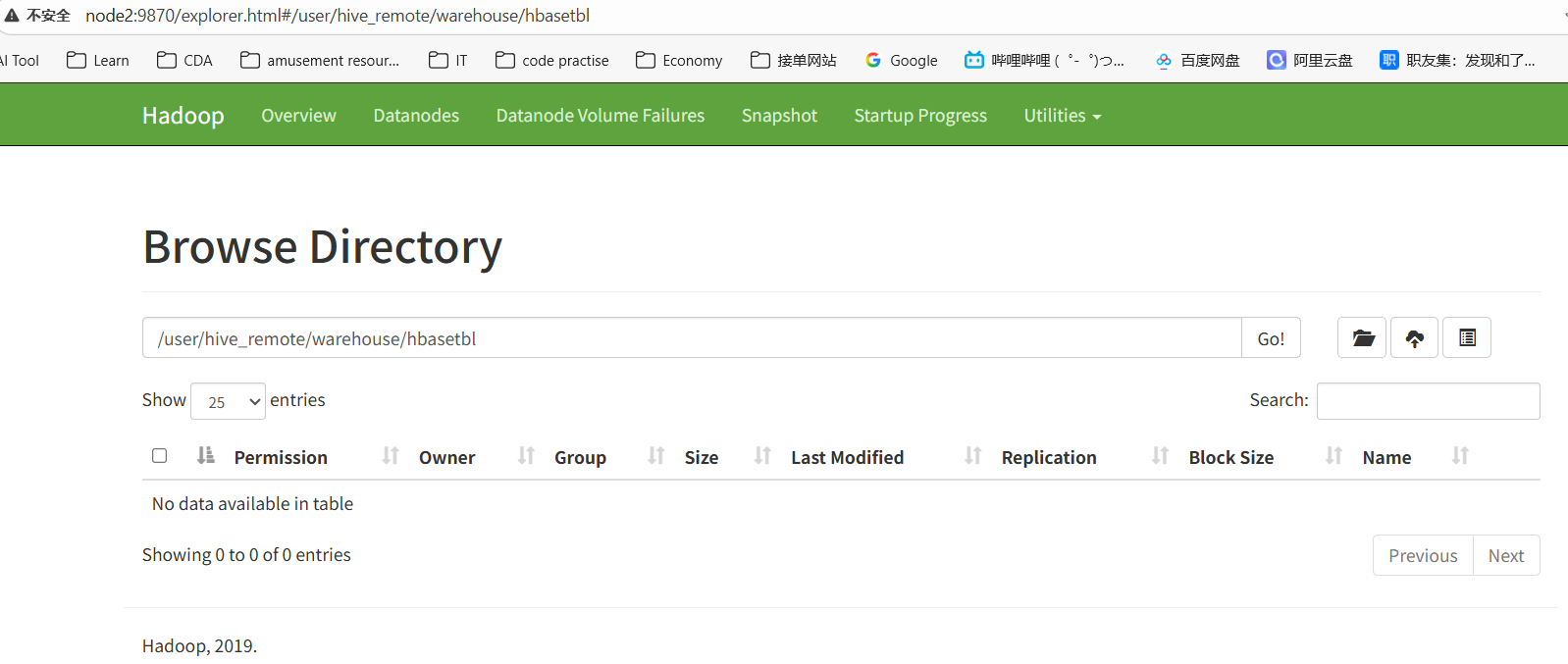
总结:关于hive与hbase有映射关系的内部表数据的存储位置,数据保存在hbase的表中。
外部表
注意:Hive建立外部表要求hbase中必须有表对应,否则抛错。
首先在hbase建立表
hbase(main):011:0> create 't_order', 'order'
在hive上创建外部表
hive> create external table tmp_order (key string, id string, user_id string)
stored by 'org.apache.hadoop.hive.hbase.HBaseStorageHandler'
with serdeproperties
("hbase.columns.mapping" =":key,order:order_id,order:user_id")
tblproperties ("hbase.table.name" = "t_order");
读取和写入操作和内部表的一样的,这里就不赘述了。
总结
创建hive的内部表,要求hbase中不能有对应的表
创建hive的外部表,要求hbase中一定要有对应的表
映射关系通过with serdeproperties ("hbase.columns.mapping" =
":key,cf:id,cf:username,cf:age")
stored by指定hive中存储数据的时候,由该类来处理,该类会将数据放到hbase的存储中,同时在hive读取数据的时候,由该类负责处理hbase的数据和hive的对应关系
STORED BY 'org.apache.hadoop.hive.hbase.HBaseStorageHandler'
指定hive表和hbase中的哪张表对应,outputtable负责当hive insert数据的时候将数据写到hbase的哪张表。
tblproperties ("hbase.table.name" = "my_table","hbase.mapred.output.outputtable" = "my_table");
如果hbase中的表名和hive中的表名一致,则可以不指定tblproperties。