Vulkan 稀疏资源是一种创建 VkBuffer 和 VkImage 对象的方式,这些对象可以非连续地绑定到一个或多个 VkDeviceMemory 分配上。稀疏资源包含诸多特性与细节,规范中已有详尽说明。正如实现指南所指出,大多数实现会利用稀疏资源向应用暴露一段线性虚拟地址范围,并在绑定时将每个稀疏块映射到物理页。
绑定稀疏内存
与普通资源调用 vkBindBufferMemory() 或 vkBindImageMemory() 不同,稀疏内存通过队列操作 vkQueueBindSparse() 进行绑定。其主要优势在于:应用可在稀疏资源的整个生命周期内重新绑定内存。
需要注意,这要求应用做出额外考量:
- 应用必须使用同步原语,确保其他队列不会在绑定变更时并发访问内存范围。
- 调用 vkFreeMemory() 释放 VkDeviceMemory 对象不会自动解除绑定到该内存的资源(或资源区域)。
- 应用严禁访问已绑定到已释放内存的资源。
稀疏缓冲
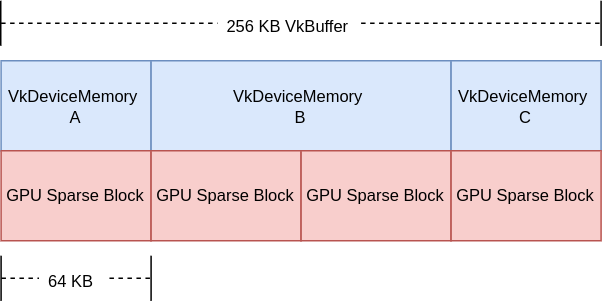
以下示例直观展示稀疏 VkBuffer 在内存中的布局。注意:并非强制,但大多数实现对 VkBuffer 使用 64 KB 的稀疏块大小(实际大小由 VkMemoryRequirements::alignment 返回)。
假设一个 256 KB 的 VkBuffer,应用希望分别更新 3 个部分:
- 区域 A:64 KB
- 区域 B:128 KB
- 区域 C:64 KB
下图展示应用视角下的 VkBuffer:
稀疏图像
Mip 尾区域
稀疏图像可用于分别更新各 mip 层级,从而形成 mip tail region。规范中配有图示描述各种可能场景。
基础稀疏资源示例
以下示例演示稀疏图像的基础创建,并将其绑定到物理内存。该基础示例创建普通 VkImage 对象,但使用细粒度内存分配,以多段内存范围支撑该资源。
VkDevice device;
VkQueue queue;
VkImage sparseImage;
VkAllocationCallbacks* pAllocator = NULL;
VkMemoryRequirements memoryRequirements = {};
VkDeviceSize offset = 0;
VkSparseMemoryBind binds[MAX_CHUNKS] = {}; // MAX_CHUNKS 并非 Vulkan 定义
uint32_t bindCount = 0;
// …
// 创建图像对象
const VkImageCreateInfo sparseImageInfo =
{
VK_STRUCTURE_TYPE_IMAGE_CREATE_INFO, // sType
NULL, // pNext
VK_IMAGE_CREATE_SPARSE_BINDING_BIT | …, // flags
…
};
vkCreateImage(device, &sparseImageInfo, pAllocator, &sparseImage);
// 获取内存需求
vkGetImageMemoryRequirements(
device,
sparseImage,
&memoryRequirements);
// 细粒度绑定内存,从可能的多个 VkDeviceMemory 池中获取可用内存范围
// 仅作示例,可按性能优化
while (memoryRequirements.size && bindCount < MAX_CHUNKS)
{
VkSparseMemoryBind* pBind = &binds[bindCount];
pBind->resourceOffset = offset;
AllocateOrGetMemoryRange(
device,
&memoryRequirements,
&pBind->memory,
&pBind->memoryOffset,
&pBind->size);
// 内存范围大小必须是对齐值的倍数
assert(IsMultiple(pBind->size, memoryRequirements.alignment));
assert(IsMultiple(pBind->memoryOffset, memoryRequirements.alignment));
memoryRequirements.size -= pBind->size;
offset += pBind->size;
bindCount++;
}
// 确保整张图像都有物理内存支撑
if (memoryRequirements.size)
{
// 错误:块数量过多
}
const VkSparseImageOpaqueMemoryBindInfo opaqueBindInfo =
{
sparseImage, // image
bindCount, // bindCount
binds // pBinds
};
const VkBindSparseInfo bindSparseInfo =
{
VK_STRUCTURE_TYPE_BIND_SPARSE_INFO, // sType
NULL, // pNext
…
1, // imageOpaqueBindCount
&opaqueBindInfo, // pImageOpaqueBinds
…
};
// vkQueueBindSparse 按队列对象外部同步
AcquireQueueOwnership(queue);
// 执行内存绑定
vkQueueBindSparse(queue, 1, &bindSparseInfo, VK_NULL_HANDLE);
ReleaseQueueOwnership(queue);
高级稀疏资源
该进阶示例创建数组式颜色附件 / 纹理图像,并仅将 LOD 0 与所需元数据绑定到物理内存。
VkDevice device;
VkQueue queue;
VkImage sparseImage;
VkAllocationCallbacks* pAllocator = NULL;
VkMemoryRequirements memoryRequirements = {};
uint32_t sparseRequirementsCount = 0;
VkSparseImageMemoryRequirements* pSparseReqs = NULL;
VkSparseMemoryBind binds[MY_IMAGE_ARRAY_SIZE] = {};
VkSparseImageMemoryBind imageBinds[MY_IMAGE_ARRAY_SIZE] = {};
uint32_t bindCount = 0;
// 创建图像对象(可渲染且可采样)
const VkImageCreateInfo sparseImageInfo =
{
VK_STRUCTURE_TYPE_IMAGE_CREATE_INFO, // sType
NULL, // pNext
VK_IMAGE_CREATE_SPARSE_RESIDENCY_BIT | …, // flags
…
VK_FORMAT_R8G8B8A8_UNORM, // format
…
MY_IMAGE_ARRAY_SIZE, // arrayLayers
…
VK_IMAGE_USAGE_COLOR_ATTACHMENT_BIT |
VK_IMAGE_USAGE_SAMPLED_BIT, // usage
…
};
vkCreateImage(device, &sparseImageInfo, pAllocator, &sparseImage);
// 获取内存需求
vkGetImageMemoryRequirements(
device,
sparseImage,
&memoryRequirements);
// 获取稀疏图像切面属性
vkGetImageSparseMemoryRequirements(
device,
sparseImage,
&sparseRequirementsCount,
NULL);
pSparseReqs = (VkSparseImageMemoryRequirements*)
malloc(sparseRequirementsCount * sizeof(VkSparseImageMemoryRequirements));
vkGetImageSparseMemoryRequirements(
device,
sparseImage,
&sparseRequirementsCount,
pSparseReqs);
// 绑定 LOD 0 与所需元数据到内存
for (uint32_t i = 0; i < sparseRequirementsCount; ++i)
{
if (pSparseReqs[i].formatProperties.aspectMask &
VK_IMAGE_ASPECT_METADATA_BIT)
{
// 元数据不可与其他切面合并
assert(pSparseReqs[i].formatProperties.aspectMask ==
VK_IMAGE_ASPECT_METADATA_BIT);
if (pSparseReqs[i].formatProperties.flags &
VK_SPARSE_IMAGE_FORMAT_SINGLE_MIPTAIL_BIT)
{
VkSparseMemoryBind* pBind = &binds[bindCount];
pBind->memorySize = pSparseReqs[i].imageMipTailSize;
bindCount++;
// … 分配内存范围
pBind->resourceOffset = pSparseReqs[i].imageMipTailOffset;
pBind->memoryOffset = /* 分配的 memoryOffset */;
pBind->memory = /* 分配的 memory */;
pBind->flags = VK_SPARSE_MEMORY_BIND_METADATA_BIT;
}
else
{
// 每个数组层需要一个 mip tail 区域
for (uint32_t a = 0; a < sparseImageInfo.arrayLayers; ++a)
{
VkSparseMemoryBind* pBind = &binds[bindCount];
pBind->memorySize = pSparseReqs[i].imageMipTailSize;
bindCount++;
// … 分配内存范围
pBind->resourceOffset = pSparseReqs[i].imageMipTailOffset +
(a * pSparseReqs[i].imageMipTailStride);
pBind->memoryOffset = /* 分配的 memoryOffset */;
pBind->memory = /* 分配的 memory */
pBind->flags = VK_SPARSE_MEMORY_BIND_METADATA_BIT;
}
}
}
else
{
// 资源数据
VkExtent3D lod0BlockSize =
{
AlignedDivide(
sparseImageInfo.extent.width,
pSparseReqs[i].formatProperties.imageGranularity.width),
AlignedDivide(
sparseImageInfo.extent.height,
pSparseReqs[i].formatProperties.imageGranularity.height),
AlignedDivide(
sparseImageInfo.extent.depth,
pSparseReqs[i].formatProperties.imageGranularity.depth)
};
size_t totalBlocks =
lod0BlockSize.width *
lod0BlockSize.height *
lod0BlockSize.depth;
// 每个块大小与对齐要求相同,计算 0 级总内存大小
VkDeviceSize lod0MemSize = totalBlocks * memoryRequirements.alignment;
// 为每个数组层分配内存
for (uint32_t a = 0; a < sparseImageInfo.arrayLayers; ++a)
{
// … 分配内存范围
VkSparseImageMemoryBind* pBind = &imageBinds[a];
pBind->subresource.aspectMask = pSparseReqs[i].formatProperties.aspectMask;
pBind->subresource.mipLevel = 0;
pBind->subresource.arrayLayer = a;
pBind->offset = (VkOffset3D){0, 0, 0};
pBind->extent = sparseImageInfo.extent;
pBind->memoryOffset = /* 分配的 memoryOffset */;
pBind->memory = /* 分配的 memory */;
pBind->flags = 0;
}
}
free(pSparseReqs);
}
const VkSparseImageOpaqueMemoryBindInfo opaqueBindInfo =
{
sparseImage, // image
bindCount, // bindCount
binds // pBinds
};
const VkSparseImageMemoryBindInfo imageBindInfo =
{
sparseImage, // image
sparseImageInfo.arrayLayers, // bindCount
imageBinds // pBinds
};
const VkBindSparseInfo bindSparseInfo =
{
VK_STRUCTURE_TYPE_BIND_SPARSE_INFO, // sType
NULL, // pNext
…
1, // imageOpaqueBindCount
&opaqueBindInfo, // pImageOpaqueBinds
1, // imageBindCount
&imageBindInfo, // pImageBinds
…
};
// vkQueueBindSparse 按队列对象外部同步
AcquireQueueOwnership(queue);
// 执行内存绑定
vkQueueBindSparse(queue, 1, &bindSparseInfo, VK_NULL_HANDLE);
ReleaseQueueOwnership(queue);