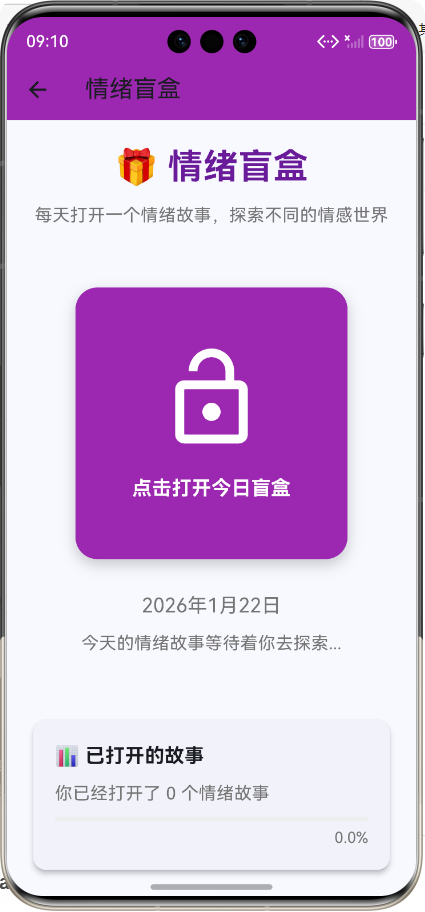
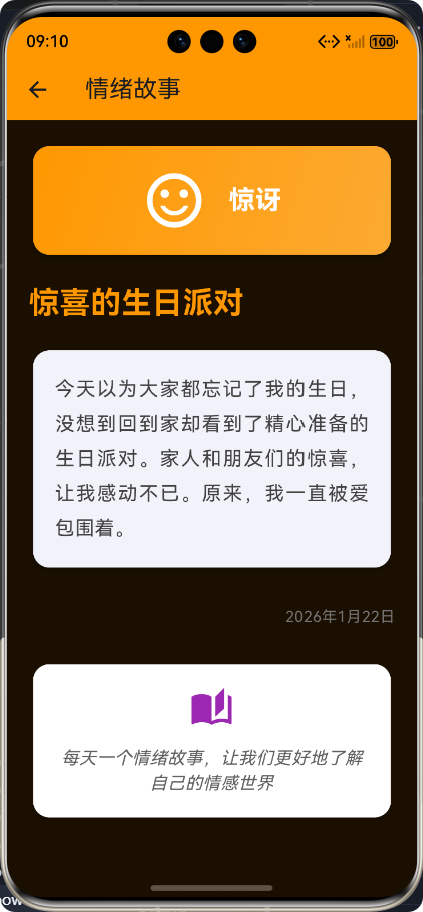
🚀运行效果展示
Flutter框架跨平台鸿蒙开发——每日情绪盲盒APP开发流程
📝 前言
在当今快节奏的生活中,人们面临着越来越多的压力和情绪问题。情绪管理成为了现代人必备的技能之一。而移动应用作为人们日常生活中不可或缺的一部分,也可以成为情绪管理的好帮手。
Flutter作为Google推出的开源UI框架,以其"一次编写,到处运行"的特性,成为跨平台开发的热门选择。而鸿蒙OS作为华为推出的全场景分布式操作系统,也在快速发展。本文将详细介绍如何使用Flutter框架开发一款跨平台的每日情绪盲盒APP,并适配鸿蒙OS,包括开发流程、核心功能实现、技术难点及解决方案。
🎨 应用介绍
应用概述
每日情绪盲盒是一款基于Flutter框架开发的跨平台移动端应用,支持在Android、iOS和鸿蒙OS上运行。应用的核心功能是每天为用户提供一个情绪故事,用户需要打开盲盒才能查看当天的情绪故事。应用涵盖了8种基本情绪 类型,包括快乐、悲伤、愤怒、恐惧、惊讶、平静、爱和焦虑。
应用特点
- 跨平台兼容:基于Flutter框架开发,支持Android、iOS和鸿蒙OS
- 每日限量:每天只能打开一个情绪盲盒,培养用户的期待感
- 丰富的情绪类型:涵盖8种基本情绪类型,满足不同用户的需求
- 精美的视觉设计:根据不同情绪类型显示不同的颜色和图标,提供沉浸式体验
- 进度追踪:显示已打开故事的数量和进度,鼓励用户持续使用
应用架构
应用采用MVC架构,分离模型、视图和控制器:
- 模型层:负责数据管理,包括情绪类型、情绪故事和盲盒状态等
- 视图层:负责UI渲染,包括盲盒主界面和情绪故事详情界面等
- 控制层:负责处理用户交互,包括触摸事件、打开盲盒和状态管理等
🔧 开发环境搭建
开发工具
- Flutter SDK:3.10.0
- Dart SDK:3.0.0
- Android Studio:2022.3.1
- HarmonyOS DevEco Studio:3.1.0
环境配置
📊 开发流程
开发流程总览
#mermaid-svg-vbJTgRBjemtguM9J{font-family:\”trebuchet ms\”,verdana,arial,sans-serif;font-size:16px;fill:#333;}@keyframes edge-animation-frame{from{stroke-dashoffset:0;}}@keyframes dash{to{stroke-dashoffset:0;}}#mermaid-svg-vbJTgRBjemtguM9J .edge-animation-slow{stroke-dasharray:9,5!important;stroke-dashoffset:900;animation:dash 50s linear infinite;stroke-linecap:round;}#mermaid-svg-vbJTgRBjemtguM9J .edge-animation-fast{stroke-dasharray:9,5!important;stroke-dashoffset:900;animation:dash 20s linear infinite;stroke-linecap:round;}#mermaid-svg-vbJTgRBjemtguM9J .error-icon{fill:#552222;}#mermaid-svg-vbJTgRBjemtguM9J .error-text{fill:#552222;stroke:#552222;}#mermaid-svg-vbJTgRBjemtguM9J .edge-thickness-normal{stroke-width:1px;}#mermaid-svg-vbJTgRBjemtguM9J .edge-thickness-thick{stroke-width:3.5px;}#mermaid-svg-vbJTgRBjemtguM9J .edge-pattern-solid{stroke-dasharray:0;}#mermaid-svg-vbJTgRBjemtguM9J .edge-thickness-invisible{stroke-width:0;fill:none;}#mermaid-svg-vbJTgRBjemtguM9J .edge-pattern-dashed{stroke-dasharray:3;}#mermaid-svg-vbJTgRBjemtguM9J .edge-pattern-dotted{stroke-dasharray:2;}#mermaid-svg-vbJTgRBjemtguM9J .marker{fill:#333333;stroke:#333333;}#mermaid-svg-vbJTgRBjemtguM9J .marker.cross{stroke:#333333;}#mermaid-svg-vbJTgRBjemtguM9J svg{font-family:\”trebuchet ms\”,verdana,arial,sans-serif;font-size:16px;}#mermaid-svg-vbJTgRBjemtguM9J p{margin:0;}#mermaid-svg-vbJTgRBjemtguM9J .label{font-family:\”trebuchet ms\”,verdana,arial,sans-serif;color:#333;}#mermaid-svg-vbJTgRBjemtguM9J .cluster-label text{fill:#333;}#mermaid-svg-vbJTgRBjemtguM9J .cluster-label span{color:#333;}#mermaid-svg-vbJTgRBjemtguM9J .cluster-label span p{background-color:transparent;}#mermaid-svg-vbJTgRBjemtguM9J .label text,#mermaid-svg-vbJTgRBjemtguM9J span{fill:#333;color:#333;}#mermaid-svg-vbJTgRBjemtguM9J .node rect,#mermaid-svg-vbJTgRBjemtguM9J .node circle,#mermaid-svg-vbJTgRBjemtguM9J .node ellipse,#mermaid-svg-vbJTgRBjemtguM9J .node polygon,#mermaid-svg-vbJTgRBjemtguM9J .node path{fill:#ECECFF;stroke:#9370DB;stroke-width:1px;}#mermaid-svg-vbJTgRBjemtguM9J .rough-node .label text,#mermaid-svg-vbJTgRBjemtguM9J .node .label text,#mermaid-svg-vbJTgRBjemtguM9J .image-shape .label,#mermaid-svg-vbJTgRBjemtguM9J .icon-shape .label{text-anchor:middle;}#mermaid-svg-vbJTgRBjemtguM9J .node .katex path{fill:#000;stroke:#000;stroke-width:1px;}#mermaid-svg-vbJTgRBjemtguM9J .rough-node .label,#mermaid-svg-vbJTgRBjemtguM9J .node .label,#mermaid-svg-vbJTgRBjemtguM9J .image-shape .label,#mermaid-svg-vbJTgRBjemtguM9J .icon-shape .label{text-align:center;}#mermaid-svg-vbJTgRBjemtguM9J .node.clickable{cursor:pointer;}#mermaid-svg-vbJTgRBjemtguM9J .root .anchor path{fill:#333333!important;stroke-width:0;stroke:#333333;}#mermaid-svg-vbJTgRBjemtguM9J .arrowheadPath{fill:#333333;}#mermaid-svg-vbJTgRBjemtguM9J .edgePath .path{stroke:#333333;stroke-width:2.0px;}#mermaid-svg-vbJTgRBjemtguM9J .flowchart-link{stroke:#333333;fill:none;}#mermaid-svg-vbJTgRBjemtguM9J .edgeLabel{background-color:rgba(232,232,232, 0.8);text-align:center;}#mermaid-svg-vbJTgRBjemtguM9J .edgeLabel p{background-color:rgba(232,232,232, 0.8);}#mermaid-svg-vbJTgRBjemtguM9J .edgeLabel rect{opacity:0.5;background-color:rgba(232,232,232, 0.8);fill:rgba(232,232,232, 0.8);}#mermaid-svg-vbJTgRBjemtguM9J .labelBkg{background-color:rgba(232, 232, 232, 0.5);}#mermaid-svg-vbJTgRBjemtguM9J .cluster rect{fill:#ffffde;stroke:#aaaa33;stroke-width:1px;}#mermaid-svg-vbJTgRBjemtguM9J .cluster text{fill:#333;}#mermaid-svg-vbJTgRBjemtguM9J .cluster span{color:#333;}#mermaid-svg-vbJTgRBjemtguM9J div.mermaidTooltip{position:absolute;text-align:center;max-width:200px;padding:2px;font-family:\”trebuchet ms\”,verdana,arial,sans-serif;font-size:12px;background:hsl(80, 100%, 96.2745098039%);border:1px solid #aaaa33;border-radius:2px;pointer-events:none;z-index:100;}#mermaid-svg-vbJTgRBjemtguM9J .flowchartTitleText{text-anchor:middle;font-size:18px;fill:#333;}#mermaid-svg-vbJTgRBjemtguM9J rect.text{fill:none;stroke-width:0;}#mermaid-svg-vbJTgRBjemtguM9J .icon-shape,#mermaid-svg-vbJTgRBjemtguM9J .image-shape{background-color:rgba(232,232,232, 0.8);text-align:center;}#mermaid-svg-vbJTgRBjemtguM9J .icon-shape p,#mermaid-svg-vbJTgRBjemtguM9J .image-shape p{background-color:rgba(232,232,232, 0.8);padding:2px;}#mermaid-svg-vbJTgRBjemtguM9J .icon-shape rect,#mermaid-svg-vbJTgRBjemtguM9J .image-shape rect{opacity:0.5;background-color:rgba(232,232,232, 0.8);fill:rgba(232,232,232, 0.8);}#mermaid-svg-vbJTgRBjemtguM9J .label-icon{display:inline-block;height:1em;overflow:visible;vertical-align:-0.125em;}#mermaid-svg-vbJTgRBjemtguM9J .node .label-icon path{fill:currentColor;stroke:revert;stroke-width:revert;}#mermaid-svg-vbJTgRBjemtguM9J :root{–mermaid-font-family:\”trebuchet ms\”,verdana,arial,sans-serif;}
项目初始化
架构设计
模型层开发
服务层开发
视图层开发
功能测试
鸿蒙适配
性能优化
发布上线
详细开发流程
🚀 核心功能实现
1. 模型层开发
情绪类型枚举
/// 情绪类型枚举
enum EmotionType {
/// 快乐
happy,
/// 悲伤
sad,
/// 愤怒
angry,
/// 恐惧
fear,
/// 惊讶
surprise,
/// 平静
calm,
/// 爱
love,
/// 焦虑
anxious,
}
情绪故事模型
/// 情绪故事模型类
/// 用于存储单个情绪故事的所有信息
class EmotionStory {
/// 构造函数
EmotionStory({
required this.id,
required this.title,
required this.content,
required this.emotionType,
required this.date,
});
/// 故事ID
final int id;
/// 故事标题
final String title;
/// 故事内容
final String content;
/// 情绪类型
final EmotionType emotionType;
/// 对应的日期(用于控制每天只能打开一个)
final DateTime date;
/// 获取情绪类型对应的颜色
Color get emotionColor {
switch (emotionType) {
case EmotionType.happy:
return Colors.yellow;
case EmotionType.sad:
return Colors.blue;
case EmotionType.angry:
return Colors.red;
case EmotionType.fear:
return Colors.purple;
case EmotionType.surprise:
return Colors.orange;
case EmotionType.calm:
return Colors.green;
case EmotionType.love:
return Colors.pink;
case EmotionType.anxious:
return Colors.brown;
}
}
/// 获取情绪类型对应的图标
IconData get emotionIcon {
switch (emotionType) {
case EmotionType.happy:
return Icons.emoji_emotions;
case EmotionType.sad:
return Icons.emoji_emotions_outlined;
case EmotionType.angry:
return Icons.face;
case EmotionType.fear:
return Icons.face_outlined;
case EmotionType.surprise:
return Icons.sentiment_satisfied_alt;
case EmotionType.calm:
return Icons.self_improvement;
case EmotionType.love:
return Icons.favorite;
case EmotionType.anxious:
return Icons.sentiment_very_dissatisfied;
}
}
/// 获取情绪类型对应的名称
String get emotionName {
switch (emotionType) {
case EmotionType.happy:
return '快乐';
case EmotionType.sad:
return '悲伤';
case EmotionType.angry:
return '愤怒';
case EmotionType.fear:
return '恐惧';
case EmotionType.surprise:
return '惊讶';
case EmotionType.calm:
return '平静';
case EmotionType.love:
return '爱';
case EmotionType.anxious:
return '焦虑';
}
}
}
盲盒状态模型
/// 情绪盲盒状态模型类
/// 用于管理情绪盲盒的状态
class EmotionBlindBoxState {
/// 构造函数
EmotionBlindBoxState() {
openedStoryIds = [];
lastOpenedDate = DateTime.now().subtract(const Duration(days: 1));
}
/// 已打开的故事ID列表
late List<int> openedStoryIds;
/// 上次打开盲盒的日期
late DateTime lastOpenedDate;
/// 是否可以打开今日盲盒
bool get canOpenTodayBlindBox {
final today = DateTime.now();
return lastOpenedDate.year != today.year ||
lastOpenedDate.month != today.month ||
lastOpenedDate.day != today.day;
}
}
2. 服务层开发
情绪故事服务
/// 情绪故事服务类
/// 负责生成和管理情绪故事数据
class EmotionStoryService {
/// 构造函数
EmotionStoryService() {
_stories = _generateStories();
_state = EmotionBlindBoxState();
}
/// 情绪故事列表
late List<EmotionStory> _stories;
/// 盲盒状态
late EmotionBlindBoxState _state;
/// 生成情绪故事列表
List<EmotionStory> _generateStories() {
final stories = <EmotionStory>[];
// 准备不同情绪类型的故事模板
final storyTemplates = {
// 不同情绪类型的故事模板…
};
// 生成365天的故事(一年)
for (int i = 0; i < 365; i++) {
final date = DateTime.now().subtract(Duration(days: 364 – i));
final emotionTypes = EmotionType.values;
final randomEmotionType = emotionTypes[i % emotionTypes.length];
// 从对应情绪类型的模板中随机选择一个
final templates = storyTemplates[randomEmotionType]!;
final randomTemplate = templates[i % templates.length];
// 创建故事
final story = EmotionStory(
id: i + 1,
title: randomTemplate.title,
content: randomTemplate.content,
emotionType: randomEmotionType,
date: date,
);
stories.add(story);
}
return stories;
}
// 其他方法…
}
3. 视图层开发
情绪盲盒主界面
/// 情绪盲盒主屏幕
/// 用于显示盲盒状态和打开盲盒
class EmotionBlindBoxScreen extends StatefulWidget {
/// 构造函数
const EmotionBlindBoxScreen({super.key});
State<EmotionBlindBoxScreen> createState() => _EmotionBlindBoxScreenState();
}
class _EmotionBlindBoxScreenState extends State<EmotionBlindBoxScreen> {
/// 情绪故事服务
late EmotionStoryService _storyService;
void initState() {
super.initState();
_storyService = EmotionStoryService();
}
Widget build(BuildContext context) {
return Scaffold(
appBar: AppBar(
title: const Text('情绪盲盒'),
backgroundColor: Colors.purple,
),
body: Padding(
padding: const EdgeInsets.all(20.0),
child: Column(
children: [
// 标题和介绍
_buildHeader(),
const SizedBox(height: 30.0),
// 盲盒主体
Expanded(
child: _buildBlindBox(),
),
const SizedBox(height: 30.0),
// 已打开故事统计
_buildStats(),
],
),
),
);
}
// 其他方法…
}
情绪故事详情界面
/// 情绪故事详情屏幕
/// 用于显示打开盲盒后得到的情绪故事
class EmotionStoryDetailScreen extends StatelessWidget {
/// 构造函数
const EmotionStoryDetailScreen({super.key, required this.story});
/// 要显示的情绪故事
final EmotionStory story;
Widget build(BuildContext context) {
return Scaffold(
backgroundColor: story.emotionColor.withOpacity(0.1),
appBar: AppBar(
title: const Text('情绪故事'),
backgroundColor: story.emotionColor,
elevation: 0,
),
body: SingleChildScrollView(
child: Container(
padding: const EdgeInsets.all(20.0),
child: Column(
crossAxisAlignment: CrossAxisAlignment.start,
children: [
// 情绪类型卡片
_buildEmotionCard(),
const SizedBox(height: 20.0),
// 故事标题
_buildStoryTitle(),
const SizedBox(height: 20.0),
// 故事内容
_buildStoryContent(),
const SizedBox(height: 30.0),
// 日期信息
_buildDateInfo(),
const SizedBox(height: 30.0),
// 鼓励话语
_buildEncouragement(),
],
),
),
),
);
}
// 其他方法…
}
🔧 鸿蒙适配
适配流程
适配注意事项
- 权限配置:根据鸿蒙OS的权限要求,配置相应的权限
- 屏幕适配:适配鸿蒙OS设备的屏幕尺寸
- 性能优化:针对鸿蒙OS进行性能优化
- API兼容:确保使用的API在鸿蒙OS上兼容
🎯 技术难点及解决方案
1. 每日盲盒限制
问题:如何确保用户每天只能打开一个盲盒?
解决方案:
- 使用EmotionBlindBoxState类存储上次打开盲盒的日期
- 在canOpenTodayBlindBox getter中比较上次打开日期和当前日期
- 只有当两个日期不同时,才允许打开今日盲盒
2. 情绪故事生成
问题:如何生成365天的情绪故事?
解决方案:
- 准备不同情绪类型的故事模板
- 使用循环生成365天的故事
- 为每个故事分配一个情绪类型和对应的模板
- 确保故事的日期覆盖一年中的每一天
3. 情绪可视化
问题:如何根据不同情绪类型显示不同的颜色和图标?
解决方案:
- 在EmotionStory类中添加emotionColor和emotionIcon getters
- 根据emotionType返回对应的颜色和图标
- 在UI组件中使用这些颜色和图标,提供沉浸式体验
📈 性能优化
1. 绘制优化
- 使用Flutter的内置组件,避免使用自定义绘制
- 合理使用StatefulWidget和StatelessWidget
- 避免在build方法中进行复杂计算
2. 内存优化
- 及时释放不再使用的资源
- 避免内存泄漏
- 优化数据结构,减少内存占用
3. 响应式设计
- 使用MediaQuery获取屏幕尺寸,适配不同屏幕
- 使用Flex布局,确保UI在不同屏幕尺寸下都能正常显示
- 测试不同屏幕尺寸下的显示效果,确保兼容性
📋 总结
本文详细介绍了如何使用Flutter框架开发一款跨平台的每日情绪盲盒APP,并适配鸿蒙OS。主要内容包括:
通过本项目的开发,我们可以看到Flutter框架在跨平台开发中的优势,以及如何适配鸿蒙OS。情绪盲盒APP不仅可以帮助用户了解不同的情绪类型,还可以培养用户的情绪管理能力,提高用户的生活质量。
📚 参考资料
- Flutter官方文档
- 鸿蒙OS官方文档
- Flutter跨平台开发实战
- 鸿蒙OS应用开发实战
欢迎加入开源鸿蒙跨平台社区:https://openharmonycrossplatform.csdn.net