文章目录
-
- SnipTrip 简介
- 问题现象
- 为什么这个坑容易踩?
-
- 最小复现 Demo(有 Bug 版本)
- 为什么容易写出这样的代码?
- 原始实现方式
-
- 完整代码
- 设计思路
- 问题根源分析
-
- SwiftUI 的执行时序
- 时序图分析
- 真正的问题所在
- 修复后的实现方式
-
- 修复后的完整代码
- 最小复现 Demo(修复版本)
- 核心改变
- 修复原理
- 代价与权衡
- 总结
-
- 问题本质
- 解决方案
- 开发原则
- 经验教训
- 相关信息
SnipTrip 简介
SnipTrip 是一款精致的 iOS 贴纸拼贴应用,专注于为用户提供流畅、优雅的创作体验。应用采用了大量现代 UI 设计语言,包括类似 Apple Intelligence 风格的动态光晕效果、液态玻璃质感的界面元素,以及细腻的交互反馈。
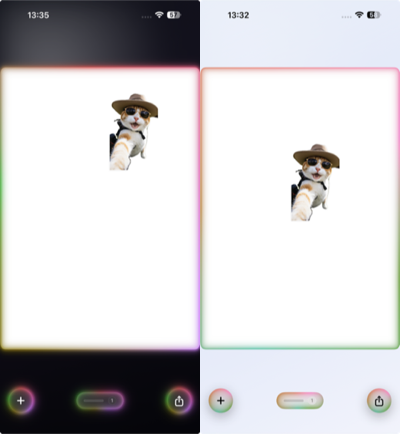
左:深色模式下的彩虹光晕流动效果 | 右:浅色模式下的柔和光晕呼吸效果
在 SnipTrip 中,光晕动画是视觉体验的重要组成部分。这些光晕会持续流动和呼吸,为界面增添生命力。当用户操作贴纸时,光晕会智能地暂停,避免分散注意力;操作结束后,光晕从暂停位置无缝继续,保持视觉连贯性。
本文记录了在实现这一交互细节时遇到的一个微妙问题,以及最终的解决方案。
问题现象
在测试过程中发现了一个细微但可感知的视觉问题:点击暂停的瞬间,光晕会往后"抖动"一下。虽然位移很小(约 1-2 度的旋转),但足以让交互感觉不够流畅。
预期行为:
- 点击时,光晕立即冻结在当前位置
- 松开时,光晕从冻结位置继续流动
实际行为:
- 点击时,光晕先往后退一点,然后冻结
- 松开时,正常继续
预期效果:
──────●──────────────── (点击瞬间冻结在 ● 位置)
实际效果:
──────●──────────────── (点击前在 ● 位置)
────○────────────────── (点击后跳到 ○ 位置,往后退了)
为什么这个坑容易踩?
在深入分析之前,先提供一个最小复现 Demo,可以直接在 Xcode 中运行体验这个问题:
最小复现 Demo(有 Bug 版本)
import SwiftUI
/// 最小复现 Demo – 展示"回退一帧"问题
/// 点击按钮暂停时,观察圆环会轻微往后跳动
struct BuggyAnimationDemo: View {
@State private var isAnimating = true
var body: some View {
VStack(spacing: 40) {
// 有问题的动画组件
BuggyRotatingRing(isAnimating: isAnimating)
.frame(width: 200, height: 200)
Button(isAnimating ? "点击暂停 (观察抖动)" : "点击继续") {
isAnimating.toggle()
}
.buttonStyle(.borderedProminent)
}
}
}
/// 有 Bug 的旋转圆环 – 使用预测时间
struct BuggyRotatingRing: View {
var isAnimating: Bool
@State private var accumulatedTime: TimeInterval = 0
@State private var lastTick: TimeInterval?
var body: some View {
TimelineView(.animation(minimumInterval: 1.0 / 60.0)) { timeline in
let tick = timeline.date.timeIntervalSinceReferenceDate
let time = drivenTime(for: tick) // ⚠️ 问题所在:使用预测时间
Circle()
.strokeBorder(
AngularGradient(
colors: [.red, .orange, .yellow, .green, .blue, .purple, .red],
center: .center,
angle: .degrees(time * 90) // 90°/秒 旋转
),
lineWidth: 8
)
.onAppear { lastTick = tick }
.onChange(of: tick) { _, newTick in
guard let previousTick = lastTick else {
lastTick = newTick
return
}
let delta = max(0, min(newTick – previousTick, 0.25))
if isAnimating {
accumulatedTime += delta
}
lastTick = newTick
}
}
}
/// ⚠️ 这个函数是问题的根源
/// 渲染时返回"预测值",但状态更新在渲染之后
private func drivenTime(for tick: TimeInterval) -> TimeInterval {
guard let lastTick else { return accumulatedTime }
let delta = max(0, min(tick – lastTick, 0.25))
return isAnimating ? (accumulatedTime + delta) : accumulatedTime
}
}
#Preview {
BuggyAnimationDemo()
}
为什么容易写出这样的代码?
这个实现看起来非常合理,甚至可以说是"教科书式"的做法:
但问题在于:这个实现忽略了 SwiftUI 的执行时序。
原始实现方式
完整代码
以下是 SnipTrip 中 AppleIntelligenceGlow 组件的原始实现:
struct AppleIntelligenceGlow<S: Shape>: View {
let shape: S
let lineWidth: CGFloat
var isAnimating: Bool = true
@Environment(\\.accessibilityReduceMotion) private var reduceMotion
@State private var accumulatedTime: TimeInterval = 0
@State private var lastTick: TimeInterval?
var body: some View {
if reduceMotion {
glowStroke(at: 0) // 辅助功能:减少动态效果
} else {
TimelineView(.animation(minimumInterval: 1.0 / 60.0)) { timeline in
let tick = timeline.date.timeIntervalSinceReferenceDate
let time = drivenTime(for: tick) // ⚠️ 使用预测时间
glowStroke(at: time)
.onAppear {
lastTick = tick
}
.onChange(of: tick) { _, newTick in
guard let previousTick = lastTick else {
lastTick = newTick
return
}
let delta = max(0, min(newTick – previousTick, 0.25))
if isAnimating {
accumulatedTime += delta
}
lastTick = newTick
}
}
}
}
/// ⚠️ 问题函数:渲染时预测当前帧的时间
private func drivenTime(for tick: TimeInterval) -> TimeInterval {
guard let lastTick else { return accumulatedTime }
let delta = max(0, min(tick – lastTick, 0.25))
return isAnimating ? (accumulatedTime + delta) : accumulatedTime
}
/// 渲染光晕效果
private func glowStroke(at time: TimeInterval) -> some View {
let breathe = 0.88 + (sin(time * 2.513) * 0.12) // 呼吸效果
let rotation = Angle(degrees: time * 80) // 旋转效果
let hueDrift = Angle(degrees: time * 12) // 色相漂移
let gradient = intelligenceGradient(angle: rotation)
return ZStack {
// 外层光晕
shape
.stroke(gradient, lineWidth: lineWidth + 4)
.hueRotation(hueDrift)
.blur(radius: 12)
.opacity(breathe * 0.45)
.blendMode(.plusLighter)
// 中层光晕
shape
.stroke(gradient, lineWidth: lineWidth + 2)
.hueRotation(hueDrift)
.blur(radius: 7)
.opacity(breathe * 0.65)
.blendMode(.plusLighter)
// 内层光晕
shape
.stroke(gradient, lineWidth: lineWidth)
.hueRotation(hueDrift)
.blur(radius: 3)
.opacity(breathe * 0.85)
.blendMode(.plusLighter)
}
}
private func intelligenceGradient(angle: Angle) -> AngularGradient {
AngularGradient(
gradient: Gradient(colors: [
Color(red: 0.545, green: 0.361, blue: 0.965), // 紫色
Color(red: 0.231, green: 0.510, blue: 0.965), // 蓝色
Color(red: 0.024, green: 0.714, blue: 0.831), // 青色
Color(red: 0.925, green: 0.282, blue: 0.600), // 粉色
Color(red: 0.976, green: 0.451, blue: 0.086), // 橙色
Color(red: 0.545, green: 0.361, blue: 0.965), // 回到紫色
]),
center: .center,
angle: angle
)
}
}
设计思路
这个实现的核心思想是累积时间驱动:
- accumulatedTime 记录动画已经播放的总时间
- TimelineView 每帧触发更新,提供当前时间戳 tick
- drivenTime() 函数计算当前帧应该渲染的时间点
- onChange 在每帧结束后更新 accumulatedTime
当 isAnimating = false 时:
- drivenTime() 返回 accumulatedTime(不加 delta)
- onChange 不更新 accumulatedTime
理论上,这应该能让动画精确地冻结在当前位置。但实际并非如此。
问题根源分析
SwiftUI 的执行时序
理解这个 bug 的关键在于 SwiftUI 视图更新的执行顺序:
┌─────────────────────────────────────────────────────────────┐
│ SwiftUI 帧更新流程 │
├─────────────────────────────────────────────────────────────┤
│ │
│ ┌─────────────┐ ┌─────────────┐ ┌─────────────┐ │
│ │ 1. 状态变化 │ → │ 2. 计算 body │ → │ 3. 比较差异 │ │
│ │ 触发更新 │ │ (渲染阶段) │ │ 提交更新 │ │
│ └─────────────┘ └─────────────┘ └──────┬──────┘ │
│ │ │
│ ↓ │
│ ┌─────────────┐ │
│ │ 4. onChange │ │
│ │ 等回调执行 │ │
│ │ (提交阶段) │ │
│ └─────────────┘ │
│ │
└─────────────────────────────────────────────────────────────┘
关键点:onChange 在渲染之后执行。
这意味着:
- 渲染时读取的 accumulatedTime 是上一帧更新的值
- 本帧的 accumulatedTime 更新发生在渲染之后
时序图分析
以下是一个具体的暂停场景追踪:
┌─────────────────────────────────────────────────────────────────────┐
│ Frame N (isAnimating = true) │
├─────────────────────────────────────────────────────────────────────┤
│ 渲染阶段: │
│ • lastTick = 100.000 (上一帧设置的) │
│ • tick = 100.016 (当前帧,60fps ≈ 16ms/帧) │
│ • accumulatedTime = 1.000 (上一帧 onChange 更新的) │
│ • drivenTime() = 1.000 + 0.016 = 1.016 ← 用户看到的位置 │
│ • 渲染光晕在角度 1.016 × 80 = 81.28° │
│ │
│ 提交阶段: │
│ • onChange 执行 │
│ • accumulatedTime = 1.016 │
│ • lastTick = 100.016 │
└─────────────────────────────────────────────────────────────────────┘
│
↓ 用户点击,isAnimating → false
│
┌─────────────────────────────────────────────────────────────────────┐
│ Frame N+1 (isAnimating = false) │
├─────────────────────────────────────────────────────────────────────┤
│ 渲染阶段: │
│ • lastTick = 100.016 │
│ • tick = 100.032 │
│ • accumulatedTime = 1.016 │
│ • drivenTime() 检测到 isAnimating = false │
│ • drivenTime() = 1.016 (不加 delta) ← 用户看到的位置 │
│ • 渲染光晕在角度 1.016 × 80 = 81.28° │
│ │
│ 提交阶段: │
│ • onChange 不更新(因为 isAnimating = false) │
└─────────────────────────────────────────────────────────────────────┘
看起来没问题?问题在于边界情况。
真正的问题所在
在 Frame N 渲染时,drivenTime() 返回的是:
accumulatedTime + delta // 1.000 + 0.016 = 1.016
这是一个预测值——预测"这一帧结束后,累积时间应该是多少"。
但 accumulatedTime 的实际更新发生在 onChange 中,也就是渲染之后。
因此在 Frame N:
- 用户看到的位置:1.016(预测值)
- accumulatedTime 的实际值:1.000(还没更新)
- Frame N 结束后 accumulatedTime 才变成 1.016
边界情况:
当 isAnimating 从 true 变成 false 时,这个状态变化可能发生在 Frame N 的渲染之后、onChange 之前。此时:
- Frame N 渲染使用了 accumulatedTime + delta
- 但 onChange 检测到 isAnimating = false,不更新 accumulatedTime
- Frame N+1 渲染使用 accumulatedTime(没有被更新的旧值)
这就导致了回退一帧的现象:
┌────────────────────────────────────────────────────────────┐
│ 回退量计算 │
├────────────────────────────────────────────────────────────┤
│ │
│ 正常播放时,用户每帧看到: accumulatedTime + delta (预测值) │
│ 暂停时,用户看到: accumulatedTime (实际值) │
│ │
│ 回退量 = 预测值 – 实际值 = delta ≈ 16ms │
│ │
│ 对于旋转速度 80°/秒 的光晕: │
│ 回退角度 = 80 × 0.016 ≈ 1.3° │
│ │
│ 对于呼吸频率 2.513 rad/秒: │
│ 回退相位 = 2.513 × 0.016 ≈ 0.04 rad │
│ │
└────────────────────────────────────────────────────────────┘
这个 1.3° 的回退就是用户感知到的"抖动"。
修复后的实现方式
修复后的完整代码
struct AppleIntelligenceGlow<S: Shape>: View {
let shape: S
let lineWidth: CGFloat
var isAnimating: Bool = true
@Environment(\\.accessibilityReduceMotion) private var reduceMotion
@State private var accumulatedTime: TimeInterval = 0
@State private var lastTick: TimeInterval?
var body: some View {
if reduceMotion {
glowStroke(at: 0)
} else {
TimelineView(.animation(minimumInterval: 1.0 / 60.0)) { timeline in
let tick = timeline.date.timeIntervalSinceReferenceDate
glowStroke(at: accumulatedTime) // ✅ 直接使用累积时间,不预测
.onAppear {
lastTick = tick
}
.onChange(of: tick) { _, newTick in
guard let previousTick = lastTick else {
lastTick = newTick
return
}
let delta = max(0, min(newTick – previousTick, 0.25))
if isAnimating {
accumulatedTime += delta
}
lastTick = newTick
}
}
}
}
// ✅ 删除了 drivenTime() 函数
private func glowStroke(at time: TimeInterval) -> some View {
// … 渲染代码不变
}
}
最小复现 Demo(修复版本)
/// 修复后的旋转圆环 – 直接使用累积时间
struct FixedRotatingRing: View {
var isAnimating: Bool
@State private var accumulatedTime: TimeInterval = 0
@State private var lastTick: TimeInterval?
var body: some View {
TimelineView(.animation(minimumInterval: 1.0 / 60.0)) { timeline in
let tick = timeline.date.timeIntervalSinceReferenceDate
Circle()
.strokeBorder(
AngularGradient(
colors: [.red, .orange, .yellow, .green, .blue, .purple, .red],
center: .center,
angle: .degrees(accumulatedTime * 90) // ✅ 直接使用 accumulatedTime
),
lineWidth: 8
)
.onAppear { lastTick = tick }
.onChange(of: tick) { _, newTick in
guard let previousTick = lastTick else {
lastTick = newTick
return
}
let delta = max(0, min(newTick – previousTick, 0.25))
if isAnimating {
accumulatedTime += delta
}
lastTick = newTick
}
}
}
// ✅ 不需要 drivenTime() 函数
}
核心改变
移除了 drivenTime() 的预测机制,直接使用 accumulatedTime 渲染。
TimelineView(.animation(minimumInterval: 1.0 / 60.0)) { timeline in
let tick = timeline.date.timeIntervalSinceReferenceDate
– let time = drivenTime(for: tick)
– glowStroke(at: time)
+ glowStroke(at: accumulatedTime)
修复原理
新的时序:
┌─────────────────────────────────────────────────────────────────────┐
│ Frame N (isAnimating = true) │
├─────────────────────────────────────────────────────────────────────┤
│ 渲染: 使用 accumulatedTime = 1.000 │
│ 用户看到: 光晕在 1.000 的位置 │
│ onChange: accumulatedTime = 1.016 │
└─────────────────────────────────────────────────────────────────────┘
│
↓
┌─────────────────────────────────────────────────────────────────────┐
│ Frame N+1 (isAnimating = true) │
├─────────────────────────────────────────────────────────────────────┤
│ 渲染: 使用 accumulatedTime = 1.016 │
│ 用户看到: 光晕在 1.016 的位置 │
│ onChange: accumulatedTime = 1.032 │
└─────────────────────────────────────────────────────────────────────┘
│
↓ 用户点击
┌─────────────────────────────────────────────────────────────────────┐
│ Frame N+2 (isAnimating = false) │
├─────────────────────────────────────────────────────────────────────┤
│ 渲染: 使用 accumulatedTime = 1.032 │
│ 用户看到: 光晕在 1.032 的位置 ← 和上一帧连续! │
│ onChange: 不更新 │
└─────────────────────────────────────────────────────────────────────┘
│
↓
┌─────────────────────────────────────────────────────────────────────┐
│ Frame N+3 (isAnimating = false) │
├─────────────────────────────────────────────────────────────────────┤
│ 渲染: 使用 accumulatedTime = 1.032 (没变) │
│ 用户看到: 光晕保持在 1.032 的位置 ← 精确冻结! │
│ onChange: 不更新 │
└─────────────────────────────────────────────────────────────────────┘
关键区别:
| 渲染使用的时间 | accumulatedTime + delta(预测值) | accumulatedTime(实际值) |
| 暂停时的行为 | 从预测值跳到实际值,回退一帧 | 实际值不变,精确冻结 |
| 动画延迟 | 无 | 滞后一帧(~16ms,不可感知) |
代价与权衡
新实现的动画会比旧实现"滞后"一帧(约 16ms)。但这个延迟:
- 人眼无法察觉(人眼的时间分辨率约 40-50ms)
- 换来了暂停时的精确性
- 简化了代码逻辑
总结
问题本质
这个 bug 的根本原因是渲染时的预测值和状态更新的时序不同步。
解决方案
放弃预测,使用已确认的状态值。 虽然引入了一帧的延迟,但换来了状态切换时的精确性。
开发原则
这个案例体现了一个重要的 SwiftUI 动画开发原则:
在处理动画状态切换时,优先保证状态的一致性,而不是追求"零延迟"的预测。
人眼对连续动画的延迟不敏感,但对突然的跳变非常敏感。一帧的延迟不会被注意到,但一帧的回退会立即被感知为"卡顿"或"抖动"。
经验教训
在 SnipTrip 的开发过程中,这类细节的打磨是提升用户体验的关键。看似微小的 1.3° 回退,却能让整个交互感觉"不对劲"。通过深入分析 SwiftUI 的执行时序,最终找到了简洁而有效的解决方案。
相关信息
- 影响组件:AppleIntelligenceGlow、AppleIntelligenceGlowLight、VibrantGlowBorder