Flutter鸿蒙开发实战:从零实现Dio网络请求与猫咪API调用

🌸你好呀!我是 lbb小魔仙
🌟 感谢陪伴~ 小白博主在线求友
🌿 跟着小白学Linux/Java/Python
📖 专栏汇总:
《Linux》专栏 |
《Java》专栏 |
《Python》专栏

- Flutter鸿蒙开发实战:从零实现Dio网络请求与猫咪API调用
-
- 一、项目简介
-
- 技术栈
- 二、环境准备
-
- 2.1 必装软件
- 2.2 创建项目
- 三、项目结构设计
-
- 架构原则
- 四、核心代码实现
-
- 4.1 配置依赖(pubspec.yaml)
- 4.2 API常量配置
- 4.3 HTTP工具类封装
- 4.4 数据模型
- 4.5 API服务封装
- 4.6 状态管理(Provider)
- 4.7 UI组件 – 猫咪卡片
- 4.8 页面 – 猫咪图库
- 4.9 主页
- 4.10 路由配置
- 4.11 应用入口
- 五、运行项目
-
- 5.1 鸿蒙端运行
- 5.2 安卓端运行
- 六、遇到的问题与解决方案
-
- 问题1:网络请求失败 – Certificate Verify Failed
- 问题2:图片加载缓慢或超时
- 问题3:Provider 状态未更新
- 问题4:鸿蒙平台打包失败
- 问题5:import 路径报错
- 七、总结
-
- 学习收获
- 后续优化方向
前言:本文记录了从零开始构建一个Flutter鸿蒙项目的完整过程,使用Dio库实现网络请求,调用猫咪图片API,并展示在鸿蒙和安卓双平台上。
一、项目简介
本项目是一个Flutter鸿蒙跨平台应用,实现了以下功能:
- 使用 Dio 库进行网络请求
- 调用 The Cat API 获取随机猫咪图片
- 使用 Provider 进行状态管理
- 支持 鸿蒙(HarmonyOS) 和 Android 双平台运行
技术栈
| Flutter | 3.x | 跨平台UI框架 |
| Dart | 3.x | 编程语言 |
| Dio | ^5.5.0+1 | HTTP网络请求库 |
| Provider | ^6.1.2 | 状态管理 |
二、环境准备
2.1 必装软件
验证鸿蒙适配:在终端运行 flutter –version,确认支持 ohos 平台。
2.2 创建项目
# 创建Flutter项目
flutter create my_harmonyos_three
# 添加鸿蒙平台支持
flutter create –platform ohos .
三、项目结构设计
采用分层架构,职责清晰:
lib/
├── api/ # API服务层(封装网络请求)
├── components/ # 可复用UI组件
├── contents/ # 常量配置(API地址等)
├── pages/ # 页面
│ ├── Main/ # 主页
│ ├── Login/ # 登录页
│ └── Cats/ # 猫咪图库页
├── routes/ # 路由配置
├── stores/ # 状态管理(Provider)
├── utils/ # 工具类
├── viewmodels/ # 数据模型
└── main.dart # 应用入口
架构原则
UI层 (pages) → API层 (api) → 工具层 (utils) → 数据层 (viewmodels)
↓
状态管理层 (stores)
四、核心代码实现
4.1 配置依赖(pubspec.yaml)
dependencies:
flutter:
sdk: flutter
dio: ^5.5.0+1 # 网络请求
provider: ^6.1.2 # 状态管理
cupertino_icons: ^1.0.8
安装依赖:
flutter pub get
4.2 API常量配置
文件:lib/contents/api_constants.dart
class ApiConstants {
// 猫咪API
static const String catBaseUrl = 'https://api.thecatapi.com/v1';
static const String catImagesEndpoint = '/images/search';
// 默认配置
static const int defaultPageSize = 10;
static const int defaultTimeout = 15; // 秒
}
设计思路:集中管理API地址,避免硬编码,便于后续维护和环境切换。
4.3 HTTP工具类封装
文件:lib/utils/http_util.dart
import 'package:dio/dio.dart';
class HttpUtil {
static final HttpUtil _instance = HttpUtil._internal();
late Dio _dio;
factory HttpUtil() => _instance;
HttpUtil._internal() {
_dio = Dio(BaseOptions(
connectTimeout: const Duration(seconds: 15),
receiveTimeout: const Duration(seconds: 15),
));
}
Dio get dio => _dio;
// 通用GET请求
Future<dynamic> get(String endpoint, {Map<String, dynamic>? queryParams}) async {
try {
final response = await _dio.get(endpoint, queryParameters: queryParams);
return response.data;
} on DioException catch (e) {
throw _handleError(e);
}
}
String _handleError(DioException e) {
switch (e.type) {
case DioExceptionType.connectionTimeout:
case DioExceptionType.sendTimeout:
case DioExceptionType.receiveTimeout:
return '网络连接超时,请检查网络';
case DioExceptionType.badResponse:
return '服务器错误: ${e.response?.statusCode}';
case DioExceptionType.cancel:
return '请求已取消';
default:
return '网络错误: ${e.message}';
}
}
}
设计亮点:
- 单例模式:全局唯一实例,避免重复创建
- 统一错误处理:将DioException转换为用户友好的中文提示
4.4 数据模型
文件:lib/viewmodels/cat_model.dart
class CatModel {
final String id;
final String url;
final int width;
final int height;
CatModel({
required this.id,
required this.url,
required this.width,
required this.height,
});
factory CatModel.fromJson(Map<String, dynamic> json) {
return CatModel(
id: json['id'] ?? '',
url: json['url'] ?? '',
width: json['width'] ?? 0,
height: json['height'] ?? 0,
);
}
Map<String, dynamic> toJson() => {
'id': id,
'url': url,
'width': width,
'height': height,
};
}
API返回格式:
[{
"id": "MTgxNTAxOA",
"url": "https://cdn2.thecatapi.com/images/MTgxNTAxOA.jpg",
"width": 560,
"height": 443
}]
4.5 API服务封装
文件:lib/api/cat_api.dart
import 'package:my_harmonyos_three/utils/http_util.dart';
import 'package:my_harmonyos_three/viewmodels/cat_model.dart';
import 'package:my_harmonyos_three/contents/api_constants.dart';
class CatApi {
static final HttpUtil _http = HttpUtil();
// 获取猫咪图片列表(基础方法)
static Future<List<CatModel>> getCatImages({
int limit = 1,
int? page,
String? order,
bool? hasBreeds,
String? breedIds,
String? categoryIds,
int? subId,
}) async {
try {
final Map<String, dynamic> queryParams = {'limit': limit};
if (page != null) queryParams['page'] = page;
if (order != null) queryParams['order'] = order;
if (hasBreeds != null) queryParams['has_breeds'] = hasBreeds ? 1 : 0;
if (breedIds != null) queryParams['breed_ids'] = breedIds;
if (categoryIds != null) queryParams['category_ids'] = categoryIds;
if (subId != null) queryParams['sub_id'] = subId;
final data = await _http.get(
'${ApiConstants.catBaseUrl}${ApiConstants.catImagesEndpoint}',
queryParams: queryParams,
);
if (data is List) {
return data.map((json) => CatModel.fromJson(json)).toList();
} else {
throw Exception('返回数据格式错误');
}
} catch (e) {
rethrow;
}
}
// 获取单张猫咪图片(简化方法)
static Future<CatModel> getSingleCat() async {
final cats = await getCatImages(limit: 1);
return cats.first;
}
// 获取多张猫咪图片
static Future<List<CatModel>> getMultipleCats(int count) async {
return await getCatImages(limit: count);
}
}
4.6 状态管理(Provider)
文件:lib/stores/cat_store.dart
import 'package:flutter/material.dart';
import 'package:my_harmonyos_three/api/cat_api.dart';
import 'package:my_harmonyos_three/viewmodels/cat_model.dart';
class CatStore extends ChangeNotifier {
List<CatModel> _cats = [];
bool _isLoading = false;
String? _error;
int _currentPage = 1;
List<CatModel> get cats => _cats;
bool get isLoading => _isLoading;
String? get error => _error;
int get currentPage => _currentPage;
// 获取猫咪图片
Future<void> fetchCats({
int limit = 10,
bool hasBreeds = false,
bool loadMore = false,
}) async {
if (!loadMore) {
_currentPage = 1;
}
_isLoading = true;
_error = null;
notifyListeners();
try {
final newCats = await CatApi.getCatImages(
limit: limit,
page: _currentPage,
hasBreeds: hasBreeds,
);
if (loadMore) {
_cats.addAll(newCats);
} else {
_cats = newCats;
}
_currentPage++;
} catch (e) {
_error = e.toString();
} finally {
_isLoading = false;
notifyListeners();
}
}
// 刷新数据
Future<void> refresh() async {
await fetchCats(limit: _cats.length);
}
// 清空数据
void clear() {
_cats = [];
_error = null;
_currentPage = 1;
notifyListeners();
}
}
4.7 UI组件 – 猫咪卡片
文件:lib/components/cat_card.dart
import 'package:flutter/material.dart';
import 'package:my_harmonyos_three/viewmodels/cat_model.dart';
class CatCard extends StatelessWidget {
final CatModel cat;
const CatCard({
super.key,
required this.cat,
});
Widget build(BuildContext context) {
return Card(
shape: RoundedRectangleBorder(
borderRadius: BorderRadius.circular(12),
),
elevation: 2,
child: Column(
children: [
// 猫咪图片
ClipRRect(
borderRadius: const BorderRadius.vertical(
top: Radius.circular(12),
),
child: SizedBox(
width: double.infinity,
height: 200,
child: Image.network(
cat.url,
fit: BoxFit.cover,
loadingBuilder: (context, child, loadingProgress) {
if (loadingProgress == null) return child;
return Center(
child: CircularProgressIndicator(
value: loadingProgress.expectedTotalBytes != null
? loadingProgress.cumulativeBytesLoaded /
loadingProgress.expectedTotalBytes!
: null,
),
);
},
errorBuilder: (context, error, stackTrace) {
return Container(
color: Colors.grey[100],
child: const Center(
child: Icon(
Icons.image_not_supported,
size: 50,
color: Colors.grey,
),
),
);
},
),
),
),
// 猫咪信息
Padding(
padding: const EdgeInsets.all(12),
child: Column(
crossAxisAlignment: CrossAxisAlignment.start,
children: [
Text(
'尺寸: ${cat.width} × ${cat.height}',
style: const TextStyle(
fontSize: 14,
fontWeight: FontWeight.w500,
),
),
const SizedBox(height: 4),
Text(
'ID: ${cat.id}',
style: TextStyle(
fontSize: 12,
color: Colors.grey[600],
),
),
],
),
),
],
),
);
}
}
4.8 页面 – 猫咪图库
文件:lib/pages/Cats/index.dart
import 'package:flutter/material.dart';
import 'package:my_harmonyos_three/api/cat_api.dart';
import 'package:my_harmonyos_three/viewmodels/cat_model.dart';
import 'package:my_harmonyos_three/components/cat_card.dart';
class CatsPage extends StatefulWidget {
const CatsPage({super.key});
State<CatsPage> createState() => _CatsPageState();
}
class _CatsPageState extends State<CatsPage> {
CatModel? _cat;
bool _isLoading = false;
String? _error;
void initState() {
super.initState();
_fetchCat();
}
Future<void> _fetchCat() async {
setState(() {
_isLoading = true;
_error = null;
});
try {
final cat = await CatApi.getSingleCat();
setState(() {
_cat = cat;
});
} catch (e) {
setState(() {
_error = e.toString();
});
} finally {
setState(() {
_isLoading = false;
});
}
}
Widget build(BuildContext context) {
return Scaffold(
appBar: AppBar(
title: const Text('随机猫咪'),
actions: [
IconButton(
icon: const Icon(Icons.refresh),
onPressed: _fetchCat,
),
],
),
body: _buildBody(),
);
}
Widget _buildBody() {
if (_isLoading) {
return const Center(child: CircularProgressIndicator());
}
if (_error != null) {
return Center(
child: Column(
mainAxisAlignment: MainAxisAlignment.center,
children: [
const Icon(Icons.error_outline, size: 64, color: Colors.red),
const SizedBox(height: 16),
Text('加载失败: $_error'),
const SizedBox(height: 16),
ElevatedButton(
onPressed: _fetchCat,
child: const Text('重新获取'),
),
],
),
);
}
if (_cat == null) {
return const Center(child: Text('暂无猫咪图片'));
}
return SingleChildScrollView(
child: Center(
child: Padding(
padding: const EdgeInsets.all(20),
child: Column(
mainAxisAlignment: MainAxisAlignment.center,
children: [
CatCard(cat: _cat!),
const SizedBox(height: 20),
Wrap(
spacing: 12,
children: [
ElevatedButton.icon(
onPressed: _fetchCat,
icon: const Icon(Icons.refresh),
label: const Text('换一张'),
),
OutlinedButton.icon(
onPressed: () {
// 保存功能待实现
},
icon: const Icon(Icons.download),
label: const Text('保存'),
),
],
),
const SizedBox(height: 20),
Container(
padding: const EdgeInsets.all(16),
decoration: BoxDecoration(
color: Colors.grey[50],
borderRadius: BorderRadius.circular(12),
),
child: Column(
crossAxisAlignment: CrossAxisAlignment.start,
children: [
const Text(
'图片信息',
style: TextStyle(
fontSize: 16,
fontWeight: FontWeight.bold,
),
),
const SizedBox(height: 8),
Text('ID: ${_cat!.id}'),
Text('宽度: ${_cat!.width} 像素'),
Text('高度: ${_cat!.height} 像素'),
Text('URL: ${_cat!.url}'),
],
),
),
],
),
),
),
);
}
}
4.9 主页
文件:lib/pages/Main/index.dart
import 'package:flutter/material.dart';
class MainPage extends StatelessWidget {
const MainPage({super.key});
Widget build(BuildContext context) {
return Scaffold(
appBar: AppBar(
title: const Text('My HarmonyOS Three'),
),
body: Center(
child: Column(
mainAxisAlignment: MainAxisAlignment.center,
children: [
const Text(
'欢迎使用 My HarmonyOS Three',
style: TextStyle(fontSize: 24, fontWeight: FontWeight.bold),
),
const SizedBox(height: 40),
SizedBox(
width: 200,
child: ElevatedButton.icon(
onPressed: () {
Navigator.pushNamed(context, '/cats');
},
icon: const Icon(Icons.pets),
label: const Text('猫咪图库'),
style: ElevatedButton.styleFrom(
padding: const EdgeInsets.symmetric(vertical: 16),
),
),
),
const SizedBox(height: 16),
SizedBox(
width: 200,
child: OutlinedButton(
onPressed: () {
Navigator.pushNamed(context, '/login');
},
child: const Text('用户登录'),
),
),
],
),
),
);
}
}
4.10 路由配置
文件:lib/routes/index.dart
import 'package:flutter/material.dart';
import 'package:my_harmonyos_three/pages/Login/index.dart';
import 'package:my_harmonyos_three/pages/Main/index.dart';
import 'package:my_harmonyos_three/pages/Cats/index.dart';
// 返回App根组件
Widget getRootWidget() {
return MaterialApp(
initialRoute: '/',
routes: getRootRoutes(),
);
}
// 返回该App的路由配置
Map<String, Widget Function(BuildContext)> getRootRoutes() {
return {
'/': (context) => const MainPage(),
'/login': (context) => const LoginPage(),
'/cats': (context) => const CatsPage(),
};
}
4.11 应用入口
文件:lib/main.dart
import 'package:flutter/material.dart';
import 'package:provider/provider.dart';
import 'package:my_harmonyos_three/routes/index.dart';
import 'package:my_harmonyos_three/stores/cat_store.dart';
void main() {
runApp(
MultiProvider(
providers: [
ChangeNotifierProvider(create: (_) => CatStore()),
],
child: getRootWidget(),
),
);
}
五、运行项目
5.1 鸿蒙端运行
5.2 安卓端运行
六、遇到的问题与解决方案
问题1:网络请求失败 – Certificate Verify Failed
错误现象:
DioError: HandshakeException: Handshake error in client
原因分析:
- HTTPS证书验证问题
- 部分模拟器缺少CA证书
解决方案:
// 在 HttpUtil._internal() 中添加
_dio = Dio(BaseOptions(
connectTimeout: const Duration(seconds: 15),
receiveTimeout: const Duration(seconds: 15),
));
// 开发环境可临时禁用SSL验证(不推荐用于生产)
(_dio.httpClientAdapter as DefaultHttpClientAdapter).onHttpClientCreate = (client) {
client.badCertificateCallback = (cert, host, port) => true;
return client;
};
问题2:图片加载缓慢或超时
原因分析:
- 网络环境不稳定
- 图片服务器响应慢
解决方案:
// 1. 增加超时时间
_dio = Dio(BaseOptions(
connectTimeout: const Duration(seconds: 30), // 改为30秒
receiveTimeout: const Duration(seconds: 30),
));
// 2. 添加图片缓存
// 在 pubspec.yaml 添加
dependencies:
cached_network_image: ^3.3.0
// 使用 CachedNetworkImage 替代 Image.network
CachedNetworkImage(
imageUrl: cat.url,
placeholder: (context, url) => CircularProgressIndicator(),
errorWidget: (context, url, error) => Icon(Icons.error),
)
问题3:Provider 状态未更新
错误现象: 界面没有随数据变化而刷新
原因分析:
- 忘记调用 notifyListeners()
- 没有使用 Consumer 或 context.watch
解决方案:
// 方案1:确保状态更新后调用 notifyListeners()
_cats = newCats;
notifyListeners(); // 不要忘记这行
// 方案2:在UI中使用 Consumer
Consumer<CatStore>(
builder: (context, catStore, child) {
if (catStore.isLoading) {
return CircularProgressIndicator();
}
return YourWidget();
},
)
问题4:鸿蒙平台打包失败
错误现象:
Execution failed for task ':ohos:assembleDebug'
原因分析:
- Flutter SDK 未适配鸿蒙
- DevEco Studio 配置问题
解决方案:
问题5:import 路径报错
错误现象:
Target of URI doesn't exist: 'package:my_harmonyos_three/…'
原因分析:
- 项目名与 pubspec.yaml 中的 name 不一致
解决方案: 确保 import 路径与 pubspec.yaml 中的 name 一致:
# pubspec.yaml
name: my_harmonyos_three # 与项目名一致
// 正确的import方式
import 'package:my_harmonyos_three/utils/http_util.dart';
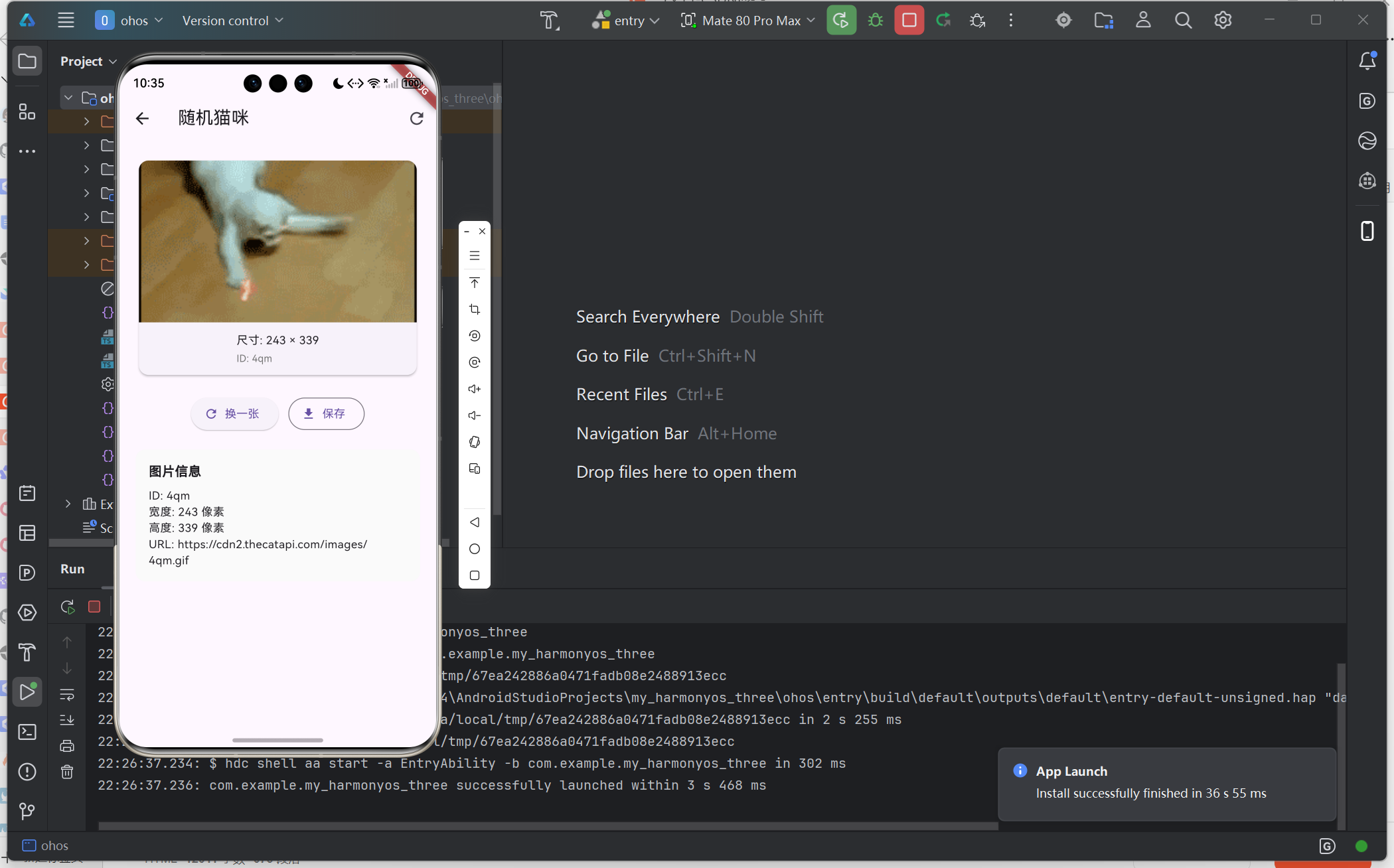
七、总结
本项目从零实现了一个 Flutter 鸿蒙网络请求应用,涵盖了:
学习收获
| 单例模式 | HttpUtil 采用单例,全局共享 |
| 错误处理 | 统一处理网络异常,提升用户体验 |
| 组件化设计 | CatCard 可复用,职责单一 |
| 状态管理 | Provider 实现数据与UI分离 |
后续优化方向
- 添加图片缓存机制
- 实现下拉刷新/上拉加载更多
- 添加收藏功能
- 接入真实的用户登录API
如果本文对你有帮助,欢迎点赞收藏!有问题欢迎评论区讨论。
欢迎加入开源鸿蒙跨平台社区: https://openharmonycrossplatform.csdn.net
📕个人领域 :Linux/C++/java/AI 🚀 个人主页 :有点流鼻涕 · CSDN 💬 座右铭 : “向光而行,沐光而生。”