系统使用windows 11
启用 Windows 虚拟化和 Linux 子系统功能
- 打开 “启用或关闭 Windows功能”,找到并勾选以下选项 (完成后需重启):
- Virtual Machine Platform
- Hyper-V
- 适用于 Linux 的 Windows 子系统
更新 WSL
打开终端,输入更新命令:
wsl –install -d Ubuntu
如果是第一次使用 wsl,可能会下载 wsl 安装包,使用命令行的方式下载速度可能很慢,可以点击这里 手动下载 WSL 离线包并安装。
安装 Ubuntu 22.04
在终端中输入命令:
wsl –install -d Ubuntu-22.04
等待下载并安装,安装完毕后要求输入 Ubuntu 的用户名和密码。
更换软件源
- sudo nano /etc/apt/sources.list
- 替换为阿里源
- 操作方法:
- 按下 Alt + \\ 将光标移动到文件开头
- 按下 Alt + A 设置锚点
- 按下 Alt + / 将光标移动到文件结尾
- 用 Ctrl + K(剪切) 或 Alt + D(直接删除)
- 复制阿里安装源
- 鼠标右键单击粘贴在 nano 中
22.04 阿里源:
deb https://mirrors.aliyun.com/ubuntu/ jammy main restricted universe multiverse
deb-src https://mirrors.aliyun.com/ubuntu/ jammy main restricted universe multiverse
deb https://mirrors.aliyun.com/ubuntu/ jammy-security main restricted universe multiverse
deb-src https://mirrors.aliyun.com/ubuntu/ jammy-security main restricted universe multiverse
deb https://mirrors.aliyun.com/ubuntu/ jammy-updates main restricted universe multiverse
deb-src https://mirrors.aliyun.com/ubuntu/ jammy-updates main restricted universe multiverse
# deb https://mirrors.aliyun.com/ubuntu/ jammy-proposed main restricted universe multiverse
# deb-src https://mirrors.aliyun.com/ubuntu/ jammy-proposed main restricted universe multiverse
deb https://mirrors.aliyun.com/ubuntu/ jammy-backports main restricted universe multiverse
deb-src https://mirrors.aliyun.com/ubuntu/ jammy-backports main restricted universe multiverse
更新系统
sudo apt update
sudo apt upgrade
文件互传
文件管理器左侧边栏下部:Linux 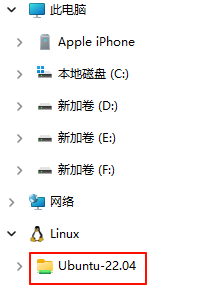 如果你已经进入 WSL,可以用:
cp /mnt/c/path/to/file ~/destination/
mv /mnt/c/path/to/file ~/destination/
wsl 常用命令
- wsl –update 这个命令只是更新 WSL 内核和相关组件(比如 WSLg、系统支持文件),并不会自动安装或更新 Ubuntu 发行版。
- wsl –list –online 查看 WSL 当前支持、可以直接安装的 Linux 发行版列表
- wsl –list –verbose 查看已安装
- wsl –install -d Ubuntu 默认安装最新的 # 安装 Ubuntu 22.04
wsl –install -d Ubuntu-22.04# 安装 Ubuntu 20.04
wsl –install -d Ubuntu-20.04# 安装 Ubuntu 18.04
wsl –install -d Ubuntu-18.04# 安装 Ubuntu 16.04微软已经下架了这个旧版本
wsl –install -d Ubuntu-16.04
``` - wsl –set-default-version 2 :默认安装到 wsl2
- wsl -d Ubuntu-22.04 启动指定的 Ubuntu
- wsl –unregister Ubuntu-20.04:卸载
- wsl –shutdown:重启wsl
vscode 远程连接
vscode 中搜索 WSL 扩展,安装完毕后按下图查看 Ubuntu 系统: 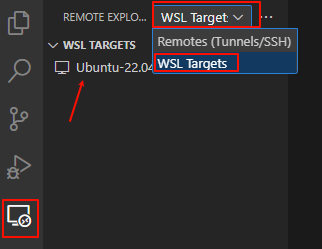 点击 Ubuntu -22.04 右侧的箭头,连接到 Ubuntu :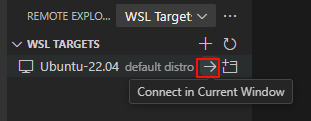
wsl 踩坑
无法访问外网:wsl setting – 网络 – 网络模式 – Mirrored(镜像模式)
在镜像模式下,wsl 会复制主机的网络接口,如果是单网卡多 IP ,则 Ubuntu 默认使用那个配置了路由的网段 IP。 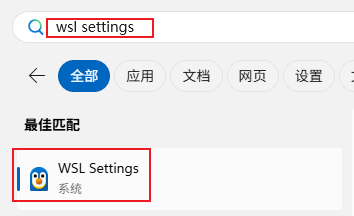
设置开发环境
本地编译
本地编译需要安装开发工具和必要的库。需要安装以下包:
$ sudo apt update
$ sudo apt install gawk wget git diffstat unzip texinfo \\
gcc-multilib build-essential chrpath socat libsdl1.2-dev \\
xterm ncurses-dev lzop libelf-dev
交叉编译
32 位 ARM 交叉编译器和工具链
sudo apt install gcc-arm-linux-gnueabihf binutils-arm-linux-gnueabihf
如果安装软件浮点数版本,将 gnueabihf 改为 gnueabi
64 位 ARM 交叉编译器和工具链
sudo apt install gcc-aarch64-linux-gnu binutils-aarch64-linux-gnu
指定编译器版本
上面的命令是安装 Ubuntu 发行版支持的最新版本,如果要指定特定的编译器版本,使用:gcc-<version>-<arch>-linux-gnu* ,其中 version 是一个数字,代表 gcc 的版本。比如安装 GCC8,可以使用:
sudo apt install gcc-8-aarch64-linux-gnu
下载 Linux 源码
下载最新源码
使用下列命令下载最新的 Linux 源码,这里使用 depth=1 来避免下载历史记录(几个 GB大小),只是选择上一次提交的历史记录(2025.11 月大约 270 MB):
git clone https://github.com/torvalds/linux –depth=1
或者:
git clone https://git.kernel.org/pub/scm/linux/kernel/git/torvalds/linux.git –depth=1
github 站点和 kernel.org 站点是官方下载站点,但在国内的速度都相当慢,还存在下载一半失败的现象。这里推荐国内的镜像站点(码云,每日同步):
https://gitee.com/mirrors/linux_old1.git –depth=1
下载指定版本
上述是克隆最新的 Linux 代码,大部分时候我们需要指定的版本,比如克隆 v5.10 版本。有两种方法:
git checkout v5.10
其它 Ubuntu 版本的安装源(阿里源)
Ubuntu 24.04
deb https://mirrors.aliyun.com/ubuntu/ noble main restricted universe multiverse
deb-src https://mirrors.aliyun.com/ubuntu/ noble main restricted universe multiverse
deb https://mirrors.aliyun.com/ubuntu/ noble-security main restricted universe multiverse
deb-src https://mirrors.aliyun.com/ubuntu/ noble-security main restricted universe multiverse
deb https://mirrors.aliyun.com/ubuntu/ noble-updates main restricted universe multiverse
deb-src https://mirrors.aliyun.com/ubuntu/ noble-updates main restricted universe multiverse
# deb https://mirrors.aliyun.com/ubuntu/ noble-proposed main restricted universe multiverse
# deb-src https://mirrors.aliyun.com/ubuntu/ noble-proposed main restricted universe multiverse
deb https://mirrors.aliyun.com/ubuntu/ noble-backports main restricted universe multiverse
deb-src https://mirrors.aliyun.com/ubuntu/ noble-backports main restricted universe multiverse
Ubuntu 20.04
deb https://mirrors.aliyun.com/ubuntu/ focal main restricted universe multiverse
deb-src https://mirrors.aliyun.com/ubuntu/ focal main restricted universe multiverse
deb https://mirrors.aliyun.com/ubuntu/ focal-security main restricted universe multiverse
deb-src https://mirrors.aliyun.com/ubuntu/ focal-security main restricted universe multiverse
deb https://mirrors.aliyun.com/ubuntu/ focal-updates main restricted universe multiverse
deb-src https://mirrors.aliyun.com/ubuntu/ focal-updates main restricted universe multiverse
# deb https://mirrors.aliyun.com/ubuntu/ focal-proposed main restricted universe multiverse
# deb-src https://mirrors.aliyun.com/ubuntu/ focal-proposed main restricted universe multiverse
deb https://mirrors.aliyun.com/ubuntu/ focal-backports main restricted universe multiverse
deb-src https://mirrors.aliyun.com/ubuntu/ focal-backports main restricted universe multiverse
Ubuntu 18.04
deb https://mirrors.aliyun.com/ubuntu/ bionic main restricted universe multiverse
deb-src https://mirrors.aliyun.com/ubuntu/ bionic main restricted universe multiverse
deb https://mirrors.aliyun.com/ubuntu/ bionic-security main restricted universe multiverse
deb-src https://mirrors.aliyun.com/ubuntu/ bionic-security main restricted universe multiverse
deb https://mirrors.aliyun.com/ubuntu/ bionic-updates main restricted universe multiverse
deb-src https://mirrors.aliyun.com/ubuntu/ bionic-updates main restricted universe multiverse
# deb https://mirrors.aliyun.com/ubuntu/ bionic-proposed main restricted universe multiverse
# deb-src https://mirrors.aliyun.com/ubuntu/ bionic-proposed main restricted universe multiverse
deb https://mirrors.aliyun.com/ubuntu/ bionic-backports main restricted universe multiverse
deb-src https://mirrors.aliyun.com/ubuntu/ bionic-backports main restricted universe multiverse