目录
一、引言
二、WebApiTestClient介绍
1、特性
2、应用场景
三、WebApiTestClient具体使用
1、WebApi项目引入组件
2、如何使用组件
1、修改Api.cshtml文件
2、配置读取注释的xml路径
3、测试接口
四、总结
一、引言
由于最近项目需要开发WebApi接口,接口开发完了需要自测或提供给第三方进行调试,看了网上的方法,大多都是使用第三方测试工具,如Postman、Fiddler等,但这些虽然功能强大,但使用起来较为繁琐,如Postman还需要注册、下载及安装等,因此就搜索其他的调试方法,如WebApiTestClient和swagger,这些都是轻量级的,可直接集成在项目中使用,很方便,本文主要介绍在WebApi中使用WebApiTestClien接口测试工具的应用。
二、WebApiTestClient介绍
WebApiTestClient是一款专门为调试和测试ASP.NET WebApi设计的工具,可以通过简洁的Web界面发送请求并查看响应。在API开发过程中,它可以帮助开发者更高效地进行调试和验证。
1、特性
2、应用场景
1)开发阶段的调试
在开发阶段,WebApiTestClient可以用于快速验证API是否按预期工作。通过其简洁的界面,可以轻松构造各种HTTP请求并查看响应,便于发现和修复问题。
2)测试API端点
在测试阶段,QA工程师可以使用WebApiTestClient模拟各种请求,验证API的稳定性和正确性。能够自定义请求参数和请求体,也有助于进行边界测试和异常处理测试。
3)与前端开发的协同
前后端分离的开发模式下,前端开发人员可以使用WebApiTestClient测试后端API的接口,确保数据交互的正确性,减少前后端联调的时间和成本。
4)快速验证和演示
在需求评审或技术交流过程中,开发者可以使用WebApiTestClient进行快速验证和演示,展示API的功能和数据交互过程,提高沟通效率。
三、WebApiTestClient具体使用
1、WebApi项目引入组件
首先,我们需要定义一个API项目
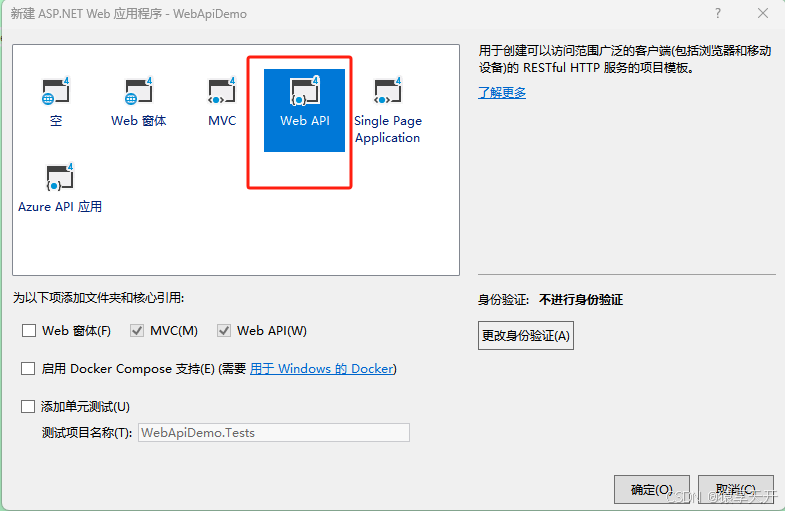
然后通过Nuget引入组件,如下图。记住选下图中的第一个WebApiTestClient进行安装。
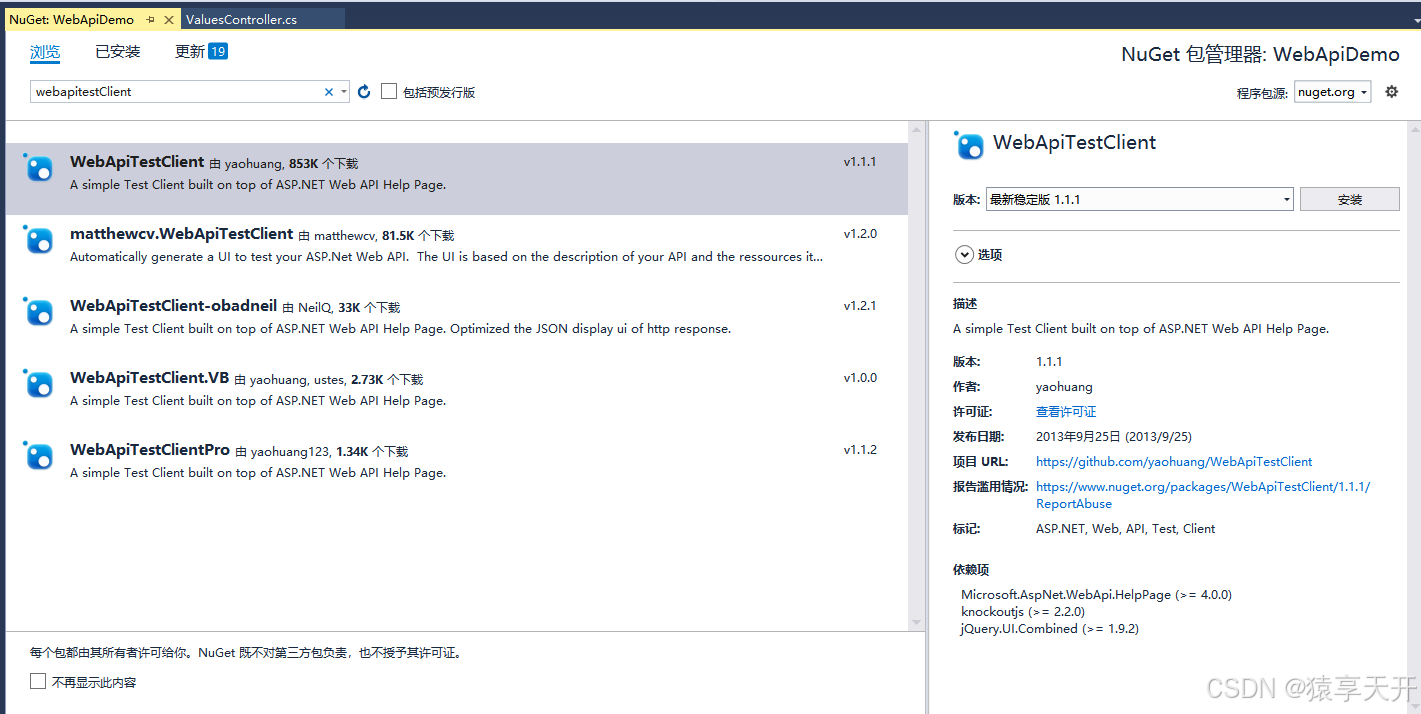
引入成功后,将向项目里面添加一些主要文件:
- Scripts\\WebApiTestClient.js
- Areas\\HelpPage\\TestClient.css
- Areas\\HelpPage\\Views\\Help\\DisplayTemplates\\TestClientDialogs.cshtml
- Areas\\HelpPage\\Views\\Help\\DisplayTemplates\\TestClientReferences.cshtml
2、如何使用组件
1、修改Api.cshtml文件
通过上述步骤,就能将组件WebAPITestClient引入进来。下面我们只需要做一件事:打开文件 (根据 Areas\\HelpPage\\Views\\Help) Api.cshtml 并添加以下内容:
- @Html.DisplayForModel("TestClientDialogs")
- @Html.DisplayForModel("TestClientReferences")
添加后Api.cshtml文件的代码如下
@using System.Web.Http
@using WebApiDemo.Areas.HelpPage.Models
@model HelpPageApiModel
@{
var description = Model.ApiDescription;
ViewBag.Title = description.HttpMethod.Method + " " + description.RelativePath;
}
<link type="text/css" href="~/Areas/HelpPage/HelpPage.css" rel="stylesheet" />
<div id="body" class="help-page">
<section class="featured">
<div class="content-wrapper">
<p>
@Html.ActionLink("Help Page Home", "Index")
</p>
</div>
</section>
<section class="content-wrapper main-content clear-fix">
@Html.DisplayForModel()
</section>
</div>
@Html.DisplayForModel("TestClientDialogs")
@section Scripts{
<link href="~/Areas/HelpPage/HelpPage.css" rel="stylesheet" />
@Html.DisplayForModel("TestClientReferences")
}
2、配置读取注释的xml路径
其实,通过上面的步骤,我们的项目已经可以跑起来了,也可以调用接口测试。但是,还不能读取 /// <summary> 注释里面的东西。需要做如下配置才行。
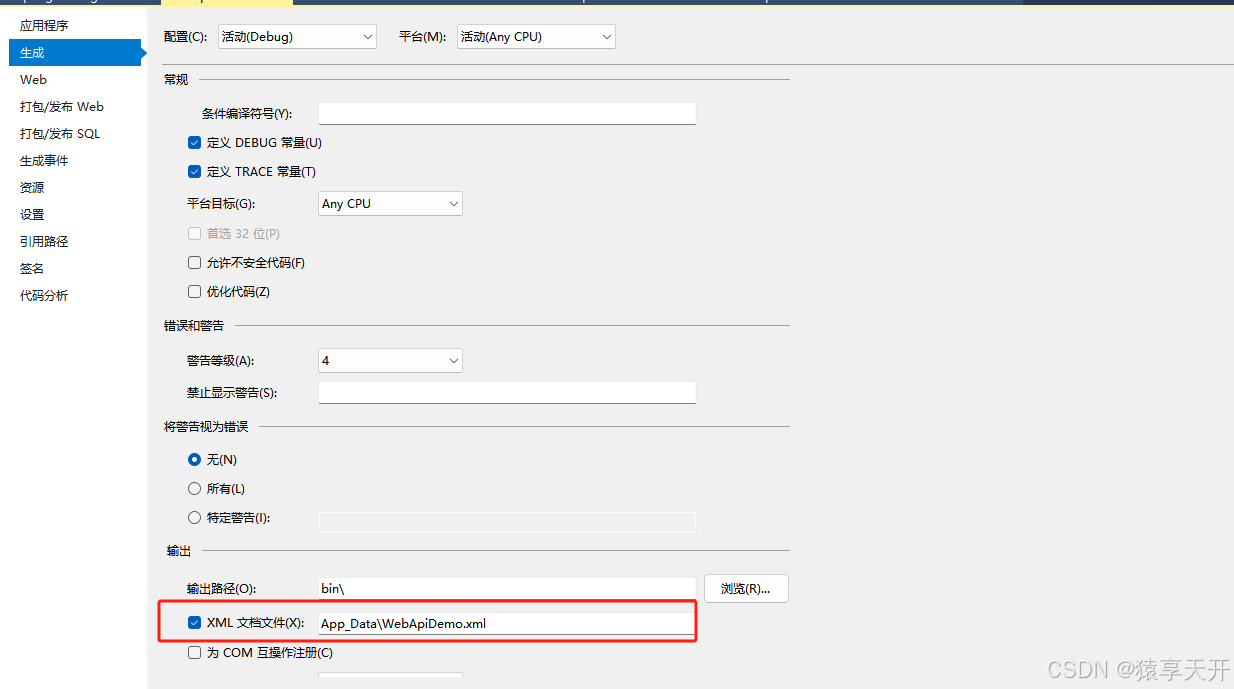
(1)配置生成xml的路径。我们在项目上面点右键→属性→生成标签页配置xml的路径
(2)在xml的读取路径:在下图的HelpPageConfig.cs里面配置一句话,指定xml的读取路径。
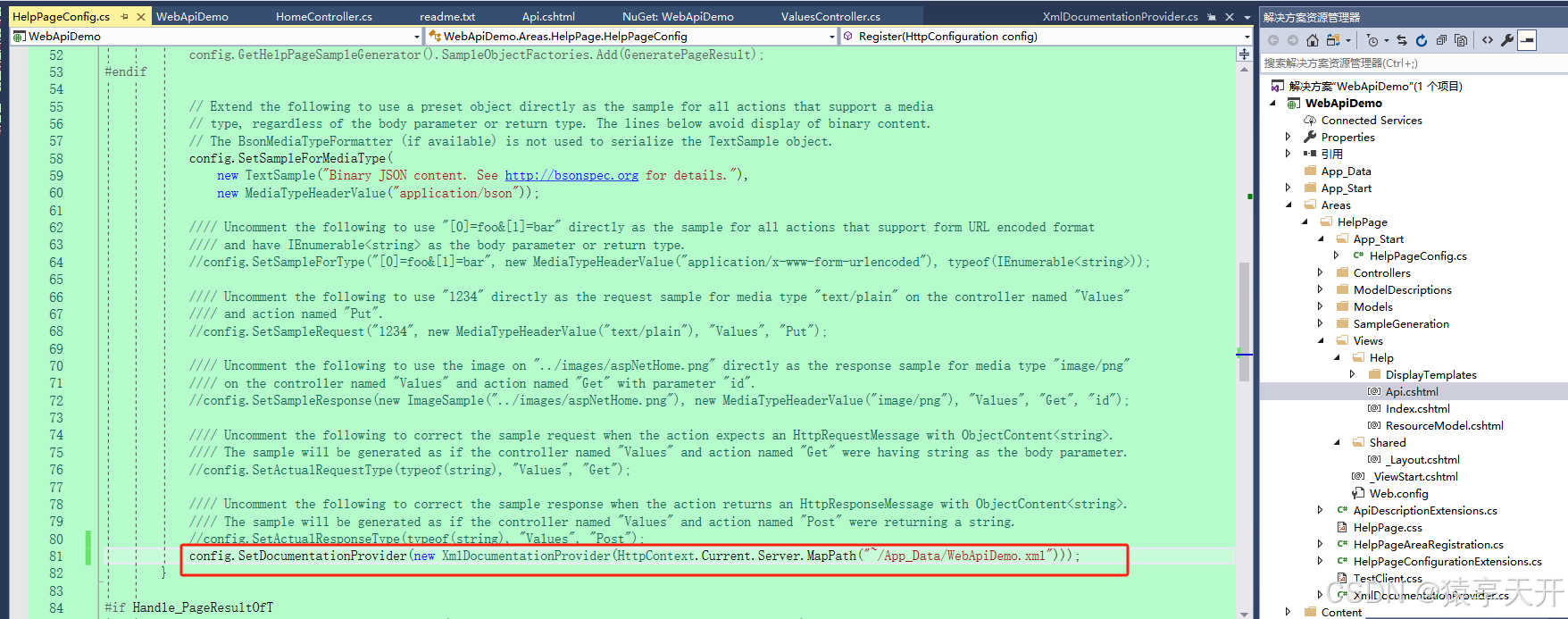
这句代码如下:
config.SetDocumentationProvider(new XmlDocumentationProvider(HttpContext.Current.Server.MapPath("~/App_Data/WebApiDemo.xml")));
HelpPageConfig.cs完整文件入下:
// Uncomment the following to provide samples for PageResult<T>. Must also add the Microsoft.AspNet.WebApi.OData
// package to your project.
////#define Handle_PageResultOfT
using System;
using System.Collections;
using System.Collections.Generic;
using System.Diagnostics;
using System.Diagnostics.CodeAnalysis;
using System.Linq;
using System.Net.Http.Headers;
using System.Reflection;
using System.Web;
using System.Web.Http;
#if Handle_PageResultOfT
using System.Web.Http.OData;
#endif
namespace WebApiDemo.Areas.HelpPage
{
/// <summary>
/// Use this class to customize the Help Page.
/// For example you can set a custom <see cref="System.Web.Http.Description.IDocumentationProvider"/> to supply the documentation
/// or you can provide the samples for the requests/responses.
/// </summary>
public static class HelpPageConfig
{
[SuppressMessage("Microsoft.Globalization", "CA1303:Do not pass literals as localized parameters",
MessageId = "WebApiDemo.Areas.HelpPage.TextSample.#ctor(System.String)",
Justification = "End users may choose to merge this string with existing localized resources.")]
[SuppressMessage("Microsoft.Naming", "CA2204:Literals should be spelled correctly",
MessageId = "bsonspec",
Justification = "Part of a URI.")]
public static void Register(HttpConfiguration config)
{
//// Uncomment the following to use the documentation from XML documentation file.
//config.SetDocumentationProvider(new XmlDocumentationProvider(HttpContext.Current.Server.MapPath("~/App_Data/XmlDocument.xml")));
//// Uncomment the following to use "sample string" as the sample for all actions that have string as the body parameter or return type.
//// Also, the string arrays will be used for IEnumerable<string>. The sample objects will be serialized into different media type
//// formats by the available formatters.
//config.SetSampleObjects(new Dictionary<Type, object>
//{
// {typeof(string), "sample string"},
// {typeof(IEnumerable<string>), new string[]{"sample 1", "sample 2"}}
//});
// Extend the following to provide factories for types not handled automatically (those lacking parameterless
// constructors) or for which you prefer to use non-default property values. Line below provides a fallback
// since automatic handling will fail and GeneratePageResult handles only a single type.
#if Handle_PageResultOfT
config.GetHelpPageSampleGenerator().SampleObjectFactories.Add(GeneratePageResult);
#endif
// Extend the following to use a preset object directly as the sample for all actions that support a media
// type, regardless of the body parameter or return type. The lines below avoid display of binary content.
// The BsonMediaTypeFormatter (if available) is not used to serialize the TextSample object.
config.SetSampleForMediaType(
new TextSample("Binary JSON content. See http://bsonspec.org for details."),
new MediaTypeHeaderValue("application/bson"));
//// Uncomment the following to use "[0]=foo&[1]=bar" directly as the sample for all actions that support form URL encoded format
//// and have IEnumerable<string> as the body parameter or return type.
//config.SetSampleForType("[0]=foo&[1]=bar", new MediaTypeHeaderValue("application/x-www-form-urlencoded"), typeof(IEnumerable<string>));
//// Uncomment the following to use "1234" directly as the request sample for media type "text/plain" on the controller named "Values"
//// and action named "Put".
//config.SetSampleRequest("1234", new MediaTypeHeaderValue("text/plain"), "Values", "Put");
//// Uncomment the following to use the image on "../images/aspNetHome.png" directly as the response sample for media type "image/png"
//// on the controller named "Values" and action named "Get" with parameter "id".
//config.SetSampleResponse(new ImageSample("../images/aspNetHome.png"), new MediaTypeHeaderValue("image/png"), "Values", "Get", "id");
//// Uncomment the following to correct the sample request when the action expects an HttpRequestMessage with ObjectContent<string>.
//// The sample will be generated as if the controller named "Values" and action named "Get" were having string as the body parameter.
//config.SetActualRequestType(typeof(string), "Values", "Get");
//// Uncomment the following to correct the sample response when the action returns an HttpResponseMessage with ObjectContent<string>.
//// The sample will be generated as if the controller named "Values" and action named "Post" were returning a string.
//config.SetActualResponseType(typeof(string), "Values", "Post");
config.SetDocumentationProvider(new XmlDocumentationProvider(HttpContext.Current.Server.MapPath("~/App_Data/WebApiDemo.xml")));
}
#if Handle_PageResultOfT
private static object GeneratePageResult(HelpPageSampleGenerator sampleGenerator, Type type)
{
if (type.IsGenericType)
{
Type openGenericType = type.GetGenericTypeDefinition();
if (openGenericType == typeof(PageResult<>))
{
// Get the T in PageResult<T>
Type[] typeParameters = type.GetGenericArguments();
Debug.Assert(typeParameters.Length == 1);
// Create an enumeration to pass as the first parameter to the PageResult<T> constuctor
Type itemsType = typeof(List<>).MakeGenericType(typeParameters);
object items = sampleGenerator.GetSampleObject(itemsType);
// Fill in the other information needed to invoke the PageResult<T> constuctor
Type[] parameterTypes = new Type[] { itemsType, typeof(Uri), typeof(long?), };
object[] parameters = new object[] { items, null, (long)ObjectGenerator.DefaultCollectionSize, };
// Call PageResult(IEnumerable<T> items, Uri nextPageLink, long? count) constructor
ConstructorInfo constructor = type.GetConstructor(parameterTypes);
return constructor.Invoke(parameters);
}
}
return null;
}
#endif
}
}
3、测试接口
下面仅为简单接口,仅为项目说明使用
using System;
using System.Collections.Generic;
using System.Linq;
using System.Net;
using System.Net.Http;
using System.Web.Http;
namespace WebApiDemo.Controllers
{
public class ValuesController : ApiController
{
// GET api/values
public IEnumerable<string> Get()
{
return new string[] { "value1", "value2" };
}
// GET api/values/5
public string Get(int id)
{
return "value";
}
// POST api/values
public void Post([FromBody]string value)
{
}
// PUT api/values/5
public void Put(int id, [FromBody]string value)
{
}
// DELETE api/values/5
public void Delete(int id)
{
}
}
}
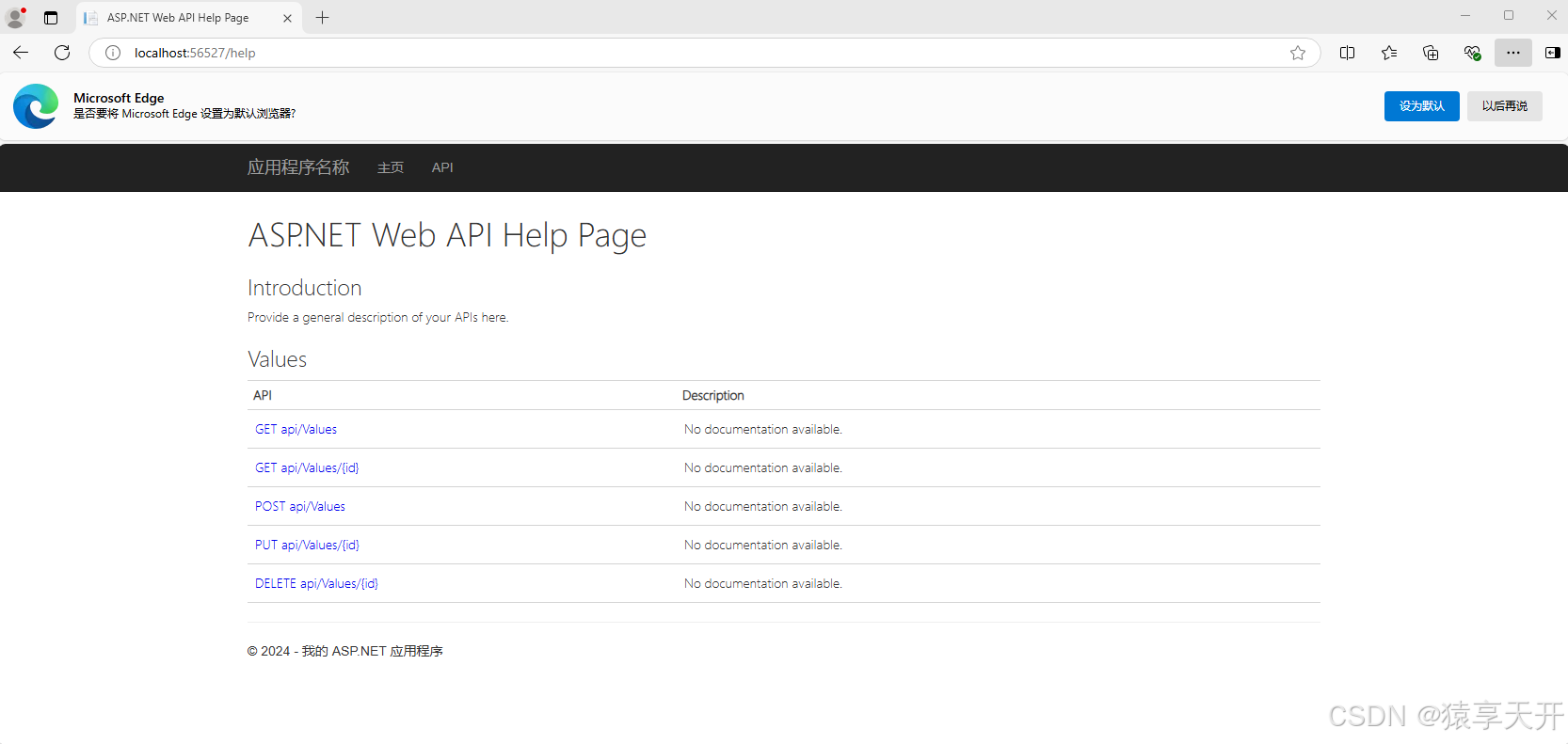
到这里组件就搭完了,剩下的就是运行了。如果过我们是是把webAPI部署在IIS或其他服务器上,在浏览器url里面敲地址http://IP地址:端口/Help即可显示WebApiTestClient调试页面;这里我是直接通过Visual Studio 2017调试弹出WebApiTestClient调试页面,如下:
WebApiTestClient调试页面展示:
接口调试:
点击某一个接口查看接口详细。例如本文查看Get请求的无参方法,右下角有按钮可以测试接口。
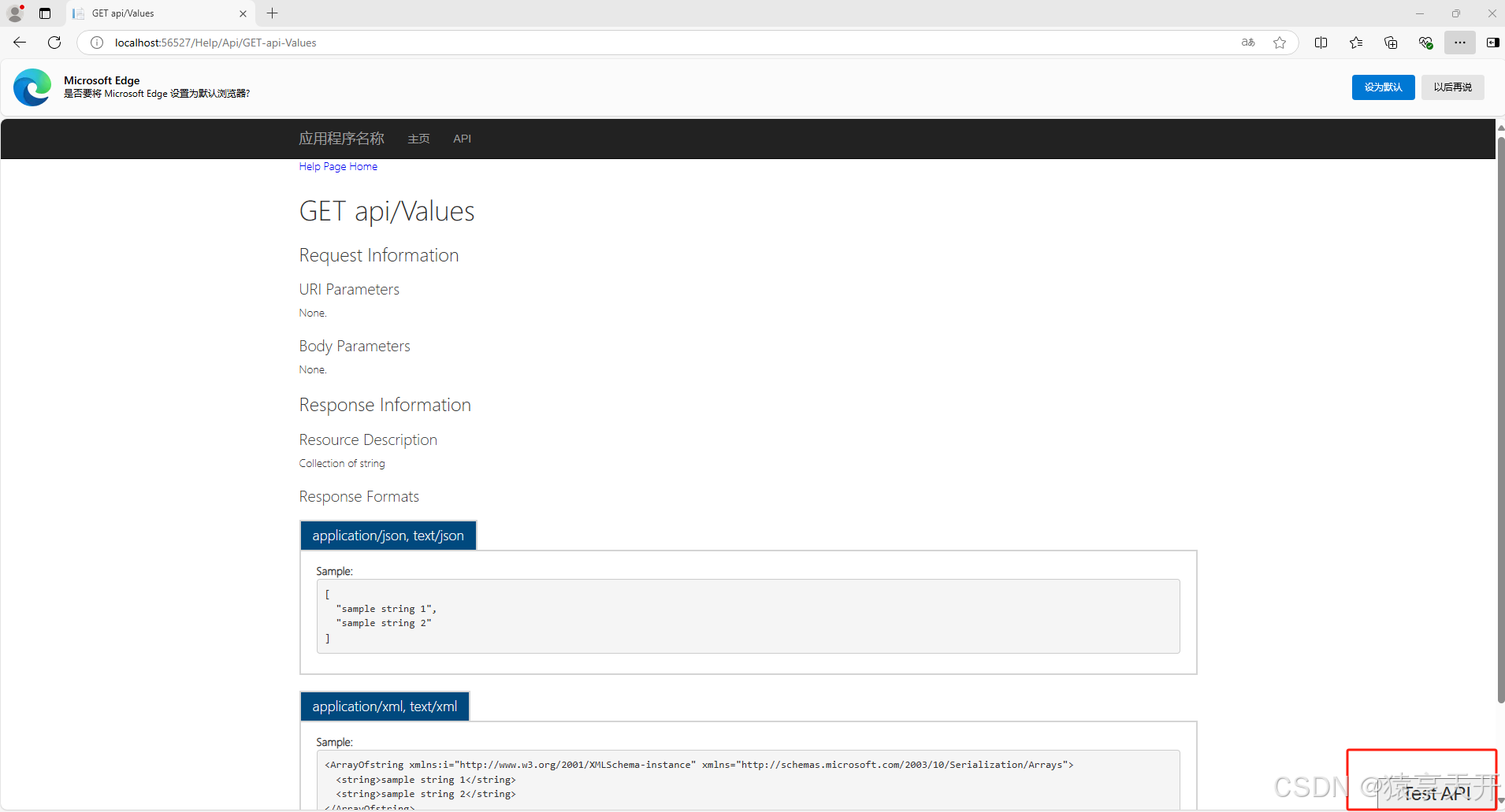
点击“Test API”按钮
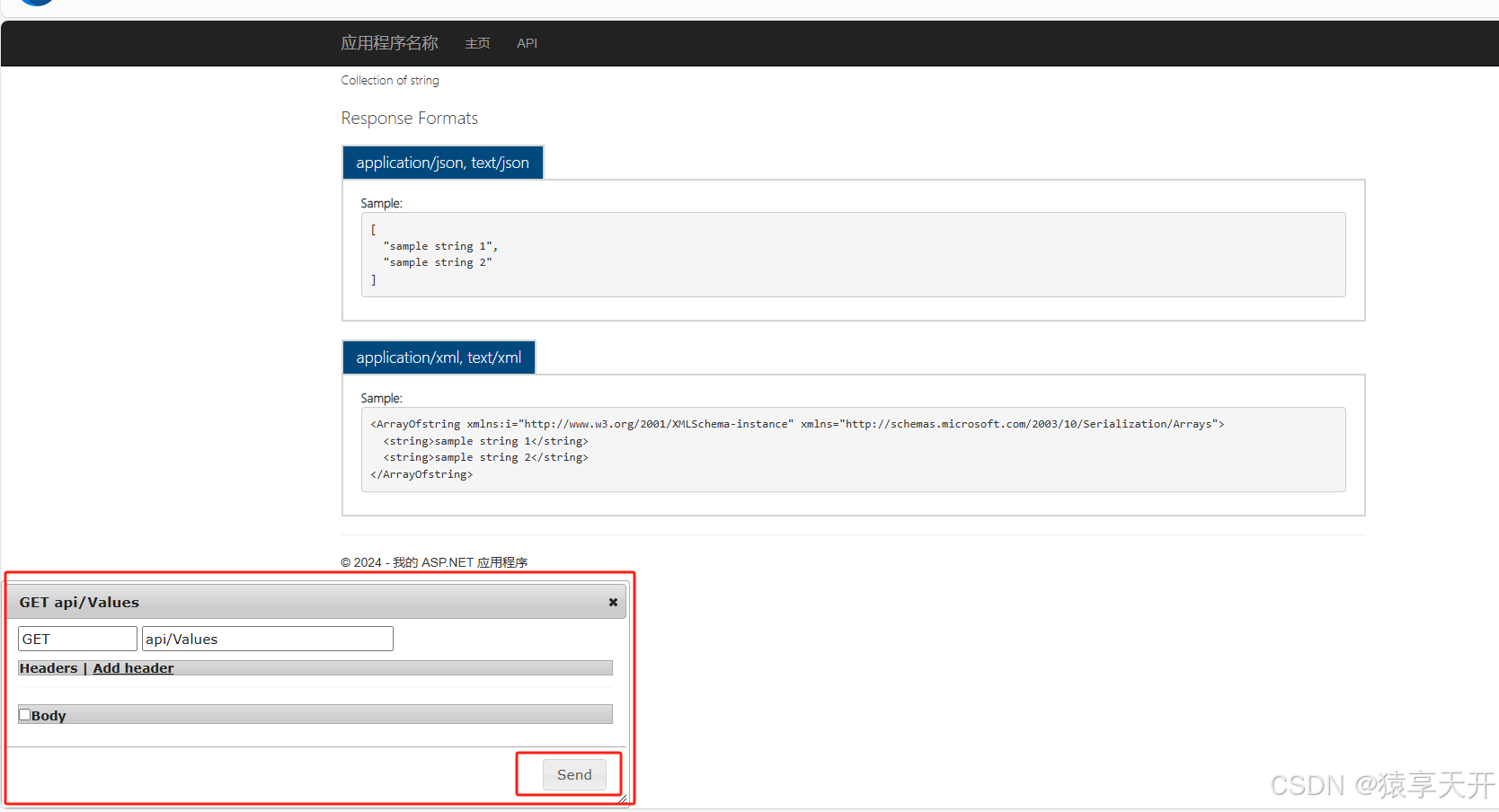
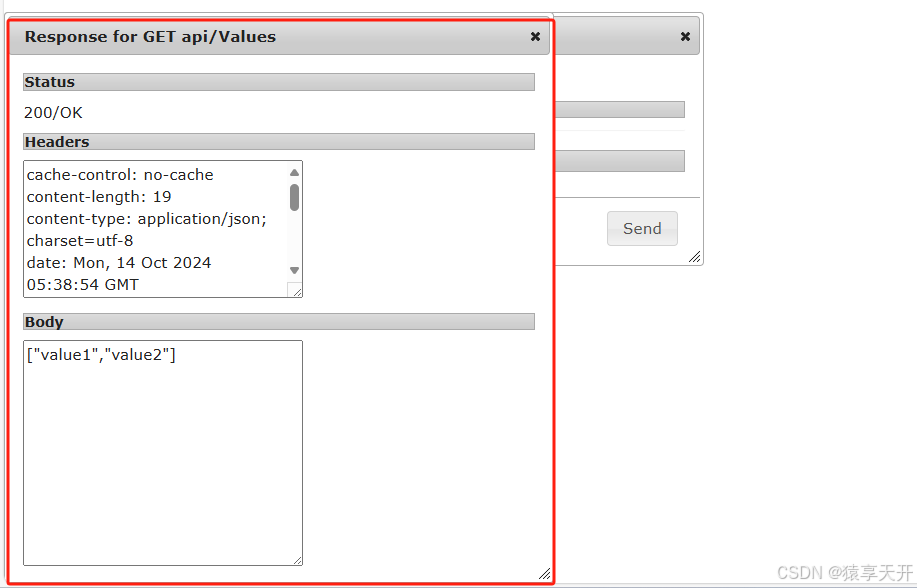
点击Send发送请求
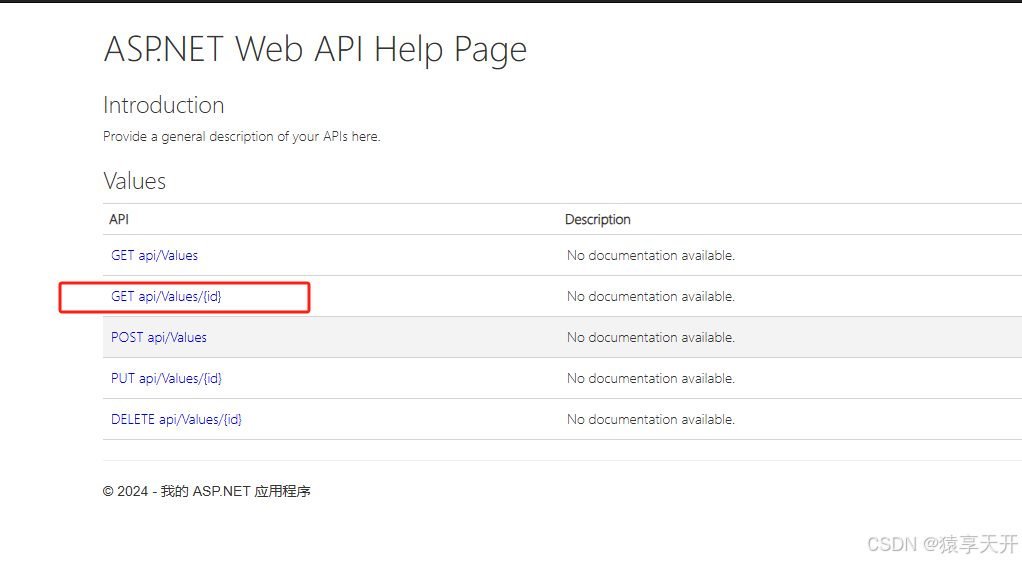
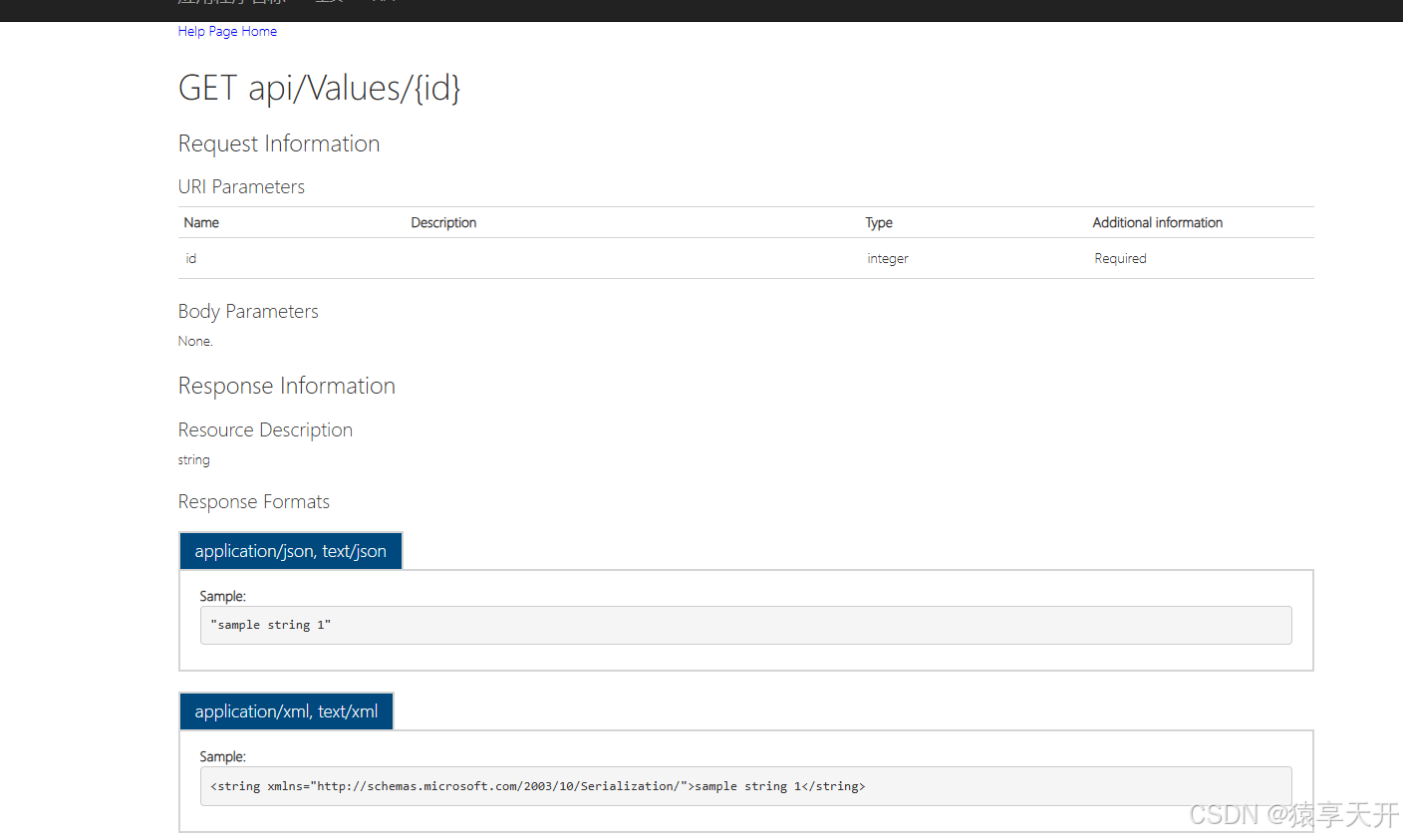
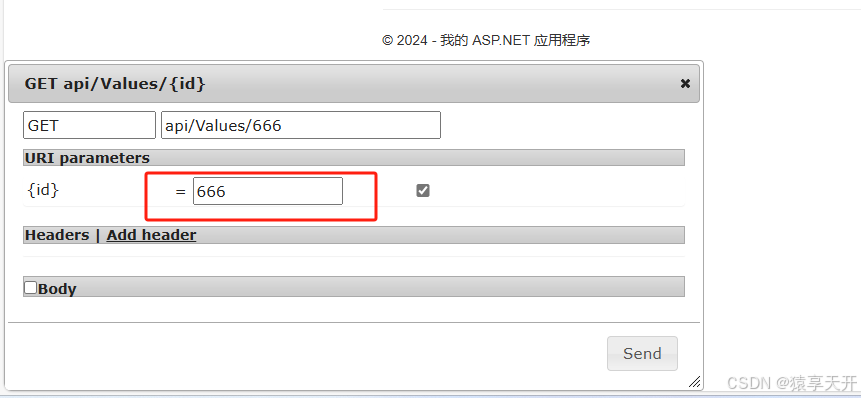
第二个有参数的接口
手动输入参数
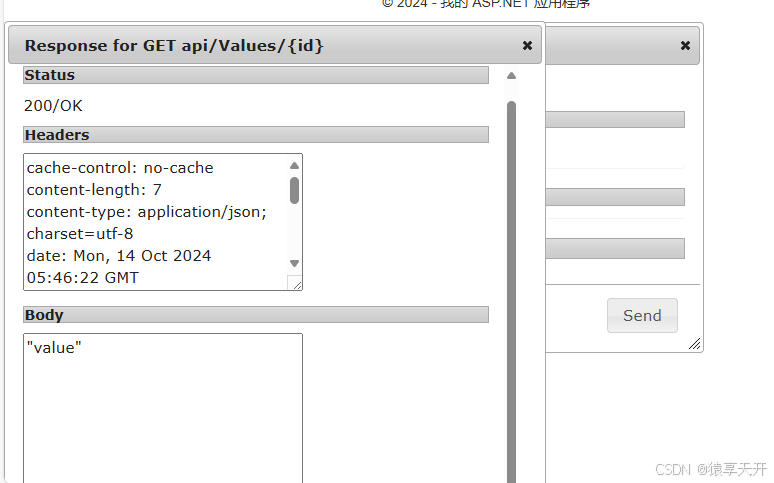
 点“Send”得到返回结果
四、总结
WebApiTestClient 是一种专门用于调试和测试 ASP.NET WebApi 的工具,其设计简洁、功能强大,具有以下几大优点:
1. 简洁易用
- Web界面:无需安装繁琐的外部工具,通过浏览器即可访问和使用,界面友好,操作简单。
- 易于集成:作为 NuGet 包,可以方便地集成到现有的 ASP.NET WebApi 项目中,配置简单,不需要额外的复杂步骤。
2. 灵活的请求配置
- 多种HTTP方法:支持 GET、POST、PUT、DELETE 等常见的 HTTP 请求方法,能够模拟各种请求场景。
- 自定义请求参数:允许用户自定义请求头、请求体和查询参数,灵活性高,便于模拟实际应用中的复杂请求。
3. 实时查看响应
- 即时反馈:可以即时查看 API 的响应结果,包括状态码、响应头和响应体,帮助开发者快速发现和定位问题。
- 详细信息:能够详细显示请求和响应的所有细节,便于调试和分析。
4. 提高开发效率
- 快速验证:在开发过程中,可以快速验证 API 的功能是否正确,无需切换到其他工具,大大提高开发效率。
- 减少联调时间:前后端分离的开发模式下,前端开发人员可以快速验证后端 API 的接口,减少前后端联调的时间和成本。
5. 便于展示和沟通
- 演示友好:在需求评审或技术交流过程中,可以使用 WebApiTestClient 进行实时演示,展示 API 的功能和数据交互过程,提高沟通效率。
- 文档生成:部分集成了API文档生成功能,便于开发者和测试人员查看和使用。
6. 配置灵活
- 路由配置:可以灵活配置路由,适应不同项目的需求。
- 环境适应:适用于开发、测试环境,便于不同阶段的调试和测试工作。
7. 无需依赖外部工具
- 内置解决方案:作为 ASP.NET WebApi 的内置调试解决方案,不需要依赖外部工具,减少了环境配置和维护的复杂度。
WebApiTestClient 以其简洁易用、灵活配置、即时反馈等优点,成为了调试和测试 ASP.NET WebApi 的理想工具。它不仅提高了开发和测试效率,而且在前后端联调、需求评审等场景中也发挥了重要作用,为开发者提供了极大的便利。


