系列第三篇:Epic 数据跑通之后,把 Steam 限免也接进来。
这一篇重点讲为什么不用 Steam 官方 API、GamerPower 的数据结构,以及如何把多平台数据合并到同一套 Game 类型里。
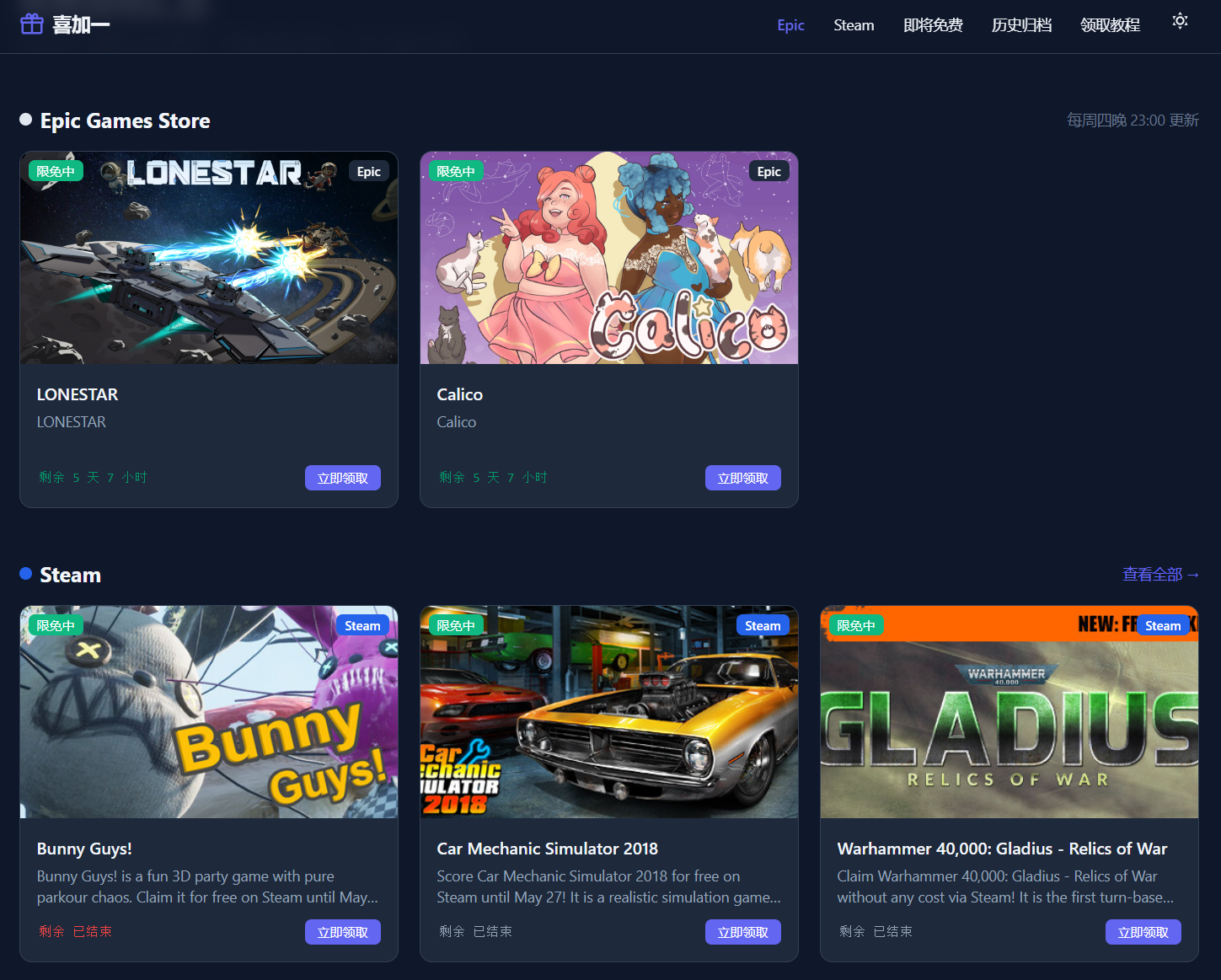
依照惯例,来个效果图:
为什么不用 Steam 官方 API
Steam 有 Web API(store.steampowered.com/api),但没有提供"当前免费游戏"的直接接口。现有接口需要 AppID 才能查单个游戏信息,没办法直接拿到"哪些游戏现在免费"的列表。
替代方案:GamerPower,一个专门聚合各平台限时免费游戏的第三方服务。它提供公开 API,覆盖 Steam、Epic、GOG、Itch.io 等平台,不需要鉴权。
API 文档:https://www.gamerpower.com/api-read
GamerPower API 接口
获取 Steam 免费游戏:
GET https://www.gamerpower.com/api/giveaways?platform=steam&type=game
不加 platform 参数就是获取所有平台:
GET https://www.gamerpower.com/api/giveaways?type=game
支持的平台参数:steam、epic-games-store、gog、itchio、ubisoft、origin、battlenet、drm-free。
返回数据结构
[
{
"id": 3654,
"title": "Bunny Guys! (Steam) Giveaway",
"worth": "$4.99",
"thumbnail": "https://www.gamerpower.com/offers/1/xxx.jpg",
"image": "https://www.gamerpower.com/offers/1b/xxx.jpg",
"description": "Bunny Guys! is a fun 3D party game…",
"instructions": "1. Click the button to visit…",
"open_giveaway_url": "https://www.gamerpower.com/open/bunny-guys-steam-giveaway",
"published_date": "2026-05-22 13:20:03",
"type": "Game",
"platforms": "PC, Steam",
"end_date": "2026-05-29 23:59:00",
"users": 26530,
"status": "Active",
"gamerpower_url": "https://www.gamerpower.com/bunny-guys-steam-giveaway",
"open_giveaway": "https://www.gamerpower.com/open/bunny-guys-steam-giveaway"
}
]
需要注意几点:
- title 带有 (Steam) Giveaway 后缀,需要清理
- platforms 是字符串,不是数组("PC, Steam")
- end_date 格式是 "2026-05-29 23:59:00",不是 ISO 8601
- status 为 "Active" 表示正在进行,"Expired" 是已结束
抓取脚本:fetch-gamerpower.mjs
完整实现
// scripts/fetch-gamerpower.mjs
import { writeFileSync } from 'node:fs'
import { join } from 'node:path'
import { fileURLToPath } from 'node:url'
const __dirname = fileURLToPath(new URL('.', import.meta.url))
const GAMERPOWER_API_BASE = 'https://www.gamerpower.com/api'
// 平台名称映射,把 API 的 key 转成友好名称
const PLATFORM_MAP = {
'steam': 'Steam',
'epic-games-store': 'Epic Games Store',
'gog': 'GOG',
'itchio': 'Itch.io',
'ubisoft': 'Ubisoft',
'origin': 'Origin',
'battlenet': 'Battle.net',
'drm-free': 'DRM-Free',
}
async function fetchGiveaways(platform = null, type = 'game') {
let url = `${GAMERPOWER_API_BASE}/giveaways`
const params = []
if (platform) params.push(`platform=${platform}`)
if (type) params.push(`type=${type}`)
if (params.length) url += `?${params.join('&')}`
const response = await fetch(url)
if (!response.ok) throw new Error(`API 请求失败: ${response.status}`)
const data = await response.json()
return data // 返回所有数据,不在这里过滤
}
数据转换
把 GamerPower 的原始字段映射成项目统一的格式:
function transformGamerPowerData(giveaway) {
return {
id: giveaway.id,
title: giveaway.title,
description: giveaway.description,
image: giveaway.image,
thumbnail: giveaway.thumbnail,
url: giveaway.open_giveaway_url || giveaway.giveaway_url,
platform: PLATFORM_MAP[giveaway.platforms] || giveaway.platforms,
worth: giveaway.worth, // 原价(字符串,如 "$4.99")
users: giveaway.users, // 领取人数
type: giveaway.type,
publishedDate: giveaway.published_date,
endDate: giveaway.end_date,
instructions: giveaway.instructions,
slug: generateSlug(giveaway.title),
}
}
slug 生成
GamerPower 的标题带有后缀(Bunny Guys! (Steam) Giveaway),slug 要清理干净:
function generateSlug(title) {
return title
.toLowerCase()
.replace(/[^a-z0-9一-龥]+/g, '-') // 非字母数字汉字的字符替换成 –
.replace(/^-+|-+$/g, '') // 去掉首尾 –
}
// "Bunny Guys! (Steam) Giveaway" → "bunny-guys-steam-giveaway"
输出文件
脚本输出两个文件:
async function main() {
const allGiveaways = await fetchGiveaways(null, 'game')
const transformedData = allGiveaways.map(transformGamerPowerData)
// 按平台分组
const groupedByPlatform = {}
transformedData.forEach(game => {
const platform = game.platform
if (!groupedByPlatform[platform]) groupedByPlatform[platform] = []
groupedByPlatform[platform].push(game)
})
// 全量数据
writeFileSync(
join(__dirname, '..', 'data', 'gamerpower-giveaways.json'),
JSON.stringify(transformedData, null, 2)
)
// 按平台分组数据
writeFileSync(
join(__dirname, '..', 'data', 'gamerpower-by-platform.json'),
JSON.stringify(groupedByPlatform, null, 2)
)
}
集成进项目:steam-games.json
项目里 Steam 游戏不直接用 GamerPower 的原始格式,而是转换成和 games.json(Epic 数据)相同的结构,存到 steam-games.json:
[
{
"id": "steam-3654",
"title": "Bunny Guys!",
"description": "Bunny Guys! is a fun 3D party game with pure parkour chaos…",
"image": "https://www.gamerpower.com/offers/1b/xxx.jpg",
"originalPrice": "$4.99",
"startDate": "2026-05-22 13:20:03",
"endDate": "2026-05-29 23:59:00",
"slug": "bunny-guys",
"url": "https://www.gamerpower.com/open/bunny-guys-steam-giveaway",
"isCurrent": true,
"seller": "Steam",
"platform": "Steam",
"fetchedAt": "2026-05-27T00:00:00.000Z"
}
]
对比原始格式的处理:
- id 加了 steam- 前缀,避免和 Epic 游戏 ID 冲突
- title 去掉了 (Steam) Giveaway 后缀
- originalPrice 从 worth 字段来
- 新增 platform: 'Steam' 字段标记来源
扩展 TypeScript 类型
原来 Game interface 只有 Epic 的字段,接入 Steam 后需要加 platform:
// composables/useGames.ts
export interface Game {
id: string
title: string
description: string
image: string
originalPrice: string
startDate: string
endDate: string
slug: string
url: string
isCurrent: boolean
seller: string
fetchedAt: string
platform?: 'Epic' | 'Steam' // ← 新增,可选字段
}
platform 是可选的(?:),Epic 的老数据没有这个字段,不加 ? 会报 TypeScript 错误。
更新 useGames:合并两个数据源
// composables/useGames.ts
import gamesData from '~/data/games.json' // Epic 数据
import historyData from '~/data/history.json'
import steamGamesData from '~/data/steam-games.json' // Steam 数据(新增)
export const useGames = () => {
const epicGames = gamesData as Game[]
const steamGames = steamGamesData as Game[]
const games = […epicGames, …steamGames] // 合并
return {
// 混合列表
current: games.filter(g => g.isCurrent),
upcoming: games.filter(g => !g.isCurrent),
all: games,
// 平台独立列表(各页面按需使用)
epicGames,
steamGames,
currentEpic: epicGames.filter(g => g.isCurrent),
currentSteam: steamGames.filter(g => g.isCurrent),
history: […historyData].sort((a, b) =>
new Date(b.endDate).getTime() – new Date(a.endDate).getTime()
),
findBySlug: (slug: string) => games.find(g => g.slug === slug),
}
}
保留独立的 currentEpic 和 currentSteam 而不只用 current,是因为:
- 首页需要分区展示(Epic 区 + Steam 区)
- Steam 专页只需要 Steam 数据
- 平台标签颜色不同(Epic 黑色,Steam 蓝色)
新增 Steam 页面
pages/steam.vue,只展示 Steam 游戏,加上数据来源说明:
<script setup lang="ts">
const { currentSteam } = useGames()
const safeSteam = currentSteam || []
</script>
<template>
<main class="max-w-6xl mx-auto px-4 py-8">
<h1>Steam 免费游戏</h1>
<div v-if="safeSteam.length" class="grid grid-cols-1 sm:grid-cols-2 lg:grid-cols-3 gap-5">
<GameCard v-for="g in safeSteam" :key="g.id" :game="g" />
</div>
<div v-else>暂无 Steam 免费游戏</div>
<!– 数据来源说明 –>
<section class="mt-8 rounded-lg bg-slate-50 border p-6">
<h2>关于数据</h2>
<p>本页面数据来自 GamerPower 公开 API,实际可用性请以 Steam 商店为准。</p>
</section>
</main>
</template>
在首页展示 Steam 区块
<!– pages/index.vue –>
<script setup lang="ts">
const { currentEpic, currentSteam, upcoming } = useGames()
</script>
<template>
<!– Epic 区块 –>
<section class="mb-12">
<h2>Epic Games Store</h2>
<div v-if="currentEpic.length" class="grid …">
<GameCard v-for="g in currentEpic" :key="g.id" :game="{ …g, platform: 'Epic' }" />
</div>
</section>
<!– Steam 区块 –>
<section class="mb-12">
<h2>Steam</h2>
<NuxtLink to="/steam">查看全部 →</NuxtLink>
<div v-if="currentSteam.length" class="grid …">
<!– 首页只展示前 3 个 –>
<GameCard v-for="g in currentSteam.slice(0, 3)" :key="g.id" :game="g" />
</div>
</section>
</template>
GameCard 里的平台标签
GameCard.vue 根据 game.platform 显示不同颜色的平台标签:
const platformColor = computed(() => {
if (props.game.platform === 'Steam') return 'bg-blue-600 text-white'
return 'bg-slate-800 text-white' // Epic 默认黑色
})
<span
v-if="game.platform"
class="absolute top-2 right-2 px-2 py-0.5 text-xs rounded-md font-medium"
:class="platformColor"
>
{{ game.platform }}
</span>
注册预渲染路由
nuxt.config.ts 里加上 /steam:
nitro: {
prerender: {
crawlLinks: false,
routes: ['/', '/upcoming', '/history', '/tutorial', '/steam'], // ← 加了 /steam
failOnError: false,
},
},
数据更新流程
两个数据源的更新互相独立:
Epic 数据(每周四):
node scripts/fetch-epic.mjs
→ data/games.json
→ data/history.json
Steam 数据(按需更新):
node scripts/fetch-gamerpower.mjs
→ data/gamerpower-giveaways.json
→ data/gamerpower-by-platform.json
(再手动处理成 steam-games.json)
GamerPower API 的限制
使用中要注意几点:
对应处理:
// endDate 为 N/A 时的处理
const safeEndDate = g.endDate === 'N/A' ? '' : g.endDate
// Countdown 组件里 endDate 为空时的处理
const diff = endDate ? new Date(endDate).getTime() – now.value.getTime() : Infinity
小结
接入 Steam 数据源的关键步骤:
参考资料
- 从0开始做自己的免费游戏聚合站(一):爬取数据并展示基本页面: https://blog.csdn.net/ShyanZh/article/details/161463561
- 从0开始做自己的免费游戏聚合站(二):游戏详情页、深色模式与倒计时组件: https://blog.csdn.net/ShyanZh/article/details/161493664
