概述
本项目使用 qiankun 的 initGlobalState API 实现主应用与子应用之间的数据通信。主应用创建全局状态,子应用通过 props 接收通信 API,实现双向数据传递。
架构
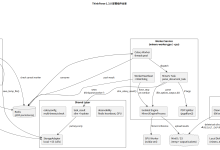
┌─────────────────────────────────────────┐
│ 主应用 (src/) │
│ │
│ actions.ts │
│ ├─ initGlobalState(initialState) │
│ ├─ onGlobalStateChange(cb) │
│ └─ setGlobalState(state) │
│ │ │
│ │ 通过 registerMicroApps props │
│ ▼ │
│ ┌──────────┬──────────┬──────────┐ │
│ │ sub-react│ sub-vue │sub-jquery│ │
│ └──────────┴──────────┴──────────┘ │
└─────────────────────────────────────────┘
核心文件
| src/micro-app/actions.ts | 全局状态定义与 API 封装 |
| src/App.tsx | 主应用注册子应用时传递 actions |
| sub-react/src/main.tsx | React 子应用接入通信 |
| sub-vue/src/main.ts | Vue 子应用接入通信 |
| sub-jquery/src/main.js | jQuery 子应用接入通信 |
API 说明
setGlobalState(state) — 修改全局状态
// 主应用中
import { setGlobalState } from "./micro-app/actions";
setGlobalState({ user: { name: "admin", token: "xxx" } });
setGlobalState({ theme: "dark" });
- 参数为 Partial<GlobalState>,会与当前状态浅合并(不是替换)
- 只传需要更新的字段即可,其他字段保持不变
onGlobalStateChange(callback, fireImmediately?) — 监听状态变化
onGlobalStateChange((state, prev) => {
console.log("新状态:", state);
console.log("旧状态:", prev);
}, true);
- callback:状态变化时触发,参数为新状态和旧状态
- fireImmediately:是否立即触发一次,默认 true
GlobalState 类型定义
// src/micro-app/actions.ts
export interface GlobalState {
user?: {
name: string;
token: string;
};
theme?: "light" | "dark";
[key: string]: unknown; // 允许扩展任意字段
}
按业务需要扩展字段即可。
各子应用接入方式
React 子应用
通信 API 挂载到 window.__POWERED_BY_QIANKUN_ACTIONS__,组件内直接访问:
// 任意 React 组件中
const actions = (window as any).__POWERED_BY_QIANKUN_ACTIONS__;
// 监听状态
actions?.onGlobalStateChange((state) => {
console.log("收到主应用数据:", state);
}, true);
// 修改状态(子应用也可向主应用发数据)
actions?.setGlobalState({ theme: "dark" });
Vue 子应用
通过 app.provide 注入,组件内用 inject 获取:
<script setup lang="ts">
import { inject } from "vue";
const { onGlobalStateChange, setGlobalState } = inject("qiankunActions") as {
onGlobalStateChange: (cb: Function, fire?: boolean) => void;
setGlobalState: (state: unknown) => void;
};
onGlobalStateChange((state) => {
console.log("收到主应用数据:", state);
}, true);
</script>
jQuery 子应用
在 render 函数中直接接收 actions 参数:
function render(container, actions) {
// 监听状态
actions?.onGlobalStateChange((state, prev) => {
console.log("收到主应用数据:", state);
}, true);
// 修改状态
actions?.setGlobalState({ someKey: "value" });
}
注意事项
1. 状态合并是浅合并
setGlobalState 执行的是浅合并,不是深合并。嵌套对象需要整体替换:
// 错误 — 不会合并 user 内部字段
setGlobalState({ user: { name: "newName" } });
// 结果: user = { name: "newName" },token 丢失
// 正确 — 整体替换 user 对象
setGlobalState({ user: { name: "newName", token: existingToken } });
2. 避免频繁触发
onGlobalStateChange 每次状态变化都会触发回调。如果子应用中多个组件都监听,需要注意性能:
// 推荐:在根组件监听一次,通过组件内部状态分发
useEffect(() => {
const unsubscribe = onGlobalStateChange((state) => {
setLocalState(state);
}, true);
return unsubscribe;
}, []);
3. 子应用独立运行时无通信
当子应用独立运行(不通过 qiankun 加载)时,onGlobalStateChange 和 setGlobalState 为 undefined。代码中需要做空值判断:
if (actions?.onGlobalStateChange) {
actions.onGlobalStateChange(callback);
}
4. unmount 时清理监听
子应用卸载时应清理监听,避免内存泄漏:
// React
useEffect(() => {
actions?.onGlobalStateChange(callback);
return () => { /* 清理逻辑 */ };
}, []);
// Vue
onUnmounted(() => { /* 清理逻辑 */ });
// jQuery — 已在 destroy() 中置空 actions 引用
5. 不要存储大量数据
全局状态适合传递轻量级的共享数据(用户信息、主题、权限标识等)。不要将大量业务数据放入全局状态,应通过 API 请求获取。
6. 类型安全
TypeScript 项目中使用时,从 src/micro-app/actions.ts 导入类型:
import type { GlobalState } from "../micro-app/actions";