鸿蒙原生开发手记:徒步迹 – 分享功能:Share Kit
集成 Share Kit 实现社交分享能力
前言
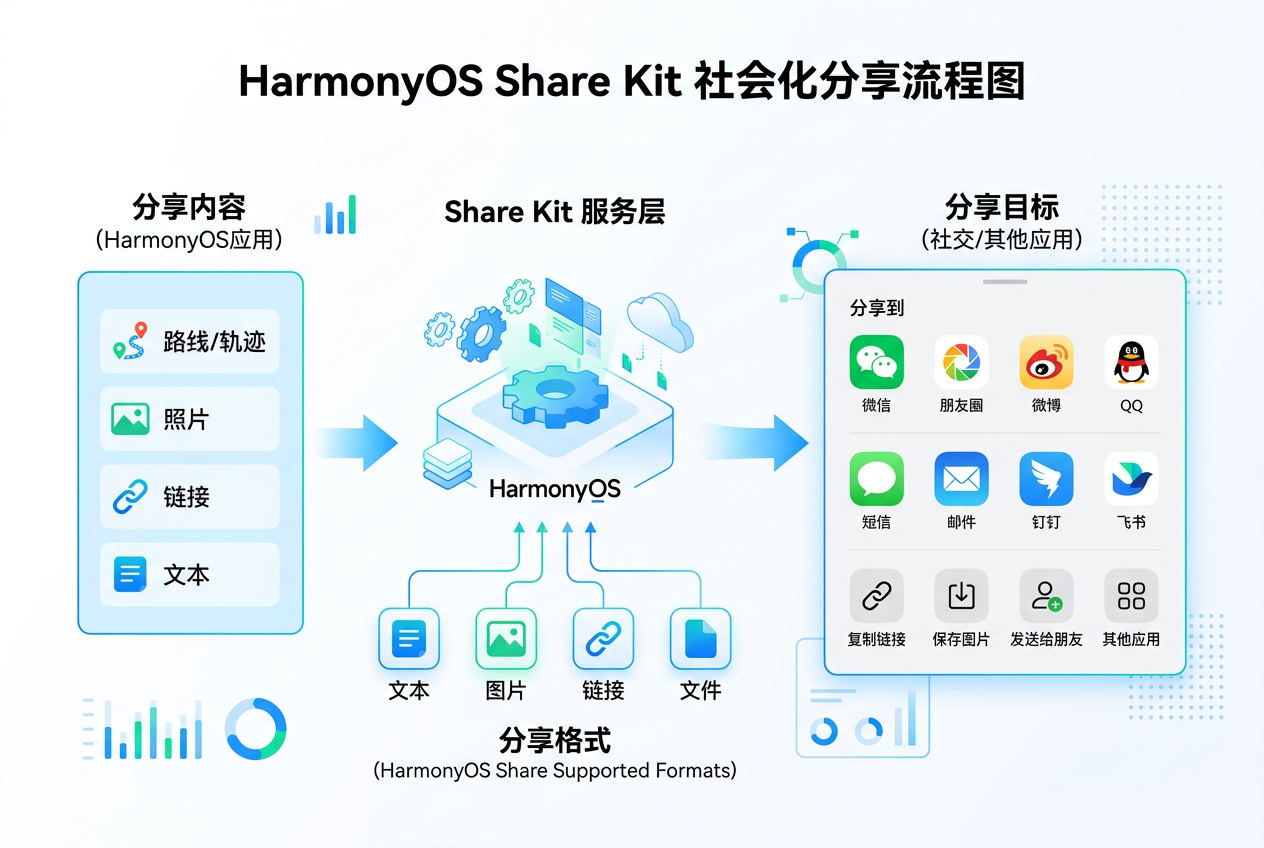
分享功能是社交类 App 的核心能力,用户可以将徒步路线、轨迹记录、健康数据等分享到微信、微博等社交平台。HarmonyOS 的 Share Kit 提供了统一的分享接口,支持文本、图片、文件等多种内容类型。
一、Share Kit 与分享
import { common } from '@kit.AbilityKit';
import { BusinessError } from '@kit.BasicServicesKit';
// 分享内容类型
enum ShareContentType {
TEXT = 'text', // 纯文本
IMAGE = 'image', // 图片
FILE = 'file', // 文件
LINK = 'link', // 链接
MULTI = 'multi', // 混合内容
}
// 分享内容
interface ShareContent {
type: ShareContentType;
title?: string;
text: string;
imageUri?: string;
fileUri?: string;
linkUrl?: string;
linkTitle?: string;
linkDescription?: string;
linkThumbnail?: string;
}
class ShareManager {
private context: common.UIAbilityContext;
constructor(context: common.UIAbilityContext) {
this.context = context;
}
// 分享文本
async shareText(text: string, title?: string): Promise<void> {
const content: ShareContent = {
type: ShareContentType.TEXT,
text,
title,
};
await this.startShare(content);
}
// 分享图片
async shareImage(imageUri: string, text?: string): Promise<void> {
const content: ShareContent = {
type: ShareContentType.IMAGE,
text: text || '',
imageUri,
};
await this.startShare(content);
}
// 分享链接
async shareLink(params: {
url: string;
title: string;
description?: string;
thumbnail?: string;
}): Promise<void> {
const content: ShareContent = {
type: ShareContentType.LINK,
text: params.description || '',
linkUrl: params.url,
linkTitle: params.title,
linkDescription: params.description,
linkThumbnail: params.thumbnail,
};
await this.startShare(content);
}
// 启动分享
private async startShare(content: ShareContent): Promise<void> {
try {
// 使用系统分享面板
await this.context.startAbility({
action: 'ohos.want.action.sendData',
type: this.getMimeType(content.type),
parameters: {
'shareTitle': content.title || content.text,
'shareText': content.text,
'shareImageUri': content.imageUri,
'shareLinkUrl': content.linkUrl,
'shareLinkTitle': content.linkTitle,
},
});
console.log('分享成功');
} catch (e) {
console.error('分享失败', (e as BusinessError).message);
throw e;
}
}
private getMimeType(type: ShareContentType): string {
switch (type) {
case ShareContentType.TEXT: return 'text/plain';
case ShareContentType.IMAGE: return 'image/*';
case ShareContentType.FILE: return 'application/octet-stream';
case ShareContentType.LINK: return 'text/plain';
default: return 'text/plain';
}
}
}
二、分享路线功能
@Component
struct RouteShareSheet {
@Prop routeName: string = '';
@Prop routeDistance: string = '';
@Prop routeDifficulty: string = '';
@Prop routeImage: string = '';
private shareManager: ShareManager;
build() {
Column() {
Text('分享路线').fontSize(18).fontWeight(FontWeight.Bold)
.width('100%').textAlign(TextAlign.Center).padding(16);
// 分享渠道
Row() {
this.ShareButton('微信', '#07C160', () => this.shareToWechat());
this.ShareButton('朋友圈', '#07C160', () => this.shareToMoments());
this.ShareButton('微博', '#FF6B35', () => this.shareToWeibo());
this.ShareButton('更多', '#666', () => this.shareToSystem());
}
.width('100%').padding(16).justifyContent(FlexAlign.SpaceAround);
// 分享内容预览
Column() {
Image(this.routeImage).width('100%').height(150)
.objectFit(ImageFit.Cover).borderRadius(12);
Text(this.routeName).fontSize(16).fontWeight(FontWeight.Bold).margin({ top: 8 });
Text(`距离: ${this.routeDistance} | 难度: ${this.routeDifficulty}`)
.fontSize(13).fontColor('#666').margin({ top: 4 });
}
.padding(16).backgroundColor('#F5F5F5').borderRadius(12).margin(16);
}
.width('100%').backgroundColor(Color.White).borderRadius(16);
}
@Builder
ShareButton(label: string, color: string, onClick: () => void) {
Column() {
Row() {
Text(label).fontSize(12).fontColor(Color.White);
}
.width(48).height(48).backgroundColor(color).borderRadius(24)
.justifyContent(FlexAlign.Center).alignItems(VerticalAlign.Center);
Text(label).fontSize(12).fontColor('#666').margin({ top: 4 });
}
.alignItems(HorizontalAlign.Center).onClick(onClick);
}
async shareToWechat(): Promise<void> {
await this.shareManager.shareLink({
url: `https://hiking.app/route/${this.routeName}`,
title: `徒步路线: ${this.routeName}`,
description: `距离 ${this.routeDistance},难度 ${this.routeDifficulty}`,
});
}
async shareToSystem(): Promise<void> {
await this.shareManager.shareText(
`我正在徒步迹 App 上探索「${this.routeName}」路线,距离 ${this.routeDistance},难度 ${this.routeDifficulty},一起来挑战吧!`
);
}
}
三、分享轨迹记录
@Component
struct TrackShareCard {
@Prop trackData: {
distance: number;
duration: number;
pace: string;
elevation: number;
date: string;
};
private shareManager: ShareManager;
build() {
Column() {
Text('🏃 徒步记录').fontSize(16).fontWeight(FontWeight.Bold);
Row() {
this.StatItem('📏', `${this.trackData.distance.toFixed(1)}km`, '距离');
this.StatItem('⏱️', `${this.trackData.duration}min`, '时长');
this.StatItem('⚡', this.trackData.pace, '配速');
this.StatItem('⛰️', `${this.trackData.elevation}m`, '爬升');
}
.width('100%').padding(16).justifyContent(FlexAlign.SpaceAround);
Button('分享到朋友圈')
.width('100%').height(44).backgroundColor('#07C160')
.fontColor(Color.White).borderRadius(22)
.onClick(() => this.shareTrack());
}
.padding(16).backgroundColor(Color.White).borderRadius(16);
}
@Builder
StatItem(icon: string, value: string, label: string) {
Column() {
Text(icon).fontSize(20);
Text(value).fontSize(16).fontWeight(FontWeight.Bold).margin({ top: 4 });
Text(label).fontSize(12).fontColor('#999').margin({ top: 2 });
}
.alignItems(HorizontalAlign.Center);
}
async shareTrack(): Promise<void> {
const shareText = `🏕️ 今日徒步完成!\\n` +
`距离: ${this.trackData.distance.toFixed(1)}km\\n` +
`时长: ${this.trackData.duration}分钟\\n` +
`配速: ${this.trackData.pace}\\n` +
`爬升: ${this.trackData.elevation}m\\n` +
`📅 ${this.trackData.date}\\n\\n` +
`—— 来自「徒步迹」App`;
await this.shareManager.shareText(shareText, '徒步记录分享');
}
}
四、分享链接到剪贴板
import { pasteboard } from '@kit.BasicServicesKit';
class ClipboardShare {
// 复制链接到剪贴板
static copyToClipboard(text: string): void {
const data = pasteboard.createData(pasteboard.MIMETYPE_TEXT_PLAIN, text);
const systemPasteboard = pasteboard.getSystemPasteboard();
systemPasteboard.setData(data);
console.log('已复制到剪贴板');
}
// 生成分享链接
static generateShareLink(routeId: number): string {
return `https://hiking.app/share/route/${routeId}`;
}
}
// 使用示例
function shareRouteLink(routeId: number): void {
const link = ClipboardShare.generateShareLink(routeId);
ClipboardShare.copyToClipboard(link);
}
| 路线分享 | 链接 | 微信/朋友圈 | Share Kit 系统面板 |
| 轨迹记录 | 图文 | 朋友圈 | 自定义分享卡片 |
| 成绩展示 | 图片 | 微博 | 生成分享图片 |
| 邀请好友 | 文本 | 所有平台 | 剪贴板复制 |
五、总结
Share Kit 为徒步迹提供了便捷的分享能力,用户可以将路线、轨迹、成绩等内容分享到社交平台。通过系统分享面板,无需集成各平台 SDK 即可实现跨平台分享。
下一篇文章将集成 Payment Kit 实现应用内支付。
下一篇预告:鸿蒙原生开发手记:徒步迹 – 应用内支付:Payment Kit
总结
本文围绕"徒步迹"应用的实际开发场景,系统讲解了相关技术的实现要点。通过代码实战+原理剖析的方式,帮助开发者快速掌握 HarmonyOS NEXT 的核心开发能力。
总结要点
核心特性回顾
- 声明式 UI:ArkUI 提供简洁高效的声明式开发范式
- 状态管理:@State、@Prop、@Link、@Provide、@Consume 等装饰器
- 跨组件通信:通过 Provide/Consume 实现跨层级数据传递
- 原生能力:通过 Kit 接入系统能力(地图、定位、相机等)
- 性能优化:LazyForEach、虚拟列表、Skeleton 骨架屏等
学习建议:技术学习重在实践,建议结合项目源码同步动手操作,遇到问题多查阅HarmonyOS 官方文档。
下一篇预告:鸿蒙原生开发手记:徒步迹 – 持续更新中
如果这篇文章对你有帮助,欢迎点赞👍、收藏⭐、关注🔔,你的支持是我持续创作的动力!
相关资源:
- 开源鸿蒙跨平台社区:https://openharmonycrossplatform.csdn.net
- HarmonyOS 官方文档:https://developer.huawei.com/consumer/cn//
- OpenHarmony 开源项目:https://www.openharmony.cn/
- ArkUI 组件参考:https://developer.huawei.com/consumer/cn/doc/harmonyos-guides/arkts-ui-development
- 徒步迹项目源码:GitHub – hiking-trail-harmonyos
- DevEco Studio 下载:https://developer.huawei.com/consumer/cn/deveco-studio/
- ArkTS 语言指南:https://developer.huawei.com/consumer/cn/doc/harmonyos-guides/arkts-overview
- 系列文章导航:CSDN 博客 – 鸿蒙原生开发手记