Linux 时间管理
系统时间设置
date 命令
# 设置语言为英语
[root@server ~ 11:34:50]# LANG=en_US.utf8 date
Fri Jul 24 13:29:06 CST 2026
# 中文语言代码为zh_CN.utf-8
# 设置为特定时间,时间字符串必须是英文格式
[root@server ~ 13:29:41]# date -s '2022年 11月 11日 星期四 11:30:10 CST'
date: 无效的日期"2022年 11月 11日 星期四 11:30:10 CST"
[root@server ~ 13:29:55]# date -s 'Thu Nov 11 11:30:59 CST 2022'
2022年 11月 11日 星期五 11:30:59 CST
hwclock 命令
# 读取硬件时钟
[root@server ~ 13:58:18]# hwclock -r
2026年07月24日 星期五 13时59分46秒 -0.600207 秒
# 将硬件时钟时间设置与系统时间一致
[root@server ~ 13:59:45]# hwclock -w
# 将系统时间设置与硬件时钟时间一致
[root@server ~ 14:00:26]# hwclock -s
timedatectl 命令
[root@server ~ 14:00:34]# timedatectl
Local time: 五 2026-07-24 14:01:02 CST
Universal time: 五 2026-07-24 06:01:02 UTC
RTC time: 五 2026-07-24 06:01:02
Time zone: Asia/Shanghai (CST, +0800)
NTP enabled: yes
NTP synchronized: no
RTC in local TZ: no
DST active: n/a
# RTC real time clock,也就是硬件时钟时间。
# NTP enabled: yes,代表对时服务chronyd应开机自启。
# 关闭自动对时
[root@server ~ 14:01:09]# timedatectl set-ntp no
[root@server ~ 14:01:47]# timedatectl
Local time: 五 2026-07-24 14:02:00 CST
Universal time: 五 2026-07-24 06:02:00 UTC
RTC time: 五 2026-07-24 06:02:00
Time zone: Asia/Shanghai (CST, +0800)
NTP enabled: no
NTP synchronized: no
RTC in local TZ: no
DST active: n/a
[root@server ~ 14:02:00]# timedatectl set-time '2022-11-10 11:42:54'
# 如果自动对时未关闭,显示如下
[root@server ~ 11:43:24]# timedatectl set-time '2022-11-10 11:42:54'
Failed to set time: Automatic time synchronization is enabled
# 设置时区
root@server ~ 11:43:26]# timedatectl set-timezone Asia/Shanghai
timedatectl set-timezone Asia/Shanghai
tzselect 命令
查询时区名称。
[root@server ~ 14:07:04]# tzselect
Please identify a location so that time zone rules can be set correctly.
Please select a continent or ocean.
1) Africa
2) Americas
3) Antarctica
4) Arctic Ocean
5) Asia
6) Atlantic Ocean
7) Australia
8) Europe
9) Indian Ocean
10) Pacific Ocean
11) none – I want to specify the time zone using the Posix TZ format.
#? 5
Please select a country.
1) Afghanistan 18) Israel 35) Palestine
2) Armenia 19) Japan 36) Philippines
3) Azerbaijan 20) Jordan 37) Qatar
4) Bahrain 21) Kazakhstan 38) Russia
5) Bangladesh 22) Korea (North) 39) Saudi Arabia
6) Bhutan 23) Korea (South) 40) Singapore
7) Brunei 24) Kuwait 41) Sri Lanka
8) Cambodia 25) Kyrgyzstan 42) Syria
9) China 26) Laos 43) Taiwan
10) Cyprus 27) Lebanon 44) Tajikistan
11) East Timor 28) Macau 45) Thailand
12) Georgia 29) Malaysia 46) Turkmenistan
13) Hong Kong 30) Mongolia 47) United Arab Emirates
14) India 31) Myanmar (Burma) 48) Uzbekistan
15) Indonesia 32) Nepal 49) Vietnam
16) Iran 33) Oman 50) Yemen
17) Iraq 34) Pakistan
#? 9
Please select one of the following time zone regions.
1) Beijing Time
2) Xinjiang Time
#? 1
The following information has been given:
China
Beijing Time
Therefore TZ='Asia/Shanghai' will be used.
Local time is now:Fri Jul 24 14:08:09 CST 2026.
Universal Time is now:Fri Jul 24 06:08:09 UTC 2026.
Is the above information OK?
1) Yes
2) No
#? 1
You can make this change permanent for yourself by appending the line
TZ='Asia/Shanghai'; export TZ
to the file '.profile' in your home directory; then log out and log in again.
Here is that TZ value again, this time on standard output so that you
can use the /bin/tzselect command in shell scripts:
Asia/Shanghai
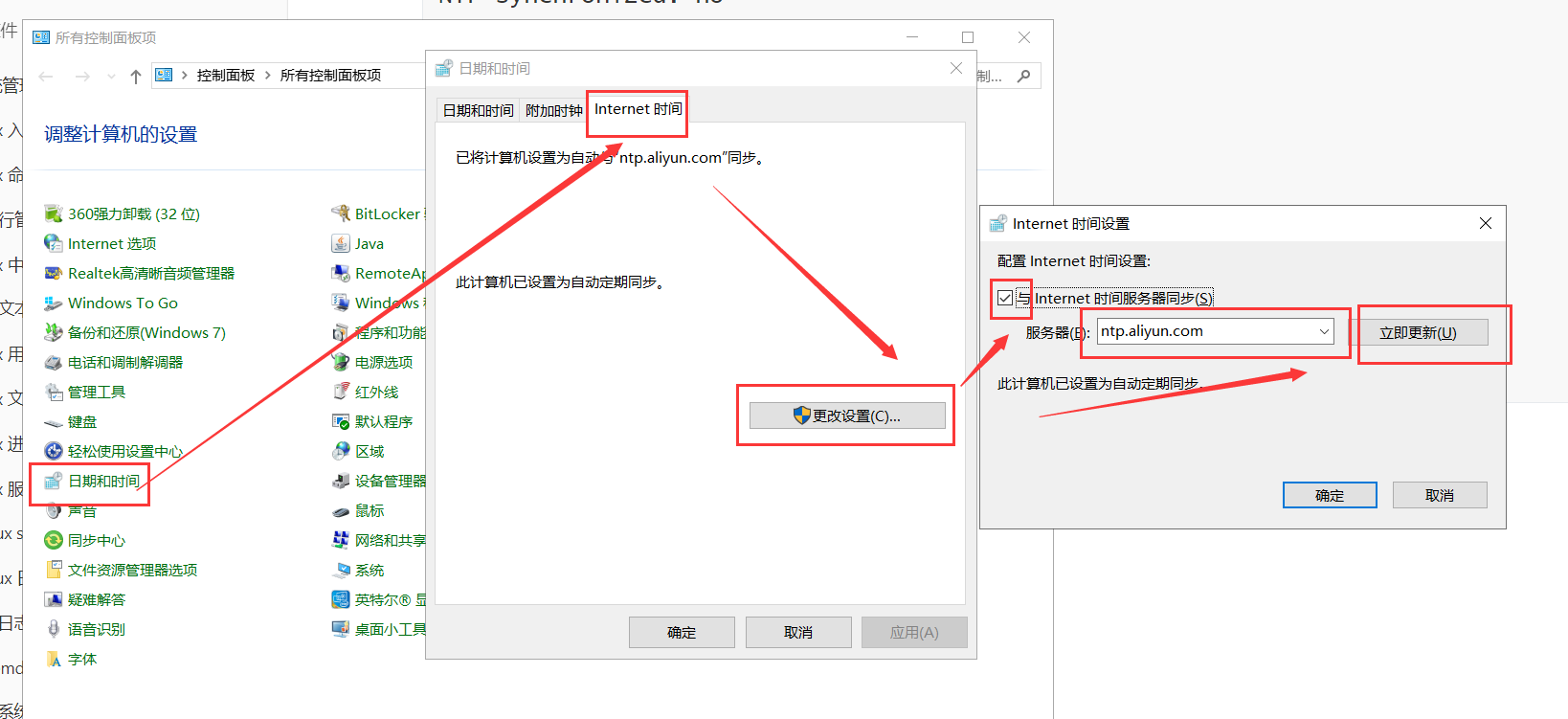
windows 自动对时
自动对时-chronyd 服务
# 安装软件包
root@server ~ 14:08:11]# yum install chrony
# 修改对时服务器
[root@server ~ 14:09:11]# vim /etc/chrony.conf
# 与时间池对时
# 时间池是包含多个时间服务器的服务器组
pool 2.rocky.pool.ntp.org iburst
# 与单个服务器 ntp.aliyun.com 对时
server ntp.aliyun.com iburst
# 启用并启动chronyd服务
[root@server ~ 17:08:59]# systemctl enable chronyd –now
# 如果之前已经启动,需要重启
[root@centos7 ~]# systemctl restart chronyd
# 验证对时情况
[root@server ~ 17:09:46]# chronyc sources -v
210 Number of sources = 9
.– Source mode '^' = server, '=' = peer, '#' = local clock.
/ .- Source state '*' = current synced, '+' = combined , '-' = not combined,
| / '?' = unreachable, 'x' = time may be in error, '~' = time too variable.
|| .- xxxx [ yyyy ] +/- zzzz
|| Reachability register (octal) -. | xxxx = adjusted offset,
|| Log2(Polling interval) –. | | yyyy = measured offset,
|| \\ | | zzzz = estimated error.
|| | | \\
MS Name/IP address Stratum Poll Reach LastRx Last sample
===============================================================================
^? ntp.wdc2.us.leaseweb.net 0 6 0 – +0ns[ +0ns] +/- 0ns
^- ntp.ams1.nl.leaseweb.net 3 6 17 17 -15ms[ -15ms] +/- 109ms
^? ntp6.flashdance.cx 2 7 20 20 -12ms[ -11ms] +/- 141ms
^- tock.ntp.infomaniak.ch 1 6 17 19 +3195us[+4975us] +/- 116ms
^- 119.28.206.193 2 6 17 19 -7566us[-5786us] +/- 62ms
^? ntp6.flashdance.cx 0 6 0 – +0ns[ +0ns] +/- 0ns
^? 2001:da8:215:4020::118:1> 0 6 0 – +0ns[ +0ns] +/- 0ns
^? 2408:4006:119b:800:5cbf:> 0 6 0 – +0ns[ +0ns] +/- 0ns
^* 203.107.6.88 2 6 17 17 +72us[+1852us] +/- 21ms
补充:vim 高级用法
vim 高级用法,可视化模式: 功能1:批量增加内容,例如注释多行内容
功能2:列删除,例如批量解除注释 1. 光标定位到目标位置,ctrl+v 2. 向下移动光标,按需选中多行 3. x或d
功能3:列复制并粘贴,例如批量增加主机名后缀 1. 光标定位到目标位置,ctrl+v 2. 向下移动光标(可以上下左右同时移动,选冲矩形块),按需选中 3. y复制 4. 光标定位到目标位置,p粘贴
部署时间服务器
chrony 既可以作为客户端,也可以作为服务端(为客户端提供对时服务)。
服务端
[root@server ~ 13:39:43]# vim /etc/chrony.conf
# 最后添加两条记录
# 配置监听地址
bindaddress 10.1.8.10
# 配置允许哪些网段主机同步
allow 10.1.8.0/24
[root@server ~ 13:41:18]# systemctl restart chronyd
# 停止防火墙服务
[root@server ~ 13:42:00]# systemctl stop firewalld.service
必须确保服务端的时间的准确性、有效性。
客户端
# 修改对时服务器
[root@server ~ 13:42:12]# vim /etc/chrony.conf
# 与单个服务器 10.1.8.10 对时
server 10.1.8.10 iburst
[root@client ~ 13:45:30]# systemctl restart chronyd
[root@client ~ 13:45:51]# chronyc sources -v
210 Number of sources = 1
.– Source mode '^' = server, '=' = peer, '#' = local clock.
/ .- Source state '*' = current synced, '+' = combined , '-' = not combined,
| / '?' = unreachable, 'x' = time may be in error, '~' = time too variable.
|| .- xxxx [ yyyy ] +/- zzzz
|| Reachability register (octal) -. | xxxx = adjusted offset,
|| Log2(Polling interval) –. | | yyyy = measured offset,
|| \\ | | zzzz = estimated error.
|| | | \\
MS Name/IP address Stratum Poll Reach LastRx Last sample
===============================================================================
^? server.xiaoma.cloud 0 6 0 – +0ns[ +0ns] +/- 0ns
全文总结
分清系统时间(软件)和硬件时钟(主板 hwclock);date 管理系统时间,hwclock 实现两者互相同步。 CentOS7 首选 timedatectl 统一管理时区、时间、NTP 状态;设置中国时区:timedatectl set-timezone Asia/Shanghai。 线上环境禁止随意手动 date 改时间,统一使用 chronyd 自动对时,避免时间跳跃引发业务故障。 内网隔离环境,可以搭建 chrony 时间服务器,所有内网设备统一同步内网标准时间。 双系统时间相差 8 小时,使用 timedatectl set-local-rtc 1 解决冲突。