这篇只做一件事:确认CodexCLI已经安装,完成灵链API配置,然后让Codex从空文件夹做出可玩的贪吃蛇网页。
最终会得到一个index.html:双击即可在浏览器运行,支持方向键、计分,以及撞墙或撞到自己后重新开始。 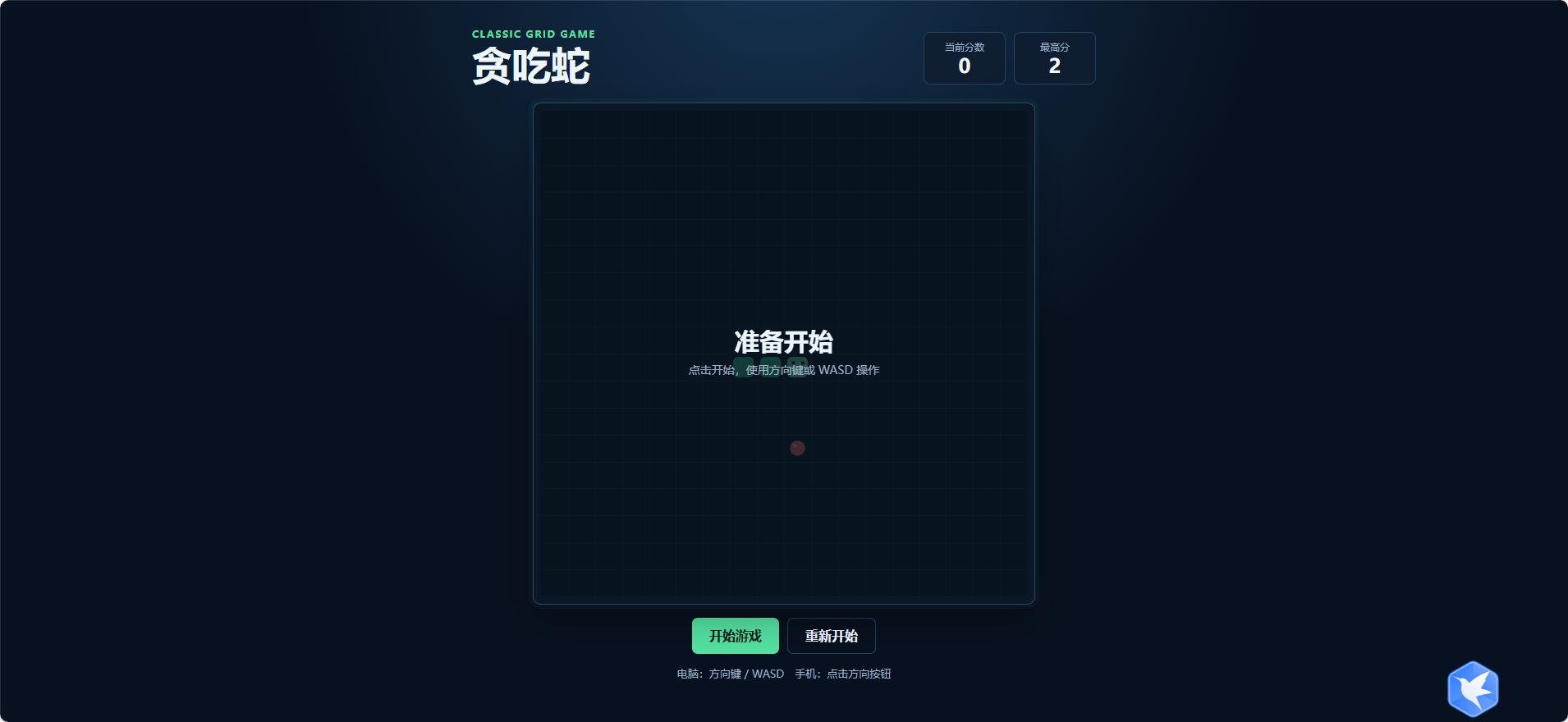
0.先检查CodexCLI是否已经安装
按Win键,搜索并打开“命令提示符”或“Windows终端”,输入:
codex –version
能看到版本号,例如codex 0.x.x,说明已经安装,直接进入下一节。
如果提示“不是内部或外部命令”,输入:
npm install -g @openai/codex
codex –version
仍然没有版本号时,重启Windows后再检查一次。先确保这一步成功,再配置API。 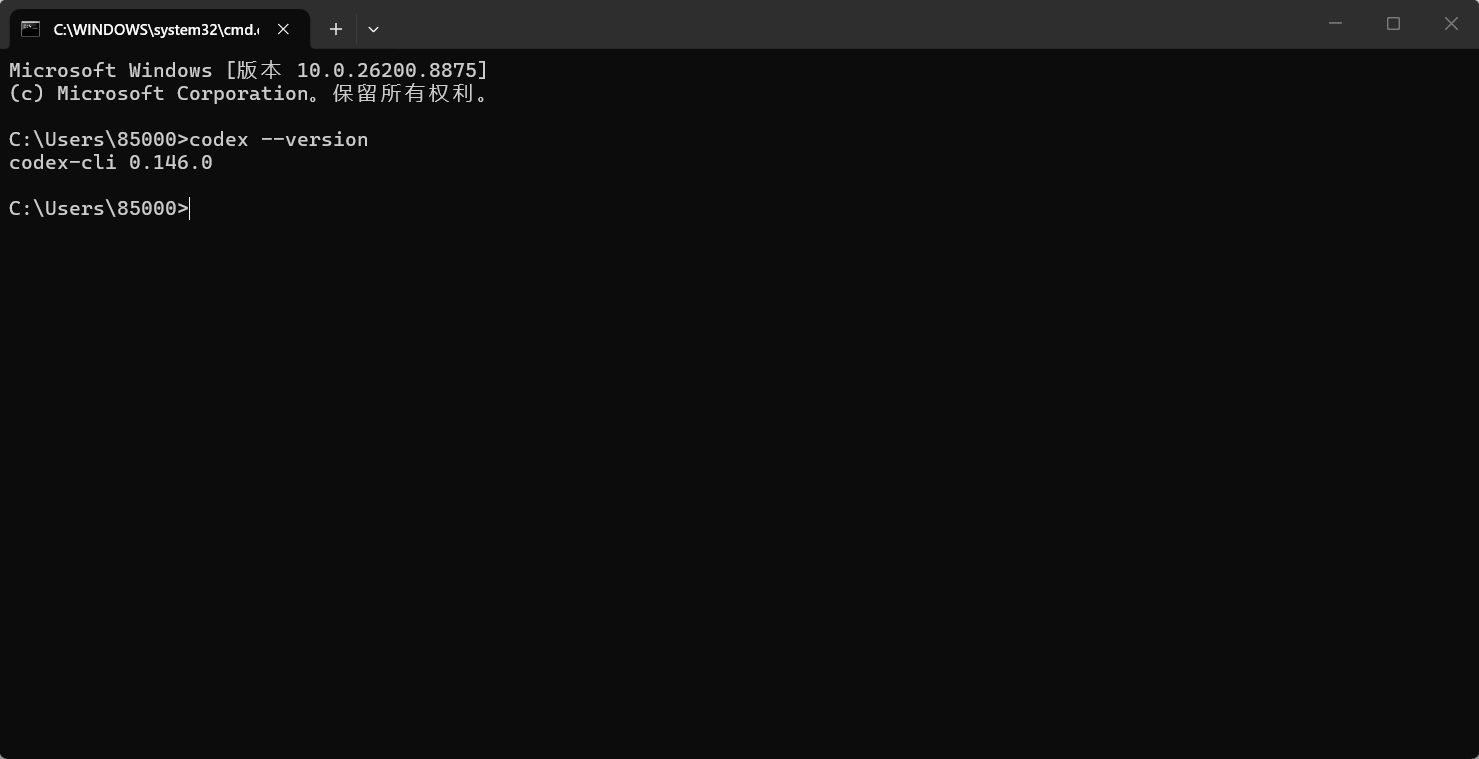
1.通过路径和记事本配置灵链API
CodexCLI需要模型服务。本文使用灵链API,BaseURL为:
https://llapi.org/v1
先在灵链API控制台创建一个专门用于Codex开发的APIKey。Key只保存在自己的电脑上,不要发布到文章、截图、Git仓库或聊天群。
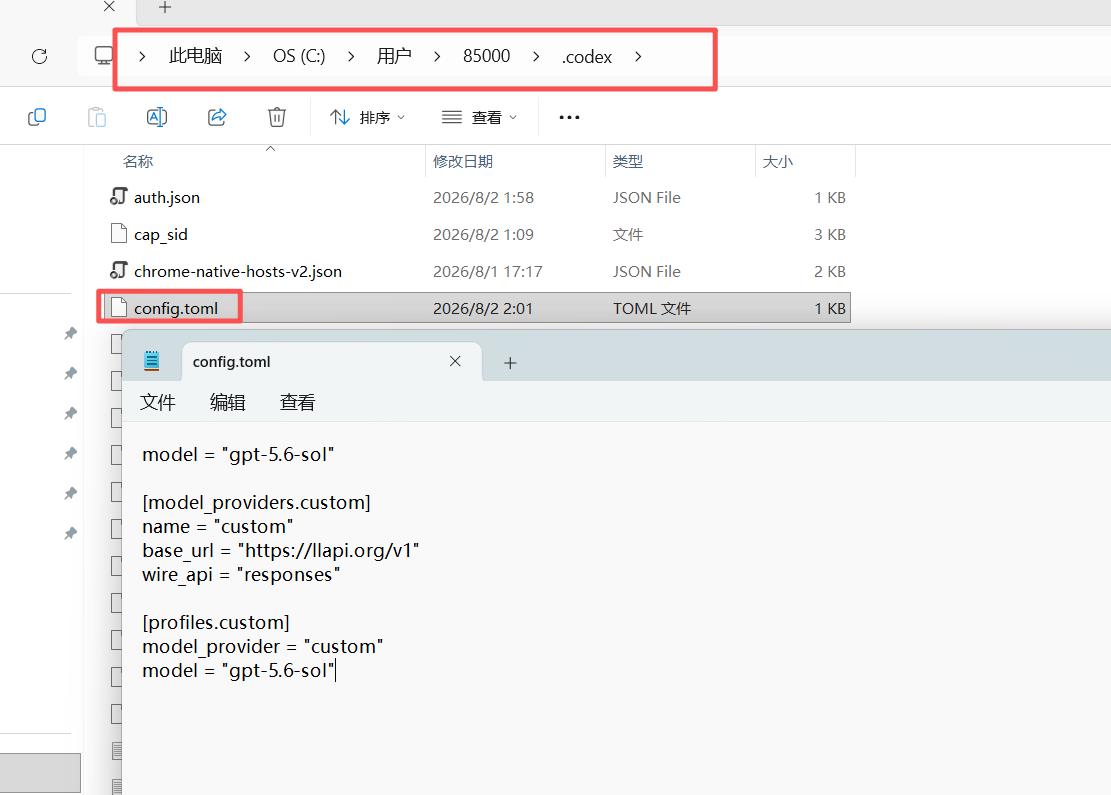
通过资源管理器和记事本编辑config.toml
打开资源管理器,在地址栏粘贴以下路径并回车:
C:\\Users\\你的Windows用户名\\.codex
例如Windows用户名是zhangsan,路径就是C:\\Users\\zhangsan\\.codex。
在该文件夹中找到config.toml,右键文件,选择“打开方式”再选择“记事本”。如果文件不存在,在空白处右键,新建“文本文档”,改名为config.toml。先在资源管理器的“查看”中开启“文件扩展名”,避免文件实际叫config.toml.txt。
在记事本中写入以下配置并保存。已有其他配置时,只补充缺少字段,不要删除正在使用的内容:
model_provider = "OpenAI"
model = "gpt-5.6-sol"
review_model = "gpt-5.6-sol"
model_reasoning_effort = "xhigh"
disable_response_storage = true
network_access = "enabled"
windows_wsl_setup_acknowledged = true
[model_providers.OpenAI]
name = "OpenAI"
base_url = "https://llapi.org"
wire_api = "responses"
requires_openai_auth = false
http_headers = { "x-openai-actor-authorization" = "local-image-extension" }
[features]
goals = true
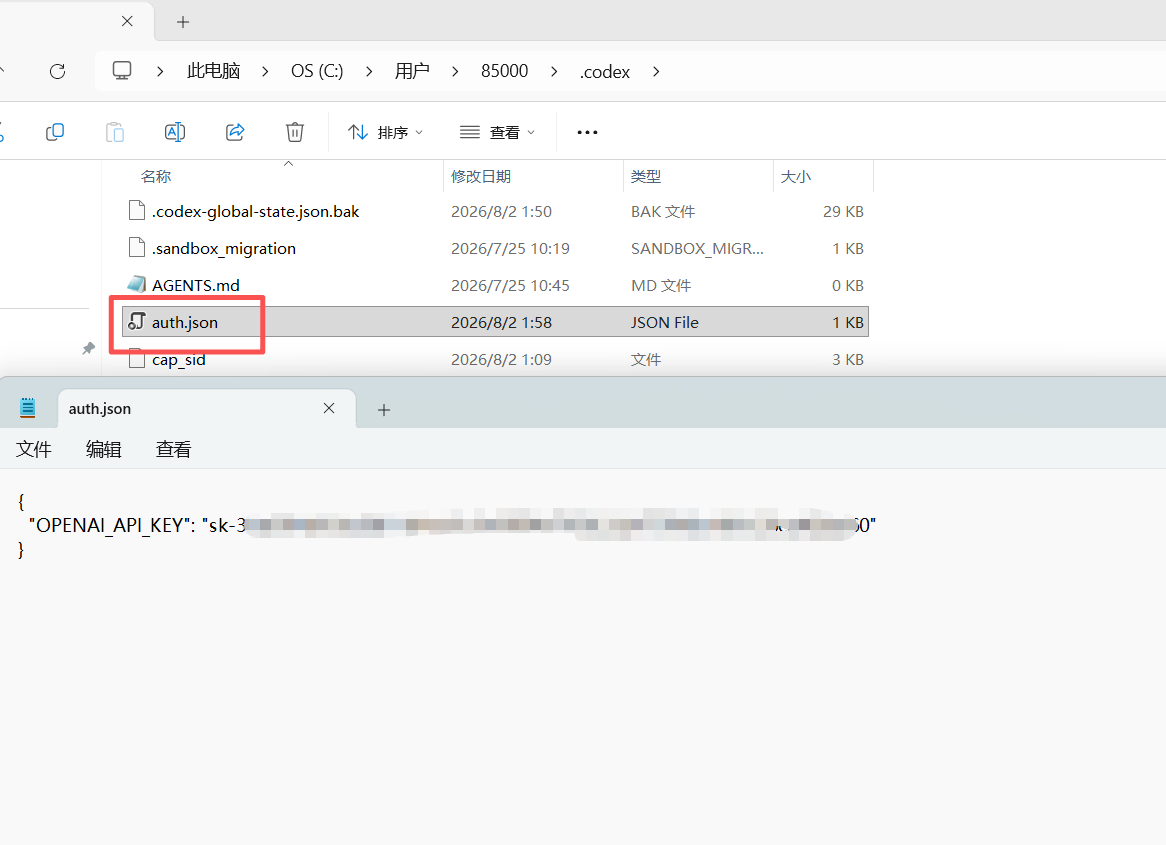
 修改.codex目录中可能含登录凭据的auth.json。
{
"OPENAI_API_KEY": "你的密钥"
}
2.新建贪吃蛇项目文件夹
在桌面新建文件夹,命名为codex-贪吃蛇。进入这个文件夹,右键空白处,选择“在终端中打开”。后续代码生成只在这个文件夹进行,避免影响其他项目。
3.验证Codex已经连通
回到codex-贪吃蛇文件夹打开的终端,输入:
codex
进入交互界面后发送:
请只回复:连接成功。
收到回复,说明Codex、环境变量和灵链API配置已经生效。
4.先让Codex给出计划
不要只说“写个贪吃蛇”。先把文件范围、游戏规则和验收条件说清楚。在Codex中粘贴:
我要在当前空文件夹做一个纯前端贪吃蛇网页。
先不要创建文件。请给出不超过8条的实现计划,说明:
1.会创建哪些文件;
2.蛇移动、食物生成、碰撞判定如何处理;
3.如何让页面适配电脑和手机;
4.完成后我应该如何验收。
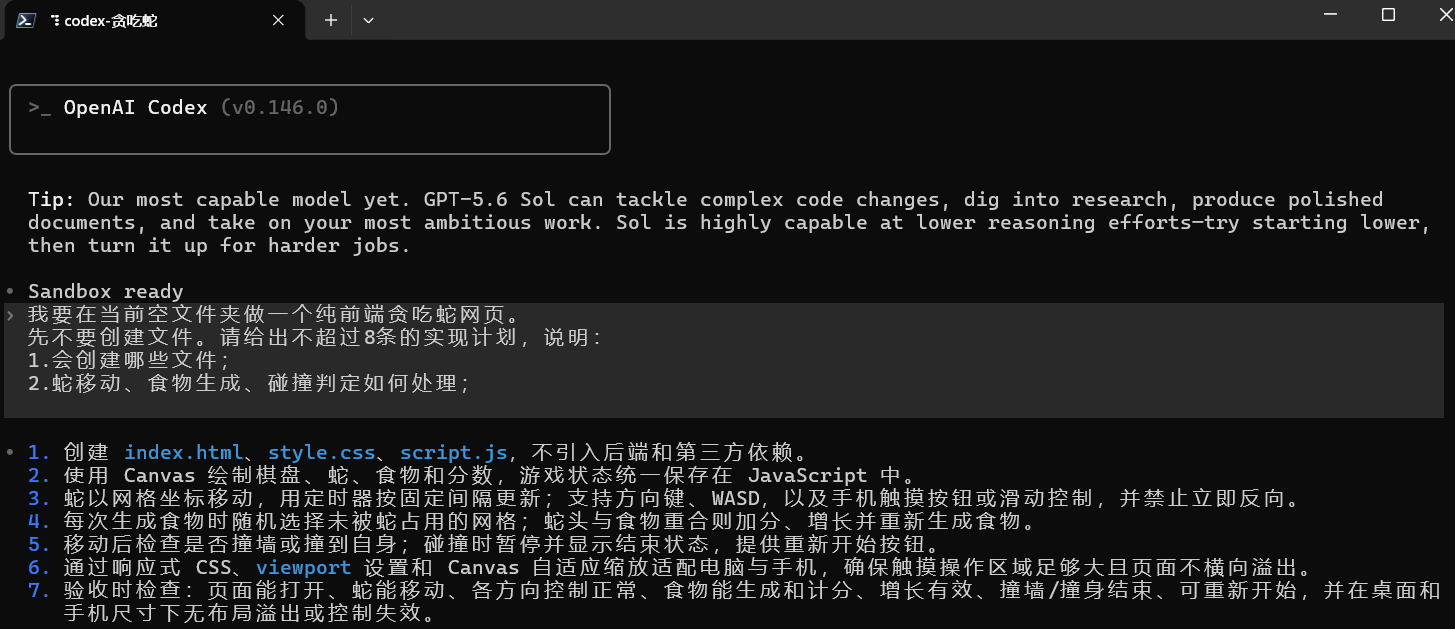
计划合理后继续发送:
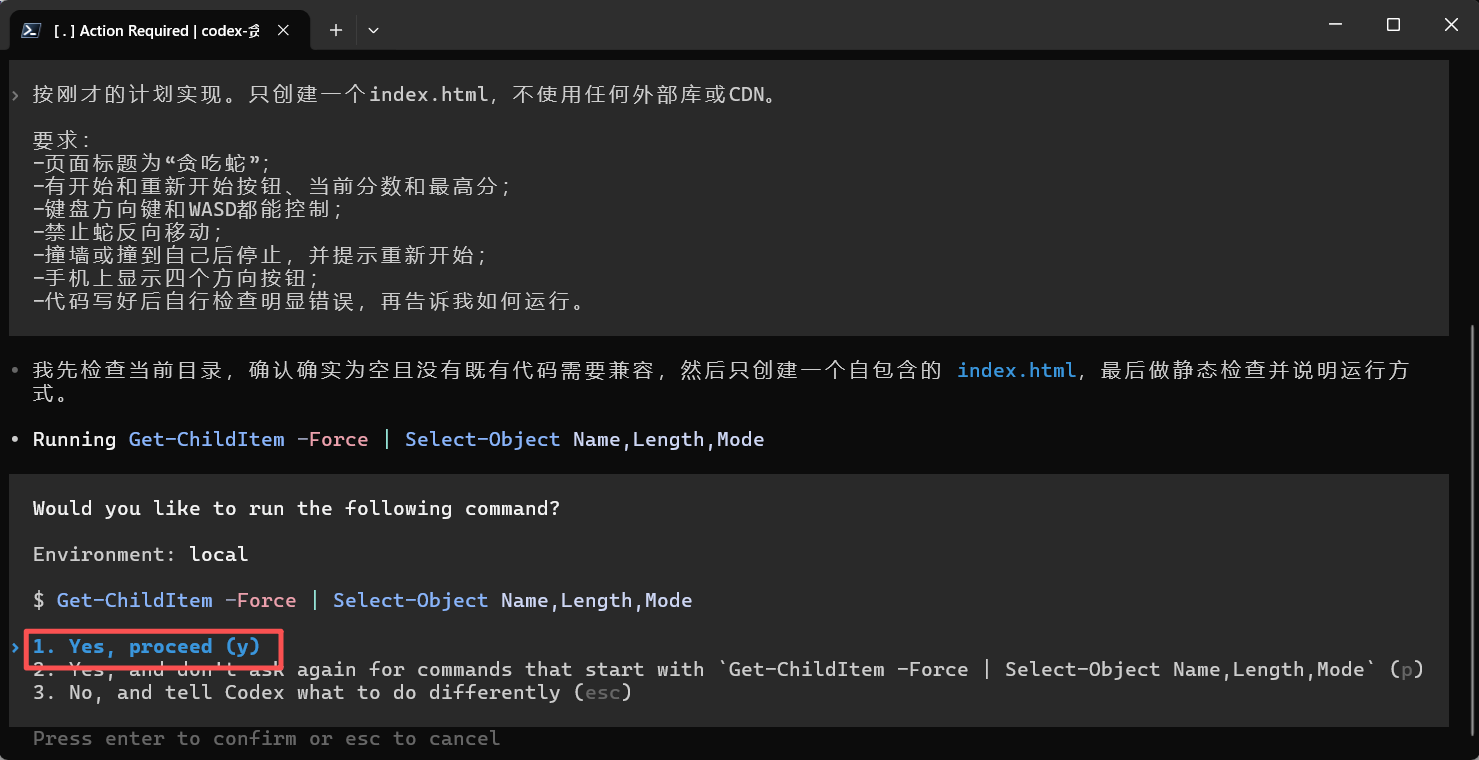
按刚才的计划实现。只创建一个index.html,不使用任何外部库或CDN。
要求:
-页面标题为“贪吃蛇”;
-有开始和重新开始按钮、当前分数和最高分;
-键盘方向键和WASD都能控制;
-禁止蛇反向移动;
-撞墙或撞到自己后停止,并提示重新开始;
-手机上显示四个方向按钮;
-代码写好后自行检查明显错误,再告诉我如何运行。
Codex如果询问是否可以创建index.html,确认操作范围是当前项目文件夹后允许即可,按回车确认。
5.运行并按清单验收
在资源管理器中双击index.html,用浏览器打开,依次检查:
-点击“开始游戏”后蛇会持续移动; -方向键和WASD都有效,且不能立刻掉头; -吃到食物后分数增加,蛇身变长; -撞墙或撞自己会结束; -点击“重新开始”能从初始状态开始; -缩小浏览器窗口后,棋盘和按钮仍可操作。 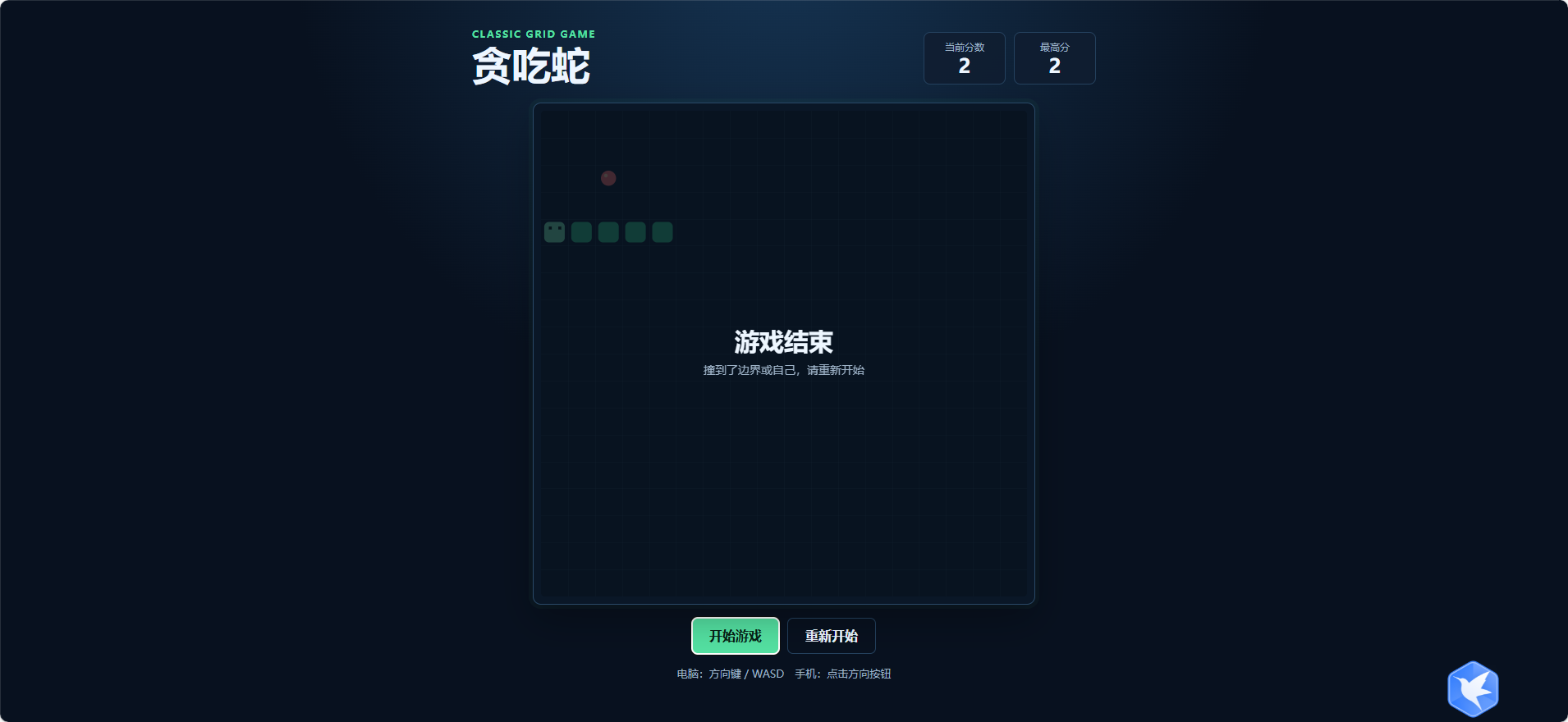
6.用明确描述让Codex修Bug
验收有问题时,不要只说“不能用”。把现象、复现步骤和期望结果说清楚。例如移动过快,就发送:
请修复index.html:游戏开始后蛇移动过快。
复现:点击开始游戏后,约3秒就撞墙。
期望:初始移动间隔约180毫秒,每吃5个食物才小幅加速,并且不能快于80毫秒。
只修改与速度控制相关的代码。修改后说明改了什么,并告诉我如何复测。
这就是使用Codex的基础方式:先定范围,再描述可复现的问题,最后要求复测方法。
常见问题
-codex不是命令:检查Node.jsLTS是否已安装,并重新打开终端后再次执行codex –version。 -提示APIKey缺失:环境变量名必须是OPENAI_API_KEY,保存后需要重新打开终端。 -模型不可用或404:检查config.toml中的模型ID是否与灵链API当前模型列表一致。 -出现401:检查Key是否复制完整、是否过期或被撤销;不要把Key写入config.toml。 -配置没有生效:确认文件实际是C:\\Users\\你的Windows用户名\\.codex\\config.toml,而不是config.toml.txt。
生成的网页代码如下:
<!doctype html>
<html lang="zh-CN">
<head>
<meta charset="utf-8">
<meta name="viewport" content="width=device-width, initial-scale=1, viewport-fit=cover">
<meta name="theme-color" content="#08111f">
<title>贪吃蛇</title>
<style>
:root {
color-scheme: dark;
–bg: #08111f;
–panel: #0f1d30;
–panel-soft: #12243a;
–line: #24415e;
–text: #edf6ff;
–muted: #9db2c7;
–accent: #54e1a2;
–accent-strong: #2dc887;
–danger: #ff7676;
–cell: min(7.5vw, 34px);
–board-size: calc(var(–cell) * 18);
}
* { box-sizing: border-box; }
html, body { min-height: 100%; }
body {
margin: 0;
background:
radial-gradient(circle at 50% -10%, #163554 0, transparent 44%),
var(–bg);
color: var(–text);
font-family: ui-sans-serif, system-ui, -apple-system, BlinkMacSystemFont, "Segoe UI", sans-serif;
}
button {
border: 0;
color: inherit;
font: inherit;
cursor: pointer;
-webkit-tap-highlight-color: transparent;
touch-action: manipulation;
}
.page {
width: min(100% – 32px, 760px);
min-height: 100vh;
margin: 0 auto;
padding: 34px 0 40px;
display: flex;
flex-direction: column;
align-items: center;
gap: 22px;
}
.topbar {
width: 100%;
display: flex;
align-items: flex-end;
justify-content: space-between;
gap: 18px;
}
.eyebrow {
margin: 0 0 6px;
color: var(–accent);
font-size: 12px;
font-weight: 700;
letter-spacing: 0.12em;
text-transform: uppercase;
}
h1 {
margin: 0;
font-size: clamp(30px, 6vw, 48px);
line-height: 1;
letter-spacing: 0;
}
.stats {
display: flex;
gap: 10px;
flex-shrink: 0;
}
.stat {
min-width: 100px;
padding: 10px 14px;
background: rgba(15, 29, 48, 0.84);
border: 1px solid var(–line);
border-radius: 8px;
text-align: center;
}
.stat-label {
display: block;
margin-bottom: 3px;
color: var(–muted);
font-size: 12px;
}
.stat-value {
display: block;
color: var(–text);
font-size: 24px;
font-variant-numeric: tabular-nums;
font-weight: 800;
line-height: 1;
}
.game-shell {
width: 100%;
display: flex;
flex-direction: column;
align-items: center;
gap: 16px;
}
.board-wrap {
position: relative;
width: min(var(–board-size), 100%);
height: auto;
aspect-ratio: 1;
padding: 9px;
background: #0a1727;
border: 1px solid #2a4968;
border-radius: 10px;
box-shadow: 0 18px 45px rgba(0, 0, 0, 0.28), 0 0 0 5px rgba(84, 225, 162, 0.04);
}
canvas {
display: block;
width: 100%;
height: 100%;
border-radius: 4px;
background: #0c1c2d;
}
.overlay {
position: absolute;
inset: 9px;
display: grid;
place-items: center;
padding: 18px;
border-radius: 4px;
background: rgba(6, 16, 28, 0.76);
text-align: center;
transition: opacity 160ms ease;
}
.overlay[hidden] { display: none; }
.overlay-content { max-width: 280px; }
.overlay-title {
margin: 0 0 8px;
font-size: clamp(22px, 5vw, 30px);
line-height: 1.15;
}
.overlay-copy {
margin: 0;
color: var(–muted);
font-size: 14px;
line-height: 1.55;
}
.actions {
display: flex;
justify-content: center;
gap: 10px;
}
.action-button {
min-height: 44px;
padding: 0 21px;
border-radius: 7px;
background: var(–accent);
color: #062016;
font-weight: 800;
transition: background 140ms ease, transform 140ms ease;
}
.action-button:hover { background: #78efb9; }
.action-button:active { transform: translateY(1px); }
.action-button.secondary {
background: transparent;
color: var(–text);
border: 1px solid var(–line);
}
.action-button.secondary:hover { background: var(–panel-soft); }
.hint {
margin: 0;
color: var(–muted);
font-size: 13px;
text-align: center;
}
.mobile-controls {
display: none;
width: min(230px, 74vw);
grid-template-columns: repeat(3, 1fr);
grid-template-rows: repeat(2, 52px);
gap: 8px;
}
.control-button {
display: grid;
place-items: center;
min-width: 52px;
min-height: 52px;
border: 1px solid var(–line);
border-radius: 8px;
background: var(–panel);
color: var(–text);
font-size: 24px;
line-height: 1;
user-select: none;
}
.control-button:active,
.control-button:focus-visible {
background: var(–accent-strong);
border-color: var(–accent);
color: #041810;
outline: none;
}
.control-button.up { grid-column: 2; grid-row: 1; }
.control-button.left { grid-column: 1; grid-row: 2; }
.control-button.down { grid-column: 2; grid-row: 2; }
.control-button.right { grid-column: 3; grid-row: 2; }
@media (max-width: 560px) {
:root { –cell: min(7.5vw, 28px); }
.page {
width: min(100% – 24px, 430px);
padding: 24px 0 max(28px, env(safe-area-inset-bottom));
gap: 18px;
}
.topbar { align-items: flex-start; }
.stats { gap: 6px; }
.stat { min-width: 74px; padding: 8px 8px; }
.stat-value { font-size: 20px; }
.mobile-controls { display: grid; }
.hint { max-width: 310px; }
}
@media (max-width: 360px) {
.topbar { flex-direction: column; align-items: stretch; gap: 12px; }
.stats { justify-content: flex-start; }
.stat { flex: 1; }
}
@media (prefers-reduced-motion: reduce) {
*, *::before, *::after { transition-duration: 0.01ms !important; }
}
</style>
</head>
<body>
<main class="page">
<header class="topbar">
<div>
<p class="eyebrow">Classic grid game</p>
<h1>贪吃蛇</h1>
</div>
<div class="stats" aria-label="游戏分数">
<div class="stat">
<span class="stat-label">当前分数</span>
<strong class="stat-value" id="score">0</strong>
</div>
<div class="stat">
<span class="stat-label">最高分</span>
<strong class="stat-value" id="high-score">0</strong>
</div>
</div>
</header>
<section class="game-shell" aria-label="贪吃蛇游戏">
<div class="board-wrap">
<canvas id="game-board" aria-label="贪吃蛇棋盘"></canvas>
<div class="overlay" id="overlay" hidden>
<div class="overlay-content">
<h2 class="overlay-title" id="overlay-title">准备开始</h2>
<p class="overlay-copy" id="overlay-copy">点击开始,使用方向键或 WASD 操作</p>
</div>
</div>
</div>
<div class="actions">
<button class="action-button" id="start-button" type="button">开始游戏</button>
<button class="action-button secondary" id="restart-button" type="button">重新开始</button>
</div>
<div class="mobile-controls" aria-label="手机方向控制">
<button class="control-button up" type="button" data-direction="up" aria-label="向上">▲</button>
<button class="control-button left" type="button" data-direction="left" aria-label="向左">◀</button>
<button class="control-button down" type="button" data-direction="down" aria-label="向下">▼</button>
<button class="control-button right" type="button" data-direction="right" aria-label="向右">▶</button>
</div>
<p class="hint">电脑:方向键 / WASD 手机:点击方向按钮</p>
</section>
</main>
<script>
(() => {
'use strict';
const GRID_SIZE = 18;
const START_LENGTH = 3;
const START_SPEED = 145;
const SPEED_STEP = 3;
const MIN_SPEED = 72;
const STORAGE_KEY = 'snake-high-score';
const canvas = document.getElementById('game-board');
const context = canvas.getContext('2d');
const scoreElement = document.getElementById('score');
const highScoreElement = document.getElementById('high-score');
const overlay = document.getElementById('overlay');
const overlayTitle = document.getElementById('overlay-title');
const overlayCopy = document.getElementById('overlay-copy');
const startButton = document.getElementById('start-button');
const restartButton = document.getElementById('restart-button');
const directions = {
up: { x: 0, y: –1 },
down: { x: 0, y: 1 },
left: { x: –1, y: 0 },
right: { x: 1, y: 0 }
};
const keyboardDirections = {
ArrowUp: 'up',
w: 'up',
W: 'up',
ArrowDown: 'down',
s: 'down',
S: 'down',
ArrowLeft: 'left',
a: 'left',
A: 'left',
ArrowRight: 'right',
d: 'right',
D: 'right'
};
let snake;
let food;
let direction;
let queuedDirection;
let score;
let highScore = readHighScore();
let gameTimer = null;
let gameState = 'ready';
let cellSize = 0;
highScoreElement.textContent = String(highScore);
resetGame();
function readHighScore() {
try {
const storedScore = Number.parseInt(localStorage.getItem(STORAGE_KEY), 10);
return Number.isFinite(storedScore) && storedScore > 0 ? storedScore : 0;
} catch (error) {
return 0;
}
}
function saveHighScore() {
try { localStorage.setItem(STORAGE_KEY, String(highScore)); } catch (error) { /* Storage may be unavailable. */ }
}
function resetGame() {
stopTimer();
const center = Math.floor(GRID_SIZE / 2);
snake = [];
for (let index = 0; index < START_LENGTH; index += 1) {
snake.push({ x: center – index, y: center });
}
direction = 'right';
queuedDirection = 'right';
score = 0;
gameState = 'ready';
scoreElement.textContent = '0';
food = createFood();
showOverlay('准备开始', '点击开始,使用方向键或 WASD 操作');
startButton.textContent = '开始游戏';
draw();
}
function startGame() {
if (gameState === 'running') return;
if (gameState === 'over') resetGame();
gameState = 'running';
hideOverlay();
startButton.textContent = '游戏中';
startTimer();
}
function restartGame() {
resetGame();
startGame();
}
function startTimer() {
stopTimer();
gameTimer = window.setInterval(step, getSpeed());
}
function stopTimer() {
if (gameTimer !== null) {
window.clearInterval(gameTimer);
gameTimer = null;
}
}
function getSpeed() {
return Math.max(MIN_SPEED, START_SPEED – score * SPEED_STEP);
}
function step() {
direction = queuedDirection;
const vector = directions[direction];
const head = snake[0];
const nextHead = { x: head.x + vector.x, y: head.y + vector.y };
const eating = food && nextHead.x === food.x && nextHead.y === food.y;
const bodyToCheck = eating ? snake : snake.slice(0, –1);
if (isOutside(nextHead) || hitsBody(nextHead, bodyToCheck)) {
endGame();
return;
}
snake.unshift(nextHead);
if (eating) {
score += 1;
scoreElement.textContent = String(score);
if (score > highScore) {
highScore = score;
highScoreElement.textContent = String(highScore);
saveHighScore();
}
food = createFood();
if (!food) {
gameState = 'over';
stopTimer();
showOverlay('恭喜通关', '棋盘已被填满,点击重新开始再来一局');
} else {
startTimer();
}
} else {
snake.pop();
}
draw();
}
function isOutside(point) {
return point.x < 0 || point.x >= GRID_SIZE || point.y < 0 || point.y >= GRID_SIZE;
}
function hitsBody(point, body) {
return body.some(segment => segment.x === point.x && segment.y === point.y);
}
function createFood() {
const available = [];
for (let y = 0; y < GRID_SIZE; y += 1) {
for (let x = 0; x < GRID_SIZE; x += 1) {
if (!hitsBody({ x, y }, snake)) available.push({ x, y });
}
}
return available.length ? available[Math.floor(Math.random() * available.length)] : null;
}
function endGame() {
gameState = 'over';
stopTimer();
startButton.textContent = '开始游戏';
showOverlay('游戏结束', '撞到了边界或自己,请重新开始');
draw();
}
function setDirection(nextDirection) {
if (!directions[nextDirection]) return;
const current = directions[direction];
const next = directions[nextDirection];
if (current.x + next.x === 0 && current.y + next.y === 0) return;
queuedDirection = nextDirection;
if (gameState === 'ready') startGame();
}
function showOverlay(title, copy) {
overlayTitle.textContent = title;
overlayCopy.textContent = copy;
overlay.hidden = false;
}
function hideOverlay() {
overlay.hidden = true;
}
function resizeCanvas() {
const pixelRatio = Math.min(window.devicePixelRatio || 1, 2);
const cssSize = canvas.clientWidth;
if (!cssSize) return;
canvas.width = Math.floor(cssSize * pixelRatio);
canvas.height = Math.floor(cssSize * pixelRatio);
cellSize = canvas.width / GRID_SIZE;
context.setTransform(pixelRatio, 0, 0, pixelRatio, 0, 0);
cellSize = cssSize / GRID_SIZE;
draw();
}
function draw() {
const cssSize = canvas.clientWidth;
if (!cssSize || !cellSize) return;
context.clearRect(0, 0, cssSize, cssSize);
drawGrid(cssSize);
if (food) drawFood(food);
snake.forEach((segment, index) => drawSegment(segment, index === 0));
}
function drawGrid(size) {
context.fillStyle = '#0c1c2d';
context.fillRect(0, 0, size, size);
context.strokeStyle = 'rgba(107, 153, 187, 0.12)';
context.lineWidth = 1;
for (let index = 1; index < GRID_SIZE; index += 1) {
const position = Math.round(index * cellSize) + 0.5;
context.beginPath();
context.moveTo(position, 0);
context.lineTo(position, size);
context.stroke();
context.beginPath();
context.moveTo(0, position);
context.lineTo(size, position);
context.stroke();
}
}
function drawSegment(segment, isHead) {
const inset = Math.max(2, cellSize * 0.12);
const x = segment.x * cellSize + inset;
const y = segment.y * cellSize + inset;
const size = cellSize – inset * 2;
context.fillStyle = isHead ? '#78efb9' : '#32c98d';
roundRect(x, y, size, size, Math.min(6, cellSize * 0.18));
context.fill();
if (isHead) {
context.fillStyle = '#062016';
const eyeSize = Math.max(2, cellSize * 0.11);
const eyeOffset = cellSize * 0.29;
const eyeX = segment.x * cellSize + eyeOffset;
const eyeY = segment.y * cellSize + eyeOffset;
context.fillRect(eyeX, eyeY, eyeSize, eyeSize);
context.fillRect(eyeX + cellSize * 0.35, eyeY, eyeSize, eyeSize);
}
}
function drawFood(point) {
const centerX = point.x * cellSize + cellSize / 2;
const centerY = point.y * cellSize + cellSize / 2;
const radius = cellSize * 0.28;
context.fillStyle = '#ff7676';
context.beginPath();
context.arc(centerX, centerY, radius, 0, Math.PI * 2);
context.fill();
context.fillStyle = '#ffd0a8';
context.beginPath();
context.arc(centerX – radius * 0.35, centerY – radius * 0.35, radius * 0.24, 0, Math.PI * 2);
context.fill();
}
function roundRect(x, y, width, height, radius) {
context.beginPath();
context.moveTo(x + radius, y);
context.arcTo(x + width, y, x + width, y + height, radius);
context.arcTo(x + width, y + height, x, y + height, radius);
context.arcTo(x, y + height, x, y, radius);
context.arcTo(x, y, x + width, y, radius);
context.closePath();
}
document.addEventListener('keydown', event => {
const nextDirection = keyboardDirections[event.key];
if (!nextDirection) return;
event.preventDefault();
setDirection(nextDirection);
});
document.querySelectorAll('[data-direction]').forEach(button => {
button.addEventListener('click', () => setDirection(button.dataset.direction));
});
startButton.addEventListener('click', startGame);
restartButton.addEventListener('click', restartGame);
window.addEventListener('resize', resizeCanvas);
if ('ResizeObserver' in window) new ResizeObserver(resizeCanvas).observe(canvas);
resizeCanvas();
})();
</script>
</body>
</html>