引言
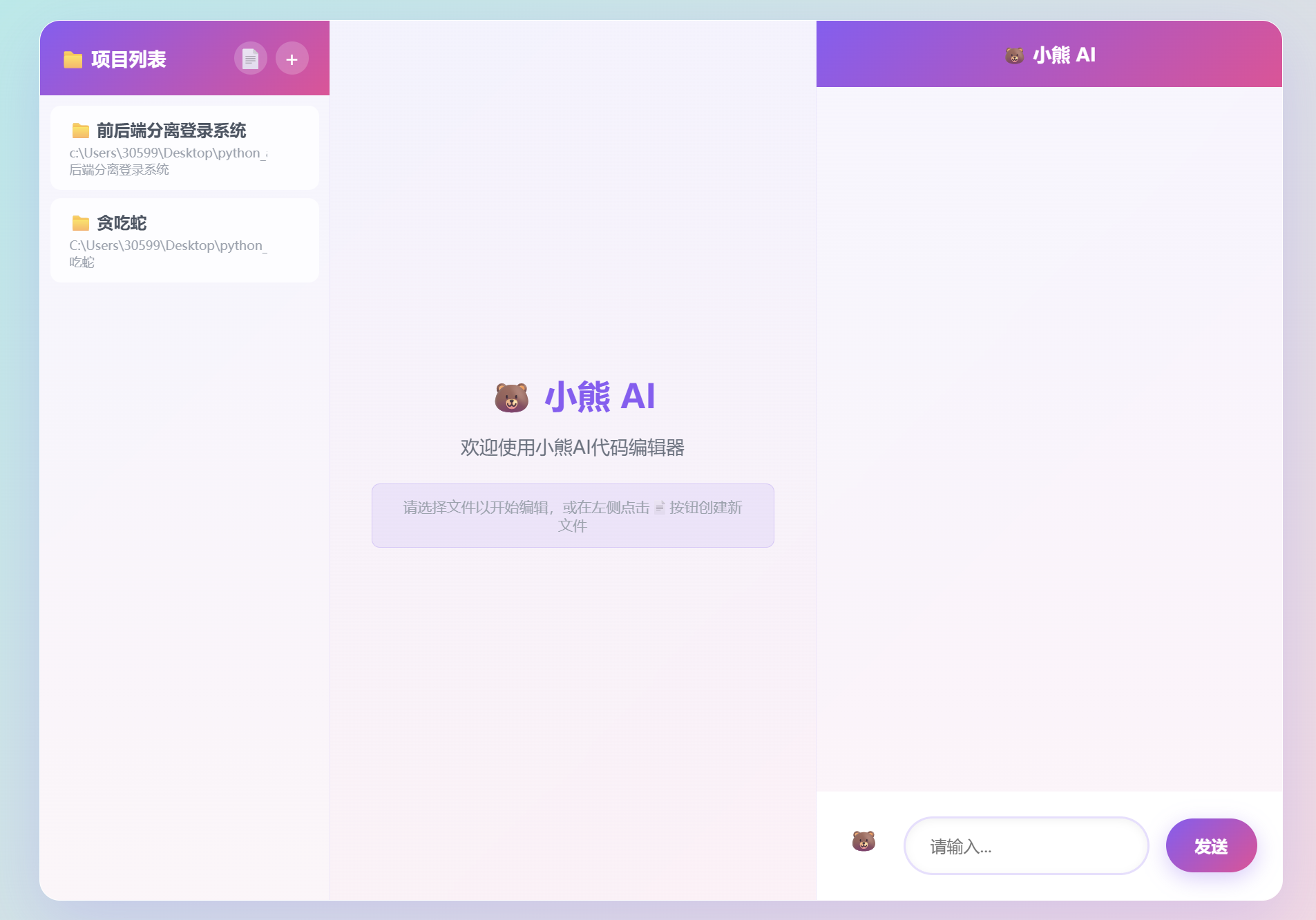
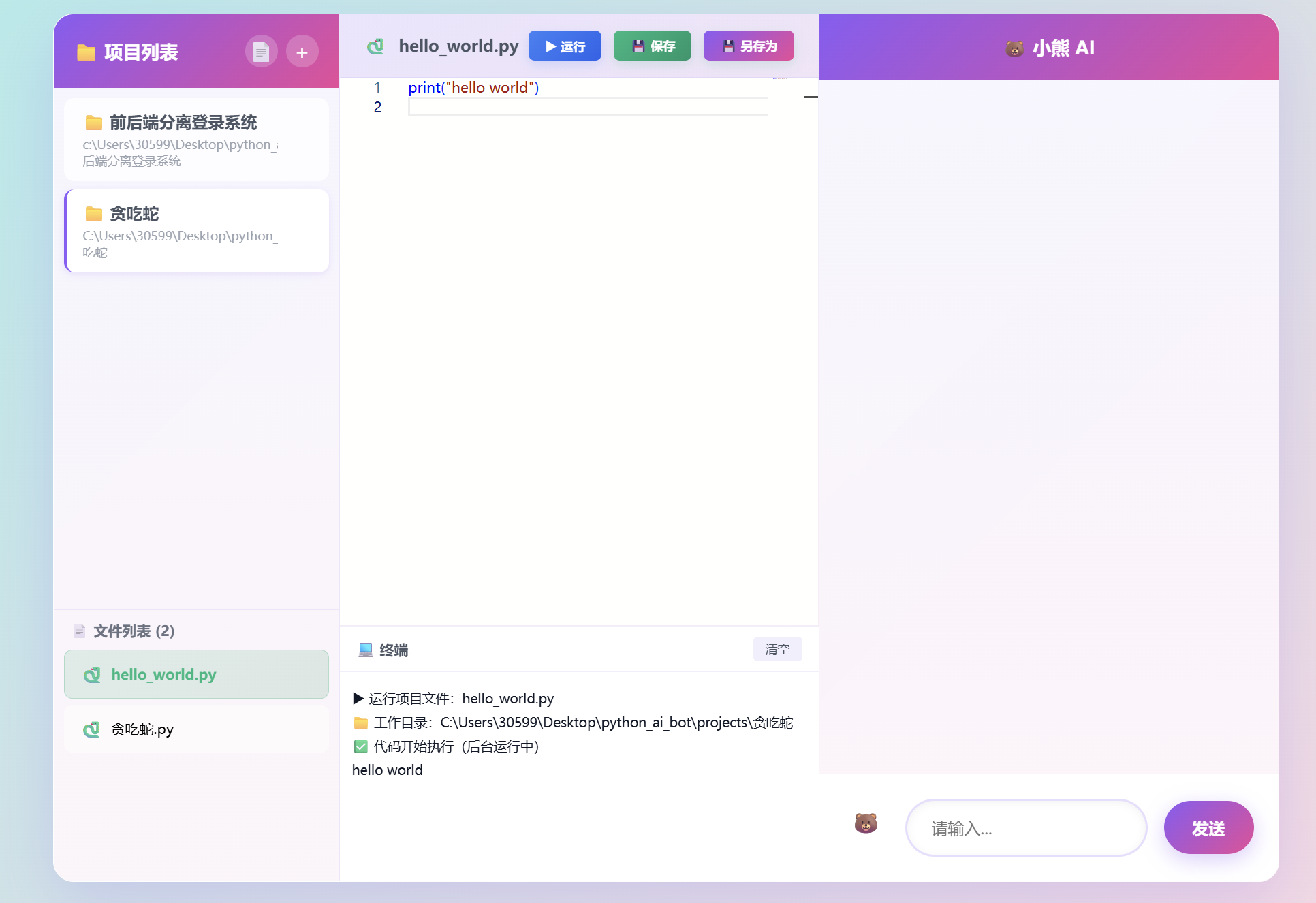
在AI技术飞速发展的今天,代码编辑器正经历着一场深刻的变革。传统的IDE功能强大但复杂,在线编辑器轻便但功能有限,而AI辅助编程工具则往往需要频繁切换上下文。基于这样的背景,我开发了"小熊AI Web IDE"——一个集成了项目管理、代码编辑、实时运行和AI对话的智能代码编辑平台。本文将分享这个项目从构思到实现的全过程,包括技术选型、核心功能开发、遇到的挑战以及解决方案,为想要构建类似工具的开发者提供参考。
项目背景与设计理念
痛点分析
在日常开发中,我发现了几个明显的痛点:
设计目标
基于以上痛点,我设定了以下设计目标:
- 一体化体验:在一个界面完成项目管理、代码编辑、AI对话和代码运行
- 轻量级部署:无需复杂安装,Python环境即可运行
- 多模式支持:既支持普通AI聊天(通义千问),也支持专业代码改写(Aider)
- 实时交互:通过WebSocket实现流式输出,提升用户体验
- 跨平台兼容:支持Windows、Linux、macOS
界面展示
技术栈选型
后端技术选择
经过多方对比,最终选择Flask作为后端框架:
- 轻量高效:Flask核心简洁,启动快速,适合中小型应用
- 扩展性强:丰富的插件生态,易于集成WebSocket、CORS等功能
- 学习成本低:文档完善,社区活跃,快速上手
关键依赖包括:
Flask==2.0.1 # Web框架
Flask-SocketIO==5.3.0 # WebSocket支持
Flask-CORS==3.0.10 # 跨域支持
SQLAlchemy==1.4.23 # ORM工具(可选,项目直接用sqlite3)
前端技术选择
为了保持轻量级,选择原生HTML/CSS/JavaScript:
- 无框架依赖:避免React/Vue的构建流程,直接编辑即可运行
- Monaco Editor:VS Code同款编辑器,提供语法高亮、代码补全等丰富功能
- Socket.IO客户端:实现实时通信,支持流式输出
数据库选择
SQLite作为项目数据库:
- 零配置:无需安装数据库服务,文件即数据库
- 跨平台:Windows、Linux、macOS均支持
- 适合规模:对于个人和小团队项目,性能完全够用
AI集成方案
项目集成了两种AI能力:
核心功能实现
项目管理系统
项目采用SQLite存储项目信息,表结构设计如下:
CREATE TABLE projects (
id INTEGER PRIMARY KEY AUTOINCREMENT,
name TEXT NOT NULL,
root_path TEXT NOT NULL,
created_at TIMESTAMP DEFAULT CURRENT_TIMESTAMP
);
CREATE TABLE files (
id INTEGER PRIMARY KEY AUTOINCREMENT,
project_id INTEGER NOT NULL,
filename TEXT NOT NULL,
file_path TEXT NOT NULL UNIQUE,
relative_path TEXT NOT NULL,
file_type TEXT,
file_size INTEGER,
created_at TIMESTAMP DEFAULT CURRENT_TIMESTAMP,
FOREIGN KEY (project_id) REFERENCES projects (id)
);
核心API实现:
@app.route('/api/projects', methods=['POST'])
def create_project():
"""创建新项目"""
data = request.json
name = data.get('name')
root_path = data.get('root_path')
if not name or not root_path:
return jsonify({'error': '缺少项目名称或路径'}), 400
# 确保目录存在
os.makedirs(root_path, exist_ok=True)
conn = get_db_connection()
cursor = conn.cursor()
cursor.execute(
'INSERT INTO projects (name, root_path) VALUES (?, ?)',
(name, root_path)
)
conn.commit()
project_id = cursor.lastrowid
conn.close()
return jsonify({'id': project_id, 'message': '项目创建成功'})
@app.route('/api/projects/<int:project_id>/files', methods=['GET'])
def get_project_files(project_id):
"""获取项目文件列表"""
conn = get_db_connection()
cursor = conn.cursor()
cursor.execute(
'SELECT * FROM files WHERE project_id = ? ORDER BY filename',
(project_id,)
)
files = cursor.fetchall()
conn.close()
return jsonify([dict(file) for file in files])
文件管理系统
文件管理支持新建、打开、保存、删除等操作,其中保存功能最为关键:
@app.route('/api/files', methods=['POST'])
def save_file():
"""保存文件(新建或更新)"""
data = request.json
project_id = data.get('project_id')
file_id = data.get('file_id')
filename = data.get('filename')
content = data.get('content', '')
relative_path = data.get('relative_path', '')
# 验证必要参数
if not project_id or not filename:
return jsonify({'error': '缺少必要参数'}), 400
conn = get_db_connection()
cursor = conn.cursor()
cursor.execute('SELECT root_path FROM projects WHERE id = ?', (project_id,))
project = cursor.fetchone()
if not project:
conn.close()
return jsonify({'error': '项目不存在'}), 404
root_path = project['root_path']
# 根据file_id决定是更新还是新建
if file_id:
# 更新现有文件
cursor.execute(
'SELECT file_path FROM files WHERE id = ?',
(file_id,)
)
file_record = cursor.fetchone()
if file_record:
file_path = file_record['file_path']
else:
conn.close()
return jsonify({'error': '文件不存在'}), 404
else:
# 新建文件:根据relative_path生成绝对路径
if relative_path:
file_path = os.path.join(root_path, relative_path)
else:
file_path = os.path.join(root_path, filename)
relative_path = filename
# 确保目录存在
os.makedirs(os.path.dirname(file_path), exist_ok=True)
# 写入文件内容
with open(file_path, 'w', encoding='utf-8') as f:
f.write(content)
# 计算文件大小
file_size = len(content.encode('utf-8'))
# 规范化路径
abs_path = os.path.abspath(file_path)
filename = os.path.basename(abs_path)
relative_path = os.path.relpath(abs_path, root_path)
# 更新或创建数据库记录
if file_id:
cursor.execute(
'''UPDATE files
SET filename = ?, file_path = ?, relative_path = ?, file_size = ?
WHERE id = ?''',
(filename, abs_path, relative_path, file_size, file_id)
)
else:
# 检查文件是否已存在
cursor.execute(
'SELECT id FROM files WHERE file_path = ?',
(abs_path,)
)
existing = cursor.fetchone()
if existing:
file_id = existing['id']
cursor.execute(
'''UPDATE files
SET filename = ?, relative_path = ?, file_size = ?
WHERE id = ?''',
(filename, relative_path, file_size, file_id)
)
else:
# 创建新文件记录
cursor.execute(
'''INSERT INTO files (project_id, filename, file_path, relative_path, file_size)
VALUES (?, ?, ?, ?, ?)''',
(project_id, filename, abs_path, relative_path, file_size)
)
file_id = cursor.lastrowid
conn.commit()
conn.close()
return jsonify({
'id': file_id,
'file_path': abs_path,
'relative_path': relative_path,
'message': '文件保存成功'
})
Monaco Editor集成
Monaco Editor提供了丰富的代码编辑功能,前端集成如下:
// 初始化Monaco编辑器
require.config({
paths: {
'vs': 'https://cdnjs.cloudflare.com/ajax/libs/monaco-editor/0.44.0/min/vs'
}
});
require(['vs/editor/editor.main'], function() {
editor = monaco.editor.create(document.getElementById('editor'), {
theme: 'vs',
automaticLayout: true,
fontSize: 14,
minimap: { enabled: true },
scrollBeyondLastLine: false,
wordWrap: 'on',
language: 'python' // 默认语言
});
// 监听内容变化
editor.onDidChangeModelContent(() => {
if (currentFileData) {
currentFileData.content = editor.getValue();
}
});
});
// 打开文件时设置语言
function openFile(fileData) {
currentFileId = fileData.id;
currentFileData = fileData;
editor.setValue(fileData.content);
// 根据文件扩展名设置语言
const ext = fileData.filename.split('.').pop().toLowerCase();
const languageMap = {
'py': 'python', 'js': 'javascript', 'html': 'html',
'css': 'css', 'json': 'json', 'md': 'markdown'
};
monaco.editor.setModelLanguage(
editor.getModel(),
languageMap[ext] || 'plaintext'
);
}
AI聊天功能
通义千问集成
使用DashScope API实现普通AI聊天:
import dashscope
from dashscope import Generation
@app.route('/api/chat', methods=['POST'])
def ai_chat():
"""AI聊天接口"""
data = request.json
prompt = data.get('prompt')
if not prompt:
return jsonify({'error': '缺少提示信息'}), 400
api_key = os.environ.get('qinwen_api_key')
if not api_key:
return jsonify({'error': '未配置API密钥'}), 500
try:
dashscope.api_key = api_key
response = Generation.call(
model='qwen-turbo',
prompt=prompt,
stream=True # 启用流式输出
)
# 通过WebSocket发送流式响应
for chunk in response:
sio.emit('ai_output', {
'output': chunk.output.text
})
return jsonify({'message': 'AI响应已发送'})
except Exception as e:
return jsonify({'error': f'AI调用失败: {str(e)}'}), 500
Aider代码改写
Aider是专业的代码改写工具,支持基于GPT-4等模型进行代码生成和修改:
import subprocess
import uuid
import signal
# 存储运行中的进程
running_processes = {}
@app.route('/api/run', methods=['POST'])
def run_code():
"""运行代码或Aider"""
data = request.json
run_mode = data.get('run_mode') # 'snippet', 'project', 'aider'
project_id = data.get('project_id')
prompt = data.get('prompt')
execution_id = str(uuid.uuid4())
# 获取项目根路径
conn = get_db_connection()
cursor = conn.cursor()
cursor.execute('SELECT root_path FROM projects WHERE id = ?', (project_id,))
project = cursor.fetchone()
conn.close()
if not project:
return jsonify({'error': '项目不存在'}), 404
root_path = project['root_path']
if run_mode == 'aider':
# 运行Aider命令
cmd = [
'aider',
'–model', 'gpt-4',
'–yes',
'–client-id', execution_id
]
# 如果选择了上下文文件,添加到命令
context_key = (data.get('client_id', 'default'), project_id)
if context_key in aider_contexts:
context = aider_contexts[context_key]
if context['file_path']:
cmd.append(context['file_path'])
# 创建子进程
process = subprocess.Popen(
cmd,
cwd=root_path,
stdin=subprocess.PIPE,
stdout=subprocess.PIPE,
stderr=subprocess.STDOUT,
text=True,
bufsize=1,
universal_newlines=True
)
# 发送提示
process.stdin.write(prompt + '\\n')
process.stdin.flush()
# 存储进程信息
running_processes[execution_id] = {
'process': process,
'project_id': project_id,
'run_mode': 'aider',
'start_time': time.time()
}
# 启动线程读取输出
threading.Thread(
target=read_aider_output,
args=(execution_id, process.stdout),
daemon=True
).start()
return jsonify({
'execution_id': execution_id,
'message': 'Aider任务已启动'
})
def read_aider_output(execution_id, stdout):
"""读取Aider输出并通过WebSocket发送"""
try:
for line in stdout:
sio.emit('aider_output', {
'execution_id': execution_id,
'output': line.strip()
})
except Exception as e:
sio.emit('aider_error', {
'execution_id': execution_id,
'error': str(e)
})
finally:
if execution_id in running_processes:
del running_processes[execution_id]
代码运行功能
支持Python和JavaScript代码的本地运行:
@app.route('/api/run', methods=['POST'])
def run_code():
"""运行代码片段"""
data = request.json
language = data.get('language') # 'python', 'javascript'
code = data.get('code')
execution_id = str(uuid.uuid4())
if language == 'python':
# 运行Python代码
temp_code_path = f'temp_{execution_id}.py'
temp_output_path = f'temp_{execution_id}.txt'
with open(temp_code_path, 'w', encoding='utf-8') as f:
f.write(code)
process = subprocess.Popen(
['python', temp_code_path],
stdout=open(temp_output_path, 'w'),
stderr=subprocess.STDOUT,
text=True
)
running_processes[execution_id] = {
'process': process,
'temp_output_path': temp_output_path,
'temp_code_path': temp_code_path,
'run_mode': 'snippet',
'start_time': time.time()
}
return jsonify({
'execution_id': execution_id,
'message': 'Python代码开始执行'
})
elif language == 'javascript':
# JavaScript在浏览器执行
return jsonify({
'browser_exec': True,
'code': code,
'message': 'JavaScript代码将在浏览器中执行'
})
else:
return jsonify({'error': f'不支持的语言: {language}'}), 400
技术难点与解决方案
路径安全验证
为防止路径遍历攻击,实现了严格的路径验证机制:
def validate_project_paths(script_path, cwd, project_id):
"""验证项目路径,防止路径遍历攻击"""
import os as os_module
# 检查是否为绝对路径
if not os_module.path.isabs(script_path) or not os_module.path.isabs(cwd):
return jsonify({'error': '路径必须是绝对路径'}), 400
# 规范化路径
script_abs = os_module.path.normpath(os_module.path.abspath(script_path))
cwd_abs = os_module.path.normpath(os_module.path.abspath(cwd))
# 检查script_path是否在cwd内(使用commonpath防止路径绕过)
try:
common = os_module.path.commonpath([script_abs, cwd_abs])
if common != cwd_abs:
return jsonify({'error': '脚本路径必须在工作目录内'}), 400
except ValueError:
return jsonify({'error': '路径验证失败'}), 400
# 检查cwd是否在项目根目录内
if project_id:
conn = get_db_connection()
cursor = conn.cursor()
cursor.execute('SELECT root_path FROM projects WHERE id = ?', (project_id,))
project = cursor.fetchone()
conn.close()
if not project:
return jsonify({'error': '项目不存在'}), 404
project_root = os_module.path.normpath(os_module.path.abspath(project['root_path']))
try:
common = os_module.path.commonpath([cwd_abs, project_root])
if common != project_root:
return jsonify({'error': '工作目录必须在项目根目录内'}), 400
except ValueError:
return jsonify({'error': '路径验证失败'}), 400
return None # 验证通过
关键点:
- 使用normpath规范化路径,防止..等相对路径
- 使用commonpath而非startswith,防止前缀路径误判
- 三层验证:绝对路径、工作目录内、项目根目录内
JSON解析安全处理
为避免前端JSON解析崩溃,实现了安全的JSON解析函数:
/**
* 安全解析JSON,防止response.json()崩溃
* @param {Response} response – Fetch响应对象
* @returns {Promise<Object>} – 解析后的JSON对象
*/
async function safeJson(response) {
try {
const text = await response.text();
if (!text || !text.trim()) {
return null;
}
return JSON.parse(text);
} catch (error) {
console.error('JSON解析失败:', error);
return null;
}
}
/**
* 获取并检查JSON响应(统一错误处理)
* @param {string} url – 请求URL
* @param {Object} options – Fetch选项
* @returns {Promise<Object>} – 解析后的JSON对象
* @throws {Error} – 当响应不成功或JSON解析失败时抛出错误
*/
async function fetchJsonChecked(url, options = {}) {
const response = await fetch(url, options);
const data = await safeJson(response);
if (!response.ok) {
const errorMsg = data && data.error ? data.error : `请求失败: ${response.status}`;
throw new Error(errorMsg);
}
if (!data) {
throw new Error('响应数据无效');
}
return data;
}
// 使用示例
async function loadProjects() {
try {
projects = await fetchJsonChecked('/api/projects');
renderProjectList();
} catch (error) {
console.error('加载项目失败:', error);
showToast('加载项目失败:' + error.message, 'error');
}
}
WebSocket实时通信优化
实现高效的WebSocket通信,减少不必要的数据传输:
# 后端WebSocket优化
@sio.on('connect')
def handle_connect(sid, environ):
print(f"Client connected: {sid}")
sio.enter_room(sid, 'general')
@sio.on('join_project')
def handle_join_project(sid, project_id):
"""加入项目房间,只接收项目相关消息"""
# 离开之前的项目房间
for room in sio.rooms(sid):
if room.startswith('project_'):
sio.leave_room(sid, room)
# 加入新项目房间
project_room = f'project_{project_id}'
sio.enter_room(sid, project_room)
print(f"Client {sid} joined project room: {project_room}")
# 发送项目相关消息时,只发送到项目房间
def send_project_update(project_id, data):
sio.emit('project_update', data, room=f'project_{project_id}')
前端WebSocket连接:
// WebSocket连接
const socket = io();
// 监听AI输出
socket.on('ai_output', data => {
const aiMsg = domElements.chatBox.lastElementChild;
if (aiMsg && aiMsg.classList.contains('ai-msg')) {
aiMsg.innerHTML += data.output;
} else {
domElements.chatBox.innerHTML += `<div class="ai-msg">${data.output}</div>`;
}
domElements.chatBox.scrollTop = domElements.chatBox.scrollHeight;
});
// 监听Aider输出
socket.on('aider_output', data => {
const aiMsg = domElements.chatBox.lastElementChild;
if (aiMsg && aiMsg.classList.contains('ai-msg')) {
aiMsg.innerHTML += data.output;
} else {
domElements.chatBox.innerHTML += `<div class="ai-msg">${data.output}</div>`;
}
domElements.chatBox.scrollTop = domElements.chatBox.scrollHeight;
// Aider结束后自动同步文件
if (data.output.includes('Aider finished')) {
if (currentFileId) {
refreshCurrentEditorFile();
}
}
});
性能优化策略
数据库查询优化
通过索引和查询优化提升数据库操作性能:
— 创建索引提升查询性能
CREATE INDEX IF NOT EXISTS idx_files_project_id ON files(project_id);
CREATE INDEX IF NOT EXISTS idx_files_file_path ON files(file_path);
CREATE INDEX IF NOT EXISTS idx_files_relative_path ON files(relative_path);
def get_project_files_optimized(project_id, sort_by='filename', order='asc'):
"""优化的项目文件查询"""
valid_sort_fields = ['filename', 'created_at', 'file_size']
sort_by = sort_by if sort_by in valid_sort_fields else 'filename'
order = 'ASC' if order.lower() == 'asc' else 'DESC'
conn = get_db_connection()
# 使用索引字段排序,提高查询速度
cursor = conn.execute(
f'SELECT * FROM files WHERE project_id = ? ORDER BY {sort_by} {order}',
(project_id,)
)
files = cursor.fetchall()
conn.close()
return [dict(file) for file in files]
前端资源加载优化
优化Monaco Editor加载性能:
// 延迟加载Monaco Editor的额外语言支持
function loadLanguageSupport(language) {
const languages = {
'python': 'vs/language/python/python.contribution',
'javascript': 'vs/language/javascript/javascript.contribution',
'html': 'vs/language/html/html.contribution',
'css': 'vs/language/css/css.contribution'
};
if (languages[language]) {
require([languages[language]], function() {
console.log(`已加载${language}语言支持`);
});
}
}
// 只在需要时加载语言支持
editor.onDidChangeModelLanguage(function(e) {
loadLanguageSupport(e.newLanguage);
});
进程管理优化
实现高效的进程管理和资源清理:
# Unix/Linux系统的进程组管理
if os_module.name != 'nt':
# 设置进程组,确保能终止整个进程树
os_module.setsid()
# 进程清理函数
def cleanup_aider_processes():
"""清理所有Aider进程"""
import os as os_module
for execution_id, proc_info in list(running_processes.items()):
if proc_info.get('run_mode') == 'aider':
process = proc_info.get('process')
if process and process.poll() is None:
try:
if os_module.name == 'nt':
# Windows: 使用taskkill强制终止进程树
subprocess.run(
['taskkill', '/T', '/F', '/PID', str(process.pid)],
capture_output=True,
timeout=5
)
else:
# Unix/Linux: 终止进程组
os_module.killpg(
os_module.getpgid(process.pid),
signal.SIGTERM
)
except:
pass
# 注册退出清理函数
import atexit
atexit.register(cleanup_aider_processes)
部署与使用指南
环境配置
pip install -r requirements.txt
# 通义千问API密钥
setx qinwen_api_key "你的通义千问key"
# Aider模式API密钥(二选一)
setx OPENAI_API_KEY "你的OpenAI key"
# 或使用DeepSeek
setx DEEPSEEK_API_KEY "你的DeepSeek key"
setx OPENAI_API_BASE "https://api.deepseek.com"
python app.py
访问 http://127.0.0.1:5000 即可使用。
使用流程
-
- 切换到"🐻 AI聊天"模式,与通义千问对话
- 切换到"🤖 Aider模式",发送代码改写需求
常见问题解决
问题1:环境变量不生效
setx只对新进程生效,需要重启终端或IDE。
问题2:局域网访问失败
检查后端是否绑定0.0.0.0,防火墙是否开放5000端口。
问题3:Aider创建奇怪文件名
建议开启–yes-always预设,并在prompt中明确指定目标文件。
项目特色与创新点
1. 双模式AI集成
项目创新性地集成了两种AI模式:
- 普通聊天模式:适合代码解释、技术问答、学习指导
- Aider模式:适合代码生成、重构、bug修复
用户可以根据需求灵活切换,提高开发效率。
2. 流式输出体验
通过WebSocket实现流式输出,用户可以实时看到AI的生成过程,无需等待完整响应,大幅提升用户体验。
3. 智能文件同步
Aider模式运行结束后,自动同步修改后的文件到编辑器和数据库,确保数据一致性。
4. 轻量级部署
整个项目只需Python环境和配置文件,无需Docker、无需复杂安装,适合个人和小团队快速部署。
总结与展望
小熊AI Web IDE从构思到实现,经历了技术选型、功能开发、性能优化等多个阶段。通过Flask后端与Monaco Editor前端的无缝集成,我们构建了一个功能完善、易于扩展的AI辅助编程平台。
项目的主要优势包括:
- 一体化体验:项目管理、代码编辑、AI对话、代码运行在一个界面
- 轻量级部署:Python环境即可运行,无需复杂配置
- 双模式AI:普通聊天和专业代码改写,满足不同需求
- 实时交互:WebSocket流式输出,提升用户体验
- 安全可靠:严格的路径验证和JSON解析,确保系统稳定
希望本文能够为想要构建类似工具的开发者提供有价值的参考和启发。
项目地址
- GitHub仓库:https://github.com/xialu727/bear_AI
- 在线演示:http://127.0.0.1:5000(本地运行)
欢迎Star、Fork和提Issue,一起完善这个项目!


