用 Python + DuckDB + FastAPI + Streamlit + DeepSeek 从零搭建企业级业财数据一体化分析平台,理解 FDE(Forward Deployed Engineer)全栈项目从 0 到 1 的核心流程。
📖 前言
什么是业财数据一体化分析平台?
把业务数据(Excel/CSV 凭证)导入分析型数据库,通过 Web API 输出财务报表(试算平衡表、利润表、预算分析),再用 AI 大模型实现自然语言查询财务数据。
财务同事用中文问"今年毛利率多少?"→ 系统自动生成 SQL → 查数据库 → 返回分析结果。
为什么要学这个项目?
| FDE 核心能力 | 数据管线 → API → 前端 → AI,完整闭环 |
| 真实技术栈 | DuckDB(列式分析库)、FastAPI、Streamlit、LLM |
| 财务领域知识 | 借贷记账、试算平衡、利润表,比 CRUD demo 有深度 |
| 可演示给甲方 | 专业仪表板 + AI 问答 + Excel 导出,像真实产品 |
你需要的基础
- Python 基础语法(变量、函数、if/for、import)
- 能在终端执行命令
- 一个 LLM API 密钥(DeepSeek / OpenAI / Anthropic)
- 不需要事先懂数据库或财务(边做边讲)
我们要做什么
一共 8 个步骤,每步产出可运行的代码:
Step 1 ── 环境搭建:安装 Python 依赖
Step 2 ── 生成样本数据:模拟科技公司的 6 个月财务数据
Step 3 ── DuckDB 数据库:建 6 张表 → 导入 → 验证借贷平衡
Step 4 ── FastAPI 后端:7 个报表 + 5 个预设查询 + SQL 注入防御
Step 5 ── Streamlit 仪表盘:7 页帆软风格数据看板
Step 6 ── AI 智能分析:DeepSeek 自然语言 → SQL → 回答
Step 7 ── Excel 导入/导出:千分位逗号、货币符号、括号负数处理
Step 8 ── 全链路 56 项测试
项目最终目录结构
finance-platform/
├── api/
│ ├── main.py # FastAPI 入口 + CORS
│ ├── llm_client.py # DeepSeek AI 客户端(requests 直调)
│ └── routers/
│ ├── reports.py # 5 个财务报表 API
│ └── chat.py # AI 对话 + 5 个预设查询
├── db/
│ ├── connection.py # DuckDB 连接管理
│ └── init_db.py # 建表 + 导入 + 验证
├── dashboard/
│ └── app.py # Streamlit 仪表盘(7页)
├── ingest/
│ └── excel_loader.py # Excel 导入/导出 + 数据清洗
├── data/
│ ├── generate_sample_data.py # 生成模拟数据
│ └── sample/ # 5 个 CSV 数据文件
├── scripts/
│ └── test_all.py # 56 项自动化测试
├── requirements.txt
└── .env # API Key 配置
Step 1:基础环境搭建
🎯 本节目标
安装 Python 依赖,确认所有包能正常导入。
📖 原理速览
项目依赖:
| duckdb | ≥1.0 | 嵌入式列式分析数据库 |
| duckdb-engine | ≥0.13 | DuckDB SQLAlchemy 引擎 |
| fastapi | ≥0.110 | 高性能 Web API 框架 |
| uvicorn | 标准 | ASGI 服务器 |
| streamlit | ≥1.30 | 纯 Python 数据仪表盘 |
| pandas | ≥2.0 | ETL 数据清洗(读 Excel/CSV) |
| openpyxl | ≥3.1 | 读写 .xlsx 文件 |
| pydantic | ≥2.0 | 数据校验(FastAPI 依赖) |
| python-dotenv | ≥1.0 | 从 .env 读取配置 |
| loguru | ≥0.7 | 彩色日志输出 |
💡 为什么用 DuckDB 而不是 MySQL/PostgreSQL?
DuckDB 是嵌入式列式分析数据库——不需要装服务器、不需要配置端口。一个 .duckdb 文件就是完整数据库。对于财务分析这种聚合查询(SUM、GROUP BY)密集的场景,性能远超 SQLite,部署成本为零。
💻 动手做
① 确认 Python 版本
python –version
# 输出应为 Python 3.10 或更高版本
② 创建项目目录
mkdir finance-platform
cd finance-platform
mkdir api api/routers db dashboard ingest data data/sample scripts
# 创建空的 __init__.py — 标记这些目录是 Python 包(没有它 import 会报错)
touch api/__init__.py api/routers/__init__.py db/__init__.py ingest/__init__.py
⚠️ Windows 没有 touch 命令,用 echo. > api\\__init__.py 替代。4 个 __init__.py 文件虽然为空,但没有它们 from api.routers import reports 这类导入会报 ModuleNotFoundError。
③ 创建 requirements.txt
pandas>=2.0
openpyxl>=3.1
duckdb>=1.0
duckdb-engine>=0.13
fastapi>=0.110
uvicorn[standard]
streamlit>=1.30
pydantic>=2.0
python-dotenv>=1.0
loguru>=0.7
⚠️ 注意:pandas 3.0 在部分 Windows 系统上有 DLL 兼容问题,如果 pip install pandas 安装了 3.x 报 DLL 错误,降级到 2.x:pip install pandas==2.2.3。
④ 安装依赖
pip install -r requirements.txt
⑤ 设置 API Key(用于 AI 分析功能)
创建 .env 文件:
# 文件: .env
LLM_PROVIDER=deepseek
DEEPSEEK_API_KEY=sk-你的密钥
💡 支持三种 Provider:deepseek、openai、anthropic。改 LLM_PROVIDER + 对应的 *_API_KEY 即可切换。DeepSeek 新用户通常有免费额度(platform.deepseek.com → API Keys)。
🧪 验证清单
- python –version 输出 ≥ 3.10
- pip install -r requirements.txt 无报错
- .env 文件已创建(要用 AI 的话)
📝 本节小结
| requirements.txt | 项目依赖声明,pip install -r 一键安装 |
| DuckDB | 嵌入式列式数据库,零配置,OLAP 优化 |
| .env | 存储密钥和配置,不提交 git |
| loguru | 比 logging 更简洁的日志库 |
Step 2:生成样本数据
🎯 本节目标
用 Python 脚本生成模拟科技公司 2024 年 1-6 月的财务数据:
- 20 个会计科目(资产/负债/权益/收入/成本/费用)
- 6 个部门(总经办、研发部、销售部、市场部、财务部、人力资源部)
- 4 个项目(智能客服系统、数据中台建设、移动APP改版、企业官网升级)
- 48 张会计凭证(116 条分录)
- 30 条预算记录(6 个月 × 5 个科目)
输出 5 个 CSV 文件到 data/sample/。
📖 原理速览
什么是会计凭证?
每笔经济业务用借贷记账法记录:一笔钱有来处(贷方)和去处(借方),金额永远相等。
例:公司卖了 100 万软件(赊账,还没收到钱)
借:应收账款 1,000,000 (资产增加 → 东西来了)
贷:主营业务收入 1,000,000 (收入增加 → 钱哪来的)
总:1,000,000 = 1,000,000 ✓
Star Schema(星型模型)
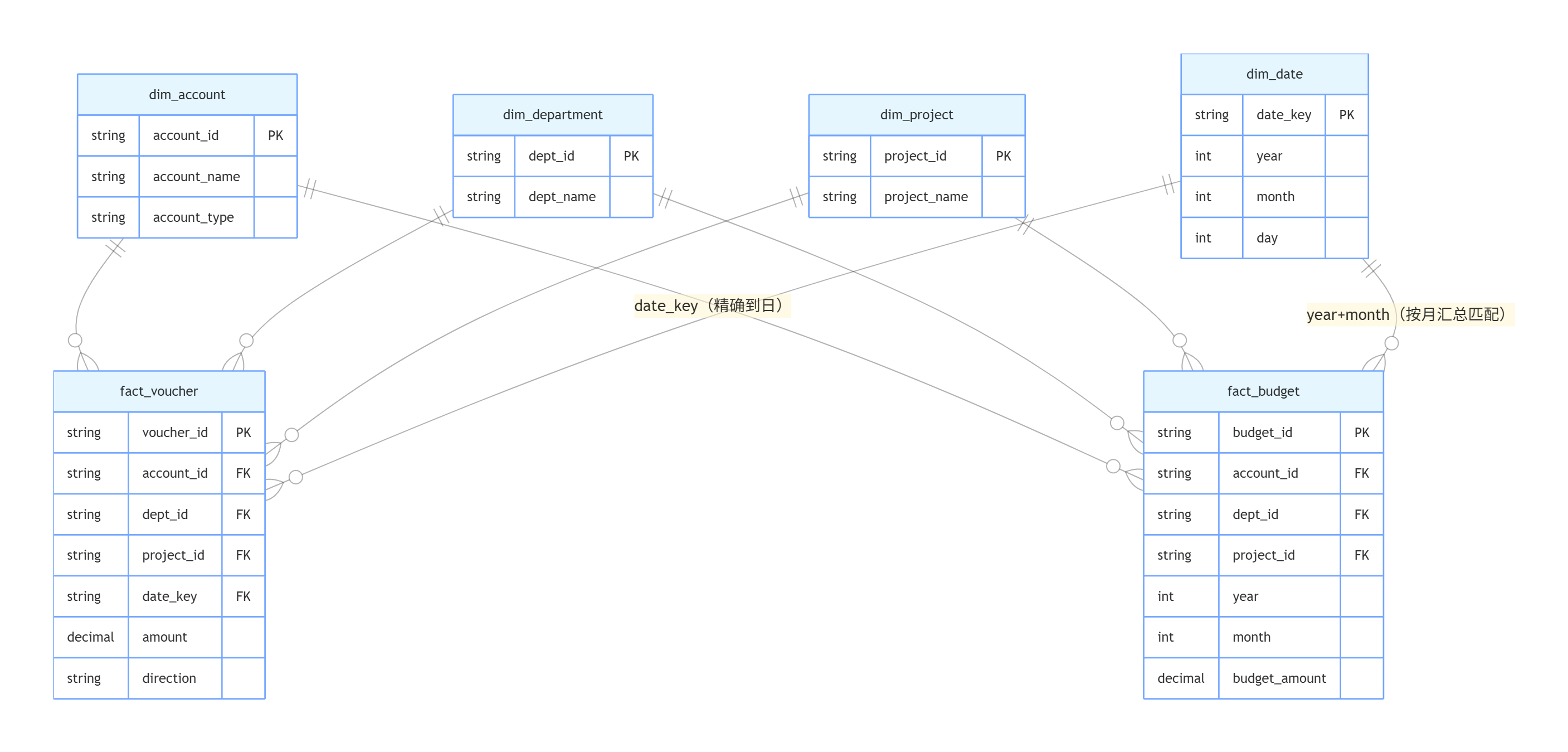
| dim_account → fact_voucher | account_code |
| dim_account → fact_budget | account_code |
| dim_department → fact_voucher | dept_code |
| dim_department → fact_budget | dept_code |
| dim_project → fact_voucher | project_code |
| dim_project → fact_budget | ❌ 无关(预算不按项目拆) |
| dim_date → fact_voucher | date = date_key |
| dim_date → fact_budget | year + month 组合关联 |
- dim_ 开头 = 维度表(“谁、什么、哪、什么时候”)
- fact_ 开头 = 事实表(“发生了多少”)
共 6 张表:4 维度 + 2 事实。
💻 动手写代码
创建 data/generate_sample_data.py:
"""
生成示例财务数据
模拟一家科技公司 2024年1月-6月 的日常凭证
"""
import pandas as pd
import os
from datetime import datetime
import random
random.seed(42)
OUTPUT_DIR = os.path.join(os.path.dirname(__file__), "sample")
os.makedirs(OUTPUT_DIR, exist_ok=True)
# ============================================
# 1. 科目表(20 个会计科目)
# ============================================
accounts = [
# 资产类 (1xxx)
("1001", "库存现金", "资产", "流动资产"),
("1002", "银行存款", "资产", "流动资产"),
("1122", "应收账款", "资产", "流动资产"),
("1221", "其他应收款", "资产", "流动资产"),
("1403", "原材料", "资产", "流动资产"),
("1601", "固定资产", "资产", "非流动资产"),
("1602", "累计折旧", "资产", "非流动资产"),
# 负债类 (2xxx)
("2001", "短期借款", "负债", "流动负债"),
("2202", "应付账款", "负债", "流动负债"),
("2211", "应付职工薪酬", "负债", "流动负债"),
("2221", "应交税费", "负债", "流动负债"),
# 权益类 (4xxx)
("4001", "实收资本", "权益", "所有者权益"),
("4101", "未分配利润", "权益", "所有者权益"),
# 收入类 (6xxx)
("6001", "主营业务收入", "收入", "营业收入"),
("6051", "其他业务收入", "收入", "营业收入"),
# 成本费用类 (6xxx)
("6401", "主营业务成本", "成本", "营业成本"),
("6601", "销售费用", "费用", "期间费用"),
("6602", "管理费用", "费用", "期间费用"),
("6603", "研发费用", "费用", "期间费用"),
("6604", "财务费用", "费用", "期间费用"),
]
df = pd.DataFrame(accounts,
columns=["account_code", "account_name", "category", "sub_category"])
df.to_csv(os.path.join(OUTPUT_DIR, "dim_account.csv"),
index=False, encoding="utf-8-sig")
print(f" dim_account.csv: {len(df)} 个科目")
💡 第 4 列 sub_category 是科目细分类别(流动资产/流动负债/期间费用等),不是借贷方向 dr/cr。借贷方向由 category 隐含决定:资产/成本/费用在借方,负债/权益/收入在贷方。
# ============================================
# 2. 部门维度(6 个部门 + 部门类型)
# ============================================
departments = [
("D001", "总经办", "管理"),
("D002", "研发部", "研发"),
("D003", "销售部", "销售"),
("D004", "市场部", "市场"),
("D005", "财务部", "财务"),
("D006", "人力资源部", "行政"),
]
df = pd.DataFrame(departments,
columns=["dept_code", "dept_name", "dept_type"])
df.to_csv(os.path.join(OUTPUT_DIR, "dim_department.csv"),
index=False, encoding="utf-8-sig")
print(f" dim_department.csv: {len(df)} 个部门")
# ============================================
# 3. 项目维度(4 个项目 + 负责人部门 + 起止日期)
# ============================================
projects = [
("P2024-001", "智能客服系统", "D002", "2024-01-01", "2024-12-31"),
("P2024-002", "数据中台建设", "D002", "2024-03-01", "2024-09-30"),
("P2024-003", "移动APP改版", "D002", "2024-02-01", "2024-08-31"),
("P2024-004", "企业官网升级", "D004", "2024-04-01", "2024-06-30"),
]
df = pd.DataFrame(projects,
columns=["project_code", "project_name", "owner_dept",
"start_date", "end_date"])
df.to_csv(os.path.join(OUTPUT_DIR, "dim_project.csv"),
index=False, encoding="utf-8-sig")
print(f" dim_project.csv: {len(df)} 个项目")
💡 项目编码用 P2024-001 格式比 P001 更好——年份编码在编码里,跨年不会冲突。owner_dept 记录哪个部门负责这个项目。
# ============================================
# 4. 凭证数据(48 张凭证 = 116 条分录)
# ============================================
vouchers = []
voucher_id = 1
def add_voucher(date, entries, summary=""):
"""entries: [(account_code, dept_code, project_code, dr, cr), …]"""
global voucher_id
for (acct, dept, proj, dr, cr) in entries:
vouchers.append({
"voucher_id": f"J{voucher_id:05d}",
"date": date,
"account_code": acct,
"dept_code": dept,
"project_code": proj,
"dr_amount": dr,
"cr_amount": cr,
"summary": summary,
})
voucher_id += 1
# 期初余额
add_voucher("2024-01-01", [
("1002", "D005", None, 5_000_000, 0), # 银行存款
("1601", "D005", None, 2_000_000, 0), # 固定资产
("4001", "D005", None, 0, 6_500_000), # 实收资本
("4101", "D005", None, 0, 500_000), # 未分配利润
], "期初余额")
# 每月业务(1-6月)
for month_num in range(1, 7):
month_start = datetime(2024, month_num, 1)
# 收入确认
revenue = random.randint(800_000, 1_500_000)
cost = int(revenue * 0.55)
add_voucher(
month_start.strftime("%Y-%m-15"),
[("1122", "D003", "P2024-001", revenue, 0),
("6001", "D003", "P2024-001", 0, revenue)],
f"{month_start.month}月收入确认-智能客服"
)
add_voucher(
month_start.strftime("%Y-%m-15"),
[("6401", "D002", "P2024-001", cost, 0),
("1002", "D005", None, 0, cost)],
f"{month_start.month}月成本结转"
)
# 工资计提(按比例分配到各部门,用余数法确保借贷平衡)
salary = random.randint(300_000, 500_000)
s_mgmt = int(salary * 0.15)
s_rd = int(salary * 0.50)
s_sales = int(salary * 0.25)
s_hr = salary – s_mgmt – s_rd – s_sales
add_voucher(
month_start.strftime("%Y-%m-05"),
[("6602", "D005", None, s_mgmt, 0),
("6603", "D002", None, s_rd, 0),
("6601", "D003", None, s_sales, 0),
("6602", "D006", None, s_hr, 0),
("2211", "D005", None, 0, salary)],
f"{month_start.month}月工资计提"
)
# 工资发放
add_voucher(
month_start.strftime("%Y-%m-10"),
[("2211", "D005", None, salary, 0),
("1002", "D005", None, 0, salary)],
f"{month_start.month}月工资发放"
)
# 运营费用
operating = random.randint(50_000, 120_000)
add_voucher(
month_start.strftime("%Y-%m-20"),
[("6602", "D005", None, operating, 0),
("1002", "D005", None, 0, operating)],
f"{month_start.month}月运营费用"
)
# 客户回款(滞后 1-2 个月)
if month_num >= 2:
collection = random.randint(600_000, 1_200_000)
add_voucher(
month_start.strftime("%Y-%m-25"),
[("1002", "D005", None, collection, 0),
("1122", "D003", "P2024-001", 0, collection)],
"收到客户回款"
)
# 折旧
add_voucher(
month_start.strftime("%Y-%m-28"),
[("6602", "D005", None, 25_000, 0),
("1602", "D005", None, 0, 25_000)],
f"{month_start.month}月折旧"
)
# 市场费用
marketing = random.randint(20_000, 80_000)
add_voucher(
month_start.strftime("%Y-%m-18"),
[("6601", "D004", "P2024-004", marketing, 0),
("1002", "D005", None, 0, marketing)],
f"{month_start.month}月市场推广费"
)
df_v = pd.DataFrame(vouchers)
total_dr = df_v["dr_amount"].sum()
total_cr = df_v["cr_amount"].sum()
print(f" 借贷平衡: {'✅' if abs(total_dr – total_cr) < 0.01 else '❌'}")
print(f" 借方: {total_dr:,.2f} 贷方: {total_cr:,.2f}")
df_v.to_csv(os.path.join(OUTPUT_DIR, "fact_voucher.csv"),
index=False, encoding="utf-8-sig")
print(f" fact_voucher.csv: {len(df_v)} 条分录")
💡 工资分配的余数法:s_hr = salary – s_mgmt – s_rd – s_sales。因为 int() 会舍弃小数,四个部门的工资加起来可能不等于总工资。把最后一份用总数减去前三份,确保"有借必有贷,借贷必相等"。
# ============================================
# 5. 预算数据(6 个月 × 5 个科目 = 30 条)
# ============================================
budgets = []
for month in range(1, 7):
budgets.append(
{"year":2024,"month":month,"account_code":"6001","dept_code":"D003",
"budget_amount":1_200_000,"budget_type":"收入预算"})
budgets.append(
{"year":2024,"month":month,"account_code":"6401","dept_code":"D002",
"budget_amount":660_000,"budget_type":"成本预算"})
budgets.append(
{"year":2024,"month":month,"account_code":"6601","dept_code":"D003",
"budget_amount":330_000,"budget_type":"费用预算"})
budgets.append(
{"year":2024,"month":month,"account_code":"6602","dept_code":"D005",
"budget_amount":200_000,"budget_type":"费用预算"})
budgets.append(
{"year":2024,"month":month,"account_code":"6603","dept_code":"D002",
"budget_amount":250_000,"budget_type":"费用预算"})
df_b = pd.DataFrame(budgets)
df_b.to_csv(os.path.join(OUTPUT_DIR, "fact_budget.csv"),
index=False, encoding="utf-8-sig")
print(f" fact_budget.csv: {len(df_b)} 条预算")
print("\\n✅ 示例数据生成完毕!")
运行
python data/generate_sample_data.py
如图:

预期输出:
dim_account.csv: 20 个科目
dim_department.csv: 6 个部门
dim_project.csv: 4 个项目
借贷平衡: ✅
借方: 27,243,411.00 贷方: 27,243,411.00
fact_voucher.csv: 116 条分录
fact_budget.csv: 30 条预算
✅ 示例数据生成完毕!
🧪 验证清单
- data/sample/ 下有 5 个 CSV 文件(没有 dim_date.csv)
- 借贷合计相等
- 凭证 ID 格式为 J00001, J00002, …
📝 本节小结
| 借贷记账法 | SUM(dr_amount) = SUM(cr_amount) 永真 |
| 余数法分配 | int() 舍入后让最后一笔兜底,确保借贷平衡 |
| seed(42) | 固定随机种子,每次生成相同数据 |
| 5 个 CSV | dim_account, dim_department, dim_project, fact_voucher, fact_budget |
| dim_date 去哪了 | 不生成 CSV——在 Step 3 用纯 SQL 的 range() 函数自动生成 |
Step 3:DuckDB 数据库
🎯 本节目标
建 6 张表 → 导入 5 个 CSV → 验证借贷平衡 → 输出试算平衡表。
📖 原理速览
CSV 文件 ──pandas 读取──→ DuckDB INSERT ──→ .duckdb 文件
dim_date ──SQL range()──→ 自动生成 365 天
| 嵌入式 | 一个文件,零配置,不需要服务端 |
| 列式存储 | SUM/AVG 等聚合查询极快 |
| SQL 标准 | 完整支持 SELECT/JOIN/GROUP BY/CTE |
| 参数化查询 | ?, [params] 防 SQL 注入 |
💻 动手写代码
① db/connection.py — 连接管理
"""
DuckDB 连接管理
"""
import duckdb
import os
DB_PATH = os.path.join(os.path.dirname(os.path.dirname(__file__)),
"db", "finance.duckdb")
def get_connection(read_only: bool = False):
"""获取数据库连接。默认 read_only=False 允许写入。"""
return duckdb.connect(DB_PATH, read_only=read_only)
def query(sql: str, params=None):
"""执行 SELECT,返回 pandas DataFrame。强制只读连接。"""
conn = get_connection(read_only=True)
try:
if params:
return conn.execute(sql, params).fetchdf()
return conn.execute(sql).fetchdf()
finally:
conn.close() # ← 最重要的一行:无论是否报错都关闭连接
def execute(sql: str, params=None):
"""执行 INSERT/UPDATE/DELETE/CREATE。使用可写连接。"""
conn = get_connection(read_only=False)
try:
if params:
conn.execute(sql, params)
else:
conn.execute(sql)
finally:
conn.close()
💡 为什么拆成两个函数? query() 用只读连接——即使 SQL 里不小心写了 DELETE,数据库也会拒绝。execute() 用可写连接——调用处看到函数名就知道这里会改数据。finally: conn.close() 保证连接绝不泄露。
② db/init_db.py — 建表 + 导入 + 验证
"""
数据库初始化:
[1/4] 删旧表 → [2/4] 建 6 张表 → [3/4] 导入 CSV → [4/4] 验证
"""
import sys, os
sys.path.insert(0, os.path.dirname(os.path.dirname(__file__)))
import pandas as pd
from db.connection import get_connection, query
SAMPLE_DIR = os.path.join(os.path.dirname(os.path.dirname(__file__)),
"data", "sample")
def init_database():
conn = get_connection(read_only=False)
# [1/4] 清理旧表
print("[1/4] 清理旧表…")
for t in ["fact_budget", "fact_voucher", "dim_project",
"dim_department", "dim_account", "dim_date"]:
conn.execute(f"DROP TABLE IF EXISTS {t}")
# [2/4] 建表
print("[2/4] 创建表…")
# 科目维度
conn.execute("""
CREATE TABLE dim_account (
account_code VARCHAR PRIMARY KEY,
account_name VARCHAR NOT NULL,
category VARCHAR NOT NULL,
sub_category VARCHAR
)
""")
# 部门维度(含 dept_type)
conn.execute("""
CREATE TABLE dim_department (
dept_code VARCHAR PRIMARY KEY,
dept_name VARCHAR NOT NULL,
dept_type VARCHAR
)
""")
# 项目维度(含 owner_dept、起止日期、外键)
conn.execute("""
CREATE TABLE dim_project (
project_code VARCHAR PRIMARY KEY,
project_name VARCHAR NOT NULL,
owner_dept VARCHAR,
start_date DATE,
end_date DATE,
FOREIGN KEY (owner_dept) REFERENCES dim_department(dept_code)
)
""")
# 日期维度 —— 纯 SQL 生成,不需要 CSV!
conn.execute("""
CREATE TABLE dim_date AS
SELECT
CAST(range AS DATE) AS date_key,
strftime(CAST(range AS DATE), '%Y-%m-%d') AS date_str,
year(CAST(range AS DATE)) AS year,
month(CAST(range AS DATE)) AS month,
day(CAST(range AS DATE)) AS day,
strftime(CAST(range AS DATE), '%Y-%m') AS year_month,
strftime(CAST(range AS DATE), '%Y年第%m月') AS year_month_cn
FROM range(DATE '2024-01-01', DATE '2024-12-31', INTERVAL 1 DAY)
""")
# 凭证事实表 — 金额用 DECIMAL(18,2) 而非 DOUBLE
conn.execute("""
CREATE TABLE fact_voucher (
id INTEGER PRIMARY KEY,
voucher_id VARCHAR NOT NULL,
date DATE NOT NULL,
account_code VARCHAR NOT NULL,
dept_code VARCHAR,
project_code VARCHAR,
dr_amount DECIMAL(18,2) DEFAULT 0,
cr_amount DECIMAL(18,2) DEFAULT 0,
summary VARCHAR
)
""")
# 预算事实表
conn.execute("""
CREATE TABLE fact_budget (
id INTEGER PRIMARY KEY,
year INTEGER NOT NULL,
month INTEGER NOT NULL,
account_code VARCHAR NOT NULL,
dept_code VARCHAR,
budget_amount DECIMAL(18,2) DEFAULT 0,
budget_type VARCHAR
)
""")
print(" 6 张表创建完毕")
# [3/4] 导入 CSV
print("[3/4] 导入 CSV…")
for name, table in [
("dim_account", "dim_account"),
("dim_department", "dim_department"),
("dim_project", "dim_project"),
("fact_voucher", "fact_voucher"),
("fact_budget", "fact_budget"),
]:
df = pd.read_csv(os.path.join(SAMPLE_DIR, f"{name}.csv"))
if name.startswith("fact_"):
conn.execute(
f"INSERT INTO {table} "
"SELECT row_number() OVER () AS id, * FROM df"
)
else:
conn.execute(f"INSERT INTO {table} SELECT * FROM df")
print(f" {table}: {len(df)} rows")
# [4/4] 验证
print("[4/4] 验证…")
balance = conn.execute("""
SELECT SUM(dr_amount), SUM(cr_amount),
SUM(dr_amount) – SUM(cr_amount) AS diff
FROM fact_voucher
""").fetchone()
print(f" 借方: {balance[0]:,.2f} 贷方: {balance[1]:,.2f}")
print(f" 平衡: {'✅ OK' if abs(balance[2]) < 0.01 else '❌ FAIL'}")
conn.close()
print("✅ 数据库初始化完成!")
def show_trial_balance():
"""快速试算平衡表 — 按科目汇总借贷发生额"""
print("\\n— 试算平衡表 (科目汇总) —")
df = query("""
SELECT
a.account_code,
a.account_name,
a.category,
SUM(v.dr_amount) AS dr_total,
SUM(v.cr_amount) AS cr_total,
SUM(v.dr_amount) – SUM(v.cr_amount) AS balance
FROM fact_voucher v
JOIN dim_account a ON v.account_code = a.account_code
GROUP BY a.account_code, a.account_name, a.category
ORDER BY a.account_code
""")
print(df.to_string(index=False))
return df
if __name__ == "__main__":
init_database()
show_trial_balance()
⚠️ dim_date 用 DuckDB 的 range() 函数生成 365 天,不需要 CSV 文件。year_month_cn(“2024年第03月”)是中文明细备用列。
⚠️ 金额用 DECIMAL(18,2) 而非 DOUBLE——定点精确计算,永远不会有 0.1+0.2≠0.3 的问题。
③ 运行
python db/init_db.py
如图:
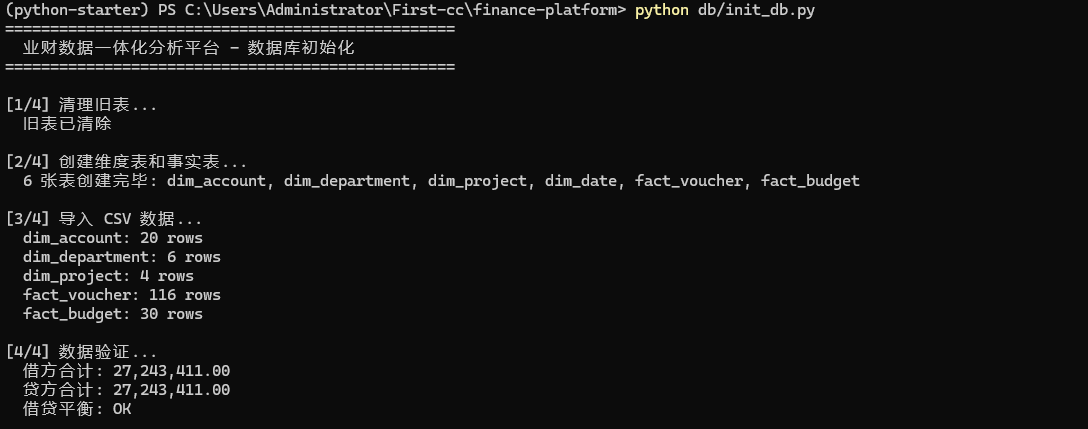
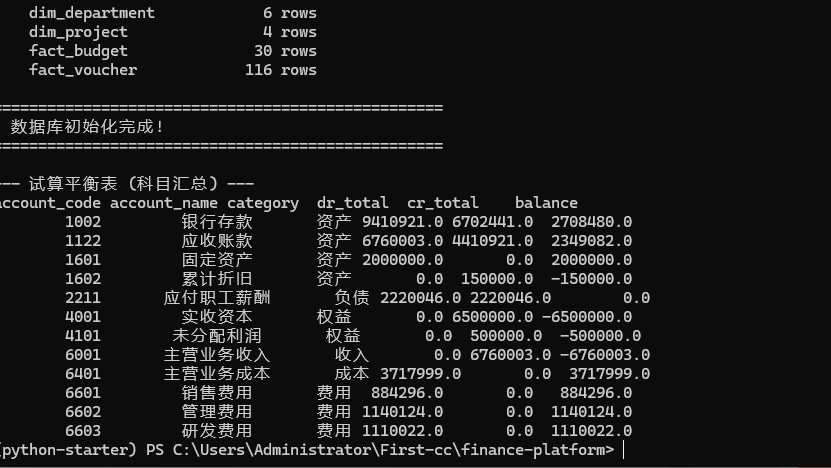
预期输出:
[1/4] 清理旧表…
[2/4] 创建表…
6 张表创建完毕
[3/4] 导入 CSV…
dim_account: 20 rows
dim_department: 6 rows
dim_project: 4 rows
dim_date: 365 rows ← SQL 自动生成
fact_voucher: 116 rows
fact_budget: 30 rows
[4/4] 验证…
借方: 27,243,411.00 贷方: 27,243,411.00
平衡: ✅ OK
✅ 数据库初始化完成!
— 试算平衡表 (科目汇总) —
account_code account_name category dr_total cr_total balance
1002 银行存款 资产 9410921.0 6702441.0 2708480.0
1122 应收账款 资产 6760003.0 4410921.0 2349082.0
1601 固定资产 资产 2000000.0 0.0 2000000.0
1602 累计折旧 资产 0.0 150000.0 -150000.0
2211 应付职工薪酬 负债 2220046.0 2220046.0 0.0
4001 实收资本 权益 0.0 6500000.0 -6500000.0
4101 未分配利润 权益 0.0 500000.0 -500000.0
6001 主营业务收入 收入 0.0 6760003.0 -6760003.0
6401 主营业务成本 成本 3717999.0 0.0 3717999.0
6601 销售费用 费用 884296.0 0.0 884296.0
6602 管理费用 费用 1140124.0 0.0 1140124.0
6603 研发费用 费用 1110022.0 0.0 1110022.0
🧪 验证清单
- db/finance.duckdb 文件已生成
- 借贷平衡 diff=0
- 6 张表全部有数据
📝 本节小结
| DECIMAL(18,2) | 定点精确数值。财务系统必须用,不能用 DOUBLE |
| range() 生成日期 | 纯 SQL 生成 365 天,零 IO,比 CSV 导入快 |
| 参数化查询 | ?, [params] 是防 SQL 注入的基础手段 |
| finally: conn.close() | 资源安全的三字经 |
Step 4:FastAPI 后端
🎯 本节目标
搭建 REST API,提供财务报表接口 + 安全防护。
📖 原理速览
Streamlit 前端(8501) → HTTP → FastAPI(8000) → DuckDB → JSON
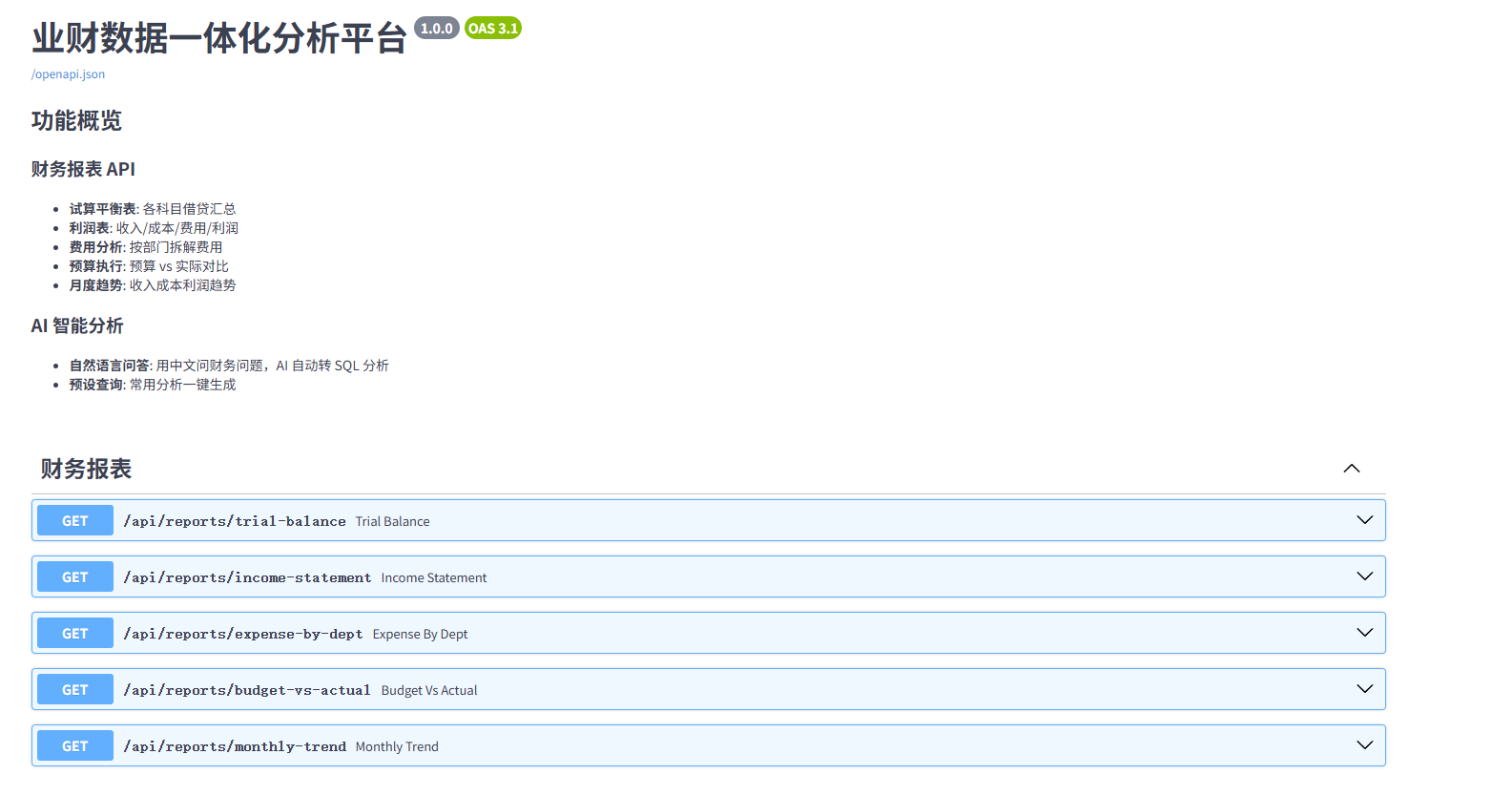
| / | GET | API 信息 |
| /health | GET | 健康检查 |
| /api/reports/trial-balance | GET | 试算平衡表 |
| /api/reports/income-statement | GET | 利润表 |
| /api/reports/expense-by-dept | GET | 部门费用分析 |
| /api/reports/budget-vs-actual | GET | 预算执行 |
| /api/reports/monthly-trend | GET | 月度趋势 |
| /api/chat | POST | AI 智能问答 |
| /api/chat/presets | GET | 预设查询列表 |
| /api/chat/presets/{key} | GET | 运行预设 |
💻 动手写代码
后端由 4 个文件组成:
api/
├── main.py # 应用入口 + 路由注册 + CORS + 健康检查
├── routers/
│ ├── reports.py # 5 个财务报表接口
│ └── chat.py # AI 对话 + 5 个预设查询
└── llm_client.py # LLM 调用引擎(Step 6 详讲)
① api/main.py — 应用工厂
"""
业财数据一体化分析平台 – API 入口
启动: python -m uvicorn api.main:app –reload –port 8000
文档: http://localhost:8000/docs
"""
import sys
import os
sys.path.insert(0, os.path.dirname(os.path.dirname(__file__)))
from fastapi import FastAPI
from fastapi.middleware.cors import CORSMiddleware
from api.routers import reports, chat
app = FastAPI(
title="业财数据一体化分析平台",
description="""
## 功能概览
### 财务报表 API
– **试算平衡表**: 各科目借贷汇总
– **利润表**: 收入/成本/费用/利润
– **费用分析**: 按部门拆解费用
– **预算执行**: 预算 vs 实际对比
– **月度趋势**: 收入成本利润趋势
### AI 智能分析
– **自然语言问答**: 用中文问财务问题,AI 自动转 SQL 分析
– **预设查询**: 常用分析一键生成
""",
version="1.0.0",
)
# CORS(允许 Streamlit 前端跨域访问)
app.add_middleware(
CORSMiddleware,
allow_origins=["*"],
allow_methods=["*"],
allow_headers=["*"],
)
app.include_router(reports.router)
app.include_router(chat.router)
@app.get("/")
def root():
"""根路径 — 返回 API 导航信息"""
return {
"name": "业财数据一体化分析平台",
"version": "1.0.0",
"docs": "/docs",
"endpoints": {
"reports": "/api/reports",
"chat": "/api/chat",
}
}
@app.get("/health")
def health():
"""健康检查 — 验证 API 和数据库都正常"""
from db.connection import query
try:
row_count = query("SELECT COUNT(*) AS cnt FROM fact_voucher")
return {
"status": "ok",
"database": "connected",
"voucher_count": int(row_count.iloc[0, 0]),
}
except Exception as e:
return {"status": "error", "message": str(e)}
💡 两个关键设计:
- FastAPI(description=…) — 自动渲染到 /docs 页面,零成本生成产品文档
- GET / 返回 docs: "/docs" — 方便新同事一眼找到 Swagger
② api/routers/reports.py — 5 个报表接口
"""
财务报表 API 路由
提供: 试算平衡表、利润表、费用分析、预算执行、月度趋势
"""
import sys, os, re
sys.path.insert(0, os.path.dirname(os.path.dirname(os.path.dirname(__file__))))
from fastapi import APIRouter, Query
from db.connection import query
router = APIRouter(prefix="/api/reports", tags=["财务报表"])
接口 1:试算平衡表 GET /api/reports/trial-balance
按科目汇总借贷发生额,验证 SUM(借) = SUM(贷)。
@router.get("/trial-balance")
def trial_balance(year_month: str = Query(None, description="月份筛选,如 2024-03")):
# 安全防护 ①:正则校验输入格式
if year_month:
if not re.match(r'^\\d{4}-\\d{2}$', year_month):
return {"data": [], "total": 0, "error": "月份格式无效,请使用 YYYY-MM"}
where = "d.year_month = ?"
params = [year_month]
else:
where = "1=1"
params = []
# 安全防护 ②:? 占位符参数化查询
sql = f"""
SELECT
a.account_code,
a.account_name,
a.category,
ROUND(SUM(v.dr_amount), 2) AS dr_total,
ROUND(SUM(v.cr_amount), 2) AS cr_total,
ROUND(SUM(v.dr_amount) – SUM(v.cr_amount), 2) AS balance
FROM fact_voucher v
JOIN dim_account a ON v.account_code = a.account_code
JOIN dim_date d ON v.date = d.date_key
WHERE {where}
GROUP BY a.account_code, a.account_name, a.category
ORDER BY a.account_code
"""
df = query(sql, params)
return {"data": df.to_dict(orient="records"), "total": len(df)}
💡 资产类科目余额 = dr – cr,负债/权益/收入类应该是 cr – dr。但这里统一用 dr – cr 是为了原始展示——资产正数、负债权益负数——财务人员习惯直接看借贷方向和余额符号判断。
接口 2:利润表 GET /api/reports/income-statement
@router.get("/income-statement")
def income_statement(year_month: str = Query(None)):
if year_month:
if not re.match(r'^\\d{4}-\\d{2}$', year_month):
return {"error": "月份格式无效,请使用 YYYY-MM"}
where = "d.year_month = ?"
params = [year_month]
else:
where = "1=1"
params = []
# ★ 核心:收入类用 cr-dr,成本/费用类用 dr-cr
sql = f"""
SELECT
a.category AS item,
ROUND(SUM(
CASE
WHEN a.category = '收入' THEN COALESCE(v.cr_amount,0) – COALESCE(v.dr_amount,0)
ELSE COALESCE(v.dr_amount,0) – COALESCE(v.cr_amount,0)
END
), 2) AS amount
FROM fact_voucher v
JOIN dim_account a ON v.account_code = a.account_code
JOIN dim_date d ON v.date = d.date_key
WHERE {where}
AND a.category IN ('收入', '成本', '费用')
GROUP BY a.category
ORDER BY CASE a.category
WHEN '收入' THEN 1 WHEN '成本' THEN 2 WHEN '费用' THEN 3 END
"""
df = query(sql, params)
# 解析为结构化响应
items = df.set_index("item")["amount"].to_dict()
revenue = items.get("收入", 0)
cost = items.get("成本", 0)
expense = items.get("费用", 0)
gross_profit = revenue – cost
net_profit = gross_profit – expense
return {
"period": year_month or "全部期间",
"revenue": revenue,
"cost": cost,
"gross_profit": gross_profit,
"gross_margin": f"{gross_profit/revenue*100:.1f}%" if revenue != 0 else "N/A",
"total_expense": expense,
"net_profit": net_profit,
"net_margin": f"{net_profit/revenue*100:.1f}%" if revenue != 0 else "N/A",
}
💡 返回的不是纯列表,而是结构化 JSON(revenue/cost/gross_profit/net_profit),前端不用再做计算。
接口 3:部门费用分析 GET /api/reports/expense-by-dept
@router.get("/expense-by-dept")
def expense_by_dept(year_month: str = Query(None)):
if year_month:
if not re.match(r'^\\d{4}-\\d{2}$', year_month):
return {"data": [], "total": 0, "error": "月份格式无效,请使用 YYYY-MM"}
where = "d.year_month = ?"
params = [year_month]
else:
where = "1=1"
params = []
sql = f"""
SELECT
COALESCE(d2.dept_name, '未分配') AS department,
a.account_name AS account,
ROUND(SUM(v.dr_amount), 2) AS amount
FROM fact_voucher v
JOIN dim_account a ON v.account_code = a.account_code
JOIN dim_date d ON v.date = d.date_key
LEFT JOIN dim_department d2 ON v.dept_code = d2.dept_code
WHERE {where} AND a.category = '费用'
GROUP BY d2.dept_name, a.account_name
ORDER BY amount DESC
"""
df = query(sql, params)
return {"data": df.to_dict(orient="records"), "total": len(df)}
💡 费用只查 dr_amount(费用在借方发生),LEFT JOIN 部门表用 COALESCE 兜底未分配凭证。
接口 4:预算执行分析 GET /api/reports/budget-vs-actual
@router.get("/budget-vs-actual")
def budget_vs_actual(year_month: str = Query(None)):
if year_month:
if not re.match(r'^\\d{4}-\\d{2}$', year_month):
return {"data": [], "total": 0, "error": "月份格式无效,请使用 YYYY-MM"}
parts = year_month.split('-')
# 预算表用 year+month 整数存储,这里 int() 保证恶意输入被转成整数
budget_filter = f"b.year = {int(parts[0])} AND b.month = {int(parts[1])}"
else:
budget_filter = "1=1"
sql = f"""
SELECT
b.year, b.month,
a.account_name,
COALESCE(d.dept_name, '全部') AS department,
b.budget_amount,
b.budget_type,
ROUND(COALESCE(actual.amount, 0), 2) AS actual_amount,
ROUND(COALESCE(actual.amount, 0) – b.budget_amount, 2) AS variance,
CASE
WHEN b.budget_amount = 0 THEN 'N/A'
ELSE ROUND(COALESCE(actual.amount,0)/b.budget_amount*100,1)::VARCHAR || '%'
END AS execution_rate
FROM fact_budget b
LEFT JOIN dim_department d ON b.dept_code = d.dept_code
LEFT JOIN dim_account a ON b.account_code = a.account_code
LEFT JOIN (
— 子查询:汇总实际发生额
SELECT
d2.year_month,
v.account_code,
v.dept_code,
SUM(
CASE
WHEN a2.category = '收入' THEN COALESCE(v.cr_amount,0)-COALESCE(v.dr_amount,0)
ELSE COALESCE(v.dr_amount,0)
END
) AS amount
FROM fact_voucher v
JOIN dim_date d2 ON v.date = d2.date_key
JOIN dim_account a2 ON v.account_code = a2.account_code
WHERE a2.category IN ('收入', '成本', '费用')
GROUP BY d2.year_month, v.account_code, v.dept_code
) actual
ON CAST(b.year AS VARCHAR)||'-'||LPAD(CAST(b.month AS VARCHAR),2,'0') = actual.year_month
AND b.account_code = actual.account_code
AND COALESCE(b.dept_code,'') = COALESCE(actual.dept_code,'')
WHERE {budget_filter}
ORDER BY b.year, b.month, a.account_name
"""
df = query(sql)
return {"data": df.to_dict(orient="records"), "total": len(df)}
⚠️ budget_filter 用 f-string + int() 而非 ? 占位。int() + re.match 双重约束保证安全,但严格来说不如纯参数化优雅。
接口 5:月度趋势 GET /api/reports/monthly-trend
@router.get("/monthly-trend")
def monthly_trend():
"""月度收入/成本/费用趋势(无需参数)"""
sql = """
SELECT
d.year_month,
a.category,
ROUND(SUM(
CASE
WHEN a.category = '收入' THEN COALESCE(v.cr_amount,0) – COALESCE(v.dr_amount,0)
ELSE COALESCE(v.dr_amount,0) – COALESCE(v.cr_amount,0)
END
), 2) AS amount
FROM fact_voucher v
JOIN dim_date d ON v.date = d.date_key
JOIN dim_account a ON v.account_code = a.account_code
WHERE a.category IN ('收入', '成本', '费用')
GROUP BY d.year_month, a.category
ORDER BY d.year_month, a.category
"""
df = query(sql)
return {"data": df.to_dict(orient="records"), "total": len(df)}
③ api/routers/chat.py — AI 对话 + 预设查询(147 行)
"""
AI 智能问答 API
将自然语言问题 → SQL → 数据库查询 → 分析回答
"""
import sys, os
sys.path.insert(0, os.path.dirname(os.path.dirname(os.path.dirname(__file__))))
from fastapi import APIRouter
from pydantic import BaseModel
from api.llm_client import ask_llm
router = APIRouter(prefix="/api/chat", tags=["AI 分析"])
class ChatRequest(BaseModel):
question: str
class ChatResponse(BaseModel):
question: str
sql: str | None = None
data: list | None = None
answer: str | None = None
error: str | None = None
# ── 预设查询(无需 API Key,直接查数据库)──
PRESET_QUERIES = {
"收入": {
"label": "收入概览",
"sql": """
SELECT d.year_month AS 月份, ROUND(SUM(v.cr_amount), 2) AS 收入金额
FROM fact_voucher v
JOIN dim_account a ON v.account_code = a.account_code
JOIN dim_date d ON v.date = d.date_key
WHERE a.category = '收入'
GROUP BY d.year_month ORDER BY d.year_month
"""
},
"费用": {
"label": "费用构成",
"sql": """
SELECT a.account_name AS 费用科目, ROUND(SUM(v.dr_amount), 2) AS 金额
FROM fact_voucher v
JOIN dim_account a ON v.account_code = a.account_code
WHERE a.category = '费用'
GROUP BY a.account_name ORDER BY 金额 DESC
"""
},
"利润": {
"label": "利润趋势",
"sql": """
SELECT d.year_month AS 月份, a.category AS 类别,
ROUND(SUM(
CASE
WHEN a.category = '收入' THEN COALESCE(v.cr_amount,0)-COALESCE(v.dr_amount,0)
ELSE COALESCE(v.dr_amount,0)-COALESCE(v.cr_amount,0)
END
), 2) AS 金额
FROM fact_voucher v
JOIN dim_date d ON v.date = d.date_key
JOIN dim_account a ON v.account_code = a.account_code
WHERE a.category IN ('收入', '成本', '费用')
GROUP BY d.year_month, a.category
ORDER BY d.year_month,
CASE a.category WHEN '收入' THEN 1 WHEN '成本' THEN 2 WHEN '费用' THEN 3 END
"""
},
"预算": {
"label": "预算执行",
"sql": """
SELECT
b.year::VARCHAR || '-' || LPAD(b.month::VARCHAR, 2, '0') AS 月份,
a.account_name AS 科目,
b.budget_amount AS 预算, b.budget_type AS 预算类型,
ROUND(COALESCE(SUM(
CASE
WHEN a.category = '收入' THEN COALESCE(v.cr_amount,0)-COALESCE(v.dr_amount,0)
ELSE COALESCE(v.dr_amount,0)
END
), 0), 2) AS 实际
FROM fact_budget b
JOIN dim_account a ON b.account_code = a.account_code
LEFT JOIN fact_voucher v ON v.account_code = b.account_code
AND v.date >= (b.year::VARCHAR||'-'||LPAD(b.month::VARCHAR,2,'0')||'-01')::DATE
AND v.date < (b.year::VARCHAR||'-'||LPAD(b.month::VARCHAR,2,'0')||'-01')::DATE
+ INTERVAL '1 month'
GROUP BY b.year, b.month, a.account_name, b.budget_amount, b.budget_type
ORDER BY b.year, b.month, a.account_name
"""
},
"部门": {
"label": "部门费用",
"sql": """
SELECT COALESCE(d2.dept_name, '未分配') AS 部门,
ROUND(SUM(v.dr_amount), 2) AS 费用金额
FROM fact_voucher v
JOIN dim_account a ON v.account_code = a.account_code
LEFT JOIN dim_department d2 ON v.dept_code = d2.dept_code
WHERE a.category = '费用'
GROUP BY d2.dept_name ORDER BY 费用金额 DESC
"""
},
}
@router.post("")
def chat(req: ChatRequest):
"""AI 智能问答: 自然语言 → SQL → 数据 → 分析"""
result = ask_llm(req.question)
return result
@router.get("/presets")
def list_presets():
"""列出预设查询模板(无需 API Key)"""
return {
"presets": [
{"key": k, "label": v["label"]}
for k, v in PRESET_QUERIES.items()
]
}
@router.get("/presets/{key}")
def run_preset(key: str):
"""运行一个预设查询"""
if key not in PRESET_QUERIES:
return {"error": f"未知预设: {key}。可用: {list(PRESET_QUERIES.keys())}"}
preset = PRESET_QUERIES[key]
from db.connection import query
try:
df = query(preset["sql"])
return {
"question": preset["label"],
"sql": preset["sql"],
"data": df.to_dict(orient="records"),
"answer": f"共 {len(df)} 条结果",
"error": None,
}
except Exception as e:
return {"question": preset["label"], "sql": preset["sql"],
"data": None, "answer": None, "error": str(e)}
💡 预设查询的 SQL 是手写优化过的——收入用 cr_amount、费用用 dr_amount、利润用 CASE。不依赖 LLM,无 API Key 也能用。
④ api/llm_client.py — AI 引擎(见 Step 6 完整展开)
核心流程 ask_llm(question) → SQL → DuckDB → 分析回答。见 Step 6 完整代码。
🧪 启动验证
python -m uvicorn api.main:app –port 8000
如图:

浏览器打开 http://localhost:8000/docs — FastAPI 自动生成的 Swagger 文档,可直接在页面上测试所有接口。
如图:
📝 本节小结
| CORS | 允许跨域,Streamlit(8501) 才能调 FastAPI(8000) |
| 正则 + 参数化 | 双重防御 SQL 注入 |
| Swagger | FastAPI 自动生成 /docs,零额外代码 |
| 符号规则 | 收入 cr-dr,成本费用 dr-cr |
Step 5:Streamlit 仪表盘
🎯 本节目标
搭建财务仪表盘,通过 API 调用后端数据。
💻 动手写代码
创建 dashboard/app.py。核心组件逐层展开:
① 页面配置 + Global CSS
import sys, os
sys.path.insert(0, os.path.dirname(os.path.dirname(__file__)))
from dotenv import load_dotenv
env_path = os.path.join(os.path.dirname(os.path.dirname(os.path.abspath(__file__))), ".env")
load_dotenv(env_path)
import streamlit as st
import pandas as pd
import requests
from datetime import datetime
st.set_page_config(
page_title="业财数据一体化分析平台",
page_icon="📊",
layout="wide",
initial_sidebar_state="expanded",
)
API_BASE = "http://localhost:8000"
# 全局 CSS(帆软风格 — 深蓝侧边栏、彩色 KPI 卡片、专业表格)
st.markdown("""
<style>
.main { background: #f0f2f5; }
[data-testid="stSidebar"] {
background: linear-gradient(180deg, #0f1a2e 0%, #162033 40%, #1a2744 100%);
}
/* Radio 导航隐藏圆点,改为左侧蓝色竖条 + 背景色 */
[data-testid="stSidebar"] [data-testid="stRadio"] input[type="radio"] { display: none; }
[data-testid="stSidebar"] [data-testid="stRadio"] label:has(input:checked) {
background: rgba(24,144,255,.15) !important;
border-left: 3px solid #1890ff !important;
}
/* KPI 卡片 */
.metric-card {
background: #fff; border-radius: 6px; padding: 18px 22px;
box-shadow: 0 1px 3px rgba(0,0,0,.08); border-left: 4px solid #1890ff;
}
.metric-card.revenue { border-left-color: #1890ff; }
.metric-card.cost { border-left-color: #ff6b6b; }
.metric-card.expense { border-left-color: #ffa940; }
.metric-card.profit { border-left-color: #52c41a; }
/* 表格 */
[data-testid="stTable"] thead th { background: #f5f7fa; border-bottom: 2px solid #e2e8f0; }
</style>
""", unsafe_allow_html=True)
② Helper 函数 — API 调用 + 金额格式化
def api_get(endpoint: str, params: dict = None):
"""调用后端 API,统一错误处理"""
try:
r = requests.get(f"{API_BASE}{endpoint}", params=params, timeout=10)
return r.json() if r.ok else {"error": r.text}
except Exception as e:
return {"error": str(e)}
def api_post(endpoint: str, body: dict):
try:
r = requests.post(f"{API_BASE}{endpoint}", json=body, timeout=30)
return r.json() if r.ok else {"error": r.text}
except Exception as e:
return {"error": str(e)}
def format_money(val):
"""金额格式化: >=1万显示为 xx.xx 万,否则保留两位小数"""
if val is None: return "-"
if abs(val) >= 10000:
return f"{val/10000:,.2f} 万"
return f"{val:,.2f}"
def kpi_card(col, label, value, card_type="revenue", sub=None):
"""帆软风格 KPI 指标卡片(HTML 注入)"""
col.markdown(f"""
<div class="metric-card {card_type}">
<div style="font-size:13px;color:#8c8c8c;">{label}</div>
<div style="font-size:26px;font-weight:700;color:#1a1a2e;">{value}</div>
{f'<div style="font-size:12px;color:#8c8c8c;margin-top:4px;">{sub}</div>' if sub else ''}
</div>
""", unsafe_allow_html=True)
③ 侧边栏 — Logo + 导航 + 月份筛选 + 状态灯
# Logo 区
st.sidebar.markdown("""
<div style="padding:28px 20px 12px;">
<div style="display:flex;align-items:center;gap:12px;">
<div style="width:40px;height:40px;background:linear-gradient(135deg,#1890ff,#36cfc9);
border-radius:10px;display:flex;align-items:center;justify-content:center;
font-size:20px;">📊</div>
<div>
<div style="font-size:16px;font-weight:700;color:#e8f0fe;">业财一体化平台</div>
<div style="font-size:11px;color:#5c7299;">FINANCE · DATA · PLATFORM</div>
</div>
</div>
</div>
""", unsafe_allow_html=True)
# 导航菜单
page = st.sidebar.radio(
"导航菜单",
["🏠 财务概览", "📈 利润表", "📋 试算平衡表",
"💰 费用分析", "🎯 预算执行", "🤖 AI 智能分析", "📥 数据导入"],
label_visibility="collapsed",
)
# 月份筛选
st.sidebar.markdown("### 📅 会计期间")
period_option = st.sidebar.selectbox(
"选择月份",
["全部"] + [f"2024-{m:02d}" for m in range(1, 7)],
index=0,
label_visibility="collapsed",
)
# 底部状态
st.sidebar.markdown("""
<div style="position:fixed;bottom:0;left:0;right:0;padding:16px 20px;
background:linear-gradient(0deg,rgba(15,26,46,.95),transparent);">
<div style="display:flex;align-items:center;gap:8px;">
<div style="width:8px;height:8px;background:#52c41a;border-radius:50%;"></div>
<span style="font-size:11px;color:#5c7299;">系统运行中</span>
</div>
</div>
""", unsafe_allow_html=True)
④ 页面路由 —— 7 页分发
PAGES = {
"🏠 财务概览": page_overview,
"📈 利润表": page_income,
"📋 试算平衡表": page_trial_balance,
"💰 费用分析": page_expense,
"🎯 预算执行": page_budget,
"🤖 AI 智能分析": page_ai,
"📥 数据导入": page_import,
}
PAGES[page]() # 执行当前选中页面
⑤ 典型页面 —— 财务概览
def page_overview():
st.markdown('<h1>🏠 财务概览</h1>', unsafe_allow_html=True)
# 获取数据
params = {}
if "全部" not in period_option:
params["year_month"] = period_option
income = api_get("/api/reports/income-statement", params)
if "error" in income:
st.error(f"API 连接失败: {income['error']}")
return
# KPI 卡片行
c1, c2, c3, c4 = st.columns(4)
kpi_card(c1, "营业收入", format_money(income.get("revenue", 0)),
"revenue", sub=f"毛利率 {income.get('gross_margin','')}")
kpi_card(c2, "营业成本", format_money(income.get("cost", 0)), "cost")
kpi_card(c3, "期间费用", format_money(income.get("total_expense", 0)), "expense")
kpi_card(c4, "净利润", format_money(income.get("net_profit", 0)),
"profit", sub=f"净利率 {income.get('net_margin','')}")
# 月度趋势图表
trend = api_get("/api/reports/monthly-trend")
if "data" in trend and trend["data"]:
df_trend = pd.DataFrame(trend["data"])
pivot = df_trend.pivot(index="year_month", columns="category", values="amount").fillna(0)
pivot["毛利"] = pivot.get("收入",0) – pivot.get("成本",0)
pivot["净利润"] = pivot["毛利"] – pivot.get("费用",0)
c_left, c_right = st.columns(2)
with c_left:
st.line_chart(pivot[["收入","成本","费用"]], use_container_width=True)
with c_right:
st.bar_chart(pivot[["毛利","净利润"]], use_container_width=True)
# 科目余额表
tb = api_get("/api/reports/trial-balance", params)
if "data" in tb and tb["data"]:
df_tb = pd.DataFrame(tb["data"])
df_tb = df_tb[df_tb["balance"] != 0]
st.dataframe(df_tb[["account_code","account_name","category","balance"]],
use_container_width=True, hide_index=True)
⑥ 利润表页
def page_income():
st.markdown('<h1>📈 利润表</h1>', unsafe_allow_html=True)
income = api_get("/api/reports/income-statement",
{"year_month": period_option} if "全部" not in period_option else {})
if "error" in income:
st.error(f"错误: {income['error']}")
return
st.markdown(f"<p style='font-size:14px;color:#8c8c8c;'>{income.get('period', '')}</p>",
unsafe_allow_html=True)
# ── 利润表主表(逐行渲染,颜色区分)──
st.markdown('<div class="card">', unsafe_allow_html=True)
items = [
("一、营业收入", income.get("revenue", 0), "revenue"),
("二、营业成本", income.get("cost", 0), "cost"),
(" 减:成本后毛利", income.get("gross_profit", 0), "profit"),
(" 毛利率", income.get("gross_margin", ""), "sub"),
("三、期间费用", income.get("total_expense", 0), "expense"),
("四、净利润", income.get("net_profit", 0), "profit"),
(" 净利率", income.get("net_margin", ""), "sub"),
]
for name, val, style in items:
color = {"revenue": "#1890ff", "cost": "#ff6b6b", "profit": "#52c41a",
"expense": "#ffa940", "sub": "#8c8c8c"}.get(style, "#2c3e50")
is_sub = style == "sub"
val_str = val if is_sub else format_money(val)
indent = "16px" if name.startswith(" ") else "0"
weight = "700" if not is_sub and name.startswith(("四", "三")) \\
else ("400" if is_sub else "500")
st.markdown(f"""
<div style="display:flex;justify-content:space-between;padding:6px {indent};
font-size:{'14px' if not is_sub else '12px'};
font-weight:{weight};color:{color};border-bottom:1px solid #f5f5f5;
{'border-top:2px solid #1890ff;' if '四' in name and not is_sub else ''}">
<span>{name}</span><span>{val_str}</span>
</div>
""", unsafe_allow_html=True)
st.markdown('</div>', unsafe_allow_html=True)
# ── 月度利润趋势 ──
trend = api_get("/api/reports/monthly-trend")
if "data" in trend and trend["data"]:
df_t = pd.DataFrame(trend["data"])
pivot = df_t.pivot(index="year_month", columns="category", values="amount").fillna(0)
for col in ["收入", "成本", "费用"]:
if col not in pivot.columns:
pivot[col] = 0
pivot["净利润"] = pivot.get("收入", 0) – pivot.get("成本", 0) – pivot.get("费用", 0)
st.markdown('<div class="card">', unsafe_allow_html=True)
st.markdown('<h3 style="margin-top:0;">📈 月度利润趋势</h3>', unsafe_allow_html=True)
st.line_chart(pivot["净利润"], use_container_width=True, color="#1890ff")
st.markdown('</div>', unsafe_allow_html=True)
💡 利润表用 HTML 逐行渲染而非 st.table()——每行独立控制颜色(收入蓝、成本红、利润绿)、缩进(二级指标缩进 16px)、粗细(净利润加粗)。
⑦ 试算平衡表页
def page_trial_balance():
st.markdown('<h1>📋 试算平衡表</h1>', unsafe_allow_html=True)
params = {}
if "全部" not in period_option:
params["year_month"] = period_option
tb = api_get("/api/reports/trial-balance", params)
if "data" not in tb:
st.error(f"错误: {tb}")
return
df = pd.DataFrame(tb["data"])
total_dr = df["dr_total"].sum()
total_cr = df["cr_total"].sum()
diff = total_dr – total_cr
balanced = abs(diff) < 0.01
# ── 平衡核验卡片(3 列 KPI)──
st.markdown('<div class="card">', unsafe_allow_html=True)
c1, c2, c3 = st.columns(3)
kpi_card(c1, "借方合计", format_money(total_dr), "revenue")
kpi_card(c2, "贷方合计", format_money(total_cr), "cost")
if balanced:
c3.markdown(f"""
<div class="metric-card profit">
<div class="label">借贷差额</div>
<div class="value" style="color:#52c41a;">{format_money(diff)}</div>
<div class="sub" style="color:#52c41a;">✓ 借贷平衡</div>
</div>
""", unsafe_allow_html=True)
else:
c3.markdown(f"""
<div class="metric-card" style="border-left-color:#ff4d4f;">
<div class="label">借贷差额</div>
<div class="value" style="color:#ff4d4f;">{format_money(diff)}</div>
<div class="sub" style="color:#ff4d4f;">✗ 不平衡</div>
</div>
""", unsafe_allow_html=True)
st.markdown('</div>', unsafe_allow_html=True)
# ── 按科目类别分组展示 ──
for cat in ["资产", "负债", "权益", "收入", "成本", "费用"]:
sub = df[df["category"] == cat].copy()
if sub.empty:
continue
st.markdown('<div class="card">', unsafe_allow_html=True)
# 各类别用不同颜色的竖条标识
colors = {"资产": "#1890ff", "负债": "#ff6b6b", "权益": "#52c41a",
"收入": "#1890ff", "成本": "#ffa940", "费用": "#722ed1"}
accent = colors.get(cat, "#2c3e50")
st.markdown(f"""
<div style="display:flex;align-items:center;gap:8px;margin-bottom:12px;">
<div style="width:4px;height:20px;background:{accent};border-radius:2px;"></div>
<h3 style="margin:0;font-size:15px;">{cat}类科目</h3>
</div>
""", unsafe_allow_html=True)
sub_display = sub[["account_code", "account_name",
"dr_total", "cr_total", "balance"]].copy()
for col in ["dr_total", "cr_total", "balance"]:
sub_display[col] = sub_display[col].apply(lambda x: f"{x:,.2f}")
sub_display.columns = ["科目编码", "科目名称", "借方发生额", "贷方发生额", "余额"]
st.dataframe(sub_display, use_container_width=True, hide_index=True,
height=min(200, 35*len(sub)+38))
st.markdown('</div>', unsafe_allow_html=True)
💡 每个类别用不同颜色竖条(资产蓝、负债红、权益绿…)——财务人员扫一眼颜色就知道在看哪类科目。
⑧ 费用分析页
def page_expense():
st.markdown('<h1>💰 费用分析</h1>', unsafe_allow_html=True)
expense = api_get("/api/reports/expense-by-dept",
{"year_month": period_option} if "全部" not in period_option else {})
if "data" not in expense:
st.error(f"错误: {expense}")
return
df = pd.DataFrame(expense["data"])
if df.empty:
st.info("暂无费用数据")
return
# ── 双图表并排 ──
col_left, col_right = st.columns(2)
with col_left:
st.markdown('<div class="card">', unsafe_allow_html=True)
st.markdown('<h3 style="margin-top:0;">📊 按部门分布</h3>', unsafe_allow_html=True)
dept_sum = df.groupby("department")["amount"].sum().reset_index()
dept_sum = dept_sum.sort_values("amount", ascending=True)
st.bar_chart(dept_sum.set_index("department"), use_container_width=True,
color="#1890ff")
st.markdown('</div>', unsafe_allow_html=True)
with col_right:
st.markdown('<div class="card">', unsafe_allow_html=True)
st.markdown('<h3 style="margin-top:0;">📊 按费用科目</h3>', unsafe_allow_html=True)
acct_sum = df.groupby("account")["amount"].sum().reset_index()
acct_sum = acct_sum.sort_values("amount", ascending=True)
st.bar_chart(acct_sum.set_index("account"), use_container_width=True,
color="#ffa940")
st.markdown('</div>', unsafe_allow_html=True)
# ── 明细表 ──
st.markdown('<div class="card">', unsafe_allow_html=True)
st.markdown('<h3 style="margin-top:0;">📋 费用明细</h3>', unsafe_allow_html=True)
df_display = df.copy()
df_display["amount"] = df_display["amount"].apply(lambda x: f"{x:,.2f}")
df_display.columns = ["部门", "费用科目", "金额"]
st.dataframe(df_display, use_container_width=True, hide_index=True)
st.markdown('</div>', unsafe_allow_html=True)
⑨ 预算执行页
def page_budget():
st.markdown('<h1>🎯 预算执行分析</h1>', unsafe_allow_html=True)
params = {}
if "全部" not in period_option:
params["year_month"] = period_option
budget = api_get("/api/reports/budget-vs-actual", params)
if "data" not in budget:
st.error(f"错误: {budget}")
return
df = pd.DataFrame(budget["data"])
if df.empty:
st.info("暂无预算数据")
return
# 按预算类型分组展示(收入预算、成本预算、费用预算)
for btype in df["budget_type"].unique():
sub = df[df["budget_type"] == btype]
total_budget = sub["budget_amount"].sum()
total_actual = sub["actual_amount"].sum()
variance = total_actual – total_budget
rate = total_actual / total_budget * 100 if total_budget > 0 else 0
# 超预算 → 红色左边框,节余 → 绿色
status = "cost" if rate > 100 else "profit"
st.markdown('<div class="card">', unsafe_allow_html=True)
st.markdown(f'<h3 style="margin-top:0;">📌 {btype}</h3>', unsafe_allow_html=True)
c1, c2, c3, c4 = st.columns(4)
kpi_card(c1, "预算金额", format_money(total_budget), "revenue")
kpi_card(c2, "实际金额", format_money(total_actual), "expense")
kpi_card(c3, "偏差", format_money(variance), status)
kpi_card(c4, "执行率", f"{rate:.1f}%", status)
# 明细表
sub_display = sub[["month", "account_name", "department",
"budget_amount", "actual_amount",
"variance", "execution_rate"]].copy()
for c in ["budget_amount", "actual_amount", "variance"]:
sub_display[c] = sub_display[c].apply(lambda x: f"{x:,.2f}")
sub_display.columns = ["月份", "科目", "部门", "预算金额", "实际金额", "偏差", "执行率"]
st.dataframe(sub_display, use_container_width=True, hide_index=True)
st.markdown('</div>', unsafe_allow_html=True)
st.markdown('<div style="height:8px;"></div>', unsafe_allow_html=True)
st.caption("提示:执行率 > 100% 表示超预算,需关注。")
💡 预算按类型分组(收入预算/成本预算/费用预算),每组 4 张 KPI 卡 + 明细表。执行率 > 100% 时左边框自动变红。
⑥ AI 智能分析页(第 6 页)
def page_ai():
st.markdown('<h1>🤖 AI 智能分析</h1>', unsafe_allow_html=True)
tab1, tab2 = st.tabs(["💬 自由对话", "📌 预设查询"])
with tab1:
# API Key 检测
api_key_set = os.getenv("DEEPSEEK_API_KEY") or os.getenv("ANTHROPIC_API_KEY")
question = st.text_input("输入你的问题", placeholder="例如:哪个部门费用最高?")
if st.button("🔍 提问", type="primary", disabled=not question):
resp = api_post("/api/chat", {"question": question})
if resp.get("error"):
st.error(f"❌ {resp['error']}")
else:
if resp.get("sql"):
with st.expander("🔍 查看生成的 SQL"):
st.code(resp["sql"], language="sql")
if resp.get("answer"):
st.success(resp["answer"])
if resp.get("data"):
st.dataframe(pd.DataFrame(resp["data"]), use_container_width=True)
with tab2:
# 预设查询 — 无需 API Key
presets = api_get("/api/chat/presets")
if "presets" in presets:
cols = st.columns(len(presets["presets"]))
for i, preset in enumerate(presets["presets"]):
with cols[i]:
if st.button(preset["label"], key=f"preset_{preset['key']}"):
result = api_get(f"/api/chat/presets/{preset['key']}")
st.dataframe(pd.DataFrame(result["data"]), use_container_width=True)
⑦ 数据导入页(第 7 页)
def page_import():
st.markdown('<h1>📥 数据导入</h1>', unsafe_allow_html=True)
uploaded = st.file_uploader("选择 Excel/CSV 文件", type=["xlsx", "xls", "csv"])
if uploaded:
tmp_path = f"/tmp/{uploaded.name}"
with open(tmp_path, "wb") as f:
f.write(uploaded.getbuffer())
# 预览
df_preview = pd.read_csv(tmp_path, encoding="utf-8-sig") if uploaded.name.endswith(".csv") \\
else pd.read_excel(tmp_path)
st.dataframe(df_preview.head(10), use_container_width=True)
if st.button("🚀 导入到数据库", type="primary"):
from ingest.excel_loader import load_excel_to_db
result = load_excel_to_db(tmp_path)
if result["success"]:
st.success(f"✅ 导入成功!{result['rows_imported']} 条凭证")
st.balloons()
else:
for err in result["errors"]:
st.error(err)
# 导出
if st.button("📊 导出凭证到 Excel"):
from ingest.excel_loader import export_vouchers_to_excel
path = export_vouchers_to_excel()
st.success(f"✅ 已导出到: `{path}`")
🧪 启动
streamlit run dashboard/app.py
如图:
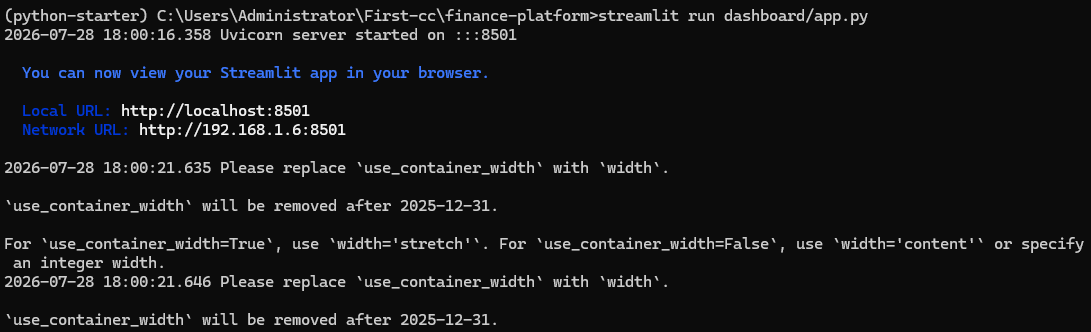
浏览器自动打开 http://localhost:8501。
如图:
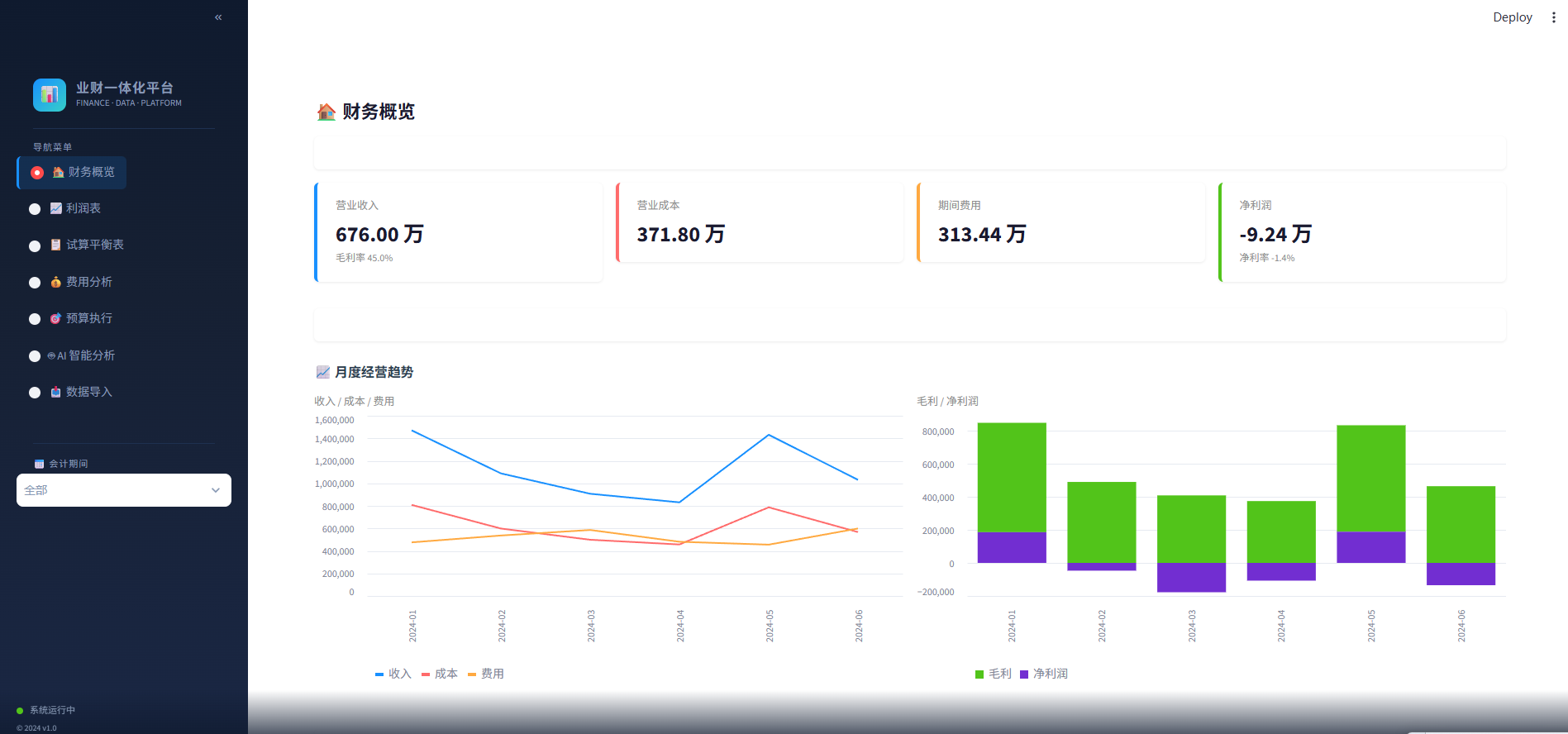
📝 本节小结
| st.set_page_config | 页面标题、wide 布局 |
| st.columns() | 栅格布局创建多列 |
| unsafe_allow_html | 注入自定义 CSS/HTML |
| api_get()/api_post() | 封装 HTTP 调用,统一 {"error": …} 处理 |
| st.tabs() | 多标签切换(AI 自由对话 / 预设查询) |
| st.file_uploader | 文件上传 → 临时文件 → 预览 → 导入 |
Step 6:AI 智能分析层
🎯 本节目标
用 DeepSeek 大模型实现 “自然语言 → SQL → 数据库查询 → 分析回答”。
📖 原理速览
用户: "哪个部门费用最高?"
↓
LLM(携带 Schema 信息)
→ 生成: SELECT dept_name, SUM(dr_amount) AS total
FROM fact_voucher v JOIN dim_department d …
WHERE a.category = '费用'
GROUP BY dept_name ORDER BY total DESC
↓
DuckDB 执行 SQL → 返回结果
↓
LLM(携带查询结果)
→ "研发部费用最高,共 111 万元,占总费用的 35%"
↓
返回给用户
💻 动手写代码
创建 api/llm_client.py(291 行)。
💡 用 requests 直调 API,不依赖 openai SDK。支持 Anthropic、OpenAI、DeepSeek 三种 Provider。
"""
LLM 客户端 – 支持 Claude / OpenAI / DeepSeek
AI 分析层的核心:自然语言 → SQL → 数据分析
"""
import os, json, sys
sys.path.insert(0, os.path.dirname(os.path.dirname(__file__)))
import requests
from loguru import logger
from dotenv import load_dotenv
project_root = os.path.dirname(os.path.dirname(os.path.abspath(__file__)))
load_dotenv(os.path.join(project_root, ".env"))
# ═══════════════════════════════════════════════════════
# 数据库 Schema 描述 — LLM 据此生成 SQL
# ═══════════════════════════════════════════════════════
DB_SCHEMA = """
你是财务数据分析专家。DuckDB 数据库结构:
=== 维度表 ===
dim_account (account_code, account_name, category, sub_category)
category: 资产/负债/权益/收入/成本/费用
dim_department (dept_code, dept_name, dept_type)
dim_project (project_code, project_name, owner_dept, start_date, end_date)
dim_date (date_key, date_str, year, month, day, year_month, year_month_cn)
date_key 是 DATE 类型,year_month 是 '2024-01' 格式字符串
=== 事实表 ===
fact_voucher (id, voucher_id, date, account_code, dept_code,
project_code, dr_amount, cr_amount, summary)
date 是 DATE 类型,和 dim_date.date_key 关联
dr_amount=借方金额, cr_amount=贷方金额。每条记录只有一个方向有值
fact_budget (id, year, month, account_code, dept_code,
budget_amount, budget_type)
=== ★★★ 最重要查询规则 ★★★
1. 查收入: SUM(v.cr_amount) WHERE category='收入' — 收入在贷方!
2. 查成本: SUM(v.dr_amount) WHERE category='成本' — 成本在借方!
3. 查费用: SUM(v.dr_amount) WHERE category='费用' — 费用在借方!
4. 毛利 = 收入(cr) – 成本(dr)
5. 净利润 = 收入(cr) – 成本(dr) – 费用(dr)
6. 资产余额 = SUM(dr) – SUM(cr) → 正数
7. 负债余额 = SUM(cr) – SUM(dr) → 正数
8. 日期关联: JOIN dim_date d ON v.date = d.date_key
9. 月份筛选: WHERE d.year_month = '2024-03'
10. 只生成 SELECT,限制 50 行,金额保留 2 位小数
"""
核心函数 ask_llm() — 三段式流程
def ask_llm(question: str) –> dict:
"""自然语言问题 → SQL → 查数据库 → 分析回答"""
provider = os.getenv("LLM_PROVIDER", "anthropic").lower()
api_key = _get_api_key(provider)
if not api_key:
return {"question": question, "sql": None, "data": None,
"answer": None,
"error": f"未设置 {provider.upper()}_API_KEY"}
# ── Step 1: 自然语言 → SQL ──
sql = _generate_sql(question, provider, api_key)
if sql is None:
return {"question": question, "sql": None, "data": None,
"answer": None, "error": "SQL 生成失败"}
# ── 安全检查:只允许 SELECT ──
if not sql.strip().rstrip(";").upper().startswith("SELECT"):
return {"question": question, "sql": sql, "data": None,
"answer": None, "error": "安全限制:只允许 SELECT 查询"}
# ── Step 2: 执行 SQL ──
try:
from db.connection import get_connection
conn = get_connection(read_only=True)
result_df = conn.execute(sql.strip().rstrip(";")).fetchdf()
conn.close()
data = json.loads(result_df.to_json(orient="records", force_ascii=False))
except Exception as e:
return {"question": question, "sql": sql, "data": None,
"answer": None, "error": f"SQL 执行错误: {e}"}
# ── Step 3: 数据 → 自然语言分析 ──
answer = _analyze_results(question, sql, data, provider, api_key)
return {"question": question, "sql": sql, "data": data[:20],
"answer": answer, "error": None}
_generate_sql() — 问题 → SQL
def _generate_sql(question: str, provider: str, api_key: str) –> str | None:
prompt = f"""{DB_SCHEMA}
用户问题: {question}
请生成一条 DuckDB SQL 查询来回答这个问题。
要求:
1. 只输出 SQL,不要任何解释
2. SQL 以 SELECT 开头
3. 金额结果保留 2 位小数
4. 限制返回 50 行以内
"""
response = _call_llm(prompt, provider, api_key, max_tokens=500)
if not response:
return None
# 提取 SQL — 去掉可能的 markdown ```sql … ```包裹
sql = response.strip()
if "```sql" in sql:
sql = sql.split("```sql")[1].split("```")[0].strip()
elif "```" in sql:
sql = sql.split("```")[1].split("```")[0].strip()
logger.info(f"Generated SQL: {sql[:200]}")
return sql
_analyze_results() — 数据 → 自然语言
def _analyze_results(question: str, sql: str, data: list,
provider: str, api_key: str) –> str:
if not data:
return "查询没有返回任何数据,可能没有匹配的记录。"
data_str = json.dumps(data[:30], ensure_ascii=False, indent=2)
prompt = f"""你是财务数据分析师。
用户问题: {question}
执行的 SQL: {sql}
查询结果 (JSON):
{data_str}
请用中文简洁分析这些数据。要求:
1. 先给出核心结论(1-2 句)
2. 然后列出关键数字
3. 如有异常或值得注意的地方,指出来
4. 控制在 200 字以内
"""
return _call_llm(prompt, provider, api_key, max_tokens=600) or "分析生成失败"
Provider 路由
def _call_llm(prompt: str, provider: str, api_key: str,
max_tokens: int = 500) –> str | None:
try:
if provider == "anthropic":
return _call_claude(prompt, api_key, max_tokens)
elif provider in ("openai", "deepseek"):
return _call_openai_compatible(prompt, api_key, max_tokens, provider)
else:
logger.error(f"Unknown provider: {provider}")
return None
except Exception as e:
logger.error(f"LLM call failed: {e}")
return None
Claude API(Anthropic 原生协议)
def _call_claude(prompt: str, api_key: str, max_tokens: int) –> str:
resp = requests.post(
"https://api.anthropic.com/v1/messages",
headers={
"x-api-key": api_key,
"anthropic-version": "2023-06-01",
"content-type": "application/json",
},
json={
"model": "claude-sonnet-5",
"max_tokens": max_tokens,
"messages": [{"role": "user", "content": prompt}],
},
timeout=30,
)
resp.raise_for_status()
return resp.json()["content"][0]["text"]
DeepSeek / OpenAI(OpenAI 兼容协议)
OPENAI_COMPATIBLE_CONFIG = {
"openai": {
"url": "https://api.openai.com/v1/chat/completions",
"model": "gpt-4o",
},
"deepseek": {
"url": "https://api.deepseek.com/v1/chat/completions",
"model": "deepseek-chat",
},
}
def _call_openai_compatible(prompt: str, api_key: str, max_tokens: int,
provider: str) –> str:
config = OPENAI_COMPATIBLE_CONFIG.get(
provider, OPENAI_COMPATIBLE_CONFIG["openai"])
resp = requests.post(
config["url"],
headers={
"Authorization": f"Bearer {api_key}",
"Content-Type": "application/json",
},
json={
"model": config["model"],
"max_tokens": max_tokens,
"messages": [{"role": "user", "content": prompt}],
},
timeout=30,
)
resp.raise_for_status()
return resp.json()["choices"][0]["message"]["content"]
API Key 管理
def _get_api_key(provider: str) –> str | None:
keys = {
"anthropic": "ANTHROPIC_API_KEY",
"openai": "OPENAI_API_KEY",
"deepseek": "DEEPSEEK_API_KEY",
}
env_key = keys.get(provider)
return os.getenv(env_key) if env_key else None
请求完整链路
用户在前端输入"公司毛利率是多少?"时的全链路:
1. 前端 POST /api/chat {"question": "公司毛利率是多少?"}
2. FastAPI → chat.router → ask_llm()
3. _generate_sql():
Prompt = DB_SCHEMA(50行规则) + "公司毛利率是多少?"
→ DeepSeek API(api.deepseek.com/v1/chat/completions)
← "SELECT ROUND((SUM(cr)-SUM(dr))/SUM(cr)*100,2) FROM …"
提取: 去 ```sql ```包裹 → 安全校验(SELECT开头?) ✓
4. DuckDB 执行 SQL → [{"毛利率": 42.5}]
5. _analyze_results():
Prompt = "问题+SQL+[{'毛利率':42.5}]" → DeepSeek API
← "公司毛利率为42.5%。收入676万,成本371.8万…"
6. 返回前端: {"sql":"…","data":[…],"answer":"公司毛利率为42.5%…"}
🧪 验证
curl -X POST http://localhost:8000/api/chat \\
-H "Content-Type: application/json" \\
-d '{"question": "公司毛利率是多少?"}'
如图:
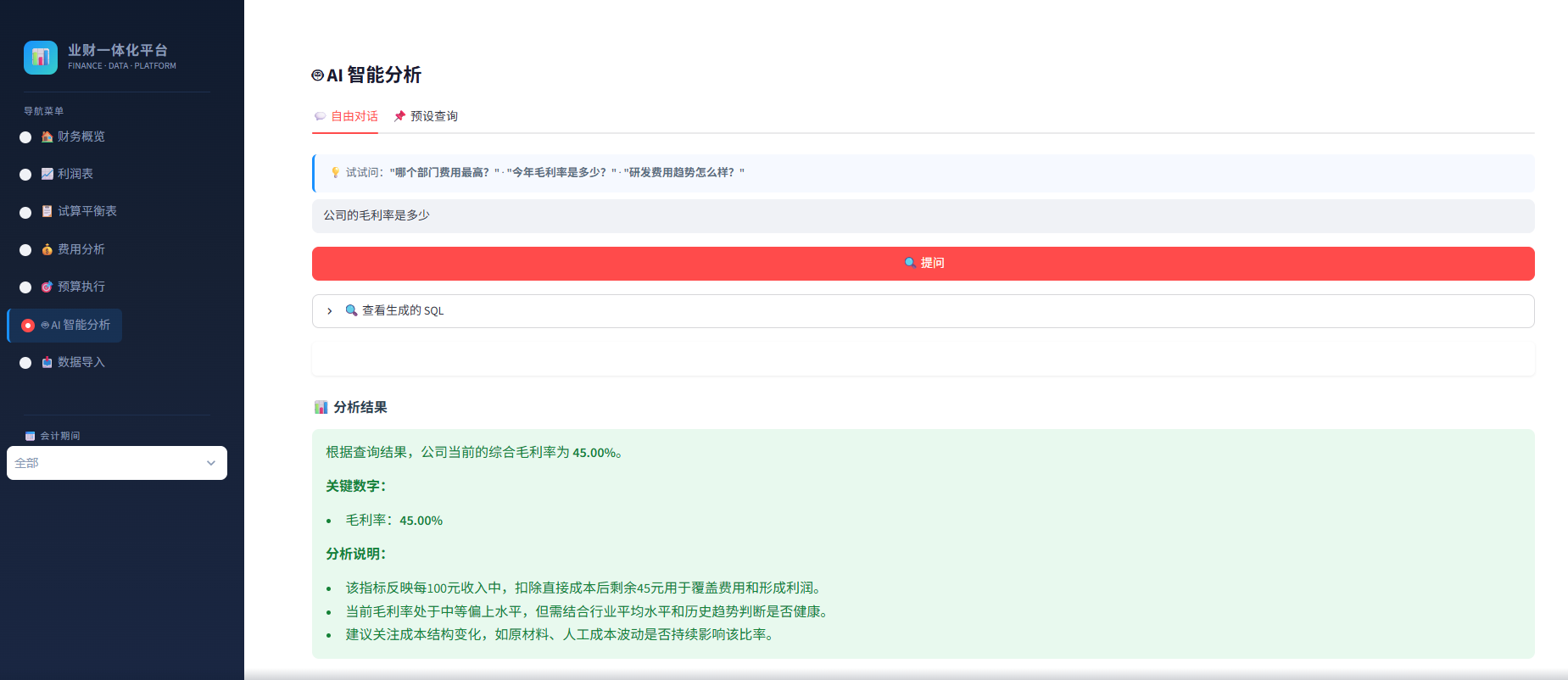
预设查询(无需 API Key)
5 个预设查询(收入/费用/利润/预算/部门)直接用预写的 SQL 查数据库,不调用 LLM。前端 “AI 智能分析 → 预设查询” 标签页里一键查看。
📝 本节小结
| Text-to-SQL | LLM 将自然语言转 SQL 的关键是 Schema Prompt |
| 两阶段 LLM 调用 | 第一次生成 SQL,第二次分析结果 |
| 安全限制 | 只允许 SELECT 语句,拦截 DROP/INSERT/UPDATE |
| requests 直调 | 不依赖 OpenAI SDK,更轻量 |
Step 7:Excel 导入/导出
🎯 本节目标
实现完整的 Excel/CSV 凭证导入管线 + 专业格式化导出。
📖 原理速览
Excel/CSV 文件 → 列名映射 → 数据清洗 → 校验 → DuckDB
↑ ↑ ↑
COLUMN_MAPPING _clean_data _validate
(中英文自适应) (三类陷阱) (借贷规则)
💻 动手写代码
创建 ingest/excel_loader.py(251 行)。
① 列名映射表 — 中英文自动识别
COLUMN_MAPPING = {
"date": "date", "日期": "date", "记账日期": "date", "凭证日期": "date",
"voucher_id": "voucher_id", "凭证号": "voucher_id", "凭证编号": "voucher_id",
"account_code": "account_code", "科目编码": "account_code", "科目代码": "account_code",
"dr_amount": "dr_amount", "借方金额": "dr_amount", "借方": "dr_amount",
"debit": "dr_amount", "dr": "dr_amount",
"cr_amount": "cr_amount", "贷方金额": "cr_amount", "贷方": "cr_amount",
"credit": "cr_amount", "cr": "cr_amount",
"summary": "summary", "摘要": "summary", "说明": "summary",
"dept_code": "dept_code", "部门编码": "dept_code", "部门": "dept_code",
"project_code": "project_code", "项目编码": "project_code", "项目": "project_code",
}
💡 财务同事的 Excel 列名千奇百怪——有的写"借方金额",有的写"dr_amount",还有写"Debit"。这个字典把它们统一映射到标准字段名,后续代码只认标准名。
② 主函数 load_excel_to_db() — 五步管线
def load_excel_to_db(file_path: str) –> dict:
"""读取 Excel/CSV → 校验 → 写入 DuckDB"""
result = {"success": False, "rows_imported": 0, "errors": []}
# Step 1: 读文件
try:
if file_path.endswith(".csv"):
df = pd.read_csv(file_path, encoding="utf-8-sig")
else:
df = pd.read_excel(file_path)
except Exception as e:
result["errors"].append(f"文件读取失败: {e}")
return result
# Step 2: 列名映射
df = _map_columns(df, result)
if result["errors"]:
return result
# Step 3: 数据清洗
df = _clean_data(df, result)
if result["errors"]:
return result
# Step 4: 校验
if not _validate(df, result):
return result
# Step 5: 写入数据库
try:
conn = get_connection(read_only=False)
max_id = conn.execute(
"SELECT COALESCE(MAX(id), 0) FROM fact_voucher").fetchone()[0]
df.insert(0, "id", range(max_id + 1, max_id + 1 + len(df)))
conn.execute("INSERT INTO fact_voucher SELECT * FROM df")
conn.close()
result["rows_imported"] = len(df)
result["success"] = True
except Exception as e:
result["errors"].append(f"数据库写入失败: {e}")
return result
💡 COALESCE(MAX(id), 0) — 如果表是空的,MAX(id) 返回 NULL,COALESCE 兜底为 0,保证自增 ID 从 1 开始。
③ _map_columns() — 列名映射
def _map_columns(df, result):
"""将 Excel 列名映射为标准字段名"""
mapping = {}
for col in df.columns:
col_stripped = col.strip()
if col_stripped in COLUMN_MAPPING:
standard = COLUMN_MAPPING[col_stripped]
mapping[standard] = col
# 必要字段检查
required = ["date", "account_code"]
missing = [f for f in required if f not in mapping]
if missing:
result["errors"].append(f"缺少必要字段: {missing}")
return df
new_df = pd.DataFrame()
for standard, original in mapping.items():
new_df[standard] = df[original]
return new_df
④ _clean_data() — 金额清洗核心
三个陷阱一次解决:
def _clean_data(df, result):
# 日期
df["date"] = pd.to_datetime(df["date"], errors="coerce")
if df["date"].isna().any():
result["errors"].append("日期列包含无法识别的格式")
# 金额: 货币符号 → 括号负数 → 千分位逗号 → pd.to_numeric
for col in ["dr_amount", "cr_amount"]:
if col in df.columns:
cleaned = df[col].astype(str).str.strip()
# ① 去货币符号 (¥ $ € £ ¥)
cleaned = cleaned.str.replace(r'[¥$€£¥]', '', regex=True)
# ② 括号负数: (123.45) → -123.45
# 支持 " (1,234)" "¥(1,234)" "$ (1,234)" 等变体
cleaned = cleaned.str.replace(
r'^\\s*\\((.+)\\)\\s*$', r'-\\1', regex=True)
# ③ 去千分位逗号、空格
cleaned = cleaned.str.replace(r'[,\\s]', '', regex=True)
df[col] = pd.to_numeric(cleaned, errors="coerce").fillna(0.0)
else:
df[col] = 0.0
# 字符串字段: 空值 → ""
for col in ["voucher_id","account_code","dept_code","project_code","summary"]:
if col in df.columns:
df[col] = df[col].fillna("").astype(str)
else:
df[col] = ""
return df
⑤ _validate() — 借贷规则校验
def _validate(df, result) –> bool:
# 检查: 借和贷不能同时为 0
both_zero = (df["dr_amount"] == 0) & (df["cr_amount"] == 0)
if both_zero.any():
result["errors"].append(f"第 {df[both_zero].index.tolist()[:5]} 行借贷金额均为 0")
# 检查: 借和贷不能同时有值
both_filled = (df["dr_amount"] > 0) & (df["cr_amount"] > 0)
if both_filled.any():
result["errors"].append(f"第 {df[both_filled].index.tolist()[:5]} 行借贷金额同时有值")
return len(result["errors"]) == 0
⑥ export_vouchers_to_excel() — 专业导出
def export_vouchers_to_excel(output_path: str = None) –> str:
from db.connection import query
if output_path is None:
output_path = os.path.join(
os.path.dirname(os.path.dirname(__file__)),
"data", f"voucher_export_{datetime.now().strftime('%Y%m%d_%H%M%S')}.xlsx"
)
# 查询凭证 + 关联科目名和部门名
df = query("""
SELECT v.voucher_id, v.date, v.account_code, a.account_name,
v.dept_code, d.dept_name,
v.dr_amount, v.cr_amount, v.summary
FROM fact_voucher v
LEFT JOIN dim_account a ON v.account_code = a.account_code
LEFT JOIN dim_department d ON v.dept_code = d.dept_code
ORDER BY v.date, v.voucher_id
""")
# xlsxwriter 引擎 — UTF-8 中文不乱码
with pd.ExcelWriter(output_path, engine='xlsxwriter') as writer:
df.to_excel(writer, index=False, sheet_name='凭证数据')
worksheet = writer.sheets['凭证数据']
# 格式定义
header_fmt = writer.book.add_format({
'bold': True, 'bg_color': '#f0f2f5',
'border': 1, 'align': 'center', 'valign': 'vcenter',
})
date_fmt = writer.book.add_format({
'num_format': 'yyyy-mm-dd', 'align': 'center', 'valign': 'vcenter',
})
money_fmt = writer.book.add_format({
'num_format': '#,##0.00', 'align': 'right', 'valign': 'vcenter',
})
text_fmt = writer.book.add_format({'align': 'left', 'valign': 'vcenter'})
# 列宽配置
col_config = {
'voucher_id': (14, text_fmt),
'date': (18, date_fmt), # yyyy-mm-dd 绝不 #####
'account_code': (14, text_fmt),
'account_name': (16, text_fmt),
'dept_code': (12, text_fmt),
'dept_name': (14, text_fmt),
'dr_amount': (16, money_fmt),
'cr_amount': (16, money_fmt),
'summary': (40, text_fmt),
}
# 写入表头格式
for i, col in enumerate(df.columns):
worksheet.write(0, i, col, header_fmt)
# 设置列宽 + 数据格式
for i, col in enumerate(df.columns):
width, fmt = col_config.get(col, (12, None))
worksheet.set_column(i, i, width, fmt)
return output_path
🧪 验证
from ingest.excel_loader import export_vouchers_to_excel
path = export_vouchers_to_excel()
# → data/voucher_export_20260728_120000.xlsx
📝 本节小结
| COLUMN_MAPPING | 中英文列名自适应,降低用户 Excel 格式要求 |
| 清洗顺序 | 货币符号 → 括号负数 → 逗号 → pd.to_numeric(顺序错一个就丢数据) |
| xlsxwriter | 比 openpyxl 更适合中文 UTF-8 导出 |
| header_fmt | 列宽 18 保证 yyyy-mm-dd 格式永不出 ##### |
Step 8:全链路测试
🎯 本节目标
运行 56 项自动化测试,覆盖导入→数据库→API→安全→导出→前端→AI 全链路。
💻 测试脚本结构
创建 scripts/test_all.py(239 行)。
① 测试框架 — 轻量级 check() 函数
#!/usr/bin/env python
"""Complete end-to-end test for finance platform"""
import os, sys, requests, importlib, zipfile, re, json
os.chdir(os.path.dirname(os.path.dirname(__file__)))
sys.path.insert(0, '.')
PASS = 0; FAIL = 0; ISSUES = []
def check(desc, condition, detail=""):
global PASS, FAIL
if condition:
PASS += 1
print(f" [PASS] {desc}")
else:
FAIL += 1
print(f" [FAIL] {desc} {'- ' + detail if detail else ''}")
ISSUES.append(desc)
BASE = 'http://localhost:8000'
💡 没有用 pytest——一个文件、60 行框架、零依赖。check() 接受描述 + 布尔条件,自动统计通过/失败,失败时记录到 ISSUES 列表。
② Stage 1 — 模块导入 + 健康检查(10 项)
# 验证 7 个核心模块都能正常 import
for mod in ["db.connection", "db.init_db", "ingest.excel_loader",
"api.main", "api.llm_client", "api.routers.reports", "api.routers.chat"]:
try:
importlib.import_module(mod)
check(f"Import {mod}", True)
except Exception as e:
check(f"Import {mod}", False, str(e)[:100])
# API 健康检查
r = requests.get(f"{BASE}/health", timeout=5)
d = r.json()
check("API running", r.status_code == 200 and d.get("status") == "ok")
check("DB connected", d.get("database") == "connected")
check("Vouchers > 0", d.get("voucher_count", 0) > 0)
③ Stage 2 — 数据完整性(6 项)
# 试算平衡
r = requests.get(f"{BASE}/api/reports/trial-balance")
d = r.json()
dr = sum(row['dr_total'] for row in d['data'])
cr = sum(row['cr_total'] for row in d['data'])
check("Trial balance balanced", abs(dr – cr) < 0.01, f"dr={dr}, cr={cr}")
# 所有 6 个月都有数据
empty = []
for m in range(1, 7):
r = requests.get(f"{BASE}/api/reports/expense-by-dept",
params={'year_month': f'2024-{m:02d}'})
if len(r.json().get('data', [])) == 0:
empty.append(f'2024-{m:02d}')
check("All 6 months have data", len(empty) == 0, str(empty))
# 利润表合理性
r = requests.get(f"{BASE}/api/reports/income-statement")
d = r.json()
check("Revenue > 0", d['revenue'] > 0)
check("Cost > 0", d['cost'] > 0)
check("Gross margin valid", d['gross_margin'] != 'N/A')
# 月度借贷平衡
all_ok = True
for m in range(1, 7):
r = requests.get(f"{BASE}/api/reports/trial-balance",
params={'year_month': f'2024-{m:02d}'})
rows = r.json().get('data', [])
if abs(sum(row['dr_total'] for row in rows) –
sum(row['cr_total'] for row in rows)) > 0.01:
all_ok = False; break
check("Monthly balance", all_ok)
④ Stage 3 — API 端点(15 项)
# 9 个报表接口
tests = [
("trial-balance all", "/api/reports/trial-balance", {}, "data"),
("trial-balance month", "/api/reports/trial-balance?year_month=2024-03", {}, "data"),
("income all", "/api/reports/income-statement", {}, "revenue"),
("income month", "/api/reports/income-statement?year_month=2024-06", {}, "revenue"),
("expense all", "/api/reports/expense-by-dept", {}, "data"),
("expense month", "/api/reports/expense-by-dept?year_month=2024-02", {}, "data"),
("budget all", "/api/reports/budget-vs-actual", {}, "data"),
("budget month", "/api/reports/budget-vs-actual?year_month=2024-03", {}, "data"),
("trend", "/api/reports/monthly-trend", {}, "data"),
]
for name, ep, params, key in tests:
try:
r = requests.get(f"{BASE}{ep}", params=params, timeout=10)
d = r.json()
ok = r.status_code == 200 and key in d
check(name, ok)
except Exception as e:
check(name, False, str(e)[:80])
# 5 个预设查询
for key in ['收入', '费用', '利润', '预算', '部门']:
r = requests.get(f"{BASE}/api/chat/presets/{key}", timeout=10)
d = r.json()
check(f"Preset {key}", not d.get('error') and len(d.get('data', [])) > 0)
# 预算月份筛选真的生效
r1 = requests.get(f"{BASE}/api/reports/budget-vs-actual", params={'year_month': '2024-01'})
r2 = requests.get(f"{BASE}/api/reports/budget-vs-actual", params={'year_month': '2024-06'})
m1 = set(f"{row['year']}/{row['month']}" for row in r1.json().get('data', []))
m2 = set(f"{row['year']}/{row['month']}" for row in r2.json().get('data', []))
check("Budget filter works", m1 != m2)
⑤ Stage 4 — 安全性(5 项)
# SQL 注入被拦截
for ep in ['/api/reports/trial-balance', '/api/reports/income-statement',
'/api/reports/expense-by-dept']:
r = requests.get(f"{BASE}{ep}",
params={'year_month': "2024-01'; DROP –"}, timeout=10)
d = r.json()
check(f"SQLi blocked {ep}", 'error' in d)
# 非法输入不崩溃
r = requests.get(f"{BASE}/api/reports/income-statement",
params={'year_month': 'bad!!!'})
check("Bad input handled", 'error' in r.json() and r.status_code == 200)
# CORS 头
r = requests.options(f"{BASE}/api/reports/trial-balance",
headers={'Origin': 'http://localhost:8501',
'Access-Control-Request-Method': 'GET'})
check("CORS", r.headers.get('access-control-allow-origin') == '*')
⑥ Stage 5 — 导入/导出(9 项)
from ingest.excel_loader import export_vouchers_to_excel
path = export_vouchers_to_excel()
check("Export creates file", os.path.exists(path))
# 验证 Excel 内部编码和中文
with zipfile.ZipFile(path, 'r') as z:
if 'xl/sharedStrings.xml' in z.namelist():
raw = z.read('xl/sharedStrings.xml')
else:
raw = z.read('xl/worksheets/sheet1.xml')
check("XML has encoding decl", b'<?xml' in raw[:50])
texts = re.findall(rb'<t[^>]*>(.*?)</t>', raw)
has_cn = any('一' <= c <= '鿿' for t in texts
for c in t.decode('utf-8', errors='ignore'))
check("Has Chinese chars", has_cn)
# 能读回来 + 行数一致
df = pd.read_excel(path)
check("Readable", len(df) == 116, f"got {len(df)} rows")
# 5 个 CSV 样本文件存在
for s in ['dim_account.csv', 'dim_department.csv', 'dim_project.csv',
'fact_voucher.csv', 'fact_budget.csv']:
check(f"Sample {s}", os.path.exists(f'data/sample/{s}'))
⑦ Stage 6 — 前端代码(6 项)
with open('dashboard/app.py', 'r', encoding='utf-8') as f:
src = f.read()
checks = [
("load_dotenv", 'load_dotenv' in src),
("DeepSeek support", 'DEEPSEEK_API_KEY' in src),
("Error handling", '.get("error"' in src),
("7 pages", src.count('def page_') == 7),
("API_BASE", 'localhost:8000' in src),
("Budget month filter", 'period_option' in src),
]
for desc, ok in checks:
check(desc, ok)
⑧ Stage 7 — AI 对话(5 项)
from dotenv import load_dotenv
load_dotenv('.env')
ds_key = os.getenv('DEEPSEEK_API_KEY')
check("DeepSeek key set", bool(ds_key))
if ds_key:
r = requests.post(f"{BASE}/api/chat",
json={'question': '公司毛利率是多少?'},
timeout=30)
d = r.json()
check("AI no error", not d.get('error'), (d.get('error') or '')[:100])
check("AI has SQL", bool(d.get('sql')))
check("AI has answer", bool(d.get('answer')))
check("AI has data", bool(d.get('data')))
# 结果汇总
print(f"\\nRESULT: {PASS} PASSED, {FAIL} FAILED")
if FAIL == 0:
print("\\n>>> ALL TESTS PASSED <<<")
else:
for i in ISSUES:
print(f" – {i}")
sys.exit(1)
🧪 运行
python scripts/test_all.py
如图:
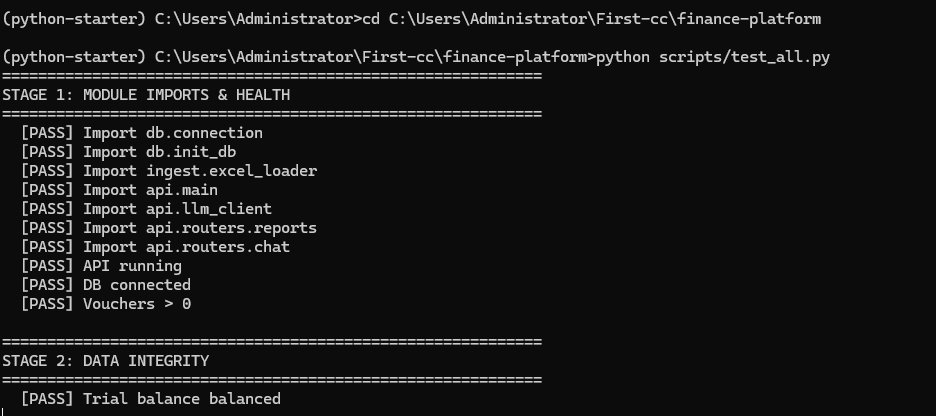
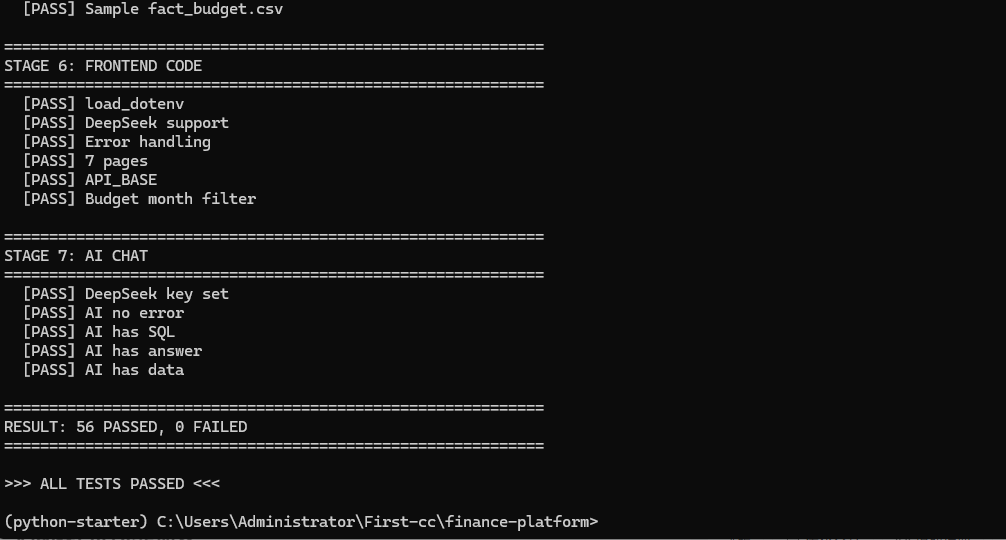
预期:
============================================================
STAGE 1: MODULE IMPORTS & HEALTH
[PASS] Import db.connection
…
============================================================
STAGE 7: AI CHAT
[PASS] DeepSeek key set
[PASS] AI no error
[PASS] AI has SQL
[PASS] AI has answer
[PASS] AI has data
============================================================
RESULT: 56 PASSED, 0 FAILED
============================================================
>>> ALL TESTS PASSED <<<
📝 本节小结
| 无框架测试 | check() + 计数器,零依赖 |
| 分层测试 | 导入→数据→API→安全→导出→前端→AI,从底层到顶层 |
| SQL 注入验证 | 故意发 '; DROP– 确认被正则拦截 |
| Excel 编码验证 | 读 .xlsx 内部的 XML 确认中文不丢 |
启动项目的完整命令
# 终端 1:后端 API
python -m uvicorn api.main:app –reload –port 8000
# 终端 2:前端仪表盘
streamlit run dashboard/app.py
# 浏览器打开 http://localhost:8501
🎬 总结
我们做了什么
| 1 | 安装全部依赖 | pip、pandas 版本兼容 |
| 2 | 生成 116 条分录 + 30 条预算 | 借贷记账、seed 固定数据 |
| 3 | DuckDB 6 张表 + 验证 | DECIMAL 精度、SQL 生成日期维表 |
| 4 | FastAPI 10 个接口 | 参数化查询、正则校验、Swagger |
| 5 | Streamlit 7 页仪表盘 | 帆软风格、自定义 CSS |
| 6 | DeepSeek AI 自然语言查询 | Schema Prompt、Text-to-SQL |
| 7 | Excel 清洗 + 导出 | 千分位/货币符号/括号负数 |
| 8 | 56 项测试 | 全链路验证 |
技术选型
| DuckDB | MySQL/PostgreSQL | 零配置、OLAP 优化 |
| FastAPI | Flask/Django | 自动文档、async、Pydantic |
| Streamlit | React/Vue | 纯 Python、财务同事也能改 |
| DeepSeek | GPT-4o | 中文理解好、性价比高 |
还能怎么扩展?
- 对接 ERP:金蝶/用友/Oracle EBS API 直连
- 权限系统:角色隔离、数据脱敏
- 定时任务:每月自动拉取 + 生成月报
- 移动端:微信小程序/钉钉 H5
- 多租户:不同公司账套隔离

![[特殊字符]DeepSeek‑Harness(DSH)小白保姆教程-171主机测评](https://www.171host.com/wp-content/uploads/2026/08/20260816085112-6a817a009aabf-220x150.png)