大家好,我是Java1234_小锋老师。
如果你在深夜对着屏幕叹气:页面能跑,功能也对,但总有一股说不清的「塑料感」,那往往不是技术不行,而是审美与排版规则没有被完整地「交给模型」。最近我在逛 GitHub 时注意到一个专门对抗这种「千篇一律界面」取向的开源项目——Taste Skill。它并不是什么新框架,更像一套可携带的 Agent 说明书:把高级感拆成可被模型反复执行的约束与工作流。
项目地址: https://github.com/Leonxlnx/taste-skill
1. 先说说我们到底在厌烦什么
很多人把前端「AI味」简单归结为紫色渐变或大圆角卡片。其实只是表象。更值得警惕的是一整套可被模型低成本复用的模版路径:居中堆叠区块、差不多的字重层级、相差无几的留白节奏、动起来永远同一套 easing。它们不是丑,而是可被无限复制的平均品味——平均在统计学上很好用,在艺术指导上却让人犯困。
Taste Skill 的自述很直白:The Anti-Slop Frontend Framework for AI Agents。这里的 slop(你可以理解为廉价的视觉填充物)不是要否定 AI 生产力,而是用一份更完整、可被版本管理的「味觉协议」,压住模型默认走捷径的本能。
下图用夸张对比的方式呈现了「模版堆栈」与「更有编辑感层级」的差别——真实项目当然不会这么戏剧化,但这种信息密度 / 字型节奏 / 余白策略的差别,往往在第一眼就会暴露出来。

2. Taste Skill 是什么,不是什么
它是什么:
- 一组可按需加载的 Agent Skills,以常见的 SKILL.md(带 frontmatter 的便携说明文件)为载体;
- 实现向技能:偏代码产出,目标是更好的布局、字体排印、动态表现与间距体系,而不是替你背下一套组件库;
- 图像生成向技能:只做设计参照图(Landing、移动端流程、Brand Kit),随后再把画面交给 Cursor、Codex、Claude Code 等编码代理落实;
- 与具体框架不强绑定 README 也写明:更像设计意图层的约束,而不是 React / Vue / Svelte 某一种 API 说明书。
它不是什么:
- 不提供「一键生成完美产品」的魔法按钮;
- 不是官方代币或链上项目——仓库里有明确声明,提防蹭名代币骗局;
- 不替代你做设计决策;只是把「高级感」翻译成模型更容易稳定遵守的语言。
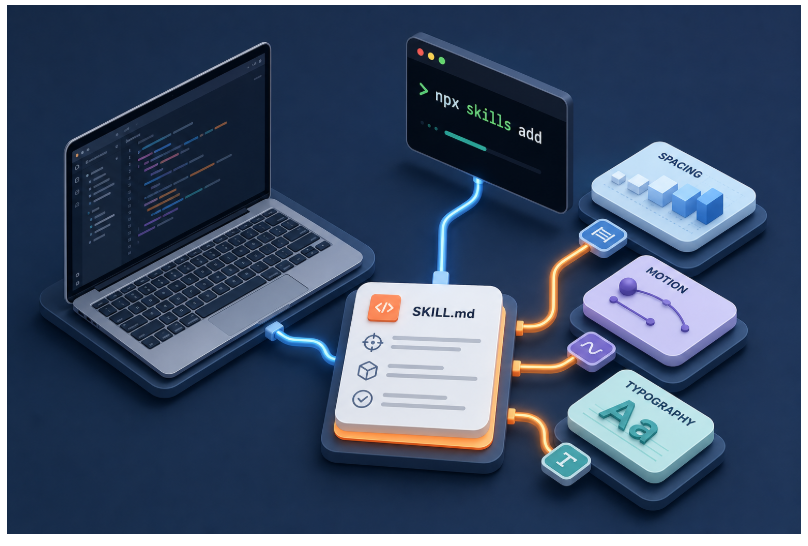
如果你对「一整套技能如何挂载到日常工作流」更感兴趣,可以想象成:CLI 一键拉取,或把 SKILL 剪贴进会话,或放进你自己的仓库。下图用偏信息图的方式概括了这条「技能—工具链」之间的关系(仅为示意)。
3. 它怎样组织「味道」——技能矩阵一览
仓库把技能拆得非常细:每个 SKILL 只做一件事,你可以按阶段叠加,而不是一把梭全糊进上下文。
以下为 README 中所列核心技能的压缩理解版(若要精确安装名请以官方表格为准)。
实现侧(产出代码或与代码强相关)
| 通用默认盘 | design-taste-frontend | 「先别太偏科」的高质感缺省味觉 |
| 更激进的 GPT/Codex 取向 | gpt-taste | 更强排版变化与动效取向,readme 用词是 aggressive anti-slop |
| 图 → 拆解 → 写码 | image-to-code | 先产出视觉参照,再走分析与实现链路 |
| 旧项目救火 | redesign-existing-projects | 先做 UI audit,对症下药 |
| 柔和高阶商业感 | high-end-visual-design | 更安静的对白界面、留白、弹性动效 |
| 收尾强迫症 | full-output-enforcement | 截断半成品时使用,减少「TODO:你自己补」这类交付 |
| 极简编辑风 | minimalist-ui | Notion / Linear 气质一类的克制板式 |
| 工业瑞士感(实验) | industrial-brutalist-ui | BETA:高对比排版语言,适合你明确要硬核实验风时 |
只做参考图的技能
| imagegen-frontend-web | Web Landing / 分区画面,偏重字体与留白走向 |
| imagegen-frontend-mobile | 移动端流程与可读性一整套 |
| brandkit | 品牌板式:标志方向、调色板与字体气质的拼贴板 |
另外还有一个 Google Stitch 兼容方向的 stitch-design-taste,以及专门的说明文档导出格式可选。
整体上,你可以选择「从代码起手」或者「先从画面起手」——后者的妙处在于:先给一个视觉锚点,再编码时模型就不太容易滑回模版路径。
4. 安装与日常使用
官方推荐与 Vercel Labs 社区的 agent-skills CLI 对齐。最省事的方式是直接拉整条仓库的技能集合:
npx skills add https://github.com/Leonxlnx/taste-skill
若你只想挂载某一个技能,用 –skill 传入 SKILL 文件中 name: 字段所写的 Install name,例如:
npx skills add https://github.com/Leonxlnx/taste-skill –skill "design-taste-frontend"
小提示: name: 可能与文件夹名不同,请以官方 README 的安装名列为准。(若你拷贝链接,请自查正确仓库地址)
当然,你也可以手动复制任一 SKILL.md 到项目里;或者像很多人那样,直接在 ChatGPT / Codex 的对话中粘贴相关内容——本质都是把「可读、可复述、可复盘」的规则喂给模型。
5. 从选型到落地的典型流程
选型这件事不该靠掷骰子。下面是 README 语境下比较顺的一条决策链,我用 Mermaid 画出来,你也可以把它打印贴在显示器边上。
5.1 我该先装哪一个?
#mermaid-svg-7iAR5dc8GLb9lHcJ{font-family:\”trebuchet ms\”,verdana,arial,sans-serif;font-size:16px;fill:#333;}@keyframes edge-animation-frame{from{stroke-dashoffset:0;}}@keyframes dash{to{stroke-dashoffset:0;}}#mermaid-svg-7iAR5dc8GLb9lHcJ .edge-animation-slow{stroke-dasharray:9,5!important;stroke-dashoffset:900;animation:dash 50s linear infinite;stroke-linecap:round;}#mermaid-svg-7iAR5dc8GLb9lHcJ .edge-animation-fast{stroke-dasharray:9,5!important;stroke-dashoffset:900;animation:dash 20s linear infinite;stroke-linecap:round;}#mermaid-svg-7iAR5dc8GLb9lHcJ .error-icon{fill:#552222;}#mermaid-svg-7iAR5dc8GLb9lHcJ .error-text{fill:#552222;stroke:#552222;}#mermaid-svg-7iAR5dc8GLb9lHcJ .edge-thickness-normal{stroke-width:1px;}#mermaid-svg-7iAR5dc8GLb9lHcJ .edge-thickness-thick{stroke-width:3.5px;}#mermaid-svg-7iAR5dc8GLb9lHcJ .edge-pattern-solid{stroke-dasharray:0;}#mermaid-svg-7iAR5dc8GLb9lHcJ .edge-thickness-invisible{stroke-width:0;fill:none;}#mermaid-svg-7iAR5dc8GLb9lHcJ .edge-pattern-dashed{stroke-dasharray:3;}#mermaid-svg-7iAR5dc8GLb9lHcJ .edge-pattern-dotted{stroke-dasharray:2;}#mermaid-svg-7iAR5dc8GLb9lHcJ .marker{fill:#333333;stroke:#333333;}#mermaid-svg-7iAR5dc8GLb9lHcJ .marker.cross{stroke:#333333;}#mermaid-svg-7iAR5dc8GLb9lHcJ svg{font-family:\”trebuchet ms\”,verdana,arial,sans-serif;font-size:16px;}#mermaid-svg-7iAR5dc8GLb9lHcJ p{margin:0;}#mermaid-svg-7iAR5dc8GLb9lHcJ .label{font-family:\”trebuchet ms\”,verdana,arial,sans-serif;color:#333;}#mermaid-svg-7iAR5dc8GLb9lHcJ .cluster-label text{fill:#333;}#mermaid-svg-7iAR5dc8GLb9lHcJ .cluster-label span{color:#333;}#mermaid-svg-7iAR5dc8GLb9lHcJ .cluster-label span p{background-color:transparent;}#mermaid-svg-7iAR5dc8GLb9lHcJ .label text,#mermaid-svg-7iAR5dc8GLb9lHcJ span{fill:#333;color:#333;}#mermaid-svg-7iAR5dc8GLb9lHcJ .node rect,#mermaid-svg-7iAR5dc8GLb9lHcJ .node circle,#mermaid-svg-7iAR5dc8GLb9lHcJ .node ellipse,#mermaid-svg-7iAR5dc8GLb9lHcJ .node polygon,#mermaid-svg-7iAR5dc8GLb9lHcJ .node path{fill:#ECECFF;stroke:#9370DB;stroke-width:1px;}#mermaid-svg-7iAR5dc8GLb9lHcJ .rough-node .label text,#mermaid-svg-7iAR5dc8GLb9lHcJ .node .label text,#mermaid-svg-7iAR5dc8GLb9lHcJ .image-shape .label,#mermaid-svg-7iAR5dc8GLb9lHcJ .icon-shape .label{text-anchor:middle;}#mermaid-svg-7iAR5dc8GLb9lHcJ .node .katex path{fill:#000;stroke:#000;stroke-width:1px;}#mermaid-svg-7iAR5dc8GLb9lHcJ .rough-node .label,#mermaid-svg-7iAR5dc8GLb9lHcJ .node .label,#mermaid-svg-7iAR5dc8GLb9lHcJ .image-shape .label,#mermaid-svg-7iAR5dc8GLb9lHcJ .icon-shape .label{text-align:center;}#mermaid-svg-7iAR5dc8GLb9lHcJ .node.clickable{cursor:pointer;}#mermaid-svg-7iAR5dc8GLb9lHcJ .root .anchor path{fill:#333333!important;stroke-width:0;stroke:#333333;}#mermaid-svg-7iAR5dc8GLb9lHcJ .arrowheadPath{fill:#333333;}#mermaid-svg-7iAR5dc8GLb9lHcJ .edgePath .path{stroke:#333333;stroke-width:2.0px;}#mermaid-svg-7iAR5dc8GLb9lHcJ .flowchart-link{stroke:#333333;fill:none;}#mermaid-svg-7iAR5dc8GLb9lHcJ .edgeLabel{background-color:rgba(232,232,232, 0.8);text-align:center;}#mermaid-svg-7iAR5dc8GLb9lHcJ .edgeLabel p{background-color:rgba(232,232,232, 0.8);}#mermaid-svg-7iAR5dc8GLb9lHcJ .edgeLabel rect{opacity:0.5;background-color:rgba(232,232,232, 0.8);fill:rgba(232,232,232, 0.8);}#mermaid-svg-7iAR5dc8GLb9lHcJ .labelBkg{background-color:rgba(232, 232, 232, 0.5);}#mermaid-svg-7iAR5dc8GLb9lHcJ .cluster rect{fill:#ffffde;stroke:#aaaa33;stroke-width:1px;}#mermaid-svg-7iAR5dc8GLb9lHcJ .cluster text{fill:#333;}#mermaid-svg-7iAR5dc8GLb9lHcJ .cluster span{color:#333;}#mermaid-svg-7iAR5dc8GLb9lHcJ div.mermaidTooltip{position:absolute;text-align:center;max-width:200px;padding:2px;font-family:\”trebuchet ms\”,verdana,arial,sans-serif;font-size:12px;background:hsl(80, 100%, 96.2745098039%);border:1px solid #aaaa33;border-radius:2px;pointer-events:none;z-index:100;}#mermaid-svg-7iAR5dc8GLb9lHcJ .flowchartTitleText{text-anchor:middle;font-size:18px;fill:#333;}#mermaid-svg-7iAR5dc8GLb9lHcJ rect.text{fill:none;stroke-width:0;}#mermaid-svg-7iAR5dc8GLb9lHcJ .icon-shape,#mermaid-svg-7iAR5dc8GLb9lHcJ .image-shape{background-color:rgba(232,232,232, 0.8);text-align:center;}#mermaid-svg-7iAR5dc8GLb9lHcJ .icon-shape p,#mermaid-svg-7iAR5dc8GLb9lHcJ .image-shape p{background-color:rgba(232,232,232, 0.8);padding:2px;}#mermaid-svg-7iAR5dc8GLb9lHcJ .icon-shape .label rect,#mermaid-svg-7iAR5dc8GLb9lHcJ .image-shape .label rect{opacity:0.5;background-color:rgba(232,232,232, 0.8);fill:rgba(232,232,232, 0.8);}#mermaid-svg-7iAR5dc8GLb9lHcJ .label-icon{display:inline-block;height:1em;overflow:visible;vertical-align:-0.125em;}#mermaid-svg-7iAR5dc8GLb9lHcJ .node .label-icon path{fill:currentColor;stroke:revert;stroke-width:revert;}#mermaid-svg-7iAR5dc8GLb9lHcJ :root{–mermaid-font-family:\”trebuchet ms\”,verdana,arial,sans-serif;}
新项目
旧项目救火
没有
有
是
想更激进的版式与 motion
柔和高阶 calm 感
极简编辑风
实验工业瑞士排版
输出老被截断
开始:我有一个前端任务
新项目还是翻新?
是否已有画面参考?
优先考虑 redesign-existing-projects
可选:imagegen-* 先出几张板再配合 image-to-code
直接进入实现技能
我需要更温和的默认质感?
design-taste-frontend 起步
gpt-taste
已知视觉方向吗?
叠加 high-end-visual-design
叠加 minimalist-ui
慎用:industrial-brutalist-ui BETA
再加 full-output-enforcement
5.2 「图先走」的一站式 pipeline
如果你在提示里反复强调流程,效果会更好。README 建议你直接写类似:
follow the skill:先生成参照图 → 再做画面分析 → 最后写代码对齐
用图描述就是:
Cursor / Codex / Claude Code
image-to-code
imagegen-* / 外部图像模型
你
Cursor / Codex / Claude Code
image-to-code
imagegen-* / 外部图像模型
你
#mermaid-svg-SaVniw2rWzlJQwTh{font-family:\”trebuchet ms\”,verdana,arial,sans-serif;font-size:16px;fill:#333;}@keyframes edge-animation-frame{from{stroke-dashoffset:0;}}@keyframes dash{to{stroke-dashoffset:0;}}#mermaid-svg-SaVniw2rWzlJQwTh .edge-animation-slow{stroke-dasharray:9,5!important;stroke-dashoffset:900;animation:dash 50s linear infinite;stroke-linecap:round;}#mermaid-svg-SaVniw2rWzlJQwTh .edge-animation-fast{stroke-dasharray:9,5!important;stroke-dashoffset:900;animation:dash 20s linear infinite;stroke-linecap:round;}#mermaid-svg-SaVniw2rWzlJQwTh .error-icon{fill:#552222;}#mermaid-svg-SaVniw2rWzlJQwTh .error-text{fill:#552222;stroke:#552222;}#mermaid-svg-SaVniw2rWzlJQwTh .edge-thickness-normal{stroke-width:1px;}#mermaid-svg-SaVniw2rWzlJQwTh .edge-thickness-thick{stroke-width:3.5px;}#mermaid-svg-SaVniw2rWzlJQwTh .edge-pattern-solid{stroke-dasharray:0;}#mermaid-svg-SaVniw2rWzlJQwTh .edge-thickness-invisible{stroke-width:0;fill:none;}#mermaid-svg-SaVniw2rWzlJQwTh .edge-pattern-dashed{stroke-dasharray:3;}#mermaid-svg-SaVniw2rWzlJQwTh .edge-pattern-dotted{stroke-dasharray:2;}#mermaid-svg-SaVniw2rWzlJQwTh .marker{fill:#333333;stroke:#333333;}#mermaid-svg-SaVniw2rWzlJQwTh .marker.cross{stroke:#333333;}#mermaid-svg-SaVniw2rWzlJQwTh svg{font-family:\”trebuchet ms\”,verdana,arial,sans-serif;font-size:16px;}#mermaid-svg-SaVniw2rWzlJQwTh p{margin:0;}#mermaid-svg-SaVniw2rWzlJQwTh .actor{stroke:hsl(259.6261682243, 59.7765363128%, 87.9019607843%);fill:#ECECFF;}#mermaid-svg-SaVniw2rWzlJQwTh text.actor>tspan{fill:black;stroke:none;}#mermaid-svg-SaVniw2rWzlJQwTh .actor-line{stroke:hsl(259.6261682243, 59.7765363128%, 87.9019607843%);}#mermaid-svg-SaVniw2rWzlJQwTh .innerArc{stroke-width:1.5;stroke-dasharray:none;}#mermaid-svg-SaVniw2rWzlJQwTh .messageLine0{stroke-width:1.5;stroke-dasharray:none;stroke:#333;}#mermaid-svg-SaVniw2rWzlJQwTh .messageLine1{stroke-width:1.5;stroke-dasharray:2,2;stroke:#333;}#mermaid-svg-SaVniw2rWzlJQwTh #arrowhead path{fill:#333;stroke:#333;}#mermaid-svg-SaVniw2rWzlJQwTh .sequenceNumber{fill:white;}#mermaid-svg-SaVniw2rWzlJQwTh #sequencenumber{fill:#333;}#mermaid-svg-SaVniw2rWzlJQwTh #crosshead path{fill:#333;stroke:#333;}#mermaid-svg-SaVniw2rWzlJQwTh .messageText{fill:#333;stroke:none;}#mermaid-svg-SaVniw2rWzlJQwTh .labelBox{stroke:hsl(259.6261682243, 59.7765363128%, 87.9019607843%);fill:#ECECFF;}#mermaid-svg-SaVniw2rWzlJQwTh .labelText,#mermaid-svg-SaVniw2rWzlJQwTh .labelText>tspan{fill:black;stroke:none;}#mermaid-svg-SaVniw2rWzlJQwTh .loopText,#mermaid-svg-SaVniw2rWzlJQwTh .loopText>tspan{fill:black;stroke:none;}#mermaid-svg-SaVniw2rWzlJQwTh .loopLine{stroke-width:2px;stroke-dasharray:2,2;stroke:hsl(259.6261682243, 59.7765363128%, 87.9019607843%);fill:hsl(259.6261682243, 59.7765363128%, 87.9019607843%);}#mermaid-svg-SaVniw2rWzlJQwTh .note{stroke:#aaaa33;fill:#fff5ad;}#mermaid-svg-SaVniw2rWzlJQwTh .noteText,#mermaid-svg-SaVniw2rWzlJQwTh .noteText>tspan{fill:black;stroke:none;}#mermaid-svg-SaVniw2rWzlJQwTh .activation0{fill:#f4f4f4;stroke:#666;}#mermaid-svg-SaVniw2rWzlJQwTh .activation1{fill:#f4f4f4;stroke:#666;}#mermaid-svg-SaVniw2rWzlJQwTh .activation2{fill:#f4f4f4;stroke:#666;}#mermaid-svg-SaVniw2rWzlJQwTh .actorPopupMenu{position:absolute;}#mermaid-svg-SaVniw2rWzlJQwTh .actorPopupMenuPanel{position:absolute;fill:#ECECFF;box-shadow:0px 8px 16px 0px rgba(0,0,0,0.2);filter:drop-shadow(3px 5px 2px rgb(0 0 0 / 0.4));}#mermaid-svg-SaVniw2rWzlJQwTh .actor-man line{stroke:hsl(259.6261682243, 59.7765363128%, 87.9019607843%);fill:#ECECFF;}#mermaid-svg-SaVniw2rWzlJQwTh .actor-man circle,#mermaid-svg-SaVniw2rWzlJQwTh line{stroke:hsl(259.6261682243, 59.7765363128%, 87.9019607843%);fill:#ECECFF;stroke-width:2px;}#mermaid-svg-SaVniw2rWzlJQwTh :root{–mermaid-font-family:\”trebuchet ms\”,verdana,arial,sans-serif;}
依 SKILL 导出关键帧(Web / Mobile / Brand)
得到一组对齐风格的参考画面
发起「分析 + 对齐实现」的流程提示
规则化约束(层级 / 留白 / motion)
提交更接近参考排版的代码
6. taste-skill 上的三枚旋钮——把风格从口号变成参数
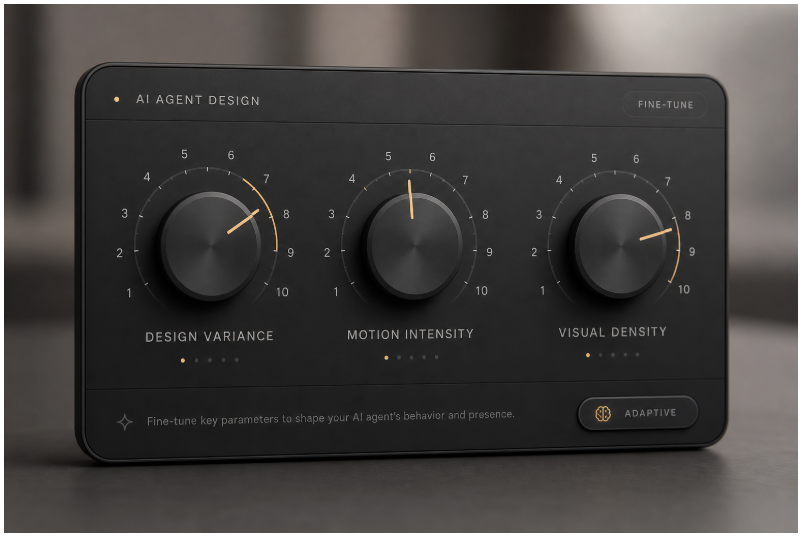
在默认的 taste-skill 里,作者在文件顶端放了三个 1–10 的旋钮式参数(口述整理如下;具体仍以源码为准)。
| DESIGN_VARIANCE | 版式胆识:越低越规整居中,越高越敢做非对称和现代实验排版 |
| MOTION_INTENSITY | 动效深度:从轻微 hover,到滚动联动、磁力感等更重层次 |
| VISUAL_DENSITY | 单屏信息量:低密度偏「杂志留白」,高密度偏仪表板信息量 |
旋钮的意义在于:我们终于可以少喊一点「高级感」「大气一点」,多给模型可操作、可复述、可回放的数字区间。下面是围绕这一概念的插画示意。
7. 和「多喝热水式提示词」相比,差在哪里
很多人在前端调教模型时习惯于每次会话重新发明一遍审美宪法:「字体好看一点」「阴影自然一点」「动效别太用力」。这当然有效,但难以沉淀。
Taste Skill 试图解决的是三件小事:
它不会让一个坏品味的人自动变成艺术指导——但它能减少你在「反复强调同一段排版纪律」上所消耗的心智带宽。
8. 后记:工具只是起点,判别力仍是你的
读到这里,也许你会想立刻装上一整套技能试水。我个人的建议是:先选一个最贴近你团队的默认味觉,跑一两个真实页面或小模块;如果模型仍爱截断半成品,再把 full-output-enforcement 当作「交付保险」挂上。
说到底,Anti-Slop 不是站队「人类 vs AI」,而是提醒我们:可复制的是套路,不可取替的是判别力。Taste Skill 把一部分判别力做成了文件与流程,这已经是开源社区很值得珍惜的方向。
如果你对视觉规范、排版史或动机好奇,也别错过仓库内的 research/ 目录——那里面往往比自己临时写的几句「要好看」更耐读。
祝你下一次 Code Review,少听到一句:「怪怪的,说不出哪里怪。」——因为这次,你心里或许已经有一块更清晰的参照尺。
参考与链接
- 项目主页:Leonxlnx/taste-skill
- 安装范式基于 npx skills add(以官方文档为准)