1.效果演示
晚间正在做一个完整的公众号合集,针对对话框#32770,专门教学如何完善各项功能、如何优化使用体验等内容,让大家在写自己的窗口项目时能够有所借鉴。
让对话框窗口在屏幕边缘自动隐藏
2.功能介绍
拖动窗口到屏幕边缘触发自动隐藏,鼠标滑过又自动显示。在VBA复刻像QQ一样贴近屏幕边缘自动隐藏的效果。
3.实现过程
我们需要在之前文章“让对话框窗口在鼠标滑出时变透明”的基础上做拓展。
原文是在这四个阶段触发窗口透明化的:
- 鼠标滑过客户区时
- 鼠标滑出客户区时
- 鼠标滑过非客户区时
- 鼠标滑出非客户区时
现在我们让这四个阶段不再触发原来的窗口透明化,而是触发下面的自定义过程:
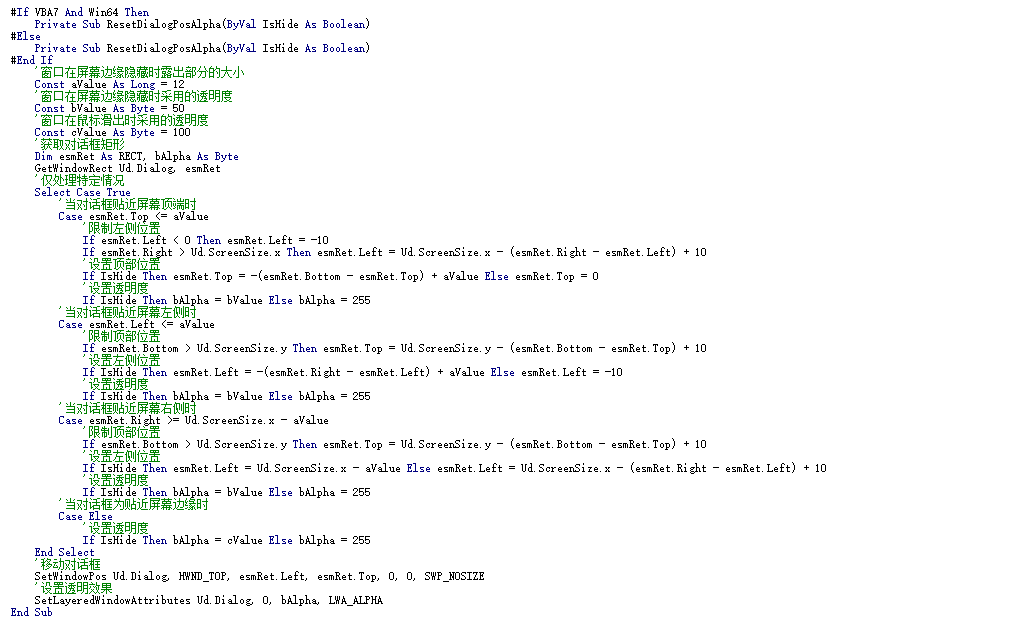
这个自定义过程同时实现了三个功能,且支持用户自定义:
- 窗口在屏幕边缘隐藏时露出部分的大小
- 窗口在屏幕边缘隐藏时采用的透明度
- 窗口在鼠标滑出时采用的透明度
对话框窗口贴近屏幕边缘自动隐藏的实现逻辑是这样的:
当鼠标滑出客户区/非客户区时,判断当前窗口是否与屏幕边缘的距离,若距离小于等于12像素,则判断为贴近,此时使用手动将窗口移动至屏幕外,只露出一小部分。当鼠标滑过露出的一小部分窗口时,判断当前窗口是否在屏幕外,若是则就近显示完整窗口,否则不做调整。
4.文件下载
网盘链接:https://pan.baidu.com/s/1VVzKVWsnNCvLNMguMVlrrA
提取码:pt4f
5.完整源码
建议大家在边看文章讲解边动手写代码,一点一点地提高自身编程水平。
- 代码适配32与64位系统
- 代码不区分WPS或EXCEL VBA环境
你只需要复制代码到一个新模块中就能运行:
'晚间有雨伴人眠202608011619
'原创代码,转载或二创请标明来源
#If VBA7 And Win64 Then
Private Declare PtrSafe Function IsWindow Lib "user32" (ByVal hwnd As LongPtr) As Long
Private Declare PtrSafe Function ShowWindow Lib "user32" (ByVal hwnd As LongPtr, ByVal nCmdShow As Long) As Long
Private Declare PtrSafe Function FindWindowA Lib "user32" (ByVal lpClassName As String, ByVal lpWindowName As String) As LongPtr
Private Declare PtrSafe Function CreateWindowExA Lib "user32" (ByVal dwExStyle As Long, ByVal lpClassName As String, ByVal lpWindowName As String, ByVal dwStyle As Long, ByVal x As Long, ByVal y As Long, ByVal nWidth As Long, ByVal nHeight As Long, ByVal HwndParent As LongPtr, ByVal hMenu As LongPtr, ByVal Hinstance As LongPtr, lpParam As Any) As LongPtr
Private Declare PtrSafe Function SetWindowLongA Lib "user32" Alias "SetWindowLongPtrA" (ByVal hwnd As LongPtr, ByVal nIndex As Long, ByVal dwNewLong As LongPtr) As LongPtr
Private Declare PtrSafe Function SetFocus Lib "user32" (ByVal hwnd As LongPtr) As LongPtr
Private Declare PtrSafe Function CallWindowProcA Lib "user32" (ByVal lpPrevWndFunc As LongPtr, ByVal hwnd As LongPtr, ByVal msg As Long, ByVal wParam As LongPtr, ByVal lParam As LongPtr) As LongPtr
Private Declare PtrSafe Function DestroyWindow Lib "user32" (ByVal hwnd As LongPtr) As Long
Private Declare PtrSafe Function GetWindowLongA Lib "user32" Alias "GetWindowLongPtrA" (ByVal hwnd As LongPtr, ByVal nIndex As Long) As LongPtr
Private Declare PtrSafe Function SetLayeredWindowAttributes Lib "user32" (ByVal hwnd As LongPtr, ByVal crKey As Long, ByVal bAlpha As Byte, ByVal dwFlags As Long) As Long
Private Declare PtrSafe Function TrackMouseEvent Lib "user32" (ByRef lpEventTrack As TrackMouseEventType) As Long
Private Declare PtrSafe Function GetCursorPos Lib "user32" (lpPoint As POINTAPI) As Long
Private Declare PtrSafe Function SendMessageA Lib "user32" (ByVal hwnd As LongPtr, ByVal wMsg As Long, ByVal wParam As LongPtr, lParam As Any) As LongPtr
Private Declare PtrSafe Function GetDC Lib "user32" (ByVal hwnd As LongPtr) As LongPtr
Private Declare PtrSafe Function GetDeviceCaps Lib "gdi32" (ByVal hdc As LongPtr, ByVal nIndex As Long) As Long
Private Declare PtrSafe Function ReleaseDC Lib "user32" (ByVal hwnd As LongPtr, ByVal hdc As LongPtr) As Long
Private Declare PtrSafe Function GetWindowRect Lib "user32" (ByVal hwnd As LongPtr, lpRect As RECT) As Long
Private Declare PtrSafe Function SetWindowPos Lib "user32" (ByVal hwnd As LongPtr, ByVal hWndInsertAfter As LongPtr, ByVal x As Long, ByVal y As Long, ByVal cx As Long, ByVal cy As Long, ByVal wFlags As Long) As Long
#Else
Private Declare Function IsWindow Lib "user32" (ByVal hwnd As Long) As Long
Private Declare Function ShowWindow Lib "user32" (ByVal hwnd As Long, ByVal nCmdShow As Long) As Long
Private Declare Function FindWindowA Lib "user32" (ByVal lpClassName As String, ByVal lpWindowName As String) As Long
Private Declare Function CreateWindowExA Lib "user32" (ByVal dwExStyle As Long, ByVal lpClassName As String, ByVal lpWindowName As String, ByVal dwStyle As Long, ByVal x As Long, ByVal y As Long, ByVal nWidth As Long, ByVal nHeight As Long, ByVal HwndParent As Long, ByVal hMenu As Long, ByVal Hinstance As Long, lpParam As Any) As Long
Private Declare Function SetWindowLongA Lib "user32" (ByVal hwnd As Long, ByVal nIndex As Long, ByVal dwNewLong As Long) As Long
Private Declare Function SetFocus Lib "user32" (ByVal hwnd As Long) As Long
Private Declare Function CallWindowProcA Lib "user32" (ByVal lpPrevWndFunc As Long, ByVal hwnd As Long, ByVal msg As Long, ByVal wParam As Long, ByVal lParam As Long) As Long
Private Declare Function DestroyWindow Lib "user32" (ByVal hwnd As Long) As Long
Private Declare Function GetWindowLongA Lib "user32" Alias "GetWindowLongPtrA" (ByVal hwnd As Long, ByVal nIndex As Long) As Long
Private Declare Function SetLayeredWindowAttributes Lib "user32" Alias "SetLayeredWindowAttributes" (ByVal hwnd As Long, ByVal crKey As Long, ByVal bAlpha As Byte, ByVal dwFlags As Long) As Long
Private Declare Function TrackMouseEvent Lib "user32" (ByRef lpEventTrack As TrackMouseEventType) As Long
Private Declare Function GetCursorPos Lib "user32" Alias "GetCursorPos" (lpPoint As POINTAPI) As Long
Private Declare Function SendMessageA Lib "user32" Alias "SendMessageA" (ByVal hwnd As Long, ByVal wMsg As Long, ByVal wParam As Long, lParam As Any) As Long
Private Declare Function GetDC Lib "user32" Alias "GetDC" (ByVal hwnd As Long) As Long
Private Declare Function GetDeviceCaps Lib "gdi32" Alias "GetDeviceCaps" (ByVal hdc As Long, ByVal nIndex As Long) As Long
Private Declare Function ReleaseDC Lib "user32" Alias "ReleaseDC" (ByVal hwnd As Long, ByVal hdc As Long) As Long
Private Declare Function GetWindowRect Lib "user32" Alias "GetWindowRect" (ByVal hwnd As Long, lpRect As RECT) As Long
Private Declare Function SetWindowPos Lib "user32" Alias "SetWindowPos" (ByVal hwnd As Long, ByVal hWndInsertAfter As Long, ByVal x As Long, ByVal y As Long, ByVal cx As Long, ByVal cy As Long, ByVal wFlags As Long) As Long
#End If
#If VBA7 And Win64 Then
Private Type POINTAPI
x As Long
y As Long
End Type
Private Type TrackMouseEventType
cbSize As Long
dwFlags As Long
hwndTrack As LongPtr
dwHoverTime As Long
End Type
Private Type RECT
Left As Long
Top As Long
Right As Long
Bottom As Long
End Type
#Else
Private Type POINTAPI
x As Long
y As Long
End Type
Private Type TrackMouseEventType
cbSize As Long
dwFlags As Long
hwndTrack As Long
dwHoverTime As Long
End Type
Private Type RECT
Left As Long
Top As Long
Right As Long
Bottom As Long
End Type
#End If
#If VBA7 And Win64 Then
Private Const Nuptr As LongPtr = 0
Private Ud As UserDialogType
Private Type UserDialogType
Dialog As LongPtr
DialogProc As LongPtr
Editor As LongPtr
EditorState As LongPtr
IsSizeMove As Boolean
IsMouseMove As Boolean
ScreenHdc As LongPtr
ScreenSize As POINTAPI
End Type
#Else
Private Const Nuptr As Long = 0
Private Ud As UserDialogType
Private Type UserDialogType
Dialog As Long
DialogProc As Long
Editor As Long
EditorState As Long
IsSizeMove As Boolean
IsMouseMove As Boolean
ScreenHdc As Long
ScreenSize As POINTAPI
End Type
#End If
Private Const SW_SHOW = 5
Private Const SW_HIDE = 0
Private Const WS_VISIBLE = &H10000000
Private Const WS_POPUP = &H80000000
Private Const WS_SYSMENU = &H80000
Private Const WS_CAPTION = &HC00000
Private Const WS_EX_DLGMODALFRAME = &H1
Private Const GWL_WNDPROC = -4
Private Const WM_CLOSE = &H10
Private Const WM_DESTROY = &H2
Private Const WM_ENTERSIZEMOVE = &H231
Private Const WM_EXITSIZEMOVE = &H232
Private Const GWL_EXSTYLE = -20
Private Const WS_EX_LAYERED = &H80000
Private Const LWA_ALPHA = &H2
Private Const WM_MOUSEMOVE = &H200
Private Const WM_MOUSELEAVE = &H2A3
Private Const WM_NCMOUSEMOVE = &HA0
Private Const WM_NCMOUSELEAVE = &H2A2
Private Const WM_NCHITTEST = &H84
Private Const HTNOWHERE = 0
Private Const HTCLIENT = 1
Private Const HTBORDER = 18
Private Const TME_LEAVE = &H2
Private Const TME_NONCLIENT = &H10
Private Const HORZRES = 8
Private Const VERTRES = 10
Private Const HWND_TOP = 0
Private Const SWP_NOSIZE = &H1
Public Sub CreateUserDialog()
'对话框窗口若已存在则直接显示
If IsWindow(Ud.Dialog) Then ShowWindow Ud.Dialog, SW_SHOW: Exit Sub
'获取编辑器句柄并隐藏
Ud.Editor = FindWindowA("wndclass_desked_gsk", vbNullString)
Ud.EditorState = ShowWindow(Ud.Editor, SW_HIDE)
'获取屏幕绘制环境
Ud.ScreenHdc = GetDC(Nuptr)
'获取屏幕尺寸
Ud.ScreenSize.x = GetDeviceCaps(Ud.ScreenHdc, HORZRES)
Ud.ScreenSize.y = GetDeviceCaps(Ud.ScreenHdc, VERTRES)
'指定对话框初始样式
Dim StyleS&: StyleS = WS_VISIBLE Or WS_POPUP Or WS_SYSMENU Or WS_CAPTION
Dim StyleE&: StyleE = WS_EX_DLGMODALFRAME
'创建对话框主窗口
Ud.Dialog = CreateWindowExA(StyleE, "#32770", "UserDialog", StyleS, 15, 50, 300, 200, Nuptr, Nuptr, Nuptr, Nuptr)
'设置分层窗口
SetWindowLongA Ud.Dialog, GWL_EXSTYLE, GetWindowLongA(Ud.Dialog, GWL_EXSTYLE) Or WS_EX_LAYERED
SetLayeredWindowAttributes Ud.Dialog, 0, 255, LWA_ALPHA
'设置对话框子类化
Ud.DialogProc = SetWindowLongA(Ud.Dialog, GWL_WNDPROC, AddressOf WindowProcUdDialog)
'设置焦点
SetFocus Ud.Dialog
End Sub
#If VBA7 And Win64 Then
Private Function WindowProcUdDialog(ByVal hwnd As LongPtr, ByVal msg As Long, ByVal wParam As LongPtr, ByVal lParam As LongPtr) As LongPtr
#Else
Private Function WindowProcUdDialog(ByVal hwnd As Long, ByVal msg As Long, ByVal wParam As Long, ByVal lParam As Long) As Long
#End If
Select Case msg
'窗口即将关闭时
Case WM_CLOSE
'释放绘制环境
ReleaseDC Nuptr, Ud.ScreenHdc
'销毁窗口
DestroyWindow Ud.Dialog
'用户已处理
WindowProcUdDialog = Nuptr
Exit Function
'窗口销毁后
Case WM_DESTROY
'取消子类化
SetWindowLongA Ud.Dialog, GWL_WNDPROC, Ud.DialogProc
'还原编辑器的显示状态
If Ud.EditorState Then ShowWindow Ud.Editor, SW_SHOW
'清理内存
Dim EmptyUd As UserDialogType: Ud = EmptyUd
'用户已处理
WindowProcUdDialog = Nuptr
Exit Function
'窗口移动或调整大小之前
Case WM_ENTERSIZEMOVE
'窗口正在移动或调整大小
Ud.IsSizeMove = True
'用户已处理
WindowProcUdDialog = Nuptr
Exit Function
'窗口移动或调整大小之后
Case WM_EXITSIZEMOVE
'窗口不再移动或调整大小
Ud.IsSizeMove = False
'用户已处理
WindowProcUdDialog = Nuptr
Exit Function
'客户区鼠标滑过通知
Case WM_MOUSEMOVE
'首次滑过时执行
If Ud.IsMouseMove = False Then
'鼠标滑过标识
Ud.IsMouseMove = True
'跟踪鼠标
StartTrackMouse Ud.Dialog, TME_LEAVE
'重设对话框显示位置和透明度
ResetDialogPosAlpha False
End If
'客户区鼠标滑出通知
Case WM_MOUSELEAVE
'首次滑出时执行;窗口不再移动或调整大小时执行
If Ud.IsMouseMove = True And Ud.IsSizeMove = False Then
'鼠标滑出标识
Ud.IsMouseMove = False
'获取鼠标坐标
Dim mlpt As POINTAPI
GetCursorPos mlpt
'当鼠标在屏幕背景时
Select Case CLng(SendMessageA(Ud.Dialog, WM_NCHITTEST, Nuptr, ByVal MAKELPARAM(mlpt.x, mlpt.y)))
Case HTNOWHERE, HTBORDER
'重设对话框显示位置和透明度
ResetDialogPosAlpha True
End Select
'用户已处理
WindowProcUdDialog = Nuptr
Exit Function
End If
'非客户区鼠标滑过通知
Case WM_NCMOUSEMOVE
'首次滑过时执行
If Ud.IsMouseMove = False Then
'鼠标滑过标识
Ud.IsMouseMove = True
'跟踪鼠标
StartTrackMouse Ud.Dialog, TME_NONCLIENT Or TME_LEAVE
'重设对话框显示位置和透明度
ResetDialogPosAlpha False
End If
'非客户区鼠标滑出通知
Case WM_NCMOUSELEAVE
'首次滑出时执行;窗口不再移动或调整大小时执行
If Ud.IsMouseMove = True And Ud.IsSizeMove = False Then
'鼠标滑出标识
Ud.IsMouseMove = False
'获取鼠标坐标
Dim nlpt As POINTAPI
GetCursorPos nlpt
'当鼠标不在客户区时
If CLng(SendMessageA(Ud.Dialog, WM_NCHITTEST, Nuptr, ByVal MAKELPARAM(nlpt.x, nlpt.y))) <> HTCLIENT Then
'重设对话框显示位置和透明度
ResetDialogPosAlpha True
End If
'用户已处理
WindowProcUdDialog = Nuptr
Exit Function
End If
End Select
'调用默认通知处理
WindowProcUdDialog = CallWindowProcA(Ud.DialogProc, hwnd, msg, wParam, lParam)
End Function
#If VBA7 And Win64 Then
Private Function MAKELPARAM(ByVal Low As Long, ByVal High As Long) As Long
#Else
Private Function MAKELPARAM(ByVal Low As Long, ByVal High As Long) As Long
#End If
'高低位整合
MAKELPARAM = (High * 65536) Or (Low And &HFFFF&)
End Function
#If VBA7 And Win64 Then
Private Function StartTrackMouse(ByVal hwnd As LongPtr, ByVal flag As Long)
#Else
Private Function StartTrackMouse(ByVal hwnd As Long, ByVal flag As Long)
#End If
'开始跟踪鼠标
Dim Tmet As TrackMouseEventType
Tmet.cbSize = LenB(Tmet)
Tmet.dwFlags = flag
Tmet.dwHoverTime = 10
Tmet.hwndTrack = hwnd
StartTrackMouse = TrackMouseEvent(Tmet)
End Function
#If VBA7 And Win64 Then
Private Sub ResetDialogPosAlpha(ByVal IsHide As Boolean)
#Else
Private Sub ResetDialogPosAlpha(ByVal IsHide As Boolean)
#End If
'窗口在屏幕边缘隐藏时露出部分的大小
Const aValue As Long = 12
'窗口在屏幕边缘隐藏时采用的透明度
Const bValue As Byte = 50
'窗口在鼠标滑出时采用的透明度
Const cValue As Byte = 100
'获取对话框矩形
Dim esmRet As RECT, bAlpha As Byte
GetWindowRect Ud.Dialog, esmRet
'仅处理特定情况
Select Case True
'当对话框贴近屏幕顶端时
Case esmRet.Top <= aValue
'限制左侧位置
If esmRet.Left < 0 Then esmRet.Left = -10
If esmRet.Right > Ud.ScreenSize.x Then esmRet.Left = Ud.ScreenSize.x – (esmRet.Right – esmRet.Left) + 10
'设置顶部位置
If IsHide Then esmRet.Top = -(esmRet.Bottom – esmRet.Top) + aValue Else esmRet.Top = 0
'设置透明度
If IsHide Then bAlpha = bValue Else bAlpha = 255
'当对话框贴近屏幕左侧时
Case esmRet.Left <= aValue
'限制顶部位置
If esmRet.Bottom > Ud.ScreenSize.y Then esmRet.Top = Ud.ScreenSize.y – (esmRet.Bottom – esmRet.Top) + 10
'设置左侧位置
If IsHide Then esmRet.Left = -(esmRet.Right – esmRet.Left) + aValue Else esmRet.Left = -10
'设置透明度
If IsHide Then bAlpha = bValue Else bAlpha = 255
'当对话框贴近屏幕右侧时
Case esmRet.Right >= Ud.ScreenSize.x – aValue
'限制顶部位置
If esmRet.Bottom > Ud.ScreenSize.y Then esmRet.Top = Ud.ScreenSize.y – (esmRet.Bottom – esmRet.Top) + 10
'设置左侧位置
If IsHide Then esmRet.Left = Ud.ScreenSize.x – aValue Else esmRet.Left = Ud.ScreenSize.x – (esmRet.Right – esmRet.Left) + 10
'设置透明度
If IsHide Then bAlpha = bValue Else bAlpha = 255
'当对话框为贴近屏幕边缘时
Case Else
'设置透明度
If IsHide Then bAlpha = cValue Else bAlpha = 255
End Select
'移动对话框
SetWindowPos Ud.Dialog, HWND_TOP, esmRet.Left, esmRet.Top, 0, 0, SWP_NOSIZE
'设置透明效果
SetLayeredWindowAttributes Ud.Dialog, 0, bAlpha, LWA_ALPHA
End Sub
6.相关合集
关于#32770对话框窗口的专项开发计划