文件IO:Linux内核提供的文件操作接口,属于系统调用
接口:man手册第2章
一、文件IO
1.打开文件
open()
#include <sys/types.h>
#include <sys/stat.h>
#include <fcntl.h>
int open(const char *pathname, int flags);
int open(const char *pathname, int flags, mode_t mode);
功能:打开一个文件并获得一个文件描述符
参数:
pathname:要打开的文件名
flags:打开方式
O_RDONLY:只读(r)
O_WRONLY:只写(w)
O_RDWR :读写(r+、)
O_CREAT :创建
O_TRUNC :清空
O_APPEND:追加
(O_CLOEXEC, O_DIRECTORY, O_EXCL, O_NOCTTY, O_NOFOLLOW, O_TMPFILE等)
"r" —>O_RDONLY
"r+"—>O_RDWR
"w" —>O_WRONLY | O_TRUNC | O_CREAT, 0664
"w+"—>O_RDWR | O_TRUNC | O_CREAT, 0664
"a" —>O_WRONLY | O_CREAT | O_APPEND, 0664
"a+"—>O_RDWR | O_CREAT | O_APPEND, 0664
mode:用户、同组用户、其他用户对该文件的读写执行权限(mode & ~umask)
在O_CREAT或O_TMPFILE使用时必须添加,权限0777(用户,用户组,其他组 rwx)
普通文件:0664
权限给满:0777(但实则只到0775rwxrwxr-x)
返回值:
成功:文件描述符
失败:-1
-
文件描述符:当打开一个文件时,操作系统会为已打开的文件分配一个文件描述符用来标记该文件。
文件描述符:是一个小的、非负的整型数据。
操作系统默认可分配出的文件描述符:0-1023共1024个(自建的只能在3-1023)
-
文件描述符的分配原则:优先分配最小未被使用的数据
-
系统默认已打开的文件
标准IO 文件IO
FILE * int
stdin 0(STDIN_FILENO)
stdout 1(STDOUT_FILENO)
strerr 2(STDERR_FILENO)
(mode & ~umask)
umask掩码:可在终端输入查看当前系统的掩码(例如我的是0002)
0002(000 000 010)
~(umask) —> 111 111 101
0777 & (~umask) —> 111 111 111 & 111 111 101 = 111 111 101(0775)
2.读文件、写文件
read()
#include <unistd.h>
ssize_t read(int fd, void *buf, size_t count);
功能:从文件中读取数据
参数:
fd:要读取的文件的文件描述符
buf:存储读取数据的空间首地址
count:希望读到的字节数
返回值:
成功:返回实际读到的字节数
失败:-1
到达文件末尾:0
测试:
#include "head.h"
int main(void)
{
int fd = open("1.txt",O_RDONLY);
if(-1 == fd)
{
printf("open error\\n");
return -1;
}
char buf[1024] = {0};
ssize_t size = read(fd,buff,sizeof(buff));
if(-1 == size)
{
printf("read error\\n");
close(fd);
return -1;
}
else if(0 == size)
{
printf("end of file\\n");
close(fd);
return -1;
}
printf("size = %ld\\n",size);
//printf("%s\\n",buff); //易越界访问
write(STDOUT_FILENO, buff, size);
close(fd);
return 0;
}
练习1:将某个文件中的全部数据读到终端显示
int main(void)
{
int fd = open("./stdio.h",O_RDONLY);
if(-1 == fd)
{
printf("open error\\n");
return -1;
}
char buf[1024] = {0};
ssize_t size;
while( (size = read(fd, buf, sizeof(buf))) != 0 )
{
if(-1 == size)
{
printf("read error\\n");
close(fd);
return -1;
}
write(STDOUT_FILENO, buf, size);
}
close(fd);
return 0;
}
练习2:使用文件IO和主函数传参,实现拷贝功能
int file_cp(const char *srcfile,const char *dstfile)
{
int fdsrc = open(srcfile,O_RDONLY);
int fddst = open(dstfile,O_WRONLY | O_CREAT | O_TRUNC, 0664);
if(-1 == fdsrc || -1 == fddst)
{
printf("open file error\\n");
return -1;
}
char buff[1024] = {0};
ssize_t size = 0;
while(1)
{
size=read(fdsrc,buff,sizeof(buff));
if(size <= 0)
{
break;
}
write(fddst,buff,size);
}
/*或者
while ((size = read(fdsrc, buff, sizeof(buff))) > 0)
{
write(fddst, buff, size);
}
*/
/*或者
while((size=read(fdsrc,buff,sizeof(buff))) != 0 )
{
if(-1 == size)
{
printf("read error\\n");
close(fdsrc);
close(fddst);
return -1;
}
write(fddst,buff,size);
}
*/
close(fdsrc);
close(fddst);
printf("copy success!\\n");
return 0;
}
int main(int argc, const char *argv[])
{
if(argc < 3)
{
printf("Usage: ./a.out <src filename> <dst filename>\\n");
return -1;
}
file_cp(argv[1],argv[2]);
return 0;
}
write()
#include <unistd.h>
ssize_t write(int fd, const void *buf, size_t count);
功能:向文件中写入数据
参数:
fd:要写入的文件描述符
buf:要写入的数据首地址
count:希望写入的字节数
返回值:
成功:返回成功写入的字节数
失败:-1
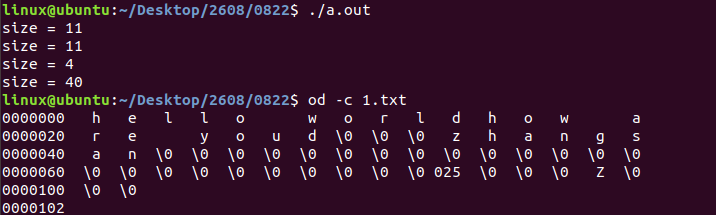
测试:
自定义一个头文件
#ifndef _HEAD_H
#define _HEAD_H
#include <stdio.h>
#include <stdlib.h>
#include <string.h>
#include <sys/types.h>
#include <sys/stat.h>
#include <fcntl.h>
#include <unistd.h>
#endif
调用自定义的头文件
#include "head.h"
struct stu
{
char name[32];
int age;
int score;
};
int main(void)
{
int fd = open("1.txt", O_WRONLY | O_CREAT | O_TRUNC, 0664);
if(-1 == fd)
{
printf("open error\\n");
return -1;
}
char str[] = {"how are you"};
/*或者
ssize_t size = write(fd, "hello world", 11);
printf("size = %ld\\n",size);
*/
size = write(fd, str, strlen(str));
printf("size = %ld\\n",size);
int num = 100;
size = write(fd, &num, sizeof(int));
printf("size = %ld\\n",size);
struct stu s = {"zhangsan",21,90};
size = write(fd, &s, sizeof(struct stu));
printf("size = %ld\\n",size);
close(fd);
return 0;
}
3.关闭文件
close()
#include <unistd.h>
int close(int fd);
功能:关闭文件
参数:
fd:文件描述符
返回值:
成功:0
失败:-1
注意:只打开文件,使用完不关闭文件会造成文件描述符泄露。
测试:
#include<stdio.h>
#include <sys/types.h>
#include <sys/stat.h>
#include <fcntl.h>
#include <unistd.h>
int main(void)
{
//int fd = open("1.txt",O_RDONLY, 0664); //"r"
//int fd = open("1.txt",O_RDWR, 0664); //"r+"
int fd = open("1.txt",O_WRONLY | O_CREAT | O_TRUNC, 0664); //"w"
//int fd = open("1.txt",O_RDWR | O_CREAT | O_TRUNC, 0664); //"w+"
//int fd = open("1.txt",O_WRONLY | O_CREAT | O_APPEND, 0664); //"a"
//int fd = open("1.txt",O_RDWR | O_CREAT | O_APPEND, 0664); //"a+"
if(-1 == fd)
{
printf("open error\\n");
return -1;
}
printf("fd = %d\\n",fd);
close(fd);
return 0;
}
4.定位函数
lseek()
#include <sys/types.h>
#include <unistd.h>
off_t lseek(int fd, off_t offset, int whence);
功能:重新定位文件的读写位置
参数:
fd:文件描述符
offset:偏移量
whence:要偏移的起始位置
SEEK_SET:从文件开头偏移
SEEK_CUR:从当前位置偏移
SEEK_END:从文件末尾偏移
返回值:
成功:返回当前读写位置到文件开头的偏移量
失败:-1
测试:
int main(void)
{
int fd = open("1.txt",O_WRONLY | O_CREAT | O_TRUNC,0664);
if(-1 == fd)
{
printf("open error\\n");
return -1;
}
off_t offset= lseek(fd,10,SEEK_SET);
printf("offfset = %ld\\n",pffset);
write(fd,"A",1);
sleek(fd,-5,SEEK_CUR);
write(fd,"B",1);
//file size
offset = lseek(fd,0,SEEK_END);
printf("len = %ld\\n",offset);
lseek(fd,0,SEEK_SET); //流复位
close(fd);
return 0;
}
二、文件IO和标准IO的区别
| 来源 | 标准C库函数,可移植性强 | Linux系统调用,可移植性弱 |
| 操作对象 | FILE *(文件流指针) | fd(文件描述符) |
| 缓冲区 | 有,减少用户层和内核层反复切换,提高效率 | 无,实时性好 |
| 用途 | 主要用于对普通文件操作 | 普通文件、硬件设备类相关的文件 |
缓冲区
行缓冲
默认大小为1024字节(1k),主要使用在人机交互终端上
刷新条件:
(1)遇到'\\n'刷新
(2)程序结束刷新
(3)使用fflush()强制刷新 fflush(FILE *stream)
(4)缓冲区满时自动刷新
全缓冲
默认大小4096字节(4k),主要用于文件交互(将数据写入文件时)
刷新条件:
(1)程序结束刷新
(2)文件关闭自动刷新
(3)全缓冲区满时自动刷新
(4)使用fflush()强制刷新
无缓冲
默认大小0k,出错信息输出,标准出错设备
例如:fputs("hello",stderr)
三、其他函数接口
printf相关函数
int printf(const char *format, …);
功能:把格式化字符串输出到终端(标准输出stdout)
int fprintf(FILE *stream, const char *format, …);
功能:将格式化后的字符串写入到stream文件流代表的文件中
int dprintf(int fd, const char *format, …);
功能:将格式化后的字符串写入到fd所代表的文件中
int sprintf(char *str, const char *format, …);
功能:将格式化后的字符串写入到字符型数组中
多用于字符串的拼接、格式化;可以将整型数据、浮点型数据等转换成字符串
测试:
int main(void)
{
FILE *fp = fopen("1.txt","w");
int fd = open("2.txt", O_WRONLY | O_CREAT | O_TRUNC, 0664);
int num1=100, num2=200;
printf("hello world\\n");
printf("%d + %d = %d\\n",num1,num2,num1+num2);
fprintf(stdout, "hello world\\n");
fprintf(fp,"hello world\\n");
fprintf(fp,"%d + %d = %d\\n",num1,num2,num1+num2);
dprintf(STDOUT_FILENO,"hello world\\n");
dprintf(fd,"hello world");
dprintf(fd,"%d + %d = %d\\n",num1,num2,num1+num2);
char *p = "hello";
char *q = "world";
char str[32] = {0};
sprintf(str, "how are you : [%s %s]",p,q);
printf("str = %s\\n",str);
//1234—>"1234"
int num = 1234;
sprintf(str, "%d", num);
printf("str = %s\\n",str);
//-3.1415—>"-3.1415"
float f = -3.1415;
sprintf(str, "%.4f", f);
printf("str = %s\\n",str);
fclose(fp);
close(fd);
return 0;
}