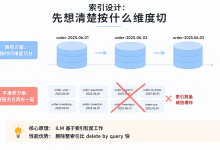
KingbaseES 间隔分区创建指南:高效解决大数据分区管理问题
1. 间隔分区概述
间隔分区是KingbaseES提供的一种高级分区功能,允许数据库自动根据预设的间隔值创建新分区,特别适合处理时间序列或有序数据。与常规分区相比,间隔分区无需预先定义所有分区,显著简化了大数据管理。
1.1 间隔分区的优势
- 自动分区管理:当新数据插入超出现有分区范围时,自动创建新分区
- 简化运维:减少手动管理分区的复杂性
- 高效查询:分区裁剪可大幅提升查询性能
- 灵活扩展:适合随时间增长的数据集
1.2 适用场景
- 时间序列数据(日志、交易记录等)
- 按序号分批处理的数据
- 数据量持续增长的应用表
2. 间隔分区创建步骤
2.1 准备工作
在创建间隔分区前,需确保满足以下条件:
2.2 创建分区表
以下是创建间隔分区表的基本语法:
CREATE TABLE table_name (
column1 datatype1,
column2 datatype2,
…
partition_by_column datatype
) PARTITION BY RANGE (partition_by_column)
INTERVAL (interval_value);
示例:按月分区的销售记录表
CREATE TABLE sales (
sale_id NUMBER,
sale_date DATE,
amount NUMBER,
customer_id NUMBER
) PARTITION BY RANGE (sale_date)
INTERVAL (NUMTOYMINTERVAL(1, 'MONTH'));
2.3 设置初始分区
间隔分区需要至少一个初始分区作为起点:
CREATE TABLE sales (
sale_id NUMBER,
sale_date DATE,
amount NUMBER,
customer_id NUMBER
) PARTITION BY RANGE (sale_date)
INTERVAL (NUMTOYMINTERVAL(1, 'MONTH'))
(
PARTITION sales_p0 VALUES LESS THAN (TO_DATE('2023-01-01', 'YYYY-MM-DD'))
);
2.4 验证分区创建
查询dba_tab_partitions视图可验证分区是否成功创建:
SELECT partition_name, high_value FROM dba_tab_partitions
WHERE table_name = 'SALES';
3. 常见问题及解决方案
3.1 分区创建失败
问题:执行CREATE TABLE语句时出现错误
可能原因:
解决方案:
CREATE TABLE sales (
sale_id NUMBER,
sale_date DATE,
amount NUMBER
) PARTITION BY RANGE (sale_date)
INTERVAL (NUMTOYMINTERVAL(1, 'MONTH'));
3.2 性能优化建议
INTERVAL (NUMTOYMINTERVAL(1, 'MONTH')) — 月度分区
INTERVAL (NUMTOYMINTERVAL(3, 'MONTH')) — 季度分区
3.3 高级用法:多列分区
order_id NUMBER,
order_date DATE,
customer_id NUMBER,
amount NUMBER
) PARTITION BY RANGE (order_date, customer_id)
INTERVAL (NUMTOYMINTERVAL(1, 'MONTH'))
(
PARTITION orders_p0 VALUES LESS THAN (TO_DATE('2023-01-01', 'YYYY-MM-DD'), 0)
);
4. 完整示例与最佳实践
4.1 完整示例代码
CREATE TABLE transaction_logs (
log_id NUMBER GENERATED ALWAYS AS IDENTITY,
log_timestamp TIMESTAMP DEFAULT SYSTIMESTAMP,
user_id NUMBER,
action VARCHAR2(50),
description VARCHAR2(200)
) PARTITION BY RANGE (log_timestamp)
INTERVAL (NUMTODSINTERVAL(1, 'DAY')) — 按天分区
(
PARTITION transaction_logs_p0 VALUES LESS THAN (TO_TIMESTAMP('2023-01-01 00:00:00', 'YYYY-MM-DD HH24:MI:SS'))
);
— 插入测试数据
INSERT INTO transaction_logs (user_id, action, description)
VALUES (1001, 'LOGIN', 'User logged in');
INSERT INTO transaction_logs (user_id, action, description)
VALUES (1002, 'PURCHASE', 'User made a purchase');
— 查询分区信息
SELECT partition_name, high_value, num_rows
FROM all_tab_partitions
WHERE table_name = 'TRANSACTION_LOGS';
4.2 流程图:间隔分区创建流程
#publish-mermaid-1787657010043-0{font-family:\”trebuchet ms\”,verdana,arial,sans-serif;font-size:16px;fill:#333;}@keyframes edge-animation-frame{from{stroke-dashoffset:0;}}@keyframes dash{to{stroke-dashoffset:0;}}#publish-mermaid-1787657010043-0 .edge-animation-slow{stroke-dasharray:9,5!important;stroke-dashoffset:900;animation:dash 50s linear infinite;stroke-linecap:round;}#publish-mermaid-1787657010043-0 .edge-animation-fast{stroke-dasharray:9,5!important;stroke-dashoffset:900;animation:dash 20s linear infinite;stroke-linecap:round;}#publish-mermaid-1787657010043-0 .error-icon{fill:#552222;}#publish-mermaid-1787657010043-0 .error-text{fill:#552222;stroke:#552222;}#publish-mermaid-1787657010043-0 .edge-thickness-normal{stroke-width:1px;}#publish-mermaid-1787657010043-0 .edge-thickness-thick{stroke-width:3.5px;}#publish-mermaid-1787657010043-0 .edge-pattern-solid{stroke-dasharray:0;}#publish-mermaid-1787657010043-0 .edge-thickness-invisible{stroke-width:0;fill:none;}#publish-mermaid-1787657010043-0 .edge-pattern-dashed{stroke-dasharray:3;}#publish-mermaid-1787657010043-0 .edge-pattern-dotted{stroke-dasharray:2;}#publish-mermaid-1787657010043-0 .marker{fill:#333333;stroke:#333333;}#publish-mermaid-1787657010043-0 .marker.cross{stroke:#333333;}#publish-mermaid-1787657010043-0 svg{font-family:\”trebuchet ms\”,verdana,arial,sans-serif;font-size:16px;}#publish-mermaid-1787657010043-0 p{margin:0;}#publish-mermaid-1787657010043-0 .label{font-family:\”trebuchet ms\”,verdana,arial,sans-serif;color:#333;}#publish-mermaid-1787657010043-0 .cluster-label text{fill:#333;}#publish-mermaid-1787657010043-0 .cluster-label span{color:#333;}#publish-mermaid-1787657010043-0 .cluster-label span p{background-color:transparent;}#publish-mermaid-1787657010043-0 .label text,#publish-mermaid-1787657010043-0 span{fill:#333;color:#333;}#publish-mermaid-1787657010043-0 .node rect,#publish-mermaid-1787657010043-0 .node circle,#publish-mermaid-1787657010043-0 .node ellipse,#publish-mermaid-1787657010043-0 .node polygon,#publish-mermaid-1787657010043-0 .node path{fill:#ECECFF;stroke:#9370DB;stroke-width:1px;}#publish-mermaid-1787657010043-0 .rough-node .label text,#publish-mermaid-1787657010043-0 .node .label text,#publish-mermaid-1787657010043-0 .image-shape .label,#publish-mermaid-1787657010043-0 .icon-shape .label{text-anchor:middle;}#publish-mermaid-1787657010043-0 .node .katex path{fill:#000;stroke:#000;stroke-width:1px;}#publish-mermaid-1787657010043-0 .rough-node .label,#publish-mermaid-1787657010043-0 .node .label,#publish-mermaid-1787657010043-0 .image-shape .label,#publish-mermaid-1787657010043-0 .icon-shape .label{text-align:center;}#publish-mermaid-1787657010043-0 .node.clickable{cursor:pointer;}#publish-mermaid-1787657010043-0 .root .anchor path{fill:#333333!important;stroke-width:0;stroke:#333333;}#publish-mermaid-1787657010043-0 .arrowheadPath{fill:#333333;}#publish-mermaid-1787657010043-0 .edgePath .path{stroke:#333333;stroke-width:1px;}#publish-mermaid-1787657010043-0 .flowchart-link{stroke:#333333;fill:none;}#publish-mermaid-1787657010043-0 .edgeLabel{background-color:rgba(232,232,232, 0.8);text-align:center;}#publish-mermaid-1787657010043-0 .edgeLabel p{background-color:rgba(232,232,232, 0.8);}#publish-mermaid-1787657010043-0 .edgeLabel rect{opacity:0.5;background-color:rgba(232,232,232, 0.8);fill:rgba(232,232,232, 0.8);}#publish-mermaid-1787657010043-0 .labelBkg{background-color:rgba(232, 232, 232, 0.5);}#publish-mermaid-1787657010043-0 .cluster rect{fill:#ffffde;stroke:#aaaa33;stroke-width:1px;}#publish-mermaid-1787657010043-0 .cluster text{fill:#333;}#publish-mermaid-1787657010043-0 .cluster span{color:#333;}#publish-mermaid-1787657010043-0 div.mermaidTooltip{position:absolute;text-align:center;max-width:200px;padding:2px;font-family:\”trebuchet ms\”,verdana,arial,sans-serif;font-size:12px;background:hsl(80, 100%, 96.2745098039%);border:1px solid #aaaa33;border-radius:2px;pointer-events:none;z-index:100;}#publish-mermaid-1787657010043-0 .flowchartTitleText{text-anchor:middle;font-size:18px;fill:#333;}#publish-mermaid-1787657010043-0 rect.text{fill:none;stroke-width:0;}#publish-mermaid-1787657010043-0 .icon-shape,#publish-mermaid-1787657010043-0 .image-shape{background-color:rgba(232,232,232, 0.8);text-align:center;}#publish-mermaid-1787657010043-0 .icon-shape p,#publish-mermaid-1787657010043-0 .image-shape p{background-color:rgba(232,232,232, 0.8);padding:2px;}#publish-mermaid-1787657010043-0 .icon-shape .label rect,#publish-mermaid-1787657010043-0 .image-shape .label rect{opacity:0.5;background-color:rgba(232,232,232, 0.8);fill:rgba(232,232,232, 0.8);}#publish-mermaid-1787657010043-0 .label-icon{display:inline-block;height:1em;overflow:visible;vertical-align:-0.125em;}#publish-mermaid-1787657010043-0 .node .label-icon path{fill:currentColor;stroke:revert;stroke-width:revert;}#publish-mermaid-1787657010043-0 .node .neo-node{stroke:#9370DB;}#publish-mermaid-1787657010043-0 [data-look=\”neo\”].node rect,#publish-mermaid-1787657010043-0 [data-look=\”neo\”].cluster rect,#publish-mermaid-1787657010043-0 [data-look=\”neo\”].node polygon{stroke:#9370DB;filter:drop-shadow(1px 2px 2px rgba(185, 185, 185, 1));}#publish-mermaid-1787657010043-0 [data-look=\”neo\”].swimlane.cluster rect{filter:none;}#publish-mermaid-1787657010043-0 [data-look=\”neo\”].node path{stroke:#9370DB;stroke-width:1px;}#publish-mermaid-1787657010043-0 [data-look=\”neo\”].node .outer-path{filter:drop-shadow(1px 2px 2px rgba(185, 185, 185, 1));}#publish-mermaid-1787657010043-0 [data-look=\”neo\”].node .neo-line path{stroke:#9370DB;filter:none;}#publish-mermaid-1787657010043-0 [data-look=\”neo\”].node circle{stroke:#9370DB;filter:drop-shadow(1px 2px 2px rgba(185, 185, 185, 1));}#publish-mermaid-1787657010043-0 [data-look=\”neo\”].node circle .state-start{fill:#000000;}#publish-mermaid-1787657010043-0 [data-look=\”neo\”].icon-shape .icon{fill:#9370DB;filter:drop-shadow(1px 2px 2px rgba(185, 185, 185, 1));}#publish-mermaid-1787657010043-0 [data-look=\”neo\”].icon-shape .icon-neo path{stroke:#9370DB;filter:drop-shadow(1px 2px 2px rgba(185, 185, 185, 1));}#publish-mermaid-1787657010043-0 :root{–mermaid-font-family:\”trebuchet ms\”,verdana,arial,sans-serif;}成功失败
开始
确定分区键和间隔值
创建基础表结构
定义初始分区
设置INTERVAL子句
验证分区创建
数据插入测试
间隔分区创建完成
检查语法和参数
4.3 注意事项
结语
间隔分区是KingbaseES处理大数据量的强大功能,正确使用可以显著提高数据库性能和管理效率。通过本文介绍的方法和示例,开发者可以轻松实现间隔分区的创建和管理,为构建高性能数据应用打下坚实基础。