一、为什么选 GitHub Pages?
| GitHub Pages | 免费 | 无需购买服务器、自动 HTTPS、与仓库代码同步 |
| 阿里云/腾讯云 | 付费 | 灵活但需运维 |
| Vercel/Netlify | 免费额度 | 国内访问较慢 |
结论:对于个人展示站点,GitHub Pages 是最优解。
二、核心概念
1. 两种仓库类型
| 用户主页 | username.github.io | https://username.github.io | 个人主站,只有一个 |
| 项目页 | 任意名称 | https://username.github.io/ 仓库名 | 展示单个项目 |
2. 推荐方案
创建 username(你的用户名).github.io 仓库作为个人主页,以后所有项目、博客都可以挂载在这个域名下。
三、部署流程(完整版)
Step 1:创建 GitHub 仓库
Step 2:准备本地项目
以 Vue 3 + Vite 为例:
# 创建项目
npm create vite@latest myPage — –template vue
cd myPage
npm install
具体项目大家采用AI Coding即可~
Step 3:配置 Vite
修改 vite.config.js:
export default defineConfig({
plugins: [vue()],
// 用户主页用 '/',项目页用 '/仓库名/'
base: '/',
})
Step 4:配置 GitHub Actions
创建 .github/workflows/deploy.yml:
name: Deploy to GitHub Pages
on:
push:
branches: [main]
workflow_dispatch:
permissions:
contents: read
pages: write
id-token: write
jobs:
build:
runs-on: ubuntu-latest
steps:
– uses: actions/checkout@v4
– uses: actions/setup-node@v4
with:
node-version: 18
cache: npm
– run: npm ci
– run: npm run build
– uses: actions/upload-pages-artifact@v3
with:
path: dist
deploy:
needs: build
runs-on: ubuntu-latest
environment:
name: github-pages
url: ${{ steps.deployment.outputs.page_url }}
steps:
– id: deployment
uses: actions/deploy-pages@v4
Step 5:推送到 GitHub
git init
git add .
git commit -m "init: 个人主页"
git branch -M main
git remote add origin https://github.com/username/username.github.io.git
git push -u origin main
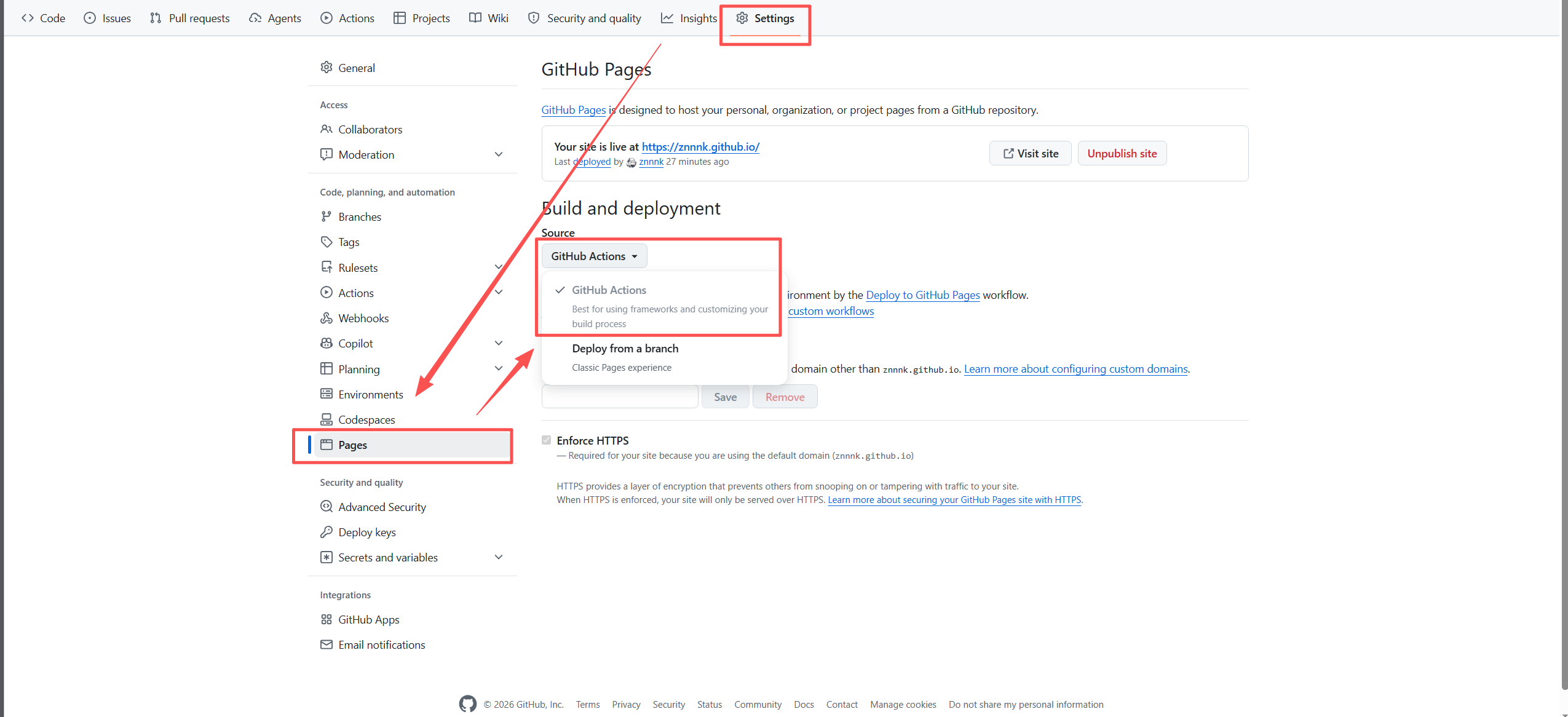
Step 6:启用 Pages
Step 7:访问
等待片刻后,即可访问 https://username.github.io,比如我的个人主页

四、日常更新
修改代码后:
git add .
git commit -m "feat: 更新个性签名"
git push origin main
GitHub Actions 会自动完成一切,无需手动操作。
五、常见问题排查
❌ 页面空白
检查 dist/index.html 中的资源路径:
- 用户主页应为 /assets/xxx.js
- 项目页应为 /仓库名/assets/xxx.js
❌ 刷新 404
Vue Router 需使用 Hash 模式:
createRouter({
history: createWebHashHistory(),
routes,
})
❌ 图片不显示
- 确保静态资源放在 public/ 目录
- 使用绝对路径 /hero-bg.jpg 而非 ./hero-bg.jpg
❌ 推送成功但没触发工作流
检查 .github/workflows/deploy.yml 是否在仓库中存在。
六、进阶技巧
1. 过滤不需要展示的仓库
// config.js
export const siteConfig = {
excludeRepos: ['myPage', 'username.github.io'],
}
2. 动态获取 GitHub 项目
const response = await fetch(
`https://api.github.com/users/${username}/repos?per_page=30&sort=updated`
)
const repos = await response.json()
七、总结
| ① 创建仓库 | GitHub → New → username.github.io |
| ② 配置项目 | vite.config.js 设置 base |
| ③ 配置 CI | 创建 deploy.yml |
| ④ 推送代码 | git push origin main |
| ⑤ 启用 Pages | Settings → Pages → GitHub Actions |
| ⑥ 日常更新 | 改代码 → git push → 自动部署 |
结语:GitHub Pages 让个人站点的部署变得像 git push 一样简单。掌握这套流程后,你可以把任何静态或前端框架项目(Vue/React/Svelte)都部署上去。祝大家都有一个好看的个人主页!
本文作者:znnnk | 个人主页:https://znnnk.github.io