前言
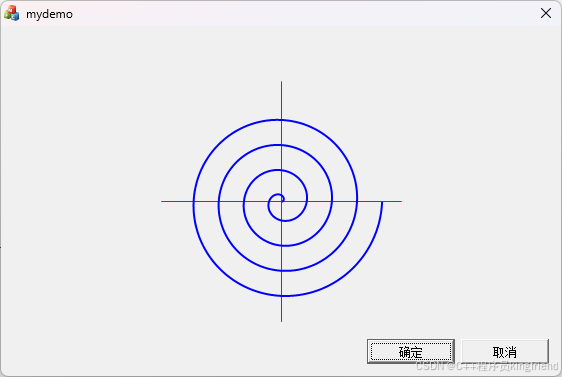
阿基米德螺线在工控运动控制、CAM 绘图、轨迹仿真场景经常用到。极坐标公式 r=a*θ,需要转换成直角坐标x,y,再用大量微小直线段拟合绘制。 本文使用 Qt5.9/Qt5.15,QPainter实现绘图,效果图如下:
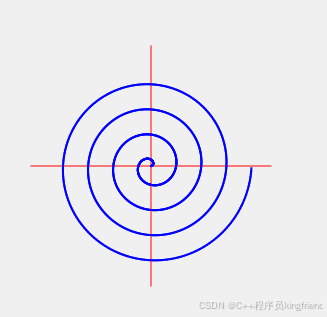
环境:Windows Qt5.15.2 MSVC,同样可以直接交叉编译运行在嵌入式 Linux。
数学原理
阿基米德螺线极坐标:
r=a*θ
- a:螺线扩张系数;a 越大,圈与圈之间间距越大
- θ:极角,单位弧度;2 PI代表完整一圈
转换直角坐标:
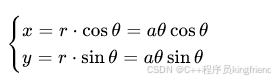
注意:阿基米德螺线不是圆弧,不能使用 drawArc 圆弧 API,只能大量短直线逐段拟合。运动控制里也是输出连续微小线段给控制器做直线插补。
完整源码
widget.h
#ifndef WIDGET_H
#define WIDGET_H
#include <QWidget>
namespace Ui {
class Widget;
}
class Widget : public QWidget
{
Q_OBJECT
public:
explicit Widget(QWidget *parent = nullptr);
~Widget();
protected:
void paintEvent(QPaintEvent *event) override;
private:
Ui::Widget *ui;
};
#endif // WIDGET_H
widget.cpp
#include "widget.h"
#include "ui_widget.h"
#include <QPainter>
#include <QPaintEvent>
#include <cmath>
Widget::Widget(QWidget *parent) :
QWidget(parent),
ui(new Ui::Widget)
{
ui->setupUi(this);
resize(600,600);
}
Widget::~Widget()
{
delete ui;
}
void Widget::paintEvent(QPaintEvent *event)
{
Q_UNUSED(event);
QPainter painter(this);
//开启抗锯齿,曲线更顺滑
painter.setRenderHint(QPainter::Antialiasing);
//坐标系平移:把绘图原点移动到窗口中心
int cx = width() / 2;
int cy = height() / 2;
painter.translate(cx, cy);
painter.scale(1, -1); // Y轴翻转,Y向上,变成教科书逆时针阿基米德螺线
// ========= 绘制中心十字线 =========
int crossLen = 120; // 十字半长,向上下左右各延伸120像素,调大就更长
painter.setPen(QPen(Qt::red,1)); //红色细线画十字
painter.drawLine(-crossLen, 0, crossLen, 0); //水平横线
painter.drawLine(0, -crossLen, 0, crossLen); //垂直竖线
//画笔:蓝色,线宽2像素,切回螺线画笔
painter.setPen(QPen(Qt::blue,2));
double a = 4.0; //螺线疏密系数,越大圈越松散
double thetaMax = 8*M_PI; //总角度,6π =3圈
double step = 0.03; //角度步长,越小曲线越平滑
QPointF prevPt;
bool first = true;
//for(double theta = thetaMax; theta >= 0; theta -= step)//由外向内
for(double theta = 0; theta <= thetaMax; theta += step)//由内向外
{
double r = a * theta;
double x = r * std::cos(theta);
double y = r * std::sin(theta);
QPointF pt(x, y);
if(!first)
{
//前后两点绘制微小直线,拟合螺线
painter.drawLine(prevPt, pt);
}
prevPt = pt;
first = false;
}
}
main.cpp
#include <QApplication>
#include "widget.h"
int main(int argc, char *argv[])
{
QApplication app(argc, argv);
Widget w;
w.show();
return app.exec();
}
.pro 工程配置
QT += core gui widgets
TARGET = ArchimedeanSpiralDemo
TEMPLATE = app
SOURCES += main.cpp\\
widget.cpp
HEADERS += widget.h
FORMS += widget.ui
编译踩坑点
#define _USE_MATH_DEFINES
#include <cmath>
#include <QPainter>
#include <QPaintEvent>
参数调参说明
表格
| a | 螺线扩张系数;a 增大,每圈间距变大;a 过小螺线会挤成一团 |
| thetaMax | 总角度;2π=1 圈,8π=4 圈,12π=6 圈 |
| step | 角度步长;0.01 曲线最平滑,但是点数量多;0.05 运行更快,略微锯齿 |
示例:a=2.0; thetaMax=12*M_PI; step=0.02,可以生成 6 圈更加紧密的螺线。
如果使用mfc gdi
#include <cmath>
#include <gdiplus.h>
#pragma comment(lib,"gdiplus.lib")
using namespace Gdiplus;
class CGdiplusInit
{
public:
CGdiplusInit()
{
GdiplusStartupInput gdiInput;
GdiplusStartup(&m_token, &gdiInput, NULL);
}
~CGdiplusInit()
{
GdiplusShutdown(m_token);
}
private:
ULONG_PTR m_token;
};
static CGdiplusInit g_gdiplusInit;
CRect rc;
GetClientRect(&rc);
int cx = rc.Width() / 2;
int cy = rc.Height() / 2;
Graphics g(dc.m_hDC);
g.SetSmoothingMode(SmoothingModeAntiAlias);
Matrix mat;
mat.Translate((REAL)cx, (REAL)cy);
mat.Scale(1.0f, -1.0f);
g.SetTransform(&mat);
// ========= 红色十字线 =========
int crossLen = 120;
Pen penRed(Color(255, 255, 0, 0), 1.0f);
PointF crossPts[] = {
PointF((REAL)-crossLen, 0),
PointF((REAL)crossLen, 0),
PointF(0, (REAL)-crossLen),
PointF(0, (REAL)crossLen)
};
g.DrawLine(&penRed, crossPts[0], crossPts[1]);
g.DrawLine(&penRed, crossPts[2], crossPts[3]);
// ========= 蓝色阿基米德螺线 =========
Pen penBlue(Color(255, 0, 0, 255), 2.0f);
const double PI = 3.14159265358979323846;
double a = 4.0;
double thetaMax = 8 * PI;
double step = 0.03;
// 扩大数组预留空间,+10,防止浮点误差导致点数不足
int pointCount = static_cast<int>((thetaMax / step) + 10);
PointF* pts = new PointF[pointCount];
int idx = 0;
double theta;
for (theta = 0.0; theta < thetaMax; theta += step)
{
double r = a * theta;
double x = r * cos(theta);
double y = r * sin(theta);
pts[idx].X = static_cast<REAL>(x);
pts[idx].Y = static_cast<REAL>(y);
idx++;
}
//强制补上最后一个点:thetaMax,把缺失的尾巴补齐
{
double r = a * thetaMax;
double x = r * cos(thetaMax);
double y = r * sin(thetaMax);
pts[idx].X = static_cast<REAL>(x);
pts[idx].Y = static_cast<REAL>(y);
idx++;
}
g.DrawLines(&penBlue, pts, idx);
delete[] pts;