Android 已经从一个仅能运行应用的平台,演进为能够理解应用行为的平台。一系列端侧智能服务将用户意图与应用行为关联起来:AppFunctions 框架允许助手通过强类型 RPC 契约调用应用的任意功能;计算机控制(Computer Control)为 AI 代理提供虚拟显示器,可在其上完成点击、滑动、截图操作;OnDeviceIntelligence 在隔离沙箱中运行大机器学习模型 —— 大语言模型以及其他生成式或大规模推理负载;NNAPI 向所有原生工作负载暴露硬件加速器。结合 AppSearch、内容捕获(Content Capture)、AdServices 以及联邦学习,这些子系统共同构成了 Android 的 AI 神经体系。
本章逐层梳理完整调用链路:从公开 SDK 类,经由 AIDL 接口、system_server 服务实现,一直到另一端沙箱进程或 HAL 进程。每一条代码路径均对应当前 AOSP 源码树中的真实源文件。
51.1 AOSP AI 全景概览
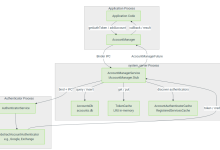
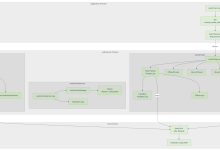
在深入任一框架细节之前,先整体浏览 AOSP 全部 AI/ML 相关组件。下图列出主要子系统、跨进程边界以及组件之间的数据流。
Mainline 模块 HAL / 驱动进程 隔离 / 沙箱进程 目标应用进程 system_server 应用进程 Binder IPC bindService Binder IPC 隔离 bind 调用 Binder IPC Binder IPC Binder IPC Binder IPC Binder IPC
第三方 / 系统应用 AppFunctionManager OnDeviceIntelligenceManager NNAPI C API ComputerControlExtensions AppSearchManager TextClassifierManager ContentCaptureManager AppPredictionManager TopicsManager
AppFunctionManagerServiceImpl OnDeviceIntelligenceManagerService VirtualDeviceManager ComputerControlSession Service ContentCaptureManagerService TextClassificationManagerService AppPredictionManagerService
AppFunctionService OnDeviceSandboxedInferenceService IsolatedTrainingService NNAPI HAL (IDevice) GPU / DSP / NPU
AppSearch 模块 NeuralNetworks 模块 OnDevicePersonalization 模块 AdServices 模块
51.1.1 AOSP 智能子系统分类表
| AppFunctions | 16(引入),Android 17 趋于成熟 | 否(框架内置) | 强类型跨应用函数调用,支持运行时注册与状态观测 |
| Computer Control | 16(Android 16) | 否(框架 + 扩展库) | 基于虚拟显示器实现 AI 驱动的 UI 自动化 |
| OnDeviceIntelligence | 15 及以上 | NeuralNetworks 模块 | 沙箱化的大语言模型 / 机器学习推理 |
| NNAPI | 8.1 及以上 | NeuralNetworks 模块 | 神经网络推理硬件加速 |
| AppSearch | 12 及以上 | AppSearch 模块 | 端侧全文检索与索引 |
| Content Capture | 10 及以上 | 否(框架内置) | 为智能服务实时捕获 UI 结构 |
| TextClassifier | 8.0 及以上 | 否(框架内置) | 实体识别、语言检测 |
| AppPrediction | 10 及以上 | 否(框架内置) | 基于使用行为的应用排序 |
| OnDevicePersonalization | 14 及以上 | ODP 模块 | 联邦计算、隔离训练 |
| AdServices | 13 及以上 | AdServices 模块 | 隐私保护广告定向(Topics、FLEDGE) |
51.1.2 跨子系统通用设计思路
所有 AI 子系统都复用若干架构设计范式:
进程隔离 智能服务运行在隔离或沙箱进程。OnDeviceSandboxedInferenceService设置android:isolatedProcess=\”true\”。IsolatedTrainingService在独立进程加载 TFLite。即使 ComputerControlSession 也基于与主显示器隔离的虚拟显示器工作。
优先使用强类型契约,而非无约束 Bundle AppFunctions 使用 AppSearch 提供的GenericDocument作为参数序列化格式。ODI 使用PersistableBundle承载特性与请求元数据。二者均鼓励 SDK 层封装强类型包装类。
AppSearch 作为通用元数据存储 AppFunction 元数据、应用预测数据、内容捕获智能数据,全部汇聚到 AppSearch 完成索引与检索。
权限管控 + 白名单机制 AppFunctions 执行受EXECUTE_APP_FUNCTIONS(或EXECUTE_APP_FUNCTIONS_SYSTEM)权限约束,同时配合平台AllowlistManager维护签名代理白名单。Computer Control 需要ACCESS_COMPUTER_CONTROL权限。ODI 需要USE_ON_DEVICE_INTELLIGENCE。AdServices 需要ACCESS_ADSERVICES_TOPICS。
支持取消信号传递 几乎全部异步 API 都会跨 Binder 传递ICancellationSignal,调用方可终止长时间推理或函数执行。
51.2 AppFunctions 框架
AppFunctions 框架在 Android 16 以 Beta 特性面世,Android 17 正式广泛可用。它提供一套标准化机制,让 AI 助手(代理)可以发现并调用任意目标应用暴露的功能。例如助手收到指令 “把 XYZ 保存到我的笔记”,框架会将请求路由至对应的AppFunctionService实现,助手无需在编译期依赖笔记应用。
Android 17 对该框架做了大幅增强,不再局限于最初仅通过 Manifest 静态声明的模式。本章后续会详细介绍以下核心新增能力:
Android 17 源码目录概览:
frameworks/base/core/java/android/app/appfunctions/
AppFunctionManager.java — 客户端系统服务入口
AppFunctionService.java — 静态目标应用抽象基类
AppFunction.java — 运行时函数回调接口
RegisterAppFunctionRequest.java — 运行时注册请求Parcelable
ExecuteAppFunctionRequest.java — 执行请求Parcelable
ExecuteAppFunctionResponse.java — 执行响应Parcelable
AppFunctionException.java — 分层异常错误体系
AppFunctionMetadata.java — 静态+运行时函数元数据
AppFunctionName.java — (包名,标识符)函数唯一标识
AppFunctionState.java — 运行时启用/可见状态
AppFunctionActivityId.java — Activity作用域函数键值
AppFunctionSearchSpec.java — 检索查询条件
AppFunctionObserver.java — 变更观测回调
AppFunctionAccessServiceInterface.java — 访问校验本地服务
IAppFunctionManager.aidl — system_server AIDL接口
IAppFunctionService.aidl — 静态目标应用AIDL(oneway)
IAppFunctionExecutor.aidl — 动态注册执行器AIDL
IExecuteAppFunctionCallback.aidl — 异步结果回调AIDL
ICancellationCallback.aidl — 取消信号传输AIDL
…
frameworks/base/services/appfunctions/
java/com/android/server/appfunctions/
AppFunctionManagerService.java — SystemService封装
AppFunctionManagerServiceImpl.java — IAppFunctionManager.Stub实现
RemoteServiceCallerImpl.java — Service绑定逻辑
CallerValidatorImpl.java — 权限+白名单校验
MetadataSyncAdapter.java — AppSearch元数据同步
AppFunctionsLoggerWrapper.java — statsd埋点日志
allowlist/SystemAppFunctionAllowlistReader.java — AllowlistManager白名单读取
dynamic/MultiUserDynamicAppFunctionRegistry.java — 运行时注册管理
reader/AppFunctionMetadataReader.java — 静态/动态元数据读取
observer/AppFunctionMetadataObserver.java — AppSearch变更观测器
…
frameworks/base/services/permission/java/com/android/server/permission/access/appfunction/
AppFunctionAccessService.kt — 持久化(代理,目标)访问状态
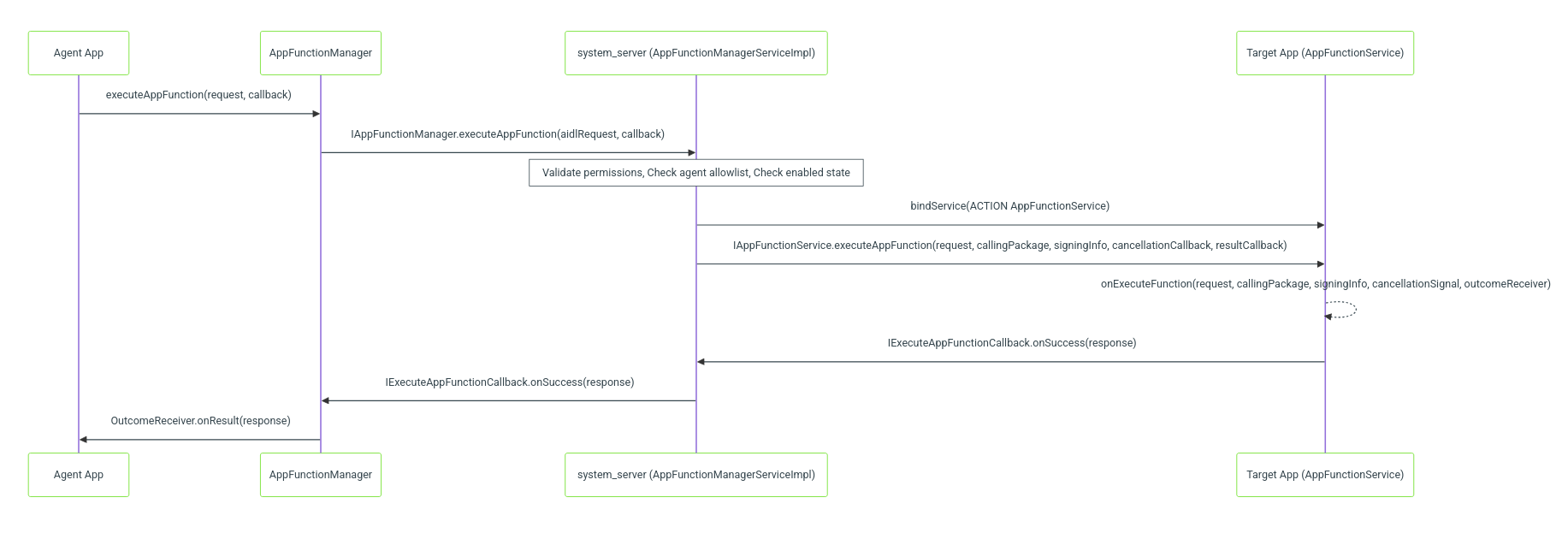
51.2.1 架构概览
51.2.2 客户端:AppFunctionManager
AppFunctionManager以系统服务注册,服务名称Context.APP_FUNCTION_SERVICE。
@FlaggedApi(FLAG_ENABLE_APP_FUNCTION_MANAGER)
@SystemService(Context.APP_FUNCTION_SERVICE)
public final class AppFunctionManager {
核心 API 为executeAppFunction(),接收四个入参。Android17 要求调用方具备两项执行权限之一;应用调用自身暴露的函数无需权限。
@FlaggedApi(FLAG_ENABLE_APP_FUNCTION_PERMISSION_V2)
@RequiresPermission(
anyOf = {
Manifest.permission.EXECUTE_APP_FUNCTIONS,
Manifest.permission.EXECUTE_APP_FUNCTIONS_SYSTEM
},
conditional = true)
@UserHandleAware
public void executeAppFunction(
@NonNull ExecuteAppFunctionRequest request,
@NonNull @CallbackExecutor Executor executor,
@NonNull CancellationSignal cancellationSignal,
@NonNull OutcomeReceiver<ExecuteAppFunctionResponse, AppFunctionException> callback) {
内部实现会将上层请求封装为ExecuteAppFunctionAidlRequest,补充调用者身份、时间戳信息。
ExecuteAppFunctionAidlRequest aidlRequest =
new ExecuteAppFunctionAidlRequest(
request,
mContext.getUser(),
mContext.getPackageName(),
/* requestTime= */ SystemClock.elapsedRealtime(),
/* requestWallTime= */ System.currentTimeMillis());
Binder 调用返回ICancellationSignal传输对象,绑定至客户端CancellationSignal,实现跨进程取消。
ICancellationSignal cancellationTransport =
mService.executeAppFunction(
aidlRequest,
new IExecuteAppFunctionCallback.Stub() {
@Override
public void onSuccess(ExecuteAppFunctionResponse result) {
executor.execute(() -> callback.onResult(result));
}
@Override
public void onError(AppFunctionException exception) {
executor.execute(() -> callback.onError(exception));
}
});
if (cancellationTransport != null) {
cancellationSignal.setRemote(cancellationTransport);
}
51.2.3 启用状态管理
每个 AppFunction 具备三态生命周期:
| APP_FUNCTION_STATE_DEFAULT | 0 | 恢复默认状态(通常为启用) |
| APP_FUNCTION_STATE_ENABLED | 1 | 显式启用 |
| APP_FUNCTION_STATE_DISABLED | 2 | 显式禁用 |
应用通过setAppFunctionEnabled()控制自身函数状态。
@UserHandleAware
public void setAppFunctionEnabled(
@NonNull String functionIdentifier,
@EnabledState int newEnabledState,
@NonNull Executor executor,
@NonNull OutcomeReceiver<Void, Exception> callback) {
启用状态以AppFunctionRuntimeMetadata文档持久化在 AppSearch,与描述函数 Schema 的AppFunctionStaticMetadata相互独立。
setAppFunctionEnabled()仅对静态AppFunctionService对应的函数生效。通过registerAppFunction注册的运行时函数,生命周期与注册会话绑定,启用状态由registerAppFunction/AppFunctionRegistration.unregister控制;对动态函数调用本方法会抛出IllegalArgumentException。
Android17 完整对外暴露运行时状态,不仅仅是启用位。AppFunctionState Parcelable 包含AppFunctionName、启用标记、可见性;可通过AppFunctionManager.getAppFunctionStates(…)批量读取。
51.2.4 访问控制模型
AppFunctions 访问模型分为三层校验:
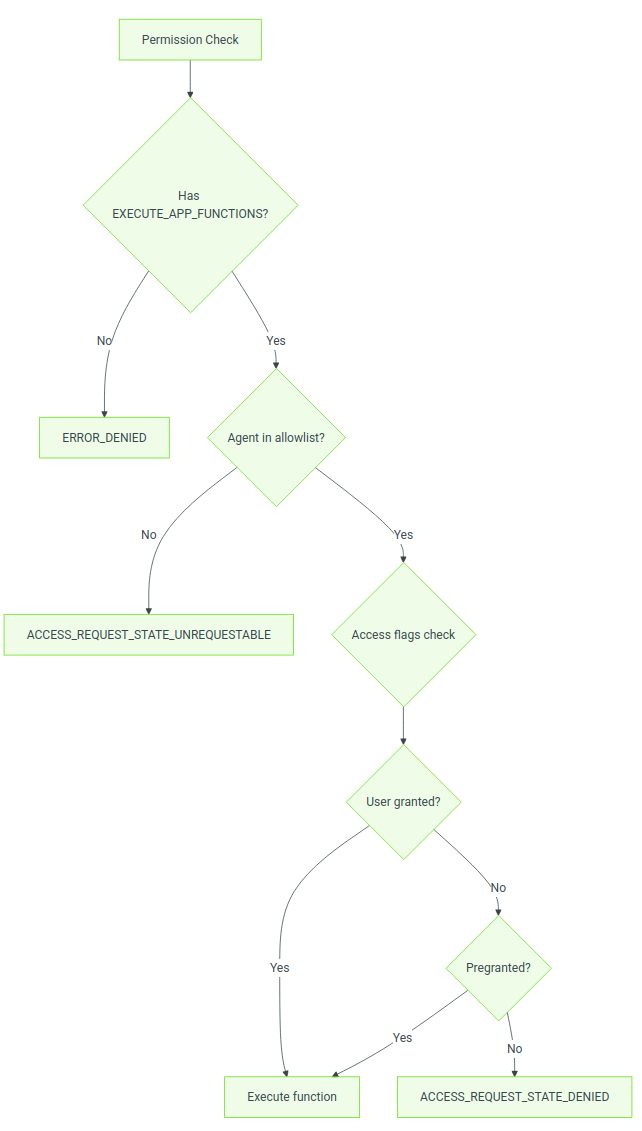
访问标志位是以(代理,目标应用)为单位存储的位掩码,常量定义在AppFunctionManager。
| ACCESS_FLAG_PREGRANTED | 1 | 系统预授权访问 |
| ACCESS_FLAG_UPGRADE_GRANTED | 1 << 1 | 系统版本升级时授予 |
| ACCESS_FLAG_USER_GRANTED | 1 << 2 | 用户通过 UI 显式授权 |
| ACCESS_FLAG_USER_DENIED | 1 << 3 | 用户通过 UI 显式拒绝(优先级高于 PREGRANTED) |
| ACCESS_FLAG_OTHER_GRANTED | 1 << 4 | ADB 或其他方式授权 |
| ACCESS_FLAG_OTHER_DENIED | 1 << 5 | ADB 或主动撤销拒绝 |
Android17 代理白名单不再使用 DeviceConfig 字符串,改为平台AllowlistManager。它以SignedPackage(包名 + 证书摘要)为 Key,记录该代理允许访问的目标包集合,支持通配符代表全部目标包。AppFunctions 服务通过SystemAppFunctionAllowlistReader读取,内部使用 LruCache 按代理缓存结果。
public class SystemAppFunctionAllowlistReader implements AppFunctionAllowlistReader {
private final LruCache<SignedPackage, ArraySet<String>> mCache;
private final AllowlistManager mAllowlistManager;
@Override
public CompletableFuture<Boolean> isAllowlisted(
String agentPackage, String targetPackageName, int userId) { … }
}
CallerValidatorImpl执行前同时校验运行时权限与白名单。持有EXECUTE_APP_FUNCTIONS_SYSTEM的特权系统代理会跳过白名单;仅持有EXECUTE_APP_FUNCTIONS的代理必须出现在目标应用对应的白名单内。
51.2.5 AIDL 接口定义
框架定义两组 AIDL 接口:一组面向客户端,一组面向目标应用。
IAppFunctionManager(客户端 → system_server) Android17 接口大幅扩充,增加发现、观测、运行时注册、访问管理相关接口。
interface IAppFunctionManager {
ICancellationSignal executeAppFunction(
in ExecuteAppFunctionAidlRequest request,
in IExecuteAppFunctionCallback callback);
// 发现与观测
void observeAppFunctions(
in AppFunctionAidlSearchSpec aidlSearchSpec,
in IObserveAppFunctionChangesCallback callback);
void unregisterAppFunctionObserver(
in String callingPackage, in UserHandle userHandle,
in IObserveAppFunctionChangesCallback callback);
void getAppFunctionStates(
in List<AppFunctionName> appFunctionNames,
in String callingPackageName, int targetUserId,
in IGetAppFunctionStatesCallback callback);
void getAppFunctionActivityStates(
in List<AppFunctionActivityId> activityIds,
in String callingPackageName, int targetUserId,
in IGetAppFunctionActivityStatesCallback callback);
// 启用状态生命周期
void isAppFunctionEnabled(
in String callingPackage, in String targetPackage,
in String functionIdentifier, in UserHandle userHandle,
in IIsAppFunctionEnabledCallback callback);
void setAppFunctionEnabled(
in String callingPackage, in String functionIdentifier,
in UserHandle userHandle, int enabledState,
in ISetAppFunctionEnabledCallback callback);
// 运行时动态注册
void registerAppFunctions(in String packageName, in List<String> functionIds,
in IAppFunctionExecutor executor, in IBinder activityToken);
void unregisterAppFunctions(in String packageName, in List<String> functionIds,
in IAppFunctionExecutor executor);
// 访问管理
int getAccessRequestState(in String agentPackageName, int agentUserId,
in String targetPackageName, int targetUserId);
int getAccessFlags(in String agentPackageName, int agentUserId,
in String targetPackageName, int targetUserId);
boolean updateAccessFlags(in String agentPackageName, int agentUserId,
in String targetPackageName, int targetUserId, int flagMask, int flags);
void revokeSelfAccess(in String targetPackageName);
List<String> getValidAgents(int userId);
List<String> getValidTargets(int targetUserId);
Intent createRequestAccessIntent(in String targetPackageName);
void addOnAccessChangedListener(IOnAppFunctionAccessChangeListener listener, int userId);
void removeOnAccessChangedListener(IOnAppFunctionAccessChangeListener listener, int userId);
}
注意区分查询回调IIsAppFunctionEnabledCallback和修改回调ISetAppFunctionEnabledCallback。运行时注册传递IAppFunctionExecutor,由系统直接调用,不再绑定独立组件。
IAppFunctionService(system_server → 目标应用,oneway)
oneway interface IAppFunctionService {
void executeAppFunction(
in ExecuteAppFunctionRequest request,
in String callingPackage,
in android.content.pm.SigningInfo callingPackageSigningInfo,
in ICancellationCallback cancellationCallback,
in IExecuteAppFunctionCallback callback);
}
oneway修饰至关重要:system_server 不会阻塞等待目标应用执行完成,结果全部经由IExecuteAppFunctionCallback回调返回。
51.2.6 目标端:AppFunctionService
目标应用继承AppFunctionService,实现唯一抽象方法:
@MainThread
public abstract void onExecuteFunction(
@NonNull ExecuteAppFunctionRequest request,
@NonNull String callingPackage,
@NonNull SigningInfo callingPackageSigningInfo,
@NonNull CancellationSignal cancellationSignal,
@NonNull OutcomeReceiver<ExecuteAppFunctionResponse, AppFunctionException> callback);
服务内部做调用者校验:仅拥有BIND_APP_FUNCTION_SERVICE权限的 system_server 可以调用。
if (context.checkCallingPermission(BIND_APP_FUNCTION_SERVICE)
== PERMISSION_DENIED) {
throw new SecurityException(\”Can only be called by the system server.\”);
}
Manifest 声明示例,必须指定绑定权限:
<service android:name=\”.YourService\”
android:permission=\”android.permission.BIND_APP_FUNCTION_SERVICE\”>
<intent-filter>
<action android:name=\”android.app.appfunctions.AppFunctionService\” />
</intent-filter>
</service>
51.2.7 请求与响应序列化格式
ExecuteAppFunctionRequest与ExecuteAppFunctionResponse均使用 AppSearch 的GenericDocument作为参数载体。该设计使函数参数可以用 Schema 描述,而 AppSearch 原生支持索引与查询该 Schema。
请求结构体:
public final class ExecuteAppFunctionRequest implements Parcelable {
@NonNull private final String mTargetPackageName;
@NonNull private final String mFunctionIdentifier;
@NonNull private final Bundle mExtras;
@NonNull private final GenericDocumentWrapper mParameters;
@Nullable private final AppInteractionAttribution mAttribution;
响应结构体:
public final class ExecuteAppFunctionResponse implements Parcelable {
public static final String PROPERTY_RETURN_VALUE = \”androidAppfunctionsReturnValue\”;
@NonNull private final GenericDocumentWrapper mResultDocumentWrapper;
@NonNull private final Bundle mExtras;
@NonNull private final List<AppFunctionUriGrant> mUriGrants;
返回值存放在结果GenericDocument的PROPERTY_RETURN_VALUE键。Jetpack AppFunction SDK 提供强类型封装,负责打包、解析该文档。
51.2.8 归因与交互日志
每一次执行可以携带AppInteractionAttribution,描述触发本次调用的交互来源。Android17 将该类型从 appfunctions 包提升至android.app包,供整个应用交互 API 复用,开关标记为FLAG_ENABLE_APP_INTERACTION_API。
public static final int INTERACTION_TYPE_OTHER = 0; // 需要自定义字符串
public static final int INTERACTION_TYPE_USER_QUERY = 1;
public static final int INTERACTION_TYPE_USER_SCHEDULED = 2;
归因包含交互类型、可选自定义类型字符串(类型为INTERACTION_TYPE_OTHER时使用)、可选交互 Uri,指向原始上下文。隐私 UI 依靠该信息向用户解释函数执行缘由。
Android17 不会持久化每次调用的历史数据库,而是把每一次执行写入平台 metrics 流水线 statsd。system_server 中的AppFunctionsLoggerWrapper运行在共享后台执行器,为每一次成功或失败输出结构化事件,归一化处理归因常量并标记函数类型。
static final int FUNCTION_TYPE_UNSPECIFIED = 0;
static final int FUNCTION_TYPE_STATIC = 1; // AppFunctionService实现
static final int FUNCTION_TYPE_DYNAMIC_GLOBAL = 2; // registerAppFunction(Service/全局)
static final int FUNCTION_TYPE_DYNAMIC_ACTIVITY = 3;// registerAppFunction(Activity作用域)
void logAppFunctionSuccess(
ExecuteAppFunctionAidlRequest request,
ExecuteAppFunctionResponse response,
int callingUid,
long executionStartTimeMillis,
@AppFunctionMetadata.AppFunctionType int appFunctionType) { … }
日志事件记录调用 UID、目标包、请求中提取的交互类型、函数类型(静态 / 动态、全局 / Activity 域)、响应码,以及绑定服务完成之后统计的执行耗时。
51.2.9 错误处理
AppFunctionException定义了分类错误码体系:
// 请求类错误 1000‑1999
public static final int ERROR_DENIED = 1000;
public static final int ERROR_INVALID_ARGUMENT = 1001;
public static final int ERROR_DISABLED = 1002;
public static final int ERROR_FUNCTION_NOT_FOUND = 1003;
// 系统类错误 2000‑2999
public static final int ERROR_SYSTEM_ERROR = 2000;
public static final int ERROR_CANCELLED = 2001;
public static final int ERROR_ENTERPRISE_POLICY_DISALLOWED = 2002;
// 应用类错误 3000‑3999
public static final int ERROR_APP_UNKNOWN_ERROR = 3000;
getErrorCategory()将错误码区间映射为错误分类:
public int getErrorCategory() {
if (mErrorCode >= 1000 && mErrorCode < 2000) return ERROR_CATEGORY_REQUEST_ERROR;
if (mErrorCode >= 2000 && mErrorCode < 3000) return ERROR_CATEGORY_SYSTEM;
if (mErrorCode >= 3000 && mErrorCode < 4000) return ERROR_CATEGORY_APP;
return ERROR_CATEGORY_UNKNOWN;
}
51.2.10 System Server 实现
薄的SystemService:AppFunctionManagerService.java,负责发布 Binder 服务到Context.APP_FUNCTION_SERVICE,转发用户生命周期。业务逻辑主体在AppFunctionManagerServiceImpl,继承IAppFunctionManager.Stub,协调各个协作类。
public class AppFunctionManagerServiceImpl extends IAppFunctionManager.Stub {
private final RemoteServiceCaller<IAppFunctionService> mRemoteServiceCaller;
private final CallerValidator mCallerValidator;
private final AppFunctionsLoggerWrapper mLoggerWrapper;
private final IUriGrantsManager mUriGrantsManager;
private final UriGrantsManagerInternal mUriGrantsManagerInternal;
private final MultiUserDynamicAppFunctionRegistry mDynamicAppFunctionRegistry;
private final AppFunctionMetadataReader mAppFunctionMetadataReader;
private final AppFunctionMetadataObserver mAppFunctionMetadataObserver;
private final VisibilityHelper mVisibilityHelper;
private final ActivityTaskManagerInternal mActivityTaskManagerInternal;
// 访问校验委托给权限子系统
private final AppFunctionAccessServiceInterface mAppFunctionAccessService;
…
关键支撑类说明:
| RemoteServiceCallerImpl | 绑定目标AppFunctionService,管理连接生命周期 |
| CallerValidatorImpl | 强制校验EXECUTE_APP_FUNCTIONS/EXECUTE_APP_FUNCTIONS_SYSTEM权限,校验白名单 |
| MetadataSyncAdapter | 应用包变更时,同步静态函数元数据至 AppSearch |
| AppFunctionPackageMonitor | 监听应用安装 / 更新 / 卸载事件 |
| MultiUserDynamicAppFunctionRegistry | 保存每个用户下registerAppFunction运行时注册项 |
| AppFunctionMetadataReader | 读取静态(AppSearch)与动态元数据,用于发现与状态查询 |
| AppFunctionMetadataObserver | 基于 AppSearch 变更事件驱动observeAppFunctions回调 |
| SystemAppFunctionAllowlistReader | 通过AllowlistManager解析签名代理白名单 |
| AppFunctionsLoggerWrapper | 为每一次执行输出 statsd 埋点事件 |
| AppFunctionAccessService(权限子系统) | 持久化(代理,目标)访问状态与标志位 |
51.2.11 通过 AppSearch 实现函数发现
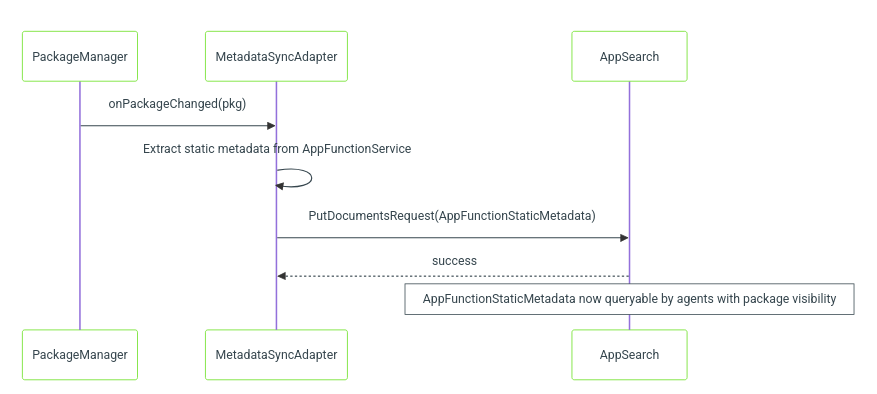
应用安装、更新或设备开机时,MetadataSyncAdapter从目标应用AppFunctionService提取函数元数据,作为AppFunctionStaticMetadata文档索引存入 AppSearch。代理应用通过查询 AppSearch 完成函数发现。
51.2.12 SafeOneTimeExecuteAppFunctionCallback
关键防御封装,保证回调有且仅有一次被交付。
public class SafeOneTimeExecuteAppFunctionCallback {
private final AtomicBoolean mOnResultCalled = new AtomicBoolean(false);
@NonNull private final IExecuteAppFunctionCallback mCallback;
@Nullable private final CompletionCallback mCompletionCallback;
@Nullable private final BeforeCompletionCallback mBeforeCompletionCallback;
private final AtomicLong mExecutionStartTimeAfterBindMillis = new AtomicLong();
public void onResult(@NonNull ExecuteAppFunctionResponse result) {
if (!mOnResultCalled.compareAndSet(false, true)) {
Log.w(TAG, \”Ignore subsequent calls to onResult/onError()\”);
return;
}
try {
if (mBeforeCompletionCallback != null) {
mBeforeCompletionCallback.beforeOnSuccess(result);
}
mCallback.onSuccess(result);
if (mCompletionCallback != null) {
mCompletionCallback.finalizeOnSuccess(
result, mExecutionStartTimeAfterBindMillis.get());
}
} catch (RemoteException ex) {
Log.w(TAG, \”Failed to invoke the callback\”, ex);
}
}
public void onError(@NonNull AppFunctionException error) {
if (!mOnResultCalled.compareAndSet(false, true)) {
Log.w(TAG, \”Ignore subsequent calls to onResult/onError()\”);
return;
}
try {
mCallback.onError(error);
if (mCompletionCallback != null) {
mCompletionCallback.finalizeOnError(
error, mExecutionStartTimeAfterBindMillis.get());
}
} catch (RemoteException ex) {
Log.w(TAG, \”Failed to invoke the callback\”, ex);
}
}
该设计模式必要性:
public interface CompletionCallback {
void finalizeOnSuccess(
ExecuteAppFunctionResponse result, long executionStartTimeMillis);
void finalizeOnError(
AppFunctionException error, long executionStartTimeMillis);
}
public interface BeforeCompletionCallback {
void beforeOnSuccess(ExecuteAppFunctionResponse result);
}
51.2.13 executeAppFunction 实现深度解析
system_server 的executeAppFunction是整个框架最核心路径,逐行解析从 AIDL 入口到绑定目标服务的完整链路。
步骤 1:入口与初始校验
@Override
public ICancellationSignal executeAppFunction(
@NonNull ExecuteAppFunctionAidlRequest requestInternal,
@NonNull IExecuteAppFunctionCallback executeAppFunctionCallback) {
int callingUid = Binder.getCallingUid();
int callingPid = Binder.getCallingPid();
final SafeOneTimeExecuteAppFunctionCallback safeExecuteAppFunctionCallback =
initializeSafeExecuteAppFunctionCallback(
requestInternal, executeAppFunctionCallback, callingUid);
String validatedCallingPackage;
try {
validatedCallingPackage =
mCallerValidator.validateCallingPackage(requestInternal.getCallingPackage());
mCallerValidator.verifyTargetUserHandle(
requestInternal.getUserHandle(), validatedCallingPackage);
} catch (SecurityException exception) {
safeExecuteAppFunctionCallback.onError(
new AppFunctionException(
AppFunctionException.ERROR_DENIED, exception.getMessage()));
return null;
}
SafeOneTimeExecuteAppFunctionCallback包装,保证无论目标应用多次应答还是崩溃,只返回一次成功 / 错误。
步骤 2:线程池异步执行,不阻塞 Binder 线程
ICancellationSignal localCancelTransport = CancellationSignal.createTransport();
THREAD_POOL_EXECUTOR.execute(
() -> {
try {
executeAppFunctionInternal(
requestInternal,
callingUid, callingPid,
localCancelTransport,
safeExecuteAppFunctionCallback,
executeAppFunctionCallback.asBinder());
} catch (Exception e) {
safeExecuteAppFunctionCallback.onError(
mapExceptionToExecuteAppFunctionResponse(e));
}
});
return localCancelTransport;
}
任务提交至THREAD_POOL_EXECUTOR,避免占用 Binder 线程池。
步骤 3:权限与状态基础校验(工作线程)
@WorkerThread
private void executeAppFunctionInternal(…) {
// 企业策略校验
if (!mCallerValidator.verifyEnterprisePolicyIsAllowed(callingUser, targetUser)) {
safeExecuteAppFunctionCallback.onError(
new AppFunctionException(
AppFunctionException.ERROR_ENTERPRISE_POLICY_DISALLOWED, …));
return;
}
// 目标包名校验非空
if (TextUtils.isEmpty(targetPackageName)) {
safeExecuteAppFunctionCallback.onError(
new AppFunctionException(
AppFunctionException.ERROR_INVALID_ARGUMENT, …));
return;
}
步骤 4:链式 Future 完成权限校验 + AppSearch 读取启用状态 实现使用AndroidFuture.thenCompose()做非阻塞权限校验,紧接着查询 AppSearch 获取函数启用状态。
mCallerValidator
.verifyCallerCanExecuteAppFunction(
callingUid, callingPid, targetUser,
requestInternal.getCallingPackage(),
targetPackageName,
requestInternal.getClientRequest().getFunctionIdentifier())
.thenCompose(canExecuteResult -> {
if (canExecuteResult == CAN_EXECUTE_APP_FUNCTIONS_DENIED) {
return AndroidFuture.failedFuture(
new SecurityException(\”Caller does not have permission\”));
}
return isAppFunctionEnabled(
functionIdentifier, targetPackageName,
getAppSearchManagerAsUser(userHandle), THREAD_POOL_EXECUTOR)
.thenApply(isEnabled -> {
if (!isEnabled) {
throw new DisabledAppFunctionException(\”Disabled\”);
}
return canExecuteResult;
});
})
步骤 5:服务解析与绑定
.thenAccept(canExecuteResult -> {
int bindFlags = Context.BIND_AUTO_CREATE;
if (canExecuteResult
== CAN_EXECUTE_APP_FUNCTIONS_ALLOWED_HAS_PERMISSION) {
bindFlags |= Context.BIND_FOREGROUND_SERVICE;
}
Intent serviceIntent =
mInternalServiceHelper.resolveAppFunctionService(
targetPackageName, targetUser);
// 授予隐式可见性,允许目标看到调用方
mPackageManagerInternal.grantImplicitAccess(
grantRecipientUserId, serviceIntent,
grantRecipientAppId, callingUid, /* direct= */ true);
bindAppFunctionServiceUnchecked(
requestInternal, serviceIntent, targetUser,
localCancelTransport, safeExecuteAppFunctionCallback,
bindFlags, callerBinder, callingUid);
})
关键点:调用方具备EXECUTE_APP_FUNCTIONS权限时,使用BIND_FOREGROUND_SERVICE提升目标服务进程优先级。自调用(同一包名)不会获得该优先级提升。
51.2.14 RemoteServiceCaller 模式
RemoteServiceCallerImpl实现一次性 Service 绑定模式:
public class RemoteServiceCallerImpl<T> implements RemoteServiceCaller<T> {
public boolean runServiceCall(
Intent intent, int bindFlags, UserHandle userHandle,
long cancellationTimeoutMillis, CancellationSignal cancellationSignal,
RunServiceCallCallback<T> callback, IBinder callerBinder) {
OneOffServiceConnection serviceConnection =
new OneOffServiceConnection(intent, bindFlags, userHandle,
cancellationTimeoutMillis, cancellationSignal,
callback, callerBinder);
return serviceConnection.bindAndRun();
}
OneOffServiceConnection是自定义ServiceConnection,行为:
private class OneOffServiceConnection
implements ServiceConnection, ServiceUsageCompleteListener {
public boolean bindAndRun() {
boolean bindServiceResult =
mContext.bindServiceAsUser(mIntent, this, mFlags, mUserHandle);
if (bindServiceResult) {
mCancellationSignal.setOnCancelListener(() -> {
mCallback.onCancelled();
mHandler.postDelayed(mCancellationTimeoutRunnable,
mCancellationTimeoutMillis);
});
mDirectServiceVulture = () -> {
Slog.w(TAG, \”Caller process onDeath signal received\”);
mCancellationSignal.cancel();
};
mCallerBinder.linkToDeath(mDirectServiceVulture, 0);
}
return bindServiceResult;
}
该模式保证资源一定被清理,无论调用方崩溃、目标应用崩溃或者用户主动取消。
51.2.15 多用户支持
实现完整支持多用户。每个用户拥有:
- 独立 AppSearch 数据库,保存静态函数元数据
- 独立PackageMonitor监听包变更
- MultiUserDynamicAppFunctionRegistry中独立分片保存运行时注册项
- 权限子系统持久化独立的(代理,目标)访问状态与标志位
public void onUserUnlocked(TargetUser user) {
if (enableDynamicAppFunctions()) {
mAppFunctionMetadataObserver.registerAppSearchObserverForUser(user);
} else {
registerAppSearchObserver(user);
}
trySyncRuntimeMetadata(user.getUserHandle(), …);
PackageMonitor pkgMonitorForUser =
AppFunctionPackageMonitor.registerPackageMonitorForUser(
mContext, user, mAppFunctionMetadataObserver);
mPackageMonitors.append(user.getUserIdentifier(), pkgMonitorForUser);
mDynamicAppFunctionRegistry.onUserUnlocked(user, …);
}
public void onUserStopping(@NonNull TargetUser user) {
if (enableDynamicAppFunctions()) {
mAppFunctionMetadataObserver.unregisterAppSearchObserverForUser(user);
} else {
MetadataSyncPerUser.removeUserSyncAdapter(user.getUserHandle());
}
mPackageMonitors.get(user.getUserIdentifier()).unregister();
mPackageMonitors.delete(user.getUserIdentifier());
}
public void onUserStopped(@NonNull TargetUser user) {
mDynamicAppFunctionRegistry.onUserStopped(user);
}
动态函数标记开启时,每个用户的 AppSearch 观察者由AppFunctionMetadataObserver持有,变更事件同时分发给内部元数据缓存以及客户端observeAppFunctions回调。运行时注册表以 userId 为 key;当用户停止,该用户下全部注册项被销毁。
51.2.16 代理白名单架构
Android17 代理白名单不再是 DeviceConfig 与 Settings.Secure 字符串拼接,改用平台AllowlistManager,白名单 ID 为ALLOWLIST_ID_APP_FUNCTION。输入签名代理包,返回该代理可访问的目标包集合。AppFunctions 服务通过SystemAppFunctionAllowlistReader消费该能力。
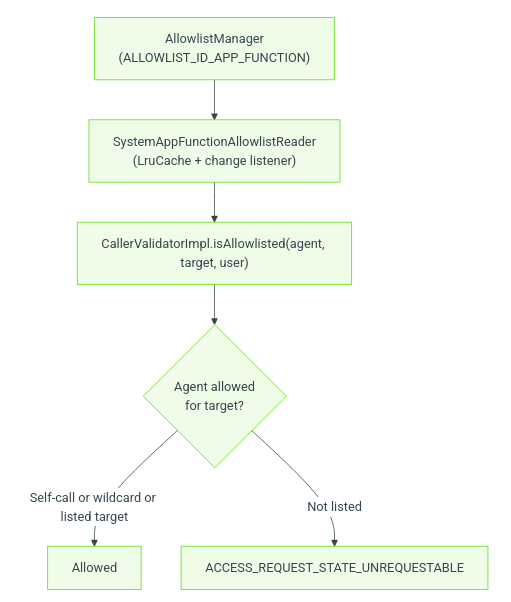
读取器将代理最新签名证书哈希封装为SignedPackage,向AllowlistManager查询合法目标包;查询结果放入 LruCache 缓存,相同代理重复执行可省去一次 IPC。
@Override
public CompletableFuture<Boolean> isAllowlisted(
String agentPackageName, String targetPackageName, int userId) {
if (agentPackageName.equals(targetPackageName)) {
return AndroidFuture.completedFuture(true); // 自身函数永远允许
}
SignedPackage agentSignedPackage =
new SignedPackage(agentPackageName, /* certificate digest */ …);
maybeStartAllowlistListener();
return getValidTargetPackages(agentSignedPackage)
.thenApply(allowlistTargets ->
allowlistTargets.contains(WILDCARD_PACKAGE_NAME)
|| allowlistTargets.contains(targetPackageName));
}
三条关键行为:
51.2.17 AppFunction 响应中的 URI 授权
当目标应用在响应中返回 content URI,框架可以为调用代理授予临时 URI 权限。
private final IUriGrantsManager mUriGrantsManager;
private final UriGrantsManagerInternal mUriGrantsManagerInternal;
private final IBinder mPermissionOwner;
// 构造函数中初始化
mPermissionOwner = mUriGrantsManagerInternal.newUriPermissionOwner(\”appfunctions\”);
响应中的AppFunctionUriGrant指明需要向代理授予哪些 URI。授权经由mUriGrantsManager.grantUriPermissionFromOwner完成,绑定到 AppFunctions 专属 permission owner。权限有效期直到 owner 释放或者设备重启。
51.2.18 Shell 命令支持
服务实现onShellCommand(),用于开发者调试。
@Override
public void onShellCommand(
FileDescriptor in, FileDescriptor out, FileDescriptor err,
@NonNull String[] args, ShellCallback callback,
@NonNull ResultReceiver resultReceiver) {
new AppFunctionManagerServiceShellCommand(mContext, this)
.exec(this, in, out, err, args, callback, resultReceiver);
}
adb 命令:adb shell cmd app_function
51.2.19 服务启动与生命周期
本框架属于SystemService。AppFunctionManagerService.onStart(),当AppFunctionManagerConfiguration.isSupported(context)为 true 时,把 Binder 服务发布到Context.APP_FUNCTION_SERVICE;开启 App Interaction API 标记时,额外发布本地服务AppInteractionService。
@Override
public void onStart() {
if (AppFunctionManagerConfiguration.isSupported(getContext())) {
publishBinderService(Context.APP_FUNCTION_SERVICE, mServiceImpl);
}
if (Flags.enableAppInteractionApi()) {
publishLocalService(AppInte