👨🎓博主简介
🏅CSDN博客专家 🏅云计算领域优质创作者 🏅华为云开发者社区专家博主 🏅阿里云开发者社区专家博主 💊交流社区:运维交流社区 欢迎大家的加入! 🐋 希望大家多多支持,我们一起进步!😄 🎉如果文章对你有帮助的话,欢迎 点赞 👍🏻 评论 💬 收藏 ⭐️ 加关注+💗
文章目录
-
- 一、为什么选择 Trivy?
- 二、在 Linux 上安装 Trivy
-
- 方法一:官方脚本快速安装(推荐)
- 方法二:手动下载安装
- 方法三:Docker 方式运行
- 三、命令及参数
-
- 3.1 命令结构
- 3.2 主要命令
- 3.3 image 命令参数详解
-
- 基础参数
- 漏洞严重级别
- 输出格式参数
- 3.4 fs 命令参数详解
- 3.5 k8s 命令参数详解
- 3.6 全局选项
- 3.7 环境变量
- 四、基础扫描实战
-
- 4.1 扫描本地 Docker 镜像
- 4.2 扫描远程仓库镜像
- 4.3 扫描镜像 tar 包
- 五、高级扫描技巧
-
- 5.1 多种输出格式
- 5.2 指定扫描类型
- 5.3 设置超时与退出码
- 5.4 离线扫描(内网环境)
- 六、CI/CD 集成实战
-
- 6.1 GitHub Actions 集成
- 6.2 Jenkins Pipeline 集成
- 6.3 GitLab CI 集成
- 七、Kubernetes 场景:Trivy Operator
- 八、最佳实践与避坑指南
-
- ✅ 推荐做法
- ❌ 常见坑点
- 九、常见错误
-
- 拉取最新漏洞库超时 timed out
-
- 报错:
- 原因:
- 解决方法:
-
- 方法一:使用国内镜像源
- 方法二:使用`代 理`
- 方法三:离线导入数据库(完全内网环境)
- 十、总结
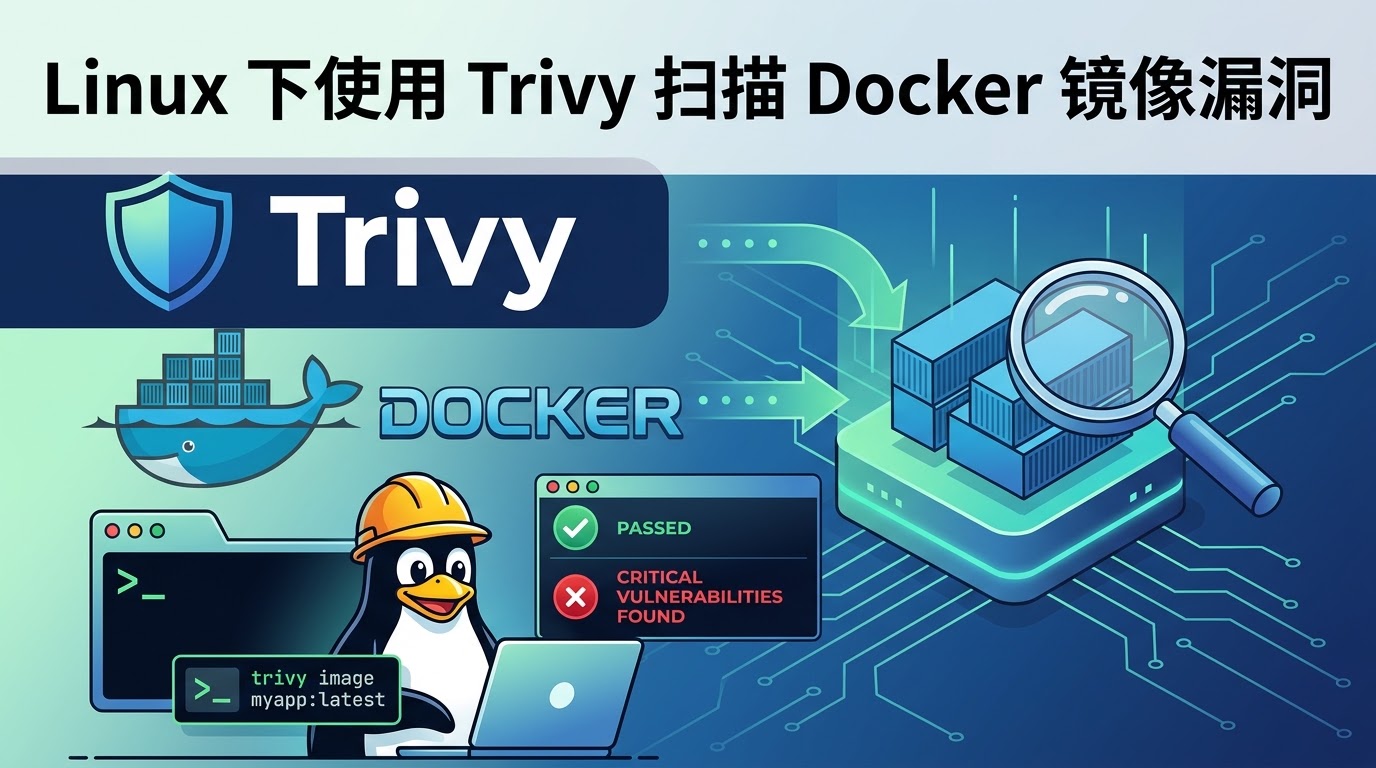
在容器化部署成为主流的今天,镜像安全不再是"可选项",而是生产环境的"必选项"。Trivy 作为 Aqua Security 开源的漏洞扫描工具,凭借零配置、速度快、覆盖广的特点,已成为 GitHub 上 Star 数 18k+ 的明星项目,被苹果、Adobe、网易等大厂广泛采用。
一、为什么选择 Trivy?
在选型容器扫描工具时,Trivy 相比传统方案(如 Clair)有显著优势:
| 安装复杂度 | 单二进制文件,开箱即用 | 需配置数据库、策略文件 |
| 扫描速度 | 比 Clair 快约 3 倍 | 首次扫描需长时间初始化 |
| 覆盖范围 | 镜像 + 文件系统 + K8s + IaC | 通常仅支持镜像 |
| 漏洞库更新 | 最快 4 小时内推送 | 更新周期较长 |
| 离线能力 | 支持离线扫描 | 多数依赖在线服务 |
- Trivy 官网:https://trivy.dev/
- 开源地址:https://github.com/aquasecurity/trivy
二、在 Linux 上安装 Trivy
推荐使用方法2,理由为:安全性高、支持离线安装、版本可控、卸载方便、安装位置灵活、便于批量部署和自动化
方法一:官方脚本快速安装(推荐)
# 一键安装到 /usr/local/bin
curl -sfL https://raw.githubusercontent.com/aquasecurity/trivy/main/contrib/install.sh | sh -s — -b /usr/local/bin
# 验证安装
trivy –version
方法二:手动下载安装
# 下载对应版本(以 v0.73.0 为例)
wget https://github.com/aquasecurity/trivy/releases/download/v0.73.0/trivy_0.73.0_Linux-64bit.tar.gz
# 解压并安装
tar -zxvf trivy_0.73.0_Linux-64bit.tar.gz
chmod +x trivy
cp trivy /usr/local/bin/
# 验证安装
trivy –version
- github各版本下载地址:https://github.com/aquasecurity/trivy/tags
- 版本的多种部署方式下载地址:https://github.com/aquasecurity/trivy/releases/tag/v0.73.0(包含:rpm、deb、arm、linux、windows等等,根据自己所需进行下载)
方法三:Docker 方式运行
docker run –rm -v /var/run/docker.sock:/var/run/docker.sock \\
aquasec/trivy:latest image nginx:1.25.0
三、命令及参数
3.1 命令结构
trivy [全局选项] <命令> [命令选项] <目标>
3.2 主要命令
| image | 扫描容器镜像 | trivy image nginx:1.25.0 |
| fs | 扫描本地文件系统 | trivy fs /path/to/project |
| repo | 扫描远程代码仓库 | trivy repo https://github.com/user/repo |
| sbom | 扫描 SBOM 文件 | trivy sbom /path/to/sbom.json |
| k8s | 扫描 Kubernetes 集群 | trivy k8s –report summary cluster |
| vm | 扫描虚拟机镜像 | trivy vm disk.img |
| aws | 扫描 AWS 云资源 | trivy aws –region us-east-1 |
| convert | 转换报告格式 | trivy convert -f html -o report.html result.json |
| server | 启动 Trivy 服务器模式 | trivy server –listen 0.0.0.0:8080 |
3.3 image 命令参数详解
基础参数
| –severity | -s | 指定漏洞严重级别 | –severity HIGH,CRITICAL |
| –vuln-type | 漏洞类型:os/library/os,library | –vuln-type os,library | |
| –ignore-unfixed | 忽略无修复方案的漏洞 | –ignore-unfixed | |
| –exit-code | 发现漏洞时的退出码 | –exit-code 1 | |
| –timeout | 扫描超时时间 | –timeout 10m | |
| –skip-db-update | 跳过漏洞数据库更新 | –skip-db-update | |
| –skip-java-db-update | 跳过 Java 数据库更新 | –skip-java-db-update | |
| –download-db-only | 仅下载数据库,不扫描 | –download-db-only | |
| –input | 扫描镜像 tar 包 | –input nginx.tar |
漏洞严重级别
| CRITICAL | 严重 | 9.0 – 10.0 | 极易被利用,可能导致系统完全沦陷,必须立即修复 |
| HIGH | 高危 | 7.0 – 8.9 | 容易被利用,可能造成严重数据泄露或权限提升,应尽快修复 |
| MEDIUM | 中危 | 4.0 – 6.9 | 利用条件较复杂,有一定安全风险,建议规划修复 |
| LOW | 低危 | 0.1 – 3.9 | 难以利用,影响有限,可按常规周期处理 |
| UNKNOWN | 未知 | N/A | 暂无评分信息,需要人工评估 |
输出格式参数
| –format | -f | 输出格式 | -f json |
| –output | -o | 输出到文件 | -o report.json |
| –template | -t | 使用自定义模板 | -t @html.tpl |
| –list-all-pkgs | 列出所有包(不仅是有漏洞的) | –list-all-pkgs |
支持的格式:
- table(默认,终端表格)
- json(JSON 格式)
- sarif(SARIF 标准格式,用于 GitHub Security)
- cyclonedx(CycloneDX SBOM 格式)
- spdx(SPDX SBOM 格式)
- template(自定义模板)
3.4 fs 命令参数详解
trivy fs [选项] <路径>
| –severity | 指定严重级别 | –severity CRITICAL |
| –scanners | 扫描器类型 | –scanners vuln,secret,config |
| –skip-dirs | 跳过指定目录 | –skip-dirs node_modules,vendor |
| –skip-files | 跳过指定文件 | –skip-files "*.test.js" |
| –include-dev-deps | 包含开发依赖 | –include-dev-deps |
3.5 k8s 命令参数详解
trivy k8s [选项] [资源]
| –report | 报告格式:summary/all | –report summary |
| –namespace | 指定命名空间 | –namespace default |
| –components | 扫描组件 | –components workload |
3.6 全局选项
| –cache-dir | 缓存目录 | –cache-dir /tmp/trivy-cache | |
| –quiet | -q | 静默模式,只输出结果 | -q |
| –debug | -d | 调试模式,输出详细日志 | -d |
| –insecure | -k | 跳过 TLS 证书验证 | -k |
| –offline-scan | 完全离线扫描 | –offline-scan |
3.7 环境变量
| TRIVY_DB_REPOSITORY | 漏洞数据库镜像地址 | registry.cn-hangzhou.aliyuncs.com/aquasec/trivy-db |
| TRIVY_JAVA_DB_REPOSITORY | Java 数据库镜像地址 | registry.cn-hangzhou.aliyuncs.com/aquasec/trivy-java-db |
| TRIVY_SEVERITY | 默认严重级别 | CRITICAL,HIGH |
| TRIVY_IGNORE_UNFIXED | 默认忽略无修复漏洞 | true |
| HTTP_PROXY / HTTPS_PROXY | 代 理设置 | http://proxy:8080 |
四、基础扫描实战
4.1 扫描本地 Docker 镜像
# 基础扫描(表格形式输出)
trivy image nginx:1.25.0
# 扫描指定严重级别的漏洞
trivy image –severity HIGH,CRITICAL nginx:1.25.0
# 只显示有修复方案的漏洞(避免被大量无修复漏洞刷屏)
trivy image –ignore-unfixed nginx:1.25.0
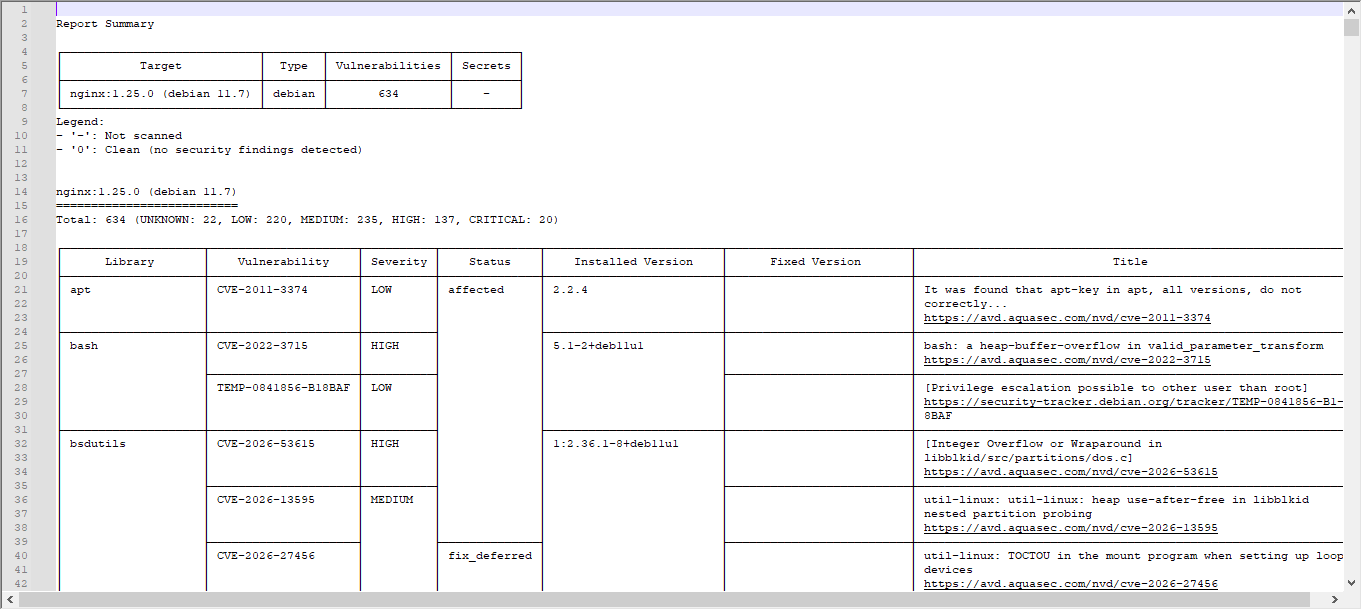
输出示例:
┌────────────────────┬─────────────────────┬──────────┬──────────────┬─────────────────────────┬──────────────────────────┬──────────────────────────────────────────────────────────────┐
│ Library │ Vulnerability │ Severity │ Status │ Installed Version │ Fixed Version │ Title │
├────────────────────┼─────────────────────┼──────────┼──────────────┼─────────────────────────┼──────────────────────────┼──────────────────────────────────────────────────────────────┤
│ apt │ CVE-2011-3374 │ LOW │ affected │ 2.2.4 │ │ It was found that apt-key in apt, all versions, do not │
│ │ │ │ │ │ │ correctly… │
│ │ │ │ │ │ │ https://avd.aquasec.com/nvd/cve-2011-3374 │
└────────────────────┴─────────────────────┴──────────┴──────────────┴─────────────────────────┴──────────────────────────┴──────────────────────────────────────────────────────────────┘
4.2 扫描远程仓库镜像
# Docker Hub 镜像
trivy image 172.16.10.224:10010/library/nginx:1.25.0
# 私有仓库(需认证)
trivy image –username admin –password $PASS \\
registry.example.com/app:v1.0
4.3 扫描镜像 tar 包
# 导出镜像后扫描
docker save nginx:1.25.0 -o nginx-1.25.0.tar
trivy image –input nginx-1.25.0.tar
五、高级扫描技巧
5.1 多种输出格式
# 基础扫描(表格形式输出)并存到指定文件中,方便保存及阅读
trivy image nginx:1.25.0 -o nginx-1.25.0.log
# JSON 格式(适合程序化处理)
trivy image -f json -o nginx-1.25.0.json nginx:1.25.0
# SARIF 格式(可导入 GitHub Security tab)
trivy image -f sarif -o results.sarif nginx:1.25.0
# HTML 报告(适合人工审阅,没有模板的可以看下一步)
trivy image \\
–format template \\
–template @/usr/local/share/trivy/contrib/html.tpl \\
-o report.html nginx:1.25.0
- 添加 html 模板
# 创建模板目录
mkdir -p ~/.config/trivy/templates
# 可以下载官方 HTML 模板
curl -L -o ~/.config/trivy/templates/html.tpl \\
https://raw.githubusercontent.com/aquasecurity/trivy/main/contrib/html.tpl
# 也可以采用我修改过的模板,官方的模板和默认的表格形式的不一样,所以我改了一下,加了筛选。
- 模板内容如下:
<!DOCTYPE html>
<html>
<head>
<meta http-equiv="Content-Type" content="text/html; charset=utf-8">
{{- if . }}
<style>
* {
font-family: Arial, Helvetica, sans-serif;
box-sizing: border-box;
}
body {
margin: 0;
padding: 10px 16px 24px;
background: #ffffff;
color: #111111;
}
h1 {
text-align: center;
margin: 8px 0 12px;
}
h2 {
margin: 22px 0 10px;
padding: 8px 12px;
background: #f0f2f5;
border-left: 6px solid #4472C4;
}
h3 {
margin: 12px 0 6px;
padding: 8px 12px;
background: #f7f7f7;
border: 1px solid #dddddd;
}
.target-path {
font-weight: bold;
word-break: break-all;
}
.target-meta {
margin-left: 10px;
color: #666666;
font-size: 13px;
font-weight: normal;
}
table, th, td {
border: 1px solid black;
border-collapse: collapse;
padding: .3em;
}
table {
width: 100%;
margin: 0 auto 14px;
}
th {
background: #fafafa;
white-space: nowrap;
}
td {
vertical-align: top;
}
.table-wrap {
width: 100%;
overflow-x: auto;
}
.severity {
text-align: center;
font-weight: bold;
color: #fafafa;
white-space: nowrap;
}
.severity-LOW .severity { background-color: #00B050; }
.severity-MEDIUM .severity { background-color: #FFC000; color: #111111; }
.severity-HIGH .severity { background-color: #FF6600; }
.severity-CRITICAL .severity { background-color: #C00000; }
.severity-UNKNOWN .severity { background-color: #808080; }
.severity-LOW { background-color: #00B05030; }
.severity-MEDIUM { background-color: #FFC00030; }
.severity-HIGH { background-color: #FF660030; }
.severity-CRITICAL { background-color: #C0000030; }
.severity-UNKNOWN { background-color: #80808030; }
.pkg-name, .target-cell {
font-weight: bold;
}
.target-cell {
white-space: normal;
word-break: break-all;
}
.title-cell, .links {
white-space: normal;
min-width: 320px;
word-break: break-word;
}
.pkg-name, .pkg-version, .fixed-version {
white-space: normal;
word-break: break-word;
}
.jar-cell {
font-weight: bold;
white-space: nowrap;
word-break: keep-all;
}
.jar-target-cell {
white-space: normal;
word-break: break-all;
color: #333333;
}
.status-cell {
text-align: center;
white-space: nowrap;
}
.no-data {
text-align: center;
color: #666666;
font-weight: bold;
}
.summary-bar {
text-align: center;
margin: 10px 0;
font-size: 14px;
}
.summary-bar span {
display: inline-block;
margin: 3px 6px;
padding: 4px 10px;
border-radius: 3px;
font-weight: bold;
}
.summary-critical { background: #C00000; color: white; }
.summary-high { background: #FF6600; color: white; }
.summary-medium { background: #FFC000; color: #111111; }
.summary-low { background: #00B050; color: white; }
.summary-unknown { background: #808080; color: white; }
.category-summary {
display: flex;
gap: 12px;
justify-content: center;
flex-wrap: wrap;
margin: 8px 0 12px;
}
.category-card {
min-width: 260px;
padding: 10px 14px;
border: 1px solid #dddddd;
border-radius: 6px;
background: #fafafa;
text-align: center;
}
.category-card strong {
display: block;
margin-bottom: 4px;
font-size: 16px;
}
.language-bar {
text-align: right;
margin: 4px 0 10px;
}
.lang-btn {
margin-left: 6px;
padding: 6px 12px;
border: 1px solid #4472C4;
border-radius: 4px;
background: #ffffff;
color: #4472C4;
cursor: pointer;
font-weight: bold;
}
.lang-btn.active {
background: #4472C4;
color: #ffffff;
}
.filter-bar {
text-align: center;
margin: 14px 0 18px;
padding: 10px;
background: #f5f5f5;
border-radius: 5px;
}
.filter-btn {
margin: 4px 5px;
padding: 8px 16px;
border: none;
border-radius: 4px;
cursor: pointer;
font-weight: bold;
color: white;
}
.filter-btn.all { background: #4472C4; }
.filter-btn.os { background: #5B9BD5; }
.filter-btn.java { background: #70AD47; }
.filter-btn.critical { background: #C00000; }
.filter-btn.high { background: #FF6600; }
.filter-btn.medium { background: #FFC000; color: #111111; }
.filter-btn.low { background: #00B050; }
.filter-btn.unknown { background: #808080; }
.filter-btn.active { outline: 3px solid #333333; }
.filter-btn:hover { opacity: 0.85; }
.summary-table th, .summary-table td {
text-align: center;
white-space: nowrap;
}
.summary-table .target-cell {
text-align: left;
}
.summary-table .jar-target .target-cell::before {
content: "JAR ";
display: inline-block;
margin-right: 5px;
padding: 1px 5px;
border-radius: 3px;
background: #70AD47;
color: #ffffff;
font-size: 12px;
}
.summary-table .os-target .target-cell::before {
content: "OS ";
display: inline-block;
margin-right: 5px;
padding: 1px 5px;
border-radius: 3px;
background: #5B9BD5;
color: #ffffff;
font-size: 12px;
}
.links a,
.links[data-more-links=on] a {
display: block;
}
.links[data-more-links=off] a:nth-of-type(1n+5) {
display: none;
}
a.toggle-more-links { cursor: pointer; }
</style>
<title>{{- escapeXML ( index . 0 ).Target }} – Trivy Report – {{ now }} </title>
<script>
var severityOrder = { "CRITICAL": 1, "HIGH": 2, "MEDIUM": 3, "LOW": 4, "UNKNOWN": 5 };
var currentCategory = "ALL";
var currentSeverity = "ALL";
var currentLang = "en";
var I18N = {
en: {
languageLabel: "Language",
catAll: "All Types",
catOs: "OS / Base Image Only",
catJava: "Java / JAR Only",
sevAll: "All Severities",
sevCritical: "CRITICAL",
sevHigh: "HIGH",
sevMedium: "MEDIUM",
sevLow: "LOW",
sevUnknown: "UNKNOWN",
summaryTitle: "Scan Object Summary",
osSectionTitle: "OS / Base Image Vulnerabilities",
javaSectionTitle: "Java / JAR Vulnerabilities",
javaNote: "Note: each Java vulnerability shows only the outermost JAR in the JAR column. The Library column shows only the dependency name and does not repeat the JAR name.",
target: "Target",
type: "Type",
vulnerabilities: "Vulnerabilities",
jar: "JAR",
library: "Library",
vulnerability: "Vulnerability",
severity: "Severity",
status: "Status",
installedVersion: "Installed Version",
fixedVersion: "Fixed Version",
titleLinks: "Title / Links",
noVulns: "No Vulnerabilities found",
loading: "Loading…",
moreLinks: "Show / Hide More Links",
osSummaryTitle: "OS / Base Image Vulnerabilities",
osSummaryText: "Targets: {targets}, Vulnerabilities: {vulns}",
javaSummaryTitle: "Java / JAR Vulnerabilities",
javaSummaryText: "JARs: {targets}, Vulnerabilities: {vulns}",
misconfigurations: "Misconfigurations",
misconfType: "Type",
misconfId: "Misconf ID",
check: "Check",
message: "Message"
},
zh: {
languageLabel: "语言",
catAll: "全部类型",
catOs: "仅操作系统/基础镜像",
catJava: "仅 Java / JAR",
sevAll: "全部级别",
sevCritical: "严重 (CRITICAL)",
sevHigh: "高危 (HIGH)",
sevMedium: "中危 (MEDIUM)",
sevLow: "低危 (LOW)",
sevUnknown: "未知 (UNKNOWN)",
summaryTitle: "扫描对象概览",
osSectionTitle: "操作系统/基础镜像漏洞",
javaSectionTitle: "Java / JAR 漏洞",
javaNote: "说明:每条 Java 漏洞只在 JAR 列显示最外层 Jar 包;Library 列只显示依赖名称,不再重复显示 Jar 包名称。",
target: "扫描对象",
type: "类型",
vulnerabilities: "漏洞数",
jar: "Jar 包",
library: "依赖库",
vulnerability: "漏洞编号",
severity: "严重级别",
status: "状态",
installedVersion: "当前版本",
fixedVersion: "修复版本",
titleLinks: "标题 / 链接",
noVulns: "未发现漏洞",
loading: "加载中…",
moreLinks: "显示/隐藏更多链接",
osSummaryTitle: "操作系统/基础镜像漏洞",
osSummaryText: "扫描对象:{targets} 个,漏洞:{vulns} 个",
javaSummaryTitle: "Java / JAR 漏洞",
javaSummaryText: "JAR 包:{targets} 个,漏洞:{vulns} 个",
misconfigurations: "配置问题",
misconfType: "类型",
misconfId: "配置项编号",
check: "检查项",
message: "说明"
}
};
window.onload = function() {
sortTablesBySeverity();
prepareLinks();
prepareJarRows();
rebuildJavaSummaryRows();
rebuildJavaCleanRows();
setLanguage('zh');
updateSummary();
applyFilters();
};
function t(key) {
return (I18N[currentLang] && I18N[currentLang][key]) || I18N.en[key] || key;
}
function setLanguage(lang) {
currentLang = lang || 'en';
document.documentElement.setAttribute('lang', currentLang === 'zh' ? 'zh-CN' : 'en');
document.querySelectorAll('[data-i18n]').forEach(function(el) {
var key = el.getAttribute('data-i18n');
el.textContent = t(key);
});
document.querySelectorAll('.lang-btn').forEach(function(btn) {
btn.classList.toggle('active', btn.getAttribute('data-lang') === currentLang);
});
document.querySelectorAll('a.toggle-more-links').forEach(function(link) {
link.textContent = t('moreLinks');
});
updateSummary();
}
function prepareLinks() {
document.querySelectorAll('td.links').forEach(function(linkCell) {
var links = Array.prototype.slice.call(linkCell.querySelectorAll('a:not(.toggle-more-links)'));
links.sort(function(a, b) {
return a.href > b.href ? 1 : –1;
});
links.forEach(function(link, idx) {
if (links.length > 4 && idx === 4) {
var toggleLink = document.createElement('a');
toggleLink.innerText = t("moreLinks");
toggleLink.href = "#toggleMore";
toggleLink.setAttribute("class", "toggle-more-links");
linkCell.appendChild(toggleLink);
}
linkCell.appendChild(link);
});
});
document.querySelectorAll('a.toggle-more-links').forEach(function(toggleLink) {
toggleLink.onclick = function() {
var expanded = toggleLink.parentElement.getAttribute("data-more-links");
toggleLink.parentElement.setAttribute("data-more-links", "on" === expanded ? "off" : "on");
return false;
};
});
}
function basenameOf(path) {
if (!path) { return ''; }
var text = String(path).trim();
return text.split(/[\\\\/]/).pop() || text;
}
function outermostArchivePath(path) {
var text = String(path || '').trim();
if (!text) { return ''; }
var normalized = text.replace(/\\\\/g, '/');
var match = normalized.match(/^(.+?\\.(?:jar|war|ear|par))(?:[!\\/].*)?$/i);
return match ? match[1] : text;
}
function extractJarFromLibrary(libraryText) {
var text = String(libraryText || '');
var match = text.match(/\\(([^()]*\\.(?:jar|war|ear|par))\\)\\s*$/i);
return match ? outermostArchivePath(match[1]) : '';
}
function stripTrailingArchiveSuffix(text) {
return String(text || '').replace(/\\s*\\([^()]*\\.(?:jar|war|ear|par)\\)\\s*$/i, '').trim();
}
function resolveJarPath(row) {
var jarPath = outermostArchivePath((row.getAttribute('data-jar-path') || '').trim());
var resultTarget = outermostArchivePath((row.getAttribute('data-result-target') || '').trim());
var libraryText = row.getAttribute('data-library-raw') || '';
var jarFromLibrary = extractJarFromLibrary(libraryText);
if (!jarPath || /^java$/i.test(jarPath)) {
jarPath = jarFromLibrary || resultTarget;
}
if (!jarPath || /^java$/i.test(jarPath)) {
jarPath = '未知Jar包';
}
return jarPath;
}
function prepareJarRows() {
document.querySelectorAll('tr.vuln-row[data-category="java"]').forEach(function(row) {
var jarPath = resolveJarPath(row);
var jarName = basenameOf(jarPath);
var jarCell = row.querySelector('.jar-cell');
var libraryCell = row.querySelector('.pkg-name');
var rawLibrary = row.getAttribute('data-library-raw') || (libraryCell ? libraryCell.textContent : '');
row.setAttribute('data-target', jarPath);
row.setAttribute('data-jar-full', jarPath);
row.setAttribute('data-jar-name', jarName);
if (jarCell) {
// Java / JAR 漏洞明细只显示 JAR 文件名;
// 完整路径仍保留在 title / data-jar-full 中,概览继续显示完整路径。
jarCell.setAttribute('title', jarPath);
jarCell.textContent = jarName;
}
if (libraryCell) {
var shownLibrary = stripTrailingArchiveSuffix(rawLibrary);
libraryCell.textContent = shownLibrary || rawLibrary;
libraryCell.setAttribute('title', rawLibrary);
}
});
}
function rebuildJavaSummaryRows() {
var tbody = document.querySelector('#targetSummary tbody');
if (!tbody) { return; }
// Java Result.Target 通常只是 "Java",不能把它当成 JAR 名称。
// JAR 的真实路径优先来自 Result.Packages[].FilePath;
// 如果 Packages 中没有,则用 Vulnerabilities[].PkgPath 作为兼容回退。
tbody.querySelectorAll('tr[data-category="java"]').forEach(function(row) {
row.parentNode.removeChild(row);
});
var jars = {};
document.querySelectorAll('.jar-package-source').forEach(function(source) {
var jarPath = outermostArchivePath(source.getAttribute('data-jar-path') || '');
if (jarPath && /\\.(?:jar|war|ear|par)$/i.test(jarPath)) {
jars[jarPath] = true;
}
});
// 兼容没有 Packages 数据、但存在漏洞的情况。
document.querySelectorAll('tr.vuln-row[data-category="java"]').forEach(function(row) {
var jarPath = resolveJarPath(row);
if (jarPath && !/^未知Jar包$/i.test(jarPath)) {
jars[jarPath] = true;
}
});
Object.keys(jars).sort(function(a, b) { return a.localeCompare(b); }).forEach(function(jarPath) {
var tr = document.createElement('tr');
tr.className = 'jar-target';
tr.setAttribute('data-category', 'java');
tr.setAttribute('data-target', jarPath);
tr.innerHTML =
'<td class="target-cell jar-target-cell" title="' + escapeHtml(jarPath) + '">' + escapeHtml(jarPath) + '</td>' +
'<td>jar</td>' +
'<td class="target-total">0</td>' +
'<td class="target-critical">0</td>' +
'<td class="target-high">0</td>' +
'<td class="target-medium">0</td>' +
'<td class="target-low">0</td>' +
'<td class="target-unknown">0</td>';
tbody.appendChild(tr);
});
}
function rebuildJavaCleanRows() {
document.querySelectorAll('tr.clean-jar-row').forEach(function(row) {
row.parentNode.removeChild(row);
});
document.querySelectorAll('.target-block[data-category="java"]').forEach(function(block) {
var resultTarget = block.getAttribute('data-result-target') || block.getAttribute('data-target') || '';
var tbody = block.querySelector('tbody.vuln-body');
if (!tbody) { return; }
var inventory = {};
document.querySelectorAll('.jar-package-source').forEach(function(source) {
var sourceTarget = source.getAttribute('data-result-target') || '';
if (sourceTarget !== resultTarget) { return; }
var jarPath = outermostArchivePath(source.getAttribute('data-jar-path') || '');
if (jarPath && /\\.(?:jar|war|ear|par)$/i.test(jarPath)) {
inventory[jarPath] = true;
}
});
// 漏洞中出现、但 package inventory 未出现的 JAR 也纳入展示。
block.querySelectorAll('tr.vuln-row[data-category="java"]').forEach(function(row) {
var jarPath = resolveJarPath(row);
if (jarPath && !/^未知Jar包$/i.test(jarPath)) {
inventory[jarPath] = true;
}
});
Object.keys(inventory).sort(function(a, b) { return a.localeCompare(b); }).forEach(function(jarPath) {
var hasVulnerability = Array.prototype.some.call(
block.querySelectorAll('tr.vuln-row[data-category="java"]'),
function(row) { return resolveJarPath(row) === jarPath; }
);
if (hasVulnerability) { return; }
var tr = document.createElement('tr');
tr.className = 'clean-jar-row';
tr.setAttribute('data-category', 'java');
tr.setAttribute('data-target', jarPath);
var jarName = basenameOf(jarPath);
tr.innerHTML =
'<td class="jar-cell" title="' + escapeHtml(jarPath) + '">' + escapeHtml(jarName) + '</td>' +
'<td colspan="7" class="no-data" data-i18n="noVulns">No Vulnerabilities found</td>';
tbody.appendChild(tr);
});
});
}
function escapeHtml(text) {
return String(text || '').replace(/[&<>"']/g, function(ch) {
return ({ '&': '&', '<': '<', '>': '>', '"': '"', "'": ''' })[ch];
});
}
function sortTablesBySeverity() {
document.querySelectorAll('tbody.vuln-body').forEach(function(tbody) {
var rows = Array.prototype.slice.call(tbody.querySelectorAll('tr.vuln-row'));
rows.sort(function(a, b) {
var sevA = a.getAttribute('data-severity') || 'UNKNOWN';
var sevB = b.getAttribute('data-severity') || 'UNKNOWN';
return severityOrder[sevA] – severityOrder[sevB];
});
rows.forEach(function(row) { tbody.appendChild(row); });
});
}
function setCategoryFilter(category) {
currentCategory = category;
setActiveButton('category', category);
applyFilters();
}
function setSeverityFilter(severity) {
currentSeverity = severity;
setActiveButton('severity', severity);
applyFilters();
}
function setActiveButton(group, value) {
document.querySelectorAll('.filter-btn[data-filter-group="' + group + '"]').forEach(function(btn) {
btn.classList.toggle('active', btn.getAttribute('data-filter-value') === value);
});
}
function applyFilters() {
document.querySelectorAll('tr.vuln-row').forEach(function(row) {
var rowCategory = row.getAttribute('data-category');
var rowSeverity = row.getAttribute('data-severity');
var showCategory = (currentCategory === 'ALL' || rowCategory === currentCategory);
var showSeverity = (currentSeverity === 'ALL' || rowSeverity === currentSeverity);
row.style.display = (showCategory && showSeverity) ? '' : 'none';
});
document.querySelectorAll('tr.clean-jar-row').forEach(function(row) {
var rowCategory = row.getAttribute('data-category');
var showCategory = (currentCategory === 'ALL' || rowCategory === currentCategory);
row.style.display = (showCategory && currentSeverity === 'ALL') ? '' : 'none';
});
document.querySelectorAll('.target-block').forEach(function(block) {
var blockCategory = block.getAttribute('data-category');
var categoryOk = (currentCategory === 'ALL' || blockCategory === currentCategory);
var allVulnRows = block.querySelectorAll('tr.vuln-row').length;
var visibleRows = block.querySelectorAll('tr.vuln-row:not([style*="display: none"])').length;
/*
* 在“全部严重级别”下,0 漏洞对象也要显示。
* 这样只要 Trivy 扫描到了 JAR,对应 block 就会保留,
* 并显示模板已有的“未发现漏洞”提示。
* 选择具体严重级别时,仍只展示真正命中的对象。
*/
var showBlock = false;
if (categoryOk) {
if (currentSeverity === 'ALL') {
showBlock = true;
} else {
showBlock = (allVulnRows > 0 && visibleRows > 0);
}
}
block.style.display = showBlock ? '' : 'none';
});
document.querySelectorAll('.category-section').forEach(function(section) {
var visibleBlocks = section.querySelectorAll('.target-block:not([style*="display: none"])').length;
section.style.display = visibleBlocks > 0 ? '' : 'none';
});
}
function updateSummary() {
var total = { "CRITICAL": 0, "HIGH": 0, "MEDIUM": 0, "LOW": 0, "UNKNOWN": 0 };
var category = {
"os": { targets: 0, vulns: 0 },
"java": { targets: 0, vulns: 0 }
};
var byTarget = {};
document.querySelectorAll('#targetSummary tbody tr').forEach(function(row) {
var rowCategory = row.getAttribute('data-category');
if (category[rowCategory]) {
category[rowCategory].targets++;
}
});
document.querySelectorAll('tr.vuln-row').forEach(function(row) {
var sev = row.getAttribute('data-severity') || 'UNKNOWN';
var rowCategory = row.getAttribute('data-category') || 'os';
var target = row.getAttribute('data-target') || '';
// Java 漏洞必须按真实 JAR 路径统计,不能按 Result.Target=Java 汇总。
if (rowCategory === 'java') {
target = resolveJarPath(row);
}
if (!total[sev] && total[sev] !== 0) {
total[sev] = 0;
}
total[sev]++;
if (category[rowCategory]) {
category[rowCategory].vulns++;
}
if (!byTarget[target]) {
byTarget[target] = { "CRITICAL": 0, "HIGH": 0, "MEDIUM": 0, "LOW": 0, "UNKNOWN": 0, total: 0 };
}
if (!byTarget[target][sev] && byTarget[target][sev] !== 0) {
byTarget[target][sev] = 0;
}
byTarget[target][sev]++;
byTarget[target].total++;
});
var summaryDiv = document.getElementById('summary');
if (summaryDiv) {
summaryDiv.innerHTML =
'<span class="summary-critical">CRITICAL: ' + total.CRITICAL + '</span>' +
'<span class="summary-high">HIGH: ' + total.HIGH + '</span>' +
'<span class="summary-medium">MEDIUM: ' + total.MEDIUM + '</span>' +
'<span class="summary-low">LOW: ' + total.LOW + '</span>' +
'<span class="summary-unknown">UNKNOWN: ' + total.UNKNOWN + '</span>';
}
var osCard = document.getElementById('osSummary');
if (osCard) {
osCard.innerHTML = '<strong>' + escapeHtml(t('osSummaryTitle')) + '</strong>' +
escapeHtml(t('osSummaryText').replace('{targets}', category.os.targets).replace('{vulns}', category.os.vulns));
}
var javaCard = document.getElementById('javaSummary');
if (javaCard) {
javaCard.innerHTML = '<strong>' + escapeHtml(t('javaSummaryTitle')) + '</strong>' +
escapeHtml(t('javaSummaryText').replace('{targets}', category.java.targets).replace('{vulns}', category.java.vulns));
}
document.querySelectorAll('#targetSummary tbody tr').forEach(function(row) {
var target = row.getAttribute('data-target') || '';
var counts = byTarget[target] || { "CRITICAL": 0, "HIGH": 0, "MEDIUM": 0, "LOW": 0, "UNKNOWN": 0, total: 0 };
setCell(row, 'target-total', counts.total);
setCell(row, 'target-critical', counts.CRITICAL);
setCell(row, 'target-high', counts.HIGH);
setCell(row, 'target-medium', counts.MEDIUM);
setCell(row, 'target-low', counts.LOW);
setCell(row, 'target-unknown', counts.UNKNOWN);
});
}
function setCell(row, className, value) {
var cell = row.querySelector('.' + className);
if (cell) {
cell.innerText = value;
}
}
</script>
{{- end }}
</head>
{{- if . }}
<body>
<h1>{{- escapeXML ( index . 0 ).Target }} – Trivy Report – {{ now }}</h1>
<div class="language-bar">
<span data-i18n="languageLabel">Language</span>:
<button class="lang-btn" data-lang="zh" onclick="setLanguage('zh')">中文</button>
<button class="lang-btn active" data-lang="en" onclick="setLanguage('en')">English</button>
</div>
<div class="summary-bar" id="summary"><span data-i18n="loading">Loading…</span></div>
<div class="category-summary">
<div class="category-card" id="osSummary"><span data-i18n="loading">Loading…</span></div>
<div class="category-card" id="javaSummary"><span data-i18n="loading">Loading…</span></div>
</div>
<div class="filter-bar">
<button class="filter-btn all active" data-filter-group="category" data-filter-value="ALL" onclick="setCategoryFilter('ALL')" data-i18n="catAll">All Types</button>
<button class="filter-btn os" data-filter-group="category" data-filter-value="os" onclick="setCategoryFilter('os')" data-i18n="catOs">OS / Base Image Only</button>
<button class="filter-btn java" data-filter-group="category" data-filter-value="java" onclick="setCategoryFilter('java')" data-i18n="catJava">Java / JAR Only</button>
<br>
<button class="filter-btn all active" data-filter-group="severity" data-filter-value="ALL" onclick="setSeverityFilter('ALL')" data-i18n="sevAll">All Severities</button>
<button class="filter-btn critical" data-filter-group="severity" data-filter-value="CRITICAL" onclick="setSeverityFilter('CRITICAL')" data-i18n="sevCritical">CRITICAL</button>
<button class="filter-btn high" data-filter-group="severity" data-filter-value="HIGH" onclick="setSeverityFilter('HIGH')" data-i18n="sevHigh">HIGH</button>
<button class="filter-btn medium" data-filter-group="severity" data-filter-value="MEDIUM" onclick="setSeverityFilter('MEDIUM')" data-i18n="sevMedium">MEDIUM</button>
<button class="filter-btn low" data-filter-group="severity" data-filter-value="LOW" onclick="setSeverityFilter('LOW')" data-i18n="sevLow">LOW</button>
<button class="filter-btn unknown" data-filter-group="severity" data-filter-value="UNKNOWN" onclick="setSeverityFilter('UNKNOWN')" data-i18n="sevUnknown">UNKNOWN</button>
</div>
<h2 data-i18n="summaryTitle">Scan Object Summary</h2>
<div class="table-wrap">
<table class="summary-table" id="targetSummary">
<thead>
<tr>
<th data-i18n="target">Target</th>
<th data-i18n="type">Type</th>
<th data-i18n="vulnerabilities">Vulnerabilities</th>
<th>CRITICAL</th>
<th>HIGH</th>
<th>MEDIUM</th>
<th>LOW</th>
<th>UNKNOWN</th>
</tr>
</thead>
<tbody>
{{- range $idx, $result := . }}
{{- $type := ($result.Type | toString) }}
{{- if ne $type "jar" }}
<tr class="os-target" data-category="os" data-target="{{ escapeXML $result.Target }}">
<td class="target-cell">{{ escapeXML $result.Target }}</td>
<td>{{ escapeXML $type }}</td>
<td class="target-total">{{ len $result.Vulnerabilities }}</td>
<td class="target-critical">0</td>
<td class="target-high">0</td>
<td class="target-medium">0</td>
<td class="target-low">0</td>
<td class="target-unknown">0</td>
</tr>
{{- end }}
{{- end }}
</tbody>
</table>
</div>
<!–
Java/JAR 实际扫描对象清单。
Result.Target 对 Java 可能只是 "Java";真实 JAR 路径在 Packages[].FilePath。
Vulnerabilities[].PkgPath 仅作为兼容回退,因为 0 漏洞 JAR 不会出现在 Vulnerabilities 中。
–>
<div id="jarPackageInventory" style="display:none">
{{- range $idx, $result := . }}
{{- $type := ($result.Type | toString) }}
{{- if eq $type "jar" }}
{{- range $pkg := $result.Packages }}
{{- if $pkg.FilePath }}
<span class="jar-package-source" data-result-target="{{ escapeXML $result.Target }}" data-jar-path="{{ escapeXML $pkg.FilePath }}"></span>
{{- end }}
{{- end }}
{{- range $vuln := $result.Vulnerabilities }}
{{- if $vuln.PkgPath }}
<span class="jar-package-source" data-result-target="{{ escapeXML $result.Target }}" data-jar-path="{{ escapeXML $vuln.PkgPath }}"></span>
{{- end }}
{{- end }}
{{- end }}
{{- end }}
</div>
<div class="category-section" id="osSection">
<h2 data-i18n="osSectionTitle">OS / Base Image Vulnerabilities</h2>
{{- range $idx, $result := . }}
{{- $type := ($result.Type | toString) }}
{{- if ne $type "jar" }}
<div class="target-block" data-category="os" data-target="{{ escapeXML $result.Target }}">
<h3><span class="target-path">{{ escapeXML $result.Target }}</span><span class="target-meta">Type: {{ escapeXML $type }} | Vulnerabilities: {{ len $result.Vulnerabilities }}</span></h3>
{{- if eq (len $result.Vulnerabilities) 0 }}
<table><tr><td class="no-data" data-i18n="noVulns">No Vulnerabilities found</td></tr></table>
{{- else }}
<div class="table-wrap">
<table class="vuln-table">
<thead>
<tr>
<th data-i18n="library">Library</th>
<th data-i18n="vulnerability">Vulnerability</th>
<th data-i18n="severity">Severity</th>
<th data-i18n="status">Status</th>
<th data-i18n="installedVersion">Installed Version</th>
<th data-i18n="fixedVersion">Fixed Version</th>
<th data-i18n="titleLinks">Title / Links</th>
</tr>
</thead>
<tbody class="vuln-body">
{{- range $result.Vulnerabilities }}
<tr class="vuln-row severity-{{ escapeXML .Severity }}" data-category="os" data-target="{{ escapeXML $result.Target }}" data-severity="{{ escapeXML .Severity }}">
<td class="pkg-name">{{ escapeXML .PkgName }}</td>
<td>{{ escapeXML .VulnerabilityID }}</td>
<td class="severity">{{ escapeXML .Severity }}</td>
<td class="status-cell">{{- $status := (printf "%d" .Status) -}}{{- if eq $status "0" -}}unknown{{- else if eq $status "1" -}}not_affected{{- else if eq $status "2" -}}affected{{- else if eq $status "3" -}}fixed{{- else if eq $status "4" -}}under_investigation{{- else if eq $status "5" -}}will_not_fix{{- else if eq $status "6" -}}fix_deferred{{- else if eq $status "7" -}}end_of_life{{- else -}}{{ escapeXML $status }}{{- end -}}</td>
<td class="pkg-version">{{ escapeXML .InstalledVersion }}</td>
<td class="fixed-version">{{ escapeXML .FixedVersion }}</td>
<td class="title-cell links" data-more-links="off">
{{ escapeXML .Title }}
{{- if .PrimaryURL }}<a href={{ escapeXML .PrimaryURL | printf "%q" }} target="_blank">{{ escapeXML .PrimaryURL }}</a>{{ end }}
</td>
</tr>
{{- end }}
</tbody>
</table>
</div>
{{- end }}
</div>
{{- end }}
{{- end }}
</div>
<div class="category-section" id="javaSection">
<h2 data-i18n="javaSectionTitle">Java / JAR Vulnerabilities</h2>
<p style="margin: 6px 0 10px; color:#555;" data-i18n="javaNote">Note: each Java vulnerability shows only the outermost JAR in the JAR column. The Library column shows only the dependency name and does not repeat the JAR name.</p>
{{- range $idx, $result := . }}
{{- $type := ($result.Type | toString) }}
{{- if eq $type "jar" }}
<div class="target-block" data-category="java" data-target="{{ escapeXML $result.Target }}" data-result-target="{{ escapeXML $result.Target }}">
<h3><span class="target-path">Java / JAR</span><span class="target-meta">Type: {{ escapeXML $type }} | Vulnerabilities: {{ len $result.Vulnerabilities }}</span></h3>
<div class="table-wrap">
<table class="vuln-table">
<thead>
<tr>
<th data-i18n="jar">JAR</th>
<th data-i18n="library">Library</th>
<th data-i18n="vulnerability">Vulnerability</th>
<th data-i18n="severity">Severity</th>
<th data-i18n="status">Status</th>
<th data-i18n="installedVersion">Installed Version</th>
<th data-i18n="fixedVersion">Fixed Version</th>
<th data-i18n="titleLinks">Title / Links</th>
</tr>
</thead>
<tbody class="vuln-body">
{{- range $result.Vulnerabilities }}
<tr class="vuln-row severity-{{ escapeXML .Severity }}" data-category="java" data-result-target="{{ escapeXML $result.Target }}" data-target="{{ escapeXML .PkgPath }}" data-jar-path="{{ escapeXML .PkgPath }}" data-library-raw="{{ escapeXML .PkgName }}" data-severity="{{ escapeXML .Severity }}">
<td class="jar-cell" data-full-target="{{ escapeXML .PkgPath }}" title="{{ escapeXML .PkgPath }}"></td>
<td class="pkg-name">{{ escapeXML .PkgName }}</td>
<td>{{ escapeXML .VulnerabilityID }}</td>
<td class="severity">{{ escapeXML .Severity }}</td>
<td class="status-cell">{{- $status := (printf "%d" .Status) -}}{{- if eq $status "0" -}}unknown{{- else if eq $status "1" -}}not_affected{{- else if eq $status "2" -}}affected{{- else if eq $status "3" -}}fixed{{- else if eq $status "4" -}}under_investigation{{- else if eq $status "5" -}}will_not_fix{{- else if eq $status "6" -}}fix_deferred{{- else if eq $status "7" -}}end_of_life{{- else -}}{{ escapeXML $status }}{{- end -}}</td>
<td class="pkg-version">{{ escapeXML .InstalledVersion }}</td>
<td class="fixed-version">{{ escapeXML .FixedVersion }}</td>
<td class="title-cell links" data-more-links="off">
{{ escapeXML .Title }}
{{- if .PrimaryURL }}<a href={{ escapeXML .PrimaryURL | printf "%q" }} target="_blank">{{ escapeXML .PrimaryURL }}</a>{{ end }}
</td>
</tr>
{{- end }}
</tbody>
</table>
</div>
</div>
{{- end }}
{{- end }}
</div>
{{- range . }}
{{- if gt (len .Misconfigurations) 0 }}
<h2><span data-i18n="misconfigurations">Misconfigurations</span> – {{ escapeXML .Target }}</h2>
<div class="table-wrap">
<table>
<thead>
<tr>
<th data-i18n="type">Type</th>
<th data-i18n="misconfId">Misconf ID</th>
<th data-i18n="check">Check</th>
<th data-i18n="severity">Severity</th>
<th data-i18n="message">Message</th>
</tr>
</thead>
<tbody>
{{- range .Misconfigurations }}
<tr class="severity-{{ escapeXML .Severity }}">
<td class="misconf-type">{{ escapeXML .Type }}</td>
<td>{{ escapeXML .ID }}</td>
<td class="misconf-check">{{ escapeXML .Title }}</td>
<td class="severity">{{ escapeXML .Severity }}</td>
<td class="links" data-more-links="off" style="white-space:normal;">
{{ escapeXML .Message }}
{{- if .PrimaryURL }}<a href={{ escapeXML .PrimaryURL | printf "%q" }} target="_blank">{{ escapeXML .PrimaryURL }}</a>{{ end }}
</td>
</tr>
{{- end }}
</tbody>
</table>
</div>
{{- end }}
{{- end }}
</body>
{{- else }}
<body>
<h1>Trivy Returned Empty Report</h1>
</body>
{{- end }}
</html>
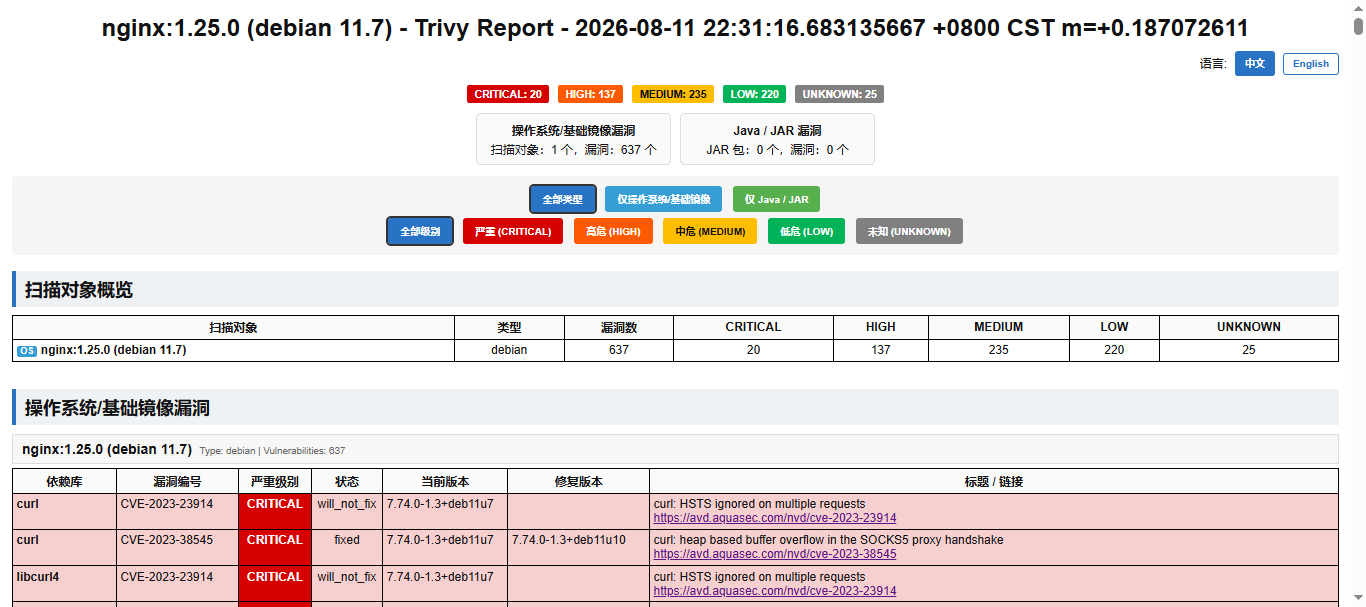
- 使用模板生成报告(指定-t要使用绝对路径)
trivy image \\
–format template \\
–template @/root/.config/trivy/templates/html.tpl \\
-o nginx-1.25.0.html \\
nginx:1.25.0
5.2 指定扫描类型
# 仅扫描 OS 包漏洞
trivy image –vuln-type os nginx:1.25.0
# 仅扫描应用依赖库漏洞
trivy image –vuln-type library nginx:1.25.0
# 同时扫描 OS 包和库(默认)
trivy image –vuln-type os,library nginx:1.25.0
5.3 设置超时与退出码
# 设置超时时间为 10 分钟
trivy image –timeout 10m nginx:1.25.0
# 发现漏洞时返回非零退出码(CI 流水线必备)
trivy image –exit-code 1 –severity CRITICAL nginx:1.25.0
⚠️ 重要提示1:Trivy 默认即使发现漏洞也返回退出码 0,这是linux中命令只要执行成功了就是0,但在 CI/CD 中务必加上 –exit-code 1,否则流水线会"绿灯通过"存在严重漏洞的镜像。 ⚠️ 重要提示2:使用发现漏洞时返回非零退出码时,他并不是不返回漏洞数据,而是:先输出完整的漏洞报告,最后再返回退出码,退出码可以使用命令查看:echo $?。
5.4 离线扫描(内网环境)
# 首次联网下载漏洞库
trivy image –download-db-only
# 下载java相关漏洞库
trivy image –download-java-db-only
# 后续离线扫描(跳过指定数据库进行扫描)
trivy image –skip-db-update –skip-java-db-update nginx:1.25.0
六、CI/CD 集成实战
6.1 GitHub Actions 集成
name: Security Scan
on: [push, pull_request]
jobs:
trivy-scan:
runs-on: ubuntu–latest
steps:
– uses: actions/checkout@v4
– name: Build Docker Image
run: docker build –t myapp:${{ github.sha }} .
– name: Run Trivy Scan
uses: aquasecurity/trivy–action@0.29.0
with:
image-ref: 'myapp:${{ github.sha }}'
format: 'sarif'
output: 'trivy-results.sarif'
severity: 'CRITICAL,HIGH'
ignore-unfixed: true
exit-code: '1'
– name: Upload to GitHub Security
uses: github/codeql–action/upload–sarif@v3
with:
sarif_file: 'trivy-results.sarif'
- 加注释
name: Security Scan
# 工作流的名称,显示在 GitHub Actions 页面
on: [push, pull_request]
# 触发条件:当代码被 push(推送)或 pull_request(提交 PR)时自动运行
jobs:
# 定义要执行的任务列表
trivy-scan:
# 任务名称:安全扫描
runs-on: ubuntu–latest
# 运行环境:使用最新的 Ubuntu 虚拟机
steps:
# 步骤列表,按顺序执行
– uses: actions/checkout@v4
# 步骤1:检出代码
# uses: 引用官方 action
# actions/checkout@v4: GitHub 官方提供的代码检出 action,v4 是版本号
# 作用:把当前仓库的代码下载到 runner 工作目录
– name: Build Docker Image
# 步骤2:构建 Docker 镜像
# name: 步骤显示名称
run: docker build –t myapp:${{ github.sha }} .
# run: 执行 shell 命令
# docker build: 构建 Docker 镜像
# -t myapp:${{ github.sha }}: 给镜像打标签,标签名是本次提交的 SHA 值(唯一标识)
# .: 使用当前目录下的 Dockerfile 构建
– name: Run Trivy Scan
# 步骤3:运行 Trivy 漏洞扫描
uses: aquasecurity/trivy–action@0.29.0
# 引用 Aqua Security 官方的 Trivy action,版本 0.29.0
with:
# 传入 action 的参数
image-ref: 'myapp:${{ github.sha }}'
# 要扫描的镜像引用,就是上一步构建的镜像
format: 'sarif'
# 输出格式:SARIF(静态分析结果交换格式)
# SARIF 是标准化格式,可被 GitHub Security 识别
output: 'trivy-results.sarif'
# 扫描结果输出到文件:trivy-results.sarif
severity: 'CRITICAL,HIGH'
# 只报告 CRITICAL(严重)和 HIGH(高危)级别的漏洞
ignore-unfixed: true
# 忽略没有修复方案的漏洞(减少噪音)
exit-code: '1'
# 发现漏洞时返回退出码 1
# 在 CI 中,非零退出码会导致当前步骤失败,阻断后续流程
– name: Upload to GitHub Security
# 步骤4:上传扫描结果到 GitHub Security 标签页
uses: github/codeql–action/upload–sarif@v3
# 引用 GitHub 官方的 SARIF 上传 action,版本 v3
with:
sarif_file: 'trivy-results.sarif'
# 指定要上传的 SARIF 文件路径
# 上传后可在 GitHub 仓库的 Security → Code scanning alerts 中查看
- 流程图
代码 push / PR ──→ 检出代码 ──→ 构建镜像 ──→ Trivy 扫描 ──→ 上传报告到 GitHub Security
│ │ │ │
│ │ │ └── 在 Security tab 查看
│ │ └── 发现漏洞 → 阻断流水线
│ └── 生成 myapp:abc1234
└── git checkout
6.2 Jenkins Pipeline 集成
pipeline {
agent any
stages {
stage('Build') {
steps {
sh 'docker build -t myapp:$BUILD_NUMBER .'
}
}
stage('Security Scan') {
steps {
sh '''
trivy image \\
–exit-code 1 \\
–severity CRITICAL,HIGH \\
–ignore-unfixed \\
myapp:$BUILD_NUMBER
'''
}
}
}
}
- 加注释
pipeline {
// 声明这是一个 Jenkins Pipeline
agent any
// 指定运行节点:any 表示任意可用的 Jenkins agent/slave 节点
stages {
// 定义流水线阶段(stage),按顺序执行
stage('Build') {
// 阶段1:构建 Docker 镜像
steps {
// steps 块内写具体执行步骤
sh 'docker build -t myapp:$BUILD_NUMBER .'
// sh: 执行 shell 命令
// docker build: 构建 Docker 镜像
// -t myapp:$BUILD_NUMBER: 镜像标签,$BUILD_NUMBER 是 Jenkins 内置变量(每次构建的唯一序号,如 1, 2, 3…)
// .: 使用当前目录的 Dockerfile 构建
}
}
stage('Security Scan') {
// 阶段2:安全扫描
steps {
sh '''
// 三个单引号 ''' 表示多行字符串,保留换行和格式
trivy image \\
// 使用 trivy 扫描镜像
—exit–code 1 \\
// 发现漏洞时返回退出码 1(非零 = 失败)
// Jenkins 检测到非零退出码会标记当前 stage 为失败
—severity CRITICAL,HIGH \\
// 只报告 CRITICAL(严重)和 HIGH(高危)级别的漏洞
// 中危/低危不报告,减少噪音
—ignore–unfixed \\
// 忽略没有修复方案的漏洞
// 只关注"有补丁可打"的漏洞,避免报了也修不了的尴尬
myapp:$BUILD_NUMBER
// 扫描目标:上一步构建的镜像
'''
}
}
}
}
- 流程图
┌─────────────────────────────────────────────────────────────┐
│ Jenkins Pipeline 启动 │
│ 触发条件:代码提交 / 定时触发 / 手动触发 │
└─────────────────────────────────────────────────────────────┘
│
▼
┌─────────────────────────────────────────────────────────────┐
│ Stage 1: Build(构建) │
│ ┌───────────────────────────────────────────────────────┐ │
│ │ sh 'docker build -t myapp:$BUILD_NUMBER .' │ │
│ │ │ │
│ │ 1. 读取当前目录 Dockerfile │ │
│ │ 2. 逐层构建镜像 │ │
│ │ 3. 打标签:myapp:1(假设 BUILD_NUMBER=1) │ │
│ └───────────────────────────────────────────────────────┘ │
│ │ │
│ ▼ │
│ 构建成功? │
│ / \\ │
│ 是 否 │
│ │ │ │
│ ▼ ▼ │
│ 进入下一阶段 Stage 失败 ❌ │
│ (标红,停止流水线) │
└─────────────────────────────────────────────────────────────┘
│
▼
┌─────────────────────────────────────────────────────────────┐
│ Stage 2: Security Scan(安全扫描) │
│ ┌───────────────────────────────────────────────────────┐ │
│ │ trivy image \\ │ │
│ │ –exit-code 1 \\ ← 有漏洞就返回 1(失败) │ │
│ │ –severity CRITICAL,HIGH \\ ← 只看严重/高危 │ │
│ │ –ignore-unfixed \\ ← 忽略无修复方案的 │ │
│ │ myapp:$BUILD_NUMBER ← 扫描刚构建的镜像 │ │
│ └───────────────────────────────────────────────────────┘ │
│ │ │
│ ▼ │
│ 发现 CRITICAL/HIGH 漏洞? │
│ / \\ │
│ 是 否 │
│ │ │ │
│ ▼ ▼ │
│ exit-code=1 exit-code=0 │
│ Stage 失败 ❌ Stage 通过 ✅ │
│ (标红) (变绿,流水线继续) │
│ 阻断后续部署 │
└─────────────────────────────────────────────────────────────┘
│
▼
┌─────────────────────────────────────────────────────────────┐
│ 后续 Stage(如 Deploy 部署) │
│ 只有 Security Scan 通过才会执行到这里 │
└─────────────────────────────────────────────────────────────┘
6.3 GitLab CI 集成
stages:
– build
– scan
build:
stage: build
script:
– docker build –t $CI_REGISTRY_IMAGE:$CI_COMMIT_SHA .
scan:
stage: scan
image: aquasec/trivy:latest
script:
– trivy image ––exit–code 1 ––severity CRITICAL $CI_REGISTRY_IMAGE:$CI_COMMIT_SHA
allow_failure: false
- 加注释
stages:
# 定义流水线阶段(stage)的执行顺序
# stages 是 GitLab CI 的关键字,声明所有阶段
– build
# 阶段1:构建镜像
– scan
# 阶段2:安全扫描
# 按顺序执行:build 完成后才会执行 scan
build:
# 定义名为 build 的 job(任务)
stage: build
# 指定该 job 属于 build 阶段
# 同一个 stage 的 job 可以并行执行
script:
# script 块:定义具体执行的 shell 命令
– docker build –t $CI_REGISTRY_IMAGE:$CI_COMMIT_SHA .
# docker build: 构建 Docker 镜像
# -t: 给镜像打标签
# $CI_REGISTRY_IMAGE: GitLab 内置变量,当前项目的镜像仓库地址
# 例如:registry.gitlab.com/group/project
# $CI_COMMIT_SHA: GitLab 内置变量,当前提交的完整 SHA 哈希值
# 例如:a1b2c3d4…(40位十六进制字符串,唯一标识一次提交)
# .: 使用当前目录的 Dockerfile 构建
scan:
# 定义名为 scan 的 job
stage: scan
# 指定该 job 属于 scan 阶段
# 必须等 build 阶段的所有 job 成功后才会执行
image: aquasec/trivy:latest
# 指定运行该 job 的 Docker 镜像
# 不用宿主机安装的 trivy,而是用官方最新镜像运行
# 优点:版本可控,无需在 runner 上预装 trivy
script:
# 在 trivy 镜像内执行的命令
– trivy image ––exit–code 1 ––severity CRITICAL $CI_REGISTRY_IMAGE:$CI_COMMIT_SHA
# trivy image: 扫描容器镜像
# –exit-code 1: 发现漏洞时返回退出码 1(非零 = 失败)
# –severity CRITICAL: 只报告 CRITICAL(严重)级别的漏洞
# $CI_REGISTRY_IMAGE:$CI_COMMIT_SHA: 扫描上一步构建的镜像
allow_failure: false
# 是否允许失败:false = 不允许
# 该 job 失败时,整个流水线标记为失败,阻断后续阶段
# 如果设为 true,job 失败但流水线继续(不推荐用于安全扫描)
- 流程图
┌─────────────────────────────────────────────────────────────┐
│ GitLab CI Pipeline 触发 │
│ 触发条件:push / merge request / tag / 手动触发 │
└─────────────────────────────────────────────────────────────┘
│
▼
┌─────────────────────────────────────────────────────────────┐
│ Stage: build(构建阶段) │
│ │
│ ┌───────────────────────────────────────────────────────┐ │
│ │ Job: build │ │
│ │ Runner: 默认镜像(如 alpine/ruby:2.7) │ │
│ │ │ │
│ │ script: │ │
│ │ docker build -t $CI_REGISTRY_IMAGE:$CI_COMMIT_SHA │ │
│ │ │ │
│ │ 1. 读取项目根目录 Dockerfile │ │
│ │ 2. 构建镜像层 │ │
│ │ 3. 打标签:registry.gitlab.com/group/project:a1b2c3d │ │
│ │ 4. 推送到 GitLab Container Registry(默认自动推送) │ │
│ └───────────────────────────────────────────────────────┘ │
│ │ │
│ ▼ │
│ build 阶段成功? │
│ / \\ │
│ 是 否 │
│ │ │ │
│ ▼ ▼ │
│ 进入下一阶段 Job 失败 ❌ │
│ Pipeline 失败 │
│ (标红,停止) │
└─────────────────────────────────────────────────────────────┘
│
▼
┌─────────────────────────────────────────────────────────────┐
│ Stage: scan(扫描阶段) │
│ │
│ ┌───────────────────────────────────────────────────────┐ │
│ │ Job: scan │ │
│ │ image: aquasec/trivy:latest ← 专门的扫描镜像 │ │
│ │ │ │
│ │ script: │ │
│ │ trivy image \\ │ │
│ │ –exit-code 1 \\ ← 有漏洞就失败 │ │
│ │ –severity CRITICAL \\ ← 只看严重级别 │ │
│ │ $CI_REGISTRY_IMAGE:$CI_COMMIT_SHA │ │
│ │ │ │
│ │ 1. 从 Registry 拉取镜像 │ │
│ │ 2. 解压分析镜像层 │ │
│ │ 3. 比对漏洞数据库 │ │
│ │ 4. 输出报告 │ │
│ └───────────────────────────────────────────────────────┘ │
│ │ │
│ ▼ │
│ 发现 CRITICAL 漏洞? │
│ / \\ │
│ 是 否 │
│ │ │ │
│ ▼ ▼ │
│ exit-code=1 exit-code=0 │
│ Job 失败 ❌ Job 通过 ✅ │
│ allow_failure: false │
│ Pipeline 失败 Pipeline 成功 │
│ (标红) (标绿) │
│ 阻断部署 │
└─────────────────────────────────────────────────────────────┘
七、Kubernetes 场景:Trivy Operator
对于已在 K8s 集群中运行的应用,可以部署 Trivy Operator 实现持续监控:
# 安装 Trivy Operator
helm repo add aqua https://aquasecurity.github.io/helm-charts/
helm repo update
helm install trivy-operator aqua/trivy-operator \\
–namespace trivy-system \\
–create-namespace \\
–set trivy.ignoreUnfixed=true
# 查看漏洞报告
kubectl get vulnerabilityreports -A
kubectl describe vulnerabilityreport -n default <report-name>
八、最佳实践与避坑指南
✅ 推荐做法
| 三层扫描 | 开发阶段 trivy fs → CI 阶段 trivy image → 运行时 Trivy Operator |
| 设置严重级别阈值 | 生产环境阻断 CRITICAL/HIGH,开发环境可放宽至 MEDIUM |
| 定期更新漏洞库 | 漏洞库超过 12 小时未更新会自动触发下载 |
| 使用 .trivyignore | 对确认误报或已评估风险的 CVE 进行忽略,但需标注原因和过期时间 |
| 缓存数据库 | CI 环境中缓存 ~/.cache/trivy 目录,避免每次重复下载 |
❌ 常见坑点
九、常见错误
拉取最新漏洞库超时 timed out
报错:
2026-08-10T23:14:45+08:00FATALFatal errorrun error: init error: DB error: failed to download vulnerability DB: OCI artifact error: failed to download vulnerability DB: failed to download artifact from mirror.gcr.io/aquasec/trivy-db:2: OCI repository error: 1 error occurred:
* Get "https://mirror.gcr.io/v2/": dial tcp 142.251.188.82:443: connect: connection timed out
原因:
这个错误是因为 Trivy 默认从 mirror.gcr.io(Google 容器镜像仓库)下载漏洞数据库,而你的网络环境无法访问 Google 服务,导致连接超时。
解决方法:
方法一:使用国内镜像源
Trivy 支持通过环境变量指定数据库镜像地址,你可以配置阿里云或其他国内镜像:
# 配置国内镜像源(阿里云)
export TRIVY_DB_REPOSITORY=registry.cn-hangzhou.aliyuncs.com/aquasec/trivy-db
export TRIVY_JAVA_DB_REPOSITORY=registry.cn-hangzhou.aliyuncs.com/aquasec/trivy-java-db
# 然后执行扫描
trivy image nginx:1.25.0
或者写入 ~/.bashrc 永久生效:
echo 'export TRIVY_DB_REPOSITORY=registry.cn-hangzhou.aliyuncs.com/aquasec/trivy-db' >> ~/.bashrc
echo 'export TRIVY_JAVA_DB_REPOSITORY=registry.cn-hangzhou.aliyuncs.com/aquasec/trivy-java-db' >> ~/.bashrc
source ~/.bashrc
方法二:使用代 理
如果你有可用的 HTTP/HTTPS 代 理: 具体的代 理使用可以参考:docker解决超时报错 – 通过代 理软件 的方式,不需要按照里面创建目录,这是docker的操作,只需要打开windows代 理,按需求开启之后,记住代 理的端口和windows的ip,加到如下,进行扫描,就可以自动更新漏洞库。
# 临时设置`代 理`
export HTTP_PROXY=http://your-proxy:port
export HTTPS_PROXY=http://your-proxy:port
# 执行扫描
trivy image nginx:1.25.0
方法三:离线导入数据库(完全内网环境)
如果完全无法联网,可以在有外网的机器上下载数据库,再导入到内网(请定期更新离线数据库):
步骤1:外网机器下载数据库(当然也是需要代 理才能下载下来)
# 在外网机器上安装 trivy 并下载漏洞数据库
trivy image –download-db-only
# 下载 Java 数据库(如果扫描 Java 项目需要)
trivy image –download-java-db-only
# 数据库会缓存在 ~/.cache/trivy/db/
# 打包缓存目录
tar -czvf trivy-db-backup.tar.gz ~/.cache/trivy/
步骤2:传输到内网机器并恢复数据库
# 将缓存的数据库打包好之后传入内网任意地方,需要解压
# 解压到对应位置
mkdir -p ~/.cache/trivy
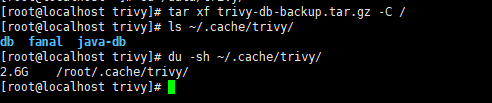
tar xf trivy-db-backup.tar.gz -C /
# 检查
ls ~/.cache/trivy/
du -sh ~/.cache/trivy/
# 扫描
trivy image nginx:1.25.0
# 扫描时跳过数据库更新
trivy image –skip-db-update –skip-java-db-update nginx:1.25.0
# 扫描时跳过数据库更新并保存到指定文件中
trivy image –skip-db-update –skip-java-db-update nginx:1.25.0 -o nginx-1.25.0.log
十、总结
Trivy 以其零配置、高性能、全场景覆盖的特点,成为容器安全扫描的事实标准工具。从本地开发到 CI/CD 流水线,再到 Kubernetes 运行时,Trivy 提供了完整的安全左移方案。
核心命令速查:
# 基础扫描
trivy image nginx:1.25.0
# 基础扫描生成html
trivy image –skip-db-update –skip-java-db-update -f template -t @/root/.config/trivy/templates/html.tpl -o nginx-1.25.0.html nginx:1.25.0
# 生产级扫描(CI 推荐)
trivy image –exit-code 1 -s CRITICAL,HIGH –ignore-unfixed –timeout 10m nginx:1.25.0
安全不是一次性的检查,而是持续的过程。将 Trivy 集成到开发工作流中,让漏洞在到达生产环境之前就被发现和修复。