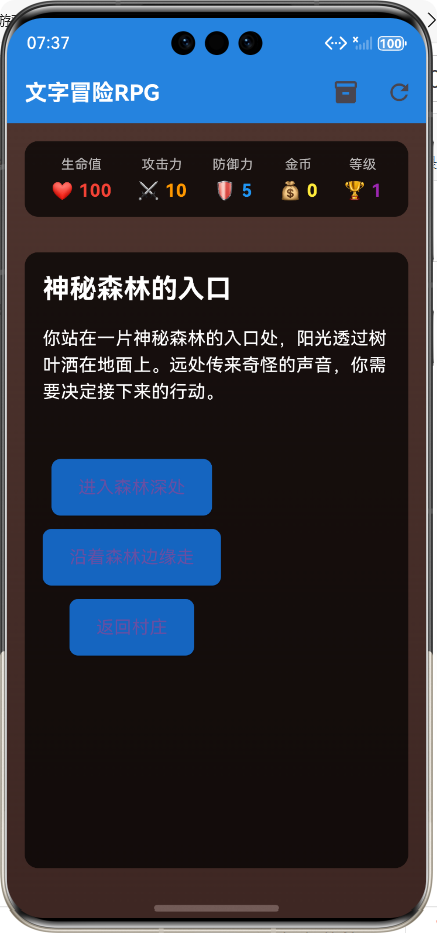
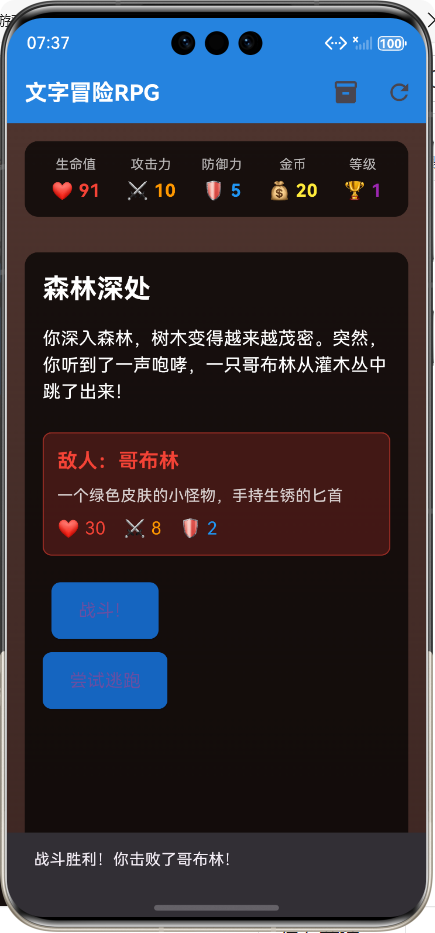
🚀运行效果展示
Flutter框架跨平台鸿蒙开发——文字冒险游戏的开发流程
📝 前言
随着移动应用开发技术的不断发展,跨平台开发框架已经成为主流趋势。Flutter作为Google推出的跨平台UI框架,凭借其高性能、热重载和丰富的组件库,受到了广大开发者的青睐。而鸿蒙系统作为华为自主研发的分布式操作系统,也在不断扩大其生态影响力。本文将详细介绍如何使用Flutter框架开发一款跨平台的文字冒险RPG游戏,并成功运行在鸿蒙系统上。
🎮 游戏介绍
游戏概述
本次开发的文字冒险RPG游戏是一款基于选择分支的剧情向游戏,玩家将扮演一名冒险者,在神秘森林、幽暗洞穴、古老神庙和宏伟城堡等场景中展开冒险。游戏包含完整的角色成长系统、物品收集系统、战斗系统和分支剧情选择。
游戏特色
- 丰富的剧情分支: 玩家的选择将影响故事的发展方向
- 完整的角色成长:包含等级提升、属性成长和技能强化
- 多样化的物品系统:支持物品收集、使用和管理
- 自动战斗系统:简化战斗操作,专注于剧情体验
- 沉浸式文字体验:通过生动的文字描述构建游戏世界
游戏架构
#mermaid-svg-ZSjq9RV2FUnB6gnm{font-family:\”trebuchet ms\”,verdana,arial,sans-serif;font-size:16px;fill:#333;}@keyframes edge-animation-frame{from{stroke-dashoffset:0;}}@keyframes dash{to{stroke-dashoffset:0;}}#mermaid-svg-ZSjq9RV2FUnB6gnm .edge-animation-slow{stroke-dasharray:9,5!important;stroke-dashoffset:900;animation:dash 50s linear infinite;stroke-linecap:round;}#mermaid-svg-ZSjq9RV2FUnB6gnm .edge-animation-fast{stroke-dasharray:9,5!important;stroke-dashoffset:900;animation:dash 20s linear infinite;stroke-linecap:round;}#mermaid-svg-ZSjq9RV2FUnB6gnm .error-icon{fill:#552222;}#mermaid-svg-ZSjq9RV2FUnB6gnm .error-text{fill:#552222;stroke:#552222;}#mermaid-svg-ZSjq9RV2FUnB6gnm .edge-thickness-normal{stroke-width:1px;}#mermaid-svg-ZSjq9RV2FUnB6gnm .edge-thickness-thick{stroke-width:3.5px;}#mermaid-svg-ZSjq9RV2FUnB6gnm .edge-pattern-solid{stroke-dasharray:0;}#mermaid-svg-ZSjq9RV2FUnB6gnm .edge-thickness-invisible{stroke-width:0;fill:none;}#mermaid-svg-ZSjq9RV2FUnB6gnm .edge-pattern-dashed{stroke-dasharray:3;}#mermaid-svg-ZSjq9RV2FUnB6gnm .edge-pattern-dotted{stroke-dasharray:2;}#mermaid-svg-ZSjq9RV2FUnB6gnm .marker{fill:#333333;stroke:#333333;}#mermaid-svg-ZSjq9RV2FUnB6gnm .marker.cross{stroke:#333333;}#mermaid-svg-ZSjq9RV2FUnB6gnm svg{font-family:\”trebuchet ms\”,verdana,arial,sans-serif;font-size:16px;}#mermaid-svg-ZSjq9RV2FUnB6gnm p{margin:0;}#mermaid-svg-ZSjq9RV2FUnB6gnm .label{font-family:\”trebuchet ms\”,verdana,arial,sans-serif;color:#333;}#mermaid-svg-ZSjq9RV2FUnB6gnm .cluster-label text{fill:#333;}#mermaid-svg-ZSjq9RV2FUnB6gnm .cluster-label span{color:#333;}#mermaid-svg-ZSjq9RV2FUnB6gnm .cluster-label span p{background-color:transparent;}#mermaid-svg-ZSjq9RV2FUnB6gnm .label text,#mermaid-svg-ZSjq9RV2FUnB6gnm span{fill:#333;color:#333;}#mermaid-svg-ZSjq9RV2FUnB6gnm .node rect,#mermaid-svg-ZSjq9RV2FUnB6gnm .node circle,#mermaid-svg-ZSjq9RV2FUnB6gnm .node ellipse,#mermaid-svg-ZSjq9RV2FUnB6gnm .node polygon,#mermaid-svg-ZSjq9RV2FUnB6gnm .node path{fill:#ECECFF;stroke:#9370DB;stroke-width:1px;}#mermaid-svg-ZSjq9RV2FUnB6gnm .rough-node .label text,#mermaid-svg-ZSjq9RV2FUnB6gnm .node .label text,#mermaid-svg-ZSjq9RV2FUnB6gnm .image-shape .label,#mermaid-svg-ZSjq9RV2FUnB6gnm .icon-shape .label{text-anchor:middle;}#mermaid-svg-ZSjq9RV2FUnB6gnm .node .katex path{fill:#000;stroke:#000;stroke-width:1px;}#mermaid-svg-ZSjq9RV2FUnB6gnm .rough-node .label,#mermaid-svg-ZSjq9RV2FUnB6gnm .node .label,#mermaid-svg-ZSjq9RV2FUnB6gnm .image-shape .label,#mermaid-svg-ZSjq9RV2FUnB6gnm .icon-shape .label{text-align:center;}#mermaid-svg-ZSjq9RV2FUnB6gnm .node.clickable{cursor:pointer;}#mermaid-svg-ZSjq9RV2FUnB6gnm .root .anchor path{fill:#333333!important;stroke-width:0;stroke:#333333;}#mermaid-svg-ZSjq9RV2FUnB6gnm .arrowheadPath{fill:#333333;}#mermaid-svg-ZSjq9RV2FUnB6gnm .edgePath .path{stroke:#333333;stroke-width:2.0px;}#mermaid-svg-ZSjq9RV2FUnB6gnm .flowchart-link{stroke:#333333;fill:none;}#mermaid-svg-ZSjq9RV2FUnB6gnm .edgeLabel{background-color:rgba(232,232,232, 0.8);text-align:center;}#mermaid-svg-ZSjq9RV2FUnB6gnm .edgeLabel p{background-color:rgba(232,232,232, 0.8);}#mermaid-svg-ZSjq9RV2FUnB6gnm .edgeLabel rect{opacity:0.5;background-color:rgba(232,232,232, 0.8);fill:rgba(232,232,232, 0.8);}#mermaid-svg-ZSjq9RV2FUnB6gnm .labelBkg{background-color:rgba(232, 232, 232, 0.5);}#mermaid-svg-ZSjq9RV2FUnB6gnm .cluster rect{fill:#ffffde;stroke:#aaaa33;stroke-width:1px;}#mermaid-svg-ZSjq9RV2FUnB6gnm .cluster text{fill:#333;}#mermaid-svg-ZSjq9RV2FUnB6gnm .cluster span{color:#333;}#mermaid-svg-ZSjq9RV2FUnB6gnm div.mermaidTooltip{position:absolute;text-align:center;max-width:200px;padding:2px;font-family:\”trebuchet ms\”,verdana,arial,sans-serif;font-size:12px;background:hsl(80, 100%, 96.2745098039%);border:1px solid #aaaa33;border-radius:2px;pointer-events:none;z-index:100;}#mermaid-svg-ZSjq9RV2FUnB6gnm .flowchartTitleText{text-anchor:middle;font-size:18px;fill:#333;}#mermaid-svg-ZSjq9RV2FUnB6gnm rect.text{fill:none;stroke-width:0;}#mermaid-svg-ZSjq9RV2FUnB6gnm .icon-shape,#mermaid-svg-ZSjq9RV2FUnB6gnm .image-shape{background-color:rgba(232,232,232, 0.8);text-align:center;}#mermaid-svg-ZSjq9RV2FUnB6gnm .icon-shape p,#mermaid-svg-ZSjq9RV2FUnB6gnm .image-shape p{background-color:rgba(232,232,232, 0.8);padding:2px;}#mermaid-svg-ZSjq9RV2FUnB6gnm .icon-shape rect,#mermaid-svg-ZSjq9RV2FUnB6gnm .image-shape rect{opacity:0.5;background-color:rgba(232,232,232, 0.8);fill:rgba(232,232,232, 0.8);}#mermaid-svg-ZSjq9RV2FUnB6gnm .label-icon{display:inline-block;height:1em;overflow:visible;vertical-align:-0.125em;}#mermaid-svg-ZSjq9RV2FUnB6gnm .node .label-icon path{fill:currentColor;stroke:revert;stroke-width:revert;}#mermaid-svg-ZSjq9RV2FUnB6gnm :root{–mermaid-font-family:\”trebuchet ms\”,verdana,arial,sans-serif;}
探索
战斗
物品
胜利
失败
游戏启动
玩家创建
初始场景
选择分支
新场景
战斗系统
背包系统
获得奖励
游戏结束
🔧 核心功能实现
1. 项目结构设计
首先,我们需要规划项目的目录结构,采用模块化设计,便于后续扩展和维护。
lib/
├── models/ # 数据模型层
│ ├── rpg_player.dart # 玩家模型
│ └── rpg_story.dart # 故事和战斗模型
├── screens/ # UI界面层
│ └── rpg_game_screen.dart # 游戏主界面
└── main.dart # 应用入口
2. 玩家模型实现
玩家模型是游戏的核心,包含玩家的基本属性、背包系统和物品使用功能。
/// RPG游戏玩家模型
class RPGPlayer {
/// 玩家名称
String name;
/// 玩家生命值
int health;
/// 玩家攻击力
int attack;
/// 玩家防御力
int defense;
/// 玩家金币
int gold;
/// 玩家经验值
int experience;
/// 玩家等级
int level;
/// 玩家背包物品
List<RPGItem> inventory;
/// 构造函数
RPGPlayer({
required this.name,
this.health = 100,
this.attack = 10,
this.defense = 5,
this.gold = 0,
this.experience = 0,
this.level = 1,
List<RPGItem>? inventory,
}) : inventory = inventory ?? [];
/// 增加经验值
void gainExperience(int amount) {
experience += amount;
// 检查是否可以升级
while (experience >= level * 100) {
experience -= level * 100;
level++;
health += 20;
attack += 2;
defense += 1;
}
}
/// 使用物品
bool useItem(RPGItem item) {
if (inventory.contains(item)) {
// 根据物品类型执行不同效果
switch (item.type) {
case RPGItemType.healthPotion:
heal(item.value);
break;
case RPGItemType.attackPotion:
attack += item.value;
break;
case RPGItemType.defensePotion:
defense += item.value;
break;
case RPGItemType.weapon:
attack += item.value;
break;
case RPGItemType.armor:
defense += item.value;
break;
case RPGItemType.goldCoin:
gold += item.value;
break;
}
inventory.remove(item);
return true;
}
return false;
}
}
3. 故事和战斗系统
故事系统采用节点化设计,每个节点包含标题、描述、选项和奖励等信息。战斗系统则基于回合制设计,自动计算战斗结果。
/// RPG游戏故事节点模型
class StoryNode {
/// 节点ID
String id;
/// 节点标题
String title;
/// 节点描述
String description;
/// 节点选项列表
List<StoryOption> options;
/// 节点奖励(可选)
StoryReward? reward;
/// 是否是战斗节点
bool isCombat;
/// 战斗敌人(如果是战斗节点)
Enemy? enemy;
}
/// RPG游戏战斗系统
class CombatSystem {
/// 执行战斗
static CombatResult executeCombat(RPGPlayer player, Enemy enemy) {
int playerHealth = player.health;
int enemyHealth = enemy.health;
// 战斗回合循环
while (playerHealth > 0 && enemyHealth > 0) {
// 玩家攻击
final playerDamage = player.attack – enemy.defense;
enemyHealth -= (playerDamage > 0 ? playerDamage : 1).toInt();
if (enemyHealth <= 0) {
// 玩家胜利
return CombatResult(
isVictory: true,
reward: enemy.reward,
remainingHealth: playerHealth,
);
}
// 敌人攻击
final enemyDamage = enemy.attack – player.defense;
playerHealth -= (enemyDamage > 0 ? enemyDamage : 1).toInt();
if (playerHealth <= 0) {
// 玩家失败
return CombatResult(
isVictory: false,
reward: StoryReward(),
remainingHealth: 0,
);
}
}
// 默认返回失败
return CombatResult(
isVictory: false,
reward: StoryReward(),
remainingHealth: 0,
);
}
}
4. 游戏主界面实现
游戏主界面采用响应式设计,包含玩家属性面板、故事内容区域、选项列表和背包系统。
Widget build(BuildContext context) {
return Scaffold(
appBar: AppBar(
title: const Text('文字冒险RPG'),
actions: [
IconButton(
icon: const Icon(Icons.inventory),
onPressed: () {
setState(() {
_showInventory = !_showInventory;
});
},
),
IconButton(
icon: const Icon(Icons.refresh),
onPressed: _resetGame,
),
],
),
body: Container(
decoration: BoxDecoration(
gradient: LinearGradient(
begin: Alignment.topCenter,
end: Alignment.bottomCenter,
colors: [Colors.brown.shade800, Colors.brown.shade900],
),
),
child: SafeArea(
child: Column(
children: [
// 玩家属性面板
_buildPlayerStats(),
// 主游戏内容区域
Expanded(
child: Container(
margin: const EdgeInsets.all(16.0),
decoration: BoxDecoration(
color: Colors.black.withOpacity(0.7),
borderRadius: BorderRadius.circular(12.0),
),
child: _showInventory ? _buildInventory() : _buildGameContent(),
),
),
],
),
),
),
);
}
5. 鸿蒙平台适配
Flutter框架本身就支持跨平台开发,通过简单的配置即可将应用打包为鸿蒙系统支持的HAP格式。
关键配置步骤
# 构建鸿蒙应用包
flutter build ohos
# 运行到鸿蒙设备
flutter run
📊 开发流程总结
1. 需求分析与设计阶段
| 1 | 游戏核心玩法设计 | 游戏设计文档 |
| 2 | 数据模型设计 | 类图和关系图 |
| 3 | UI界面设计 | 界面原型图 |
| 4 | 技术栈选择 | 技术方案文档 |
2. 开发实现阶段
控制器层
视图层
模型层
开发者
控制器层
视图层
模型层
开发者
#mermaid-svg-2xndgcpS66krcRrW{font-family:\”trebuchet ms\”,verdana,arial,sans-serif;font-size:16px;fill:#333;}@keyframes edge-animation-frame{from{stroke-dashoffset:0;}}@keyframes dash{to{stroke-dashoffset:0;}}#mermaid-svg-2xndgcpS66krcRrW .edge-animation-slow{stroke-dasharray:9,5!important;stroke-dashoffset:900;animation:dash 50s linear infinite;stroke-linecap:round;}#mermaid-svg-2xndgcpS66krcRrW .edge-animation-fast{stroke-dasharray:9,5!important;stroke-dashoffset:900;animation:dash 20s linear infinite;stroke-linecap:round;}#mermaid-svg-2xndgcpS66krcRrW .error-icon{fill:#552222;}#mermaid-svg-2xndgcpS66krcRrW .error-text{fill:#552222;stroke:#552222;}#mermaid-svg-2xndgcpS66krcRrW .edge-thickness-normal{stroke-width:1px;}#mermaid-svg-2xndgcpS66krcRrW .edge-thickness-thick{stroke-width:3.5px;}#mermaid-svg-2xndgcpS66krcRrW .edge-pattern-solid{stroke-dasharray:0;}#mermaid-svg-2xndgcpS66krcRrW .edge-thickness-invisible{stroke-width:0;fill:none;}#mermaid-svg-2xndgcpS66krcRrW .edge-pattern-dashed{stroke-dasharray:3;}#mermaid-svg-2xndgcpS66krcRrW .edge-pattern-dotted{stroke-dasharray:2;}#mermaid-svg-2xndgcpS66krcRrW .marker{fill:#333333;stroke:#333333;}#mermaid-svg-2xndgcpS66krcRrW .marker.cross{stroke:#333333;}#mermaid-svg-2xndgcpS66krcRrW svg{font-family:\”trebuchet ms\”,verdana,arial,sans-serif;font-size:16px;}#mermaid-svg-2xndgcpS66krcRrW p{margin:0;}#mermaid-svg-2xndgcpS66krcRrW .actor{stroke:hsl(259.6261682243, 59.7765363128%, 87.9019607843%);fill:#ECECFF;}#mermaid-svg-2xndgcpS66krcRrW text.actor>tspan{fill:black;stroke:none;}#mermaid-svg-2xndgcpS66krcRrW .actor-line{stroke:hsl(259.6261682243, 59.7765363128%, 87.9019607843%);}#mermaid-svg-2xndgcpS66krcRrW .innerArc{stroke-width:1.5;stroke-dasharray:none;}#mermaid-svg-2xndgcpS66krcRrW .messageLine0{stroke-width:1.5;stroke-dasharray:none;stroke:#333;}#mermaid-svg-2xndgcpS66krcRrW .messageLine1{stroke-width:1.5;stroke-dasharray:2,2;stroke:#333;}#mermaid-svg-2xndgcpS66krcRrW #arrowhead path{fill:#333;stroke:#333;}#mermaid-svg-2xndgcpS66krcRrW .sequenceNumber{fill:white;}#mermaid-svg-2xndgcpS66krcRrW #sequencenumber{fill:#333;}#mermaid-svg-2xndgcpS66krcRrW #crosshead path{fill:#333;stroke:#333;}#mermaid-svg-2xndgcpS66krcRrW .messageText{fill:#333;stroke:none;}#mermaid-svg-2xndgcpS66krcRrW .labelBox{stroke:hsl(259.6261682243, 59.7765363128%, 87.9019607843%);fill:#ECECFF;}#mermaid-svg-2xndgcpS66krcRrW .labelText,#mermaid-svg-2xndgcpS66krcRrW .labelText>tspan{fill:black;stroke:none;}#mermaid-svg-2xndgcpS66krcRrW .loopText,#mermaid-svg-2xndgcpS66krcRrW .loopText>tspan{fill:black;stroke:none;}#mermaid-svg-2xndgcpS66krcRrW .loopLine{stroke-width:2px;stroke-dasharray:2,2;stroke:hsl(259.6261682243, 59.7765363128%, 87.9019607843%);fill:hsl(259.6261682243, 59.7765363128%, 87.9019607843%);}#mermaid-svg-2xndgcpS66krcRrW .note{stroke:#aaaa33;fill:#fff5ad;}#mermaid-svg-2xndgcpS66krcRrW .noteText,#mermaid-svg-2xndgcpS66krcRrW .noteText>tspan{fill:black;stroke:none;}#mermaid-svg-2xndgcpS66krcRrW .activation0{fill:#f4f4f4;stroke:#666;}#mermaid-svg-2xndgcpS66krcRrW .activation1{fill:#f4f4f4;stroke:#666;}#mermaid-svg-2xndgcpS66krcRrW .activation2{fill:#f4f4f4;stroke:#666;}#mermaid-svg-2xndgcpS66krcRrW .actorPopupMenu{position:absolute;}#mermaid-svg-2xndgcpS66krcRrW .actorPopupMenuPanel{position:absolute;fill:#ECECFF;box-shadow:0px 8px 16px 0px rgba(0,0,0,0.2);filter:drop-shadow(3px 5px 2px rgb(0 0 0 / 0.4));}#mermaid-svg-2xndgcpS66krcRrW .actor-man line{stroke:hsl(259.6261682243, 59.7765363128%, 87.9019607843%);fill:#ECECFF;}#mermaid-svg-2xndgcpS66krcRrW .actor-man circle,#mermaid-svg-2xndgcpS66krcRrW line{stroke:hsl(259.6261682243, 59.7765363128%, 87.9019607843%);fill:#ECECFF;stroke-width:2px;}#mermaid-svg-2xndgcpS66krcRrW :root{–mermaid-font-family:\”trebuchet ms\”,verdana,arial,sans-serif;}
实现玩家模型
实现故事节点模型
实现战斗系统
实现游戏主界面
实现属性面板
实现背包界面
实现游戏逻辑控制
实现选项处理
实现战斗逻辑
3. 测试与优化阶段
| 功能测试 | 游戏流程完整性 | 修复剧情分支错误 |
| 性能测试 | 应用启动速度 | 优化资源加载 |
| 兼容性测试 | 鸿蒙系统适配 | 修复平台特定问题 |
| 用户体验测试 | 界面操作流畅度 | 优化交互设计 |
🎯 技术难点与解决方案
1. 跨平台兼容性问题
问题:不同平台的渲染差异和API支持不一致
解决方案:
- 使用Flutter提供的跨平台组件和API
- 针对鸿蒙平台进行特定优化
- 充分利用Flutter的热重载功能进行调试
2. 游戏状态管理
问题:游戏状态复杂,包含多个场景和分支
解决方案:
- 采用节点化设计,每个场景对应一个故事节点
- 使用状态管理库管理全局状态
- 实现游戏存档和读档功能
3. 性能优化
问题:文字渲染和状态更新可能导致性能问题
解决方案:
- 优化列表渲染,使用ListView.builder
- 减少不必要的重建,合理使用const构造函数
- 优化状态更新,只更新必要的组件
📈 项目成果
运行效果
游戏成功运行在鸿蒙模拟器上,各项功能正常,包括:
- ✅ 角色属性显示和更新
- ✅ 故事内容和选项展示
- ✅ 战斗系统正常运行
- ✅ 背包系统功能完整
- ✅ 物品使用和管理
技术成果
- 成功实现了Flutter框架在鸿蒙系统上的应用
- 建立了完整的文字冒险游戏架构
- 实现了跨平台的游戏开发流程
- 积累了Flutter鸿蒙开发经验
📝 总结
本文详细介绍了使用Flutter框架开发跨平台文字冒险RPG游戏的完整流程,包括游戏设计、核心功能实现、鸿蒙平台适配和开发流程总结。通过本次开发,我们验证了Flutter框架在鸿蒙系统上的可行性和优势,为未来的跨平台开发提供了宝贵经验。
未来展望
- 扩展游戏内容,增加更多场景和剧情分支
- 实现更复杂的战斗系统,支持手动操作
- 增加多人游戏功能,支持联机冒险
- 优化游戏性能,提升用户体验
- 探索更多Flutter鸿蒙生态的可能性
结语
随着Flutter和鸿蒙生态的不断发展,跨平台开发将成为越来越多开发者的选择。通过本次开发实践,我们看到了Flutter框架在跨平台开发中的强大潜力,也体验到了鸿蒙系统的开放性和包容性。相信在不久的将来,Flutter和鸿蒙的结合将为移动应用开发带来更多可能性。
📚 参考资料
欢迎加入开源鸿蒙跨平台社区:https://openharmonycrossplatform.csdn.net