C++ 红黑树详解(map、set 模拟实现)
文章目录
- C++ 红黑树详解(map、set 模拟实现)
-
- 一、红黑树的概念与性质
- 二、红黑树的节点定义
- 三、红黑树的插入:变色与旋转(核心)
-
- 3.1 新节点为什么默认红色
- 3.2 插入流程总览
- 3.3 情况一:叔叔存在且为红,变色后继续向上
- 3.4 情况二:叔叔不存在或为黑,单旋加变色
- 3.5 情况三:叔叔不存在或为黑,双旋加变色
- 3.6 旋转函数:三叉链下的单旋实现
- 3.7 Insert 完整代码
- 四、红黑树的验证:IsBalance
- 五、红黑树与 AVL 树的对比
-
- 5.1 概念对比
- 六、红黑树的迭代器
-
- 6.1 迭代器的设计
- 6.2 operator++:中序后继
- 6.3 operator–:中序前驱与 end 特例
- 6.4 完整代码
- 七、用红黑树封装 set 与 map(模拟实现)
-
- 7.1 一个树,两种容器:K、T、KeyOfT 三个模板参数
- 7.2 封装 set
- 7.3 封装 map 与 operator[]
- 7.4 测试结果
- 八、完整代码
-
- 红黑树模拟实现
- set模拟封装
- map模拟封装
- 总结
上一篇笔记我们走完了关联式容器的使用层:set 是 K 模型的去重加排序容器,map 是 KV 模型的键值对容器,
operator[] 借助 insert 的返回值实现了"不存在则插入、存在则查找"的复合功能;笔记结尾还铺垫了 AVL 树的概念,讲了平衡因子、更新规则和三叉链。这篇笔记要回答上一篇留下的问题:map、set 的底层到底长什么样。答案是
红黑树,一棵自平衡的二叉搜索树。AVL 树的四种旋转和完整实现已经在上一篇专题里讲完,本篇不再重复,只在对比环节用到它。本篇会从红黑树的五条性质讲起,重点拆解插入时的变色与旋转处理,再用对比测试把红黑树和 AVL 树的实测数据摆出来,然后实现红黑树的迭代器,最后用这棵树把 set 和 map 完整封装出来,完成模拟实现。学完这篇,关联式容器的底牌就彻底揭开了。
一、红黑树的概念与性质
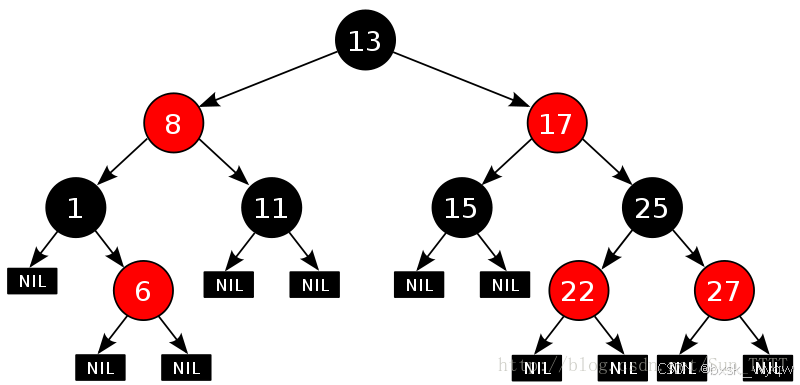
普通二叉搜索树在极端情况下会退化成链,查找效率变成 O(n),不可控。AVL 树通过"左右子树高度差不超过 1"把树控制得很平衡,但这个标准太严格,插入和删除时为了维持平衡要做大量旋转。红黑树换了一个思路:不追求高度差,而是给节点染上颜色,用颜色规则把"最长路径"和"最短路径"的比例限制住,平衡要求更宽松,旋转次数自然更少。
红黑树的性质有五条,这是面试高频考点,要能默写:
为什么这五条能保证平衡?关键在第 4、5 条的组合。性质 5 保证所有路径的黑色节点数相同,设最短路径全黑、黑节点数为 h;性质 4 保证红节点不能相邻,所以最长路径上红黑交替,红节点最多和黑节点一样多。最长路径的长度最多是 2h,也就是说最长路径不超过最短路径的 2 倍,树的高度被限制在 O(log n) 量级。红黑树的平衡是一个"比例"概念,而 AVL 树的"高度差不超过 1"是一个"差值"概念,后者严格得多。
放宽平衡标准换来的是更少的旋转:AVL 树删除节点可能一路回溯旋转,红黑树删除最多旋转三次。STL 的 map、set 底层选择红黑树,正是因为实际使用中插入删除远比纯查找频繁,旋转少的优势更大。
#mermaid-svg-eG9LpzLYReUU6r5B{font-family:\”trebuchet ms\”,verdana,arial,sans-serif;font-size:16px;fill:#333;}@keyframes edge-animation-frame{from{stroke-dashoffset:0;}}@keyframes dash{to{stroke-dashoffset:0;}}#mermaid-svg-eG9LpzLYReUU6r5B .edge-animation-slow{stroke-dasharray:9,5!important;stroke-dashoffset:900;animation:dash 50s linear infinite;stroke-linecap:round;}#mermaid-svg-eG9LpzLYReUU6r5B .edge-animation-fast{stroke-dasharray:9,5!important;stroke-dashoffset:900;animation:dash 20s linear infinite;stroke-linecap:round;}#mermaid-svg-eG9LpzLYReUU6r5B .error-icon{fill:#552222;}#mermaid-svg-eG9LpzLYReUU6r5B .error-text{fill:#552222;stroke:#552222;}#mermaid-svg-eG9LpzLYReUU6r5B .edge-thickness-normal{stroke-width:1px;}#mermaid-svg-eG9LpzLYReUU6r5B .edge-thickness-thick{stroke-width:3.5px;}#mermaid-svg-eG9LpzLYReUU6r5B .edge-pattern-solid{stroke-dasharray:0;}#mermaid-svg-eG9LpzLYReUU6r5B .edge-thickness-invisible{stroke-width:0;fill:none;}#mermaid-svg-eG9LpzLYReUU6r5B .edge-pattern-dashed{stroke-dasharray:3;}#mermaid-svg-eG9LpzLYReUU6r5B .edge-pattern-dotted{stroke-dasharray:2;}#mermaid-svg-eG9LpzLYReUU6r5B .marker{fill:#333333;stroke:#333333;}#mermaid-svg-eG9LpzLYReUU6r5B .marker.cross{stroke:#333333;}#mermaid-svg-eG9LpzLYReUU6r5B svg{font-family:\”trebuchet ms\”,verdana,arial,sans-serif;font-size:16px;}#mermaid-svg-eG9LpzLYReUU6r5B p{margin:0;}#mermaid-svg-eG9LpzLYReUU6r5B .label{font-family:\”trebuchet ms\”,verdana,arial,sans-serif;color:#333;}#mermaid-svg-eG9LpzLYReUU6r5B .cluster-label text{fill:#333;}#mermaid-svg-eG9LpzLYReUU6r5B .cluster-label span{color:#333;}#mermaid-svg-eG9LpzLYReUU6r5B .cluster-label span p{background-color:transparent;}#mermaid-svg-eG9LpzLYReUU6r5B .label text,#mermaid-svg-eG9LpzLYReUU6r5B span{fill:#333;color:#333;}#mermaid-svg-eG9LpzLYReUU6r5B .node rect,#mermaid-svg-eG9LpzLYReUU6r5B .node circle,#mermaid-svg-eG9LpzLYReUU6r5B .node ellipse,#mermaid-svg-eG9LpzLYReUU6r5B .node polygon,#mermaid-svg-eG9LpzLYReUU6r5B .node path{fill:#ECECFF;stroke:#9370DB;stroke-width:1px;}#mermaid-svg-eG9LpzLYReUU6r5B .rough-node .label text,#mermaid-svg-eG9LpzLYReUU6r5B .node .label text,#mermaid-svg-eG9LpzLYReUU6r5B .image-shape .label,#mermaid-svg-eG9LpzLYReUU6r5B .icon-shape .label{text-anchor:middle;}#mermaid-svg-eG9LpzLYReUU6r5B .node .katex path{fill:#000;stroke:#000;stroke-width:1px;}#mermaid-svg-eG9LpzLYReUU6r5B .rough-node .label,#mermaid-svg-eG9LpzLYReUU6r5B .node .label,#mermaid-svg-eG9LpzLYReUU6r5B .image-shape .label,#mermaid-svg-eG9LpzLYReUU6r5B .icon-shape .label{text-align:center;}#mermaid-svg-eG9LpzLYReUU6r5B .node.clickable{cursor:pointer;}#mermaid-svg-eG9LpzLYReUU6r5B .root .anchor path{fill:#333333!important;stroke-width:0;stroke:#333333;}#mermaid-svg-eG9LpzLYReUU6r5B .arrowheadPath{fill:#333333;}#mermaid-svg-eG9LpzLYReUU6r5B .edgePath .path{stroke:#333333;stroke-width:2.0px;}#mermaid-svg-eG9LpzLYReUU6r5B .flowchart-link{stroke:#333333;fill:none;}#mermaid-svg-eG9LpzLYReUU6r5B .edgeLabel{background-color:rgba(232,232,232, 0.8);text-align:center;}#mermaid-svg-eG9LpzLYReUU6r5B .edgeLabel p{background-color:rgba(232,232,232, 0.8);}#mermaid-svg-eG9LpzLYReUU6r5B .edgeLabel rect{opacity:0.5;background-color:rgba(232,232,232, 0.8);fill:rgba(232,232,232, 0.8);}#mermaid-svg-eG9LpzLYReUU6r5B .labelBkg{background-color:rgba(232, 232, 232, 0.5);}#mermaid-svg-eG9LpzLYReUU6r5B .cluster rect{fill:#ffffde;stroke:#aaaa33;stroke-width:1px;}#mermaid-svg-eG9LpzLYReUU6r5B .cluster text{fill:#333;}#mermaid-svg-eG9LpzLYReUU6r5B .cluster span{color:#333;}#mermaid-svg-eG9LpzLYReUU6r5B div.mermaidTooltip{position:absolute;text-align:center;max-width:200px;padding:2px;font-family:\”trebuchet ms\”,verdana,arial,sans-serif;font-size:12px;background:hsl(80, 100%, 96.2745098039%);border:1px solid #aaaa33;border-radius:2px;pointer-events:none;z-index:100;}#mermaid-svg-eG9LpzLYReUU6r5B .flowchartTitleText{text-anchor:middle;font-size:18px;fill:#333;}#mermaid-svg-eG9LpzLYReUU6r5B rect.text{fill:none;stroke-width:0;}#mermaid-svg-eG9LpzLYReUU6r5B .icon-shape,#mermaid-svg-eG9LpzLYReUU6r5B .image-shape{background-color:rgba(232,232,232, 0.8);text-align:center;}#mermaid-svg-eG9LpzLYReUU6r5B .icon-shape p,#mermaid-svg-eG9LpzLYReUU6r5B .image-shape p{background-color:rgba(232,232,232, 0.8);padding:2px;}#mermaid-svg-eG9LpzLYReUU6r5B .icon-shape .label rect,#mermaid-svg-eG9LpzLYReUU6r5B .image-shape .label rect{opacity:0.5;background-color:rgba(232,232,232, 0.8);fill:rgba(232,232,232, 0.8);}#mermaid-svg-eG9LpzLYReUU6r5B .label-icon{display:inline-block;height:1em;overflow:visible;vertical-align:-0.125em;}#mermaid-svg-eG9LpzLYReUU6r5B .node .label-icon path{fill:currentColor;stroke:revert;stroke-width:revert;}#mermaid-svg-eG9LpzLYReUU6r5B :root{–mermaid-font-family:\”trebuchet ms\”,verdana,arial,sans-serif;}
二叉搜索树
退化成链最坏 O(n)
AVL 树高度差不超过 1控制严格 旋转多
红黑树最长路径不超过最短的 2 倍控制宽松 旋转少
STL map / set 的底层
二、红黑树的节点定义
红黑树的节点在二叉搜索树节点的基础上多了两样东西:三叉链的 _parent 指针(AVL 树一节已经引入,红黑树同样需要向上找父亲、祖父、叔叔),以及颜色成员 _col。
颜色用枚举表示:
enum Colour
{
RED,
BLACK
};
template<class T>
struct RBTreeNode
{
T _data; // 节点存的数据,泛型 T:set 存 key,map 存 pair
RBTreeNode<T>* _left;
RBTreeNode<T>* _right;
RBTreeNode<T>* _parent; // 三叉链:向上找父亲、祖父、叔叔
Colour _col; // 节点颜色
RBTreeNode(const T& data)
: _data(data)
, _left(nullptr)
, _right(nullptr)
, _parent(nullptr)
{}
};
注意节点存的是泛型 T,而不是写死的 key 或 value。这是为了一棵树同时服务 set 和 map 做的设计,第七节封装的时候会展开讲。
三、红黑树的插入:变色与旋转(核心)
3.1 新节点为什么默认红色
插入新节点时默认给它染成红色,这是一个深思熟虑的选择。
如果默认黑色,性质 5 必被破坏:新节点所在路径的黑色节点数比其他路径多 1。而性质 5 是全局约束,所有路径的黑节点数都要一致,修起来要动全树。
如果默认红色,只可能破坏性质 4:当父亲也是红色时出现连续红色。连续红色是局部问题,只影响从新节点到祖父的一条链,修复代价小。
两害相权取其轻,新节点默认红色。破坏面最小,修复最便宜。
3.2 插入流程总览
插入分四步:
三种情况的处理手段各不相同:
| 情况一 | 叔叔存在且为红 | 变色:父亲、叔叔变黑,祖父变红;祖父当作新节点继续向上检查 |
| 情况二 | 叔叔不存在或为黑,新节点与父亲、祖父在同侧(LL 或 RR) | 单旋:对祖父旋转,父亲变黑、祖父变红 |
| 情况三 | 叔叔不存在或为黑,新节点与父亲、祖父在异侧(LR 或 RL) | 双旋:先旋转父亲再旋转祖父,新节点变黑、祖父变红 |
#mermaid-svg-plOyIq8wjWcDV7IG{font-family:\”trebuchet ms\”,verdana,arial,sans-serif;font-size:16px;fill:#333;}@keyframes edge-animation-frame{from{stroke-dashoffset:0;}}@keyframes dash{to{stroke-dashoffset:0;}}#mermaid-svg-plOyIq8wjWcDV7IG .edge-animation-slow{stroke-dasharray:9,5!important;stroke-dashoffset:900;animation:dash 50s linear infinite;stroke-linecap:round;}#mermaid-svg-plOyIq8wjWcDV7IG .edge-animation-fast{stroke-dasharray:9,5!important;stroke-dashoffset:900;animation:dash 20s linear infinite;stroke-linecap:round;}#mermaid-svg-plOyIq8wjWcDV7IG .error-icon{fill:#552222;}#mermaid-svg-plOyIq8wjWcDV7IG .error-text{fill:#552222;stroke:#552222;}#mermaid-svg-plOyIq8wjWcDV7IG .edge-thickness-normal{stroke-width:1px;}#mermaid-svg-plOyIq8wjWcDV7IG .edge-thickness-thick{stroke-width:3.5px;}#mermaid-svg-plOyIq8wjWcDV7IG .edge-pattern-solid{stroke-dasharray:0;}#mermaid-svg-plOyIq8wjWcDV7IG .edge-thickness-invisible{stroke-width:0;fill:none;}#mermaid-svg-plOyIq8wjWcDV7IG .edge-pattern-dashed{stroke-dasharray:3;}#mermaid-svg-plOyIq8wjWcDV7IG .edge-pattern-dotted{stroke-dasharray:2;}#mermaid-svg-plOyIq8wjWcDV7IG .marker{fill:#333333;stroke:#333333;}#mermaid-svg-plOyIq8wjWcDV7IG .marker.cross{stroke:#333333;}#mermaid-svg-plOyIq8wjWcDV7IG svg{font-family:\”trebuchet ms\”,verdana,arial,sans-serif;font-size:16px;}#mermaid-svg-plOyIq8wjWcDV7IG p{margin:0;}#mermaid-svg-plOyIq8wjWcDV7IG .label{font-family:\”trebuchet ms\”,verdana,arial,sans-serif;color:#333;}#mermaid-svg-plOyIq8wjWcDV7IG .cluster-label text{fill:#333;}#mermaid-svg-plOyIq8wjWcDV7IG .cluster-label span{color:#333;}#mermaid-svg-plOyIq8wjWcDV7IG .cluster-label span p{background-color:transparent;}#mermaid-svg-plOyIq8wjWcDV7IG .label text,#mermaid-svg-plOyIq8wjWcDV7IG span{fill:#333;color:#333;}#mermaid-svg-plOyIq8wjWcDV7IG .node rect,#mermaid-svg-plOyIq8wjWcDV7IG .node circle,#mermaid-svg-plOyIq8wjWcDV7IG .node ellipse,#mermaid-svg-plOyIq8wjWcDV7IG .node polygon,#mermaid-svg-plOyIq8wjWcDV7IG .node path{fill:#ECECFF;stroke:#9370DB;stroke-width:1px;}#mermaid-svg-plOyIq8wjWcDV7IG .rough-node .label text,#mermaid-svg-plOyIq8wjWcDV7IG .node .label text,#mermaid-svg-plOyIq8wjWcDV7IG .image-shape .label,#mermaid-svg-plOyIq8wjWcDV7IG .icon-shape .label{text-anchor:middle;}#mermaid-svg-plOyIq8wjWcDV7IG .node .katex path{fill:#000;stroke:#000;stroke-width:1px;}#mermaid-svg-plOyIq8wjWcDV7IG .rough-node .label,#mermaid-svg-plOyIq8wjWcDV7IG .node .label,#mermaid-svg-plOyIq8wjWcDV7IG .image-shape .label,#mermaid-svg-plOyIq8wjWcDV7IG .icon-shape .label{text-align:center;}#mermaid-svg-plOyIq8wjWcDV7IG .node.clickable{cursor:pointer;}#mermaid-svg-plOyIq8wjWcDV7IG .root .anchor path{fill:#333333!important;stroke-width:0;stroke:#333333;}#mermaid-svg-plOyIq8wjWcDV7IG .arrowheadPath{fill:#333333;}#mermaid-svg-plOyIq8wjWcDV7IG .edgePath .path{stroke:#333333;stroke-width:2.0px;}#mermaid-svg-plOyIq8wjWcDV7IG .flowchart-link{stroke:#333333;fill:none;}#mermaid-svg-plOyIq8wjWcDV7IG .edgeLabel{background-color:rgba(232,232,232, 0.8);text-align:center;}#mermaid-svg-plOyIq8wjWcDV7IG .edgeLabel p{background-color:rgba(232,232,232, 0.8);}#mermaid-svg-plOyIq8wjWcDV7IG .edgeLabel rect{opacity:0.5;background-color:rgba(232,232,232, 0.8);fill:rgba(232,232,232, 0.8);}#mermaid-svg-plOyIq8wjWcDV7IG .labelBkg{background-color:rgba(232, 232, 232, 0.5);}#mermaid-svg-plOyIq8wjWcDV7IG .cluster rect{fill:#ffffde;stroke:#aaaa33;stroke-width:1px;}#mermaid-svg-plOyIq8wjWcDV7IG .cluster text{fill:#333;}#mermaid-svg-plOyIq8wjWcDV7IG .cluster span{color:#333;}#mermaid-svg-plOyIq8wjWcDV7IG div.mermaidTooltip{position:absolute;text-align:center;max-width:200px;padding:2px;font-family:\”trebuchet ms\”,verdana,arial,sans-serif;font-size:12px;background:hsl(80, 100%, 96.2745098039%);border:1px solid #aaaa33;border-radius:2px;pointer-events:none;z-index:100;}#mermaid-svg-plOyIq8wjWcDV7IG .flowchartTitleText{text-anchor:middle;font-size:18px;fill:#333;}#mermaid-svg-plOyIq8wjWcDV7IG rect.text{fill:none;stroke-width:0;}#mermaid-svg-plOyIq8wjWcDV7IG .icon-shape,#mermaid-svg-plOyIq8wjWcDV7IG .image-shape{background-color:rgba(232,232,232, 0.8);text-align:center;}#mermaid-svg-plOyIq8wjWcDV7IG .icon-shape p,#mermaid-svg-plOyIq8wjWcDV7IG .image-shape p{background-color:rgba(232,232,232, 0.8);padding:2px;}#mermaid-svg-plOyIq8wjWcDV7IG .icon-shape .label rect,#mermaid-svg-plOyIq8wjWcDV7IG .image-shape .label rect{opacity:0.5;background-color:rgba(232,232,232, 0.8);fill:rgba(232,232,232, 0.8);}#mermaid-svg-plOyIq8wjWcDV7IG .label-icon{display:inline-block;height:1em;overflow:visible;vertical-align:-0.125em;}#mermaid-svg-plOyIq8wjWcDV7IG .node .label-icon path{fill:currentColor;stroke:revert;stroke-width:revert;}#mermaid-svg-plOyIq8wjWcDV7IG :root{–mermaid-font-family:\”trebuchet ms\”,verdana,arial,sans-serif;}
黑色
红色
存在且为红
不存在或为黑
按搜索树规则插入新节点颜色默认为红
父亲是什么颜色
什么都不用做结束
叔叔什么颜色
变色:父亲、叔叔变黑祖父变红
祖父当作新节点继续向上检查
旋转加变色
单旋:LL 右旋 / RR 左旋双旋:LR 先左后右 / RL 先右后左
结束
LL、LR、RR、RL 的命名来自"祖父、父亲、新节点"三点的位置形状:LL 是父亲是祖父的左孩子、新节点是父亲的左孩子,即两次都在左侧;LR 是父亲在左、新节点在右,折线形状;RR、RL 是右侧的镜像。这个形状划分和 AVL 树的旋转完全一样,AVL 学过的形状在这里直接复用。
3.3 情况一:叔叔存在且为红,变色后继续向上
形状如下:祖父必为黑色(性质 4 保证红色节点的父亲是黑色,父亲是红色,祖父只能是黑色),父亲和叔叔都是红色。
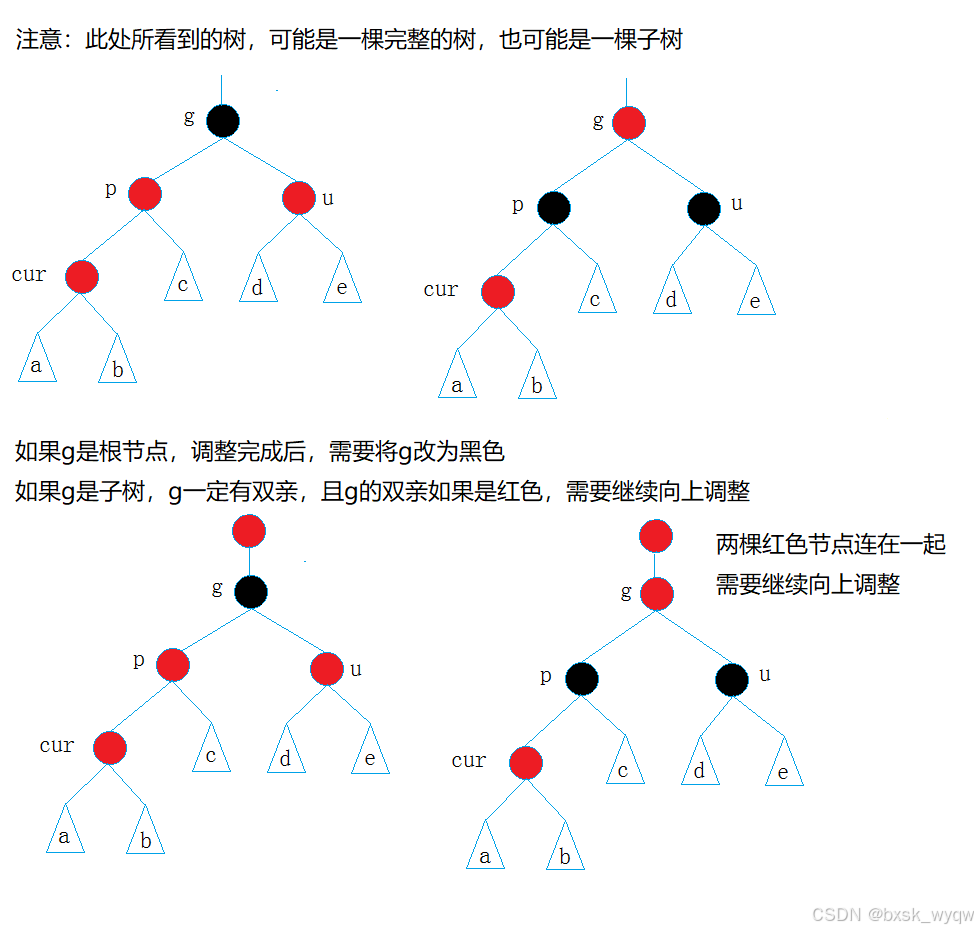
处理:父亲、叔叔变黑,祖父变红。这样做的巧妙之处在于黑色节点数守恒:父亲、叔叔由红变黑,这两条路径各加 1 个黑节点;祖父由黑变红,减 1 个黑节点,净变化为 0,性质 5 局部保持,只有祖父自己变成了红色。
祖父变红之后,连续红色的问题从"父亲、新节点"上移到了"祖父、祖父的父亲"之间:如果祖父的父亲也是红色,又出现了连续红色,需要继续处理。所以把祖父当作新节点,进入下一轮循环。最坏情况下这个循环一路爬到根,所以最后统一执行根节点强制变黑,保证性质 2。
3.4 情况二:叔叔不存在或为黑,单旋加变色
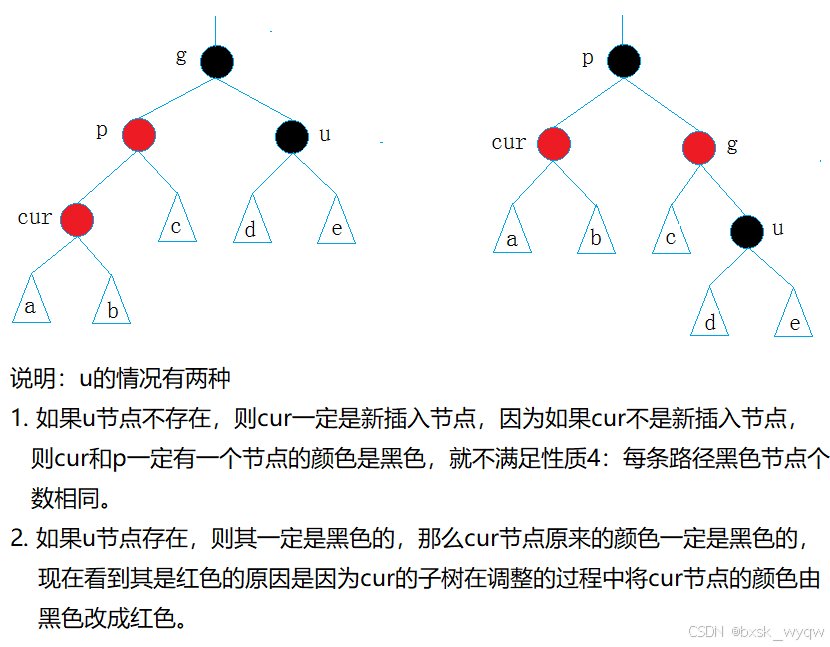
以 LL 型为例(父亲是祖父的左孩子,新节点是父亲的左孩子),叔叔不存在或为黑: 处理:对祖父做右单旋,然后父亲变黑、祖父变红。
旋转后父亲顶替祖父成为这棵子树的根,父亲变黑,向上不再有连续红色问题,处理结束。染色也是守恒的:子树内黑节点数不变,且子树根是黑色,不影响更上层。
RR 型完全镜像:父亲是祖父的右孩子、新节点是父亲的右孩子,对祖父做左单旋,同样父亲变黑、祖父变红。
3.5 情况三:叔叔不存在或为黑,双旋加变色
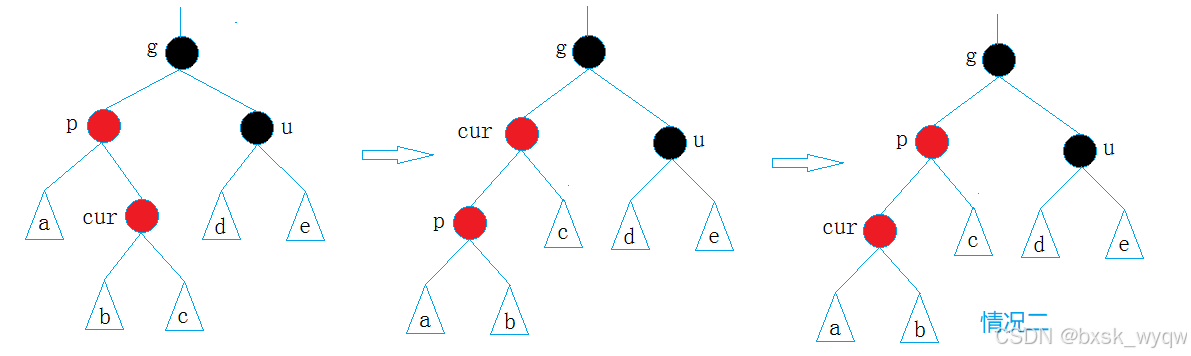
以 LR 型为例(父亲是祖父的左孩子,新节点是父亲的右孩子),形状是折线:
处理分两步:先对父亲左旋,把折线捋直成 LL 形状;再对祖父右旋。染色与单旋不同:单旋是父亲变黑,双旋是新节点变黑、祖父变红。
RL 型镜像:先对父亲右旋,再对祖父左旋,同样新节点变黑、祖父变红。
为什么双旋后是新节点变黑而不是父亲变黑?因为双旋后顶替祖父位置的是新节点,它是新的子树根,必须保证子树根为黑色,所以新节点变黑,父亲保持红色,祖父变红。
3.6 旋转函数:三叉链下的单旋实现
旋转只改指针,不改颜色,颜色由 Insert 里的分支决定。和 AVL 树的旋转形状完全一样,区别是 AVL 旋转后要更新平衡因子,红黑树没有平衡因子,反而更简单。
左单旋(以 parent 为轴,parent 的右孩子 subR 顶上来):
void RotateL(Node* parent)
{
Node* subR = parent->_right;
Node* subRL = subR->_left;
// 1. subRL 过继给 parent 当右孩子
parent->_right = subRL;
if (subRL)
subRL->_parent = parent;
// 2. subR 顶替 parent 的位置
Node* parentParent = parent->_parent;
subR->_left = parent;
parent->_parent = subR;
// 3. 处理 subR 与上层的关系
if (parentParent == nullptr)
{
_root = subR; // parent 是根,subR 成为新根
subR->_parent = nullptr;
}
else
{
if (parent == parentParent->_left)
parentParent->_left = subR;
else
parentParent->_right = subR;
subR->_parent = parentParent;
}
}
三叉链版本的旋转比二叉链麻烦一点:除了改动旋转点内部的三个指针,还要处理 subR 的父指针(更新 subRL 和 parent 的 _parent)、以及上层 parentParent 的指向(parent 是根则更新 _root,否则把 parentParent 对应方向的指针指向 subR)。每一步都要同步维护 _parent,漏掉一个三叉链就断了,后面向上查找祖先就会出错。
右单旋完全镜像:subL 是 parent 的左孩子,subLR 过继给 parent 当左孩子,subL 顶替 parent 位置,其余逻辑对称。
3.7 Insert 完整代码
template<class K, class T, class KeyOfT>
class RBTree
{
typedef RBTreeNode<T> Node;
public:
typedef RBTreeIterator<T, T&, T*> Iterator;
typedef RBTreeIterator<T, const T&, const T*> ConstIterator;
// 拷贝构造、赋值、析构与搜索树版本一致(深拷贝 Copy、后序销毁 Destroy),这里省略
pair<Iterator, bool> Insert(const T& data)
{
if (_root == nullptr)
{
// 空树:第一个节点作为根,必须是黑色
_root = new Node(data);
_root->_col = BLACK;
return make_pair(Iterator(_root, _root), true);
}
KeyOfT kot;
Node* parent = nullptr;
Node* cur = _root;
while (cur)
{
if (kot(cur->_data) < kot(data)) // 键小,往右走
{
parent = cur;
cur = cur->_right;
}
else if (kot(cur->_data) > kot(data)) // 键大,往左走
{
parent = cur;
cur = cur->_left;
}
else
{
return make_pair(Iterator(cur, _root), false); // 键已存在,插入失败
}
}
// 挂上新节点,默认红色
cur = new Node(data);
cur->_col = RED;
if (kot(parent->_data) < kot(data))
parent->_right = cur;
else
parent->_left = cur;
cur->_parent = parent;
Node* newnode = cur;
// 父亲是红色,出现连续红色,进入调整
while (parent && parent->_col == RED)
{
Node* grandfather = parent->_parent;
if (parent == grandfather->_left) // 父亲是祖父的左孩子
{
Node* uncle = grandfather->_right;
if (uncle && uncle->_col == RED)
{
// 情况一:叔叔存在且为红,变色后继续向上
parent->_col = uncle->_col = BLACK;
grandfather->_col = RED;
cur = grandfather;
parent = cur->_parent;
}
else
{
// 情况二、三:叔叔不存在或为黑,旋转加变色
if (cur == parent->_left)
{
// LL 型:对祖父右单旋,父亲变黑、祖父变红
RotateR(grandfather);
parent->_col = BLACK;
grandfather->_col = RED;
}
else
{
// LR 型:先左旋父亲,再右旋祖父,新节点变黑、祖父变红
RotateL(parent);
RotateR(grandfather);
cur->_col = BLACK;
grandfather->_col = RED;
}
break;
}
}
else // 父亲是祖父的右孩子,镜像处理
{
Node* uncle = grandfather->_left;
if (uncle && uncle->_col == RED)
{
// 情况一:叔叔存在且为红,变色后继续向上
parent->_col = uncle->_col = BLACK;
grandfather->_col = RED;
cur = grandfather;
parent = cur->_parent;
}
else
{
if (cur == parent->_right)
{
// RR 型:对祖父左单旋,父亲变黑、祖父变红
RotateL(grandfather);
parent->_col = BLACK;
grandfather->_col = RED;
}
else
{
// RL 型:先右旋父亲,再左旋祖父,新节点变黑、祖父变红
RotateR(parent);
RotateL(grandfather);
cur->_col = BLACK;
grandfather->_col = RED;
}
break;
}
}
}
// 情况一向上迭代时根可能被染红,最后强制变黑
_root->_col = BLACK;
return make_pair(Iterator(newnode, _root), true);
}
Find 与普通搜索树一致,只是比较时要用 KeyOfT 取出键:
Iterator Find(const K& key)
{
KeyOfT kot;
Node* cur = _root;
while (cur)
{
if (kot(cur->_data) < key)
cur = cur->_right;
else if (kot(cur->_data) > key)
cur = cur->_left;
else
return Iterator(cur, _root);
}
return End();
}
四、红黑树的验证:IsBalance
插入逻辑分支多,写完后不能靠肉眼确认,需要一个验证函数检查树是否真的满足红黑树性质。验证思路很直接,对照性质逐条检查:
bool IsBalance()
{
if (_root == nullptr)
return true;
if (_root->_col == RED)
return false; // 性质 2:根必须是黑色
// 参考值:最左路径上的黑色节点个数
int refNum = 0;
Node* cur = _root;
while (cur)
{
if (cur->_col == BLACK)
++refNum;
cur = cur->_left;
}
return Check(_root, 0, refNum);
}
private:
bool Check(Node* root, int blackNum, const int refNum)
{
if (root == nullptr)
{
// 走到空节点,这条路径的黑色节点数必须和参考值一致
if (refNum != blackNum)
{
cout << "存在黑色节点数量不同的路径" << endl;
return false;
}
return true;
}
// 性质 4:不能出现连续红色
if (root->_col == RED && root->_parent->_col == RED)
{
cout << "存在连续的红色节点" << endl;
return false;
}
if (root->_col == BLACK)
++blackNum;
return Check(root->_left, blackNum, refNum)
&& Check(root->_right, blackNum, refNum);
}
几个实现细节。性质 3(空节点视为黑色)是约定,代码里"走到空节点"这个分支就代表遇到黑色空节点,不用显式处理。连续红色的检查写成"当前节点是红色且父亲是红色",因为循环里不能写 cur == RED 然后检查孩子,孩子可能为空,用父亲判空更安全:能走到这里的节点 _parent 一定不为空(根节点已在入口检查过是黑色,短路了后面的判断)。两条路径递归用与连接,任何一条路径不满足就整体返回 false。
插入若干数据后调用 IsBalance,返回 true 说明树的红黑性质完好,可以放心把插入逻辑交付。
五、红黑树与 AVL 树的对比
5.1 概念对比
| 平衡标准 | 左右子树高度差不超过 1 | 最长路径不超过最短路径的 2 倍 |
| 平衡强度 | 严格 | 宽松 |
| 树高 | 矮 | 较高 |
| 插入旋转次数 | 最多 2 次(含双旋) | 最多 2 次(含双旋) |
| 删除旋转次数 | 最多 O(log n) 次回溯 | 最多 3 次 |
| 单次查找 | 略快(树更矮) | 略慢 |
| 插入删除 | 旋转多,较慢 | 旋转少,较快 |
| 典型应用 | 对查找效率要求极高的场景 | STL map/set、Linux 内核、Java TreeMap |
对比的核心是平衡强度的取舍。AVL 用"高度差不超过 1"把树控制得很矮,查找路径短;红黑树只保证"最长不超过最短的 2 倍",树更高,但旋转少。删除上差距最明显:AVL 删除后要沿着祖先链回溯旋转,最坏 O(log n) 次;红黑树删除最多旋转 3 次。实际场景中插入删除比纯查找频繁,所以 STL 选择了红黑树。
六、红黑树的迭代器
6.1 迭代器的设计
红黑树的迭代器是一个自定义类,成员有两个:_node 指向当前节点,_root 指向树的根。
template<class T, class Ref, class Ptr>
struct RBTreeIterator
{
typedef RBTreeNode<T> Node;
typedef RBTreeIterator<T, Ref, Ptr> Self;
Node* _node; // 当前节点
Node* _root; // 根节点,–end() 时要用
...
为什么除了 _node 还要存 _root?因为 end() 返回的迭代器_node是空指针,对 end() 做 — 操作要找到整棵树的中序最后一个节点,也就是最右节点,这个必须从根出发往下找,没有 _root 指针做不到。
模板参数 Ref 和 Ptr 用来区分普通迭代器和 const 迭代器:普通迭代器是 RBTreeIterator<T, T&, T*>,解引用返回 T 的引用;const 迭代器是 RBTreeIterator<T, const T&, const T*>,解引用返回 const 引用。一个模板类同时实例化出两种迭代器,和 list 的模拟实现手法一致。
6.2 operator++:中序后继
迭代器往前走一步,要找中序遍历的下一个节点,分两种情况:
Self& operator++()
{
if (_node->_right)
{
// 右子树不为空:右子树最左节点就是中序下一个
Node* leftMost = _node->_right;
while (leftMost->_left)
leftMost = leftMost->_left;
_node = leftMost;
}
else
{
// 右子树为空:沿父亲向上爬,找到"孩子是父亲的左孩子"的情况
Node* cur = _node;
Node* parent = cur->_parent;
while (parent && cur == parent->_right)
{
cur = parent;
parent = cur->_parent;
}
_node = parent;
}
return *this;
}
6.3 operator–:中序前驱与 end 特例
– 是 ++ 的镜像,逻辑对称:
Self& operator—()
{
if (_node == nullptr) // end():中序最后一个是整棵树最右节点
{
Node* rightMost = _root;
while (rightMost && rightMost->_right)
rightMost = rightMost->_right;
_node = rightMost;
}
else if (_node->_left)
{
// 左子树不为空:左子树最右节点就是中序上一个
Node* rightMost = _node->_left;
while (rightMost->_right)
rightMost = rightMost->_right;
_node = rightMost;
}
else
{
// 左子树为空:沿父亲向上爬,找到"孩子是父亲右孩子"的那个祖先
Node* cur = _node;
Node* parent = cur->_parent;
while (parent && cur == parent->_left)
{
cur = parent;
parent = cur->_parent;
}
_node = parent;
}
return *this;
}
6.4 完整代码
剩下的运算符和 list 迭代器几乎一样:operator* 返回节点数据的引用,operator-> 返回节点数据的指针,operator== 和 operator!= 比较 _node 指针。遍历从 Begin 开始:Begin 返回最左节点,也就是中序第一个;End 返回空节点迭代器。所以用迭代器遍历红黑树,天然就是有序的。
Ref operator*()
{
return _node->_data;
}
Ptr operator->()
{
return &_node->_data;
}
bool operator!=(const Self& s)
{
return _node != s._node;
}
bool operator==(const Self& s)
{
return _node == s._node;
}
};
七、用红黑树封装 set 与 map(模拟实现)
7.1 一个树,两种容器:K、T、KeyOfT 三个模板参数
set 的节点存 key,map 的节点存 pair。如果红黑树的比较逻辑写死"比较 key",map 用不了;写死"比较 pair 的 first",set 用不了。代码用三个模板参数解决这个问题:
template<class K, class T, class KeyOfT>
class RBTree
三个参数各司其职:K 是查找时用的键类型,T 是节点实际存的数据类型,KeyOfT 是一个仿函数,负责从 T 中取出 K。树内部比较时永远通过 KeyOfT 取键,不关心 T 具体长什么样。这正好用上仿函数学过的思想:比较规则做成对象传进容器。
// 插入时取键比较
KeyOfT kot;
if (kot(cur->_data) < kot(data)) // 键小,往右走
cur = cur->_right;
// 查找时用 key 比较
if (kot(cur->_data) < key)
cur = cur->_right;
7.2 封装 set
set 的数据类型 T 就是 key 本身,KeyOfT 直接返回 key。树实例化成 RBTree<K, const K, SetKeyOfT>:节点存 const K,保证 key 一旦插入就不可修改(key 改了会破坏搜索树规则)。
namespace bit
{
template<class K>
class set
{
struct SetKeyOfT
{
const K& operator()(const K& key)
{
return key;
}
};
public:
typedef typename RBTree<K, const K, SetKeyOfT>::Iterator iterator;
typedef typename RBTree<K, const K, SetKeyOfT>::ConstIterator const_iterator;
iterator begin()
{
return _t.Begin();
}
iterator end()
{
return _t.End();
}
const_iterator begin() const
{
return _t.Begin();
}
const_iterator end() const
{
return _t.End();
}
pair<iterator, bool> insert(const K& key)
{
return _t.Insert(key);
}
iterator find(const K& key)
{
return _t.Find(key);
}
private:
RBTree<K, const K, SetKeyOfT> _t;
};
}
几个细节。迭代器直接复用红黑树的 Iterator 和 ConstIterator,用 typedef 重命名成 STL 习惯的小写 begin、end、iterator 风格。typedef 前面要加 typename(防止编译器将其视为变量):RBTree<K, const K, SetKeyOfT>::Iterator 是依赖类型,编译器在模板实例化前不知道它是类型还是成员,必须显式声明。insert 和 find 都是透传,返回值原样转发,insert 返回的 pair 里 bool 表示插入成功与否,和真实 set 的语义一致。
7.3 封装 map 与 operator[]
map 的数据类型是 pair,KeyOfT 从 pair 里取出 first。树实例化成 RBTree<K, pair<const K, V>, MapKeyOfT>:first 是 const 的(pair<const K, V>),key 不可修改;second 没有 const,value 可以改。
namespace bit
{
template<class K, class V>
class map
{
struct MapKeyOfT
{
const K& operator()(const pair<K, V>& kv)
{
return kv.first;
}
};
public:
typedef typename RBTree<K, pair<const K, V>, MapKeyOfT>::Iterator iterator;
typedef typename RBTree<K, pair<const K, V>, MapKeyOfT>::ConstIterator const_iterator;
iterator begin()
{
return _t.Begin();
}
iterator end()
{
return _t.End();
}
const_iterator begin() const
{
return _t.Begin();
}
const_iterator end() const
{
return _t.End();
}
pair<iterator, bool> insert(const pair<K, V>& kv)
{
return _t.Insert(kv);
}
iterator find(const K& key)
{
return _t.Find(key);
}
V& operator[](const K& key)
{
pair<iterator, bool> ret = insert(make_pair(key, V()));
return ret.first->second;
}
private:
RBTree<K, pair<const K, V>, MapKeyOfT> _t;
};
}
operator[] 的实现只有两行,完整复刻了笔记 16 讲过的原理:先 insert(make_pair(key, V())),key 不存在就插入缺省值,key 存在就插入失败;insert 无论如何都返回 pair,取 first 拿到迭代器,迭代器箭头解引用得到 kv,取 second 返回引用。调用方对返回值赋值或修改,就是在修改树里真实存储的 value。
这个模拟实现是核心骨架:真实 STL 的 map 还提供 erase、lower_bound、upper_bound、equal_range 等接口,但底层的树、迭代器、插入调整逻辑已经完全一致,把使用篇学过的接口按同样思路补全即可。
7.4 测试结果
set 的测试:插入一批乱序数据,正序和反序各遍历一遍。
void test_set()
{
set<int> s;
int a[] = { 4, 2, 6, 1, 3, 5, 15, 7, 16, 14 };
for (auto e : a)
{
s.insert(e);
}
for (auto e : s) // 正序遍历
{
cout << e << " ";
}
cout << endl;
// 反向遍历:从 end() 开始 –,走到 begin() 为止
set<int>::iterator it = s.end();
while (it != s.begin())
{
—it;
cout << *it << " ";
}
cout << endl;
}
运行输出:
1 2 3 4 5 6 7 14 15 16
16 15 14 7 6 5 4 3 2 1
中序遍历天然有序,去重加排序的效果和真实 set 一致。反向遍历从 end() 开始不断 –,正好依赖 6.3 节 –end() 的特例处理。
map 的测试:插入几个键值对,再用 operator[] 做修改和缺省插入。
void test_map()
{
map<string, string> dict;
dict.insert({ "sort", "排序" });
dict.insert({ "left", "左边" });
dict.insert({ "right", "右边" });
dict["left"] = "左边(已改)"; // key 已存在:修改 value
dict["insert"] = "插入"; // key 不存在:插入 { "insert", "" } 再赋值
dict["string"]; // key 不存在:只插入缺省值空串
map<string, string>::iterator it = dict.begin();
while (it != dict.end())
{
// it->first 是 const 的,不能修改 key;second 可以修改
it->second += 'x';
cout << it->first << ":" << it->second << endl;
++it;
}
cout << endl;
}
运行输出(按 key 字典序):
insert:插入x
left:左边(已改)x
right:右边x
sort:排序x
string:x
输出验证了三件事。第一,遍历按 key 字典序(insert 在 left 前,sort 在 string 前)。第二,dict["left"] 修改成功,验证 operator[] 的"存在则查找";dict["insert"] 插入成功,验证"不存在则插入"。第三,dict["string"] 只读不赋值,也往树里塞进了一个空串,输出里 string 只有追加的 x,这正是笔记 16 强调过的陷阱:operator[] 做纯查找会静默插入缺省值。模拟实现和真实 map 的行为完全一致。
八、完整代码
红黑树模拟实现
#pragma once
#include <cassert>
#include <iostream>
enum Color
{
RED,
BLACK
};
template <class Data>
struct RBTreeNode
{
Data _data;
RBTreeNode<Data> *_left;
RBTreeNode<Data> *_right;
RBTreeNode<Data> *_parent; // 父节点
Color _color;
RBTreeNode()
: _data(Data()), _left(nullptr), _right(nullptr), _parent(nullptr), _color(RED)
{
}
RBTreeNode(const Data &data)
: _data(data), _left(nullptr), _right(nullptr), _parent(nullptr), _color(RED)
{
}
};
// 迭代器
template <class Data, class Ref, class Ptr>
struct RBTree_Iterator
{
typedef RBTreeNode<Data> Node;
typedef RBTreeNode<Data> *PNode;
typedef RBTree_Iterator<Data, Ref, Ptr> Self;
PNode _node;
PNode _root; // 树的根节点,注意如果红黑树发生旋转,可能会导致迭代器失效
RBTree_Iterator(PNode node, PNode root)
: _node(node), _root(root)
{
}
Ref operator*()
{
return _node->_data;
}
Ptr operator->()
{
return &_node->_data;
}
bool operator!=(const Self &s)
{
return s._node != _node;
}
bool operator==(const Self &s)
{
return s._node == _node;
}
Self &operator++()
{
// 整体思想为中序遍历
if (_node && _node->_right)
{
// 如果当前节点的右子树存在,找右子树的最小值
PNode MostSubL = _node->_right;
while (MostSubL && MostSubL->_left)
{
MostSubL = MostSubL->_left;
}
_node = MostSubL;
}
else
{
// 如果当前节点的右子树不存在,代表当前子树已经遍历完成,需要查找父节点
// 此外,如果当前节点是父节点的右节点,代表以父节点的子树已经遍历过了,需要查找父节点的父节点,如此循环
PNode cur = _node;
PNode parent = _node->_parent;
while (parent && cur == parent->_right)
{
cur = parent;
parent = cur->_parent;
}
// 循环出来之后,要么 parent 为空,要么 parent 还有右子树没有遍历,此时parent就是目标节点
_node = parent;
}
return *this;
}
Self &operator—()
{
if (_node == nullptr)
{
// _node为空,我们将他视为end(),返回当前树的最右节点
if (_root == nullptr) return *this; // 空树,end() 的前驱还是 end()
PNode MostSubR = _root; // 从根出发找最右节点(根可能没有右孩子)
while (MostSubR->_right)
{
MostSubR = MostSubR->_right;
}
_node = MostSubR;
}
else if (_node->_left)
{
// 如果当前节点的左子树存在,找左子树的最大值
PNode MostSubR = _node->_left;
while (MostSubR->_right)
{
MostSubR = MostSubR->_right;
}
_node = MostSubR;
}
else
{
// 如果当前节点的左子树不存在,代表当前子树已经遍历完成,需要查找父节点
// 此外,如果当前节点是父节点的右节点,代表以父节点的子树已经遍历过了,需要查找父节点的父节点,如此循环
PNode cur = _node;
PNode parent = _node->_parent;
while (parent && cur == parent->_left)
{
cur = parent;
parent = cur->_parent;
}
_node = parent;
}
return *this;
}
};
template <class K, class Data, class KofData>
class RBTree
{
typedef RBTreeNode<Data> Node;
typedef RBTreeNode<Data> *PNode;
private:
PNode _root = nullptr; // 必须初始化,否则默认构造出的 _root 是野指针
// 先序遍历
void _InOrder(PNode n)
{
if (n == nullptr)
return;
_InOrder(n->_left);
std::cout << " data: " << n->_data << std::endl;
_InOrder(n->_right);
}
// 拷贝子节点
PNode copy(PNode node)
{
if (node == nullptr)
return nullptr;
// 先序遍历创建节点
PNode newNode = new Node(node->_data);
PNode left = copy(node->_left);
PNode right = copy(node->_right);
newNode->_left = left;
newNode->_right = right;
newNode->_color = node->_color;
if (left)
left->_parent = newNode;
if (right)
right->_parent = newNode;
return newNode;
}
// 销毁子节点
void Destory(PNode node)
{
if (node == nullptr)
return;
// 后序遍历
Destory(node->_left);
Destory(node->_right);
delete node;
}
// 左单旋:
void RotateL(PNode parent)
{
PNode subR = parent->_right;
PNode subRL = subR->_left;
PNode PP = parent->_parent;
// 从subRL出发
if (subRL != nullptr) // 一定要注意 subRL 可能为空
subRL->_parent = parent;
// 从parent节点出发
parent->_right = subRL;
parent->_parent = subR;
// 从subR出发
subR->_left = parent;
subR->_parent = PP;
// 如果进行左旋的节点不是根节点(),需要改变 PP 的指向
if (PP == nullptr) // 当前节点为根节点
_root = subR;
else
{
if (PP->_left == parent)
PP->_left = subR;
else if (PP->_right == parent)
PP->_right = subR;
}
}
// 右单旋:
void RotateR(PNode parent)
{
PNode subL = parent->_left;
PNode subLR = subL->_right;
PNode PP = parent->_parent;
// 从 subLR 出发
if (subLR != nullptr)
subLR->_parent = parent;
// 从 parent 出发
parent->_left = subLR;
parent->_parent = subL;
// 从 subL 出发
subL->_right = parent;
subL->_parent = PP;
// 如果进行右旋的节点不是根节点(),需要改变 PP 的指向
if (PP == nullptr)
_root = subL;
else
{
if (PP->_left == parent)
PP->_left = subL;
else
PP->_right = subL;
}
}
public:
// 迭代器
typedef RBTree_Iterator<Data, Data &, Data *> iterator;
typedef RBTree_Iterator<Data, const Data &, const Data *> const_iterator;
// 注意不能返回引用
iterator begin()
{
// 找搜索树中最左侧的节点
PNode MostSubR = _root;
while (MostSubR && MostSubR->_left)
{
MostSubR = MostSubR->_left;
}
return iterator(MostSubR, _root);
}
iterator end()
{
return iterator(nullptr, _root);
}
const_iterator cbegin()
{
// 找搜索树中最左侧的节点
PNode MostSubR = _root;
while (MostSubR && MostSubR->_left)
{
MostSubR = MostSubR->_left;
}
return const_iterator(MostSubR, _root);
}
const_iterator cend()
{
return const_iterator(nullptr, _root);
}
public:
RBTree()
: _root(nullptr)
{
}
RBTree(const RBTree &root)
{
_root = copy(root._root);
}
RBTree &operator=(const RBTree &root)
{
if (this != &root) // 防止自赋值
{
Destory(_root);
_root = copy(root._root);
}
return *this;
}
~RBTree()
{
Destory(_root);
_root = nullptr;
}
std::pair<iterator, bool> Insert(const Data &data)
{
// 如果根节点为空,则为根节点
if (_root == nullptr)
{
_root = new Node(data);
_root->_color = BLACK;
return std::make_pair(iterator(_root, _root), true);
// return {{_root, _root}, true};
}
KofData kov; // KofData 是类型名,KofData(x) 会被解析成构造一个临时对象,需要先定义,再使用(易错)
PNode parent = nullptr; // 新节点的父节点
PNode cur = _root;
while (cur)
{
if (kov(cur->_data) < kov(data)) // 如果类型 T 为复杂对象,则需要重载运算符
{
parent = cur;
cur = cur->_right;
}
else if (kov(cur->_data) > kov(data))
{
parent = cur;
cur = cur->_left;
}
else
return std::make_pair(iterator(cur, _root), false); // 去重处理,不会插入重复内容
// return {{cur, _root}, false};
}
cur = new Node(data); // cur变量的任务已经完成,这里复用了这个变量来存储新节点的值
cur->_color = RED;
PNode newnode = cur;
if (kov(parent->_data) < kov(data))
parent->_right = cur;
else
parent->_left = cur;
cur->_parent = parent; // 一定要记得更新_parent的指向,这容易遗漏
while (parent && parent->_color == RED)
{
PNode grand = parent->_parent; // parent 为红, 则一定有grand节点,因为红节点不能为根节点(规则1)
PNode uncle = nullptr;
if (parent == grand->_left)
uncle = grand->_right;
else
uncle = grand->_left;
if (uncle && uncle->_color == RED)
{
// uncle 存在且为红
parent->_color = uncle->_color = BLACK;
grand->_color = RED;
cur = grand;
parent = cur->_parent;
}
else
{
// uncle 不存在/存在且为黑
if (parent == grand->_left)
{
// 如果 parent 是 grand 的左子树
// g
// p u
if (cur == parent->_left)
{
// 如果 cur 是 parent 的左子树
// g
// p u
// c
// 右单旋
RotateR(grand);
// p
// c g
// u
parent->_color = BLACK;
grand->_color = RED;
// 旋转完成之后不需要再向上遍
// 因为此时 p 是当前子树的根节点,而p为黑,p的父节点不管是红/黑都不会违反规则
break;
}
else
{
// 如果 cur 是 parent 的右子树
// g
// p u
// c
// 对parent先左单旋,再对grand右单旋
RotateL(parent);
// g
// p u
// c
RotateR(grand);
// p
// c g
// u
cur->_color = BLACK;
grand->_color = RED;
// 旋转完成之后不需要再向上遍
// 因为此时 p 是当前子树的根节点,而p为黑,p的父节点不管是红/黑都不会违反规则
break;
}
}
else
{
// 如果 parent 是 grand 的左子树
// g
// u p
if (cur == parent->_left)
{
// 如果 cur 是 parent 的左子树
// g
// u p
// c
// 对parent先右单旋,再对grand左单旋
RotateR(parent);
// g
// u p
// c
RotateL(grand);
// p
// g c
// u
cur->_color = BLACK;
grand->_color = RED;
// 旋转完成之后不需要再向上遍
// 因为此时 p 是当前子树的根节点,而p为黑,p的父节点不管是红/黑都不会违反规则
break;
}
else
{
// 如果 cur 是 parent 的右子树
// g
// u p
// c
// 左单旋
RotateL(grand);
// p
// g c
// u
parent->_color = BLACK;
grand->_color = RED;
// 旋转完成之后不需要再向上遍
// 因为此时 p 是当前子树的根节点,而p为黑,p的父节点不管是红/黑都不会违反规则
break;
}
}
}
}
_root->_color = BLACK; // 若 grand 是根且被染红,这里强制根为黑(性质1)
return std::make_pair(iterator(newnode, _root), true);
}
void InOrder()
{
_InOrder(_root);
}
};
set模拟封装
#pragma once
#include "RBTree.hpp"
namespace myset
{
template<class K>
class set
{
struct SetKofV
{
const K& operator()(const K& key)
{
return key;
}
};
private:
RBTree<K, const K, SetKofV> _t;// 注意这里也要改成 const
public:
// 迭代器
// 注意:无论是否为const迭代器,set都不支持使用迭代器改变节点的值,防止破坏红黑树的结构
// 因此,我们传入 RBTree 模板的 Data 类型设置为 const 类型,防止修改
typedef typename RBTree<K, const K, SetKofV>::iterator iterator;
typedef typename RBTree<K, const K, SetKofV>::const_iterator const_iterator;
iterator begin()
{
return _t.begin();
}
iterator end()
{
return _t.end();
}
const_iterator cbegin()
{
return _t.cbegin();
}
const_iterator cend()
{
return _t.cend();
}
public:
std::pair<iterator, bool> insert(const K& key)
{
return _t.Insert(key);
}
};
}
map模拟封装
#pragma once
#include "RBTree.hpp"
namespace mymap
{
template<class K, class V>
class map
{
struct MapKofV
{
const K& operator()(const std::pair<K, V>& kv)
{
return kv.first;
}
};
private:
// 需要注意,map的val并不是模板中的 V 而是 pair<K, V>
RBTree<K, std::pair<const K, V>, MapKofV> _t; // 注意这里也要改成 const
public:
// 迭代器
// 注意:与set不同,map支持 val 的修改,不支持 key 的修改
// 因此,我们传入 RBTree 模板的 Data 类型设置为 std::pair<const K, V> 类型,防止key被修改
typedef typename RBTree<K, std::pair<const K, V>, MapKofV>::iterator iterator;
typedef typename RBTree<K, std::pair<const K, V>, MapKofV>::const_iterator const_iterator;
iterator begin()
{
return _t.begin();
}
iterator end()
{
return _t.end();
}
const_iterator cbegin()
{
return _t.cbegin();
}
const_iterator cend()
{
return _t.cend();
}
V& operator[](const K& key)
{
std::pair<iterator, bool> p = insert(key, V());
return p.first->second;// 这里翻译一下: p.first 得到 iterator; iterator-> 得到 RBTree 的 Dataj 即 pair<K, V>, 之后 second 取出 V
}
public:
std::pair<iterator, bool> insert(const K& key, const V& val)
{
return _t.Insert(std::pair<K, V>(key, val));
}
};
}
总结
这篇笔记揭开了 map、set 的底层:一棵红黑树。红黑树用五条性质约束平衡,核心是"无连续红色"和"所有路径黑色节点数相同",两条合起来保证最长路径不超过最短路径的 2 倍,高度稳定在 O(log n)。插入是整棵树的灵魂:新节点默认红色,把破坏面控制在连续红色这一条性质上;父亲是黑色直接结束,父亲是红色看叔叔——叔叔红就变色并向上迭代,叔叔黑或不存在就旋转,LL 右单旋、RR 左单旋、LR 先左后右、RL 先右后左,旋转后单旋染父亲、双旋染新节点,最后强制根变黑。验证函数对照性质逐条检查,最左路径的黑节点数作为参考值,递归确认每条路径黑节点数一致且无连续红。实测对比里,升序插入 1000 万节点,AVL 树更矮(24 对 44)插入更快(706 对 976 毫秒),旋转次数几乎相同,查找时间持平,说明"红黑树旋转少"的优势要放在更一般的随机场景里看。迭代器用 _node 加 _root 两个指针实现中序前后驱,–end() 靠根指针找到最右节点。最后用 K、T、KeyOfT 三个模板参数让一棵树同时服务 set 和 map:set 存 const K,map 存 pair(const K, V),KeyOfT 负责取键,map 的 operator[] 两行代码复刻了"不存在则插入、存在则查找"。至此关联式容器的使用和底层全部贯通:会用容器,也看得懂容器的内脏,这就是 STL 学习的完整闭环。