🌈个人主页:一条泥憨鱼(欢迎各位大佬莅临)

❄️《数据结构》 ❄️《AI与Agent那些事》
❄️《从0开始学计算机网络》 ❄️《后端开发》

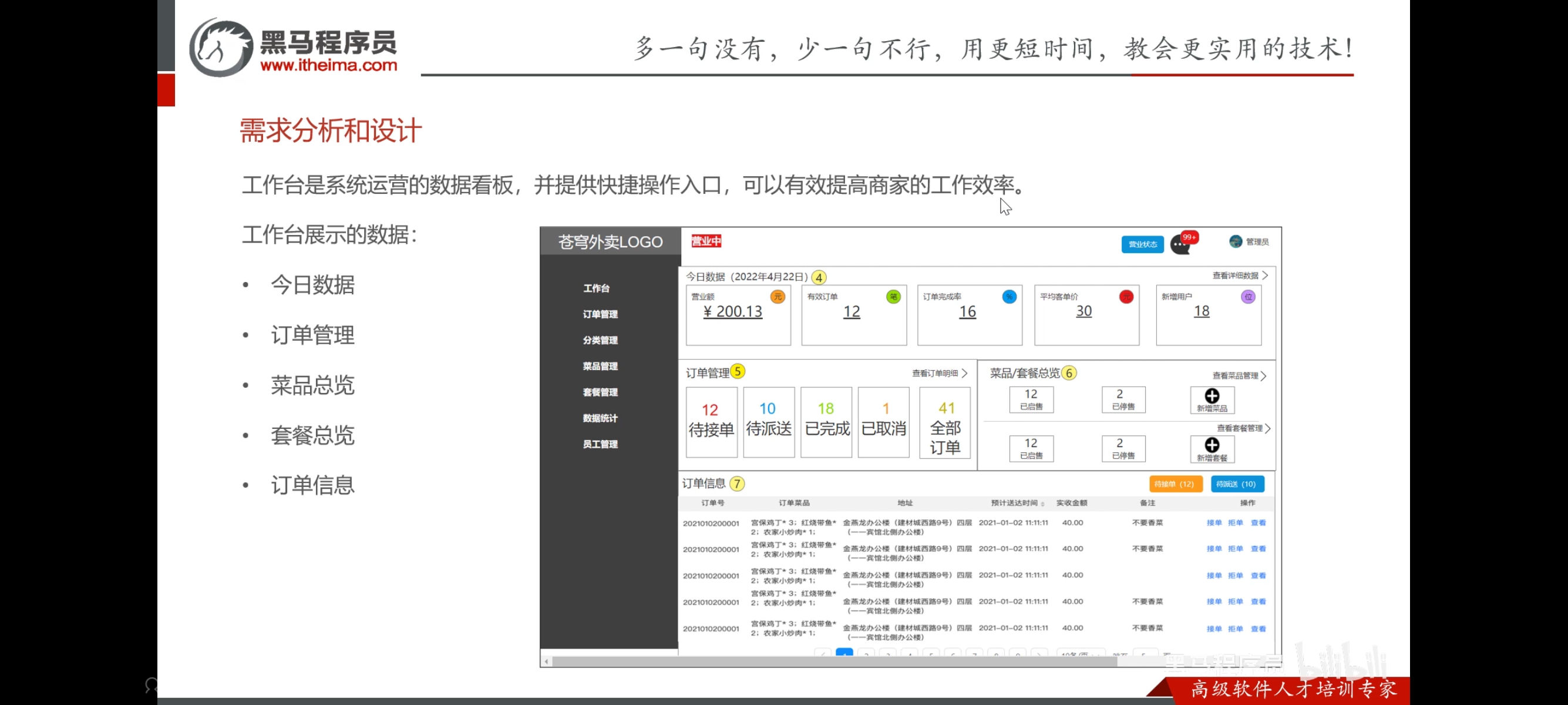
工作台
需求分析和设计

代码开发
一、Controller 层
WorkSpaceController.java
@RequestMapping("/admin/workspace") 为该类所有接口统一前缀。
接口 1:今日营业数据
@GetMapping("/businessData")
public Result<BusinessDataVO> businessData() {
LocalDateTime begin = LocalDateTime.now().with(LocalTime.MIN); // 今天 00:00
LocalDateTime end = LocalDateTime.now().with(LocalTime.MAX); // 今天 23:59
BusinessDataVO businessDataVO = workspaceService.getBusinessData(begin, end);
return Result.success(businessDataVO);
}
| 42 | LocalDateTime.now() | 获取当前日期+时间,如 2022-06-15T14:30:00 |
| 42 | .with(LocalTime.MIN) | 把时间部分设为 00:00:00,保留日期不变 |
| 44 | .with(LocalTime.MAX) | 把时间部分设为 23:59:59.999… |
为什么 Controller 层自己算时间? 因为工作台默认就是"今天"的数据,不需要前端传参。
接口 2-4:三组概览
@GetMapping("/overviewOrders") // 订单概览:待接单/待派送/已完成/已取消
@GetMapping("/overviewDishes") // 菜品概览:启售数/停售数
@GetMapping("/overviewSetmeals") // 套餐概览:启售数/停售数
这三个接口都 不需要参数,直接调用 Service 获取全量统计。
二、VO 层:4 个返回数据模型
2.1 BusinessDataVO — 今日营业核心指标
| turnover | Double | 营业额(今天完成订单的总金额) |
| validOrderCount | Integer | 有效订单数(今天完成的订单数) |
| orderCompletionRate | Double | 订单完成率 = 有效 / 总订单 |
| unitPrice | Double | 平均客单价 = 营业额 / 有效订单 |
| newUsers | Integer | 今日新增用户数 |
2.2 OrderOverViewVO — 订单状态分布
| waitingOrders | 待接单(status=2) |
| deliveredOrders | 待派送(status=3) |
| completedOrders | 已完成(status=5) |
| cancelledOrders | 已取消(status=6) |
| allOrders | 全部订单 |
2.3 DishOverViewVO & SetmealOverViewVO — 菜品/套餐状态
两者结构完全一样:
| sold | 已启售数量(status=1) |
| discontinued | 已停售数量(status=0) |
三、Service 层(重心)
WorkspaceServiceImpl.java
3.1 getBusinessData — 今日营业数据怎么算出来
public BusinessDataVO getBusinessData(LocalDateTime begin, LocalDateTime end) {
第 54-56 行 — 构建查询条件
Map map = new HashMap();
map.put("begin", begin); // 今天 00:00:00
map.put("end", end); // 今天 23:59:59
此时 Map 内容:{begin: …, end: …},还没放 status。
第 59 行 — 总订单数
Integer totalOrderCount = orderMapper.countByMap(map);
此时 map 里没有 status,触发 SQL:
SELECT COUNT(id) FROM orders
WHERE order_time > '今天00:00:00' AND order_time < '今天23:59:59'
统计今天所有创建的订单,不管什么状态。
第 61-64 行 — 营业额 + 有效订单数
map.put("status", Orders.COMPLETED); // status = 5
//营业额
Double turnover = orderMapper.sumByMap(map);
turnover = turnover == null ? 0.0 : turnover; // ← 防 null
//有效订单数
Integer validOrderCount = orderMapper.countByMap(map);
| sumByMap(map) | SELECT SUM(amount) FROM orders WHERE … AND status=5 | 今天已完成订单的金额总和 |
| countByMap(map) | SELECT COUNT(id) FROM orders WHERE … AND status=5 | 今天已完成订单的数量 |
为什么传入同一个 map? 因为 sumByMap 的 <if test="status != null"> 会生效,复用 Map 对象省内存。
第 68-74 行 — 计算完成率和客单价
Double unitPrice = 0.0;
Double orderCompletionRate = 0.0;
if (totalOrderCount != 0 && validOrderCount != 0) {
orderCompletionRate = validOrderCount.doubleValue() / totalOrderCount;
unitPrice = turnover / validOrderCount;
}
| validOrderCount.doubleValue() / totalOrderCount | 有效订单 ÷ 总订单 | 80 / 100 = 0.8 |
| turnover / validOrderCount | 营业额 ÷ 有效订单 | 5000.0 / 80 = 62.5 |
双重检查 != 0,确保分母不为零。
第 77 行 — 新增用户数
Integer newUsers = userMapper.countByMap(map);
⚠️ 这里 map 里有 status=5! 传到 userMapper.countByMap(map) 时,UserMapper.xml 里没有 <if test="status != null"> 条件,所以 status=5 被忽略,查询仍是全量新用户。但如果 UserMapper.xml 未来加了 status 判断就会出 bug。
第 79-85 行 — 封装返回
return BusinessDataVO.builder()
.turnover(turnover)
.validOrderCount(validOrderCount)
.orderCompletionRate(orderCompletionRate)
.unitPrice(unitPrice)
.newUsers(newUsers)
.build();
3.2 getOrderOverView — 订单概览
WorkspaceServiceImpl.java#L93-L126
Map map = new HashMap();
map.put("begin", LocalDateTime.now().with(LocalTime.MIN)); // 今天 00:00
这里只看今天的订单,因为 begin 有值而 end 没有,SQL 变成 order_time > 今天00:00,无上限。
然后逐状态查询 5 次:
| 98 | TO_BE_CONFIRMED (2) | waitingOrders | 待接单 |
| 106 | CONFIRMED (3) | deliveredOrders | 待派送 |
| 110 | COMPLETED (5) | completedOrders | 已完成 |
| 114 | CANCELLED (6) | cancelledOrders | 已取消 |
| 118 | null | allOrders | 全部订单(去掉 status 条件) |
核心技巧:同一个 Map 对象,复用修改 status,调 5 次 Mapper。每次 map.put("status", 新值) 覆盖上一次。
map.put("status", null); // 把 status 设为 null
Integer allOrders = orderMapper.countByMap(map);
// SQL: WHERE order_time > 今天00:00(没有 status 条件)
3.3 getDishOverView — 菜品总览
WorkspaceServiceImpl.java#L133-L146
Map map = new HashMap();
map.put("status", StatusConstant.ENABLE); // status = 1
Integer sold = dishMapper.countByMap(map); // 启售菜品数
map.put("status", StatusConstant.DISABLE); // status = 0
Integer discontinued = dishMapper.countByMap(map); // 停售菜品数
DishMapper.xml countByMap 的 SQL:
SELECT COUNT(id) FROM dish WHERE status = #{status}
3.4 getSetmealOverView — 套餐总览
与菜品完全对称,只是调 setmealMapper.countByMap(map),查的是 setmeal 表。
SetmealMapper.xml countByMap:
SELECT COUNT(id) FROM setmeal WHERE status = #{status}
四、核心 Mapper SQL:countByMap 和 sumByMap
OrderMapper.xml
| countByMap | COUNT(id) | 统计订单/用户/菜品/套餐数量 |
| sumByMap | SUM(amount) | 统计营业额(工作台独有) |
<!– countByMap: 统计订单数 –>
select count(id) from orders
<where>
<if test="begin != null"> and order_time > #{begin} </if>
<if test="end != null"> and order_time < #{end} </if>
<if test="status != null"> and status = #{status} </if>
</where>
<!– sumByMap: 统计营业额(工作台专用) –>
select sum(amount) from orders
<where>
<if test="begin != null"> and order_time > #{begin} </if>
<if test="end != null"> and order_time < #{end} </if>
<if test="status != null"> and status = #{status} </if>
</where>
| {begin, end} | 今天总订单数 | 今天总营业额 |
| {begin, end, status=5} | 今天已完成订单数 | 今天已完成营业额 |
五、完整架构图
┌──────────────────────────────────────────────────────┐
│ WorkSpaceController /admin/workspace │
│ │
│ GET /businessData → 今日营业数据 │
│ GET /overviewOrders → 订单概览(按状态) │
│ GET /overviewDishes → 菜品概览(启售/停售) │
│ GET /overviewSetmeals → 套餐概览(启售/停售) │
└──────┬───────────────────────────────────────────────┘
│
▼
┌──────────────────────────────────────────────────────┐
│ WorkspaceServiceImpl │
│ │
│ getBusinessData(): │
│ ① countByMap({begin,end}) → 总订单数 │
│ ② sumByMap({begin,end,status=5}) → 营业额 │
│ ③ countByMap({begin,end,status=5}) → 有效订单 │
│ ④ 计算:完成率、客单价 │
│ ⑤ userMapper.countByMap({begin,end}) → 新增用户 │
│ │
│ getOrderOverView(): │
│ 逐状态调用 countByMap × 5 │
│ │
│ getDishOverView(): │
│ dishMapper.countByMap(status=1) → sold │
│ dishMapper.countByMap(status=0) → discontinued │
│ │
│ getSetmealOverView(): (同上结构, 查 setmeal 表) │
└──────┬───────────────────────────────────────────────┘
│
▼
┌──────────────────────────────────────────────────────┐
│ Mapper 层 │
│ OrderMapper ─→ sumByMap / countByMap │
│ UserMapper ─→ countByMap │
│ DishMapper ─→ countByMap │
│ SetmealMapper──→ countByMap │
└──────────────────────────────────────────────────────┘
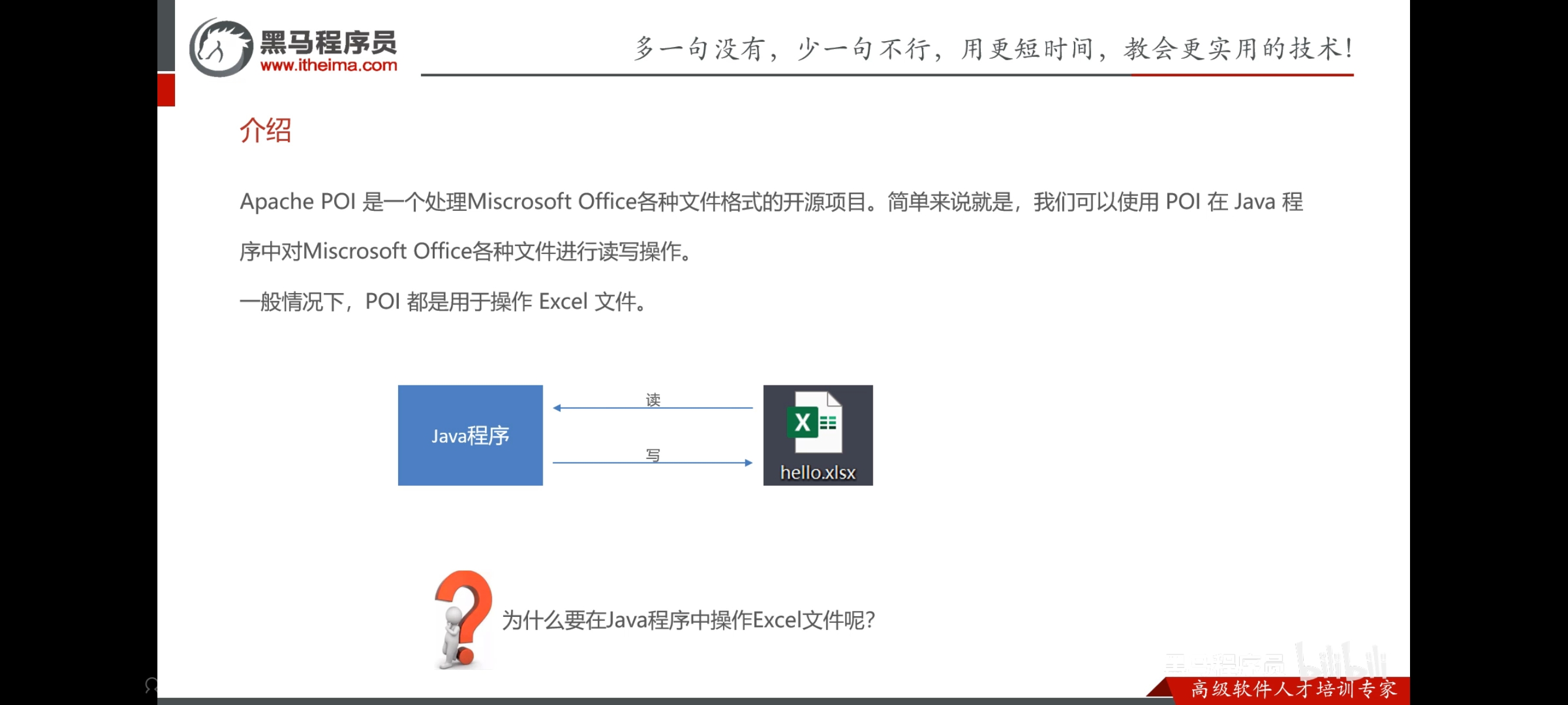
Apache POI
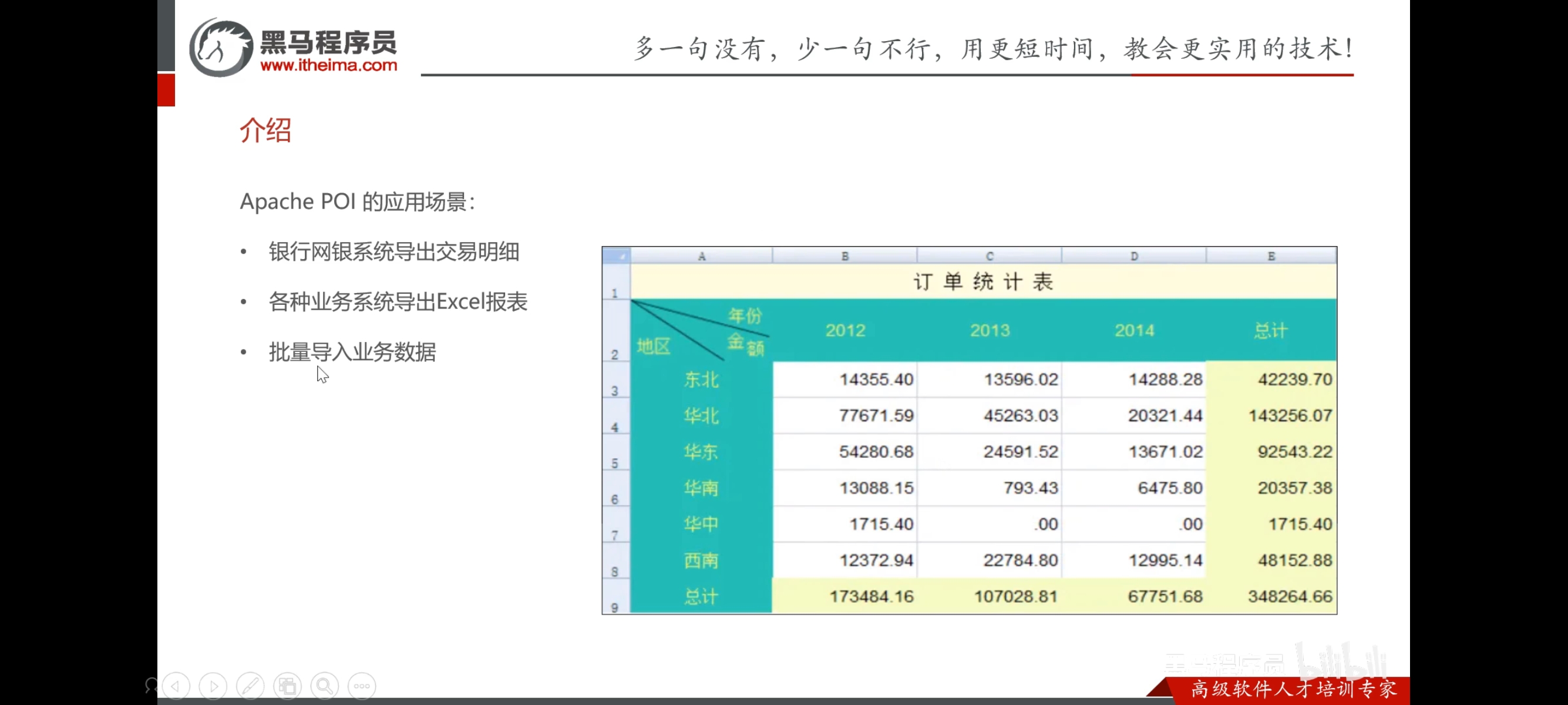
导出运营数据Excel报表
需求分析和设计


代码开发
导出运营数据报表模块 — 逐行详解
涉及 4 个文件:
| ReportController.java | 接收请求、设响应头 |
| ReportService.java | 接口定义 |
| ReportServiceImpl.java | 核心逻辑 |
| template/运营数据报表模板.xlsx | Excel 模板文件 |
一、Controller 层:入口
ReportController.java#L74-L81
@GetMapping("/export") // ①
public void export(HttpServletResponse response){ // ②
response.setContentType("application/vnd.openxmlformats-officedocument.spreadsheetml.sheet"); // ③
response.setHeader("Content-Disposition", "attachment; filename=report.xlsx"); // ④
reportService.exportBusinessData(response); // ⑤
}
| ① | @GetMapping("/export") | 完整路径:GET /admin/report/export。注意返回类型是 void,不走 Result.success() 包裹,因为这是文件下载流 |
| ② | HttpServletResponse response | Spring 自动注入原生响应对象,用于控制 HTTP 响应 |
| ③ | setContentType(…) | 告诉浏览器:"我发的是 Excel 文件(.xlsx 格式)" |
| ④ | setHeader(…) | 告诉浏览器:"这是一个附件下载,保存时默认文件名叫 report.xlsx"。没有这行,浏览器可能直接显示乱码而非弹出下载框 |
| ⑤ | exportBusinessData(response) | 把 response 传给 Service,让 Service 往里面写数据 |
return void 是什么道理? Spring MVC 检测到方法返回 void 且有 HttpServletResponse 参数时,不会走视图解析器,而是认为"你已经通过 response 自己处理了输出"。
二、Service 层:三步骤
ReportServiceImpl.java#L197-L258
方法签名:
public void exportBusinessData(HttpServletResponse response) {
void — 不需要返回值,数据直接写入 response 的输出流里。
步骤 1:确定时间范围(第 200-201 行)
LocalDate dateBegin = LocalDate.now().minusDays(30); // 30 天前
LocalDate dateEnd = LocalDate.now().minusDays(1); // 昨天
| 2022-06-15 | 2022-05-16 | 2022-06-14 | 最近 30 天,不含今天(今天数据不完整) |
步骤 2:查 30 天汇总数据(第 203 行)
BusinessDataVO businessDataVO = workspaceService.getBusinessData(
LocalDateTime.of(dateBegin, LocalTime.MIN), // 2022-05-16 00:00:00
LocalDateTime.of(dateEnd, LocalTime.MAX) // 2022-06-14 23:59:59
);
调 workspaceService.getBusinessData(begin, end),返回这 30 天的整体汇总:
| turnover | 30 天总营业额 | 150000.00 |
| validOrderCount | 30 天有效订单数 | 3200 |
| orderCompletionRate | 30 天订单完成率 | 0.85 |
| unitPrice | 30 天平均客单价 | 46.88 |
| newUsers | 30 天新增用户数 | 480 |
回忆:getBusinessData 内部调用 orderMapper.sumByMap 算营业额、countByMap 算订单数。这里不再重述。
步骤 3:加载 Excel 模板(第 208 行)
InputStream in = this.getClass()
.getClassLoader()
.getResourceAsStream("template/运营数据报表模板.xlsx");
| this.getClass() | 获得当前类的 Class 对象 |
| .getClassLoader() | 获得类加载器,负责从 classpath 找文件 |
| getResourceAsStream("…") | 从 resources/ 目录下读文件,返回一个输入流 |
实际路径:sky-server/src/main/resources/template/运营数据报表模板.xlsx
失败返回 null(文件不存在时)。
步骤 4:用 POI 打开模板(第 212-216 行)
XSSFWorkbook excel = new XSSFWorkbook(in); // ① 把输入流解析为 Excel 工作簿对象
XSSFSheet sheet = excel.getSheet("Sheet1"); // ② 获取第一个工作表
sheet.getRow(1).getCell(1).setCellValue( // ③ 第 2 行、第 2 列,填入日期
"时间:" + dateBegin + "至" + dateEnd
);
| XSSFWorkbook | POI 提供的 .xlsx 工作簿对象,对应整个 Excel 文件 |
| XSSFSheet | 工作表,对应 Excel 底部的 Sheet 标签页 |
| XSSFRow | 一行 |
| XSSFCell | 一个格子 |
POI 的行列索引从 0 开始:
- getRow(1) → Excel 第 2 行(第 1 行通常是表头)
- getCell(1) → Excel 第 B 列(第 A 列是 0)
步骤 5:填入 30 天汇总数据(第 218-228 行)
模板设计如下(第 4 行 = getRow(3)):
| 第 4 行 | 营业额 | 完成率 | 新增用户 | ||||
| 第 5 行 | 有效订单 | 客单价 |
// 第 4 行(汇总行)
XSSFRow row = sheet.getRow(3);
row.getCell(2).setCellValue(businessDataVO.getTurnover()); // C4 = 营业额
row.getCell(4).setCellValue(businessDataVO.getOrderCompletionRate()); // E4 = 订单完成率
row.getCell(6).setCellValue(businessDataVO.getNewUsers()); // G4 = 新增用户
// 第 5 行(汇总行)
row = sheet.getRow(4);
row.getCell(2).setCellValue(businessDataVO.getValidOrderCount()); // C5 = 有效订单
row.getCell(4).setCellValue(businessDataVO.getUnitPrice()); // E5 = 客单价
步骤 6:填入 30 天每日明细(第 231-243 行)
for (int i = 0; i < 30; i++) { // 循环 30 天
LocalDate date = dateBegin.plusDays(i); // 第 i 天是哪一天
// 查询这一天的营业数据
BusinessDataVO businessData = workspaceService.getBusinessData(
LocalDateTime.of(date, LocalTime.MIN), // 当天 00:00:00
LocalDateTime.of(date, LocalTime.MAX) // 当天 23:59:59
);
row = sheet.getRow(7 + i); // 从第 8 行开始,每天一行
row.getCell(1).setCellValue(date.toString()); // B 列 = 日期
row.getCell(2).setCellValue(businessData.getTurnover()); // C 列 = 营业额
row.getCell(3).setCellValue(businessData.getValidOrderCount()); // D 列 = 有效订单
row.getCell(4).setCellValue(businessData.getOrderCompletionRate()); // E 列 = 完成率
row.getCell(5).setCellValue(businessData.getUnitPrice()); // F 列 = 客单价
row.getCell(6).setCellValue(businessData.getNewUsers()); // G 列 = 新增用户
}
| 0 | 2022-05-16 | 第 8 行 | 第 1 天的数据 |
| 1 | 2022-05-17 | 第 9 行 | 第 2 天的数据 |
| … | … | … | … |
| 29 | 2022-06-14 | 第 37 行 | 第 30 天的数据 |
步骤 7:输出到浏览器(第 247-253 行)
ServletOutputStream out = response.getOutputStream(); // ① 获取响应输出流
excel.write(out); // ② 把 Excel 工作簿的二进制数据写入输出流
out.close(); // ③ 关闭输出流(强制刷出缓冲区)
excel.close(); // ④ 关闭工作簿(释放 POI 资源)
| ① | response.getOutputStream() | 拿到 HTTP 响应的字节输出流 |
| ② | excel.write(out) | POI 把整个 Excel 对象序列化成 .xlsx 二进制,写入流 |
| ③ | out.close() | 关闭流 → 浏览器开始接收文件 |
| ④ | excel.close() | 释放 Excel 对象占用的内存 |
三、模板文件结构一览
运营数据报表模板.xlsx → Sheet1:
A B C D E F G
1 ┌─────────┬────────┬─────────┬─────────┬──────────┬─────────┬──────────┐
│(标题行) │ │ │ │ │ │ │
2 │ │ 时间: │ 2022-05-16至2022-06-14 │
3 │ │ │ │ │ │ │ │
4 │ │ │ 150000 │ │ 0.85 │ │ 480 │ ← 汇总
5 │ │ │ 3200 │ │ 46.88 │ │ │ ← 汇总
6 │ │ │ │ │ │ │ │
7 │ │ 表头 │ 营业额 │ 有效订单 │ 完成率 │ 客单价 │ 新增用户 │ ← 列标题
8 │ │05-16 │ 5000 │ 100 │ 0.80 │ 50.00 │ 20 │ ← 第1天
9 │ │05-17 │ 4800 │ 95 │ 0.82 │ 50.53 │ 15 │ ← 第2天
… │ │ … │ … │ … │ … │ … │ … │
37 │ │06-14 │ 5200 │ 110 │ 0.85 │ 47.27 │ 18 │ ← 第30天
└─────────┴────────┴─────────┴─────────┴──────────┴─────────┴──────────┘
四、与其他统计的区别
| 返回格式 | JSON | JSON | JSON | .xlsx 文件流 |
| 返回类型 | Result<T> | Result<T> | Result<T> | void(直接写流) |
| 时间范围 | 前端传参 | 前端传参 | 前端传参 | 固定最近 30 天 |
| 数据来源 | 单一 Mapper | 单一 Mapper | 单一 Mapper | 复用 WorkspaceService |
| 循环 | ✅ 逐天 | ✅ 逐天 | ❌ | ✅ 逐天(30 次) |
| 额外依赖 | 无 | 无 | 无 | Apache POI |
五、完整数据流图
用户点击"导出"按钮
│
▼
GET /admin/report/export
│
▼
ReportController.export(response)
├─ ① 设 Content-Type = .xlsx
├─ ② 设 Content-Disposition = attachment
└─ ③ → reportService.exportBusinessData(response)
│
▼
ReportServiceImpl.exportBusinessData(response)
│
├─ 步骤1: dateBegin = 30天前, dateEnd = 昨天
│
├─ 步骤2: workspaceService.getBusinessData(30天)
│ 返回: BusinessDataVO { turnover, validOrderCount, … }
│
├─ 步骤3: 加载模板 → InputStream in = "template/运营数据报表模板.xlsx"
│
├─ 步骤4: POI 打开模板 → XSSFWorkbook excel = new XSSFWorkbook(in)
│ 填标题行:第2行 ← 日期
│
├─ 步骤5: 填汇总行(第4-5行)← businessDataVO 的 5 个字段
│
├─ 步骤6: 循环 30 次,逐天查 workspaceService.getBusinessData(当天)
│ 填第 8-37 行 ← 每天的 5 个字段
│
└─ 步骤7: excel.write(response.getOutputStream())
→ 浏览器弹出下载框,保存为 report.xlsx
至此,第12天的代码开发已经全部结束。