/* MD / 富文本中的 .toc(含博客园搬家等嵌套结构);.toc-box 在侧栏,不受影响 */
#content_views .toc,
/* 编辑器常在目录前后插入空 p(:empty 仍占 20px),一并去掉避免顶空隙 */
#content_views.markdown_views > p:empty:has(+ .toc),
#content_views.markdown_views > .toc + p:empty,
/* 富文本旧版目录标记 */
#content_views.htmledit_views #main-toc,
#content_views.htmledit_views #hr-toc,
#content_views.htmledit_views p[id*=\”-toc\”] {
display: none !important;
}
/* 目录去掉后,紧跟的首个标题不再多出一块上边距 */
#content_views.markdown_views > .toc + h1,
#content_views.markdown_views > .toc + h2,
#content_views.markdown_views > .toc + h3,
#content_views.markdown_views > .toc + h4,
#content_views.markdown_views > .toc + p:empty + h1,
#content_views.markdown_views > .toc + p:empty + h2,
#content_views.markdown_views > .toc + p:empty + h3,
#content_views.markdown_views > .toc + p:empty + h4 {
margin-top: 0 !important;
}
目录
Hadoop自定义分组比较器实现分组功能
1. Hadoop默认分组机制
2. 自定义分组比较器的必要性
3. 实现自定义分组比较器
3.1 定义键类
编辑3.2 实现自定义分组比较器
3.3 配置Job
4. 运行示例编辑
场景描述
实现步骤
示例代码
1. 定义键值对类型
2. 编写Mapper类
3. 编写Reducer类
4. 实现自定义GroupingComparator
5. 配置Job
运行Job
1. 理解默认分组比较器
2. 自定义分组比较器的场景
3. 实现自定义分组比较器
4. 配置MapReduce作业
5. 运行作业
Hadoop自定义分组比较器实现分组功能
在Hadoop MapReduce编程中,默认情况下,框架会根据键(Key)的自然排序来进行分组。然而,在某些应用场景下,我们可能需要根据特定的业务逻辑来对数据进行分组。这时,就需要自定义分组比较器(Grouping Comparator)来满足需求。
本文将详细介绍如何在Hadoop中实现自定义分组比较器,并通过一个具体的例子来说明其应用。
1. Hadoop默认分组机制
在Hadoop中,默认的分组比较器是WritableComparator,它基于键的自然排序进行分组。例如,如果我们有一个键值对<Integer, Text>,那么Hadoop会根据整数的大小顺序将相同的键值对归为一组。
2. 自定义分组比较器的必要性
假设我们有一个日志文件,每行记录了用户访问网站的时间戳和用户的ID,格式如下:
2023-10-01 12:00:00, user1 2023-10-01 12:05:00, user2 2023-10-01 12:10:00, user1 2023-10-01 12:15:00, user2
我们的目标是统计每个用户在一天内的访问次数。在这种情况下,我们希望根据用户ID而不是时间戳来分组。因此,我们需要自定义一个分组比较器。
3. 实现自定义分组比较器
3.1 定义键类
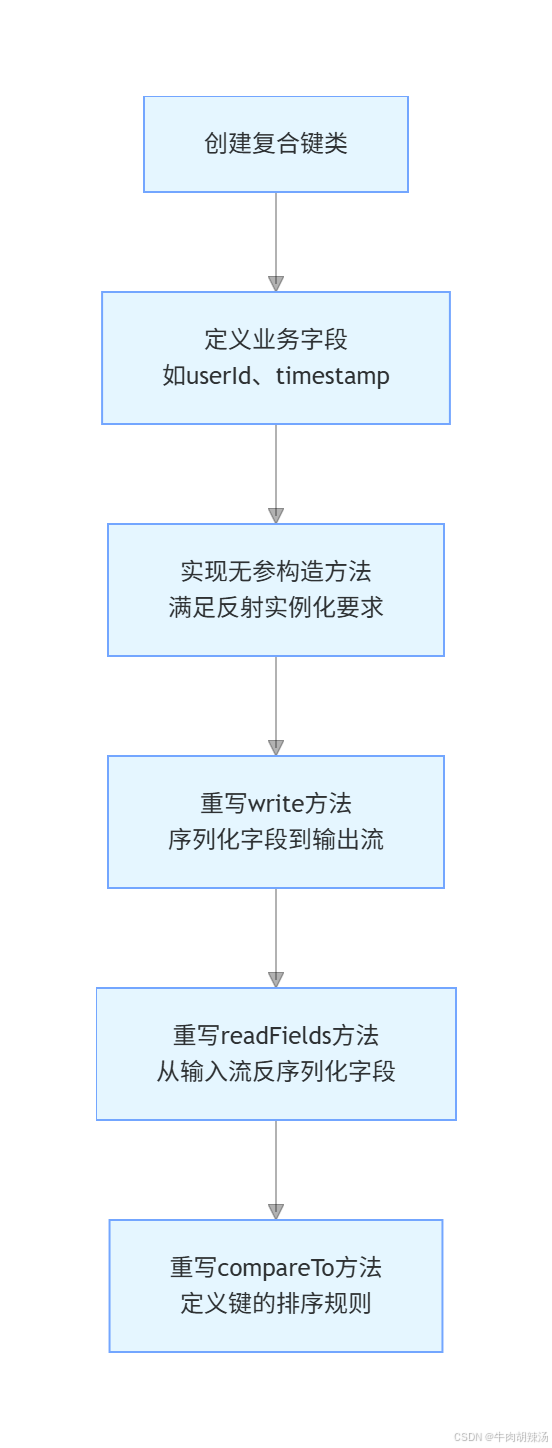
首先,我们需要定义一个复合键类,该类包含时间和用户ID两个字段。这个键类需要实现WritableComparable接口,以便能够在MapReduce框架中使用。
import org.apache.hadoop.io.WritableComparable;
import java.io.DataInput;
import java.io.DataOutput;
import java.io.IOException;
public class CompositeKey implements WritableComparable<CompositeKey> {
private String timestamp;
private String userId;
public CompositeKey() {}
public CompositeKey(String timestamp, String userId) {
this.timestamp = timestamp;
this.userId = userId;
}
public String getTimestamp() {
return timestamp;
}
public void setTimestamp(String timestamp) {
this.timestamp = timestamp;
}
public String getUserId() {
return userId;
}
public void setUserId(String userId) {
this.userId = userId;
}
@Override
public void write(DataOutput out) throws IOException {
out.writeUTF(timestamp);
out.writeUTF(userId);
}
@Override
public void readFields(DataInput in) throws IOException {
timestamp = in.readUTF();
userId = in.readUTF();
}
@Override
public int compareTo(CompositeKey other) {
int cmp = this.userId.compareTo(other.userId);
if (cmp != 0) {
return cmp;
}
return this.timestamp.compareTo(other.timestamp);
}
}
 3.2 实现自定义分组比较器
接下来,我们需要实现一个自定义的分组比较器。这个比较器只需要比较用户ID即可。
import org.apache.hadoop.io.WritableComparator;
public class CustomGroupingComparator extends WritableComparator {
protected CustomGroupingComparator() {
super(CompositeKey.class, true);
}
@Override
public int compare(WritableComparable a, WritableComparable b) {
CompositeKey key1 = (CompositeKey) a;
CompositeKey key2 = (CompositeKey) b;
return key1.getUserId().compareTo(key2.getUserId());
}
}
3.3 配置Job
最后,我们需要在MapReduce Job中配置自定义的分组比较器。
import org.apache.hadoop.conf.Configuration;
import org.apache.hadoop.fs.Path;
import org.apache.hadoop.io.IntWritable;
import org.apache.hadoop.io.Text;
import org.apache.hadoop.mapreduce.Job;
import org.apache.hadoop.mapreduce.lib.input.FileInputFormat;
import org.apache.hadoop.mapreduce.lib.output.FileOutputFormat;
public class UserVisitCount {
public static void main(String[] args) throws Exception {
Configuration conf = new Configuration();
Job job = Job.getInstance(conf, "User Visit Count");
job.setJarByClass(UserVisitCount.class);
// 设置Mapper和Reducer类
job.setMapperClass(UserVisitMapper.class);
job.setReducerClass(UserVisitReducer.class);
// 设置输出类型
job.setOutputKeyClass(CompositeKey.class);
job.setOutputValueClass(IntWritable.class);
// 设置自定义分组比较器
job.setGroupingComparatorClass(CustomGroupingComparator.class);
// 设置输入和输出路径
FileInputFormat.addInputPath(job, new Path(args[0]));
FileOutputFormat.setOutputPath(job, new Path(args[1]));
System.exit(job.waitForCompletion(true) ? 0 : 1);
}
}
4. 运行示例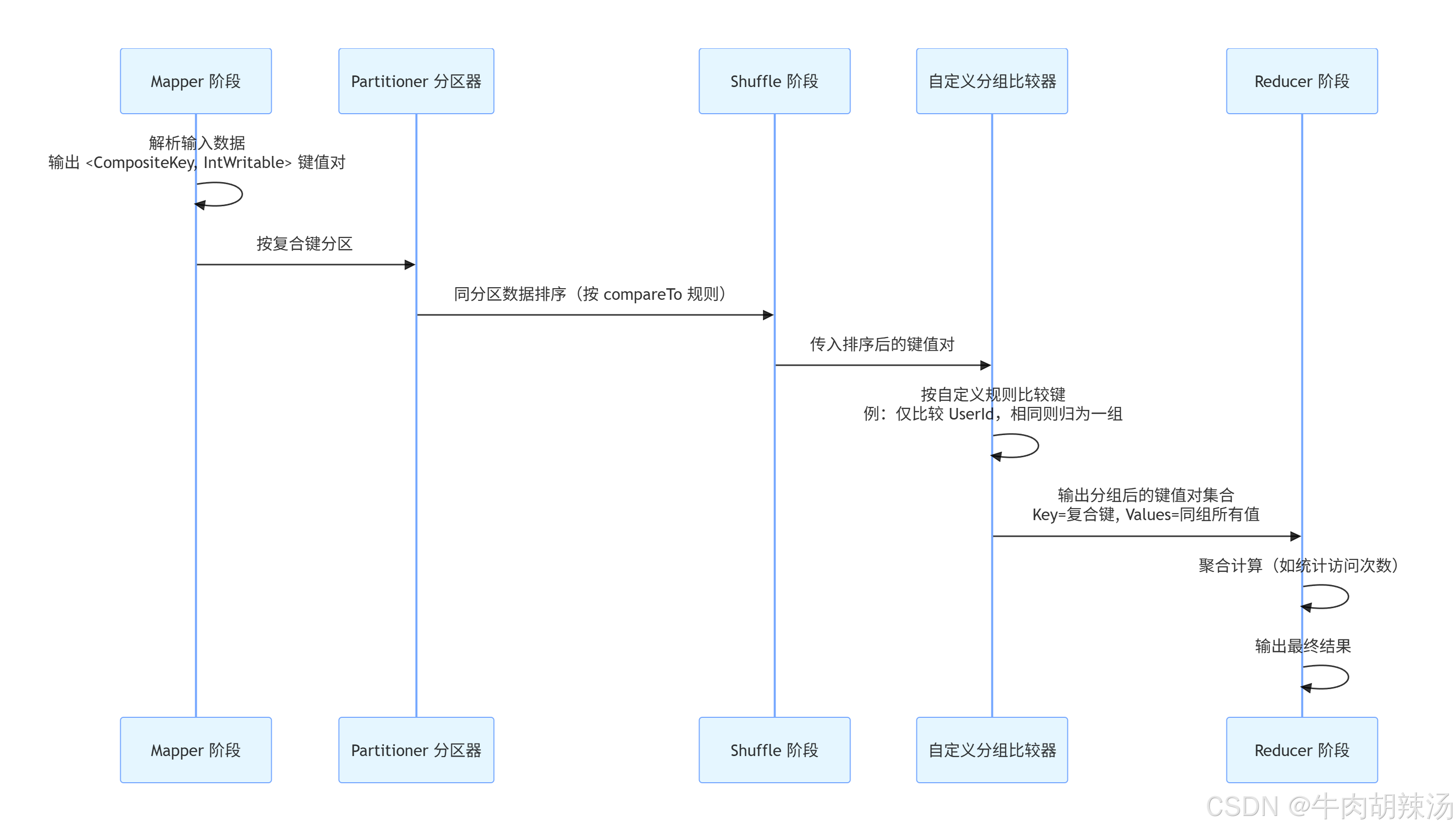
假设我们有一个输入文件input.txt,内容如下:
2023-10-01 12:00:00, user1
2023-10-01 12:05:00, user2
2023-10-01 12:10:00, user1
2023-10-01 12:15:00, user2
运行上述MapReduce程序后,输出文件output/part-r-00000的内容将是:
2023-10-01 12:00:00, user1 2
2023-10-01 12:05:00, user2 2
在Hadoop中,GroupingComparator 是一个重要的组件,用于控制MapReduce作业中的键值对如何分组。默认情况下,Hadoop使用键的自然排序来分组,但有时我们需要根据特定的业务逻辑来自定义分组规则。下面通过一个具体的例子来展示如何实现和使用自定义的 GroupingComparator。
场景描述
假设我们有一个日志文件,记录了用户在不同时间点的行为,格式如下:
username,timestamp,action alice,1628534400,login bob,1628534401,logout alice,1628534402,view_product
我们的目标是按用户名(username)分组,并计算每个用户的不同行为次数。但是,如果用户的某些行为(如 view_product 和 add_to_cart)被视为同一类,我们需要将这些行为合并到同一个组中进行统计。
实现步骤
示例代码
1. 定义键值对类型
import org.apache.hadoop.io.Text;
import org.apache.hadoop.io.WritableComparable;
import java.io.DataInput;
import java.io.DataOutput;
import java.io.IOException;
public class UserActionKey implements WritableComparable<UserActionKey> {
private Text username;
private Text action;
public UserActionKey() {
this(new Text(), new Text());
}
public UserActionKey(Text username, Text action) {
this.username = username;
this.action = action;
}
@Override
public void write(DataOutput out) throws IOException {
username.write(out);
action.write(out);
}
@Override
public void readFields(DataInput in) throws IOException {
username.readFields(in);
action.readFields(in);
}
@Override
public int compareTo(UserActionKey other) {
int cmp = username.compareTo(other.username);
if (cmp == 0) {
return action.compareTo(other.action);
}
return cmp;
}
@Override
public boolean equals(Object obj) {
if (this == obj) {
return true;
}
if (obj == null || getClass() != obj.getClass()) {
return false;
}
UserActionKey that = (UserActionKey) obj;
return username.equals(that.username) && action.equals(that.action);
}
@Override
public int hashCode() {
return username.hashCode() * 31 + action.hashCode();
}
@Override
public String toString() {
return username + "\\t" + action;
}
public Text getUsername() {
return username;
}
public Text getAction() {
return action;
}
}
2. 编写Mapper类
import org.apache.hadoop.io.IntWritable;
import org.apache.hadoop.mapreduce.Mapper;
import java.io.IOException;
public class UserActionMapper extends Mapper<Object, Text, UserActionKey, IntWritable> {
private final static IntWritable one = new IntWritable(1);
@Override
protected void map(Object key, Text value, Context context) throws IOException, InterruptedException {
String[] parts = value.toString().split(",");
Text username = new Text(parts[0]);
Text action = new Text(parts[2]);
// 如果action为view_product或add_to_cart,统一为view
if ("view_product".equals(action.toString()) || "add_to_cart".equals(action.toString())) {
action = new Text("view");
}
UserActionKey userActionKey = new UserActionKey(username, action);
context.write(userActionKey, one);
}
}
3. 编写Reducer类
import org.apache.hadoop.io.IntWritable;
import org.apache.hadoop.mapreduce.Reducer;
import java.io.IOException;
public class UserActionReducer extends Reducer<UserActionKey, IntWritable, UserActionKey, IntWritable> {
@Override
protected void reduce(UserActionKey key, Iterable<IntWritable> values, Context context) throws IOException, InterruptedException {
int sum = 0;
for (IntWritable val : values) {
sum += val.get();
}
context.write(key, new IntWritable(sum));
}
}
4. 实现自定义GroupingComparator
import org.apache.hadoop.io.Text;
import org.apache.hadoop.io.WritableComparator;
public class UserActionGroupingComparator extends WritableComparator {
public UserActionGroupingComparator() {
super(UserActionKey.class, true);
}
@Override
public int compare(WritableComparable a, WritableComparable b) {
UserActionKey key1 = (UserActionKey) a;
UserActionKey key2 = (UserActionKey) b;
int cmp = key1.getUsername().compareTo(key2.getUsername());
if (cmp == 0) {
// 自定义分组逻辑:将view_product和add_to_cart视为同一组
Text action1 = key1.getAction();
Text action2 = key2.getAction();
if (("view_product".equals(action1.toString()) || "add_to_cart".equals(action1.toString())) &&
("view_product".equals(action2.toString()) || "add_to_cart".equals(action2.toString()))) {
return 0; // 视为同一组
} else {
return action1.compareTo(action2);
}
}
return cmp;
}
}
5. 配置Job
import org.apache.hadoop.conf.Configuration;
import org.apache.hadoop.fs.Path;
import org.apache.hadoop.io.IntWritable;
import org.apache.hadoop.io.Text;
import org.apache.hadoop.mapreduce.Job;
import org.apache.hadoop.mapreduce.lib.input.FileInputFormat;
import org.apache.hadoop.mapreduce.lib.output.FileOutputFormat;
public class UserActionCount {
public static void main(String[] args) throws Exception {
Configuration conf = new Configuration();
Job job = Job.getInstance(conf, "User Action Count");
job.setJarByClass(UserActionCount.class);
job.setMapperClass(UserActionMapper.class);
job.setReducerClass(UserActionReducer.class);
job.setOutputKeyClass(UserActionKey.class);
job.setOutputValueClass(IntWritable.class);
FileInputFormat.addInputPath(job, new Path(args[0]));
FileOutputFormat.setOutputPath(job, new Path(args[1]));
// 设置自定义的GroupingComparator
job.setGroupingComparatorClass(UserActionGroupingComparator.class);
System.exit(job.waitForCompletion(true) ? 0 : 1);
}
}
运行Job
编译并打包上述代码,然后使用Hadoop命令行工具运行Job,例如:
hadoop jar your-jar-file.jar UserActionCount /input/path /output/path
这样,你就可以根据自定义的分组规则来处理和分析数据了。在Hadoop中,MapReduce框架允许用户通过自定义分组比较器(Grouping Comparator)来控制键的分组方式。这在处理需要根据特定逻辑进行聚合的数据时非常有用。下面详细介绍如何实现一个自定义的分组比较器。
1. 理解默认分组比较器
默认情况下,Hadoop使用WritableComparator作为分组比较器,它基于键的字节表示进行比较。这意味着如果两个键的字节表示相同,它们就会被分到同一个组中。
2. 自定义分组比较器的场景
假设我们有一个日志文件,每行记录包含用户的ID和访问时间戳,格式如下:
user1,2023-10-01 12:00:00
user1,2023-10-01 12:05:00
user2,2023-10-01 12:00:00
user1,2023-10-01 12:10:00
我们的目标是按用户ID分组,并计算每个用户在一天内的访问次数。但是,我们希望将所有在同一天内访问的记录归为一组,而不是按每条记录的时间戳分组。
3. 实现自定义分组比较器
首先,我们需要定义一个自定义的键类,该类包含用户ID和日期信息。
import org.apache.hadoop.io.WritableComparable;
import java.io.DataInput;
import java.io.DataOutput;
import java.io.IOException;
public class UserDateKey implements WritableComparable<UserDateKey> {
private String userId;
private String date;
public UserDateKey() {}
public UserDateKey(String userId, String date) {
this.userId = userId;
this.date = date;
}
public String getUserId() {
return userId;
}
public void setUserId(String userId) {
this.userId = userId;
}
public String getDate() {
return date;
}
public void setDate(String date) {
this.date = date;
}
@Override
public void write(DataOutput out) throws IOException {
out.writeUTF(userId);
out.writeUTF(date);
}
@Override
public void readFields(DataInput in) throws IOException {
userId = in.readUTF();
date = in.readUTF();
}
@Override
public int compareTo(UserDateKey other) {
int cmp = userId.compareTo(other.userId);
if (cmp == 0) {
return date.compareTo(other.date);
}
return cmp;
}
@Override
public boolean equals(Object obj) {
if (this == obj) {
return true;
}
if (obj == null || getClass() != obj.getClass()) {
return false;
}
UserDateKey that = (UserDateKey) obj;
return userId.equals(that.userId) && date.equals(that.date);
}
@Override
public int hashCode() {
int result = userId.hashCode();
result = 31 * result + date.hashCode();
return result;
}
@Override
public String toString() {
return "UserDateKey{" +
"userId='" + userId + '\\'' +
", date='" + date + '\\'' +
'}';
}
}
接下来,实现自定义的分组比较器:
import org.apache.hadoop.io.WritableComparator;
public class UserDateGroupingComparator extends WritableComparator {
protected UserDateGroupingComparator() {
super(UserDateKey.class, true);
}
@Override
public int compare(byte[] b1, int s1, int l1, byte[] b2, int s2, int l2) {
try {
// 读取用户ID部分
int userIdLength1 = readVInt(b1, s1);
int userIdLength2 = readVInt(b2, s2);
// 比较用户ID
int cmp = compareBytes(b1, s1 + 4, userIdLength1, b2, s2 + 4, userIdLength2);
if (cmp != 0) {
return cmp;
}
// 读取日期部分
int dateLength1 = readVInt(b1, s1 + 4 + userIdLength1);
int dateLength2 = readVInt(b2, s2 + 4 + userIdLength2);
// 比较日期
return compareBytes(b1, s1 + 4 + userIdLength1 + 4, dateLength1, b2, s2 + 4 + userIdLength2 + 4, dateLength2);
} catch (IOException e) {
throw new RuntimeException("Error comparing keys", e);
}
}
}
4. 配置MapReduce作业
在MapReduce作业中,我们需要配置自定义的分组比较器:
import org.apache.hadoop.conf.Configuration;
import org.apache.hadoop.fs.Path;
import org.apache.hadoop.io.IntWritable;
import org.apache.hadoop.io.Text;
import org.apache.hadoop.mapreduce.Job;
import org.apache.hadoop.mapreduce.Mapper;
import org.apache.hadoop.mapreduce.Reducer;
import org.apache.hadoop.mapreduce.lib.input.FileInputFormat;
import org.apache.hadoop.mapreduce.lib.output.FileOutputFormat;
public class UserVisitCount {
public static class UserVisitMapper extends Mapper<Object, Text, UserDateKey, IntWritable> {
private final static IntWritable one = new IntWritable(1);
private UserDateKey userDateKey = new UserDateKey();
@Override
public void map(Object key, Text value, Context context) throws IOException, InterruptedException {
String[] parts = value.toString().split(",");
String userId = parts[0];
String date = parts[1].substring(0, 10); // 取日期部分
userDateKey.setUserId(userId);
userDateKey.setDate(date);
context.write(userDateKey, one);
}
}
public static class UserVisitReducer extends Reducer<UserDateKey, IntWritable, UserDateKey, IntWritable> {
private IntWritable result = new IntWritable();
@Override
public void reduce(UserDateKey key, Iterable<IntWritable> values, Context context) throws IOException, InterruptedException {
int sum = 0;
for (IntWritable val : values) {
sum += val.get();
}
result.set(sum);
context.write(key, result);
}
}
public static void main(String[] args) throws Exception {
Configuration conf = new Configuration();
Job job = Job.getInstance(conf, "User Visit Count");
job.setJarByClass(UserVisitCount.class);
job.setMapperClass(UserVisitMapper.class);
job.setCombinerClass(UserVisitReducer.class);
job.setReducerClass(UserVisitReducer.class);
job.setOutputKeyClass(UserDateKey.class);
job.setOutputValueClass(IntWritable.class);
// 设置自定义分组比较器
job.setGroupingComparatorClass(UserDateGroupingComparator.class);
FileInputFormat.addInputPath(job, new Path(args[0]));
FileOutputFormat.setOutputPath(job, new Path(args[1]));
System.exit(job.waitForCompletion(true) ? 0 : 1);
}
}
5. 运行作业
编译并运行上述MapReduce作业,输入数据可以是一个包含用户访问记录的文件,输出将是每个用户在每一天的访问次数。
通过自定义分组比较器,我们可以灵活地控制键的分组方式,从而实现更复杂的聚合逻辑。