文章目录
-
- 1. 使用浏览器原生 API
-
- 1.1 `navigator.connection` (Network Information API)
- 1.2 在线/离线状态检测
- 2. 主动测量网络速度
-
- 2.1 通过下载测试估算带宽
- 2.2 通过 Image 加载时间检测
- 3. 综合网络状态判断
- 4. 应用场景与优化策略
-
- 4.1 动态调整资源加载
- 4.2 显示网络状态提示
- 4.3 请求失败自动降级
- 5. 兼容性增强方案
-
- 5.1 旧版浏览器支持
- 5.2 使用第三方库
- 6. 注意事项
前端提供了
navigator.connection 等 API 来检测用户的网络状态和强度。
1. 使用浏览器原生 API
1.1 navigator.connection (Network Information API)
获取网络类型、带宽估算和 RTT(往返延迟):
const connection = navigator.connection || navigator.mozConnection || navigator.webkitConnection;
if (connection) {
console.log("网络类型:", connection.effectiveType); // '4g', '3g', '2g'
console.log("下行带宽:", connection.downlink + " Mbps"); // 估算值
console.log("往返延迟:", connection.rtt + " ms");
console.log("数据节省模式:", connection.saveData); // 是否开启省流模式
// 监听网络变化
connection.addEventListener("change", () => {
console.log("网络状态变化:", connection.effectiveType);
});
}
如图所示:
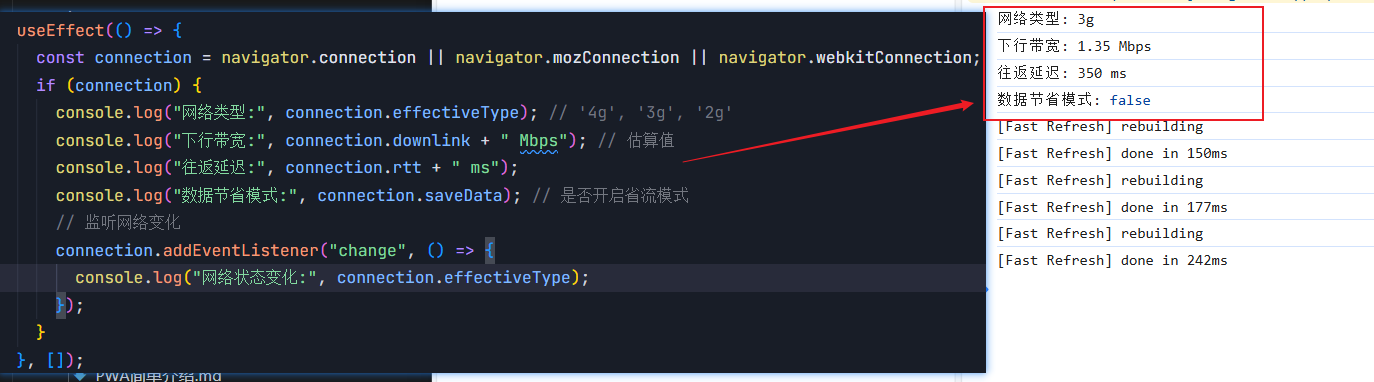
兼容性:Chrome/Edge/Android WebView 支持,Safari 和 Firefox 部分支持。
1.2 在线/离线状态检测
// 检测当前状态
console.log("是否在线:", navigator.onLine);
// 监听网络变化
window.addEventListener("online", () => console.log("网络恢复"));
window.addEventListener("offline", () => console.log("网络断开"));
是否在线: true;
2. 主动测量网络速度
2.1 通过下载测试估算带宽
async function measureSpeed(url = "https://search-operate.cdn.bcebos.com/5b8fa41e5c92ea8793a99c5081a7a9d8.mp4") {
const start = performance.now();
const response = await fetch(url, { cache: "no-store" });
const blob = await response.blob();
const duration = (performance.now() – start) / 1000; // 秒
const bits = blob.size * 8; // 转为比特
const speed = (bits / duration / 1024 / 1024).toFixed(2); // Mbps
console.log(`下载速度: ${speed} Mbps`);
return speed;
}
// 使用示例
measureSpeed();
如图所示:

注意:需准备一个已知大小的测试文件,避免跨域问题。
2.2 通过 Image 加载时间检测
function measureLatency(imageUrl) {
const start = Date.now();
const img = new Image();
img.onload = () => {
const latency = Date.now() – start;
console.log(`图片加载延迟: ${latency}ms`);
};
img.src = imageUrl + "?t=" + Date.now(); // 避免缓存
}
3. 综合网络状态判断
class NetworkMonitor {
constructor() {
this.speed = 0; // Mbps
this.type = "unknown";
this.init();
}
async init() {
// 浏览器API检测
if (navigator.connection) {
this.type = navigator.connection.effectiveType;
this.speed = navigator.connection.downlink;
}
// 主动测量(如果浏览器API不可用)
if (this.speed === 0) {
this.speed = await this.measureSpeed();
this.type = this.speed > 10 ? "4g" : this.speed > 2 ? "3g" : "2g";
}
console.log(`网络类型: ${this.type}, 速度: ${this.speed}Mbps`);
}
async measureSpeed() {
/* 同前文方法 */
}
}
// 使用
const monitor = new NetworkMonitor();
4. 应用场景与优化策略
4.1 动态调整资源加载
if (monitor.type === "4g") {
loadHDVideo();
} else {
loadLQVideo();
}
4.2 显示网络状态提示
<div id="network-status"></div>
<script>
const statusEl = document.getElementById("network-status");
function updateStatus() {
const status = navigator.onLine ? `在线 (${monitor.type}, ${monitor.speed}Mbps)` : "离线";
statusEl.textContent = `网络状态: ${status}`;
}
window.addEventListener("online", updateStatus);
window.addEventListener("offline", updateStatus);
</script>
4.3 请求失败自动降级
async function fetchWithFallback(primaryUrl, fallbackUrl, retries = 2) {
try {
const response = await fetch(primaryUrl);
return response.json();
} catch (error) {
if (retries > 0) {
return fetchWithFallback(fallbackUrl, null, retries – 1);
}
throw error;
}
}
5. 兼容性增强方案
5.1 旧版浏览器支持
// 如果没有navigator.connection,默认按3G处理
if (!navigator.connection) {
console.warn("Network Information API not supported");
monitor.type = "3g";
monitor.speed = 1.5;
}
5.2 使用第三方库
- Network Speed:跨浏览器网络测速
- Offline.js:离线状态管理
6. 注意事项
👉点击进入我的网站