文章目录
-
- 1. 等待接口的职责
-
- 1.1 等待结果与回收记录
- 1.2 wait 与 waitpid
- 2. 返回值决定下一步能做什么
-
- 2.1 三种返回结果
- 2.2 阻塞等待的几种时机
- 2.3 EINTR 与 ECHILD
- 3. 原始状态与解析宏
-
- 3.1 先分类,再提取
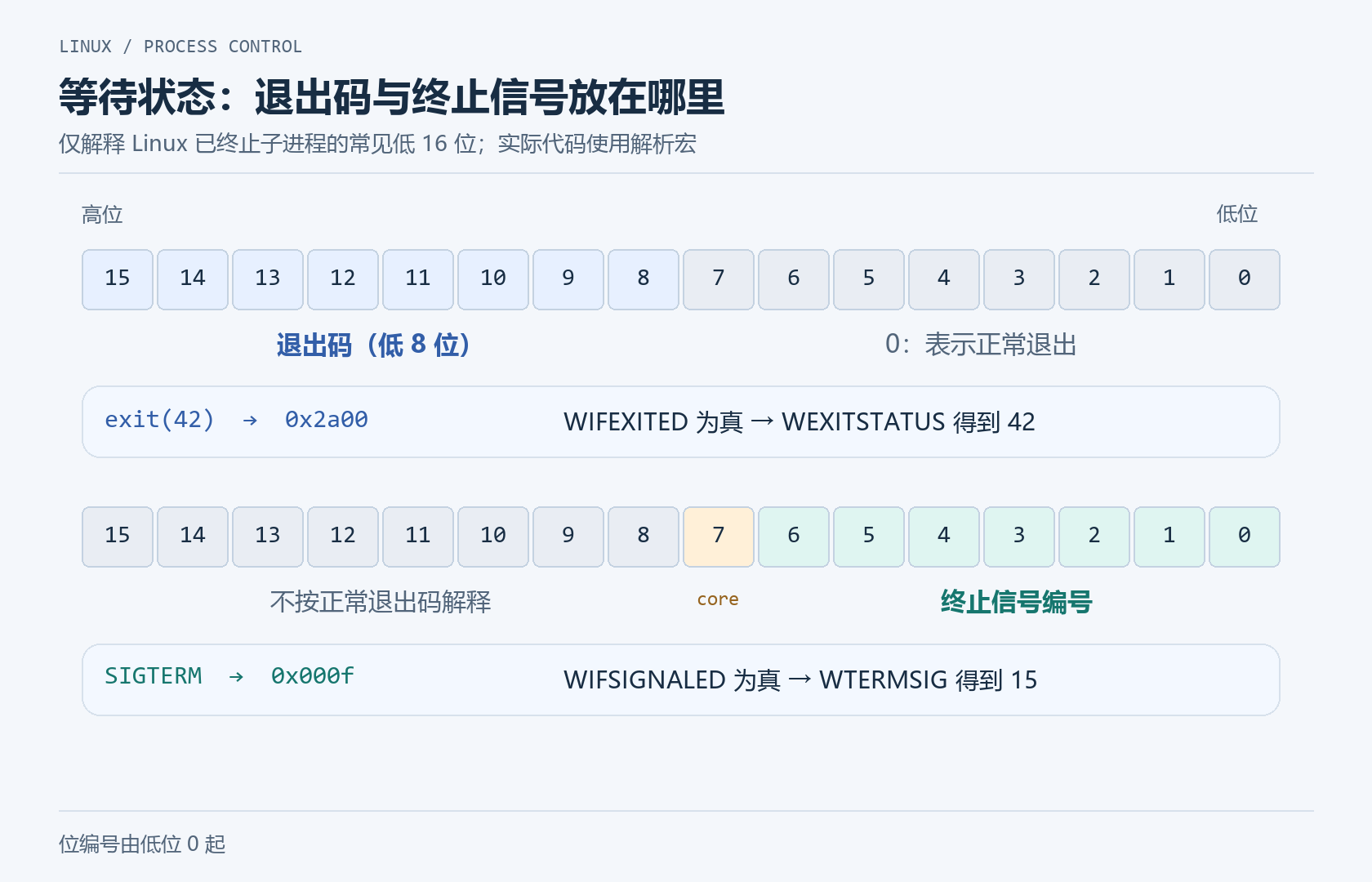
- 3.2 Linux 终止状态的低 16 位示意
- 4. 正常退出与信号终止的完整对照
- 5. WNOHANG 与有节奏的查询
-
- 5.1 非阻塞不会自动产生回调
- 5.2 查询间隔的取舍
- 6. 多个子进程需要多次回收
-
- 6.1 一次调用只报告一个结果
- 6.2 数量已知与数量未知
- 7. 暂停、继续与终止的边界
- 8. 小结
上一篇我们大致讨论了进程是怎样终止的。那么这一篇将从父进程的角度继续:子进程结束以后,怎样知道结束的是谁,怎样取到结果,又怎样把保留的退出记录回收掉?
这里需要分清三个量(值):
| 等待函数的返回值 | 这次报告的是哪个子进程,或者有没有结果、是否出错 | pid_t,来自 wait / waitpid 的返回值 |
| 原始等待状态 | 子进程是正常退出、被信号终止,还是发生了其他可报告事件 | int status,由函数通过指针写入 |
| 正常退出码 | 子进程正常终止时报告了什么结果 | 确认 WIFEXITED(status) 后,用 WEXITSTATUS(status) 提取 |
waitpid 返回 42,与子进程退出码是 42,完全是两件事。 前者表示 PID,后者才是程序约定的执行结果。
1. 等待接口的职责
1.1 等待结果与回收记录
在默认的子进程回收设置下,子进程终止时,大部分运行资源都已经释放或解除关联,但仍需要保留必要的身份、终止状态等记录。父进程会通过等待接口取得这些结果,并完成相应回收。
如果子进程先结束,结果会保留到父进程来取;如果父进程先等待,可以睡眠到出现符合条件的结果。
僵尸进程的背景可以回看进程状态
1.2 wait 与 waitpid
#include <sys/types.h>
#include <sys/wait.h>
pid_t wait(int *wstatus);
pid_t waitpid(pid_t pid, int *wstatus, int options);
wait(&status) 等待任意一个子进程的终止结果。
在默认条件下,可以把它看作 waitpid(-1, &status, 0) 的简便形式。
waitpid 则把选择范围和等待方式明确写出来:
| pid | 大于 0 | 只等待该 PID 对应的子进程 |
| pid | -1 | 等待任意一个子进程 |
| wstatus | &status | 成功报告结果时,把状态写入这个整数 |
| wstatus | NULL | 不需要状态,但仍进行等待和回收 |
| options | 0 | 默认阻塞等待终止结果 |
| options | WNOHANG | 暂无可报告结果时立即返回 |
pid == 0 表示选择与调用者同进程组的子进程;pid < -1 表示选择进程组 ID 等于其绝对值的子进程。
普通父子进程关系下,waitpid 等待的是自己的子进程。所以即使知道某个服务器进程的 PID,也不代表可以调用它来回收那个进程。
2. 返回值决定下一步能做什么
2.1 三种返回结果
| 大于 0 | 成功取得一个子进程的状态,返回其 PID | 可以,随后先判断状态类别 |
| 0 | 使用了 WNOHANG,有符合选择条件的子进程,但目前没有所请求的可报告状态 | 不可以 |
| -1 | 调用失败,按接口约定检查 errno | 不可以 |
WNOHANG 返回 0,不表示“子进程以 0 退出”,也不表示“根本没有子进程”。如果没有符合条件、可等待的子进程,通常返回 -1,并设置 errno = ECHILD。
即使事先写了 int status = 0;,也不能在返回 0 后解析它。那只是自己初始化的旧值,不是这次取得的子进程结果。
2.2 阻塞等待的几种时机
调用 waitpid(child, &status, 0) 时:
| 还在运行,没有可报告终止结果 | 父进程进入等待;调度器可以运行其他任务 |
| 已终止,退出记录尚未回收 | 通常立即取得结果并回收,不需要再等一次 |
| 对应退出记录已经回收 | 不会再次取出相同结果,通常报 ECHILD |
| 不存在符合条件的子进程 | 通常报 ECHILD |
“阻塞”描述调用暂时不能完成,调用者等待条件成立;不等于父进程不停执行循环占满 CPU,也不等于整台服务器一起停住。
2.3 EINTR 与 ECHILD
阻塞等待可能被已捕获的信号打断。常见的稳妥写法是重试 EINTR,其他错误另行处理:
/* 局部写法:child 是 fork 成功后保存的子进程 PID */
pid_t got;
do {
got = waitpid(child, &status, 0);
} while (got == –1 && errno == EINTR);
这里的循环没有忙等:没有结果时,waitpid 本身会阻塞。
#mermaid-svg-SJcA3wxr9pzPRt3n{font-family:\”trebuchet ms\”,verdana,arial,sans-serif;font-size:16px;fill:#333;}@keyframes edge-animation-frame{from{stroke-dashoffset:0;}}@keyframes dash{to{stroke-dashoffset:0;}}#mermaid-svg-SJcA3wxr9pzPRt3n .edge-animation-slow{stroke-dasharray:9,5!important;stroke-dashoffset:900;animation:dash 50s linear infinite;stroke-linecap:round;}#mermaid-svg-SJcA3wxr9pzPRt3n .edge-animation-fast{stroke-dasharray:9,5!important;stroke-dashoffset:900;animation:dash 20s linear infinite;stroke-linecap:round;}#mermaid-svg-SJcA3wxr9pzPRt3n .error-icon{fill:#552222;}#mermaid-svg-SJcA3wxr9pzPRt3n .error-text{fill:#552222;stroke:#552222;}#mermaid-svg-SJcA3wxr9pzPRt3n .edge-thickness-normal{stroke-width:1px;}#mermaid-svg-SJcA3wxr9pzPRt3n .edge-thickness-thick{stroke-width:3.5px;}#mermaid-svg-SJcA3wxr9pzPRt3n .edge-pattern-solid{stroke-dasharray:0;}#mermaid-svg-SJcA3wxr9pzPRt3n .edge-thickness-invisible{stroke-width:0;fill:none;}#mermaid-svg-SJcA3wxr9pzPRt3n .edge-pattern-dashed{stroke-dasharray:3;}#mermaid-svg-SJcA3wxr9pzPRt3n .edge-pattern-dotted{stroke-dasharray:2;}#mermaid-svg-SJcA3wxr9pzPRt3n .marker{fill:#333333;stroke:#333333;}#mermaid-svg-SJcA3wxr9pzPRt3n .marker.cross{stroke:#333333;}#mermaid-svg-SJcA3wxr9pzPRt3n svg{font-family:\”trebuchet ms\”,verdana,arial,sans-serif;font-size:16px;}#mermaid-svg-SJcA3wxr9pzPRt3n p{margin:0;}#mermaid-svg-SJcA3wxr9pzPRt3n .label{font-family:\”trebuchet ms\”,verdana,arial,sans-serif;color:#333;}#mermaid-svg-SJcA3wxr9pzPRt3n .cluster-label text{fill:#333;}#mermaid-svg-SJcA3wxr9pzPRt3n .cluster-label span{color:#333;}#mermaid-svg-SJcA3wxr9pzPRt3n .cluster-label span p{background-color:transparent;}#mermaid-svg-SJcA3wxr9pzPRt3n .label text,#mermaid-svg-SJcA3wxr9pzPRt3n span{fill:#333;color:#333;}#mermaid-svg-SJcA3wxr9pzPRt3n .node rect,#mermaid-svg-SJcA3wxr9pzPRt3n .node circle,#mermaid-svg-SJcA3wxr9pzPRt3n .node ellipse,#mermaid-svg-SJcA3wxr9pzPRt3n .node polygon,#mermaid-svg-SJcA3wxr9pzPRt3n .node path{fill:#ECECFF;stroke:#9370DB;stroke-width:1px;}#mermaid-svg-SJcA3wxr9pzPRt3n .rough-node .label text,#mermaid-svg-SJcA3wxr9pzPRt3n .node .label text,#mermaid-svg-SJcA3wxr9pzPRt3n .image-shape .label,#mermaid-svg-SJcA3wxr9pzPRt3n .icon-shape .label{text-anchor:middle;}#mermaid-svg-SJcA3wxr9pzPRt3n .node .katex path{fill:#000;stroke:#000;stroke-width:1px;}#mermaid-svg-SJcA3wxr9pzPRt3n .rough-node .label,#mermaid-svg-SJcA3wxr9pzPRt3n .node .label,#mermaid-svg-SJcA3wxr9pzPRt3n .image-shape .label,#mermaid-svg-SJcA3wxr9pzPRt3n .icon-shape .label{text-align:center;}#mermaid-svg-SJcA3wxr9pzPRt3n .node.clickable{cursor:pointer;}#mermaid-svg-SJcA3wxr9pzPRt3n .root .anchor path{fill:#333333!important;stroke-width:0;stroke:#333333;}#mermaid-svg-SJcA3wxr9pzPRt3n .arrowheadPath{fill:#333333;}#mermaid-svg-SJcA3wxr9pzPRt3n .edgePath .path{stroke:#333333;stroke-width:2.0px;}#mermaid-svg-SJcA3wxr9pzPRt3n .flowchart-link{stroke:#333333;fill:none;}#mermaid-svg-SJcA3wxr9pzPRt3n .edgeLabel{background-color:rgba(232,232,232, 0.8);text-align:center;}#mermaid-svg-SJcA3wxr9pzPRt3n .edgeLabel p{background-color:rgba(232,232,232, 0.8);}#mermaid-svg-SJcA3wxr9pzPRt3n .edgeLabel rect{opacity:0.5;background-color:rgba(232,232,232, 0.8);fill:rgba(232,232,232, 0.8);}#mermaid-svg-SJcA3wxr9pzPRt3n .labelBkg{background-color:rgba(232, 232, 232, 0.5);}#mermaid-svg-SJcA3wxr9pzPRt3n .cluster rect{fill:#ffffde;stroke:#aaaa33;stroke-width:1px;}#mermaid-svg-SJcA3wxr9pzPRt3n .cluster text{fill:#333;}#mermaid-svg-SJcA3wxr9pzPRt3n .cluster span{color:#333;}#mermaid-svg-SJcA3wxr9pzPRt3n div.mermaidTooltip{position:absolute;text-align:center;max-width:200px;padding:2px;font-family:\”trebuchet ms\”,verdana,arial,sans-serif;font-size:12px;background:hsl(80, 100%, 96.2745098039%);border:1px solid #aaaa33;border-radius:2px;pointer-events:none;z-index:100;}#mermaid-svg-SJcA3wxr9pzPRt3n .flowchartTitleText{text-anchor:middle;font-size:18px;fill:#333;}#mermaid-svg-SJcA3wxr9pzPRt3n rect.text{fill:none;stroke-width:0;}#mermaid-svg-SJcA3wxr9pzPRt3n .icon-shape,#mermaid-svg-SJcA3wxr9pzPRt3n .image-shape{background-color:rgba(232,232,232, 0.8);text-align:center;}#mermaid-svg-SJcA3wxr9pzPRt3n .icon-shape p,#mermaid-svg-SJcA3wxr9pzPRt3n .image-shape p{background-color:rgba(232,232,232, 0.8);padding:2px;}#mermaid-svg-SJcA3wxr9pzPRt3n .icon-shape .label rect,#mermaid-svg-SJcA3wxr9pzPRt3n .image-shape .label rect{opacity:0.5;background-color:rgba(232,232,232, 0.8);fill:rgba(232,232,232, 0.8);}#mermaid-svg-SJcA3wxr9pzPRt3n .label-icon{display:inline-block;height:1em;overflow:visible;vertical-align:-0.125em;}#mermaid-svg-SJcA3wxr9pzPRt3n .node .label-icon path{fill:currentColor;stroke:revert;stroke-width:revert;}#mermaid-svg-SJcA3wxr9pzPRt3n :root{–mermaid-font-family:\”trebuchet ms\”,verdana,arial,sans-serif;}
大于 0
正常退出
信号终止
其他事件
等于 0
等于 -1
是
否
调用 waitpid
返回值
记录返回的子进程 PID
状态类别
提取 WEXITSTATUS
提取 WTERMSIG
按请求的选项另行处理
本次没有结果,继续其他工作
适当等待后再次查询
errno 是 EINTR
处理错误,不解析 status
3. 原始状态与解析宏
3.1 先分类,再提取
status 不是一个简单的可以直接当退出码打印的普通业务整数。它包含着系统编码的状态信息,应当通过 <sys/wait.h> 提供的宏解析来具体判断。
| WIFEXITED(status):正常终止 | WEXITSTATUS(status):低 8 位退出码 |
| WIFSIGNALED(status):由信号终止 | WTERMSIG(status):终止信号编号 |
| WIFSTOPPED(status):报告暂停 | WSTOPSIG(status):暂停信号编号 |
| WIFCONTINUED(status):报告继续 | 表示曾暂停的子进程已经继续运行 |
例如,WIFEXITED(status) 为真且退出码为 7,表示子进程通过正常终止方式报告了 7;不是“检测到系统错误 7”。
3.2 Linux 终止状态的低 16 位示意
在这一限定范围内:
- 正常退出:位 8~15 保存低 8 位退出码,低 8 位为 0。
- 信号终止:位 0~6 保存终止信号,位 7 表示 core dump 相关标志;此时不能把高 8 位当正常退出码。
例如,正常情况下的 exit(42) 在这一 Linux 编码下常见的原始状态是 0x2a00;默认行为下由 SIGTERM 终止,常见原始状态是 0x000f。这同时也解释了为什么直接打印 status,得到的往往不是 42 或 Shell 的 143。
4. 正常退出与信号终止的完整对照
下面让子进程先等待约 1 秒,再选择正常退出 42,或者向自己发送默认会终止进程的 SIGTERM。不需要修改非法地址,也不需要寻找其他进程来结束。
编写程序并把内容保存为 wait_demo.c:
#define _POSIX_C_SOURCE 200809L
#include <errno.h>
#include <signal.h>
#include <stdio.h>
#include <string.h>
#include <sys/types.h>
#include <sys/wait.h>
#include <unistd.h>
// 解析并打印waitpid拿到的子进程状态信息
// pid:被回收的子进程PID
// status:waitpid输出的打包状态值,不能直接打印,要用宏解析
static void report_status(pid_t pid, int status)
{
// 打印子进程PID与status原始十六进制值
printf("reaped pid=%ld, raw status=0x%04x\\n", (long)pid, (unsigned int)status);
// WIFEXITED:判断子进程是否正常退出(_exit/exit/main return)
if (WIFEXITED(status)) {
// WEXITSTATUS:提取子进程退出码
printf("normal exit, code=%d\\n", WEXITSTATUS(status));
}
// WIFSIGNALED:判断子进程是否被信号终止
else if (WIFSIGNALED(status)) {
// WTERMSIG:获取杀死子进程的信号编号
printf("signal termination, signal=%d\\n", WTERMSIG(status));
#ifdef WCOREDUMP
// WCOREDUMP:判断进程崩溃是否生成core转储文件
printf("core flag=%d\\n", WCOREDUMP(status) != 0);
#endif
}
// 其他状态(暂停、继续等,本程序默认不会触发)
else {
puts("another reported state");
}
}
int main(int argc, char *argv[])
{
// 参数校验:必须传入1个参数,只能是 exit 或 signal
if (argc != 2 || (strcmp(argv[1],"exit") && strcmp(argv[1],"signal"))) {
fputs("usage: ./wait_demo exit|signal\\n", stderr);
return 2;
}
// 创建子进程
pid_t child = fork();
// fork失败的情况
if (child < 0) { perror("fork"); return 1; }
// 子进程逻辑
if (child == 0) {
sleep(1); // 休眠1秒,延长子进程运行时间,方便观察时序
if (!strcmp(argv[1], "signal")) {
raise(SIGTERM); // 给自己发送SIGTERM信号,进程被信号终止
_exit(126); // 收到SIGTERM默认终止,这行代码不会执行
}
_exit(42); // 正常退出,设置退出码42
}
int status;
pid_t got;
/*
* 阻塞waitpid等待指定子进程
* do-while循环:专门处理EINTR
* 当阻塞系统调用被捕获的信号打断(返回-1,errno=EINTR),重试waitpid
*/
do {
got = waitpid(child, &status, 0);
} while (got == –1 && errno == EINTR);
// waitpid调用真正失败
if (got == –1) { perror("waitpid"); return 1; }
// 解析打印子进程状态
report_status(got, status);
return 0;
}
gcc -std=c11 wait_demo.c -o wait_demo
./wait_demo exit
./wait_demo signal
PID 每次会变化,重点观察其它字段: 
-
./wait_demo exit:子进程调用_exit(42)正常退出,父进程 waitpid 回收,WIFEXITED(status)成立,WEXITSTATUS拿到 42。
-
./wait_demo signal:子进程raise(SIGTERM)给自己发送 15 号 SIGTERM 信号,被信号终止,WIFSIGNALED(status)成立,WTERMSIG拿到信号号 15。
父进程最后 return 0,因此这两次 ./wait_demo 自身通常都向 Shell 报告 0。子进程退出 42,不会自动让父进程也退出 42。
5. WNOHANG 与有节奏的查询
5.1 非阻塞不会自动产生回调
把 options 改为 WNOHANG 后,暂无退出结果时立刻返回 0。它让父进程有机会继续做别的工作,但不会替你注册一个“结束后自动调用的函数”。
下面是完整的 poll_wait.c。子进程约 2 秒后退出,父进程每次查询没有结果,就完成一轮简单的计数工作,并等待 1 秒再查:
#define _POSIX_C_SOURCE 200809L
#include <errno.h>
#include <stdio.h>
#include <sys/types.h>
#include <sys/wait.h>
#include <unistd.h>
int main(void)
{
// 创建子进程
pid_t child = fork();
if (child == –1) {
perror("fork");
return 1;
}
// 子进程分支:休眠2秒后正常退出,退出码9
if (child == 0)
{
sleep(2);
_exit(9);
}
unsigned int rounds = 0;
int status;
// WNOHANG:非阻塞模式,子进程未结束时waitpid立刻返回0,不阻塞等待
int options = WNOHANG;
// 循环轮询检测子进程状态
for (;;)
{
pid_t got = waitpid(child, &status, options);
if (got > 0)
{
// got>0:成功回收子进程,解析退出状态
if (WIFEXITED(status))
printf("reaped pid=%ld, code=%d\\n", (long)got, WEXITSTATUS(status));
else if (WIFSIGNALED(status))
printf("reaped pid=%ld, signal=%d\\n", (long)got, WTERMSIG(status));
break; // 回收完成,退出循环
}
if (got == 0)
{
// got==0:子进程还在运行,父进程继续做自己的任务
rounds++;
printf("parent work round=%u\\n", rounds);
sleep(1); // 暂停1秒,再进行下一轮轮询
continue;
}
// 被信号打断,直接重试
if (errno == EINTR)
continue;
perror("waitpid");
return 1;
}
return 0;
}
gcc -std=c11 poll_wait.c -o poll_wait
./poll_wait
运行示例: 
- 子进程sleep(2),2 秒后退出;父进程每次没检测到子进程结束就sleep(1)。
- 第一轮:打印round=1,休眠 1s
- 第二轮:打印round=2,休眠 1s
- 再过 1s,子进程已经退出,waitpid成功回收,输出reaped pid=…, code=9
5.2 查询间隔的取舍
没有间隔地反复调用 waitpid(…, WNOHANG),会在等待期间不断占用 CPU。
适当间隔可以避免空转,但也会带来最多约一个查询周期的发现延迟,再加上调度延迟。
如果父进程除了等子进程什么也不需要做,直接阻塞等待相对更加简单。
6. 多个子进程需要多次回收
6.1 一次调用只报告一个结果
当一个父进程同时拥有多个子进程时,一次成功的 wait 或 waitpid,只会取得其中一个子进程的状态。它不会一次性回收全部子进程,也不会返回一个结果数组。
选择指定 PID 时,父进程可能仍在等较慢的子进程 A,而较快的子进程 B 已经结束并暂时保留退出记录。
如果不关心处理的顺序,可以使用 waitpid(-1, …),并根据返回的 PID 来识别任务。
下面的 wait_many.c 会最多创建 3 个子进程:
#define _POSIX_C_SOURCE 200809L
#include <errno.h>
#include <stdio.h>
#include <sys/types.h>
#include <sys/wait.h>
#include <unistd.h>
int main(void)
{
const int wanted = 3; // 计划创建3个子进程
int created = 0; // 记录成功创建的子进程数量
int failed = 0; // 标记fork是否失败
// 循环创建wanted个子进程
for (int i = 0; i < wanted; ++i)
{
pid_t child = fork();
if (child == –1)
{
perror("fork");
failed = 1;
break;
}
if (child == 0)
{
// 子进程:休眠不同时长再退出,实现子进程先后结束
sleep((unsigned int)(wanted – i));
_exit(10 + i); // 子进程退出码:10+i
}
// 父进程执行到这里,child是子进程pid
++created;
printf("created pid=%ld, task=%d\\n", (long)child, i);
}
int remaining = created; // 待回收的子进程数目
while (remaining > 0)
{
int status;
// waitpid(-1, …, 0):阻塞等待任意一个子进程退出
pid_t got = waitpid(–1, &status, 0);
if (got == –1) {
if (errno == EINTR) {
// 被信号中断,继续循环等待
continue;
}
perror("waitpid");
return 1;
}
—remaining; // 成功回收一个子进程
// 判断子进程是正常退出还是被信号杀死
if (WIFEXITED(status)) {
// 正常退出,获取退出码
printf("reaped pid=%ld, code=%d\\n",
(long)got, WEXITSTATUS(status));
} else if (WIFSIGNALED(status)) {
// 被信号终止,获取信号编号
printf("reaped pid=%ld, signal=%d\\n",
(long)got, WTERMSIG(status));
}
}
printf("all %d created children reaped\\n", created);
return failed;
}
gcc -std=c11 wait_many.c -o wait_many
./wait_many
运行示例: 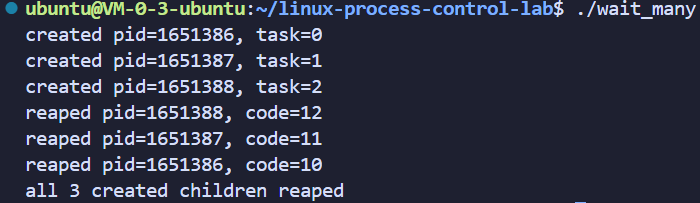
正常情况下会创建 3 个子进程,分别报告 10、11、12,最后打印全部回收完成。
6.2 数量已知与数量未知
上面的独立程序明确记录成功创建的子进程的数量,所以按照 remaining 等待。另一种常见方式是不预先计数,而是反复地调用 waitpid(-1, &status, 0),直到返回 -1 且 errno == ECHILD,表示没有剩余可等待子进程。
这两种方式有不同前提。如果程序其他部分也会创建子进程,就要明确由谁负责等待、怎样根据 PID 分发结果;否则一个模块可能先取得另一个模块等待的结果。
7. 暂停、继续与终止的边界
waitpid 不只可以报告终止。下面这些选项简单知道用途即可,具体信号控制留到后续学习:
| WUNTRACED | 普通子进程因信号暂停 | WIFSTOPPED、WSTOPSIG |
| WCONTINUED | 已暂停的子进程因 SIGCONT 继续 | WIFCONTINUED |
暂停不是退出,报告一次暂停也没有回收一个仍然活着的进程。如果以后给程序增加这些选项,就不能沿用“返回大于 0,剩余子进程数立刻减一”的逻辑;应当仅在确认正常终止或信号终止时减少存活数量。
8. 小结
-
wait /waitpid 用于父进程等待子进程退出,回收僵尸进程资源,防止资源泄漏。
-
status 是复合状态变量,不能直接当作退出码,需要配套宏解析。
-
WIFEXITED 判断子进程是否正常退出,WEXITSTATUS 获取子进程退出码。
-
WIFSIGNALED 判断子进程是否被信号终止,WTERMSIG 获取终止信号编号。
-
进程暂停不等于进程终止,暂停事件不会产生僵尸进程,不需要执行回收计数。