🚀 AI 生成的 UI 太丑?3 步让你的前端秒变高级感
你是不是也遇到过这种情况:满心期待地用 AI 生成一个前端页面,结果得到的是一个土到掉渣的蓝紫色界面,丑到自己都看不下去?🤦♂️
别担心,你不是一个人!这是目前 90% 开发者使用 AI 写前端时都会遇到的痛点。
好消息是,经过一番研究和实践,我们发现了一些有效的方法!通过几个简单的技巧,不需要手写任何 CSS,就能让 AI 帮你生成媲美专业设计师的 UI 界面。
今天就手把手教你 3 步搞定,让 AI 彻底告别 “AI 味”!
🧪 实验准备
工具准备
想要跟着实验,你需要准备:
Claude Code (2.0.55)
底层模型是 Minimax-M2
Frontend Design Skills
⚙️ 安装步骤:
- 打开终端,启动 Claude Code
- 输入 /plugin 命令
- 选择 “Add Marketplace”
- 输入仓库名:anthropics/claude-code
- 选择 “Browse and install plugins”
- 安装 frontend-design 插件
🎯 实验目标
我们设计了一个对比实验,用同一个需求提示词,在不同条件下测试 AI 生成 UI 的效果。
实验任务:创建一个 Todo List 单页面应用
下面是我们用的标准需求提示词(所有实验都用这个):
Create a production-ready, single-page Todo List application using pure HTML, CSS, and JavaScript (ES6+). The application must be entirely
self-contained within one html file.
Technical Requirements
● Frontend Only: Use pure HTML5, CSS3, and vanilla JavaScript (ES6+). No external frameworks or libraries.
● Data Persistence: Implement using browser's LocalStorage. All data should persist after page refresh/close.
● Browser Compatibility: Support modern browsers (Chrome, Firefox, Safari, Edge latest versions).
● Code Quality: Clean, modular, well-commented code following best practices.
Core Features
1. Task Management (CRUD Operations):
○ Add new tasks (title required, optional description, priority, due date)
○ Edit existing tasks (inline or modal editing)
○ Delete tasks (single and bulk delete completed tasks)
○ Mark tasks as complete/incomplete (checkbox toggle)
2. Task Attributes:
○ Title (required)
○ Description (optional)
○ Priority levels (High/Medium/Low)
○ Due date (date picker)
○ Completion status
○ Creation timestamp
3. View & Filtering:
○ Filter tasks: All, Active, Completed
○ Sort by: Priority, Due date, Creation time
○ Real-time search (title and description)
4. User Interface:
○ Responsive design (mobile-first approach)
○ Clean, modern aesthetic
○ Intuitive interactions with visual feedback
UI/UX Specifications
● Layout: Clean, card-based design with clear visual hierarchy
● Color Scheme: Professional palette
● Typography: System font stack with proper hierarchy
● Interactions: Smooth transitions, hover effects, loading states
● Accessibility: WCAG 2.1 AA compliant, keyboard navigable
Implementation Details
● Use semantic HTML5 elements
● CSS Grid/Flexbox for layouts
● ES6+ modules for code organization
● LocalStorage for data persistence
● Proper error handling and edge cases
Delivery Format
Provide one complete page file with all CSS and JavaScript embedded. The file should run immediately when opened in a browser.
Evaluation Criteria: Code quality, functionality completeness, design execution, and adherence to specifications.
📊 实验 1 | 基础 AI 生成
实验条件:直接使用 Claude Code,不使用任何额外技能
操作步骤:
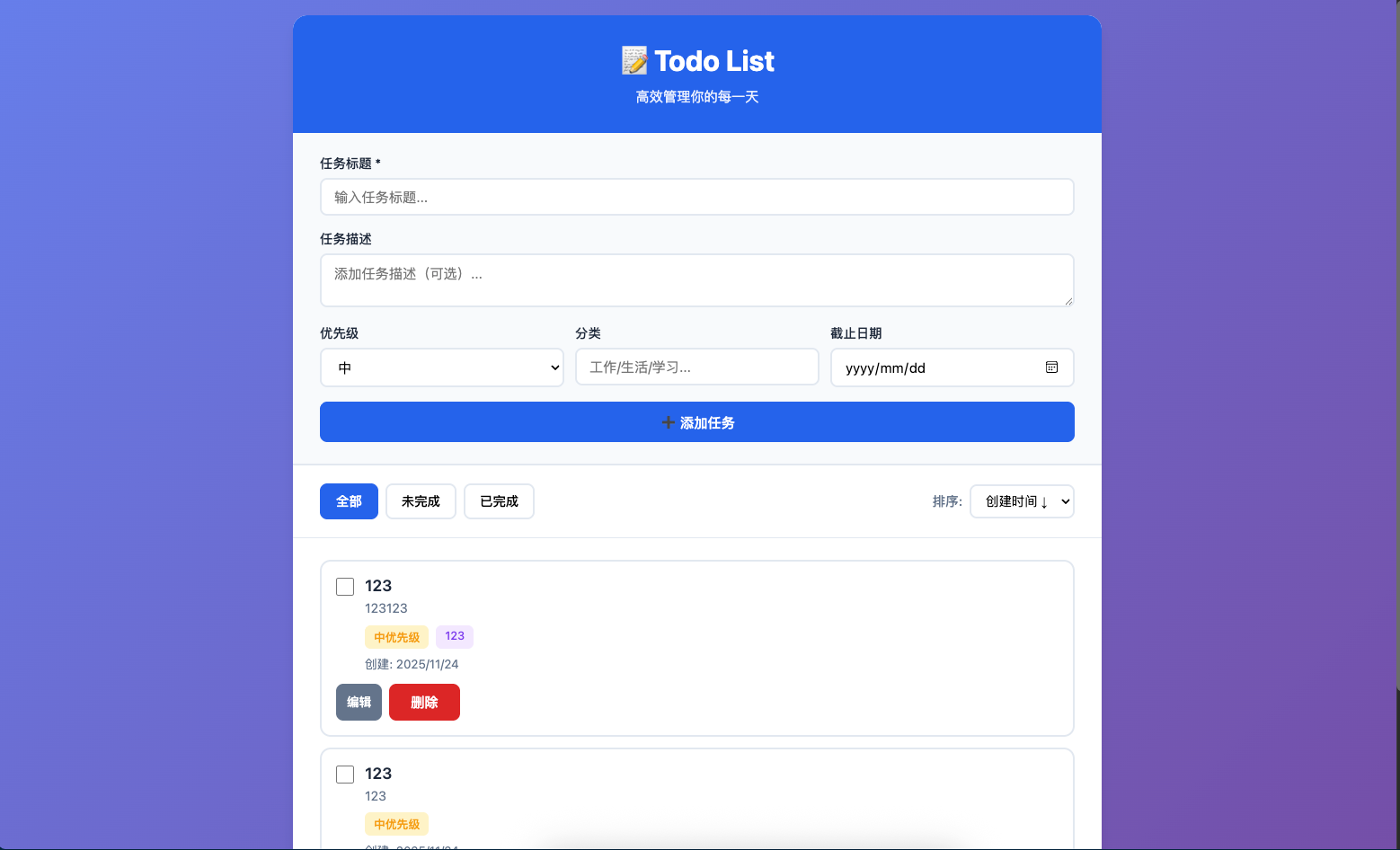
实验结果:
实验小结:
✅ 功能完整,所有需求都能实现
❌ UI 设计确实很 “AI 味”——典型的蓝紫色配色,布局平淡无奇
📊 实验 2 | 加入 Frontend Design Skills
实验条件:使用 Frontend Design Skills + 自定义颜色配置
操作步骤:
我们选的配色方案:
color palette is below: /* CSS HEX */
–dark-teal: #114b5fff;
–sea-green: #1a936fff;
–celadon: #88d498ff;
–tea-green: #c6dabfff;
/* CSS HSL */
–dark-teal: hsla(195, 70%, 22%, 1);
–sea-green: hsla(162, 70%, 34%, 1);
–celadon: hsla(133, 47%, 68%, 1);
–tea-green: hsla(104, 27%, 80%, 1);
完整提示词:
# 需求提示词
# css 的要求
颜色要严格符合上面的 css 要求
save local file xxx.html
use frontend-design skill
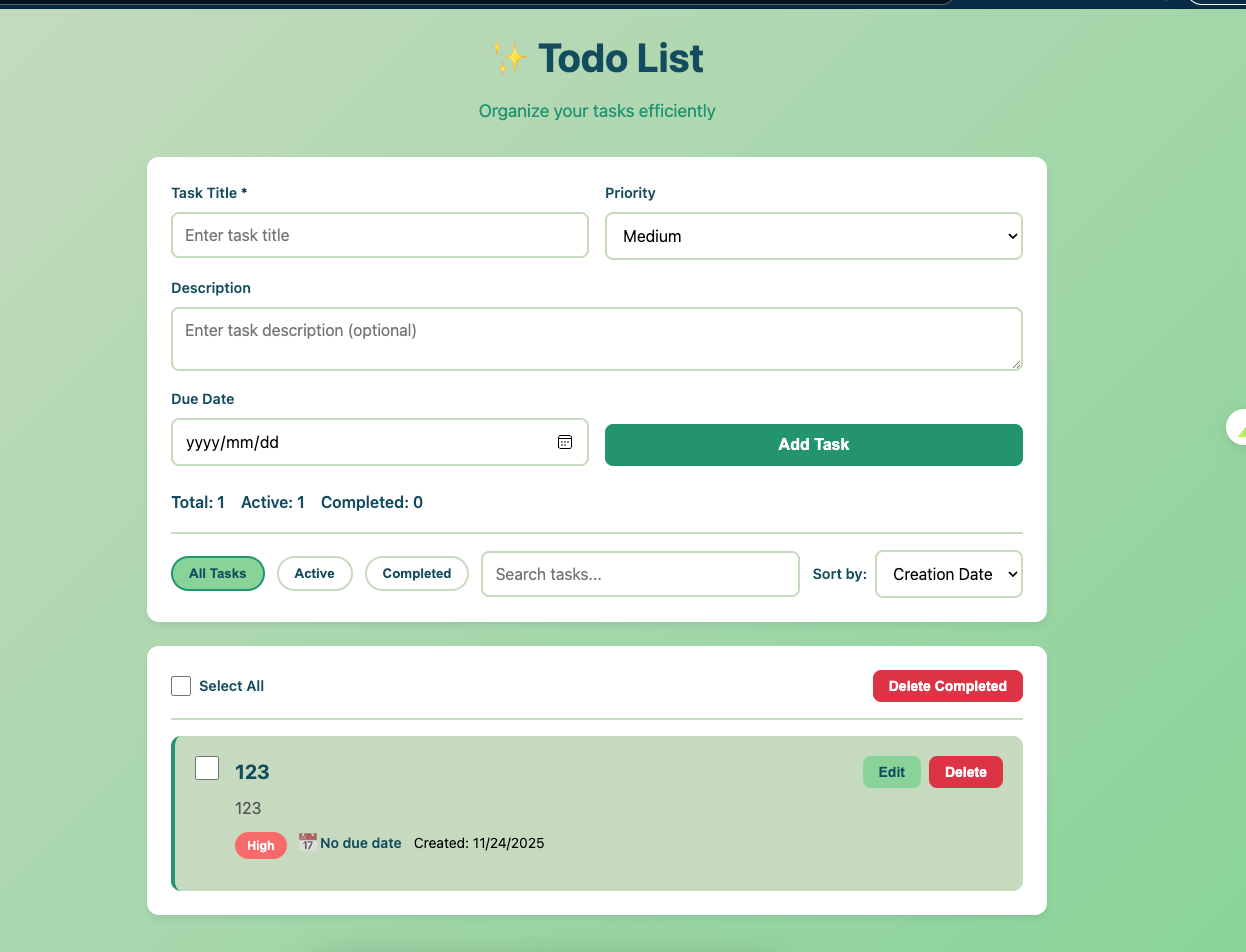
实验结果:
实验小结:
✅ UI 明显提升!配色和谐,有设计感
✅ 布局更专业,告别了蓝紫色 AI 味
💡 发现:观察 AI 的思考过程,他会随机加入风格提示词(如 “Aesthetic Direction: Organic & Refined”)
📊 实验 3 | 增加风格控制
实验条件:在实验 2 基础上,明确指定设计风格
操作步骤:
我们测试了两种风格:
风格 A:极简主义 (Minimalism)
提示词:
# 前面的需求提示词
save local file xxx.html
use aesthetic direction: Minimalism
use frontend-design skill
结果:
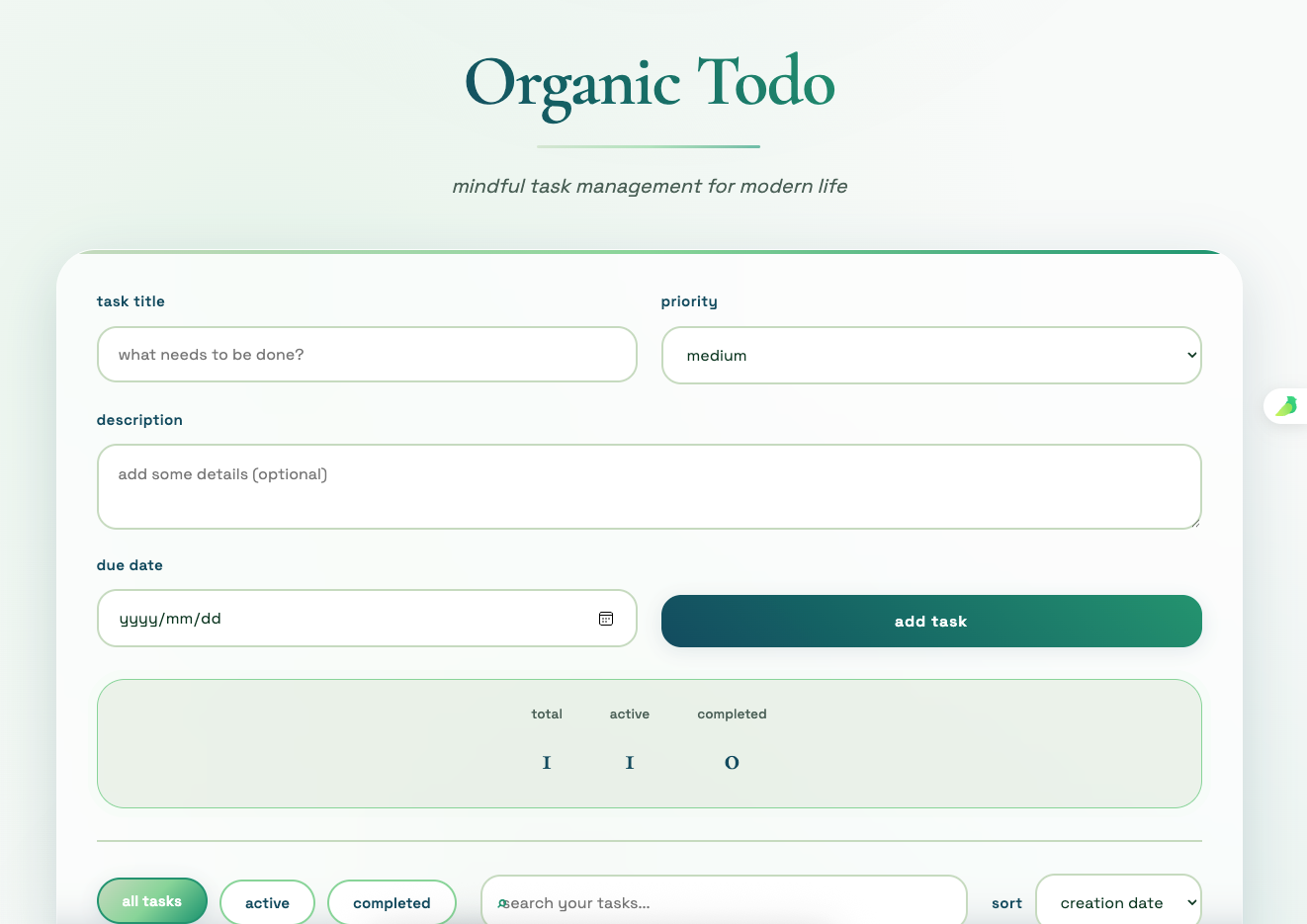
感受:非常地讨喜,有设计味道!🌞
风格 B:暗黑模式 (Dark Mode)
提示词:
# 前面的需求提示词
save local file xxx.html
use aesthetic direction: Dark Mode
use frontend-design skill
结果:
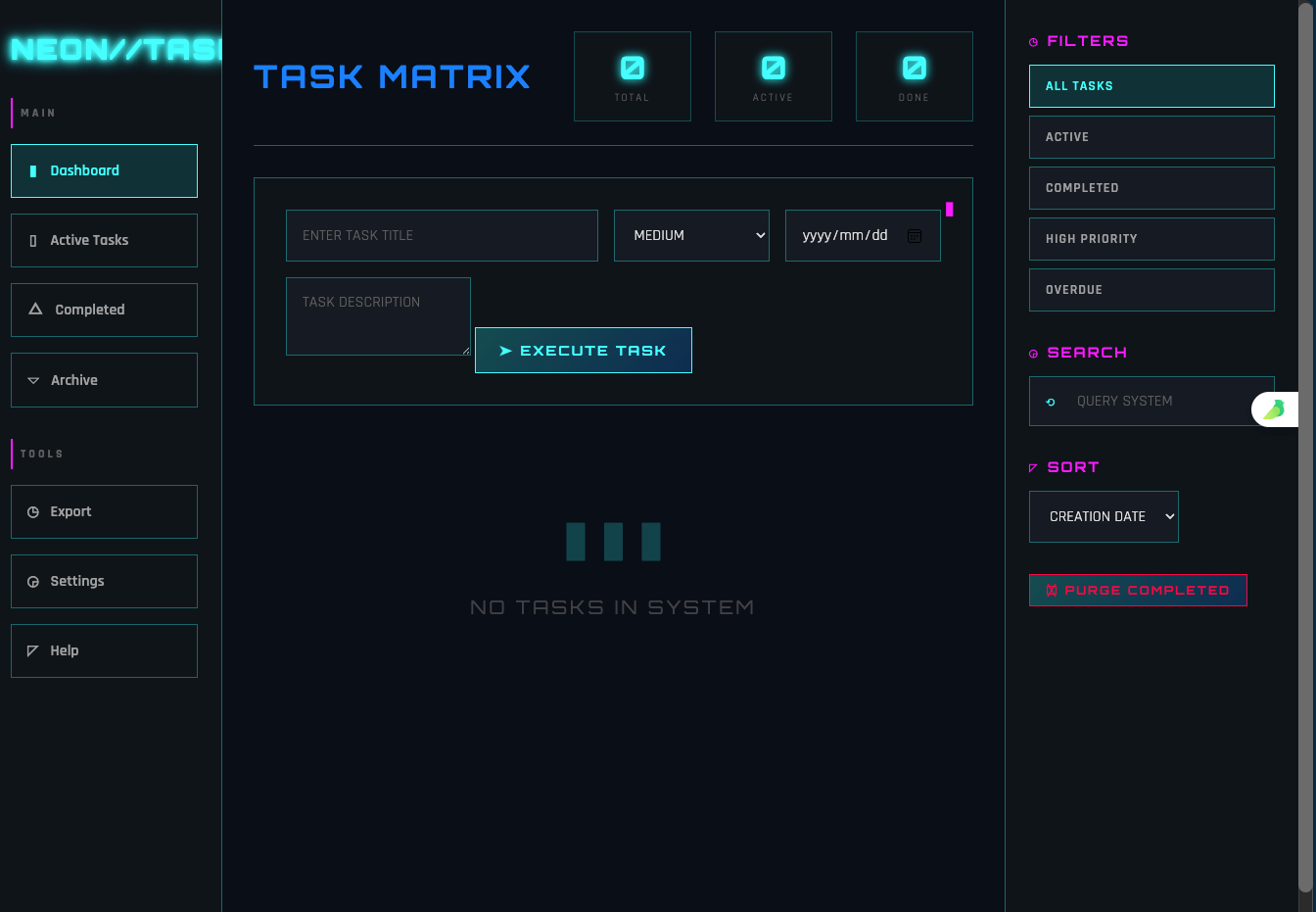
感受:秒变赛博朋克风格!🌞
实验 3 小结:
✅ 风格控制非常有效!同一个功能,不同风格呈现完全不同感觉
✅ 可以根据项目需求选择合适的风格方向
📊 效果对比一览表
想知道 3 个实验的 UI 效果对比?看这里!
| 配色方案 | 默认蓝紫色(丑) | 专业配色(好看) | 专业配色 + 风格化 |
| 设计感 | 平淡无奇 | 有设计感 | 风格鲜明 |
| 布局 | 普通 | 更专业 | 专业 + 个性化 |
| 整体感受 | 💩 AI 味很重 | 🌞 明显提升 | 🚀 专业级别 |
| 推荐指数 | ⭐ | ⭐⭐⭐ | ⭐⭐⭐⭐⭐ |
💡 结论:3 步升级,UI 效果天差地别!
🎯 汇总结果
经过 3 轮实验,我们得出以下结论:
核心发现
1. Frontend Design Skills 是关键 🔥
- 不使用:UI 充满 “AI 味”(蓝紫色、平淡布局)
- 使用后:UI 立即提升,有专业设计感
2. 颜色配置很重要
- AI 默认配色确实很丑
- 提供专业配色方案,AI 会严格执行
- 推荐使用 https://coolors.co/ 选配色
3. 风格控制是点睛之笔
- 同一功能,不同风格完全不同感觉
- 可以精准控制最终效果
实操建议
想要告别 AI 味,你只需要:
就这么简单!不需要手写任何 CSS,AI 就能生成专业级 UI。
🎉 行动呼吁
现在就试试看!
按照上面的 3 步,用你的项目需求验证一下效果。
📢 最后的最后
欢迎添加 G_Z_号,小兵张咔咔, xiaobinzhangkaka,里面有更加详尽的说明,同时分享你的建议和意见,或者你感兴趣的主题,期待与你交流。
我还会持续分享更多 AI + 前端的实用技巧,记得关注我!
你的反馈是我最大的动力! 🚀
欢迎分享你的建议和意见,或者你感兴趣的话题,期待与你交流。
#ClaudeCode #VideoCoding #Skill #Minimax #个人独立开发者