背景
由于本人对各应用的安装目录有洁癖, 但ClaudeCode官方推出的本地化安装模式无法设置安装路径, 故此基于官方安装脚本进行完善扩展。
特性
- 可检查版本是否有更新
- 可强制覆盖安装
- 可指定目录安装/更新
- 可指定具体版本号(2.0.70)/stable/latest版本安装/更新
- 失败自动重试
- 自动添加环境变量
- 文件SHA256校验及更新备份
- 自动创建ClaudeCode所需本地链接
使用方法
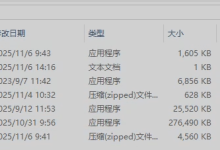
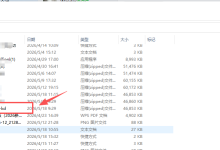
目录结构如下, 由于安装目录已经配置环境变量, 因此可直接使用, 未配置环境变量则使用如下格式
.\\update-cc.ps1 -h 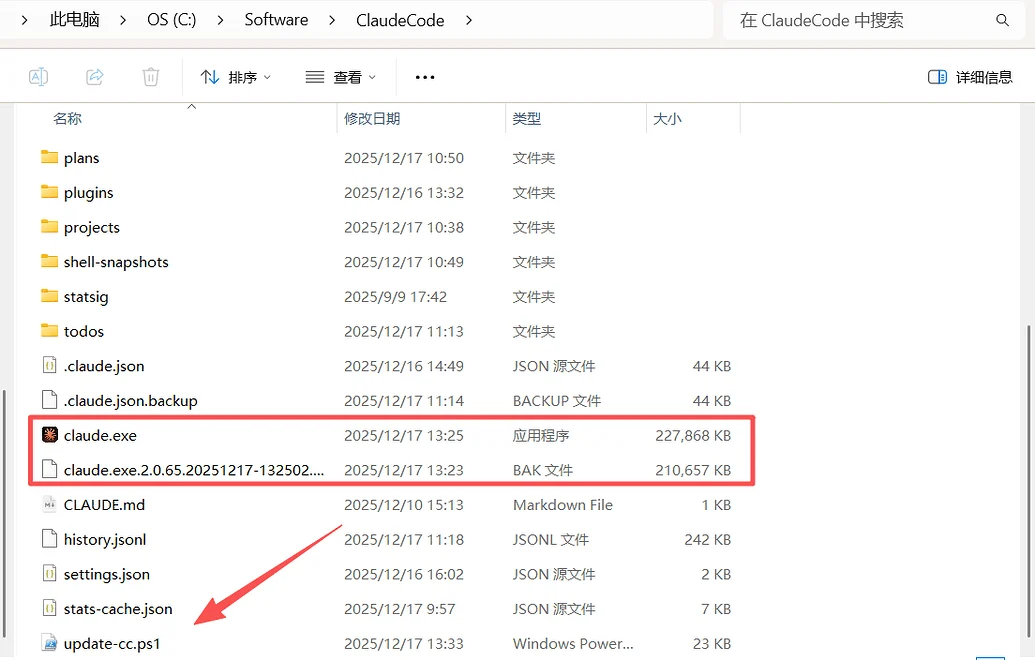
# 显示帮助
update-cc –h
# 更新到最新版本
update-cc
# 安装稳定版
update-cc stable
# 安装指定版本
update-cc 2.0.71
# 强制更新
update-cc –f
# 安装指定目录
update-cc –i "C:\\ClaudeCode"
脚本内容
# Windows – Claude Code 安装及更新脚本
# 作者: SmallBaby
# 版本: v1.1
param(
[Parameter(Position=0)]
[ValidatePattern('^(stable|latest|\\d+\\.\\d+\\.\\d+(-[^\\s]+)?)$')]
[string]$Target = "latest",
[switch]$Force,
[switch]$Help,
[string]$InstallDir = "C:\\Software\\ClaudeCode",
[string]$Platform = "win32-x64"
)
$ErrorActionPreference = "Stop"
$script:ScriptDir = Split-Path –Parent $MyInvocation.MyCommand.Path
$script:InstallPath = Join-Path –Path $InstallDir –ChildPath "claude.exe"
# 配置常量
$script:CONSTANTS = @{
REPO_URL = "https://storage.googleapis.com/claude-code-dist-86c565f3-f756-42ad-8dfa-d59b1c096819/claude-code-releases"
TEMP_DIR = $env:TEMP
DEFAULT_PLATFORM = "win32-x64"
MAX_RETRY_COUNT = 3
RETRY_DELAY_MS = 1000
DEFAULT_CONNECT_TIMEOUT = 30
DEFAULT_DOWNLOAD_TIMEOUT = 600
LOG_LEVEL = @{
SUCCESS = "SUCCESS"
INFO = "INFO"
WARN = "WARN"
ERROR = "ERROR"
}
}
# 验证32位系统
function Validate-SystemArchitecture {
if (-not [Environment]::Is64BitProcess) {
Write-Log "Claude Code 不支持 32 位 Windows,请使用 64 位版本" $script:CONSTANTS.LOG_LEVEL.ERROR
exit 1
}
}
# 主函数
function Show-Help {
Write-Host @"
Windows – Claude Code 安装及更新脚本 © SmallBaby
用法:
update-cc.ps1 [选项] [版本]
参数:
目标版本 (可选):
stable 安装稳定版本
latest 安装最新版本 (默认)
2.0.70 安装指定的版本号
选项:
-f,-Force 强制更新,即使当前版本已是最新
-h,-Help 显示此帮助信息并退出
-i,-InstallDir 指定 Claude Code 的安装目录
默认: C:\\Software\\ClaudeCode
示例: -i "C:\\Tools"
示例:
update-cc.ps1
检查更新并提示安装最新版本
update-cc.ps1 stable
安装稳定版本
update-cc.ps1 2.0.70
安装指定的 2.0.70 版本
update-cc.ps1 -Force
强制重新安装最新版本,不提示确认
update-cc.ps1 -InstallDir "C:\\Tools"
安装到指定目录 C:\\Tools
"@ –ForegroundColor White
}
function Write-Log {
param(
[string]$Message,
[string]$Level = "INFO"
)
$timestamp = Get-Date –Format "yyyy-MM-dd HH:mm:ss"
$color = if ($Level -eq "ERROR") { "Red" }
elseif ($Level -eq "WARN") { "Yellow" }
elseif ($Level -eq "SUCCESS") { "Green" }
else { "White" }
Write-Host "[$timestamp] [$Level] $Message" –ForegroundColor $color
}
# 下载函数
function Download-Claude {
param(
[string]$Version,
[string]$Platform = $script:CONSTANTS.DEFAULT_PLATFORM,
[int]$RetryCount = 0
)
try {
$downloadUrl = "$($script:CONSTANTS.REPO_URL)/$Version/$Platform/claude.exe"
$tempPath = Join-Path $script:CONSTANTS.TEMP_DIR "claude-${Version}-${Platform}.exe"
Write-Log "正在下载 Claude Code $Version…"
Write-Log "下载地址: $downloadUrl"
$response = Invoke-RestMethod –Uri $downloadUrl –Method Get –UseBasicParsing –TimeoutSec $script:CONSTANTS.DEFAULT_DOWNLOAD_TIMEOUT
Write-Log "使用 Invoke-RestMethod 下载…" "INFO"
Invoke-WebRequest –Uri $downloadUrl –OutFile $tempPath –TimeoutSec $script:CONSTANTS.DEFAULT_DOWNLOAD_TIMEOUT –UseBasicParsing
if (Test-Path $tempPath) {
$fileSize = (Get-Item $tempPath).Length / 1MB
Write-Log "下载完成,文件大小: $([math]::Round($fileSize, 2)) MB" "SUCCESS"
# 校验文件完整性
Write-Log "正在校验文件完整性…"
$expectedChecksum = Get-Checksum –Version $Version –Platform $Platform
if (-not $expectedChecksum) { throw "无法获取校验和" }
$actualChecksum = (Get-FileHash –Path $tempPath –Algorithm SHA256).Hash.ToLower()
if ($actualChecksum -ne $expectedChecksum) {
Remove-Item –Path $tempPath –Force –ErrorAction SilentlyContinue
throw "校验和不匹配,文件可能已损坏"
}
Write-Log "文件校验通过" "SUCCESS"
return $tempPath
} else {
throw "下载失败,文件未找到"
}
}
catch {
if ($RetryCount -lt $script:CONSTANTS.MAX_RETRY_COUNT) {
Write-Log "下载失败 (第$($RetryCount + 1)次), 重试中…: $($_.Exception.Message)" "WARN"
Start-Sleep –Milliseconds $script:CONSTANTS.RETRY_DELAY_MS
return Download-Claude –Version $Version –Platform $Platform –RetryCount ($RetryCount + 1)
} else {
Write-Log "下载失败 (所有重试均失败): $($_.Exception.Message)" "ERROR"
throw
}
}
}
# 版本信息获取函数
function Get-VersionInfo {
[CmdletBinding()]
param(
[string]$Target,
[int]$RetryCount = 0
)
try {
Write-Log "正在获取版本信息… (目标: $Target)"
if ($Target -match '^\\d+\\.\\d+\\.\\d+') {
Write-Log "使用指定版本: $Target"
return $Target
}
$versionUrl = "$($script:CONSTANTS.REPO_URL)/$Target"
$version = Invoke-RestMethod –Uri $versionUrl –TimeoutSec $script:CONSTANTS.DEFAULT_CONNECT_TIMEOUT –ErrorAction Stop
$version = $version.Trim()
Write-Log "获取到 $Target 版本: $version"
return $version
}
catch {
if ($RetryCount -lt $script:CONSTANTS.MAX_RETRY_COUNT) {
Write-Log "获取版本信息失败 (第$($RetryCount + 1)次), 重试中…: $($_.Exception.Message)" "WARN"
Start-Sleep –Milliseconds $script:CONSTANTS.RETRY_DELAY_MS
return Get-VersionInfo –Target $Target –RetryCount ($RetryCount + 1)
} else {
Write-Log "获取版本信息失败 (所有重试均失败): $($_.Exception.Message)" "ERROR"
throw
}
}
}
# 当前版本获取函数
function Get-CurrentVersion {
try {
Write-Log "正在检查当前版本…"
# 检查已安装路径
if (Test-Path $script:InstallPath) {
try {
$versionOutput = & $script:InstallPath –v 2>&1
if ($versionOutput -match '(\\d+\\.\\d+\\.\\d+)') {
$currentVersion = $matches[1]
Write-Log "当前版本 (路径): $currentVersion"
return $currentVersion
}
}
catch {
Write-Log "无法从 $script:InstallPath 获取版本: $($_.Exception.Message)" "WARN"
}
}
# 检查PATH中的claude
try {
$claudeVersion = & claude –v 2>&1
if ($claudeVersion -match '(\\d+\\.\\d+\\.\\d+)') {
$currentVersion = $matches[1]
Write-Log "当前版本 (PATH): $currentVersion"
return $currentVersion
}
}
catch {
Write-Log "claude command not found in PATH" "WARN"
}
Write-Log "未找到已安装的 Claude Code" "WARN"
return $null
}
catch {
Write-Log "获取当前版本失败: $($_.Exception.Message)" "ERROR"
return $null
}
}
# 更新尝试函数
function Try–ClaudeUpdate {
param(
[string]$Target
)
try {
Write-Log "尝试使用 claude update 命令更新…" "INFO"
$claudeCmd = Get-Command claude –ErrorAction SilentlyContinue
if (-not $claudeCmd) {
Write-Log "未找到 claude 命令,跳过内置更新" "WARN"
return $false
}
$updateArgs = @("update")
if ($Target -ne "latest") {
$updateArgs += $Target
}
Write-Log "执行: claude $ $($updateArgs -join ' ')"
# 执行更新并捕获退出代码
$processInfo = New-Object System.Diagnostics.ProcessStartInfo
$processInfo.FileName = $claudeCmd.Source
$processInfo.Arguments = ($updateArgs -join ' ')
$processInfo.UseShellExecute = $false
$process = [System.Diagnostics.Process]::Start($processInfo)
$process.WaitForExit()
Write-Log "claude update 退出代码: $($process.ExitCode)" "INFO"
if ($process.ExitCode -eq 0) {
$newVersion = Get-CurrentVersion
$targetVersion = Get-VersionInfo –Target $Target
if ($newVersion -eq $targetVersion) {
Write-Log "使用 claude update 成功更新到版本: $newVersion" "SUCCESS"
return $true
} else {
Write-Log "claude update 未更新到目标版本,将使用下载方式" "INFO"
return $false
}
} else {
Write-Log "claude update 失败,退出代码: $($process.ExitCode)" "WARN"
return $false
}
}
catch {
Write-Log "claude update 失败: $($_.Exception.Message)" "WARN"
return $false
}
}
# 版本比较函数
function Compare-Version {
param(
[string]$Version1,
[string]$Version2
)
try {
# 使用[version]对象进行比较
$v1 = [System.Version]$Version1
$v2 = [System.Version]$Version2
if ($v1 -gt $v2) { return 1 }
elseif ($v1 -lt $v2) { return –1 }
else { return 0 }
}
catch {
Write-Log "版本比较失败: $($_.Exception.Message)" "ERROR"
Write-Log "尝试字符串比较…" "WARN"
# 如果版本对象比较失败,使用字符串比较
$v1Components = $Version1.Split('.')
$v2Components = $Version2.Split('.')
$maxLen = [Math]::Max($v1Components.Count, $v2Components.Count)
for ($i = 0; $i -lt $maxLen; $i++) {
$c1 = [int]($v1Components[$i] ?? 0)
$c2 = [int]($v2Components[$i] ?? 0)
if ($c1 -gt $c2) { return 1 }
elseif ($c1 -lt $c2) { return –1 }
}
return 0
}
}
# 校验和获取函数
function Get-Checksum {
[CmdletBinding()]
param(
[string]$Version,
[string]$Platform = $script:CONSTANTS.DEFAULT_PLATFORM,
[int]$RetryCount = 0
)
try {
$manifestUrl = "$($script:CONSTANTS.REPO_URL)/$Version/manifest.json"
Write-Log "获取清单: $manifestUrl"
$manifest = Invoke-RestMethod –Uri $manifestUrl –TimeoutSec $script:CONSTANTS.DEFAULT_CONNECT_TIMEOUT –ErrorAction Stop
$checksum = $manifest.platforms.$Platform.checksum
if (-not $checksum) {
throw "清单中未找到平台 $Platform"
}
Write-Log "获取到校验和: $($checksum.Substring(0, 16))…"
return $checksum.ToLower()
}
catch {
if ($RetryCount -lt $script:CONSTANTS.MAX_RETRY_COUNT) {
Write-Log "获取校验和失败 (第$($RetryCount + 1)次), 重试中…: $($_.Exception.Message)" "WARN"
Start-Sleep –Milliseconds $script:CONSTANTS.RETRY_DELAY_MS
return Get-Checksum –Version $Version –Platform $Platform –RetryCount ($RetryCount + 1)
} else {
Write-Log "获取校验和失败 (所有重试均失败): $($_.Exception.Message)" "ERROR"
throw
}
}
}
# 备份函数
function Backup-CurrentClaude {
param(
[string]$CurrentVersion
)
try {
if (Test-Path $script:InstallPath) {
$directory = Split-Path –Path $script:InstallPath –Parent
# 清理旧备份
$backupPattern = "claude.exe.*.bak"
$backupFiles = Get-ChildItem –Path $directory –Name $backupPattern –ErrorAction SilentlyContinue
if ($backupFiles.Count -gt 0) {
Write-Log "正在清理旧备份文件…"
foreach ($backupFile in $backupFiles) {
$backupPath = Join-Path –Path $directory –ChildPath $backupFile
Remove-Item –Path $backupPath –Force –ErrorAction SilentlyContinue
Write-Log "已删除旧备份: $backupFile"
}
}
$timestamp = Get-Date –Format "yyyyMMdd-HHmmss"
$backupPath = Join-Path –Path $directory –ChildPath "claude.exe.$CurrentVersion.$timestamp.bak"
Write-Log "正在备份当前文件到: $backupPath"
Copy-Item –Path $script:InstallPath –Destination $backupPath –Force –ErrorAction Stop
Write-Log "备份创建成功" "SUCCESS"
return $backupPath
}
return $null
}
catch {
Write-Log "备份失败: $($_.Exception.Message)" "WARN"
return $null
}
}
# 环境变量函数
function Add-To–Path {
param(
[string]$PathToAdd
)
try {
$directory = Split-Path –Path $PathToAdd –Parent
$userPath = [Environment]::GetEnvironmentVariable("PATH", "User") –split ';' | Where-Object { $_ -ne $null -and $_ -ne '' }
if ($userPath -notcontains $directory) {
Write-Log "正在添加环境变量: $directory"
$newPath = $userPath + $directory | Where-Object { $_ -ne $null -and $_ -ne '' }
[Environment]::SetEnvironmentVariable("PATH", ($newPath -join ';'), "User")
Write-Log "环境变量已添加,请重启终端或重新登录以使更改生效" "SUCCESS"
} else {
Write-Log "环境变量已存在,跳过添加" "INFO"
}
}
catch {
Write-Log "添加环境变量失败: $($_.Exception.Message)" "WARN"
}
}
# 链接创建函数
function Create-Links {
param(
[string]$Version
)
try {
Write-Log "正在创建链接…" "INFO"
$installDirectory = Split-Path –Path $script:InstallPath –Parent
$userProfile = $env:USERPROFILE
# 创建用户目录下的 .claude 软链接
$claudeUserDir = Join-Path $userProfile ".claude"
if (Test-Path $claudeUserDir) {
Remove-Item –Path $claudeUserDir –Force –Recurse –ErrorAction SilentlyContinue
Write-Log "已删除现有链接: $claudeUserDir"
}
New-Item –ItemType SymbolicLink –Path $claudeUserDir –Value $installDirectory –Force –ErrorAction Stop | Out-Null
Write-Log "已创建软链接: $claudeUserDir -> $installDirectory" "SUCCESS"
# 创建各种配置文件的软链接
$configFiles = @('.claude.json', '.claude.json.backup')
foreach ($configFile in $configFiles) {
$sourcePath = Join-Path $installDirectory $configFile
$targetPath = Join-Path $userProfile $configFile
if (Test-Path $sourcePath) {
if (Test-Path $targetPath) {
Remove-Item –Path $targetPath –Force –ErrorAction SilentlyContinue
Write-Log "已删除现有链接: $targetPath"
}
try {
New-Item –ItemType SymbolicLink –Path $targetPath –Value $sourcePath –Force –ErrorAction Stop | Out-Null
Write-Log "已创建软链接: $targetPath -> $sourcePath" "SUCCESS"
}
catch {
Write-Log "创建软链接失败 (不影响主功能): $($_.Exception.Message)" "WARN"
}
}
}
# 创建 .local 目录结构
$binDir = Join-Path $userProfile ".local\\bin"
$versionsDir = Join-Path $userProfile ".local\\share\\claude\\versions"
foreach ($dir in @($binDir, $versionsDir)) {
if (-not (Test-Path $dir)) {
New-Item –ItemType Directory –Path $dir –Force –ErrorAction Stop | Out-Null
Write-Log "已创建目录: $dir"
}
}
# 创建到 .local/bin 的软链接
$binLinkPath = Join-Path $binDir "claude.exe"
if (Test-Path $binLinkPath) {
Remove-Item –Path $binLinkPath –Force –ErrorAction SilentlyContinue
Write-Log "已删除现有链接: $binLinkPath"
}
try {
New-Item –ItemType SymbolicLink –Path $binLinkPath –Value $script:InstallPath –Force –ErrorAction Stop | Out-Null
Write-Log "已创建软链接: $binLinkPath -> $script:InstallPath" "SUCCESS"
}
catch {
Write-Log "创建软链接失败 (不影响主功能): $($_.Exception.Message)" "WARN"
}
Write-Log "链接创建完成" "SUCCESS"
}
catch {
Write-Log "创建链接失败: $($_.Exception.Message)" "WARN"
Write-Log "此错误通常不影响核心功能" "INFO"
}
}
# 清理临时文件
function Cleanup-TempFiles {
param(
[string]$TempFile = $null,
[string]$LogFile = $null
)
try {
if ($TempFile -and (Test-Path $TempFile)) {
Remove-Item –Path $TempFile –Force –ErrorAction SilentlyContinue
Write-Log "已清理临时文件" "INFO"
}
if ($LogFile -and (Test-Path $LogFile)) {
Remove-Item –Path $LogFile –Force –ErrorAction SilentlyContinue
}
}
catch {
Write-Log "清理临时文件时出错: $($_.Exception.Message)" "WARN"
}
}
# 进程检查
function Check-And-KillClaudeProcess {
Write-Log "检查 Claude Code 运行进程…" "INFO"
# 获取并终止相关进程
$processes = Get-Process –Name "claude", "Claude*" –ErrorAction SilentlyContinue
if ($processes) {
foreach ($proc in $processes) {
# 检查进程是否使用了目标路径中的文件
if ($proc.Path -and $proc.Path -like "*claude.exe*") {
Write-Log "发现运行中的 claude 进程 PID: $($proc.Id), 已启动: $(Get-Date –Format 'yyyy-MM-dd HH:mm:ss'), 运行时间: $((Get-Date) – $proc.StartTime)" "WARN"
try {
Stop-Process –Id $proc.Id –Force –ErrorAction Stop
Write-Log "已终止进程 PID: $($proc.Id)" "INFO"
Start-Sleep –Seconds 2
}
catch {
Write-Log "终止进程失败: $($_.Exception.Message)" "WARN"
}
}
}
}
# 多次检查进程是否完全终止
for ($i = 1; $i -le 3; $i++) {
$remaining = Get-Process –Name "claude" –ErrorAction SilentlyContinue
if ($remaining.Count -eq 0) {
Write-Log "claude 进程已全部终止" "INFO"
break
} else {
Write-Log "仍有 $([array]$remaining.Count) 个 claude 进程存在,等待 $($i*2) 秒后重试…" "INFO"
Start-Sleep –Seconds ($i * 2)
}
}
# 检查目标文件是否仍然被锁定
$targetExists = Test-Path $script:InstallPath
if ($targetExists) {
try {
# 尝试访问文件以确认是否被锁定
$fileInfo = Get-Item $script:InstallPath
Write-Log "目标文件存在,最后一次写入: $($fileInfo.LastWriteTime)" "INFO"
}
catch {
Write-Log "目标文件被锁定: $($_.Exception.Message)" "WARN"
}
}
# 给系统一些时间来清理文件锁
Start-Sleep –Seconds 2
}
# 主执行逻辑
function Main {
if ($Help) {
Show-Help
return
}
try {
Write-Log "=== Claude Code 自动更新脚本启动 ===" "SUCCESS"
Write-Log "目标安装路径: $script:InstallPath"
Write-Log "目标版本: $Target"
Write-Log "平台架构: $Platform"
Write-Log "安装目录: $(Split-Path –Path $script:InstallPath –Parent)"
# 验证系统架构
Validate-SystemArchitecture
$targetVersion = Get-VersionInfo –Target $Target
$backupPath = $null
$tempFile = $null
# 如果用户指定了特定版本号,直接走下载流程
if ($Target -match '^\\d+\\.\\d+\\.\\d+') {
Write-Log "检测到指定版本,跳过版本比较,直接下载" "INFO"
} else {
# 非指定版本,执行原有检查逻辑
$currentVersion = Get-CurrentVersion
if ($currentVersion) {
$comparison = Compare-Version –Version1 $targetVersion –Version2 $currentVersion
if ($comparison -eq 0) {
Write-Log "版本 $currentVersion 已是最新版本" "SUCCESS"
if (-not $Force) {
Write-Log "如需强制更新,请使用 -Force 参数"
return
} else {
Write-Log "强制模式下,继续更新" "INFO"
}
}
elseif ($comparison -eq 1) {
Write-Log "发现新版本: $currentVersion -> $targetVersion" "INFO"
}
else {
Write-Log "当前版本 $currentVersion 比目标版本 $targetVersion 更新" "WARN"
if (-not $Force) {
Write-Log "如需强制更新,请使用 -Force 参数"
return
}
}
# 尝试使用内建更新功能
if (-not $Force -and $Target -ne "latest" -and $Target -ne "stable") {
Write-Log "尝试使用 claude update 功能…" "INFO"
$updateSuccess = Try–ClaudeUpdate –Target $Target
if ($updateSuccess) {
Create-Links –Version (Get-CurrentVersion)
Write-Log "=== Claude Code 更新完成 (使用内建更新) ===" "SUCCESS"
return
}
}
} else {
Write-Log "未找到已安装版本,执行全新安装" "INFO"
}
}
# 用户确认(仅对非指定版本)
if (-not $Force -and -not ($Target -match '^\\d+\\.\\d+\\.\\d+')) {
$choice = Read-Host "是否继续下载并安装 Claude Code $targetVersion ? (y/N)"
if ($choice -notmatch '^[Yy]$') {
Write-Log "用户取消更新"
return
}
}
# 创建安装目录
$installDirectory = Split-Path –Path $script:InstallPath –Parent
if (-not (Test-Path $installDirectory)) {
New-Item –ItemType Directory –Path $installDirectory –Force –ErrorAction Stop | Out-Null
Write-Log "已创建安装目录: $installDirectory"
}
# 对于非指定版本的场景才备份
if ($Target -notmatch '^\\d+\\.\\d+\\.\\d+') {
$currentVersion = Get-CurrentVersion
if ($currentVersion) {
$backupPath = Backup-CurrentClaude –CurrentVersion $currentVersion
}
}
# 直接下载新版本
Write-Log "开始下载文件…" "INFO"
$tempFile = Download-Claude –Version $targetVersion –Platform $Platform
try {
Write-Log "正在安装到: $script:InstallPath"
Check-And-KillClaudeProcess
Start-Sleep –Seconds 2
Copy-Item –Path $tempFile –Destination $script:InstallPath –Force –ErrorAction Stop
if (Test-Path $script:InstallPath) {
# 等待文件操作完成
Start-Sleep –Seconds 2
# 验证安装
$newVersion = Get-CurrentVersion
if ($newVersion -eq $targetVersion) {
Write-Log "Claude Code 更新安装成功!版本: $targetVersion" "SUCCESS"
if ($backupPath) {
Write-Log "备份文件保存在: $backupPath" "INFO"
}
# 创建符号链接和环境变量
Create-Links –Version $targetVersion
Add-To–Path –PathToAdd $script:InstallPath
} else {
throw "安装验证失败: 期望版本 $targetVersion, 实际版本 $newVersion"
}
} else {
throw "文件复制失败"
}
}
catch {
Write-Log "安装失败: $($_.Exception.Message)" "ERROR"
# 恢复备份
if ($backupPath -and (Test-Path $backupPath)) {
Write-Log "正在恢复备份…"
Check-And-KillClaudeProcess
Start-Sleep –Seconds 2
Copy-Item –Path $backupPath –Destination $script:InstallPath –Force –ErrorAction SilentlyContinue
Write-Log "已恢复到之前的版本" "WARN"
}
throw
}
finally {
Cleanup-TempFiles –TempFile $tempFile
}
Write-Log "=== Claude Code 更新完成 ===" "SUCCESS"
Write-Log "新版本: $targetVersion" "SUCCESS"
Write-Log "请重新打开终端以使用新版本" "INFO"
}
catch {
Write-Log "脚本执行失败: $($_.Exception.Message)" "ERROR"
exit 1
}
}
# 执行主函数
Main
引用
- Github地址: OneToolkit