目录
一、表情识别
1、原理
2、代码实现
代码:
讲解:
执行效果:
二、疲劳检测
1、原理
2、代码实现
代码:
讲解:
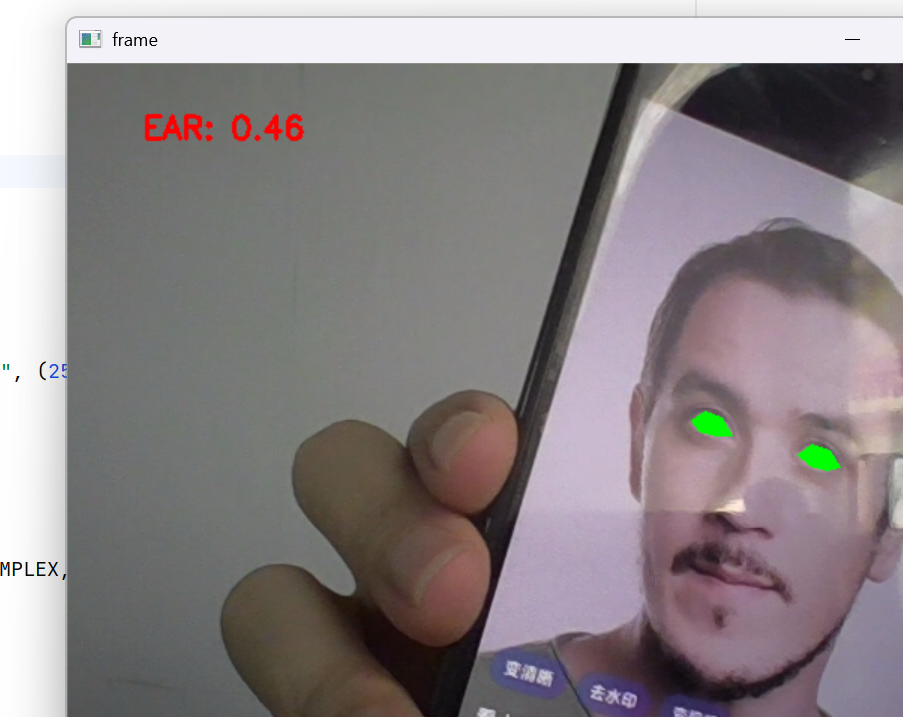
执行效果:
昨天,我们通过调用dlib.shape_predictor(形状预测器构造函数 / 模型加载函数),加载shape_predictor_68_face_landmarks.dat人脸68个特征点预训练文件,实现了人脸68个特征点提取。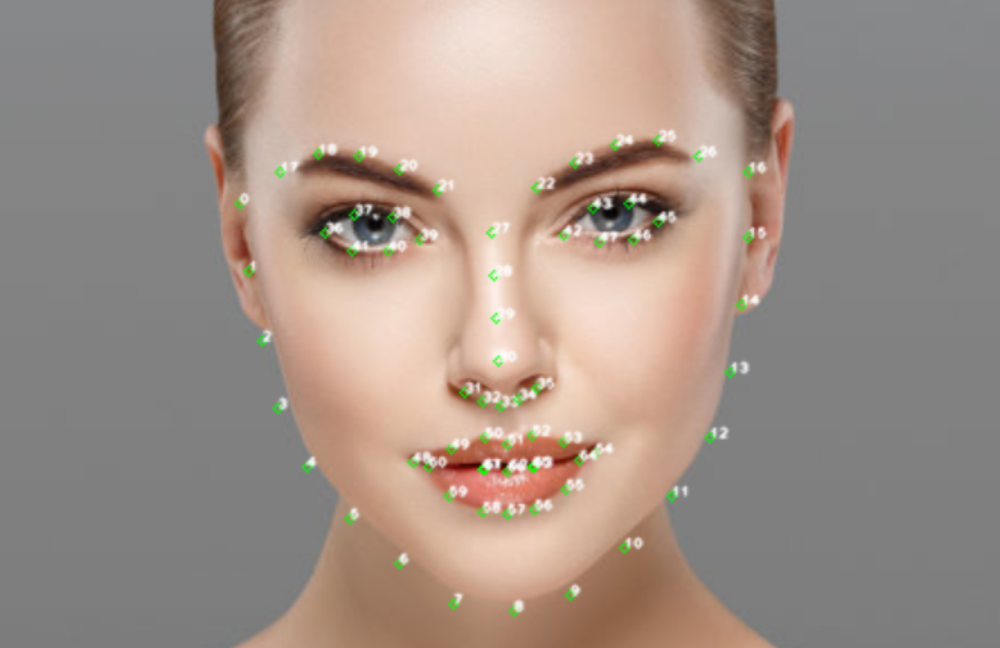
今天,我们通过计算特征点距离的比值来进行表情(嘴部关键点距离比值)识别,疲劳(眼睛关键点距离比值)检测。
一、表情识别
1、原理
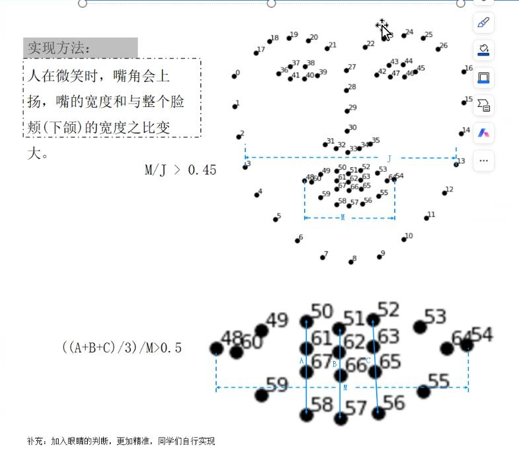
微笑检测MJR:Mouth to Jaw Ratio(嘴巴 – 面部参考比值,也可简写为 Mouth Jaw Ratio),当比值M/J大于0.45,我们判断为微笑。
大笑检测MAR:Mouth to Jaw Ratio(嘴巴 – 面部参考比值,也可简写为 Mouth Jaw Ratio),如图判定。
2、代码实现
代码:
import numpy as np
import dlib
import cv2
from sklearn.metrics.pairwise import euclidean_distances
from PIL import Image, ImageDraw, ImageFont
def MAR(shape):
A=euclidean_distances(shape[50].reshape(1,2),shape[58].reshape(1,2))
B=euclidean_distances(shape[51].reshape(1,2),shape[57].reshape(1,2))
C=euclidean_distances(shape[52].reshape(1,2),shape[56].reshape(1,2))
D=euclidean_distances(shape[48].reshape(1,2),shape[54].reshape(1,2))
return ((A+B+C)/3)/D
def MJR(shape):
M=euclidean_distances(shape[48].reshape(1,2),shape[54].reshape(1,2))
J=euclidean_distances(shape[3].reshape(1,2),shape[13].reshape(1,2))
return M/J
def FRR(shape):
"""
皱眉比值(Frown Ratio)
核心:判断眉毛是否向中间聚拢,比值降低代表皱眉(生气、难过、困惑)
特征点:眉毛内侧间距 / 眉毛外侧间距(皱眉时内侧聚拢,间距变小)
"""
# 眉毛内侧间距(18-25,左右眉内侧靠近鼻梁的点)
brow_inner_distance = euclidean_distances(shape[18].reshape(1, 2), shape[25].reshape(1, 2))
# 眉毛外侧间距(17-26,左右眉最外侧的点,稳定参考)
brow_outer_distance = euclidean_distances(shape[17].reshape(1, 2), shape[26].reshape(1, 2))
return brow_inner_distance / brow_outer_distance
def PRR(shape):
"""
撇嘴比值(Pout Ratio)
核心:判断嘴巴是否向下撇嘴,比值升高代表撇嘴(委屈、难过、不满)
特征点:嘴巴下沿中点到嘴角的垂直距离 / 嘴巴横向宽度
"""
# 嘴巴下沿中点(57是下唇中间,66是下巴上方嘴巴下沿,取平均)
mouth_lower_mid = (shape[57] + shape[66]) / 2
# 左嘴角(48)到嘴巴下沿中点的垂直距离
left_corner_pout = euclidean_distances(shape[48].reshape(1, 2), mouth_lower_mid.reshape(1, 2))
# 右嘴角(54)到嘴巴下沿中点的垂直距离
right_corner_pout = euclidean_distances(shape[54].reshape(1, 2), mouth_lower_mid.reshape(1, 2))
# 嘴巴横向宽度(稳定参考,和你的MJR一致)
mouth_horizontal = euclidean_distances(shape[48].reshape(1, 2), shape[54].reshape(1, 2))
# 计算平均撇嘴距离 / 嘴巴横向宽度
avg_pout_distance = (left_corner_pout + right_corner_pout) / 2
return avg_pout_distance / mouth_horizontal
def BRR(shape):
"""
眉毛抬高比(Brow Raise Ratio)
核心:判断眉毛是否上抬,比值升高代表挑眉(惊讶、疑惑、意外)
特征点:眉毛中点(19、24)到眼睛上沿(37、43)的垂直距离 / 面部稳定宽度
"""
# 计算左眉中点到左眼上沿的垂直距离
left_brow_eye = euclidean_distances(shape[19].reshape(1, 2), shape[37].reshape(1, 2))
# 计算右眉中点到右眼上沿的垂直距离
right_brow_eye = euclidean_distances(shape[24].reshape(1, 2), shape[43].reshape(1, 2))
# 面部稳定参考:鼻翼外侧宽度(和你的MJR一致,消除人脸大小影响)
face_reference = euclidean_distances(shape[3].reshape(1, 2), shape[13].reshape(1, 2))
# 计算平均眉毛-眼睛距离 / 面部参考宽度
avg_brow_eye = (left_brow_eye + right_brow_eye) / 2
return avg_brow_eye / face_reference
def EAR(shape):
"""
眼睛长宽比(Eye Aspect Ratio)
核心:判断眼睛是否闭合,比值骤降代表闭眼(困倦、眨眼、闭眼)
特征点:左眼36-41,右眼42-47(垂直距离/水平距离,归一化)
"""
# 计算左眼垂直方向3组距离(上眼睑-下眼睑)
left_eye_1 = euclidean_distances(shape[37].reshape(1, 2), shape[41].reshape(1, 2))
left_eye_2 = euclidean_distances(shape[38].reshape(1, 2), shape[40].reshape(1, 2))
# 计算右眼垂直方向3组距离
right_eye_1 = euclidean_distances(shape[43].reshape(1, 2), shape[47].reshape(1, 2))
right_eye_2 = euclidean_distances(shape[44].reshape(1, 2), shape[46].reshape(1, 2))
# 计算眼睛水平方向距离(左右眼角,作为稳定参考)
left_eye_horizontal = euclidean_distances(shape[36].reshape(1, 2), shape[39].reshape(1, 2))
right_eye_horizontal = euclidean_distances(shape[42].reshape(1, 2), shape[45].reshape(1, 2))
# 计算平均垂直距离/平均水平距离(得到EAR值)
avg_vertical = (left_eye_1 + left_eye_2 + right_eye_1 + right_eye_2) / 4
avg_horizontal = (left_eye_horizontal + right_eye_horizontal) / 2
return avg_vertical / avg_horizontal
def cv2_put_chinese_text(img, text, pos, font_size=30, color=(0, 255, 0)):
img_rgb = cv2.cvtColor(img, cv2.COLOR_BGR2RGB)
pil_img = Image.fromarray(img_rgb)
font = ImageFont.truetype("C:/Windows/Fonts/simsun.ttc", font_size, encoding="utf-8")
draw = ImageDraw.Draw(pil_img)
draw.text(pos, text, font=font, fill=(color[2], color[1], color[0]))
img_bgr = cv2.cvtColor(np.array(pil_img), cv2.COLOR_RGB2BGR)
return img_bgr
detector = dlib.get_frontal_face_detector()
predictor = dlib.shape_predictor("shape_predictor_68_face_landmarks.dat")
cap = cv2.VideoCapture(0)
while True:
ret, frame = cap.read()
face=detector(frame,0)
for i in face:
shape=predictor(frame,i)
shape=np.array([[p.x,p.y] for p in shape.parts()])
#嘴巴特征
MAR_value=MAR(shape)
MJR_value=MJR(shape)
result="正常"
if MAR_value>0.5:
result="开心"
elif MJR_value>0.45:
result="微笑"
mouthHull = cv2.convexHull(shape[48:61])
cv2.drawContours(frame, [mouthHull], 0, (0, 255, 0), 1)
frame=cv2_put_chinese_text(frame,result,(200,300))
#眼睛特征
EAR_value=EAR(shape)
result=""
if EAR_value<0.15:
result="困倦"
eyeHull=cv2.convexHull(shape[36:48])
frame=cv2_put_chinese_text(frame,result,eyeHull[0,0])
#眉毛特征
BRR_value=BRR(shape)
result=""
if BRR_value>0.2:
result="惊讶"
browHull=cv2.convexHull(shape[17:22])
frame=cv2_put_chinese_text(frame,result,browHull[0,0])
#皱眉
FRR_value=FRR(shape)
result=""
if FRR_value<0.2:
result="生气"
browHull=cv2.convexHull(shape[18:25])
frame=cv2_put_chinese_text(frame,result,browHull[0,0])
cv2.imshow("frame",frame)
if cv2.waitKey(1) & 0xFF == ord('q'):
break
cap.release()
cv2.destroyAllWindows()
讲解:
1、代码中除了笑容检测MAR、MJR,还定义了其他部位的关键点比值计算函数,用于判断其他表情。
2、自定义了cv2_put_chinese_text,是为了解决cv2.putText无法显示中文的问题,opencv库对中文不友好。
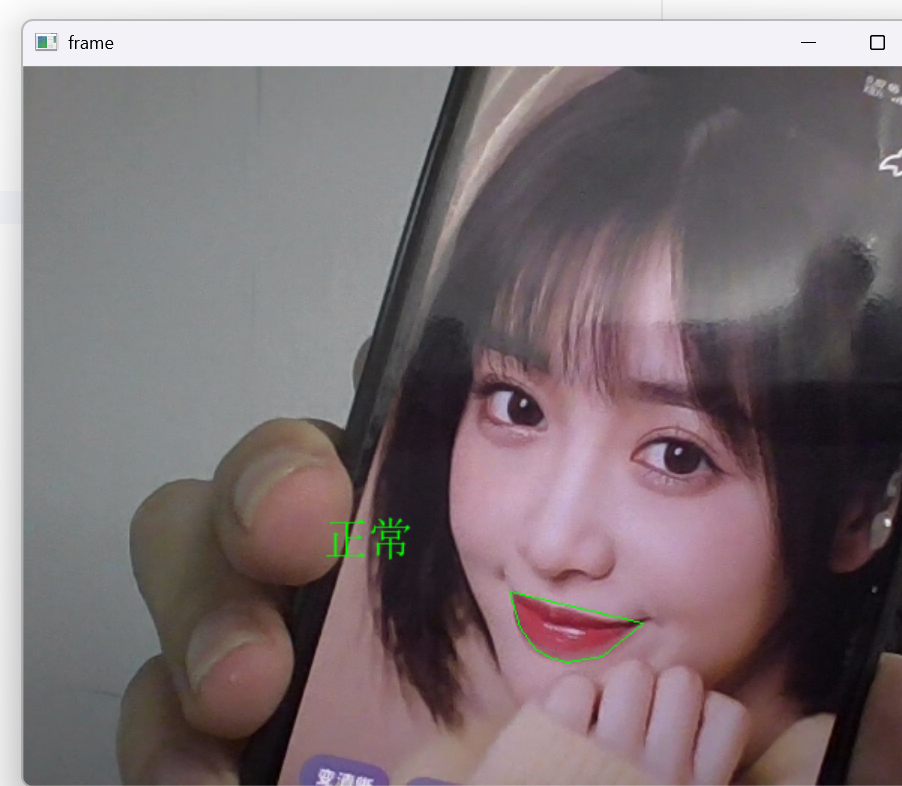
执行效果:
二、疲劳检测
1、原理
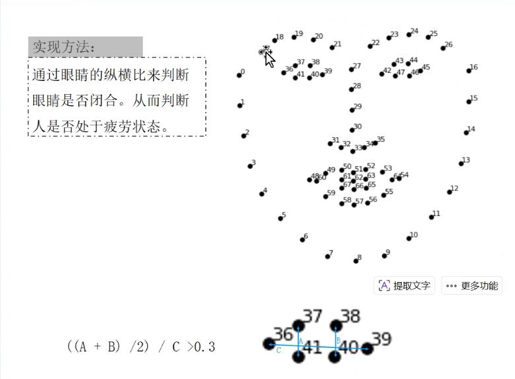
同样是通过关键点的距离判定眼睛闭合程度,从而判断是否疲劳。 需要注意的是:我们不能把眨眼判定为疲劳,也就是说只有当眼睛闭合程度持续较低时,我们才判定为疲劳。
2、代码实现
代码:
import numpy as np
import dlib
import cv2
from sklearn.metrics.pairwise import euclidean_distances
from PIL import Image, ImageDraw, ImageFont
def eye_aspect_ratio(eye):
A=euclidean_distances(eye[1].reshape(1,2),eye[5].reshape(1,2))
B=euclidean_distances(eye[2].reshape(1,2),eye[4].reshape(1,2))
C=euclidean_distances(eye[0].reshape(1,2),eye[3].reshape(1,2))
return (A+B)/(2.0*C)
def cv2_put_chinese_text(img, text, pos, font_size=30, color=(0, 255, 0)):
img_rgb = cv2.cvtColor(img, cv2.COLOR_BGR2RGB)
pil_img = Image.fromarray(img_rgb)
font = ImageFont.truetype("C:/Windows/Fonts/simsun.ttc", font_size, encoding="utf-8")
draw = ImageDraw.Draw(pil_img)
draw.text(pos, text, font=font, fill=(color[2], color[1], color[0]))
img_bgr = cv2.cvtColor(np.array(pil_img), cv2.COLOR_RGB2BGR)
return img_bgr
def draweye(eye):
eyehull= cv2.convexHull(eye)
cv2.drawContours(frame, [eyehull], -1, (0, 255, 0), -1)
counter=0
detector = dlib.get_frontal_face_detector()
predictor = dlib.shape_predictor("shape_predictor_68_face_landmarks.dat")
cap = cv2.VideoCapture(0)
while True:
ret,frame = cap.read()
faces= detector(frame,0)
for face in faces:
shape= predictor(frame, face)
shape = np.array([[p.x, p.y] for p in shape.parts()])
leftEye = shape[36:42]
rightEye = shape[42:48]
leftEAR = eye_aspect_ratio(leftEye)
rightEAR = eye_aspect_ratio(rightEye)
ear = (leftEAR + rightEAR) / 2.0
if ear < 0.3:
counter += 1
if counter > 50:
frame=cv2_put_chinese_text(frame, "危险!!!!!", (250, 250), 50, (0, 0,255))#自定义的函数是生成一张新的图像,因此需要返回值赋值,cv2自带的写字直接修改原图,可以不要赋值
else:
counter = 0
draweye(leftEye)
draweye(rightEye)
info= "EAR: {:.2f}".format(ear[0][0])
cv2.putText(frame, info, (50, 50), cv2.FONT_HERSHEY_SIMPLEX, 0.7, (0, 0, 255), 2)
cv2.imshow("frame", frame)
if cv2.waitKey(1) & 0xFF == ord('q'):
break
cap.release()
cv2.destroyAllWindows()
讲解:
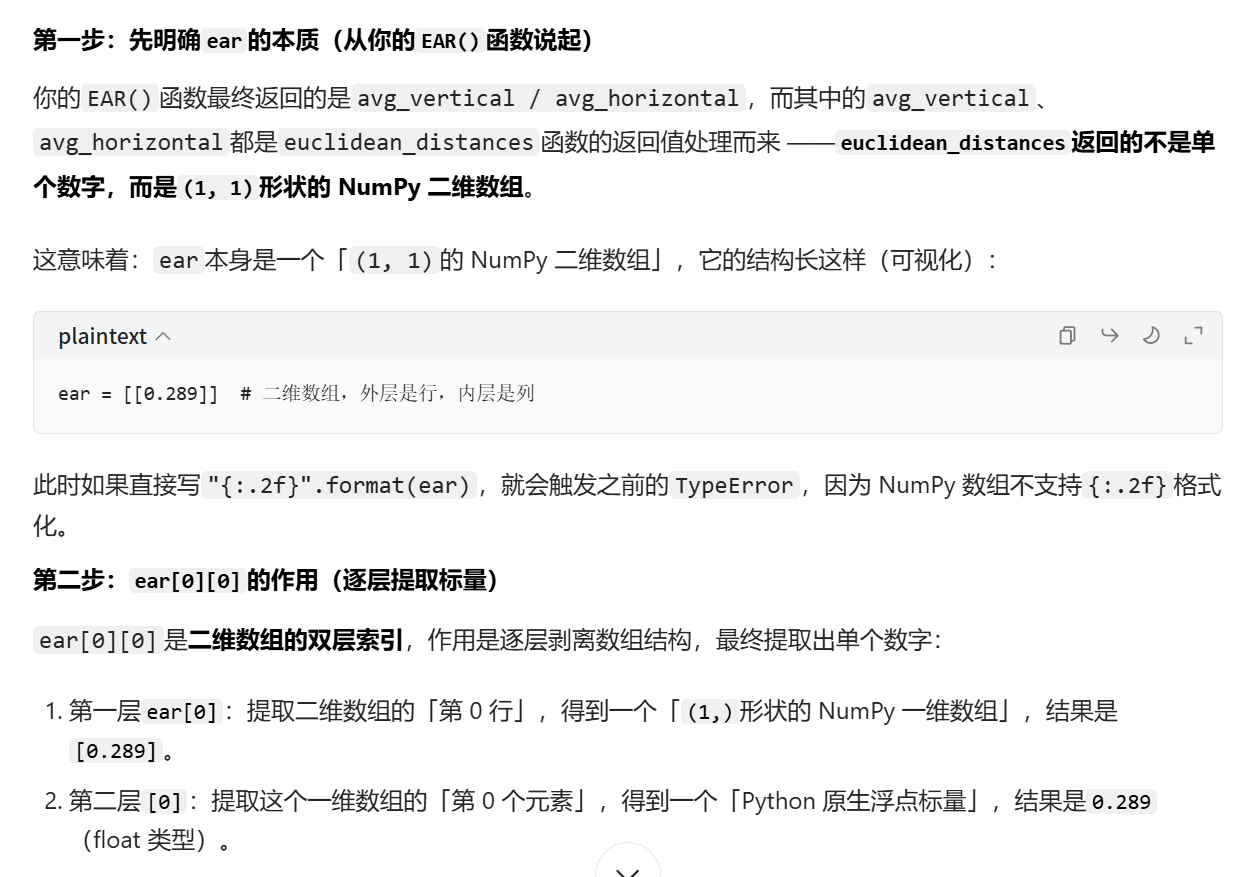
1、info= "EAR: {:.2f}".format(ear[0][0]),此处为什么不是直接使用ear:
2、由于我们自定义的cv2_put_chinese_text是生成一张新的图像绘制输入内容,因此我们使用时要把返回值赋值给原图: frame=cv2_put_chinese_text(frame,result,eyeHull[0,0]) 而opencv自带的putText方法是直接修改原图,可以不需要返回值的赋值过程: cv2.putText(frame, info, (50, 50), cv2.FONT_HERSHEY_SIMPLEX, 0.7, (0, 0, 255), 2)
执行效果: