在开发桌面应用程序时,我们经常需要处理多个文档或视图。想象一下,如果你正在开发一个代码编辑器、一个图像处理软件,或者一个数据分析工具,用户可能需要同时打开多个文件,并在它们之间快速切换。这正是多文档界面(MDI) 大显身手的时候。 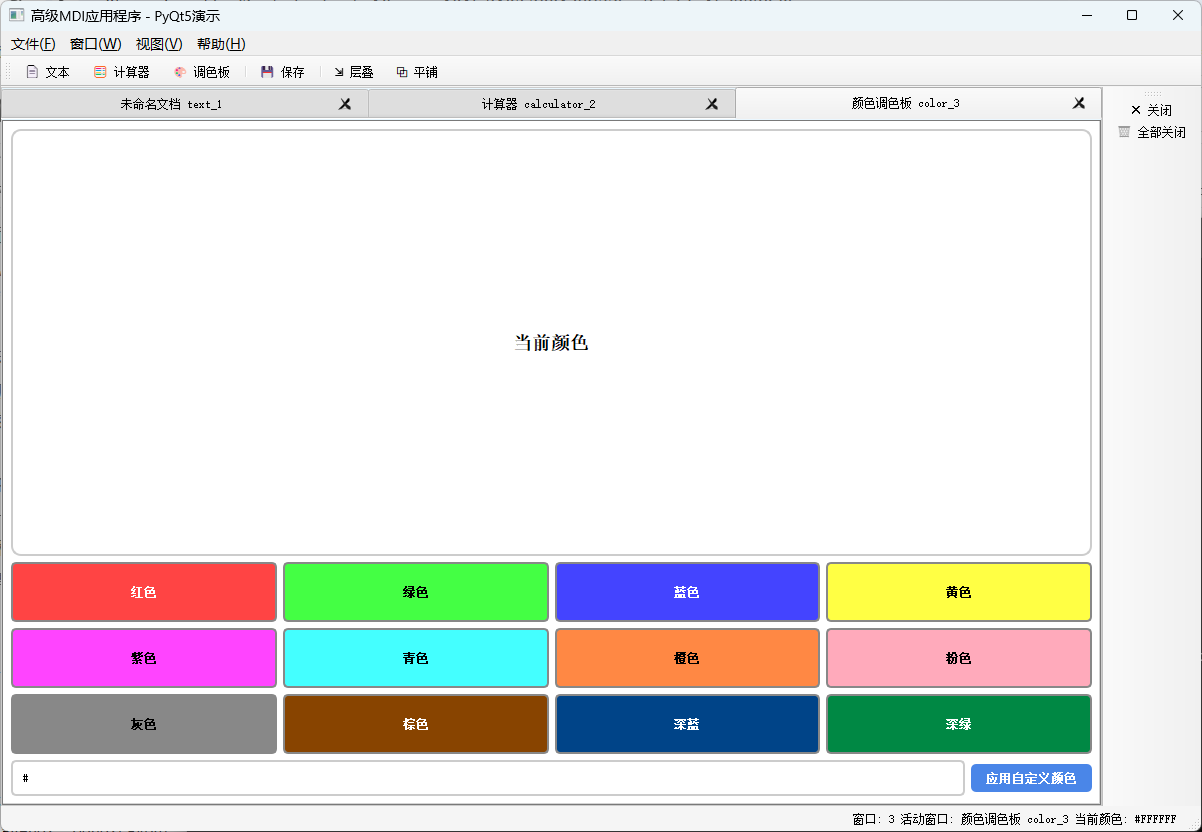
MDI是一种用户界面设计模式,允许用户在单个父窗口内打开多个子窗口。这就像一个浏览器可以打开多个标签页,但在桌面应用中,每个子窗口都可以包含完全不同的内容和功能。与传统的单文档界面相比,MDI提供了更好的组织性和工作效率,特别是对于需要处理多个相关任务的复杂应用程序。 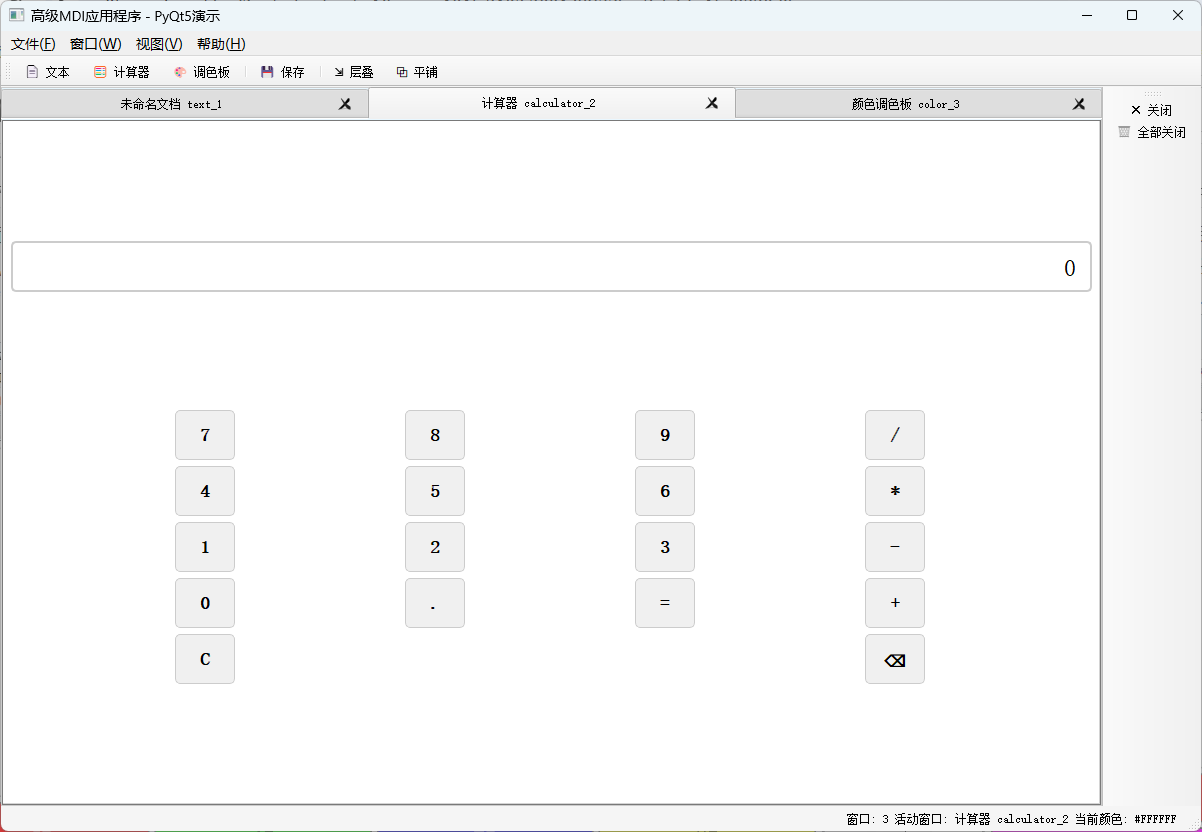
然而,在Python的GUI开发中,许多人因为MDI的实现复杂性而望而却步。今天,我将展示如何用PyQt5的QMdiArea组件,以一种优雅而强大的方式实现MDI功能。这不仅仅是关于创建多个窗口,更是关于如何管理这些窗口的生命周期、交互和用户体验。通过这个实现,你将学会如何构建一个专业的、可扩展的MDI应用程序框架,它可以作为你下一个大型桌面应用的基础。
import sys
from PyQt5.QtWidgets import (
QApplication, QMainWindow, QMdiArea, QMdiSubWindow,
QTextEdit, QMenuBar, QMenu, QAction, QToolBar,
QWidget, QVBoxLayout, QLabel, QPushButton,
QMessageBox, QHBoxLayout, QGridLayout, QLineEdit,
QStatusBar, QDialog, QDialogButtonBox, QFormLayout
)
from PyQt5.QtGui import QIcon, QFont, QColor, QPalette
from PyQt5.QtCore import Qt, QSize, pyqtSignal
import random
class CustomMdiSubWindow(QMdiSubWindow):
"""自定义MDI子窗口,增加关闭确认和窗口状态跟踪"""
windowClosed = pyqtSignal(str) # 定义关闭信号
def __init__(self, window_id, window_type="通用"):
super().__init__()
self.window_id = window_id
self.window_type = window_type
self.is_modified = False
def closeEvent(self, event):
"""重写关闭事件,添加保存确认"""
if self.is_modified:
reply = QMessageBox.question(
self,
'保存更改',
f'窗口 "{self.windowTitle()}" 有未保存的更改。\\n是否保存更改?',
QMessageBox.Save | QMessageBox.Discard | QMessageBox.Cancel,
QMessageBox.Save
)
if reply == QMessageBox.Save:
self.save_content()
event.accept()
elif reply == QMessageBox.Discard:
event.accept()
else:
event.ignore()
return
self.windowClosed.emit(self.window_id)
event.accept()
def set_modified(self, modified=True):
"""设置修改标志,更新窗口标题"""
self.is_modified = modified
title = self.windowTitle()
if modified and not title.startswith('*'):
self.setWindowTitle(f'*{title}')
elif not modified and title.startswith('*'):
self.setWindowTitle(title[1:])
def save_content(self):
"""保存内容(示例方法,可重写)"""
QMessageBox.information(self, "保存", f"已保存窗口: {self.windowTitle()}")
self.set_modified(False)
class TextEditorWindow(CustomMdiSubWindow):
"""文本编辑器子窗口"""
def __init__(self, window_id, content=""):
super().__init__(window_id, "文本编辑器")
self.init_ui(content)
def init_ui(self, content):
"""初始化UI"""
self.setWindowTitle(f"未命名文档 {self.window_id}")
self.setWindowIcon(QIcon.fromTheme("accessories-text-editor"))
# 创建文本编辑器
self.text_edit = QTextEdit()
self.text_edit.setPlainText(content if content else
f"这是一个文本编辑器窗口 #{self.window_id}\\n\\n"
f"您可以在这里输入任意文本。\\n"
f"MDI(多文档界面)允许您在单个应用程序窗口中管理多个文档。\\n\\n"
f"试试修改这个文本,然后尝试关闭窗口,您会看到保存提示。")
# 连接文本修改信号
self.text_edit.textChanged.connect(lambda: self.set_modified(True))
# 设置文本编辑器样式
font = QFont("Consolas" if sys.platform == "win32" else "Monospace", 10)
self.text_edit.setFont(font)
self.text_edit.setStyleSheet("""
QTextEdit {
background-color: #f8f8f8;
border: 1px solid #cccccc;
padding: 5px;
}
""")
self.setWidget(self.text_edit)
self.resize(600, 400)
def save_content(self):
"""保存文本内容"""
# 在实际应用中,这里应该实现文件保存逻辑
super().save_content()
class CalculatorWindow(CustomMdiSubWindow):
"""计算器子窗口"""
def __init__(self, window_id):
super().__init__(window_id, "计算器")
self.init_ui()
def init_ui(self):
"""初始化UI"""
self.setWindowTitle(f"计算器 {self.window_id}")
self.setWindowIcon(QIcon.fromTheme("accessories-calculator"))
widget = QWidget()
layout = QVBoxLayout()
# 显示区域
self.display = QLineEdit("0")
self.display.setReadOnly(True)
self.display.setAlignment(Qt.AlignRight)
self.display.setStyleSheet("""
QLineEdit {
font-size: 24px;
padding: 10px;
border: 2px solid #cccccc;
border-radius: 5px;
background-color: white;
}
""")
layout.addWidget(self.display)
# 按钮网格
buttons_layout = QGridLayout()
buttons = [
('7', 0, 0), ('8', 0, 1), ('9', 0, 2), ('/', 0, 3),
('4', 1, 0), ('5', 1, 1), ('6', 1, 2), ('*', 1, 3),
('1', 2, 0), ('2', 2, 1), ('3', 2, 2), ('-', 2, 3),
('0', 3, 0), ('.', 3, 1), ('=', 3, 2), ('+', 3, 3),
('C', 4, 0, 1, 3), ('⌫', 4, 3)
]
self.current_input = ""
self.operation = ""
self.previous_value = 0
for button_info in buttons:
if len(button_info) == 4: # 跨列按钮
text, row, col, colspan = button_info
button = QPushButton(text)
buttons_layout.addWidget(button, row, col, 1, colspan)
elif len(button_info) == 5: # 跨行跨列按钮
text, row, col, rowspan, colspan = button_info
button = QPushButton(text)
buttons_layout.addWidget(button, row, col, rowspan, colspan)
else:
text, row, col = button_info
button = QPushButton(text)
buttons_layout.addWidget(button, row, col)
button.setFixedSize(60, 50)
button.setStyleSheet("""
QPushButton {
font-size: 18px;
font-weight: bold;
border: 1px solid #cccccc;
border-radius: 5px;
background-color: #f0f0f0;
}
QPushButton:hover {
background-color: #e0e0e0;
}
QPushButton:pressed {
background-color: #d0d0d0;
}
""")
if text in '0123456789.':
button.clicked.connect(self.create_digit_handler(text))
elif text in '+-*/':
button.clicked.connect(self.create_operator_handler(text))
elif text == '=':
button.clicked.connect(self.calculate)
elif text == 'C':
button.clicked.connect(self.clear)
elif text == '⌫':
button.clicked.connect(self.backspace)
layout.addLayout(buttons_layout)
widget.setLayout(layout)
self.setWidget(widget)
self.resize(300, 350)
def create_digit_handler(self, digit):
"""创建数字按钮处理器"""
def handler():
if self.current_input == "0" and digit != ".":
self.current_input = digit
else:
self.current_input += digit
self.display.setText(self.current_input)
return handler
def create_operator_handler(self, operator):
"""创建操作符按钮处理器"""
def handler():
if self.current_input:
if self.operation:
self.calculate()
self.previous_value = float(self.current_input)
self.operation = operator
self.current_input = ""
return handler
def calculate(self):
"""执行计算"""
if not self.current_input or not self.operation:
return
current_value = float(self.current_input)
result = 0
try:
if self.operation == '+':
result = self.previous_value + current_value
elif self.operation == '-':
result = self.previous_value – current_value
elif self.operation == '*':
result = self.previous_value * current_value
elif self.operation == '/':
if current_value == 0:
raise ZeroDivisionError
result = self.previous_value / current_value
self.display.setText(str(result))
self.current_input = str(result)
self.operation = ""
self.previous_value = 0
self.set_modified(True)
except ZeroDivisionError:
QMessageBox.warning(self, "错误", "除数不能为零!")
self.clear()
def clear(self):
"""清除计算器"""
self.current_input = "0"
self.operation = ""
self.previous_value = 0
self.display.setText(self.current_input)
def backspace(self):
"""回退一位"""
if len(self.current_input) > 1:
self.current_input = self.current_input[:–1]
else:
self.current_input = "0"
self.display.setText(self.current_input)
class ColorPaletteWindow(CustomMdiSubWindow):
"""颜色调色板窗口"""
colorSelected = pyqtSignal(QColor, str) # 颜色选择信号
def __init__(self, window_id):
super().__init__(window_id, "颜色调色板")
self.init_ui()
def init_ui(self):
"""初始化UI"""
self.setWindowTitle(f"颜色调色板 {self.window_id}")
self.setWindowIcon(QIcon.fromTheme("preferences-desktop-color"))
widget = QWidget()
layout = QVBoxLayout()
# 颜色显示区域
self.color_display = QLabel("当前颜色")
self.color_display.setAlignment(Qt.AlignCenter)
self.color_display.setStyleSheet("""
QLabel {
font-size: 18px;
font-weight: bold;
padding: 20px;
border: 2px solid #cccccc;
border-radius: 10px;
background-color: white;
}
""")
layout.addWidget(self.color_display)
# 颜色按钮网格
colors_grid = QGridLayout()
colors = [
("红色", "#ff4444", 0, 0), ("绿色", "#44ff44", 0, 1),
("蓝色", "#4444ff", 0, 2), ("黄色", "#ffff44", 0, 3),
("紫色", "#ff44ff", 1, 0), ("青色", "#44ffff", 1, 1),
("橙色", "#ff8844", 1, 2), ("粉色", "#ffaabb", 1, 3),
("灰色", "#888888", 2, 0), ("棕色", "#884400", 2, 1),
("深蓝", "#004488", 2, 2), ("深绿", "#008844", 2, 3)
]
for name, hex_code, row, col in colors:
color_button = QPushButton(name)
color_button.setStyleSheet(f"""
QPushButton {{
background-color: {hex_code};
color: {'white' if self.is_dark_color(hex_code) else 'black'};
font-weight: bold;
border: 2px solid #888888;
border-radius: 5px;
padding: 10px;
}}
QPushButton:hover {{
border: 3px solid #000000;
}}
""")
color_button.setFixedHeight(60)
color_button.clicked.connect(self.create_color_handler(name, hex_code))
colors_grid.addWidget(color_button, row, col)
layout.addLayout(colors_grid)
# 自定义颜色
custom_layout = QHBoxLayout()
self.custom_color_input = QLineEdit("#")
self.custom_color_input.setPlaceholderText("输入十六进制颜色值,如 #FF5733")
self.custom_color_input.setStyleSheet("""
QLineEdit {
padding: 8px;
border: 2px solid #cccccc;
border-radius: 5px;
}
""")
custom_color_button = QPushButton("应用自定义颜色")
custom_color_button.setStyleSheet("""
QPushButton {
background-color: #4a86e8;
color: white;
font-weight: bold;
padding: 8px 15px;
border-radius: 5px;
}
QPushButton:hover {
background-color: #3a76d8;
}
""")
custom_color_button.clicked.connect(self.apply_custom_color)
custom_layout.addWidget(self.custom_color_input)
custom_layout.addWidget(custom_color_button)
layout.addLayout(custom_layout)
widget.setLayout(layout)
self.setWidget(widget)
self.resize(500, 400)
def is_dark_color(self, hex_color):
"""判断颜色是否较暗,以确定使用白色还是黑色文字"""
hex_color = hex_color.lstrip('#')
r, g, b = int(hex_color[0:2], 16), int(hex_color[2:4], 16), int(hex_color[4:6], 16)
luminance = (0.299 * r + 0.587 * g + 0.114 * b) / 255
return luminance < 0.5
def create_color_handler(self, name, hex_code):
"""创建颜色按钮处理器"""
def handler():
color = QColor(hex_code)
self.color_display.setText(f"{name}\\n{hex_code}")
self.color_display.setStyleSheet(f"""
QLabel {{
font-size: 18px;
font-weight: bold;
padding: 20px;
border: 3px solid #888888;
border-radius: 10px;
background-color: {hex_code};
color: {'white' if self.is_dark_color(hex_code) else 'black'};
}}
""")
self.colorSelected.emit(color, name)
self.set_modified(True)
return handler
def apply_custom_color(self):
"""应用自定义颜色"""
hex_code = self.custom_color_input.text()
if not hex_code.startswith('#'):
hex_code = '#' + hex_code
color = QColor(hex_code)
if color.isValid():
self.color_display.setText(f"自定义颜色\\n{hex_code}")
self.color_display.setStyleSheet(f"""
QLabel {{
font-size: 18px;
font-weight: bold;
padding: 20px;
border: 3px solid #888888;
border-radius: 10px;
background-color: {hex_code};
color: {'white' if self.is_dark_color(hex_code) else 'black'};
}}
""")
self.colorSelected.emit(color, "自定义颜色")
self.set_modified(True)
else:
QMessageBox.warning(self, "无效颜色", "请输入有效的十六进制颜色值(如 #FF5733)")
class MDIMainWindow(QMainWindow):
"""主MDI窗口"""
def __init__(self):
super().__init__()
self.window_counter = 0
self.active_color = QColor("#ffffff")
self.window_map = {} # 窗口ID到窗口对象的映射
self.init_ui()
def init_ui(self):
"""初始化主窗口UI"""
self.setWindowTitle("高级MDI应用程序 – PyQt5演示")
self.setGeometry(100, 100, 1200, 800)
# 设置应用样式
self.setStyleSheet("""
QMainWindow {
background-color: #f5f5f5;
}
QMdiArea {
background: qlineargradient(x1:0, y1:0, x2:1, y2:1,
stop:0 #e6f7ff, stop:1 #f0f8ff);
border: 1px solid #cccccc;
}
QMdiSubWindow {
background-color: white;
}
QMdiSubWindow:title {
background: qlineargradient(x1:0, y1:0, x2:0, y2:1,
stop:0 #4a86e8, stop:1 #3a76d8);
color: white;
font-weight: bold;
padding-left: 10px;
}
""")
# 创建MDI区域
self.mdi_area = QMdiArea()
self.mdi_area.setHorizontalScrollBarPolicy(Qt.ScrollBarAsNeeded)
self.mdi_area.setVerticalScrollBarPolicy(Qt.ScrollBarAsNeeded)
self.mdi_area.setViewMode(QMdiArea.TabbedView)
self.mdi_area.setDocumentMode(True)
self.mdi_area.setTabsClosable(True)
self.mdi_area.setTabsMovable(True)
self.mdi_area.subWindowActivated.connect(self.on_subwindow_activated)
self.setCentralWidget(self.mdi_area)
# 创建UI组件
self.create_menus()
self.create_toolbars()
self.create_statusbar()
# 设置初始窗口
self.create_window("text", "欢迎使用文本编辑器")
self.create_window("calculator")
self.create_window("color")
# 连接MDI区域的信号
self.mdi_area.subWindowActivated.connect(self.update_window_menu)
def create_menus(self):
"""创建菜单栏"""
menubar = self.menuBar()
# 文件菜单
file_menu = menubar.addMenu("文件(&F)")
new_text_action = QAction("新建文本窗口(&T)", self)
new_text_action.setShortcut("Ctrl+T")
new_text_action.setStatusTip("创建新的文本编辑器窗口")
new_text_action.triggered.connect(lambda: self.create_window("text"))
file_menu.addAction(new_text_action)
new_calc_action = QAction("新建计算器(&C)", self)
new_calc_action.setShortcut("Ctrl+C")
new_calc_action.setStatusTip("创建新的计算器窗口")
new_calc_action.triggered.connect(lambda: self.create_window("calculator"))
file_menu.addAction(new_calc_action)
new_color_action = QAction("新建调色板(&P)", self)
new_color_action.setShortcut("Ctrl+P")
new_color_action.setStatusTip("创建新的颜色调色板窗口")
new_color_action.triggered.connect(lambda: self.create_window("color"))
file_menu.addAction(new_color_action)
file_menu.addSeparator()
save_action = QAction("保存当前窗口(&S)", self)
save_action.setShortcut("Ctrl+S")
save_action.setStatusTip("保存当前活动窗口的内容")
save_action.triggered.connect(self.save_current_window)
file_menu.addAction(save_action)
save_all_action = QAction("保存所有窗口(&A)", self)
save_all_action.setShortcut("Ctrl+Shift+S")
save_all_action.setStatusTip("保存所有窗口的内容")
save_all_action.triggered.connect(self.save_all_windows)
file_menu.addAction(save_all_action)
file_menu.addSeparator()
close_action = QAction("关闭当前窗口(&W)", self)
close_action.setShortcut("Ctrl+W")
close_action.setStatusTip("关闭当前活动窗口")
close_action.triggered.connect(self.close_current_window)
file_menu.addAction(close_action)
close_all_action = QAction("关闭所有窗口(&X)", self)
close_all_action.setShortcut("Ctrl+Shift+W")
close_all_action.setStatusTip("关闭所有窗口")
close_all_action.triggered.connect(self.close_all_windows)
file_menu.addAction(close_all_action)
file_menu.addSeparator()
exit_action = QAction("退出(&Q)", self)
exit_action.setShortcut("Ctrl+Q")
exit_action.setStatusTip("退出应用程序")
exit_action.triggered.connect(self.close)
file_menu.addAction(exit_action)
# 窗口菜单
self.window_menu = menubar.addMenu("窗口(&W)")
cascade_action = QAction("层叠排列(&C)", self)
cascade_action.setShortcut("Ctrl+Shift+C")
cascade_action.setStatusTip("以层叠方式排列所有窗口")
cascade_action.triggered.connect(self.mdi_area.cascadeSubWindows)
self.window_menu.addAction(cascade_action)
tile_action = QAction("平铺排列(&T)", self)
tile_action.setShortcut("Ctrl+Shift+T")
tile_action.setStatusTip("以平铺方式排列所有窗口")
tile_action.triggered.connect(self.mdi_area.tileSubWindows)
self.window_menu.addAction(tile_action)
self.window_menu.addSeparator()
next_action = QAction("下一个窗口(&N)", self)
next_action.setShortcut("Ctrl+Tab")
next_action.setStatusTip("激活下一个窗口")
next_action.triggered.connect(self.mdi_area.activateNextSubWindow)
self.window_menu.addAction(next_action)
prev_action = QAction("上一个窗口(&P)", self)
prev_action.setShortcut("Ctrl+Shift+Tab")
prev_action.setStatusTip("激活上一个窗口")
prev_action.triggered.connect(self.mdi_area.activatePreviousSubWindow)
self.window_menu.addAction(prev_action)
self.window_menu.addSeparator()
# 视图菜单
view_menu = menubar.addMenu("视图(&V)")
tab_view_action = QAction("标签页视图(&B)", self)
tab_view_action.setCheckable(True)
tab_view_action.setChecked(True)
tab_view_action.setStatusTip("切换到标签页视图模式")
tab_view_action.triggered.connect(self.enable_tab_view)
view_menu.addAction(tab_view_action)
subwindow_view_action = QAction("子窗口视图(&S)", self)
subwindow_view_action.setCheckable(True)
subwindow_view_action.setStatusTip("切换到子窗口视图模式")
subwindow_view_action.triggered.connect(self.enable_subwindow_view)
view_menu.addAction(subwindow_view_action)
view_menu.addSeparator()
bg_color_action = QAction("更改背景颜色(&G)", self)
bg_color_action.setStatusTip("更改MDI区域背景颜色")
bg_color_action.triggered.connect(self.change_background_color)
view_menu.addAction(bg_color_action)
# 帮助菜单
help_menu = menubar.addMenu("帮助(&H)")
about_action = QAction("关于(&A)", self)
about_action.setStatusTip("关于此应用程序")
about_action.triggered.connect(self.show_about)
help_menu.addAction(about_action)
def create_toolbars(self):
"""创建工具栏"""
# 主工具栏
main_toolbar = QToolBar("主工具栏")
main_toolbar.setIconSize(QSize(24, 24))
self.addToolBar(main_toolbar)
new_text_btn = QAction("📄 文本", self)
new_text_btn.setStatusTip("新建文本窗口")
new_text_btn.triggered.connect(lambda: self.create_window("text"))
main_toolbar.addAction(new_text_btn)
new_calc_btn = QAction("🧮 计算器", self)
new_calc_btn.setStatusTip("新建计算器窗口")
new_calc_btn.triggered.connect(lambda: self.create_window("calculator"))
main_toolbar.addAction(new_calc_btn)
new_color_btn = QAction("🎨 调色板", self)
new_color_btn.setStatusTip("新建颜色调色板")
new_color_btn.triggered.connect(lambda: self.create_window("color"))
main_toolbar.addAction(new_color_btn)
main_toolbar.addSeparator()
save_btn = QAction("💾 保存", self)
save_btn.setStatusTip("保存当前窗口")
save_btn.triggered.connect(self.save_current_window)
main_toolbar.addAction(save_btn)
main_toolbar.addSeparator()
cascade_btn = QAction("⇲ 层叠", self)
cascade_btn.setStatusTip("层叠排列窗口")
cascade_btn.triggered.connect(self.mdi_area.cascadeSubWindows)
main_toolbar.addAction(cascade_btn)
tile_btn = QAction("⧉ 平铺", self)
tile_btn.setStatusTip("平铺排列窗口")
tile_btn.triggered.connect(self.mdi_area.tileSubWindows)
main_toolbar.addAction(tile_btn)
# 窗口管理工具栏
window_toolbar = QToolBar("窗口管理")
window_toolbar.setIconSize(QSize(20, 20))
self.addToolBar(Qt.RightToolBarArea, window_toolbar)
close_btn = QAction("✕ 关闭", self)
close_btn.setStatusTip("关闭当前窗口")
close_btn.triggered.connect(self.close_current_window)
window_toolbar.addAction(close_btn)
close_all_btn = QAction("🗑 全部关闭", self)
close_all_btn.setStatusTip("关闭所有窗口")
close_all_btn.triggered.connect(self.close_all_windows)
window_toolbar.addAction(close_all_btn)
def create_statusbar(self):
"""创建状态栏"""
self.status_bar = QStatusBar()
self.setStatusBar(self.status_bar)
# 状态标签
self.window_count_label = QLabel("窗口: 0")
self.active_window_label = QLabel("活动窗口: 无")
self.color_label = QLabel("当前颜色: #FFFFFF")
self.status_bar.addPermanentWidget(self.window_count_label)
self.status_bar.addPermanentWidget(self.active_window_label)
self.status_bar.addPermanentWidget(self.color_label)
self.status_bar.showMessage("就绪", 3000)
def create_window(self, window_type, content=""):
"""创建指定类型的窗口"""
self.window_counter += 1
window_id = f"{window_type}_{self.window_counter}"
if window_type == "text":
sub_window = TextEditorWindow(window_id, content)
elif window_type == "calculator":
sub_window = CalculatorWindow(window_id)
elif window_type == "color":
sub_window = ColorPaletteWindow(window_id)
sub_window.colorSelected.connect(self.on_color_selected)
else:
return
# 添加窗口到MDI区域
self.mdi_area.addSubWindow(sub_window)
sub_window.show()
# 注册窗口关闭信号
sub_window.windowClosed.connect(self.on_window_closed)
# 保存窗口引用
self.window_map[window_id] = sub_window
# 更新状态
self.update_status()
self.update_window_menu()
self.status_bar.showMessage(f"已创建 {sub_window.window_type} 窗口: {sub_window.windowTitle()}", 2000)
return sub_window
def save_current_window(self):
"""保存当前活动窗口"""
active_window = self.mdi_area.activeSubWindow()
if active_window and isinstance(active_window, CustomMdiSubWindow):
active_window.save_content()
else:
QMessageBox.information(self, "提示", "没有活动窗口可保存")
def save_all_windows(self):
"""保存所有窗口"""
modified_windows = [w for w in self.mdi_area.subWindowList()
if isinstance(w, CustomMdiSubWindow) and w.is_modified]
if not modified_windows:
QMessageBox.information(self, "提示", "没有需要保存的窗口")
return
for window in modified_windows:
window.save_content()
def close_current_window(self):
"""关闭当前活动窗口"""
active_window = self.mdi_area.activeSubWindow()
if active_window:
active_window.close()
def close_all_windows(self):
"""关闭所有窗口"""
windows = self.mdi_area.subWindowList()
if not windows:
return
reply = QMessageBox.question(
self, "确认关闭",
f"确定要关闭所有 {len(windows)} 个窗口吗?",
QMessageBox.Yes | QMessageBox.No,
QMessageBox.No
)
if reply == QMessageBox.Yes:
for window in windows:
window.close()
def enable_tab_view(self):
"""启用标签页视图"""
self.mdi_area.setViewMode(QMdiArea.TabbedView)
self.mdi_area.setDocumentMode(True)
self.mdi_area.setTabsClosable(True)
self.mdi_area.setTabsMovable(True)
def enable_subwindow_view(self):
"""启用子窗口视图"""
self.mdi_area.setViewMode(QMdiArea.SubWindowView)
def change_background_color(self):
"""更改MDI区域背景颜色"""
from PyQt5.QtWidgets import QColorDialog
color = QColorDialog.getColor(
QColor(230, 247, 255), # 默认颜色
self,
"选择背景颜色"
)
if color.isValid():
# 将颜色转换为十六进制字符串
hex_color = color.name()
# 更新MDI区域样式
self.mdi_area.setStyleSheet(f"""
QMdiArea {{
background-color: {hex_color};
border: 1px solid #cccccc;
}}
""")
self.status_bar.showMessage(f"背景颜色已更改为 {hex_color}", 2000)
def on_color_selected(self, color, color_name):
"""处理颜色选择信号"""
hex_color = color.name()
self.active_color = color
self.color_label.setText(f"当前颜色: {hex_color}")
self.color_label.setStyleSheet(f"""
QLabel {{
color: {hex_color};
font-weight: bold;
padding: 2px 5px;
border: 1px solid {hex_color};
border-radius: 3px;
}}
""")
# 更新活动窗口的背景(如果适用)
active_window = self.mdi_area.activeSubWindow()
if active_window and isinstance(active_window, TextEditorWindow):
active_window.text_edit.setStyleSheet(f"""
QTextEdit {{
background-color: {hex_color}20;
border: 1px solid {hex_color};
padding: 5px;
}}
""")
def on_subwindow_activated(self, window):
"""处理子窗口激活事件"""
if window:
window_title = window.windowTitle()
if window_title.startswith('*'):
window_title = window_title[1:]
self.active_window_label.setText(f"活动窗口: {window_title}")
# 如果窗口是文本编辑器,应用当前颜色
if isinstance(window, TextEditorWindow) and self.active_color:
hex_color = self.active_color.name()
window.text_edit.setStyleSheet(f"""
QTextEdit {{
background-color: {hex_color}20;
border: 1px solid {hex_color};
padding: 5px;
}}
""")
else:
self.active_window_label.setText("活动窗口: 无")
self.update_window_menu()
def on_window_closed(self, window_id):
"""处理窗口关闭事件"""
if window_id in self.window_map:
del self.window_map[window_id]
self.update_status()
def update_status(self):
"""更新状态栏"""
window_count = len(self.mdi_area.subWindowList())
self.window_count_label.setText(f"窗口: {window_count}")
# 计算每种类型的窗口数量
type_count = {}
for window in self.mdi_area.subWindowList():
if isinstance(window, TextEditorWindow):
window_type = "文本编辑器"
elif isinstance(window, CalculatorWindow):
window_type = "计算器"
elif isinstance(window, ColorPaletteWindow):
window_type = "调色板"
else:
window_type = "未知"
type_count[window_type] = type_count.get(window_type, 0) + 1
status_text = " | ".join([f"{k}: {v}" for k, v in type_count.items()])
self.status_bar.showMessage(f"窗口统计: {status_text}", 3000)
def update_window_menu(self):
"""更新窗口菜单"""
# 清除现有的窗口列表
for action in self.window_menu.actions():
if hasattr(action, 'is_window_action') and action.is_window_action:
self.window_menu.removeAction(action)
# 添加窗口列表分隔符
if self.mdi_area.subWindowList():
self.window_menu.addSeparator()
# 添加窗口列表
windows = self.mdi_area.subWindowList()
for i, window in enumerate(windows):
action = QAction(f"{i+1}. {window.windowTitle()}", self)
action.setCheckable(True)
action.setChecked(window == self.mdi_area.activeSubWindow())
action.triggered.connect(lambda checked, w=window: self.activate_window(w))
action.is_window_action = True
self.window_menu.addAction(action)
def activate_window(self, window):
"""激活指定窗口"""
if window:
self.mdi_area.setActiveSubWindow(window)
def show_about(self):
"""显示关于对话框"""
about_text = """
<h2>高级MDI应用程序</h2>
<p>版本 1.0.0</p>
<p>这是一个使用PyQt5 QMdiArea创建的高级多文档界面(MDI)应用程序演示。</p>
<h3>功能特性:</h3>
<ul>
<li><b>多文档界面</b>:在单个应用程序窗口中管理多个文档</li>
<li><b>多种窗口类型</b>:文本编辑器、计算器、颜色调色板</li>
<li><b>智能窗口管理</b>:层叠、平铺排列,标签页/子窗口视图切换</li>
<li><b>数据持久化</b>:关闭前的保存提示,修改状态跟踪</li>
<li><b>现代化UI</b>:自定义样式,响应式设计</li>
</ul>
<p><b>使用技术:</b> Python 3.x, PyQt5</p>
<p><b>开发目标:</b> 演示如何构建专业的桌面应用程序框架</p>
<p style="color: #666; font-size: 10px;">
注意:这是一个演示应用程序,用于展示PyQt5的MDI功能。
在实际应用中,您可能需要添加文件保存/加载、更多工具窗口等功能。
</p>
"""
about_dialog = QDialog(self)
about_dialog.setWindowTitle("关于 – 高级MDI应用程序")
about_dialog.setFixedSize(500, 400)
layout = QVBoxLayout()
# 标题
title_label = QLabel("高级MDI应用程序")
title_label.setStyleSheet("font-size: 24px; font-weight: bold; color: #4a86e8;")
title_label.setAlignment(Qt.AlignCenter)
layout.addWidget(title_label)
# 版本
version_label = QLabel("版本 1.0.0")
version_label.setStyleSheet("font-size: 12px; color: #666;")
version_label.setAlignment(Qt.AlignCenter)
layout.addWidget(version_label)
# 分隔线
separator = QLabel()
separator.setStyleSheet("border-top: 1px solid #cccccc; margin: 10px 0;")
layout.addWidget(separator)
# 描述
description = QLabel(about_text)
description.setWordWrap(True)
description.setOpenExternalLinks(True)
layout.addWidget(description)
# 按钮
buttons = QDialogButtonBox(QDialogButtonBox.Ok)
buttons.accepted.connect(about_dialog.accept)
layout.addWidget(buttons)
about_dialog.setLayout(layout)
about_dialog.exec_()
def closeEvent(self, event):
"""处理主窗口关闭事件"""
modified_windows = [w for w in self.mdi_area.subWindowList()
if isinstance(w, CustomMdiSubWindow) and w.is_modified]
if modified_windows:
reply = QMessageBox.question(
self, "未保存的更改",
f"有 {len(modified_windows)} 个窗口包含未保存的更改。\\n"
"退出前是否保存所有更改?",
QMessageBox.Save | QMessageBox.Discard | QMessageBox.Cancel,
QMessageBox.Save
)
if reply == QMessageBox.Save:
for window in modified_windows:
window.save_content()
event.accept()
elif reply == QMessageBox.Discard:
event.accept()
else:
event.ignore()
else:
event.accept()
def main():
"""主函数"""
app = QApplication(sys.argv)
# 设置应用程序样式
app.setStyle("Fusion")
# 设置应用程序图标和元数据
app.setApplicationName("高级MDI应用程序")
app.setApplicationVersion("1.0.0")
app.setOrganizationName("PyQt5开发团队")
# 创建并显示主窗口
window = MDIMainWindow()
window.show()
sys.exit(app.exec_())
if __name__ == "__main__":
main()
这个完整的MDI应用程序示例展示了PyQt5中QMdiArea组件的强大功能。与简单的多窗口管理不同,这个实现提供了完整的企业级应用程序框架,包括: 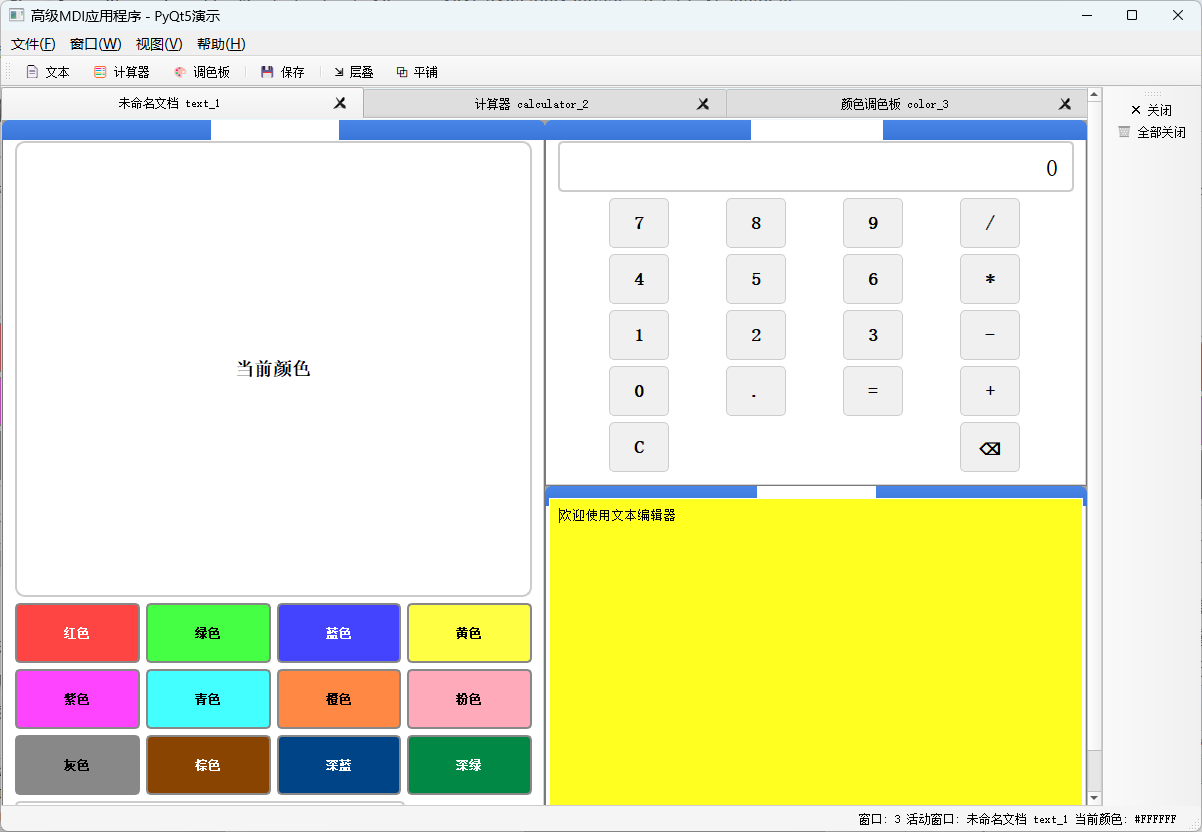
架构设计的深度思考:通过自定义的CustomMdiSubWindow基类,我们实现了统一的窗口生命周期管理。每个子窗口类型都继承自这个基类,确保了一致的关闭确认行为和修改状态跟踪。这种设计模式遵循了开放-封闭原则,使得添加新的窗口类型变得简单而安全。
信号与槽的高级应用:我们创建了自定义信号windowClosed和colorSelected,实现了窗口间的松耦合通信。颜色调色板窗口选择的颜色可以实时应用到文本编辑器窗口,这展示了如何在不同类型的子窗口之间建立通信机制,而无需让它们直接相互引用。
用户体验的精细打磨:应用程序实现了两种视图模式:标签页模式适合喜欢简洁界面的用户,子窗口模式适合需要同时查看多个窗口的专业用户。状态栏实时显示窗口统计和当前选择的颜色,提供了即时的反馈。智能的保存提示系统确保用户不会意外丢失工作。
样式与美学的融合:通过QSS样式表,我们创建了现代化的界面,而不是默认的操作系统样式。颜色调色板窗口使用动态样式,根据背景色自动选择文字颜色(黑或白)以确保可读性。MDI区域的渐变背景和子窗口的自定义标题栏样式提升了整体视觉效果。
错误处理与健壮性:计算器窗口包含除以零的错误处理,颜色输入验证确保只有有效的十六进制颜色值被接受。窗口管理逻辑确保即使有大量打开的子窗口,应用程序也能保持响应性和稳定性。
可扩展性的体现:这个框架被设计为可扩展的。添加新的窗口类型只需要创建一个继承自CustomMdiSubWindow的新类,并在主窗口的create_window方法中添加相应的创建逻辑。菜单、工具栏和状态栏的更新都是自动的。
实际应用场景:这个框架可以轻松地扩展为代码编辑器(通过添加语法高亮)、图像编辑器(通过添加图像处理功能)或数据分析工具(通过添加图表和表格)。MDI架构使得这些功能可以自然地共存于同一个应用程序中,共享数据和服务。
运行这个应用程序,你会看到一个功能齐全的MDI框架,它不仅仅是多个窗口的容器,而是一个完整的、可扩展的应用程序基础。通过这个示例,你可以理解如何将PyQt5的MDI功能转化为实际的、用户友好的应用程序功能。