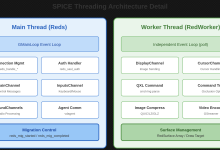
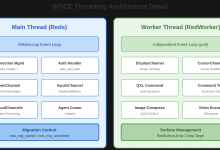
SpiceDisplay是spice-gtk提供的GTK控件,继承自GtkEventBox,负责将DisplayChannel的图形数据渲染到屏幕上,并处理用户输入事件。本文分析SpiceDisplay的渲染机制和输入处理。
SpiceDisplay的架构
SpiceDisplay是spice-gtk的核心控件,将SPICE协议与GTK界面框架连接起来:
| GTK层 | GtkEventBox | 继承自GTK事件盒,处理输入事件 |
| 渲染层 | Cairo/EGL | 两种渲染后端,Cairo用于软件渲染,EGL用于硬件加速 |
| 协议层 | DisplayChannel | 接收图形数据和解码 |
| 输入层 | InputsChannel | 发送键盘鼠标事件 |
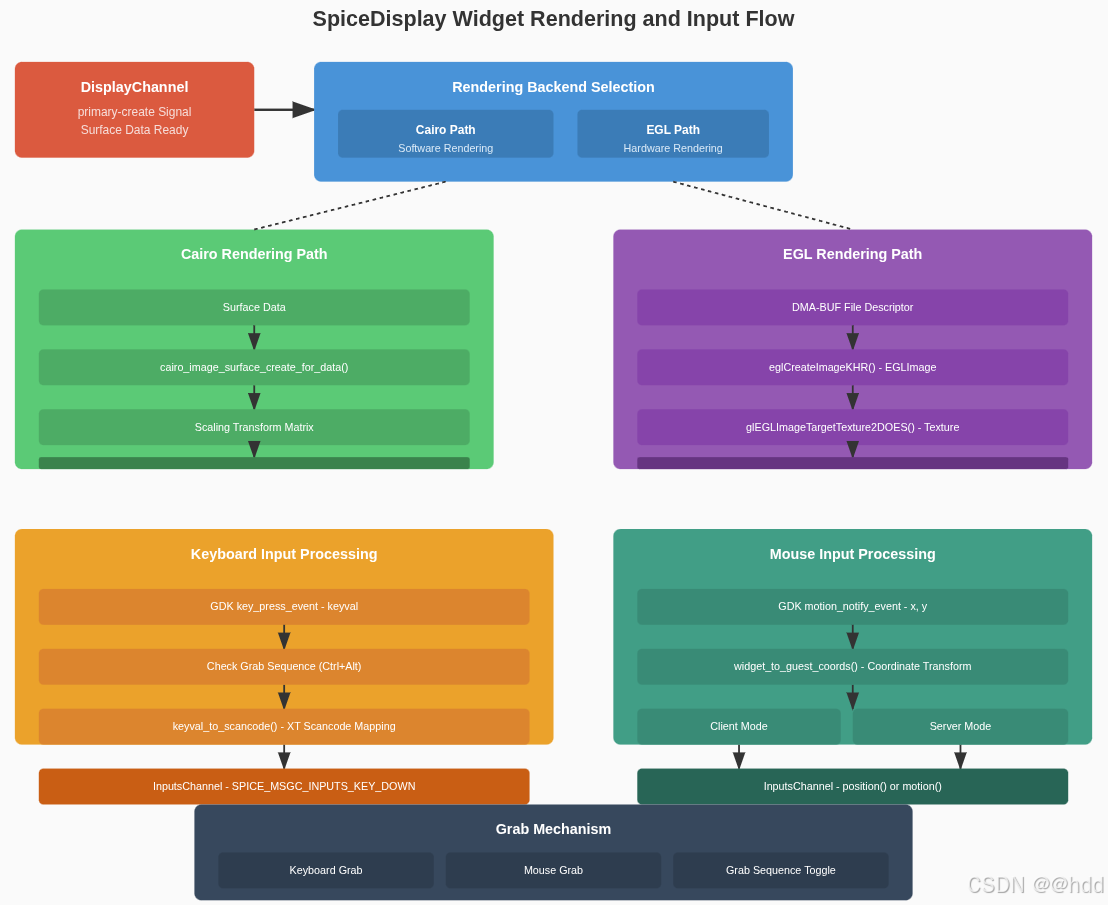
核心数据结构
SpiceDisplayPrivate
// spice-widget-priv.h
struct _SpiceDisplayPrivate {
// ===== GTK组件 =====
GtkStack *stack; // 堆栈容器(draw-area/gl-area/gst-area/label)
GtkWidget *label; // 标签(显示错误信息)
gint channel_id; // Display通道ID
gint monitor_id; // 显示器ID
// ===== 选项 =====
bool keyboard_grab_enable; // 启用键盘抓取
gboolean keyboard_grab_inhibit; // 键盘抓取抑制
bool mouse_grab_enable; // 启用鼠标抓取
bool resize_guest_enable; // 启用Guest分辨率调整
// ===== 状态 =====
gboolean ready; // 是否就绪
gboolean monitor_ready; // 显示器是否就绪
struct {
enum SpiceSurfaceFmt format; // 像素格式
gint width, height, stride; // 尺寸
gpointer data_origin; // 原始数据指针
gpointer data; // 转换后的数据(32位)
bool convert; // 是否需要转换
cairo_surface_t *surface; // Cairo表面
} canvas;
GdkRectangle area; // 显示区域
gint ww, wh, mx, my; // 窗口边框
// ===== 缩放选项 =====
gboolean allow_scaling; // 允许缩放
gboolean only_downscale; // 仅允许缩小
gboolean disable_inputs; // 禁用输入
// ===== 通道引用 =====
SpiceSession *session; // SPICE会话
SpiceGtkSession *gtk_session; // GTK会话包装
SpiceMainChannel *main; // Main通道
SpiceDisplayChannel *display; // Display通道
SpiceCursorChannel *cursor; // Cursor通道
SpiceInputsChannel *inputs; // Inputs通道
SpiceSmartcardChannel *smartcard; // Smartcard通道
// ===== 鼠标状态 =====
enum SpiceMouseMode mouse_mode; // 鼠标模式
int mouse_button_mask; // 鼠标按钮掩码
int mouse_grab_active; // 鼠标抓取是否激活
bool mouse_have_pointer; // 是否有鼠标指针
GdkCursor *mouse_cursor; // 鼠标光标
GdkPixbuf *mouse_pixbuf; // 鼠标光标位图
GdkPoint mouse_hotspot; // 鼠标热点
GdkCursor *show_cursor; // 显示的光标
int mouse_last_x, mouse_last_y; // 最后鼠标位置
int mouse_guest_x, mouse_guest_y; // Guest鼠标位置
cairo_surface_t *cursor_surface; // 光标表面
// ===== 键盘状态 =====
bool keyboard_grab_active; // 键盘抓取是否激活
bool keyboard_have_focus; // 是否有键盘焦点
const guint16 *keycode_map; // 键码映射表
size_t keycode_maplen; // 映射表长度
uint32_t key_state[512 / 32]; // 按键状态位图
int key_delayed_scancode; // 延迟的扫描码
guint key_delayed_id; // 延迟定时器ID
SpiceGrabSequence *grabseq; // 抓取键序列
gboolean *activeseq; // 当前按下的键
gboolean seq_pressed; // 序列是否按下
gboolean keyboard_grab_released; // 键盘抓取是否释放
gint mark; // 标记状态
guint keypress_delay; // 按键延迟
// ===== 缩放 =====
gint zoom_level; // 缩放级别
// ===== EGL支持 =====
#ifdef HAVE_EGL
struct {
gboolean context_ready; // 上下文是否就绪
gboolean enabled; // 是否启用
EGLSurface surface; // EGL表面
EGLDisplay display; // EGL显示
EGLConfig conf; // EGL配置
EGLContext ctx; // EGL上下文
gint mproj, attr_pos, attr_tex; // Shader属性位置
guint vbuf_id; // 顶点缓冲区ID
guint tex_id; // 纹理ID
guint tex_pointer_id; // 指针纹理ID
guint prog; // Shader程序
EGLImageKHR image; // EGL图像
gboolean call_draw_done; // 是否调用draw_done
SpiceGlScanout scanout; // GL扫描输出
} egl;
#endif
double scroll_delta_y; // 滚动增量
GWeakRef overlay_weak_ref; // 覆盖层弱引用
};
渲染后端
Cairo渲染(软件渲染)
Cairo是默认的渲染后端,使用CPU进行软件渲染:
// spice-widget-cairo.c
static gboolean draw_event(GtkWidget *widget, cairo_t *cr, gpointer data)
{
SpiceDisplay *display = SPICE_DISPLAY(data);
SpiceDisplayPrivate *d = display->priv;
SpiceDisplayPrimary primary;
cairo_surface_t *surface;
double scale_x, scale_y;
int x, y, w, h;
// ===== 获取主Surface数据 =====
if (!spice_display_channel_get_primary(SPICE_CHANNEL(d->display), 0, &primary)) {
return FALSE; // 主Surface不存在
}
// ===== 创建Cairo表面 =====
if (primary.format == SPICE_SURFACE_FMT_32_xRGB) {
surface = cairo_image_surface_create_for_data(
primary.data,
CAIRO_FORMAT_RGB24,
primary.width,
primary.height,
primary.stride);
} else {
// 需要格式转换
surface = convert_surface_format(&primary);
}
// ===== 计算缩放和位置 =====
spice_display_get_scaling(display, &scale_x, &scale_y, &x, &y, &w, &h);
// ===== 设置变换矩阵 =====
cairo_save(cr);
cairo_translate(cr, x, y);
cairo_scale(cr, scale_x, scale_y);
// ===== 绘制Surface =====
cairo_set_source_surface(cr, surface, 0, 0);
cairo_paint(cr);
// ===== 绘制鼠标光标 =====
if (d->mouse_cursor && d->mouse_have_pointer) {
cairo_save(cr);
cairo_translate(cr, d->mouse_guest_x, d->mouse_guest_y);
cairo_set_source_surface(cr, d->cursor_surface,
–d->mouse_hotspot.x, –d->mouse_hotspot.y);
cairo_paint(cr);
cairo_restore(cr);
}
cairo_restore(cr);
cairo_surface_destroy(surface);
return TRUE;
}
Cairo渲染机制分析:
draw_event()函数在Cairo渲染路径中,会根据Surface的像素格式自动创建对应的Cairo表面。对于SPICE_SURFACE_FMT_32_xRGB格式,直接使用cairo_image_surface_create_for_data()创建表面,无需格式转换。对于其他格式,会调用convert_surface_format()进行格式转换。缩放变换通过cairo_translate()和cairo_scale()实现,变换矩阵会应用到整个绘制上下文。鼠标光标的软件合成是在CPU上完成的,通过cairo_set_source_surface()和cairo_paint()将光标图像叠加到主Surface上,这种方式的优点是兼容性好,但性能不如硬件合成。
Cairo渲染特点:
| 兼容性好 | 所有平台都支持 |
| CPU渲染 | 使用CPU进行软件渲染 |
| 格式转换 | 自动处理不同像素格式的转换 |
| 光标合成 | 在CPU上合成鼠标光标 |
EGL渲染(硬件加速)
EGL使用GPU进行硬件加速渲染,支持GL Scanout零拷贝:
// spice-widget-egl.c
static gboolean gl_area_render(GtkGLArea *area, GdkGLContext *context, gpointer user_data)
{
SpiceDisplay *display = SPICE_DISPLAY(user_data);
SpiceDisplayPrivate *d = display->priv;
// ===== 更新显示 =====
spice_egl_update_display(display);
glFlush();
// ===== 调用draw_done释放GL资源 =====
if (d->egl.call_draw_done) {
spice_display_channel_gl_draw_done(d->display);
d->egl.call_draw_done = FALSE;
}
return TRUE;
}
gboolean spice_egl_update_scanout(SpiceDisplay *display,
const SpiceGlScanout *scanout,
GError **err)
{
SpiceDisplayPrivate *d = display->priv;
EGLImageKHR image;
EGLint attribs[] = {
EGL_DMA_BUF_PLANE0_FD_EXT, scanout->fd,
EGL_DMA_BUF_PLANE0_OFFSET_EXT, 0,
EGL_DMA_BUF_PLANE0_PITCH_EXT, scanout->stride,
EGL_WIDTH, scanout->width,
EGL_HEIGHT, scanout->height,
EGL_LINUX_DRM_FOURCC_EXT, scanout->format,
EGL_NONE
};
// ===== 从DMA-BUF创建EGL图像 =====
image = eglCreateImageKHR(d->egl.display,
EGL_NO_CONTEXT,
EGL_LINUX_DMA_BUF_EXT,
NULL,
attribs);
if (image == EGL_NO_IMAGE_KHR) {
g_set_error(err, SPICE_CLIENT_ERROR, SPICE_CLIENT_ERROR_FAILED,
"Failed to create EGL image from DMA-BUF");
return FALSE;
}
// ===== 更新纹理 =====
glBindTexture(GL_TEXTURE_2D, d->egl.tex_id);
glEGLImageTargetTexture2DOES(GL_TEXTURE_2D, image);
// ===== 保存scanout信息 =====
d->egl.scanout = *scanout;
d->egl.image = image;
return TRUE;
}
EGL渲染优势:
| 硬件加速 | 使用GPU进行渲染,性能高 |
| 零拷贝 | DMA-BUF直接导入,无需CPU拷贝 |
| 低延迟 | GPU渲染延迟低 |
| GL Scanout | 支持服务器端GL渲染直接显示 |
输入事件处理
键盘事件处理
键盘事件需要转换为SPICE协议的扫描码:
// spice-widget.c
static gboolean key_press_event(GtkWidget *widget, GdkEventKey *event, gpointer data)
{
SpiceDisplay *display = SPICE_DISPLAY(data);
SpiceDisplayPrivate *d = display->priv;
guint scancode;
// ===== 检查输入是否禁用 =====
if (d->disable_inputs)
return FALSE;
// ===== 检查抓取键序列 =====
if (check_grab_sequence(display, event)) {
// 切换键盘抓取状态
if (d->keyboard_grab_active) {
try_keyboard_ungrab(display);
} else {
try_keyboard_grab(display);
}
return TRUE;
}
// ===== 如果键盘未抓取,不处理 =====
if (!d->keyboard_grab_active)
return FALSE;
// ===== 转换键码到扫描码 =====
scancode = keyval_to_scancode(display, event->keyval, event->state);
if (scancode == 0)
return FALSE;
// ===== 发送按键事件 =====
spice_inputs_channel_key_press(d->inputs, scancode);
// ===== 更新按键状态 =====
update_key_state(d, scancode, TRUE);
return TRUE;
}
键盘事件处理分析:
key_press_event()函数首先调用check_grab_sequence()检查是否按下了抓取键序列(默认是Ctrl+Alt),如果按下则切换键盘抓取状态,而不是将按键发送到Guest。如果键盘未抓取(keyboard_grab_active为FALSE),函数直接返回FALSE,不处理该事件,这确保了只有在抓取状态下才会将键盘输入发送到远程虚拟机。键码到扫描码的转换是必要的,因为SPICE协议使用PC XT扫描码集,而GTK使用GDK键码,两者之间需要映射表进行转换,不同平台(X11、Wayland、Win32、macOS)的映射表可能不同。
键码到扫描码转换
SPICE使用PC XT扫描码,需要从GTK键码转换:
// spice-widget.c
static guint keyval_to_scancode(SpiceDisplay *display, guint keyval, GdkModifierType state)
{
SpiceDisplayPrivate *d = display->priv;
GdkWindow *window = gtk_widget_get_window(GTK_WIDGET(display));
guint16 scancode;
// ===== 获取键码映射表 =====
if (d->keycode_map == NULL) {
d->keycode_map = vnc_display_keymap_gdk2xtkbd_table(window, &d->keycode_maplen);
}
// ===== 查找键码映射 =====
if (d->keycode_map) {
GdkKeymapKey *keys;
gint n_keys;
gint i;
// 获取键码对应的物理键
if (gdk_keymap_get_entries_for_keyval(gdk_keymap_get_for_display(
gdk_window_get_display(window)), keyval, &keys, &n_keys)) {
for (i = 0; i < n_keys; i++) {
// 查找映射表中的扫描码
if (keys[i].keycode < d->keycode_maplen) {
scancode = d->keycode_map[keys[i].keycode];
if (scancode != 0) {
g_free(keys);
return scancode;
}
}
}
g_free(keys);
}
}
return 0;
}
键码映射表:
- vncdisplaykeymap.c提供了不同平台的键码映射表
- 支持X11、Wayland、Win32、macOS等平台
- 每个平台有不同的键盘驱动,需要不同的映射表
鼠标事件处理
鼠标事件根据鼠标模式(client/server)有不同的处理方式:
// spice-widget.c
static gboolean motion_notify_event(GtkWidget *widget, GdkEventMotion *event, gpointer data)
{
SpiceDisplay *display = SPICE_DISPLAY(data);
SpiceDisplayPrivate *d = display->priv;
gint x, y;
if (d->disable_inputs)
return FALSE;
// ===== 转换坐标到Guest坐标 =====
widget_to_guest_coords(display, event->x, event->y, &x, &y);
// ===== 根据鼠标模式发送事件 =====
if (d->mouse_mode == SPICE_MOUSE_MODE_CLIENT) {
// 客户端模式:发送绝对坐标
spice_inputs_channel_position(d->inputs, x, y, d->channel_id,
d->mouse_button_mask);
} else {
// 服务器模式:发送相对移动
gint dx = x – d->mouse_last_x;
gint dy = y – d->mouse_last_y;
if (dx != 0 || dy != 0) {
spice_inputs_channel_motion(d->inputs, dx, dy, d->mouse_button_mask);
d->mouse_last_x = x;
d->mouse_last_y = y;
}
}
return TRUE;
}
static gboolean button_press_event(GtkWidget *widget, GdkEventButton *event, gpointer data)
{
SpiceDisplay *display = SPICE_DISPLAY(data);
SpiceDisplayPrivate *d = display->priv;
guint button;
if (d->disable_inputs)
return FALSE;
// ===== 转换按钮编号 =====
button = gdk_button_to_spice_button(event->button);
// ===== 更新按钮状态 =====
d->mouse_button_mask |= (1 << (button – 1));
// ===== 发送按键事件 =====
spice_inputs_channel_button_press(d->inputs, button, d->mouse_button_mask);
return TRUE;
}
键盘和鼠标抓取
键盘抓取
键盘抓取确保所有键盘输入都发送到Guest:
// spice-widget.c
static void try_keyboard_grab(SpiceDisplay *display)
{
SpiceDisplayPrivate *d = display->priv;
GdkGrabStatus status;
// ===== 检查各种条件 =====
if (g_getenv("SPICE_NOGRAB"))
return;
if (d->disable_inputs)
return;
if (d->keyboard_grab_inhibit)
return;
if (!d->keyboard_grab_enable)
return;
if (d->keyboard_grab_active)
return;
if (!spice_gtk_session_get_keyboard_has_focus(d->gtk_session))
return;
if (!spice_gtk_session_get_mouse_has_pointer(d->gtk_session))
return;
// ===== 执行键盘抓取 =====
#ifdef G_OS_WIN32
// Windows使用低级键盘钩子
if (d->keyboard_hook == NULL)
d->keyboard_hook = SetWindowsHookEx(WH_KEYBOARD_LL, keyboard_hook_cb,
GetModuleHandle(NULL), 0);
#else
// Unix使用GDK键盘抓取
status = gdk_keyboard_grab(gtk_widget_get_window(GTK_WIDGET(display)),
TRUE, // owner_events
GDK_CURRENT_TIME);
if (status == GDK_GRAB_SUCCESS) {
d->keyboard_grab_active = TRUE;
g_signal_emit(display, signals[SPICE_DISPLAY_KEYBOARD_GRAB], 0, TRUE);
}
#endif
}
鼠标抓取
鼠标抓取确保鼠标事件发送到Guest:
// spice-widget.c
static void try_mouse_grab(SpiceDisplay *display)
{
SpiceDisplayPrivate *d = display->priv;
GdkGrabStatus status;
// ===== 检查条件 =====
if (!d->mouse_grab_enable)
return;
if (d->mouse_grab_active)
return;
if (!spice_gtk_session_get_mouse_has_pointer(d->gtk_session))
return;
// ===== 执行鼠标抓取 =====
status = gdk_pointer_grab(gtk_widget_get_window(GTK_WIDGET(display)),
TRUE, // owner_events
GDK_POINTER_MOTION_MASK | GDK_BUTTON_PRESS_MASK |
GDK_BUTTON_RELEASE_MASK,
NULL, // confine_to
NULL, // cursor
GDK_CURRENT_TIME);
if (status == GDK_GRAB_SUCCESS) {
d->mouse_grab_active = TRUE;
g_signal_emit(display, signals[SPICE_DISPLAY_MOUSE_GRAB], 0, TRUE);
}
}
抓取键序列
默认使用Control_L+Alt_L切换抓取状态:
// spice-widget.c
static gboolean check_grab_sequence(SpiceDisplay *display, GdkEventKey *event)
{
SpiceDisplayPrivate *d = display->priv;
guint i;
gboolean all_pressed = TRUE;
// ===== 检查序列中的每个键 =====
for (i = 0; i < d->grabseq->nkeysyms; i++) {
if (event->keyval == d->grabseq->keysyms[i]) {
d->activeseq[i] = TRUE; // 标记为按下
}
if (!d->activeseq[i]) {
all_pressed = FALSE; // 有键未按下
}
}
// ===== 如果所有键都按下,触发抓取切换 =====
if (all_pressed && !d->seq_pressed) {
d->seq_pressed = TRUE;
return TRUE;
}
// ===== 检查是否有键释放 =====
if (event->type == GDK_KEY_RELEASE) {
for (i = 0; i < d->grabseq->nkeysyms; i++) {
if (event->keyval == d->grabseq->keysyms[i]) {
d->activeseq[i] = FALSE;
d->seq_pressed = FALSE;
}
}
}
return FALSE;
}
缩放和变换
缩放计算
SpiceDisplay支持多种缩放模式:
// spice-widget.c
static void recalc_geometry(GtkWidget *widget)
{
SpiceDisplay *display = SPICE_DISPLAY(widget);
SpiceDisplayPrivate *d = display->priv;
GtkAllocation allocation;
double scale_x, scale_y;
int guest_w, guest_h;
gtk_widget_get_allocation(widget, &allocation);
// ===== 获取Guest尺寸 =====
guest_w = d->canvas.width;
guest_h = d->canvas.height;
// ===== 计算缩放比例 =====
if (d->allow_scaling) {
scale_x = (double)allocation.width / guest_w;
scale_y = (double)allocation.height / guest_h;
// ===== 仅允许缩小 =====
if (d->only_downscale) {
scale_x = MIN(scale_x, 1.0);
scale_y = MIN(scale_y, 1.0);
}
// ===== 保持宽高比 =====
scale_x = scale_y = MIN(scale_x, scale_y);
// ===== 应用缩放级别 =====
if (d->zoom_level != 0) {
double zoom_factor = pow(1.2, d->zoom_level);
scale_x *= zoom_factor;
scale_y *= zoom_factor;
}
} else {
scale_x = scale_y = 1.0;
}
// ===== 计算显示区域 =====
d->area.width = guest_w * scale_x;
d->area.height = guest_h * scale_y;
d->area.x = (allocation.width – d->area.width) / 2;
d->area.y = (allocation.height – d->area.height) / 2;
}
缩放算法分析:
recalc_geometry()函数实现了灵活的缩放算法。首先计算窗口尺寸与Guest尺寸的比例(scale_x和scale_y)。如果启用了only_downscale选项,会将缩放比例限制在1.0以内,避免放大导致的图像模糊。为了保持宽高比,使用MIN(scale_x, scale_y)选择较小的缩放比例,确保图像不会变形。如果设置了zoom_level,会应用额外的缩放因子(pow(1.2, zoom_level)),允许用户进行精细的缩放调整。最后计算居中显示的位置,确保图像在窗口中居中显示。
缩放模式:
| allow_scaling = FALSE | 不缩放,1:1显示 | 需要精确像素匹配 |
| allow_scaling = TRUE | 允许缩放 | 适应窗口大小 |
| only_downscale = TRUE | 仅允许缩小 | 避免放大导致的模糊 |
多显示器支持
显示器区域更新
// spice-widget.c
void spice_display_widget_update_monitor_area(SpiceDisplay *display)
{
SpiceDisplayPrivate *d = display->priv;
SpiceDisplayMonitorConfig *cfg, *c = NULL;
GArray *monitors = NULL;
int i;
DISPLAY_DEBUG(display, "update monitor area");
// ===== 如果没有指定monitor_id,使用整个Surface =====
if (d->monitor_id < 0)
goto whole;
// ===== 获取显示器配置 =====
g_object_get(d->display, "monitors", &monitors, NULL);
for (i = 0; monitors != NULL && i < monitors->len; i++) {
cfg = &g_array_index(monitors, SpiceDisplayMonitorConfig, i);
if (cfg->id == d->monitor_id) {
c = cfg;
break;
}
}
// ===== 如果找不到显示器配置 =====
if (c == NULL) {
DISPLAY_DEBUG(display, "update monitor: no monitor %d", d->monitor_id);
set_monitor_ready(display, false);
if (spice_channel_test_capability(SPICE_CHANNEL(d->display),
SPICE_DISPLAY_CAP_MONITORS_CONFIG)) {
DISPLAY_DEBUG(display, "waiting until MonitorsConfig is received");
g_clear_pointer(&monitors, g_array_unref);
return;
}
goto whole;
}
// ===== 更新显示区域 =====
if (monitors->len == 1 && !egl_enabled(d)) {
update_area(display, 0, 0, c->width, c->height);
} else {
update_area(display, c->x, c->y, c->width, c->height);
}
g_clear_pointer(&monitors, g_array_unref);
return;
whole:
// ===== 使用整个Surface =====
g_clear_pointer(&monitors, g_array_unref);
update_area(display, 0, 0, d->canvas.width, d->canvas.height);
set_monitor_ready(display, true);
}
桌面集成
剪贴板集成
SpiceDisplay通过SpiceGtkSession集成系统剪贴板:
// spice-gtk-session.c
// SpiceGtkSession管理剪贴板同步
// 当Guest剪贴板变化时,自动同步到系统剪贴板
// 当系统剪贴板变化时,自动同步到Guest
文件拖放
支持从文件管理器拖放文件到SpiceDisplay:
// spice-widget.c
static void drag_data_received_callback(SpiceDisplay *self,
GdkDragContext *drag_context,
gint x, gint y,
GtkSelectionData *data,
guint info,
guint time,
gpointer *user_data)
{
const guchar *buf;
gchar **file_urls;
int n_files;
SpiceDisplayPrivate *d = self->priv;
int i = 0;
GFile **files;
// ===== 解析文件URI列表 =====
buf = gtk_selection_data_get_data(data);
file_urls = g_uri_list_extract_uris((const gchar*)buf);
n_files = g_strv_length(file_urls);
// ===== 创建GFile数组 =====
files = g_new0(GFile*, n_files + 1);
for (i = 0; i < n_files; i++) {
files[i] = g_file_new_for_uri(file_urls[i]);
}
g_strfreev(file_urls);
// ===== 启动文件传输 =====
spice_main_channel_file_copy_async(d->main, files, 0, NULL, NULL, NULL,
file_transfer_callback, NULL);
// ===== 清理 =====
for (i = 0; i < n_files; i++) {
g_object_unref(files[i]);
}
g_free(files);
gtk_drag_finish(drag_context, TRUE, FALSE, time);
}
自动USB重定向
当键盘获得焦点时,自动请求USB设备重定向:
// spice-widget.c
static void update_keyboard_focus(SpiceDisplay *display, gboolean state)
{
SpiceDisplayPrivate *d = display->priv;
d->keyboard_have_focus = state;
spice_gtk_session_set_keyboard_has_focus(d->gtk_session, state);
// ===== 请求自动USB重定向 =====
if (!d->keyboard_grab_inhibit) {
spice_gtk_session_request_auto_usbredir(d->gtk_session, state);
}
}
Wayland扩展
相对指针
Wayland支持相对指针协议,用于服务器鼠标模式:
// wayland-extensions.c
int spice_wayland_extensions_enable_relative_pointer(GtkWidget *widget,
void (*cb)(void *,
struct zwp_relative_pointer_v1 *,
uint32_t, uint32_t,
wl_fixed_t, wl_fixed_t,
wl_fixed_t, wl_fixed_t))
{
struct zwp_relative_pointer_v1 *relative_pointer;
struct zwp_relative_pointer_manager_v1 *relative_pointer_manager;
GdkWindow *window = gtk_widget_get_window(widget);
struct wl_pointer *pointer;
// ===== 获取相对指针管理器 =====
relative_pointer_manager = g_object_get_data(G_OBJECT(widget),
"zwp_relative_pointer_manager_v1");
if (relative_pointer_manager == NULL)
return –1;
// ===== 获取Wayland指针 =====
pointer = gdk_wayland_device_get_wl_pointer(
gdk_seat_get_pointer(gdk_display_get_default_seat(
gdk_window_get_display(window))));
// ===== 创建相对指针 =====
relative_pointer = zwp_relative_pointer_manager_v1_get_relative_pointer(
relative_pointer_manager, pointer);
// ===== 设置回调 =====
zwp_relative_pointer_v1_add_listener(relative_pointer,
&relative_pointer_listener,
widget);
return 0;
}
指针约束
Wayland支持指针约束协议,用于鼠标抓取:
// wayland-extensions.c
// 使用zwp_pointer_constraints_v1协议实现鼠标抓取
// 比传统的gdk_pointer_grab()更符合Wayland的设计
总结
SpiceDisplay作为spice-gtk的核心控件,实现了以下关键功能:
SpiceDisplay的设计充分考虑了不同平台和场景的需求,通过灵活的配置选项和多种渲染后端,实现了高效的远程桌面显示。