欢迎加入开源鸿蒙跨平台社区:https://openharmonycrossplatform.csdn.net

前言
在进行 OpenHarmony 应用开发时,网络请求的响应速度直接决定了用户体验(体验 UX)。如果用户每次切换页面都必须等待加载动画,应用会显得非常低级。我们不仅需要处理异步数据请求,更需要一套精密的机制来解决以下痛点:
cached_query 是一个类似于 Web 端 React Query 的 Dart 状态管理库。它专注于数据获取与同步,让你的鸿蒙应用具备顶级的数据缓存表现。
一、核心缓存驱动机制
cached_query 在内存与数据源之间建立了一层“智能感知”缓存。
#mermaid-svg-DUYXsE5c8TdoMzxr{font-family:\”trebuchet ms\”,verdana,arial,sans-serif;font-size:16px;fill:#333;}@keyframes edge-animation-frame{from{stroke-dashoffset:0;}}@keyframes dash{to{stroke-dashoffset:0;}}#mermaid-svg-DUYXsE5c8TdoMzxr .edge-animation-slow{stroke-dasharray:9,5!important;stroke-dashoffset:900;animation:dash 50s linear infinite;stroke-linecap:round;}#mermaid-svg-DUYXsE5c8TdoMzxr .edge-animation-fast{stroke-dasharray:9,5!important;stroke-dashoffset:900;animation:dash 20s linear infinite;stroke-linecap:round;}#mermaid-svg-DUYXsE5c8TdoMzxr .error-icon{fill:#552222;}#mermaid-svg-DUYXsE5c8TdoMzxr .error-text{fill:#552222;stroke:#552222;}#mermaid-svg-DUYXsE5c8TdoMzxr .edge-thickness-normal{stroke-width:1px;}#mermaid-svg-DUYXsE5c8TdoMzxr .edge-thickness-thick{stroke-width:3.5px;}#mermaid-svg-DUYXsE5c8TdoMzxr .edge-pattern-solid{stroke-dasharray:0;}#mermaid-svg-DUYXsE5c8TdoMzxr .edge-thickness-invisible{stroke-width:0;fill:none;}#mermaid-svg-DUYXsE5c8TdoMzxr .edge-pattern-dashed{stroke-dasharray:3;}#mermaid-svg-DUYXsE5c8TdoMzxr .edge-pattern-dotted{stroke-dasharray:2;}#mermaid-svg-DUYXsE5c8TdoMzxr .marker{fill:#333333;stroke:#333333;}#mermaid-svg-DUYXsE5c8TdoMzxr .marker.cross{stroke:#333333;}#mermaid-svg-DUYXsE5c8TdoMzxr svg{font-family:\”trebuchet ms\”,verdana,arial,sans-serif;font-size:16px;}#mermaid-svg-DUYXsE5c8TdoMzxr p{margin:0;}#mermaid-svg-DUYXsE5c8TdoMzxr .label{font-family:\”trebuchet ms\”,verdana,arial,sans-serif;color:#333;}#mermaid-svg-DUYXsE5c8TdoMzxr .cluster-label text{fill:#333;}#mermaid-svg-DUYXsE5c8TdoMzxr .cluster-label span{color:#333;}#mermaid-svg-DUYXsE5c8TdoMzxr .cluster-label span p{background-color:transparent;}#mermaid-svg-DUYXsE5c8TdoMzxr .label text,#mermaid-svg-DUYXsE5c8TdoMzxr span{fill:#333;color:#333;}#mermaid-svg-DUYXsE5c8TdoMzxr .node rect,#mermaid-svg-DUYXsE5c8TdoMzxr .node circle,#mermaid-svg-DUYXsE5c8TdoMzxr .node ellipse,#mermaid-svg-DUYXsE5c8TdoMzxr .node polygon,#mermaid-svg-DUYXsE5c8TdoMzxr .node path{fill:#ECECFF;stroke:#9370DB;stroke-width:1px;}#mermaid-svg-DUYXsE5c8TdoMzxr .rough-node .label text,#mermaid-svg-DUYXsE5c8TdoMzxr .node .label text,#mermaid-svg-DUYXsE5c8TdoMzxr .image-shape .label,#mermaid-svg-DUYXsE5c8TdoMzxr .icon-shape .label{text-anchor:middle;}#mermaid-svg-DUYXsE5c8TdoMzxr .node .katex path{fill:#000;stroke:#000;stroke-width:1px;}#mermaid-svg-DUYXsE5c8TdoMzxr .rough-node .label,#mermaid-svg-DUYXsE5c8TdoMzxr .node .label,#mermaid-svg-DUYXsE5c8TdoMzxr .image-shape .label,#mermaid-svg-DUYXsE5c8TdoMzxr .icon-shape .label{text-align:center;}#mermaid-svg-DUYXsE5c8TdoMzxr .node.clickable{cursor:pointer;}#mermaid-svg-DUYXsE5c8TdoMzxr .root .anchor path{fill:#333333!important;stroke-width:0;stroke:#333333;}#mermaid-svg-DUYXsE5c8TdoMzxr .arrowheadPath{fill:#333333;}#mermaid-svg-DUYXsE5c8TdoMzxr .edgePath .path{stroke:#333333;stroke-width:2.0px;}#mermaid-svg-DUYXsE5c8TdoMzxr .flowchart-link{stroke:#333333;fill:none;}#mermaid-svg-DUYXsE5c8TdoMzxr .edgeLabel{background-color:rgba(232,232,232, 0.8);text-align:center;}#mermaid-svg-DUYXsE5c8TdoMzxr .edgeLabel p{background-color:rgba(232,232,232, 0.8);}#mermaid-svg-DUYXsE5c8TdoMzxr .edgeLabel rect{opacity:0.5;background-color:rgba(232,232,232, 0.8);fill:rgba(232,232,232, 0.8);}#mermaid-svg-DUYXsE5c8TdoMzxr .labelBkg{background-color:rgba(232, 232, 232, 0.5);}#mermaid-svg-DUYXsE5c8TdoMzxr .cluster rect{fill:#ffffde;stroke:#aaaa33;stroke-width:1px;}#mermaid-svg-DUYXsE5c8TdoMzxr .cluster text{fill:#333;}#mermaid-svg-DUYXsE5c8TdoMzxr .cluster span{color:#333;}#mermaid-svg-DUYXsE5c8TdoMzxr div.mermaidTooltip{position:absolute;text-align:center;max-width:200px;padding:2px;font-family:\”trebuchet ms\”,verdana,arial,sans-serif;font-size:12px;background:hsl(80, 100%, 96.2745098039%);border:1px solid #aaaa33;border-radius:2px;pointer-events:none;z-index:100;}#mermaid-svg-DUYXsE5c8TdoMzxr .flowchartTitleText{text-anchor:middle;font-size:18px;fill:#333;}#mermaid-svg-DUYXsE5c8TdoMzxr rect.text{fill:none;stroke-width:0;}#mermaid-svg-DUYXsE5c8TdoMzxr .icon-shape,#mermaid-svg-DUYXsE5c8TdoMzxr .image-shape{background-color:rgba(232,232,232, 0.8);text-align:center;}#mermaid-svg-DUYXsE5c8TdoMzxr .icon-shape p,#mermaid-svg-DUYXsE5c8TdoMzxr .image-shape p{background-color:rgba(232,232,232, 0.8);padding:2px;}#mermaid-svg-DUYXsE5c8TdoMzxr .icon-shape rect,#mermaid-svg-DUYXsE5c8TdoMzxr .image-shape rect{opacity:0.5;background-color:rgba(232,232,232, 0.8);fill:rgba(232,232,232, 0.8);}#mermaid-svg-DUYXsE5c8TdoMzxr .label-icon{display:inline-block;height:1em;overflow:visible;vertical-align:-0.125em;}#mermaid-svg-DUYXsE5c8TdoMzxr .node .label-icon path{fill:currentColor;stroke:revert;stroke-width:revert;}#mermaid-svg-DUYXsE5c8TdoMzxr :root{–mermaid-font-family:\”trebuchet ms\”,verdana,arial,sans-serif;}
数据过期/缺失
返回新数据
发射流
鸿蒙 Page/Widget
useQuery / QueryObserver
Query Cache (内存存储)
API Service (网络请求)
二、核心 API 实战
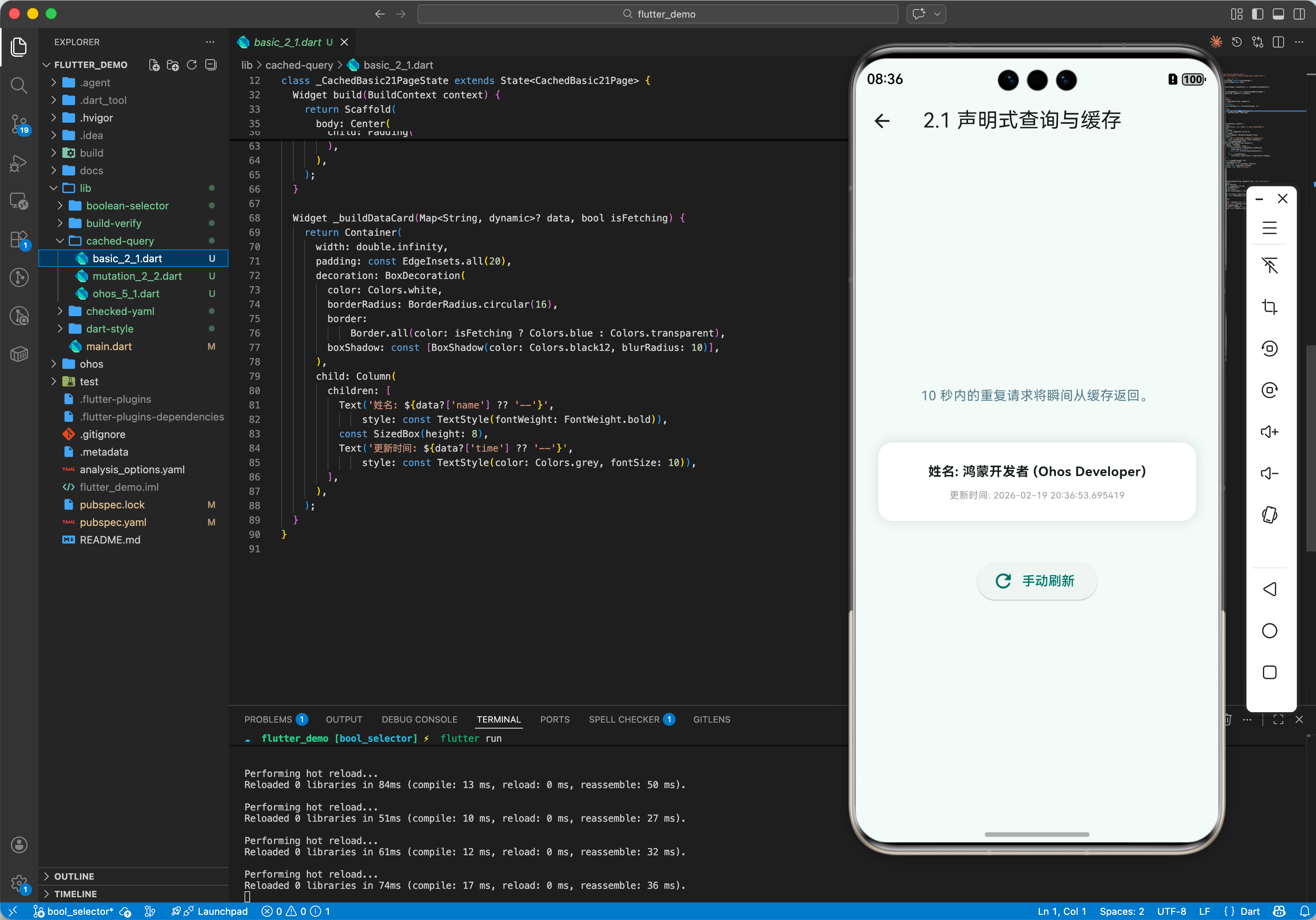
2.1 定义单一查询
import 'package:cached_query/cached_query.dart';
final userQuery = Query<Map<String, dynamic>, int>(
key: 'user_info', // 💡 唯一的缓存标识
queryFn: (userId) async {
// 模拟网络请求
await Future.delayed(Duration(seconds: 1));
return {'id': userId, 'name': '鸿蒙开发者'};
},
config: QueryConfig(
staleTime: Duration(minutes: 5), // 💡 5 分钟内不重新抓取
),
);
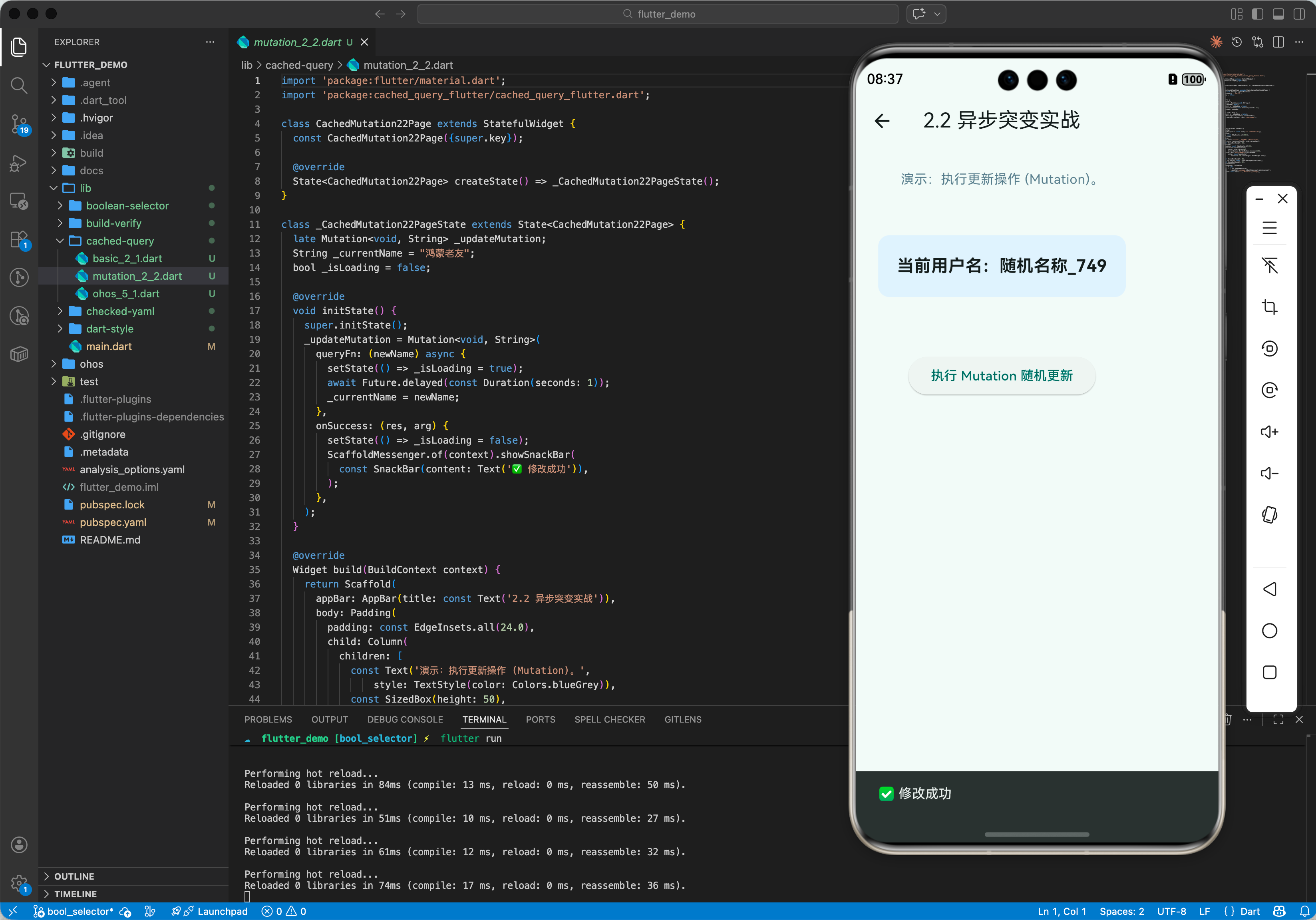
2.2 执行异步突变 (Mutation)
常用于更新、删除等会导致缓存失效的操作。
final updateMutation = Mutation<void, String>(
queryFn: (newName) => api.updateUser(newName),
onSuccess: (res, arg) {
// 💡 成功后通知缓存失效,自动触发重新抓取
CachedQuery.instance.invalidateQueries(key: 'user_info');
},
);
2.3 在 UI 中观测
QueryObserver<Map<String, dynamic>, int>(
query: userQuery,
arg: 123,
builder: (context, state) {
if (state.status == QueryStatus.loading) return CircularProgressIndicator();
return Text('用户名:${state.data?['name']}');
},
)
三、常见应用场景
3.1 鸿蒙新闻客户端列表
利用 InfiniteQuery 轻松实现“加载更多”逻辑。它会自动合并多个历史 Page 的数据,并记录每一个 Page 的滚动状态和游标(Cursor)。
3.2 离线优先的应用场景
结合 cached_query_storage 插件,可以将内存中的缓存异步序列化到鸿蒙系统的本地磁盘中。只要应用启动,即使在断网状态,也能立即看到上一次的全部内容。
四、OpenHarmony 平台适配
4.1 全局缓存单例
💡 技巧:cached_query 的核心 CachedQuery.instance 是全局共享的。在鸿蒙多端(如手机、平板)同步时,由于鸿蒙系统对内存管理的策略,通过手动配置 cacheTime 和 staleTime 的平衡,可以有效降低后台进程对 CPU 和网络的唤醒,提升续航。
4.2 适配鸿蒙复杂状态变更
在鸿蒙的“流转”场景下(跨设备接续),状态数据需要迅速序列化。由于 cached_query 的缓存数据是强类型的 JSON 或实体,我们可以通过自定义 storage 接口无缝对接鸿蒙的 Storage 模块,实现近乎无感的跨设备状态接力。
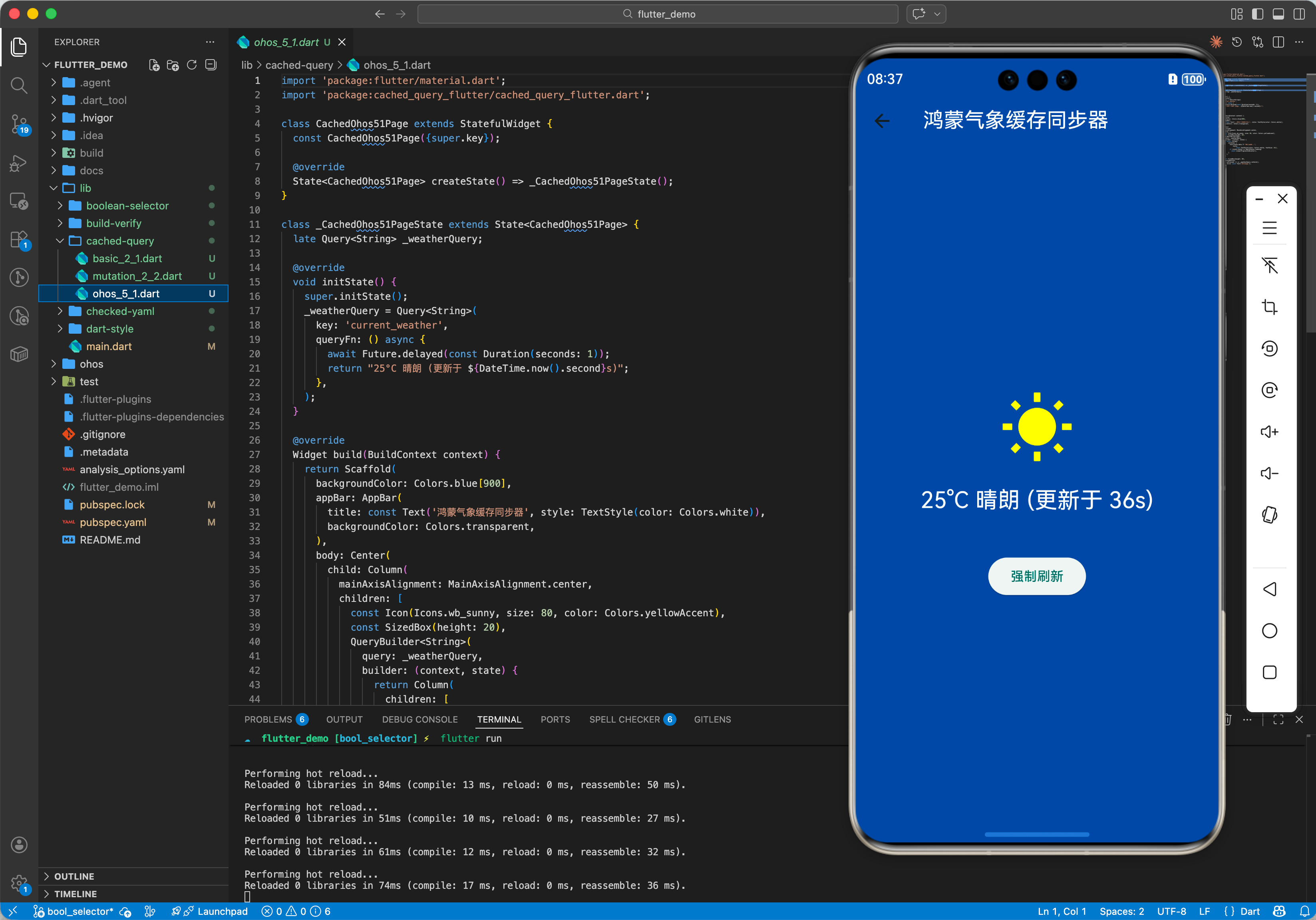
五、完整实战示例:鸿蒙天气信息同步器
本示例展示如何利用缓存策略获取天气信息,并在 10 分钟内复用缓存。
import 'package:cached_query/cached_query.dart';
class OhosWeatherService {
late Query<String, String> weatherQuery;
OhosWeatherService() {
weatherQuery = Query<String, String>(
key: 'current_weather',
queryFn: (city) async {
print('🌐 正在向鸿蒙气象服务发起请求 ($city)…');
await Future.delayed(Duration(seconds: 1));
return "25°C 晴朗";
},
config: QueryConfig(
staleTime: Duration(minutes: 10), // 💡 缓存保鲜期 10 分钟
),
);
}
void refresh() {
// 手动强制刷新,绕过缓存
weatherQuery.refetch();
}
}
void main() async {
final service = OhosWeatherService();
// 第一次:发起请求
await service.weatherQuery.getResult("深圳");
// 第二次:瞬间从内存返回,不触发请求
await service.weatherQuery.getResult("深圳");
}
六、总结
cached_query 软件包是 OpenHarmony 开发者打磨“极致快感”应用的架构首选。它不仅解决了简单的“拿数据”问题,更通过对数据生命周期的精密控制,实现了对带宽和用户等待时间的双重优化。在一个快速互联、体验至上的鸿蒙原生应用生态中,引入这样一套现代化的状态管理机制,是你构建世界级应用的基础底座。