欢迎加入开源鸿蒙跨平台社区:https://openharmonycrossplatform.csdn.net

前言
在 App 的迭代过程中,维护 pubspec.yaml 中的版本号和编写 CHANGELOG.md 是一件既繁琐又容易出错的事情。
- “这次发布是 1.0.1 还是 1.1.0?”
- “昨天的 bug fix 有没有写进变更日志?”
- “谁不小心把 build number 搞错了,导致应用商店上传失败?”
对于 OpenHarmony 应用来说,更加严格的版本管控(如 HAP 包的版本对应)使得这一环节尤为重要。
Cider 是一个专为 Dart/Flutter 项目设计的命令行工具,它可以自动化地处理版本升级、变更日志维护以及发布的检查。它就像是你的“发布管家”,确保每一次 Release 都井井有条。
一、核心功能与工作流
cider 是基于 Keep a Changelog 规范设计的。它不依赖复杂的 CI/CD 配置,仅仅作为一个本地 CLI 工具,就能极大提升效率。
1.1 核心能力
1.2 工作流示意
#mermaid-svg-XyeMqxq2J9QrWSjj{font-family:\”trebuchet ms\”,verdana,arial,sans-serif;font-size:16px;fill:#333;}@keyframes edge-animation-frame{from{stroke-dashoffset:0;}}@keyframes dash{to{stroke-dashoffset:0;}}#mermaid-svg-XyeMqxq2J9QrWSjj .edge-animation-slow{stroke-dasharray:9,5!important;stroke-dashoffset:900;animation:dash 50s linear infinite;stroke-linecap:round;}#mermaid-svg-XyeMqxq2J9QrWSjj .edge-animation-fast{stroke-dasharray:9,5!important;stroke-dashoffset:900;animation:dash 20s linear infinite;stroke-linecap:round;}#mermaid-svg-XyeMqxq2J9QrWSjj .error-icon{fill:#552222;}#mermaid-svg-XyeMqxq2J9QrWSjj .error-text{fill:#552222;stroke:#552222;}#mermaid-svg-XyeMqxq2J9QrWSjj .edge-thickness-normal{stroke-width:1px;}#mermaid-svg-XyeMqxq2J9QrWSjj .edge-thickness-thick{stroke-width:3.5px;}#mermaid-svg-XyeMqxq2J9QrWSjj .edge-pattern-solid{stroke-dasharray:0;}#mermaid-svg-XyeMqxq2J9QrWSjj .edge-thickness-invisible{stroke-width:0;fill:none;}#mermaid-svg-XyeMqxq2J9QrWSjj .edge-pattern-dashed{stroke-dasharray:3;}#mermaid-svg-XyeMqxq2J9QrWSjj .edge-pattern-dotted{stroke-dasharray:2;}#mermaid-svg-XyeMqxq2J9QrWSjj .marker{fill:#333333;stroke:#333333;}#mermaid-svg-XyeMqxq2J9QrWSjj .marker.cross{stroke:#333333;}#mermaid-svg-XyeMqxq2J9QrWSjj svg{font-family:\”trebuchet ms\”,verdana,arial,sans-serif;font-size:16px;}#mermaid-svg-XyeMqxq2J9QrWSjj p{margin:0;}#mermaid-svg-XyeMqxq2J9QrWSjj .label{font-family:\”trebuchet ms\”,verdana,arial,sans-serif;color:#333;}#mermaid-svg-XyeMqxq2J9QrWSjj .cluster-label text{fill:#333;}#mermaid-svg-XyeMqxq2J9QrWSjj .cluster-label span{color:#333;}#mermaid-svg-XyeMqxq2J9QrWSjj .cluster-label span p{background-color:transparent;}#mermaid-svg-XyeMqxq2J9QrWSjj .label text,#mermaid-svg-XyeMqxq2J9QrWSjj span{fill:#333;color:#333;}#mermaid-svg-XyeMqxq2J9QrWSjj .node rect,#mermaid-svg-XyeMqxq2J9QrWSjj .node circle,#mermaid-svg-XyeMqxq2J9QrWSjj .node ellipse,#mermaid-svg-XyeMqxq2J9QrWSjj .node polygon,#mermaid-svg-XyeMqxq2J9QrWSjj .node path{fill:#ECECFF;stroke:#9370DB;stroke-width:1px;}#mermaid-svg-XyeMqxq2J9QrWSjj .rough-node .label text,#mermaid-svg-XyeMqxq2J9QrWSjj .node .label text,#mermaid-svg-XyeMqxq2J9QrWSjj .image-shape .label,#mermaid-svg-XyeMqxq2J9QrWSjj .icon-shape .label{text-anchor:middle;}#mermaid-svg-XyeMqxq2J9QrWSjj .node .katex path{fill:#000;stroke:#000;stroke-width:1px;}#mermaid-svg-XyeMqxq2J9QrWSjj .rough-node .label,#mermaid-svg-XyeMqxq2J9QrWSjj .node .label,#mermaid-svg-XyeMqxq2J9QrWSjj .image-shape .label,#mermaid-svg-XyeMqxq2J9QrWSjj .icon-shape .label{text-align:center;}#mermaid-svg-XyeMqxq2J9QrWSjj .node.clickable{cursor:pointer;}#mermaid-svg-XyeMqxq2J9QrWSjj .root .anchor path{fill:#333333!important;stroke-width:0;stroke:#333333;}#mermaid-svg-XyeMqxq2J9QrWSjj .arrowheadPath{fill:#333333;}#mermaid-svg-XyeMqxq2J9QrWSjj .edgePath .path{stroke:#333333;stroke-width:2.0px;}#mermaid-svg-XyeMqxq2J9QrWSjj .flowchart-link{stroke:#333333;fill:none;}#mermaid-svg-XyeMqxq2J9QrWSjj .edgeLabel{background-color:rgba(232,232,232, 0.8);text-align:center;}#mermaid-svg-XyeMqxq2J9QrWSjj .edgeLabel p{background-color:rgba(232,232,232, 0.8);}#mermaid-svg-XyeMqxq2J9QrWSjj .edgeLabel rect{opacity:0.5;background-color:rgba(232,232,232, 0.8);fill:rgba(232,232,232, 0.8);}#mermaid-svg-XyeMqxq2J9QrWSjj .labelBkg{background-color:rgba(232, 232, 232, 0.5);}#mermaid-svg-XyeMqxq2J9QrWSjj .cluster rect{fill:#ffffde;stroke:#aaaa33;stroke-width:1px;}#mermaid-svg-XyeMqxq2J9QrWSjj .cluster text{fill:#333;}#mermaid-svg-XyeMqxq2J9QrWSjj .cluster span{color:#333;}#mermaid-svg-XyeMqxq2J9QrWSjj div.mermaidTooltip{position:absolute;text-align:center;max-width:200px;padding:2px;font-family:\”trebuchet ms\”,verdana,arial,sans-serif;font-size:12px;background:hsl(80, 100%, 96.2745098039%);border:1px solid #aaaa33;border-radius:2px;pointer-events:none;z-index:100;}#mermaid-svg-XyeMqxq2J9QrWSjj .flowchartTitleText{text-anchor:middle;font-size:18px;fill:#333;}#mermaid-svg-XyeMqxq2J9QrWSjj rect.text{fill:none;stroke-width:0;}#mermaid-svg-XyeMqxq2J9QrWSjj .icon-shape,#mermaid-svg-XyeMqxq2J9QrWSjj .image-shape{background-color:rgba(232,232,232, 0.8);text-align:center;}#mermaid-svg-XyeMqxq2J9QrWSjj .icon-shape p,#mermaid-svg-XyeMqxq2J9QrWSjj .image-shape p{background-color:rgba(232,232,232, 0.8);padding:2px;}#mermaid-svg-XyeMqxq2J9QrWSjj .icon-shape rect,#mermaid-svg-XyeMqxq2J9QrWSjj .image-shape rect{opacity:0.5;background-color:rgba(232,232,232, 0.8);fill:rgba(232,232,232, 0.8);}#mermaid-svg-XyeMqxq2J9QrWSjj .label-icon{display:inline-block;height:1em;overflow:visible;vertical-align:-0.125em;}#mermaid-svg-XyeMqxq2J9QrWSjj .node .label-icon path{fill:currentColor;stroke:revert;stroke-width:revert;}#mermaid-svg-XyeMqxq2J9QrWSjj :root{–mermaid-font-family:\”trebuchet ms\”,verdana,arial,sans-serif;}
1. cider log
2. 开发完成
Yes
自动更新
自动归档
3. cider release
开发者
记录变更 (Unreleased)
准备发布?
cider bump
pubspec.yaml
CHANGELOG.md
Git Tag / Release
二、安装与基础命令
2.1 安装
作为全局工具安装:
dart pub global activate cider
或者在项目中作为开发依赖(推荐):
dev_dependencies:
cider: ^0.2.10
2.2 初始化配置
在项目根目录创建 cider.yaml(可选),配置默认行为:
proj:
# 变更日志文件的位置,默认为 CHANGELOG.md
changelog: CHANGELOG.md
link_template: https://github.com/your_org/your_repo/compare/%from%…%to%
2.3 常用命令实战
1. 查看版本
cider version
# 输出: 1.0.0+1
2. 添加变更日志
当你修复了一个 bug,不需要手动打开 Markdown 文件编辑,只需:
# 添加到 [Unreleased] 下的 Fixed 分类
cider log fixed "修复了鸿蒙系统下启动白屏的问题"
此时 CHANGELOG.md 会自动更新:
## [Unreleased]
### Fixed
– 修复了鸿蒙系统下启动白屏的问题

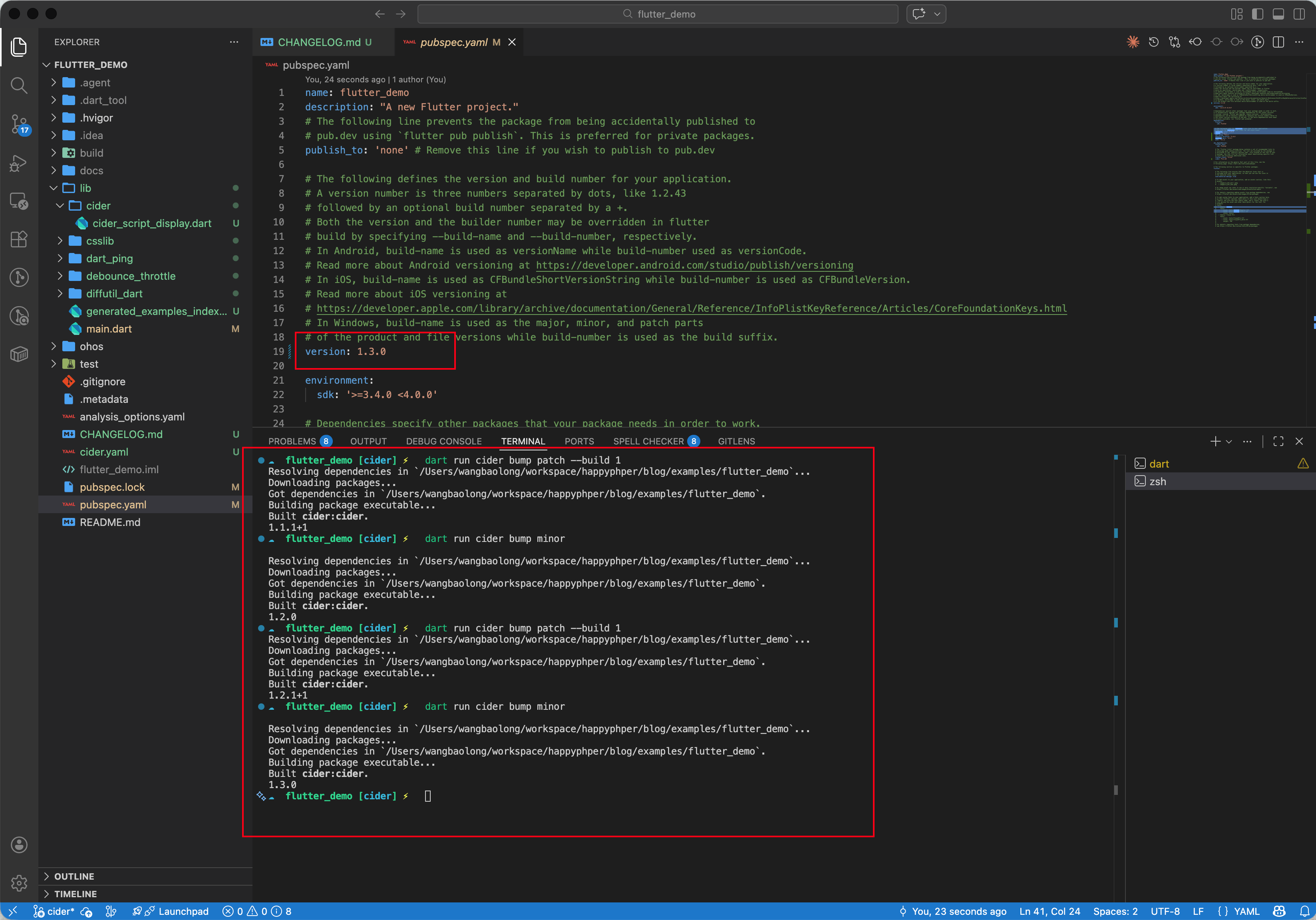
3. 发版升级 (Bump)
当积累了足够的变更,准备发布新版本时:
# 升级 patch 版本 (1.0.0 -> 1.0.1) 并更新 build number
cider bump patch –build 2
# 或者升级 minor (1.0.0 -> 1.1.0)
cider bump minor
执行该命令后:
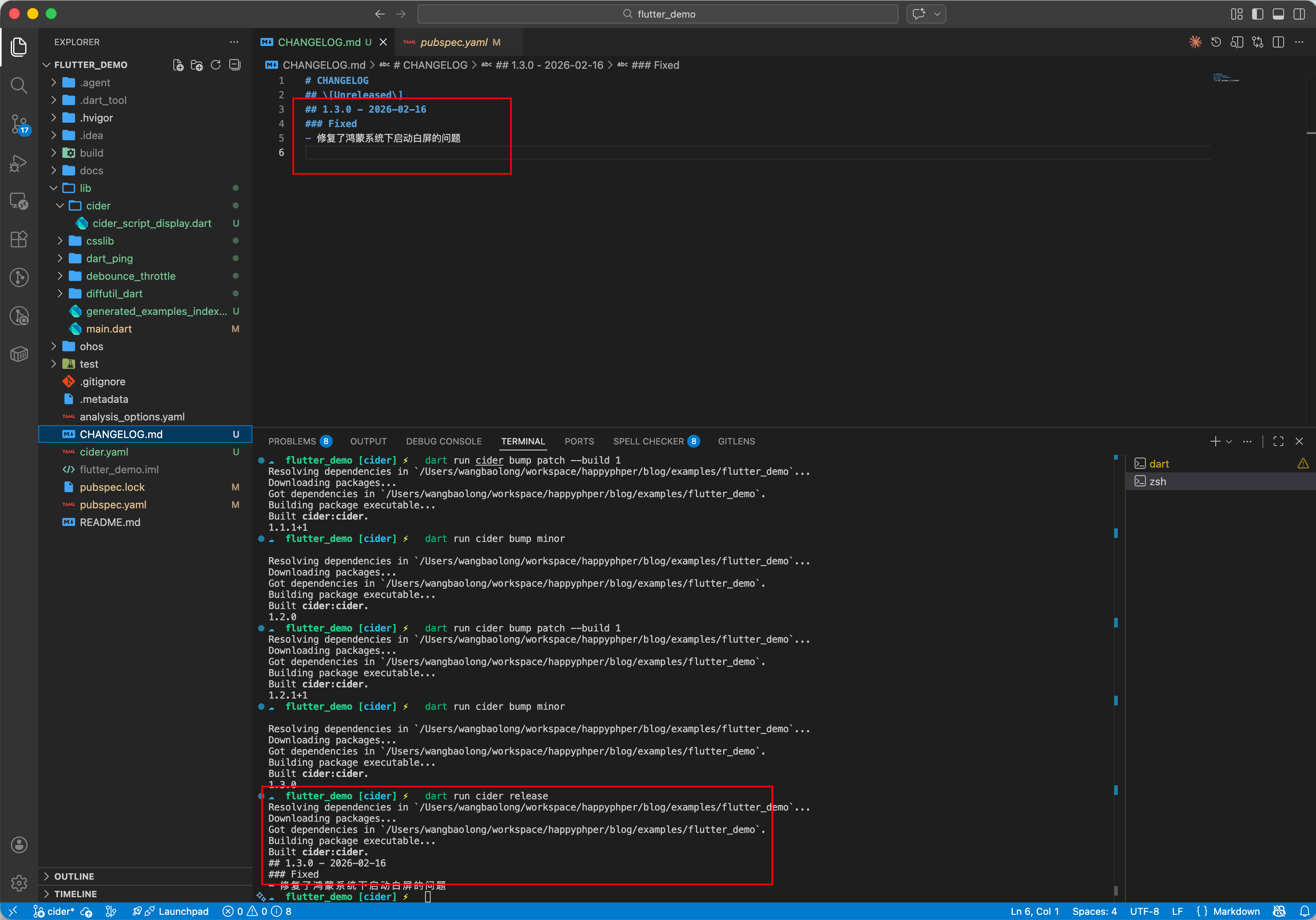
4. 标记发布
cider release
三、OpenHarmony 适配与实战:配合 Git 钩子管理 HAP 版本
在 OpenHarmony 项目中,Flutter 的 version (如 1.0.0+1) 最终会映射到鸿蒙 AppScope/app.json5 或 entry/src/main/module.json5 中的 versionCode 和 versionName。
虽然 cider 只修改 pubspec.yaml,但我们可以通过脚本将变动同步给鸿蒙配置。
3.1 编写同步脚本
我们在项目下创建一个 scripts/sync_version.dart:
import 'dart:io';
import 'package:yaml/yaml.dart';
void main() {
// 1. 读取 pubspec.yaml
final pubspecFile = File('pubspec.yaml');
final pubspec = loadYaml(pubspecFile.readAsStringSync());
final versionFull = pubspec['version'] as String;
// 解析 1.0.0+2
final parts = versionFull.split('+');
final versionName = parts[0];
final buildNumber = int.parse(parts.length > 1 ? parts[1] : '1');
// 2. 更新鸿蒙 app.json5
final ohosAppJson = File('ohos/AppScope/app.json5');
if (ohosAppJson.existsSync()) {
var content = ohosAppJson.readAsStringSync();
// 简单正则替换 (实际建议用 json 解析)
content = content.replaceFirst(
RegExp(r'"versionCode":\\s*\\d+'),
'"versionCode": $buildNumber'
);
content = content.replaceFirst(
RegExp(r'"versionName":\\s*".*?"'),
'"versionName": "$versionName"'
);
ohosAppJson.writeAsStringSync(content);
print('✅ 已同步版本到 OpenHarmony: $versionName ($buildNumber)');
}
}
3.2 串联 Cider
我们可以定义一个 Make 命令或 shell 脚本,将 cider 和同步脚本串联起来。
# bump_ohos.sh
# 1. 使用 cider 升级版本
cider bump patch –bump-build
# 2. 同步到鸿蒙配置
dart scripts/sync_version.dart
# 3. 提交
git add pubspec.yaml CHANGELOG.md ohos/AppScope/app.json5
git commit -m "chore: bump version to $(cider version)"
这样,每次发布时,Flutter 侧和鸿蒙原生侧的版本号就完美同步了,彻底告别“版本不一致”导致的提审被拒风险。
四、高级进阶:自定义模板与 CI 集成
4.1 变更日志模板
你可以自定义 cider 支持的变更类型。在 cider.yaml 中:
diff_group:
– Added
– Fixed
– Changed
– Performance # 新增性能优化类
– OHOS–Specific # 新增鸿蒙专属变更
这样就可以专门记录鸿蒙平台的适配工作:
cider log ohos-specific "适配了 Mate 60 Pro 的挖孔屏布局"
4.2 CI/CD 流水线
在 GitLab CI 或 GitHub Actions 中,cider 可以用来检查发布的合法性。
# GitHub Actions 示例
steps:
– name: Check version
run: |
current_version=$(cider version)
echo "Deploying version $current_version"
五、总结
cider 虽然小巧,但它解决了一个让无数开发者头疼的标准化问题。它强制团队遵循规范的变更日志记录习惯,并自动化了版本号的迭代。
对于 OpenHarmony 开发者,结合简单的脚本,cider 可以成为连接 Flutter 生态与鸿蒙原生工程配置的纽带,让跨端发布流程如丝般顺滑。
最佳实践:
六、完整实战示例
import 'dart:io';
// 假设使用了 yaml 库解析
// import 'package:yaml/yaml.dart';
// scripts/sync_version.dart
// 这是一个实用的脚本范例,用于将 pubspec.yaml 的版本号同步到鸿蒙工程配置
void main() {
print('开始同步版本号…');
// 1. 读取 Flutter 版本
final pubspecFile = File('pubspec.yaml');
final pubspecContent = pubspecFile.readAsStringSync();
// 简单正则提取 version: 1.0.0+1
final versionMatch = RegExp(r'version:\\s*(.+)').firstMatch(pubspecContent);
if (versionMatch == null) {
print('❌ Error: pubspec.yaml 里没找到 version 字段');
exit(1);
}
final fullVersion = versionMatch.group(1)!.trim();
// 拆分 version: 1.0.0+1 -> "1.0.0", 1
final parts = fullVersion.split('+');
final versionName = parts[0];
final versionCode = parts.length > 1 ? parts[1] : '1';
print('Flutter Version: $versionName (Build: $versionCode)');
// 2. 写入鸿蒙配置 (假设是 app.json5)
final ohosConfigFile = File('ohos/AppScope/app.json5');
if (ohosConfigFile.existsSync()) {
var content = ohosConfigFile.readAsStringSync();
// 替换 versionName
content = content.replaceAll(
RegExp(r'"versionName":\\s*".*?"'),
'"versionName": "$versionName"'
);
// 替换 versionCode
content = content.replaceAll(
RegExp(r'"versionCode":\\s*\\d+'),
'"versionCode": $versionCode'
);
ohosConfigFile.writeAsStringSync(content);
print('✅ 已同步到 OpenHarmony 工程: ohos/AppScope/app.json5');
} else {
print('⚠️ Warning: 鸿蒙配置文件未找到,跳过同步');
}
}


