Ubuntu datasophon1.2.1 二开之六:解决CLICKHOUSE安装问题
- 背景
- 问题
- 解决
-
- 下载ClickHouse
- 在DataSophon配置ClickHouse及定制策略代码
-
- 1.构造tar.gz包
- 2.配置组件配置文件
- 3.定制策略处理代码
- 集群配置
- 最后
背景
安装完HIVE之后,就剩下spark,flink,clickhouse。安装spark,flink比较简单顺利。准备安装OLAP 数据库clickhouse,发现datasophon 1.2.1 组件没有,没办法只能添加一个。
问题
如何添加clickhouse组件呢?首先下载跟操作系统匹配的clickhouse版本。其次了解为datasophon添加组件需要做哪些事情。后面详细说明
解决
下载ClickHouse
我的ubuntu版本为:
Welcome to Ubuntu 24.04.2 LTS (GNU/Linux 6.8.0–90–generic x86_64)
* Documentation: https://help.ubuntu.com
* Management: https://landscape.canonical.com
* Support: https://ubuntu.com/pro
所以选择23.3.10.5版本,我下载了好多: clickhouse-server,clickhouse-keeper-dbg,clickhouse-keeper,clickhouse-common-static-dbg,clickhouse-common-static 实际到后面只用到:clickhouse-common-static-23.3.10.5
下载地址:https://packages.clickhouse.com/tgz/stable/clickhouse-common-static-23.3.10.5-amd64.tgz
在DataSophon配置ClickHouse及定制策略代码
下载完clickhouse之后,下面开始搞配置了。要做三件事:
1.构造tar.gz包
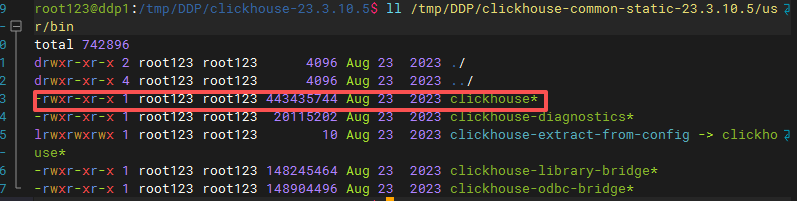
在临时目录创建cickhouse-23.3.10.5,目前结构如下 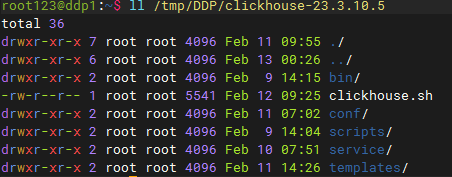 接下来说每个目录放入什么文件 bin目录:就放clickhouse的二进制文件:clickhouse 这个文件来自common-static-23.3.10.5-amd64.tgz,把这个文件解压,然后看到如下图文件,复制到bin目录即可
  clickhouse脚本文件: clickhouse.sh负责启动,停止,查询clickhouse进程状态的脚本,包装后供datasophon调用,内容如下:
#!/bin/bash
# ClickHouse 服务控制脚本 for DataSophon
# 位置: /opt/datasophon/clickhouse/clickhouse.sh
set –e
# ============================================
# 基础路径 – ✅ 修正为实际路径
# ============================================
CLICKHOUSE_HOME="/opt/datasophon/clickhouse" # ✅ 直接使用软链接路径
CLICKHOUSE_BIN="$CLICKHOUSE_HOME/bin/clickhouse" # ✅ 修正二进制路径
CONFIG_DIR="$CLICKHOUSE_HOME/conf"
LOG_DIR="$CLICKHOUSE_HOME/logs"
DATA_DIR="$CLICKHOUSE_HOME/data"
TMP_DIR="$CLICKHOUSE_HOME/tmp"
PID_DIR="$CLICKHOUSE_HOME/run" # ✅ 使用有权限的目录
PID_FILE="$PID_DIR/clickhouse-server.pid"
# 颜色输出
RED='\\033[0;31m'
GREEN='\\033[0;32m'
YELLOW='\\033[1;33m'
BLUE='\\033[0;34m'
NC='\\033[0m'
log_info() { echo –e "${GREEN}[INFO]${NC} $(date '+%Y-%m-%d %H:%M:%S') $1"; }
log_error() { echo –e "${RED}[ERROR]${NC} $(date '+%Y-%m-%d %H:%M:%S') $1"; }
# ============================================
# 核心函数
# ============================================
# 获取进程PID
get_pid() {
pgrep –f "clickhouse.*server.*config.xml" | head –1
}
# 检查是否运行
is_running() {
local pid=$(get_pid)
if [ –n "$pid" ]; then
echo "$pid"
return 0
fi
return 1
}
# 创建目录
create_dirs() {
mkdir –p "$PID_DIR" "$LOG_DIR" "$DATA_DIR" "$TMP_DIR"
chmod 755 "$PID_DIR" "$LOG_DIR" "$DATA_DIR"
}
# ============================================
# 服务控制
# ============================================
start() {
log_info "启动 ClickHouse 服务器…"
# 1. 检查是否已在运行
local pid=$(get_pid)
if [ –n "$pid" ]; then
log_info "ClickHouse 已在运行 (PID: $pid)"
return 0
fi
# 2. 创建目录
create_dirs
# 3. 检查二进制文件
if [ ! –f "$CLICKHOUSE_BIN" ]; then
log_error "二进制文件不存在: $CLICKHOUSE_BIN"
return 1
fi
# 4. 检查配置文件
if [ ! –f "$CONFIG_DIR/config.xml" ]; then
log_error "配置文件不存在: $CONFIG_DIR/config.xml"
return 1
fi
# 5. 获取端口
local http_port=$(grep –oP '<http_port>\\K[^<]+' "$CONFIG_DIR/config.xml" 2>/dev/null || echo "8123")
# 6. ✅ 启动命令(去掉—daemon)
log_info "执行: $CLICKHOUSE_BIN server –config-file=$CONFIG_DIR/config.xml"
nohup "$CLICKHOUSE_BIN" server \\
—config–file="$CONFIG_DIR/config.xml" \\
> "$LOG_DIR/clickhouse-server.log" 2>&1 &
local start_pid=$!
# 7. 等待启动
sleep 3
local new_pid=$(get_pid)
if [ –n "$new_pid" ]; then
echo "$new_pid" > "$PID_FILE"
log_info "✅ ClickHouse 启动成功 (PID: $new_pid)"
# 等待HTTP就绪
local waited=0
while [ $waited –lt 20 ]; do
if curl –s "http://localhost:$http_port/ping" 2>/dev/null | grep –q "Ok"; then
log_info "✅ HTTP接口正常 (端口: $http_port)"
break
fi
sleep 1
waited=$((waited + 1))
done
else
log_error "❌ ClickHouse 启动失败"
tail –20 "$LOG_DIR/clickhouse-server.log"
return 1
fi
}
stop() {
log_info "停止 ClickHouse 服务器…"
local pid=$(get_pid)
if [ –z "$pid" ]; then
log_info "ClickHouse 未运行"
rm –f "$PID_FILE"
return 0
fi
log_info "停止进程 (PID: $pid)…"
kill –TERM "$pid" 2>/dev/null || true
local waited=0
while [ $waited –lt 30 ]; do
if ! kill –0 "$pid" 2>/dev/null; then
break
fi
sleep 1
waited=$((waited + 1))
done
if kill –0 "$pid" 2>/dev/null; then
log_warn "强制终止进程…"
kill –KILL "$pid" 2>/dev/null || true
fi
rm –f "$PID_FILE"
log_info "✅ ClickHouse 已停止"
}
# ============================================
# 状态检查(仿HDFS风格)
# ============================================
status() {
local pid=$(get_pid)
if [ –f "$PID_FILE" ]; then
local file_pid=$(cat "$PID_FILE")
if [ "$pid" = "$file_pid" ] && [ –n "$pid" ]; then
echo "ClickHouse is running (PID: $pid)"
return 0
elif [ –n "$pid" ]; then
echo "ClickHouse is running (PID: $pid) but PID file mismatch"
echo "Consider: echo $pid > $PID_FILE"
return 0
else
echo "ClickHouse is not running (stale PID file)"
rm –f "$PID_FILE"
return 1
fi
else
if [ –n "$pid" ]; then
echo "ClickHouse is running (PID: $pid) but PID file is missing"
echo "Consider: echo $pid > $PID_FILE"
return 0
else
echo "ClickHouse is not running"
return 1
fi
fi
}
restart() {
stop
sleep 2
start
}
# ============================================
# 主函数
# ============================================
case "${1:-help}" in
start)
start
;;
stop)
stop
;;
restart)
restart
;;
status)
status
;;
*)
echo "Usage: $0 {start|stop|restart|status}"
echo " start – Start ClickHouse server"
echo " stop – Stop ClickHouse server"
echo " restart – Restart ClickHouse server"
echo " status – Check ClickHouse status"
exit 1
;;
esac
exit $?
配置templates: 这个存放生成xml的freemark 模板,用来生成xml 涉及文件如下图: 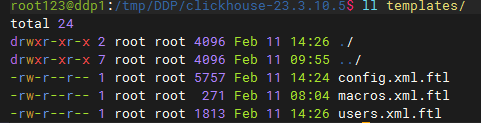 下面列出各个文件内容: config.xml.ftl:
<?xml version="1.0"?>
<yandex>
<!— Generated by DataSophon —>
<users_config>conf/users.xml</users_config>
<!— Network Configuration —>
<listen_host>0.0.0.0</listen_host>
<http_port>${http_port}</http_port>
<tcp_port>${tcp_port}</tcp_port>
<interserver_http_port>${interserver_http_port}</interserver_http_port>
<!— 最大连接和内存配置 —>
<max_connections>${max_connections}</max_connections>
<keep_alive_timeout>3</keep_alive_timeout>
<max_concurrent_queries>100</max_concurrent_queries>
<!— ZooKeeper Configuration —>
<zookeeper>
<#if zk_address?? && zk_address?has_content>
<#list zk_address?split(",") as zkNode>
<#if zkNode?contains(":")>
<#assign parts = zkNode?split(":")>
<node>
<host>${parts[0]}</host>
<port>${parts[1]}</port>
</node>
<#else>
<node>
<host>${zkNode}</host>
<port>2181</port>
</node>
</#if>
</#list>
<#else>
<node>
<host>localhost</host>
<port>2181</port>
</node>
</#if>
<session_timeout_ms>30000</session_timeout_ms>
<operation_timeout_ms>10000</operation_timeout_ms>
<root>${zk_root!'/clickhouse'}</root>
</zookeeper>
<!— Cluster Configuration – 动态解析 cluster_hosts —>
<remote_servers>
<${cluster_name}>
<#if cluster_hosts?? && cluster_hosts?has_content>
<#— 创建分片映射表 —>
<#assign shardMap = {}>
<#— 解析每个节点定义 —>
<#list cluster_hosts?split(",") as hostDef>
<#assign hostDef = hostDef?trim>
<#if hostDef?contains(":")>
<#assign parts = hostDef?split(":")>
<#if parts?size == 3>
<#assign shardNum = parts[0]?trim>
<#assign replicaNum = parts[1]?trim>
<#assign hostName = parts[2]?trim>
<#— 初始化分片数组 —>
<#if !shardMap[shardNum]??>
<#assign shardMap = shardMap + {shardNum: []}>
</#if>
<#— 添加副本到分片 —>
<#assign replicaInfo = {"host": hostName, "replica": replicaNum}>
<#assign currentList = shardMap[shardNum]>
<#assign shardMap = shardMap + {shardNum: currentList + [replicaInfo]}>
</#if>
</#if>
</#list>
<#— 按分片编号排序后生成配置 —>
<#list shardMap?keys?sort as shardKey>
<shard>
<internal_replication>true</internal_replication>
<#list shardMap[shardKey] as replicaInfo>
<replica>
<host>${replicaInfo.host}</host>
<port>${tcp_port}</port>
</replica>
</#list>
</shard>
</#list>
<#else>
<!— 默认配置(如果未提供集群节点列表) —>
<shard>
<internal_replication>true</internal_replication>
<replica>
<host>${hostname}</host>
<port>${tcp_port}</port>
</replica>
</shard>
</#if>
</${cluster_name}>
</remote_servers>
<!— Macros (每个节点不同) —>
<macros>
<cluster>${cluster_name}</cluster>
<shard>${current_shard}</shard>
<replica>${current_replica}</replica>
<hostname>${hostname}</hostname>
</macros>
<!— Path Configuration —>
<path>${data_path}</path>
<tmp_path>${tmp_path}</tmp_path>
<user_files_path>${user_files_path}</user_files_path>
<format_schema_path>/opt/datasophon/clickhouse/format_schemas/</format_schema_path>
<!— Logger Configuration —>
<logger>
<level>${log_level}</level>
<log>${log_dir}/clickhouse–server.log</log>
<errorlog>${log_dir}/clickhouse–server.err.log</errorlog>
<size>1000M</size>
<count>10</count>
</logger>
<!— 查询日志 —>
<query_log>
<database>system</database>
<table>query_log</table>
<partition_by>toYYYYMM(event_date)</partition_by>
<flush_interval_milliseconds>7500</flush_interval_milliseconds>
</query_log>
<!— 慢查询日志 —>
<trace_log>
<database>system</database>
<table>trace_log</table>
<partition_by>toYYYYMM(event_date)</partition_by>
<flush_interval_milliseconds>7500</flush_interval_milliseconds>
</trace_log>
<!— 压缩配置 —>
<compression>
<case>
<min_part_size>10000000000</min_part_size>
<min_part_size_ratio>0.01</min_part_size_ratio>
<method>lz4</method>
</case>
</compression>
<!— 合并树引擎配置 —>
<merge_tree>
<max_suspicious_broken_parts>5</max_suspicious_broken_parts>
<max_part_loading_threads>16</max_part_loading_threads>
</merge_tree>
<!— 分布式表引擎配置 —>
<distributed_ddl>
<path>/clickhouse/task_queue/ddl</path>
</distributed_ddl>
</yandex>
users.xml.ftl:
<?xml version="1.0"?>
<yandex>
<profiles>
<default>
<max_memory_usage>${max_memory_usage}</max_memory_usage>
<max_memory_usage_for_user>${max_memory_usage}</max_memory_usage_for_user>
<max_partitions_per_insert_block>${max_partitions_per_insert_block}</max_partitions_per_insert_block>
<use_uncompressed_cache>0</use_uncompressed_cache>
<load_balancing>random</load_balancing>
<log_queries>1</log_queries>
</default>
<!— readonly profile —>
<readonly>
<readonly>1</readonly>
<max_memory_usage>5000000000</max_memory_usage>
<max_partitions_per_insert_block>100</max_partitions_per_insert_block>
</readonly>
</profiles>
<users>
<default>
<#if default_password?? && default_password?has_content>
<password>${default_password}</password>
<#else>
<password></password>
</#if>
<networks>
<ip>::/0</ip>
</networks>
<profile>default</profile>
<quota>default</quota>
</default>
<datasophon>
<password>${datasophon_password!'datasophon123'}</password>
<networks>
<ip>::/0</ip>
</networks>
<profile>readonly</profile>
<quota>default</quota>
</datasophon>
</users>
<quotas>
<default>
<interval>
<duration>3600</duration>
<queries>0</queries>
<errors>0</errors>
<result_rows>0</result_rows>
<read_rows>0</read_rows>
<execution_time>0</execution_time>
</interval>
</default>
</quotas>
</yandex>
macros.xml.ftl:
<?xml version="1.0"?>
<yandex>
<macros>
<cluster>${cluster_name!'datasophon_cluster'}</cluster>
<shard>${current_shard!'1'}</shard>
<replica>${current_replica!'1'}</replica>
<host>${hostname!'localhost'}</host>
</macros>
</yandex>
文件内容我就不解释了,有兴趣的,可以问问ai。
其他没提到目录都是空的
打tar.gz包
cd /tmp/DDP
tar –zcvf clickhouse–23.3.10.5.tar.gz clickhouse–23.3.10.5/
记住,先走到clickhouse-23.3.10.5上层目录,然后再执行打包,否则打包后,里面目录结构不对
复制到/opt/datasophon/DDP/package目录,并重新生成md5签名文件
cp /tmp/DDP/clickhouse–23.3.10.5.tar.gz /opt/datasophon/DDP/package
cd /opt/datasophon/DDP/package
md5sum clickhouse–23.3.10.5.tar.gz | awk '{print $1}' > clickhouse–23.3.10.5.tar.gz.md5
2.配置组件配置文件
这个文件比较重要,datasophon-manager启动时,会把它加载到组件列表里头 为了有版本管理,我是先在datasophon-api模块里添加,然后复制到 /opt/datasophon-manager-1.2.1/conf/meta/DDP-1.2.1/CLICKHOUSE目录
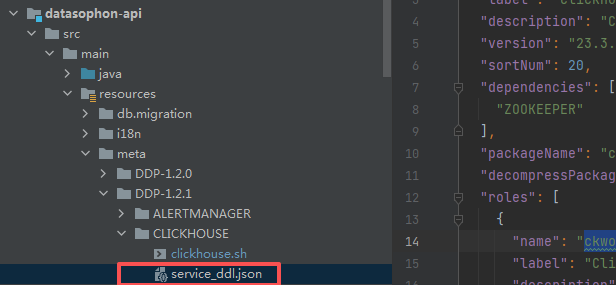 service_ddl.json内容为:
{
"name": "CLICKHOUSE",
"label": "ClickHouse",
"description": "ClickHouse OLAP Database System – 高性能列式数据库,支持实时分析",
"version": "23.3.10.5",
"sortNum": 20,
"dependencies": [
"ZOOKEEPER"
],
"packageName": "clickhouse-23.3.10.5.tar.gz",
"decompressPackageName": "clickhouse-23.3.10.5",
"roles": [
{
"name": "ckworker",
"label": "ClickHouse Worker",
"description": "数据存储和计算节点",
"roleType": "worker",
"cardinality": "2+",
"logFile": "logs/clickhouse-server.log",
"jmxPort": 0,
"startRunner": {
"timeout": "120",
"program": "clickhouse.sh",
"args": ["start"]
},
"stopRunner": {
"timeout": "60",
"program": "clickhouse.sh",
"args": ["stop"]
},
"statusRunner": {
"timeout": "30",
"program": "clickhouse.sh",
"args": ["status"]
},
"restartRunner": {
"timeout": "120",
"program": "clickhouse.sh",
"args": ["restart"]
}
},
{
"name": "ckclient",
"label": "ClickHouse Client",
"description": "查询接入节点",
"roleType": "client",
"cardinality": "0+",
"logFile": "logs/clickhouse-server.log",
"jmxPort": 0,
"startRunner": {
"timeout": "120",
"program": "clickhouse.sh",
"args": ["start"]
},
"stopRunner": {
"timeout": "60",
"program": "clickhouse.sh",
"args": ["stop"]
},
"statusRunner": {
"timeout": "30",
"program": "clickhouse.sh",
"args": ["status"]
},
"restartRunner": {
"timeout": "120",
"program": "clickhouse.sh",
"args": ["restart"]
},
"externalLink": {
"name": "ClickHouse UI",
"label": "ClickHouse UI",
"url": "http://${host}:${http_port}"
}
}
],
"configWriter": {
"generators": [
{
"filename": "config.xml",
"configFormat": "custom",
"outputDirectory": "conf",
"templateName": "config.xml.ftl",
"includeParams": [
"http_port",
"tcp_port",
"interserver_http_port",
"zk_address",
"zk_root",
"cluster_name",
"cluster_hosts",
"data_path",
"tmp_path",
"user_files_path",
"log_dir",
"log_level",
"max_connections",
"max_memory_usage",
"current_shard",
"current_replica",
"hostname"
]
},
{
"filename": "users.xml",
"configFormat": "custom",
"outputDirectory": "conf",
"templateName": "users.xml.ftl",
"includeParams": [
"default_password",
"datasophon_password",
"max_memory_usage_for_user",
"max_memory_usage",
"max_partitions_per_insert_block"
]
},
{
"filename": "macros.xml",
"configFormat": "custom",
"outputDirectory": "conf",
"templateName": "macros.xml.ftl",
"includeParams": [
"cluster_name",
"current_shard",
"current_replica",
"hostname"
]
}
]
},
"parameters": [
{
"name": "http_port",
"label": "HTTP端口",
"description": "ClickHouse HTTP接口端口",
"configType": "map",
"required": true,
"type": "input",
"value": "",
"configurableInWizard": true,
"hidden": false,
"defaultValue": "8123"
},
{
"name": "tcp_port",
"label": "TCP端口",
"description": "ClickHouse原生TCP端口",
"configType": "map",
"required": true,
"type": "input",
"value": "",
"configurableInWizard": true,
"hidden": false,
"defaultValue": "9000"
},
{
"name": "interserver_http_port",
"label": "内部通信端口",
"description": "ClickHouse节点间通信端口",
"configType": "map",
"required": true,
"type": "input",
"value": "",
"configurableInWizard": true,
"hidden": false,
"defaultValue": "9009"
},
{
"name": "zk_address",
"label": "ZK地址",
"description": "ZooKeeper集群地址,格式: host1:port1,host2:port2",
"configType": "map",
"required": true,
"type": "input",
"value": "",
"configurableInWizard": true,
"hidden": false,
"defaultValue": "${zkUrls}"
},
{
"name": "zk_root",
"label": "ZK根路径",
"description": "在ZooKeeper中的根路径",
"configType": "map",
"required": true,
"type": "input",
"value": "",
"configurableInWizard": true,
"hidden": false,
"defaultValue": "/clickhouse"
},
{
"name": "cluster_name",
"label": "集群名称",
"description": "ClickHouse分布式集群名称",
"configType": "map",
"required": true,
"type": "input",
"value": "",
"configurableInWizard": true,
"hidden": false,
"defaultValue": "datasophon_cluster"
},
{
"name": "cluster_hosts",
"label": "集群节点列表",
"description": "集群节点配置,格式: 分片编号:副本编号:主机名,多个节点用逗号分隔\\n示例: 1:1:ddp1,1:2:ddp2,2:1:ddp3,2:2:ddp4",
"configType": "map",
"required": true,
"type": "input",
"value": "",
"configurableInWizard": true,
"hidden": false,
"defaultValue": "1:1:ddp1,1:2:ddp2,2:1:ddp3,2:2:ddp4"
},
{
"name": "current_shard",
"label": "当前节点分片",
"description": "该节点所属的分片编号",
"configType": "map",
"required": true,
"type": "input",
"value": "",
"configurableInWizard": true,
"hidden": false,
"defaultValue": "1"
},
{
"name": "current_replica",
"label": "当前节点副本",
"description": "该节点在分片中的副本编号",
"configType": "map",
"required": true,
"type": "input",
"value": "",
"configurableInWizard": true,
"hidden": false,
"defaultValue": "1"
},
{
"name": "hostname",
"label": "主机名",
"description": "当前节点主机名",
"configType": "map",
"required": true,
"type": "input",
"value": "",
"configurableInWizard": false,
"hidden": true,
"defaultValue": "${host}"
},
{
"name": "data_path",
"label": "数据目录",
"description": "ClickHouse数据存储路径",
"configType": "map",
"required": true,
"type": "input",
"value": "",
"configurableInWizard": true,
"hidden": false,
"defaultValue": "/opt/datasophon/clickhouse/data"
},
{
"name": "tmp_path",
"label": "临时目录",
"description": "ClickHouse临时文件路径",
"configType": "map",
"required": true,
"type": "input",
"value": "",
"configurableInWizard": true,
"hidden": false,
"defaultValue": "/opt/datasophon/clickhouse/tmp"
},
{
"name": "user_files_path",
"label": "用户文件目录",
"description": "ClickHouse用户文件路径",
"configType": "map",
"required": true,
"type": "input",
"value": "",
"configurableInWizard": true,
"hidden": false,
"defaultValue": "/opt/datasophon/clickhouse/user_files"
},
{
"name": "log_dir",
"label": "日志目录",
"description": "ClickHouse日志文件路径",
"configType": "map",
"required": true,
"type": "input",
"value": "",
"configurableInWizard": true,
"hidden": false,
"defaultValue": "/var/log/clickhouse-server"
},
{
"name": "log_level",
"label": "日志级别",
"description": "ClickHouse日志级别",
"configType": "map",
"required": true,
"type": "select",
"value": "",
"configurableInWizard": true,
"hidden": false,
"defaultValue": "information",
"values": [
{
"value": "trace",
"desc": "TRACE"
},
{
"value": "debug",
"desc": "DEBUG"
},
{
"value": "information",
"desc": "INFORMATION"
},
{
"value": "warning",
"desc": "WARNING"
},
{
"value": "error",
"desc": "ERROR"
}
]
},
{
"name": "default_password",
"label": "默认用户密码",
"description": "ClickHouse默认用户密码",
"configType": "map",
"required": false,
"type": "password",
"value": "",
"configurableInWizard": true,
"hidden": true,
"defaultValue": ""
},
{
"name": "datasophon_password",
"label": "DataSophon用户密码",
"description": "DataSophon管理用户密码",
"configType": "map",
"required": true,
"type": "password",
"value": "",
"configurableInWizard": true,
"hidden": true,
"defaultValue": "datasophon123"
},
{
"name": "max_connections",
"label": "最大连接数",
"description": "最大客户端连接数",
"configType": "map",
"required": true,
"type": "input",
"value": "",
"configurableInWizard": true,
"hidden": false,
"defaultValue": "4096"
},
{
"name": "max_memory_usage",
"label": "最大内存使用",
"description": "单次查询最大内存使用(字节)",
"configType": "map",
"required": true,
"type": "input",
"value": "",
"configurableInWizard": true,
"hidden": false,
"defaultValue": "10000000000"
},
{
"name": "max_memory_usage_for_user",
"label": "用户最大内存使用",
"description": "单用户单次查询最大内存使用(字节)",
"configType": "map",
"required": true,
"type": "input",
"value": "",
"configurableInWizard": true,
"hidden": false,
"defaultValue": "10000000000"
},
{
"name": "max_partitions_per_insert_block",
"label": "单次插入最大分区数",
"description": "单次INSERT操作允许的最大分区数量",
"configType": "map",
"required": true,
"type": "input",
"value": "",
"configurableInWizard": true,
"hidden": false,
"defaultValue": "100"
}
]
}
这个文件告诉datasophon,你的组件叫啥名称,版本号多少,依赖组件是啥,对应tar包,有什么角色,每种角色如何启动,停止,重启,查询状态。涉及哪些配置文件,每个配置文件如何生成,使用什么模板,需要什么参数。每个参数是输入还是什么的,显示还是隐藏等等
3.定制策略处理代码
刚开始我没想弄个策略文件,后来启动时,提示需要zk目录,这个目录必须事先创建,但是zk目录只能创建一次,后面再创建会报错,如果安装集群的话,势必会引起重复创建文件。所以引入策略文件,使用redis 锁来保证只能创建一次 下面列出涉及文件:
ServiceRoleStrategyContext:
/*
* Licensed to the Apache Software Foundation (ASF) under one or more
* contributor license agreements. See the NOTICE file distributed with
* this work for additional information regarding copyright ownership.
* The ASF licenses this file to You under the Apache License, Version 2.0
* (the "License"); you may not use this file except in compliance with
* the License. You may obtain a copy of the License at
*
* http://www.apache.org/licenses/LICENSE-2.0
*
* Unless required by applicable law or agreed to in writing, software
* distributed under the License is distributed on an "AS IS" BASIS,
* WITHOUT WARRANTIES OR CONDITIONS OF ANY KIND, either express or implied.
* See the License for the specific language governing permissions and
* limitations under the License.
*/
package com.datasophon.worker.strategy;
import org.apache.commons.lang.StringUtils;
import java.util.Map;
import java.util.concurrent.ConcurrentHashMap;
public class ServiceRoleStrategyContext {
private static final Map<String, ServiceRoleStrategy> map = new ConcurrentHashMap<>();
static {
map.put("NameNode", new NameNodeHandlerStrategy("HDFS", "NameNode"));
map.put("ZKFC", new ZKFCHandlerStrategy("HDFS", "ZKFC"));
map.put("JournalNode", new JournalNodeHandlerStrategy("HDFS", "JournalNode"));
map.put("DataNode", new DataNodeHandlerStrategy("HDFS", "DataNode"));
map.put("ResourceManager", new ResourceManagerHandlerStrategy("YARN", "ResourceManager"));
map.put("NodeManager", new NodeManagerHandlerStrategy("YARN", "NodeManager"));
map.put("RangerAdmin", new RangerAdminHandlerStrategy("RANGER", "RangerAdmin"));
map.put("HiveServer2", new HiveServer2HandlerStrategy("HIVE", "HiveServer2"));
map.put("HbaseMaster", new HbaseHandlerStrategy("HBASE", "HbaseMaster"));
map.put("RegionServer", new HbaseHandlerStrategy("HBASE", "RegionServer"));
map.put("Krb5Kdc", new Krb5KdcHandlerStrategy("KERBEROS", "Krb5Kdc"));
map.put("KAdmin", new KAdminHandlerStrategy("KERBEROS", "KAdmin"));
map.put("SRFE", new FEHandlerStrategy("STARROCKS", "SRFE"));
map.put("DorisFE", new FEHandlerStrategy("DORIS", "DorisFE"));
map.put("DorisFEObserver", new FEObserverHandlerStrategy("DORIS", "DorisFEObserver"));
map.put("ZkServer", new ZkServerHandlerStrategy("ZOOKEEPER", "ZkServer"));
map.put("KafkaBroker", new KafkaHandlerStrategy("KAFKA", "KafkaBroker"));
map.put("SRBE", new BEHandlerStrategy("STARROCKS", "SRBE"));
map.put("DorisBE", new BEHandlerStrategy("DORIS", "DorisBE"));
map.put("HistoryServer", new HistoryServerHandlerStrategy("YARN", "HistoryServer"));
// TEZ Server service
map.put("TezServer", new TezServerHandlerStrategy("TEZ", "TezServer"));
//kyuubi
map.put("KyuubiServer", new KyuubiServerHandlerStrategy("KYUUBI", "KyuubiServer"));
map.put("ckworker", new ClickHouseWorkerHandlerStrategy("CLICKHOUSE", "ckworker"));
}
public static ServiceRoleStrategy getServiceRoleHandler(String type) {
if (StringUtils.isBlank(type)) {
return null;
}
return map.get(type);
}
}
这个文件其实就加了一行,告诉datasophon,clickhouse ckworker使用策略类名
map.put("ckworker", new ClickHouseWorkerHandlerStrategy("CLICKHOUSE", "ckworker"));
ZookeeperPathService:
package com.datasophon.worker.service;
import com.datasophon.common.Constants;
import com.datasophon.common.redis.utils.RedisLockUtil;
import com.datasophon.common.utils.ExecResult;
import com.datasophon.common.utils.ShellUtils;
import org.slf4j.Logger;
import org.slf4j.LoggerFactory;
import java.util.ArrayList;
/**
* ZooKeeper 目录管理服务
* 使用Redis分布式锁控制ZK目录创建,防止多节点并发
*/
public class ZookeeperPathService {
private static final Logger logger = LoggerFactory.getLogger(ZookeeperPathService.class);
// Redis锁配置
private static final String ZK_PATH_LOCK_KEY = "datasophon:clickhouse:zkpath:init:lock";
private static final long LOCK_TIMEOUT = 300; // 锁超时时间(秒)
private static final long LOCK_WAIT_TIME = 30000; // 等待锁的时间(毫秒)
// ZK客户端路径
private static final String ZK_CLI_PATH = "/opt/datasophon/zookeeper/bin/zkCli.sh";
/**
* 创建ZooKeeper目录(带Redis分布式锁)
* @param zkServer ZK服务器地址,格式: 192.168.1.181:2181
* @param zkPath ZK路径,如: /clickhouse
* @param createSubPaths 是否创建子目录
* @return 是否创建成功
*/
public static boolean createPathWithLock(String zkServer, String zkPath, boolean createSubPaths) {
logger.info("🚀 =========================================");
logger.info("🚀 ZooKeeper 目录创建开始");
logger.info("🚀 ZK服务器: {}", zkServer);
logger.info("🚀 ZK路径: {}", zkPath);
logger.info("🚀 创建子目录: {}", createSubPaths);
logger.info("🚀 Redis锁键: {}", ZK_PATH_LOCK_KEY);
logger.info("🚀 =========================================");
try {
// 1. 先测试Redis连接
logger.info("1️⃣ 测试Redis连接…");
boolean redisConnected = RedisLockUtil.testRedisConnection();
if (!redisConnected) {
logger.warn("⚠️ Redis连接测试失败,尝试直接创建ZK目录");
return createPathDirect(zkServer, zkPath, createSubPaths);
}
// 2. 检查目录是否已存在
logger.info("2️⃣ 检查ZK目录是否已存在…");
if (isPathExists(zkServer, zkPath)) {
logger.info("✅ ZK目录已存在: {}, 跳过创建", zkPath);
return true;
}
// 3. 使用Redis锁执行创建
logger.info("3️⃣ 使用Redis分布式锁执行ZK目录创建…");
boolean result = RedisLockUtil.executeWithLock(
ZK_PATH_LOCK_KEY,
LOCK_TIMEOUT,
LOCK_WAIT_TIME,
() –> {
logger.info("🔒 在Redis锁保护区内,开始创建ZK目录");
// 双重检查
if (isPathExists(zkServer, zkPath)) {
logger.info("✅ 在等待锁期间,ZK目录已被其他节点创建");
return true;
}
return createPathDirect(zkServer, zkPath, createSubPaths);
}
);
logger.info("🎉 ZK目录创建结果: {}", result);
return result;
} catch (Exception e) {
logger.error("❌ ZK目录创建过程中发生异常", e);
logger.error(" 异常堆栈: ", e);
// 异常降级:尝试直接创建
logger.warn("🔄 尝试直接创建ZK目录(绕过Redis锁)…");
try {
boolean directResult = createPathDirect(zkServer, zkPath, createSubPaths);
logger.info("直接创建结果: {}", directResult);
return directResult;
} catch (Exception ex) {
logger.error("❌ 直接创建也失败了", ex);
return false;
}
} finally {
logger.info("🚀 =========================================");
logger.info("🚀 ZooKeeper 目录创建结束");
logger.info("🚀 =========================================");
}
}
/**
* 直接创建ZooKeeper目录(无锁)
*/
public static boolean createPathDirect(String zkServer, String zkPath, boolean createSubPaths) {
logger.info("🔧 开始直接创建ZK目录(无锁)");
logger.info(" ZK服务器: {}", zkServer);
logger.info(" ZK路径: {}", zkPath);
logger.info(" 创建子目录: {}", createSubPaths);
try {
// 1. 检查zkCli.sh是否存在
if (!isZkCliAvailable()) {
logger.error("❌ zkCli.sh不存在或不可执行: {}", ZK_CLI_PATH);
return false;
}
// 2. 创建主目录
logger.info(" 创建主目录: {}", zkPath);
boolean mainPathCreated = createSinglePath(zkServer, zkPath);
if (!mainPathCreated) {
logger.error("❌ 创建主目录失败: {}", zkPath);
return false;
}
logger.info("✅ 主目录创建成功");
// 3. 如果需要创建子目录
if (createSubPaths) {
logger.info(" 创建ClickHouse子目录…");
// ClickHouse需要的子目录
String[] subPaths = {
zkPath + "/task_queue",
zkPath + "/log",
zkPath + "/log/log-1",
zkPath + "/blocks",
zkPath + "/replicas",
zkPath + "/metadata"
};
for (String subPath : subPaths) {
if (!isPathExists(zkServer, subPath)) {
boolean created = createSinglePath(zkServer, subPath);
logger.info(" 子目录 {}: {}", subPath, created ? "✅" : "❌");
} else {
logger.info(" 子目录 {}: ✅ (已存在)", subPath);
}
}
}
logger.info("✅ ZK目录创建完成");
return true;
} catch (Exception e) {
logger.error("🔥 创建ZK目录异常", e);
return false;
}
}
/**
* 创建单个ZK路径
*/
private static boolean createSinglePath(String zkServer, String zkPath) {
try {
ArrayList<String> commands = new ArrayList<>();
commands.add(ZK_CLI_PATH);
commands.add("-server");
commands.add(zkServer);
commands.add("create");
commands.add(zkPath);
commands.add("\\"\\""); // 空数据
logger.debug(" 执行命令: {} -server {} create {} \\"\\"",
ZK_CLI_PATH, zkServer, zkPath);
ExecResult execResult = ShellUtils.execWithStatus("/tmp", commands, 30L);
if (execResult.getExecResult()) {
String output = execResult.getExecOut();
if (output != null && output.contains("Created")) {
logger.debug(" ✅ 创建成功: {}", zkPath);
return true;
}
}
// 检查是否是因为已存在而失败
if (execResult.getExecErrOut() != null &&
execResult.getExecErrOut().contains("Node already exists")) {
logger.debug(" ℹ️ 节点已存在: {}", zkPath);
return true;
}
logger.error(" ❌ 创建失败: {}, 错误: {}", zkPath, execResult.getExecErrOut());
return false;
} catch (Exception e) {
logger.error(" 创建异常: {}", zkPath, e);
return false;
}
}
/**
* 检查ZK路径是否存在
*/
public static boolean isPathExists(String zkServer, String zkPath) {
logger.debug("检查ZK路径是否存在: {}", zkPath);
try {
ArrayList<String> commands = new ArrayList<>();
commands.add(ZK_CLI_PATH);
commands.add("-server");
commands.add(zkServer);
commands.add("ls");
commands.add(zkPath);
ExecResult execResult = ShellUtils.execWithStatus("/tmp", commands, 30L);
if (execResult.getExecResult()) {
String output = execResult.getExecOut();
boolean exists = output != null && !output.trim().isEmpty() && !output.contains("[]");
logger.debug(" ZK路径 {}: {}", zkPath, exists ? "✅ 存在" : "❌ 不存在");
return exists;
}
// 错误输出中包含"No node"表示节点不存在
if (execResult.getExecErrOut() != null &&
execResult.getExecErrOut().contains("No node")) {
logger.debug(" ZK路径 {}: ❌ 不存在 (No node)", zkPath);
return false;
}
logger.warn(" 检查ZK路径失败: {}", execResult.getExecErrOut());
return false;
} catch (Exception e) {
logger.warn(" 检查ZK路径异常: {}", zkPath, e);
return false;
}
}
/**
* 检查zkCli.sh是否可用
*/
private static boolean isZkCliAvailable() {
try {
ArrayList<String> commands = new ArrayList<>();
commands.add("test");
commands.add("-f");
commands.add(ZK_CLI_PATH);
ExecResult execResult = ShellUtils.execWithStatus("/tmp", commands, 10L);
return execResult.getExecResult();
} catch (Exception e) {
logger.error("检查zkCli.sh失败", e);
return false;
}
}
/**
* 从ClickHouse配置文件获取ZK地址
*/
public static String getZkServerFromConfig(String installPath, String packageName) {
String configFile = installPath + Constants.SLASH + packageName + "/conf/config.xml";
try {
// 这里需要根据实际的config.xml格式解析
// 简化实现,可以从文件中正则匹配
// <zookeeper> <node> <host>xxx</host> <port>2181</port> </node> </zookeeper>
String content = cn.hutool.core.io.FileUtil.readUtf8String(configFile);
String host = cn.hutool.core.util.ReUtil.get("<host>([^<]+)</host>", content, 1);
String port = cn.hutool.core.util.ReUtil.get("<port>([^<]+)</port>", content, 1);
if (host != null && port != null) {
return host + ":" + port;
}
} catch (Exception e) {
logger.warn("解析ZK地址失败", e);
}
return "192.168.1.181:2181"; // 默认值
}
/**
* 从ClickHouse配置文件获取ZK根路径
*/
public static String getZkRootFromConfig(String installPath, String packageName) {
String configFile = installPath + Constants.SLASH + packageName + "/conf/config.xml";
try {
// <zookeeper> <root>/clickhouse</root> </zookeeper>
String content = cn.hutool.core.io.FileUtil.readUtf8String(configFile);
String root = cn.hutool.core.util.ReUtil.get("<root>([^<]+)</root>", content, 1);
if (root != null) {
return root;
}
} catch (Exception e) {
logger.warn("解析ZK根路径失败", e);
}
return "/clickhouse"; // 默认值
}
}
这个文件完成帮clickhouse使用redis加锁方式创建zk目录,创建前判断是否存在
ClickHouseWorkerHandlerStrategy:
package com.datasophon.worker.strategy;
import com.datasophon.common.Constants;
import com.datasophon.common.command.ServiceRoleOperateCommand;
import com.datasophon.common.enums.CommandType;
import com.datasophon.common.utils.ExecResult;
import com.datasophon.worker.handler.ServiceHandler;
import com.datasophon.worker.service.ZookeeperPathService;
import java.sql.SQLException;
public class ClickHouseWorkerHandlerStrategy extends AbstractHandlerStrategy implements ServiceRoleStrategy{
public ClickHouseWorkerHandlerStrategy(String serviceName,String serviceRoleName) {
super(serviceName,serviceRoleName);
}
@Override
public ExecResult handler(ServiceRoleOperateCommand command) throws SQLException, ClassNotFoundException {
ExecResult startResult = new ExecResult();
ServiceHandler serviceHandler = new ServiceHandler(command.getServiceName(), command.getServiceRoleName());
logger.info("ClickHouse 服务角色处理开始,命令类型: {}", command.getCommandType());
logger.info("是否为从节点: {}", command.isSlave());
// 只在安装主节点时创建ZK目录
if (command.getCommandType().equals(CommandType.INSTALL_SERVICE) && !command.isSlave()) {
logger.info("🚀 =========================================");
logger.info("🚀 ClickHouse ZooKeeper 目录初始化");
logger.info("🚀 =========================================");
String installPath = Constants.INSTALL_PATH;
String packageName = command.getDecompressPackageName();
// 从配置文件获取ZK地址和根路径
String zkServer = ZookeeperPathService.getZkServerFromConfig(installPath, packageName);
String zkRoot = ZookeeperPathService.getZkRootFromConfig(installPath, packageName);
logger.info("ZooKeeper服务器: {}", zkServer);
logger.info("ZooKeeper根路径: {}", zkRoot);
// 使用Redis分布式锁创建ZK目录(完全参考HiveSchemaService模式)
boolean createSuccess = ZookeeperPathService.createPathWithLock(
zkServer,
zkRoot,
true // 创建所有ClickHouse需要的子目录
);
if (createSuccess) {
logger.info("✅ ClickHouse ZooKeeper目录初始化成功");
} else {
logger.warn("⚠️ ClickHouse ZooKeeper目录初始化失败或已被其他节点初始化");
// 不返回失败,继续启动服务
}
logger.info("🚀 =========================================\\n");
}
// 启动ClickHouse服务
logger.info("启动ClickHouse服务…");
startResult = serviceHandler.start(
command.getStartRunner(),
command.getStatusRunner(),
command.getDecompressPackageName(),
command.getRunAs()
);
if (startResult.getExecResult()) {
logger.info("✅ ClickHouse服务启动成功");
} else {
logger.error("❌ ClickHouse服务启动失败");
}
return startResult;
}
}
这个是策略文件,参考其他策略文件改写而成,就加了调用上面的创建zk目录服务即可
集群配置
这个安装默认是集群安装的,即有分片,副本。但是如何验证是否真正分片及副本。 那只能使用ck 命令回答这个问题 1.先启动ck (以ddp2为例)
root@ddp2:/opt/datasophon/clickhouse# ./clickhouse.sh start
[INFO] 2026–03–12 01:47:49 启动 ClickHouse 服务器…
[INFO] 2026–03–12 01:47:49 执行: /opt/datasophon/clickhouse/bin/clickhouse server —config–file=/opt/datasophon/clickhouse/conf/config.xml
[INFO] 2026–03–12 01:47:52 ✅ ClickHouse 启动成功 (PID: 507326)
[INFO] 2026–03–12 01:47:52 ✅ HTTP接口正常 (端口: 8123)
2.检查ck状态
root@ddp2:/opt/datasophon/clickhouse# ./clickhouse.sh status
ClickHouse is running (PID: 507326)
3.登录ck,执行查询集群信息
root@ddp2:/opt/datasophon/clickhouse# ./clickhouse client —host 127.0.0.1 —port 9000 —user default
–bash: ./clickhouse: No such file or directory
root@ddp2:/opt/datasophon/clickhouse# cd bin
root@ddp2:/opt/datasophon/clickhouse/bin# ./clickhouse client —host 127.0.0.1 —port 9000 —user default
ClickHouse client version 23.3.10.5 (official build).
Connecting to 127.0.0.1:9000 as user default.
Connected to ClickHouse server version 23.3.10 revision 54462.
ddp2 :) SHOW CLUSTERS;
SHOW CLUSTERS
Query id: 0cb5946f–8041–4aff–96e9–6d51fe8c94d6
┌─cluster────────────┐
│ datasophon_cluster │
└────────────────────┘
1 row in set. Elapsed: 0.002 sec.
ddp2 :) SELECT
cluster,
shard_num,
replica_num,
host_name
FROM system.clusters
WHERE cluster = 'datasophon_cluster'
ORDER BY shard_num, replica_num;
SELECT
cluster,
shard_num,
replica_num,
host_name
FROM system.clusters
WHERE cluster = 'datasophon_cluster'
ORDER BY
shard_num ASC,
replica_num ASC
Query id: b22d1ae9–6ee0–4977–8b39–1e1faa8ae885
┌─cluster────────────┬─shard_num─┬─replica_num─┬─host_name─┐
│ datasophon_cluster │ 1 │ 1 │ ddp1 │
│ datasophon_cluster │ 1 │ 2 │ ddp2 │
│ datasophon_cluster │ 2 │ 1 │ ddp3 │
│ datasophon_cluster │ 2 │ 2 │ ddp4 │
└────────────────────┴───────────┴─────────────┴───────────┘
4 rows in set. Elapsed: 0.002 sec.
最后的查询,显示了整个集群配置 查询 SELECT cluster, shard_num, replica_num, host_name FROM system.clusters 返回了完整的集群拓扑结构:
text ┌─cluster────────────┬─shard_num─┬─replica_num─┬─host_name─┐ │ datasophon_cluster │ 1 │ 1 │ ddp1 │ ← 分片1的副本1 │ datasophon_cluster │ 1 │ 2 │ ddp2 │ ← 分片1的副本2 │ datasophon_cluster │ 2 │ 1 │ ddp3 │ ← 分片2的副本1 │ datasophon_cluster │ 2 │ 2 │ ddp4 │ ← 分片2的副本2 └────────────────────┴───────────┴─────────────┴───────────┘ 对应你最初的配置 这正好对应你在 DataSophon 中输入的配置:
1:1:ddp1 → 分片1,副本1,主机 ddp1
1:2:ddp2 → 分片1,副本2,主机 ddp2
2:1:ddp3 → 分片2,副本1,主机 ddp3
2:2:ddp4 → 分片2,副本2,主机 ddp4
最后
直至今天,大数据组件一条龙,终于通关。实在不易。 成果截图: 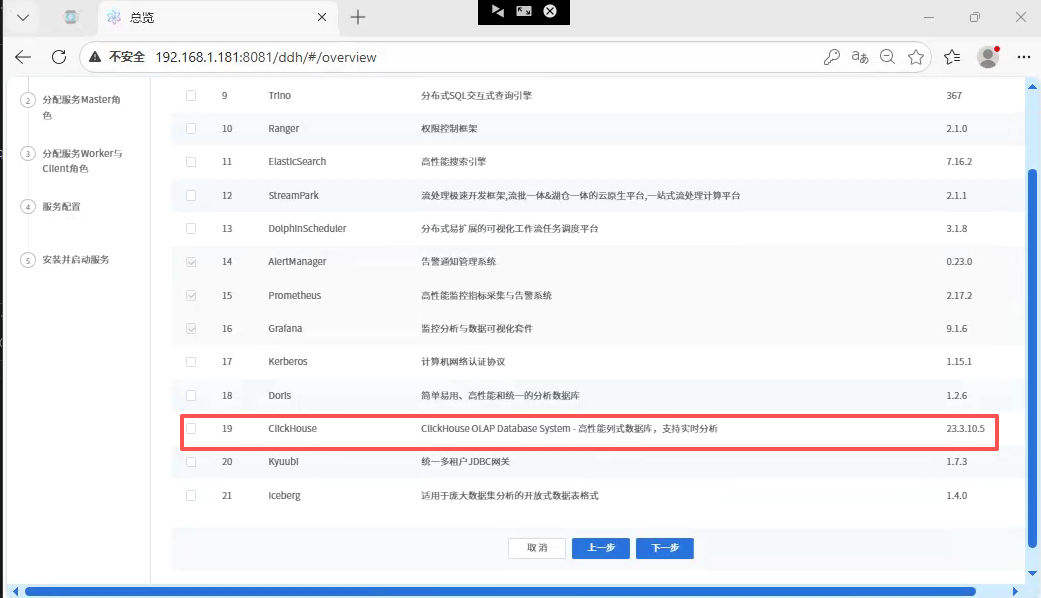
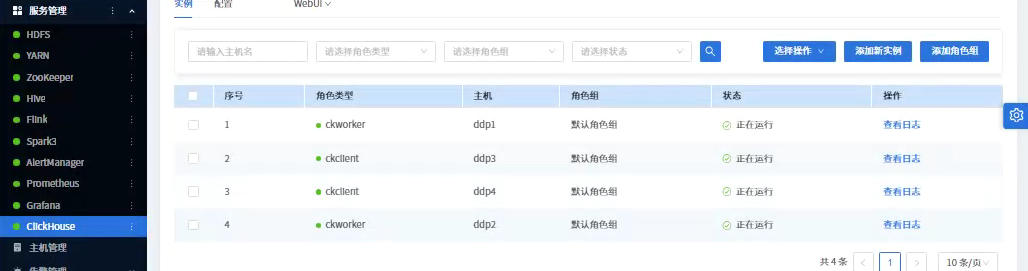
为了方便大家,我把包和源码分享出来:
包:通过网盘分享的知识:DDP-1.2.1(ubuntu) 链接: https://pan.baidu.com/s/5n1JvjkldxLwiLEO-y1ut5g
源码:https://gitee.com/longsebo/datasophon.git 分支:Akka 如需沟通:lita2lz